
Samsung P2350 ToC 1080p LCD Monitor
Samsung P2350 ToC Monitor Review
Desktop PCs have come to a point where your digital experience will be limited to the capability of your monitor. With high end Core 2 Duo CPUs and decent HD capable video cards priced around $100, there is no reason to be viewing the digital world on low resolution screens. If you are, then it is time to step up and upgrade to an HD Monitor. The question is: is the Samsung SyncMaster P2350 ToC 1080p monitor a worthy upgrade? Benchmark Review takes a look at this 23-inch LCD Widescreen monitor and see if it's a good buy.
Due to Sony's dominance in the digital sector lately, 1080p (1920x1080 pixels) has become the next standard for high definition. Blu-ray and PS3 are the leading products in this area. Currently, HD monitors are extremely affordable, and a small investment will boost your PC experience to new level. This applies to both entertainment and work productivity.
The Samsung P2350 ToC LCD widescreen Monitor targets those seeking performance and style. Here's a quick summary of the Samsung P2350 ToC's spec sheet:
-
23 inch 1080p (1920x1080 pixels), 16:9 aspect ratio
-
50,000 : 1 Dynamic Contrast
-
2ms response time
-
Approximately $200.00
Going with a 1080p monitor is a great choice, as you won't be finding it obsolete any time soon. At $200 the price is lower than many other 1080p monitors around this size. However, the Samsung P2350 ToC's dynmaic contrast ratio and first class response time make it a great monitor. The benefits include smooth picture quality with no ghosting or blur, and excellent picture colors. A 2ms response time is as fast as monitors go these days, and very few monitors go past 50,000:1 dynamic contrast. Those that do, such as Alienware's OptX HD monitor, cost an upwards of $300 for a 21 inch. But at the $200-range, the SyncMaster P2350 meets all the basic criteria to make an excellent monitor.
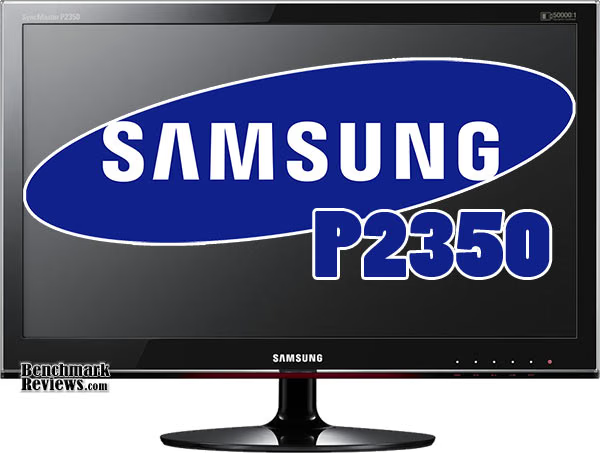
About Samsung
When it comes to premium monitors, Samsung Electronics is definitely top of the line. It is currently the world leader in LCD monitor market share, surpassing both Dell and HP. They are the flagship company of the Samsung Group, which is a collection of companies that tap into numerous industries including medicine, finance, and semiconductors. Samsung is one of the few electronic companies that managed to see an increase in shipment during 2008 when the tech industry took a hit. Their products are outstanding in terms of quality and aesthetics.
Samsung P2350 ToC Features
The Samsung P2350 comes equipped with Samsung's MagicTuner software for fine-tuning colors, and a lint-free clothe for keeping dust off. The P2350 also features Samsung's Touch of Color design, which adds a dark reddish glow to the frame. The manufacturing process is environmentally friendly and materials can be easily recycled.
Samsung's P2350 features full HD capability, excellent colors (50,000:1 dynamic contrast), and two inputs (DVI and analog RGB). Should you prefer slapping it onto a wall, the back has mounting points for you to use. Otherwise you can use the default base included with the monitor. Slightly different from the usual is its elegant touch panel, which offers the same functionality as any other monitor, but definitely more attractive than standard buttons.
Unfortunately the monitor does not come with a swivelling base, nor is the height adjustable. The viewing angle of the screen is quite decent, so you might not find yourself in need of a multifunctional base.
The P2350 is Vista and Mac compatible. Of course it will play nicely with all your previous versions of windows, though the tuning software that comes with it seems limited in compatibility.
Samsung P2350 Specifications
| Display |
Screen Size | 23" wide |
|---|---|---|
| Resolution | 1920 x 1080 |
|
| Brightness | 300 cd/m2 |
|
| Contrast Ratio |
50,000 : 1 (dynamic) 1,000 : 1 (typical) |
|
| Response time |
2ms | |
| Viewing Angle |
170o/160o | |
| Signal Input |
Connector | 15 pin D-SUB, DVI-D |
| Sync. Signal | separate H / V, composite, SOG | |
| Video Signal |
analog RGB, DVI | |
| Power | Power Consumption |
43W |
| Stand By Power |
1W | |
| Features | Plug & Play |
DDC 2B |
| Multimedia Speakers |
No | |
| Optional Accessories | DVI cable |
|
| Special Features | Special Features Unique sales point of product. It can be design, technology or spec MagicBright, off timer, Image Size, Color Effect, customized key, MagicWizard & MagicTune with AssetManagement, Windows Vista Premium, DVI with HDCP |
|
| TCO | TCO 5.0 | |
| Dimension | Product Dimension(With stand, WxHxD) | 21.9" x 16.4" x 7.5" |
| Shipping Dimension |
24.8" x 16.8" x 5.4" | |
| Weight | Product Weight |
10.6 lbs. |
| Shipping Weight |
13.9 lbs. |
|
| Stand | Function | no |
Closer Look: Samsung P2350
At 23-inch, the Samsung P2350 ToC (Touch of Color) widescreen LCD monitor will be the center of attention on your desk. With a native resolution of 1920x1080, it will be able to perfectly display Blu-Ray DVDs. What makes the SyncMaster P2350 stand out against rivals is its glass-like exterior.
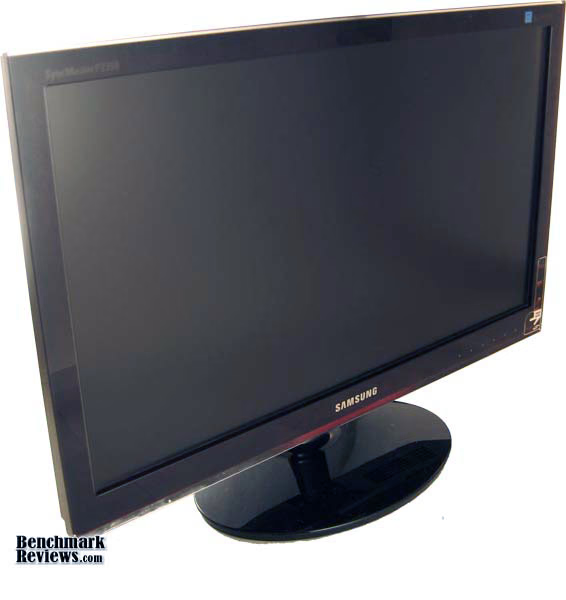
The blue on the top corner might cause a little annoyance to those who like their products "ad-free". It is not a sticker and cannot be removed. However, you can be proud that you own an officially-recognized energy efficient appliance.
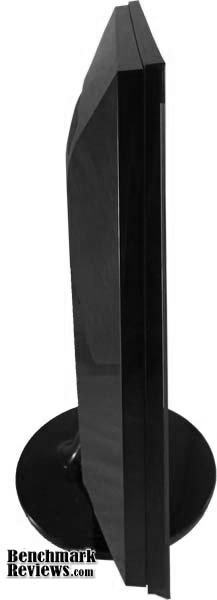
The outer frame is quite thin, a bit more than 2 inches. The back reflects light like a mirror. Naturally, dust accumulates extremely fast, thus the lint-free clothe. In a dark room you will rarely have to clean and all you will notice is the beauty of the screen. Under the sun, you will need to wipe daily to keep the look new.
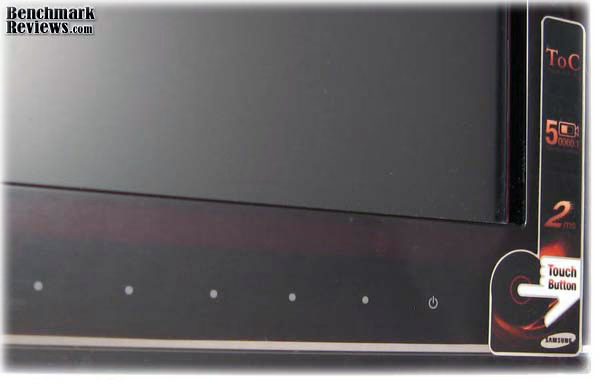

The vent is tucked nicely into the outer frame of the back. If you view the Samsung P2350 from the side, you won't even notice it. But it is a good idea to keep the vent clear of blockages as this monitor can get a little warm.
Overall, the build of the Samsung P2350 ToC is sturdy and offers a great aesthetic appeal.
Samsung P2350 Detailed Features
The base stand on the Samsung P2350 is fairly standard. It offers no other capabilities other than holding the screen up. This means if you find the screen a little too high or a little too low, you're stuck with it. The viewing angle of the screen is fairly wide. You will notice very little color distortion within 90o. After that you colors become slightly yellow. For the most part the plain stand will work.

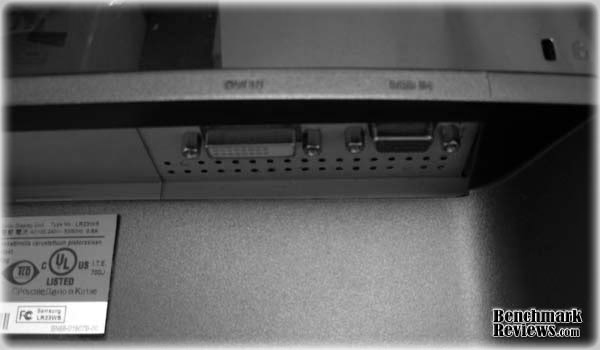
In the back we have a dual-link DVI input as well as a classic analog RGB. The lack of an HDMI input is understandable as HDMI carries digital audio, but this monitor has no audio output. Those interested in hooking up a PS3 will find themselves dishing $20 for an adapter and have no sound. So while certainly HD capable, this monitor's primary usage is confined to your PC.
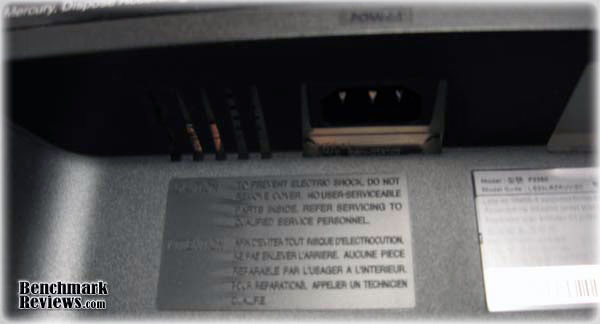
The power is located on the other side of video inputs. The advertised power usage of the Samsung P2350 is 1W idle and 43W under use. While compliant with Energy Star's standards, this isn't the most energy efficient monitor out there. Dell offers many similar HD monitor, which draws a mere 20W-30W. That's saves yourself $10 - $15 a year. But you would be missing out on a nice touch panel and would be forking over your savings to Dell's less aggressively priced units. Note that the Samsung P2370 offers the same specs but only 30W max power usage. However it is $70 more expensive.
The mounting points in the back are compatible with Vesa 75mm wall-mounts. For $30 you can get your monitor to hang off the wall and gain adjustability that the basic stand lacks.

The Samsung P2350 ToC's packaging came in a standard cardboard box with a plastic handle on the top. the package includes MagicTune installation CD, lint-free clothe, and a 5 foot long power cord.
Testing & Results
Testing Methodology
The test system consists of a basic X58 platform with a gtx 285 graphics card. Energy use is measured with Blueplanet Energy Meter, and game frame rates are measured using FRAPS.
Test System
-
Motherboard: Intel X58
-
System Memory: 12 GB
-
Processor: Intel i7-920
-
Video: Nvidia gtx 285 1GB
-
Disk Drive 1: Hitachi 1TB
-
Operating System: Vista Home Premium 64 bit
Energy Usage
At max brightness, Samsung P2350 ToC's power draw was a consistent 40W. Lowering the brightness to 50% (still bright enough for normal use) power draw instantly drops to 28W. Going any lower and the screen becomes too dim to operate during the day. At 5% brightness we draw a mere 20W.
I find the sweet spot at 80%, power usage 36W. Bright enough in any setting, and not too bright so as to blind you.
Gaming Benchmarks
According to November 2009 Steam Hardware Survey, over 86% of the game-playing world uses a resolution lower than 1920x1080 (2.1 MP). This could mean that 86% of the gamers considering an upgrade may not even realize that it could adversely affect their gaming performance. Regardless of the video card used, upgrading the monitor from one of the resolutions below to 1920x1080 will result in an added strain on graphics:
15% use 1024 x 768 (0.8 MP) = 264% more pixels to render
7% use 1280 x 800 (1.0 MP) = 203% more pixels to render
21% use 1280 x 1024 (1.3 MP) = 158% more pixels to render
11% use 1440 x 900 (1.3 MP) = 160% more pixels to render
19% use 1680 x 1050 (1.8 MP) = 118% more pixels to render
Just to give you an idea what graphics card is necessary to run the latest games at 1080p, we have some gaming benchmarks here. A $50 and up graphics card will be able to deliver HD smoothly, but gaming's an entirely different story. For gamers, budgeting your graphics card and monitor is essential. Spending too much on the monitor and you end up playing games at non-native resolution, which can look quite horrible. Spending too much on a graphics card and it becomes an overkill.
Crysis
One of the most graphically demanding games out there, the beautiful scenery and interactive environment make Crysis a great game. Benchmarking was done using Benchmark_GPU that comes with the game.
Running with AA off, 64 bit. Everything at Very High (max quality).
| 1280x1024 |
1680x1050 |
1920x1080 |
|
|---|---|---|---|
| Min FPS |
21 |
19 | 18 |
| Avg FPS | 35 | 27 | 23 |
| Max FPS |
45 | 35 | 30 |
Running with AA off, 64 bit. Everything at High.
| 1280x1024 |
1680x1050 |
1920x1080 |
|
|---|---|---|---|
| Min FPS |
34 | 26 | 28 |
| Avg FPS | 53 | 41 | 37 |
| Max FPS |
69 |
53 |
50 |
The game is playable at Very High, but explosions and action on the field will cause shutters in your game. At High the game is playable and smooth.
Need for Speed - Shift
This game offers a realistic racing experience, great graphics, but very light on your graphics card. This game will be able to run on graphic cards from 2-3 generations ago. The gtx 285 is an overkill for it. The benchmark is done with V-sync off, max details, 8xAA and 16xAF. Track: Autopolis Lakeside
| 1280x1024 |
1680x1050 |
1920x1080 |
|
|---|---|---|---|
| Min FPS |
52 | 51 | 51 |
| Avg FPS | 70 | 65 | 64 |
| Max FPS |
78 | 81 |
78 |
The original GTA IV is fun, challenging, and looks great. This is game makes full use of your graphic card's memory, a rare instance where 2 GB vs 1GB makes a difference. For benchmarking, all settings are put on max except shadow (high) and distance (37). AA is turned off. The game's built in Benchmarking tool is used.
| 1280x1024 |
1680x1050 |
1920x1080 |
|
|---|---|---|---|
| Min FPS |
45 | 43 | 42 |
| Avg FPS | 58 | 55 | 51 |
| Max FPS |
68 | 68 | 67 |
GTA is fairly capable of running on lesser PCs, as long as you tweak the settings.
In general, to get a decent game going at 1080p for the hottest games on the market, you will need at least the previous generation graphics card (starting from the HD 4000 series and gtx 200 series). That's about an upwards of $150. You won't be able to max out details for every game out there, but most games will look great even at medium settings. If you are not so heavy on the gaming and use your computer for movies, photo-editing, and other digital media, this monitor is great and will demand very little investment in a graphics card.
Samsung ToC Final Thoughts
Samsung really is at the top of the LCD market, and their Touch of Color series is a fitting example. My 40" 1080p TV also happens to be from Samsung. They always price items competitively and love to throw in "small" bonuses that make you just a little happier (the lint-free clothe is included in every LCD purchase). They didn't make it to the top of global LCD sales by offering cheap products. The lack of built-in speakers is not really a negative, more so good judgment. A decent 2.1 stereo system will cost you a mere $50, and your audio experience will increase 10-fold compared to any monitor speaker.

One concern with shopping today is "when should I upgrade and why", as computer hardware really does go obsolete within 1-2 years. Duo-Core's came about 3.5 years ago, and Intel's 6-core Gulftown processor is coming soon. But a 1080p screen is different. 1080p is considered a standard now for digital entertainment, and standards like these stay for a very long time. While new monitors may come out with new technologies (OLED rumoured to become available by 2012 and mainstream by 2015), 1080p will stay. Just to give you any idea how long standards stay, SDTV (standard TV) is at 480i/480p and has been the industry standard for TV since 1941. Currently HDTV streams at 720p, and Blu-Rays are 1080p. While HDTV may get an upgrade in the near future, it will be highly unlikely that both change any time soon.
Since a standard for HD has been set, and the dust is slowly settling with the rapid development of graphics cards, it's safe to say the benefits will outweigh the cost. HD monitors a year ago would have cost $300, and a top of the line GTX 9800 graphics card will cost you $350. Today, we're talking about $200 for a monitor and that same HD-capable graphics card for $100. Most games are DirectX 9 compatible, since that is what the majority of the population owns, so you won't have any problems enjoying the latest titles (including Crysis). If you're looking for a full upgrade to the latest graphics card, the HD 5000 series is a good choice, starting from around $150 (naturally the high end 5000 series will cost you 3-4 times that amount).
Samsung P2350 ToC Conclusion
Windows allows only up to 32-bit colors, and the Samsung P2350 has no problem displaying them. The default settings on the Samsung gives a slightly yellowish color (noticeable for whites), could be different per monitor. However tuning the colors a little (lowering red in my case) gave decent results and colors look fantastic. The 50:000 dynamic contrast is not an exaggeration, but please note that the typical contrast is 1000:1, pretty standard for an HD monitor. Dynamic contrast involves manipulation of brightness to achieve blacks and whites. On a black image with a small patch of white, the white may seem a little gray, but very typical of a 1000:1 contrast monitor. For movies/games, the monitor functions very well.
At 23", 1080p will look extremely sharp and clear. Usually and the dpi would fail to scale well as it gets larger than 25-27". As for font size, If you are used to a 15" laptop with a screen resolution of 1280x800, the font size is roughly the same. There is no visible ghosting. The refresh rate is 60 Hz. Noticing blur is on a per-person basis, just as some prefer a 60Hz TV and others prefer a 120Hz TV. Personally, I have noticed very little blur. Definetly great for movies and gaming. Dark images will look dark and bright images will be bright.
The P2350 is a great offering from Samsung. It's priced competitively and offers all the specs you could want from a performance monitor. This monitor suits gamers that can afford a mid to high range graphics card. The build is sturdy and can surely withstand a few shakes and hits. You won't need to worry about quality as Samsung products are rated fairly high in customer satisfaction.
This series of SyncMaster looks great, great enough to be a piece of decoration in a home or office. Unfortunately the tuning software has some compatibility problems with Vista 64-bit, and certainly won't work on a Mac, which sours the deal a little. Luckily, many adjustments can still be done through the built in touch-panel. Some functions include softening colors, auto-tuning, and movie/gaming mode.
If the primary purpose of your computer is browsing the web or looking at excel sheets, there are probably cheaper options out there. But if you enjoy any type of entertainment on your PC, the Samsung P2350 ToC will be a good buy. For $200 and such impressive specs, you can't go wrong.
Pros:
+ Classy Exteriors
+ LED touch panel well designed
+ Full HD
+ Good colors
+ Priced aggressively
+ Many adjustments available for colors
Cons:
- MagicTuner software has compatibility problems
- Did not come with any cables
- Stand not adjustable
Ratings:
-
Performance: 9.25
-
Appearance: 9.50
-
Construction: 9.00
-
Functionality: 8.50
-
Value: 9.25
Final Score: 9.1 out of 10.
Questions? Comments? Benchmark Reviews really wants your feedback. We invite you to leave your remarks in our Discussion Forum.