
SilverStone Fortress FT02 Computer Case
Enthusiasts today struggle with cooling high-performance systems whose processors and graphics cards can suck down 600 watts or more of power under load. Every watt consumed eventually ends up as heat, and getting all that heat out of a computer case can be a real challenge, especially with air cooling. An overclocked and overvolted processor combined with one or more high-performance graphics cards produces an immense amount of heat, which will limit the performance available to overclockers as well as potentially shortening component life. SilverStone's latest attempt to design the ultimate air-cooled enthusiast case is the SilverStone Fortress FT02, an aluminum and steel enclosure whose unique design brings both benefits and drawbacks.

It's all about thermal management, and various manufacturers have stepped up with a variety of solutions. There's the "big case with a lot of fans" design, typified by the Cooler Master HAF series and the new NZXT Phantom, as well as the "isolated thermal zones" school of thought, embraced by the Corsair Obsidian 800D and taken to its ultimate expression by the Thermaltake Level 10. All-in-one liquid cooling systems like the Corsair H50 and CoolIt Systems ECO ALC represent the next step, although these solutions bring their own problems, and users must be aware of potentially limited airflow over processor VRMs and system memory.
Although SilverStone builds power supplies and cooling systems and storage solutions, most enthusiasts know them for their cases. Their "Temjin" line of high end all aluminum cases were among the first to inrtroduce such features as dedicated GPU cooling (in the TJ10) and separate thermal zones (in the TJ07); they're also one of the few companies that ever produced an ESA (Enthusiast System Architecture) compliant case. According to SilverStone, the Fortress FT02 is "For professionals and enthusiasts looking to build a silent workstation or gaming machine with maximum performance."
Manufacturer: SilverStone Technology Corporation
Product Name: Fortress FT02
Model Number: SST FT02S-W
Price As Tested:$239.99
Full disclosure: The product used in this review was supplied by SilverStone Technology Coporation.
Fortress FT02 Features
- Revolutionary 90 degree motherboard mounting from RAVEN RV01
- Innovative 4.5mm aluminum unibody frame from Temjin TJ07
- Three 180mm fans for unprecedented positive pressure and stack effect cooling
- Supports liquid cooling radiator mounting
- Motherboard back plate opening behind CPU area for quick cooler assembly
- Supports 11" wide ATX motherboard
- Foam padded interior for advanced noise absorption
Fortress FT02 Specifications
|
Model No. |
SST-FT02B (black) | |
|---|---|---|
| SST-FT02S (silver) | ||
| SST-FT02B-W (black + window) | ||
| SST-FT02S-W (silver + window) | ||
|
Material |
4.5mm aluminum unibody frame, 0.8mm steel body | |
|
Motherboard |
SSI CEB, ATX (maximum 12” x 11”), Micro ATX | |
|
Multimedia |
-- | |
|
Drive Bay |
External | 5.25" x 5 |
| -- | ||
| Internal | 3.5" x 5 , 2.5” x1 | |
|
Cooling System |
Front | -- |
| Rear | -- | |
| Side | -- | |
| Top | 1 x 120mm exhaust, 1200rpm, 19dBA | |
| Bottom | 3 x 180mm intake fan 700/1000rpm, 18/27dBA | |
| Internal | -- | |
|
Expansion Slot |
7 |
|
|
Front I/O Port |
USB2.0 x 2 Audio x 1 MIC x 1 |
|
|
Power Supply |
1 x Optional standard PS2 (ATX) | |
|
Operating system support |
-- | |
|
Expansion Card |
Support 12” or 12.2” (with fan grille removed) | |
|
Limitation of CPU cooler |
165mm | |
|
Limitation of PSU |
Unlimited | |
|
Net Weight |
15kg | |
|
Dimension |
212mm (W) x 497mm (H) x 616mm (D) | |
|
Extra |
-- | |
Features and specifications provided by SilverStone Technology Corporation
Let's unbox this case and see if it lives up to the claims...
Closer Look: Exterior
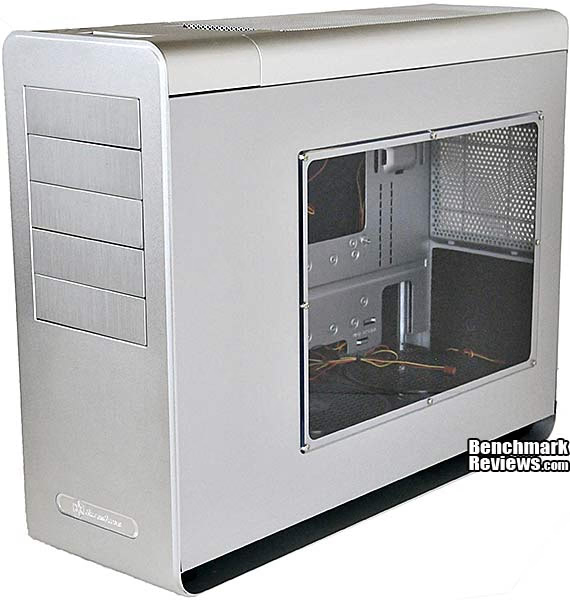
The SilverStone Fortress FT02 case is available in five variations: black, with and without a window; silver, with and without a window, and a special black version with a red interior. The review sample was the FT02S-W, which is a silver version with a window. The box calls out the interesting features of the case.

The accessories bundle includes a manual, a Molex adapter to power the three fans at the bottom of the case, an SSD bracket, a bag of screws,some tie-downs, a power supply strap, and brackets for mounting an internal 2x120mm radiator for water cooling. The radiator brackets mount the radiator on top of the 180mm fans (with their grilles removed); SilverStone says that a 30mm thick radiator leaves room for expansion cards up to 10.5" long.

Outside of its box, the FT02 presents a smooth, almost Zen-like facade. The bottom, front, and back of the computer are comprised of a single U-shaped piece of 4.5mm thick aluminum. The front of the case is featureless except for the 5.25" drive bay covers.

Since the motherboard mounts on the right side of the case, that's where the window is. The body of the case is supported about 1" above the bottom of the U-shaped main chassis; this gap serves as the intake for the three 180mm fans at the bottom of the case.

Like the front of the case, the back is almost featureless, with only a snap-off filter for the power supply intake fan breaking up the vast expanse of aluminum.
 #### Insert text here
The top of the case is where all the action is, although it's normally hidden by a snap-off grille.

Let's check out this case in more detail in the next section.
Detailed Exterior Features
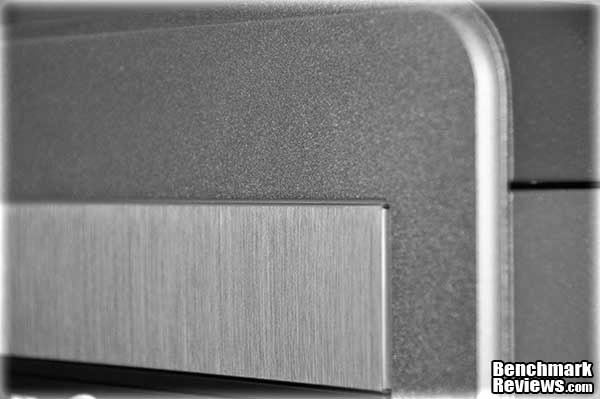
Unlike the Temjin series, this is not an all-aluminum case. The SilverStone Fortress FT02 is comprised of aluminum (main U-shaped chassis, 2.25" bay covers), 0.8mm mild steel (internal chassis, side panels, and top), and plastic (some trim). Since the steel and plastic components must be painted or molded silver, various parts of the case exhibit subtle mismatches in color and texture. Even the aluminum is inconsistent, with the main chassis having a cast or "sand" texture while the drive bay covers are brushed.
At the top front of the case are the power and reset switches, the power and drive activity LEDs, two USB ports, and microphone and speaker ports; the USB ports are thankfully far enough apart so that chunky USB keys will not block the other port. The ports are under a small sliding cover. If you have the case sitting on your desk, you won't be able to see any of these switches or indicator lights.

Three switches on top of the case set "Low" or "High" speeds (700RPM or 1000RPM) for each of the three 180mm fans at the bottom of the case. It's a nice feature, but you must remove the top grille to reach the switches. The graphic to the right of the fan controller switches is an international recycling symbol (in other words, don't throw this case in the trash!).

What seems to be a handle at the rear of the case is actually where you put your hand to help snap off the top grille. Once the grille is off, though, you can use it as a hande.

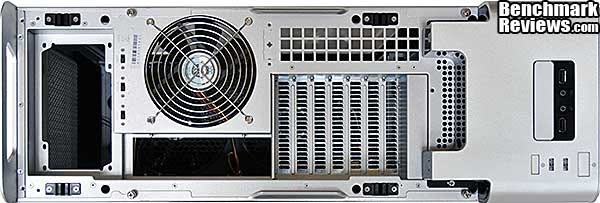
Snapping off the top grille reveals all the things you'd see on the back of a normal case, since the motherboard's orientation is rotated 90 degrees from what you'd expect! Notice the ventilated slot covers and the extra ventliation area above the slots. The three fan speed control switches are visible just to the left of the exhaust fan.
Appellations like "mid-tower" and "full tower" don't really apply to this case. It's 24.25" long, front to back, but only 19.5" high. Here's what it looks like next to the Cooler Master HAF 932 AMD Edition:

The backs of the cases were aligned for this photo, so the extra length of the FT02 is evident. Let's take a look at the interior now.
Closer Look: Interior
Of course, the interior is what this case is all about. SilverStone has designed the case so that the motherboard is rotated 90 degrees, with its ports and slots at the top of the case. The bottom of the case is dominated by three giant 180mm fans.

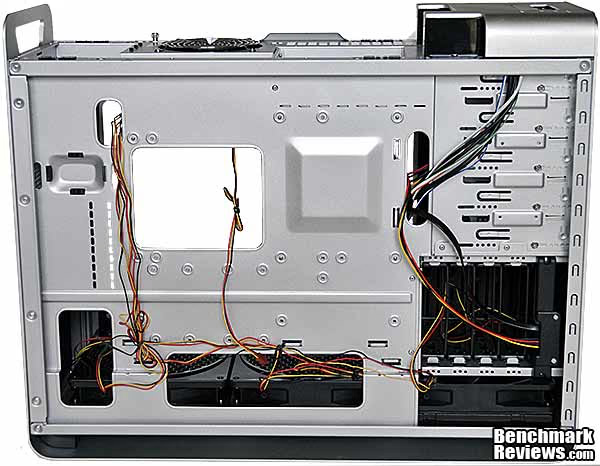
The other side of the case shows a tangle of wires. Each of the three fans at the bottom of the case has a three-pin power connector as well as a long, separate three-wire lead to a switch for selecting "low" or "high" speed at the top of the case. The wires are casually wrapped and secured with twist-ties; you'll definitely want to do some cleanup here. Cable sleeving or dedicated channels for the fan wires would have been appreciated.
There's room for five vertically-mounted hard drives, each of which screws into a slide-out plastic caddy. The screws pass through rubber isolators on the caddies to help curb any vibrations, and the 180mm fan directly under the drive bays will keep your Velocirators nice and cool. Unlike the other two fans, the drive cooling fan does without a honeycomb grille.

These two 180mm fans cool the motherboard area. Each of the three fans has a pull-out filter for easy cleaning. The fact that the case's metal "foot" runs the length of the case means these fans won't be scarfing up (much)carpet lint or floor dirt. A 12" long graphics card will be a millimeter or two above the fans; to fit a 12.2" long graphics card like an ATI Radeon 5970, you need to remove the honeycomb grille from the middle fan.

We continue checking out the interior in the next section.
Detailed Interior Features
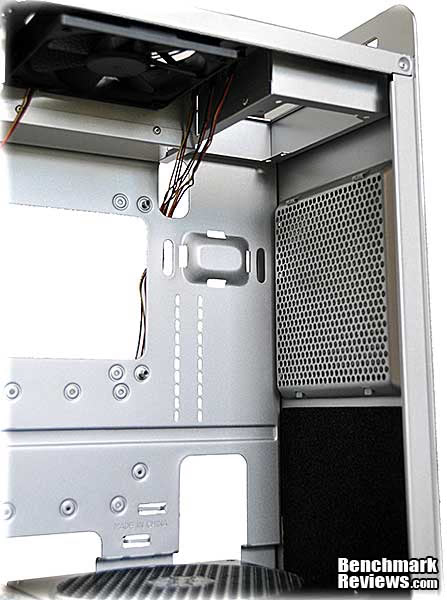
The power supply mounts vertically, held in by the standard 4 screws, here. SilverStone supplies a Velcro strap you can use to cinch the power supply down against the motherboardto prevent excess motion if the FT02 case is moved. The power supply's intake fan should be positioned next to the grille at the rear of the case. Note the black sound-absorbing foam below the grille.
SilverStone supplies a single SATA backplane adapter for the drive cage. Oddly, the power cable uses a pass-through four pin Molex connector rather than a SATA power connector. You can see more acoustic foam at the front of the drive cage.

While the three 180mm bottom fans steal the show, there's also a 120mm exhaust fan at the top of the case, SilverStone model RL4Z S1202512LIW-3M, made by Globe Fan. The dimpled blades mark it as one of their "Golf Fan" models, and while none of the 120x120x25mm golf fans listed on the Globe Fan site exactly match the RPM and noise specs SilverStone gives, several are close enough to indicate that the airflow of this fixed-speed fan is likely in the 50-55CFM range. With three 180mm intake fans and only a single 120mm exhaust fan, the FT02 is a "positive pressure" case, which means that air will always blow out of any openings in the case. This should keep your components cleaner since virtually all intake air will pass through the intake fan filters.
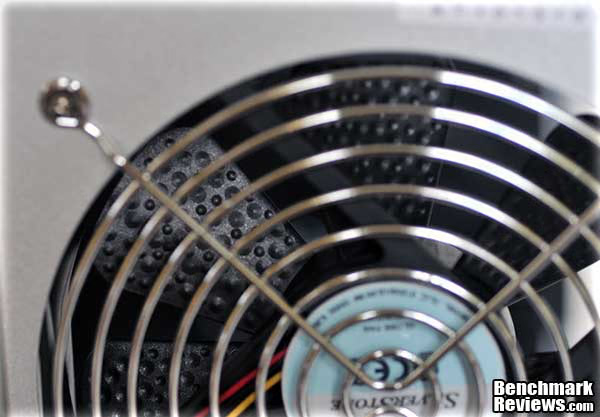
Although the chassis has room for 8 card slots, the 8th slot is blocked off. This seems odd since the SilverStone Raven RV02 case from which the Fortress FT02 descends has 8 slots, and it means the case won'twork for a lot of 7-slot motherboards if you have a double-widegraphics card in slot 7, since the card's exhaust would be inside the case.

Every available interior panel surface is covered with sound-absorbing foam. The foam feels slightly tacky and seems to deform permanently if you press it, but does a good job silencing the components in the case.

Let's build a system in this case and see what it's like to work with.
Building a System
Building a system in the SilverStone Fortress FT02 case is like walking through a carnival house of mirrors: everything's twisted around from what you'd normally expect. If you slow down and take your time, though, it shouldn't be hard. I used an ASUS P6T V2 Deluxe motherboard with an Intel 980x processor and two NVIDIA GTX480 video cards. A Cooler Master V6GT CPU coolerdoes its best to keep the overclocked and overvolted CPU at a reasonable temperature; a Corsair HX850 modular power supply and 12G of Corsair Dominator memory round things out. Notice in this shot how close the back of the optical drive is to the second NVIDIA GTX480 card. More on this later...
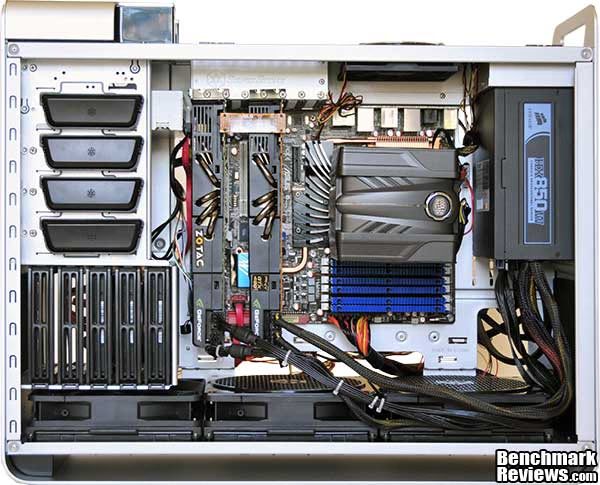
Given that the whole purpose of this case is airflow, you'll want to avoid blocking the path of air from the bottom cooling fans with tangles of cables. Fortunately, there's enough clearance at the front of the fans for the power cables for the video cards, but the rest of your cables should run behind the motherboard. Unfortunately, the design of the case makes this a bit tricky.

The first problem is that there's very little clearance between the back of the motherboard and the inside of the right case panel. The lower part of the internal chassis, which bulges outward to accommodate the fans, is a mere 1/4" from the panel, while the slightly-stepped in upper section has about 5/8" of clearance. See the thick ATX main power cable at the lower left of this image? The case panel will not fit on with it in this position; I had to nudge it up over the "ledge" just above it. Since the panels are secured at the top and bottom of the case, but not the front and rear edges, any internal pressure from squeezed cables will cause the front and rear edges to bulge noticeably.

The second problem is that you're going to need really long power supply cables. For example, the SSD mounting seems a clever use of normally wasted space, but its position means that it can't share a SATA power cable with the drives directly below it. While a 2.5" mounting system for the standard drive bays would have been nice, my build has 3 hard drives in addition to the SSD; and I still would have had to run 2 SATA cables to cover everything since the drive bays are so far from the power supply that the 4th SATA connector on the cable won't reach. The same problem occurs with any 5.25" devices: it looks from the photo as though there would be enough slack in the power cable running to the SSD to slip one into the case to connect to the optical drive, but trust me, there's not. I wound up have to use a separate 4-connector SATA power cable for the SSD and the optical drive. Still, if you have an SSD, it might be better to use a 3.5" mounting adapter and put it with the other hard drives, depending on your system layout. If you plan on getting one of these cases, I'd strongly recommend spending a few dollars for some SATA power cable extensions.

The third problem is that there's very little clearance between the 5.25" device bays and the last slot in the motherboard. My Plextor Blu-Ray reader is 7.25" long (a common size for optical drives); while it physically fits, there's not enough clearance between the second video card and the drive for a SATA power connector to fit, so I can't use it. This will be the case if you have a card in the last slot of your motherboard, or (as in this case) a double-wide card in the 6th slot. Smaller drives will fit, tightly. This also explains why SilverStone blocked off the 8th slot in the backplane: using anything in that slot would have occluded some or all of the 5.25" bays. SilverStone's 8-slot Raven RV02 case is 643mm long, while the FT02 is only 616mm long, and judging from SilverStone's photos of the RV02, all 27mm of extra space went just after the 5.25" bays. Note that even in this case, using the 8th slot would have the same problems as using the 7th slot here...so plan carefully if you're setting up a CrossFireX or SLI multi-card system in this case.

The fourth problem is external cable management. The fact that everything plugs into the top of the case means that your video, USB, Ethernet, and other cables will need to stretch 18" to 24" further than they would to the back of a "normal" computer case. Be especially careful of the video cable: the hanging weight of the thick, heavy cables used for DVI video will tend to put sideways stress on your video card's connector unless you make sure the weight of the cable isn't pulling on it.
Cooling Performance Tests
This case is all about cooling, so let's test it. The system I built in this case in the previous section was taken from an existing build in a Thermaltake Level 10 case. This 50 pound all aluminum monster takes the "separate cooling zones" design to its logical conclusion, with completely enclosed areas for the motherboard, power supply, optical drives, and hard drives. It's the most expensive production computer case I know of, but now that the initial frenzy has died down, you can get one at Newegg for only $799.00.
 f
f
Surprisingly, the two cases are virtually the same length, front-to-back, although the Level 10 is much taller. Thermaltake brags about the Level 10's cooling ability, but the enclosed motherboard area depends on a single 140mm intake fan and 120mm exhaust fan for ventilation. Subtle extra air intakes are sculpted into the case over the CPU and video card areas. The stock FN181fans in the SilverStone Fortress FT02 case are rated at 100CFM at the low 700RPM speed, and 130CFM at the higher 1000RPM speed.
I used Everest Ultimate 5.5 to load the processor with the "Stress CPU" and "Stress FPU" tests. The results are presented as "thermal difference" (the difference, in degrees Celcius, between the processor temperature and the ambient temperatures). I overclocked the Intel 980x processor to4.16gHz with a 160mHz BCLK and 1.35 volts.

With the SilverStone case, I ran the tests twice: once with the fans set to "Low" and once with the fans set to "High". And the results are...
| Case |
Thermal Difference |
Difference from Level 10 |
| Level 10 | 58.4 | 0 |
| FT02 fans low | 54.4 | -4.0 |
| FT02 fans high | 53.0 | -5.4 |
Thisis a decisive win for the FT02. It's to be expected, really:as you can see in the build photo, the CPU cooler sits right above the two rearmost fans, each blowing cool outside airstraight up. The airflow over the memory in the FT02 is excellent, too
Next it was time to test the temperatures of the GTX480 graphics cards. Two of these beasts running stress tests in SLI mode will strain the cooling capabilities of any system. For this test I left the video card's fan controls on "auto" and used Furmark to stress both cards; and as before, I ran the tests in the Fortress FT02 with the case fans on both "Low" and "High" settings, and I also noted the idle temperatures of the cards before starting the tests.

The temperature differences here aren't quite as dramatic, but are still noticeable, with the idle and load temperatures of the cards running three to five degrees cooler in the FT02 case. SilverStone lists the 180mm fan noise as 18dBa at low speed and 27dBa at high speed; I found the audible difference barely noticeable, and you might wish to simply leave the stock fans on "High" all the time. One thing I did notice during this test was the amazing amount of hot air boiling out of the top of the case, probably enough to deform plastic items you might place there. Of course this same heat comes out the back of a normal case design, but it's a lot more noticeable here.
Next, I ran the same tests with the GTX480 fans manually set to 100%, as might be the case in an overclocking or benchmarking scenario. Here, the differences were much more pronounced, with the FT02 posting temperatures that were 9.3 and 4.3 degrees better with low case fan speed and a stunning 12.3 and 5.3 degrees better with the case fans on high.
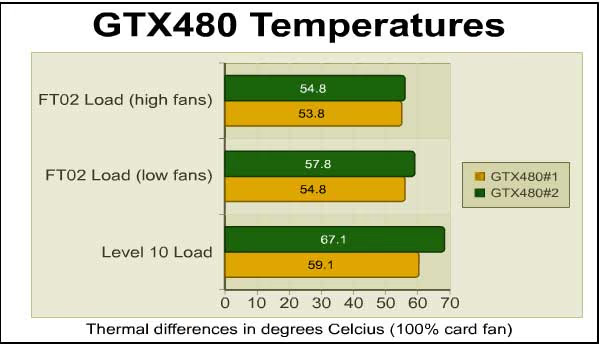
So the SilverStone Fortress FT02 really does provide significantly better cooling, at least as compared to the Thermaltake Level 10. But then there are the downsides to consider...
Fortress FT02 Final Thoughts
In an earlier case review I asked the question "What is the purpose of a computer case?" For most people, it's simply to hold the components of their system together and provide some degree of protection from the environment. Some cases make "extreme" or military styling a feature, and it's certainly true that many enthusiasts will pay extra for a cool-looking case. But as enthusiast level components increase in size and power, a case must be more than just a frame to hang parts in.
In the last few years we've seen significant functionality added to cases: cable routing systems, hot-swap drive bays, integrated fan controllers, and tool-less designs to name a few. The increasing power draw of modern enthusiast-level components (if you'd told me a few years ago that 750 watt and up power supplies would become common, I would have laughed at you) means that heat management is much more important than it used to be; we've come a long way from the days when a simple "Golden Orb" cooler was all you needed for your overclocked Pentium III...dissipating 29 watts of heat just isn't that hard.
Standard tower-style computer cases have adopted a number of design features to increase airflow and cooling, ranging from integrated side panel fans to directed graphics card cooling "tunnels". SilverStone's "rotated motherboard" design was introduced in June 2008 at Computex Taipei with the Raven RV01 case, and refined with the RV02. The Fortress FT02 takes the basic RV02 design and moves it upscale with an aluminum chassis. And as our tests have shown, it provides significant enhancements in cooling ability when compared to a standard ATX design.
Another advantage this case design has over other "high flow" designs is silence: a case like the Cooler Master HAF 932 encourages airflow with extensive perforations in every panel except the right side panel: the top, bottom, front, back, and left side all contain perforations, fans, or both. In contrast the front and sides of the FT02 are solid, and this, combined with the foam covering every interior panel and large, lower-speed case fans, makes the case much quieter than its competition.
So:the FT02 is a case whose striking, innovative design results in excellent cooling andquiet operation.
However, I can't help but be disappointed with some aspects of the case. A high-end enthusiast-level case like this where advanced cooling is a primary feature really should feature 8 card slots; but this design even compromises the use of the 7th slot. And some extra space behind the left side panel would make cable management easier (the extra length required for internal power cables and external video, USB, and other cables are unavoidble consequences of the design, and a reasonable tradeoff for innovation like this). Last, the case's smooth exterior makes it quite difficult simply to pick up, since there's no good place to grab it.
SilverStoneSST-FT02S-W Conclusion
The performance of this case - specifically, its cooling ability - was excellent, as is its quietness. In 2007 I had a system with twin NVIDIA 280GTX cards; it was quite noisy under load (i.e. playing Crysis), but at the time I just accepted that as an inevitable consequence of owning a high-performance air-cooledsystem. With the hotter and arguably louder GTX480s, the SilverStone Fortress FT02 is almost inaudible at idle, and much quieter than my other system at load.
The appearance of the case is almost dull compared to stylistas like the Thermaltake Level 10, Cooler Master HAF series, Antec Dark Fleets, and the new NZXT Phantom. However, many will find the Zen-line austerity of its lines attractive.
The quality of construction of the case was excellent, as expected both for a SilverStone product as well as a case in the $200-and-up price range. The acoustic foam seems a little cheap, somehow, although it does work.
The functionality I can only rate as "good". Compromises in cable management and the use of the last motherboard slot, along with the fact that it's a 7-slot case, are hard to excuse. Other than these complaints, though, the case works well.
Priced for $239.99 at Newegg, this is an expensive computer case. But the price is still in line with other large enthusiast cases from the likes of Lian Li or Corsair. Given the innovative design, it represents a good value. Note that the problems I encountered with spacing behind my optical drive would be less evident with most other X58 motherboards, whose first two PCI-E x16 slots wouldn't have the extra slot between them that the ASUS P6T V2 Deluxe has, so the second video card would be further away from the 5.25" bays. If your high-performancecomponents fit, this is a case you should consider.
Pros:
+ Innovative, unique design brings significant cooling benefits
+ Sleek appearance refreshing among the glut of "extreme" and "military" styled cases
+ Room forfive 5.25" devices andfive 3.5" devices
+ Excellent build quality and quiet operation
+ Integrated fan controllers
Cons:
- Not much room for cables behind the motherboard
- Case design limits utility of the 7th slot...and there really should be 8!
- Longer cables required both internally an externally
- Smooth exterior makes the case difficult to move
- Mismatched colors and textures slightly compromise case appearance
Ratings:
- Performance: 9.25
- Appearance: 8.75
- Construction: 9.50
- Functionality: 7.50
- Value: 8.75
Final Score: 8.75 out of 10.
Quality Recognition: Benchmark Reviews Silver Tachometer Award.
Questions? Comments? Benchmark Reviews really wants your feedback. We invite you to leave your remarks in our Discussion Forum.
Reader comments from the original article
15 comments were posted before commenting closed. They are preserved as written. Original avatars no longer resolve and are shown as a placeholder.
Feet...?? BruceBruce Permalink:
Any feet included on this case, or does it sit directly on the flat bottom surface?
RE: Feet...?? David Ramsey Permalink:
There are no feet as such; just a couple of very thin horizontal rubber strips at the front and back.
That's good.... BruceBruce Permalink:
...just need something to keep it from sliding around and getting scratched up if it's on a hard floor surface.
RE: SilverStone Fortress FT02 Computer Case Steven Iglesias-Hearst Permalink:
That symbol by the fan controls means that the case is recyclable (do not throw in the bin) :D
Yeah, but..... BruceBruce Permalink:
My Recycling Bin looks just like that!
RE: RE: SilverStone Fortress FT02 Computer Case David Ramsey Permalink:
So everyone is telling me! What happened to the good 'ol triple arrows? The whole point behind an icon is to be simple and, well, iconic: you know, like the old Mac trash can icon which was INSTANTLY RECOGNIZABLE as a trash can everywhere in the world...a wheeled trash can with a lid is needlessly complex and fools old people like me.
RE: SilverStone Fortress FT02 Computer Case Robert17 Permalink:
Although from your review this appears to be a respectably nice case, aluminum with foam noise dampeners and all, comparing it to the review of the upcoming Phantom case, then comparing MSRPs, it would seem to have limited draw. I'd like to get these two case designers in a room and not let them out till they agree on one really neat clone.
RE: RE: SilverStone Fortress FT02 Computer Case Steven Iglesias-Hearst Permalink:
Yeah that phantom is super sexy inside and has a nice design on the outside too. Anyone seen the red one yet? You should go have a look.
RE: RE: SilverStone Fortress FT02 Computer Case David Ramsey Permalink:
The Phantom does appear to be a really nice case at a great price point. However, I doubt it will be able to match the cooling/noise of the FT02. Wait until you see what I did with the case with SilverStone's optional fans!
RE: SilverStone Fortress FT02 Computer Case Vito Cassisi Permalink:
I have the Silverstone Raven RV01 and RV02, which I really like. This looks like another good case. Too bad it's a tad pricey.
Nice Review m3kw Permalink:
I've read many reviews of this case, this one is the most detailed on the case design, very good review!!!
RE: SilverStone Fortress FT02 Computer Case m3kw Permalink:
You did nikpick quite a bit.
RE: RE: SilverStone Fortress FT02 Computer Case David Ramsey Permalink:
You know, Silverstone griped about that, too. Sorry, but if I can't fit my optical drive in your $250 case, you're gonna get dinged for it. Still, it's a spectacular case overall, so keep that in mind.
Thanks! G Permalink:
Very detailed review, well written and clearly not biased. Thank you for adressing the flaws, as it seems like most reviewers are afraid of stepping on toes. I agree on the optical drive issue, but the performance and graceful design on this case leaves me with little choice. Would perhaps mounting the optical drive in the fifth drive bay slot give more space? I guess it depends on the card... Thanks again Mr. Ramsey, keep up the great work!
RE: SilverStone Fortress FT02 Computer Case Eric Monteiro Permalink:
I have been custom assembling my own desktops for quite a few years. Obviously, that included going through various leading brand cases. I am now running the Silverstone SST-FT02S-W, along side two other top brand models. The Silverstone is undisputedly, so far, the quietest and most cooling efficient mid-tower I have ever come across (period).