
Ozone Radon 5K Laser Gaming Mouse
Ozone Radon 5K Gaming Mouse Review
Many years ago when the first mice where hitting the computer scene, who would have thought that in 20 years not only would we still be using mice as a primary form of navigation on computers but that they would have also become a competitive niche market for certain individuals. The competitive market of gaming peripherals is full of new products each claiming to be the best, and giving you that little bit of edge you need to defeat your opponents. Each company has their own set of "ultimate" mice: Razer has the Mamba, and Naga, Logitech makes the G700, and G9x, and SteelSeries has the Xai. Now the European company Ozone is adding another addition to this competitive market segment with the Ozone Gaming Radon 5k gaming mouse.
The Radon 5k uses the 5600DPI Phillips PLN2032, which is also used in many other mice including the Razer Naga, Mamba, Lachesis, and Imperator along with the Mad Catz Cyborg RAT-7/9 and the CM Storm Sentinel Advanced. Because so many mice use this sensor, consumers focus has shifted instead to other features including aesthetics, software, and build quality. Some of the other features included with the Radon 5k are a 1,000Hz USB polling rate, programmable Macro's, and profiles which are saved directly on the mouse for easy switching at LAN's.

When it comes to testing mice it is best to not only look at one area or you may overlook flaws that a peripheral has in another area. That is why when testing a gaming mouse it is best to look at many aspects of your daily experience on a computer. This means that you should not only look at one type of game but multiple styles such as RTS, FPS, and MMO's along with making sure that the mouse is usable in non-gaming situations such as web browsing or photo editing.
Manufacturer: Ozone Gaming
Product Name: Radon 5K
Model Number: OZRADON5K
Price As Tested:$73.57
Full Disclosure: The product sample used in this article has been provided by Ozone.
Ozone Radon 5K Features
On-The-Fly Sensitivity Adjustment
You can change the sensitivity of your mouse by pushing a button. The sensitivity LED will show you what DPI levels you are choosing, according to what was set previously.
Braided Sleeve Cord
Ozone Radon 5k has a braided sleeve cord that improves flexibility and durability. With a 2m length it allows for freedom of movement and clean desktop management
On-Board Memory Macros
Set macros for all buttons, in 3 different profiles. Change profiles on-the-fly, and the button LED will tell you which profile is chosen. All of these are stored in the On-Board Memory
Custom Weight Control
The weight of your mouse is an important thing to consider if you are a real gamer. Ozone Radon 5k allows you to tune the weight of your mouse the way you want.
Adjustable Cable Position
With the Ozone Radon 5k you can set the cable position, improving your desktop management. Choose one of 5 different positions according to the way you use your mouse.
Precision Laser Sensor
The high performance Phillips PLN2032 laser sensor with 5600DPI allows precision and control of your mouse. You can set the desired levels from 100 to 5600DPI.
OZRADON5K Specifications
- Professional gaming laser sensor Philips PLN 2032
- 8 buttons (7 programmable)
- Adjustable resolution from 100 to 5600 DPI
- Accurate and predictable motion reporting up to 1m/s
- Macro and Script functions
- USB full speed
- USB report rate with 4 selectable levels (1000 Hz Max.)
- Hardware data saving technology
- Included Software for personal configuration (Windows only)
- Adjustable weight (includes 5x 4.5g weights).
- Includes mouse bag and weight bag
- Dimensions: 122.43 x 70.64 x 43.7 mm (length x width x height)
- Weight: 135 +/- 5 g (with cable and weights)
- Cable length: 1.5 m
- Power consumption: <100 mA
Closer Look: Ozone Radon 5K
With mice being so integral to our experience on computers, comfort is of utmost importance to a user. For a gamer this is even more important because in a heated moment of battle the last thing you want to do is miss that vital shot because of the ergonomics of your mouse. Ozone has designed the Radon 5k to fit in your you hand perfectly with great comfort for all grip styles.
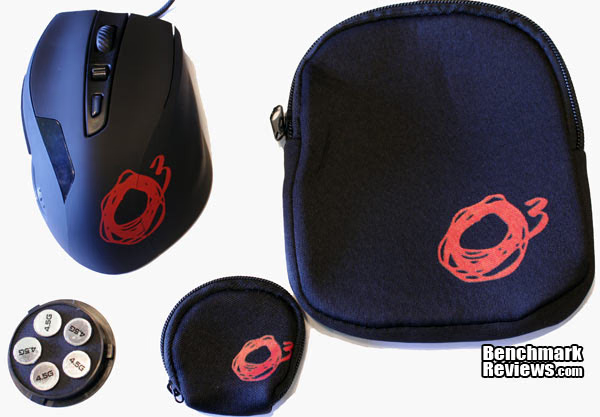
Clearly designed for a gamer the Radon 5k includes a neoprene case for your mouse and weights. For those of us who attend LAN games these cases are a nice addition as you can safely transport your you mouse without worry of tangling the cord or damaging your investment. The entire mouse is also covered in a rubber like material that gives you a comfortable grip even after hours of using the mouse.
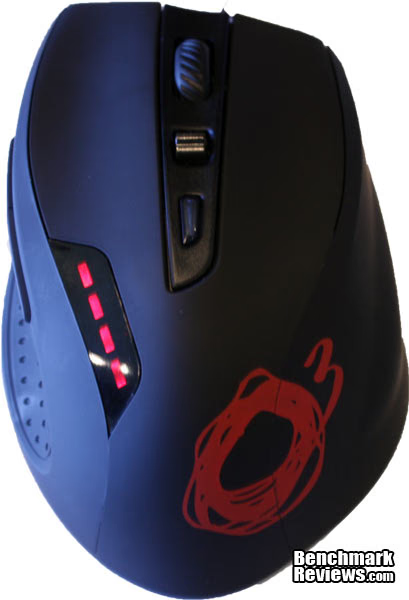
From this point-of-view you can see that the Radon 5k has two main buttons that extend along half the length of the mouse making it easier to click and giving you better response times in a high stress situation. Along the center of the Radon 5k is your typical mouse scroll wheels, a toggle switch designed to let you switch for easily between four predetermined DPI settings, and lastly a button dedicated to switching between four pre-programmed profiles which are saved directly to the Radon 5k's internal memory. On the edge is set of four lights which light up to indicate which of the four sensitivity levels are chosen.
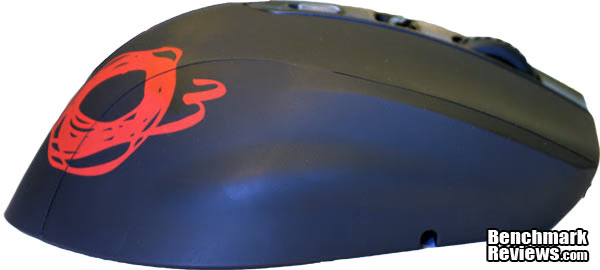
Clearly designed for comfort while in use during long gaming sessions Ozone included a small bump that divides the left side of the mouse making it so your ring finger, and pinky finger sit in a "stepped" position. This design is a matter of personal preference some may like it other may now. Personally I felt it helped give me a better grip and overall was very comfortable, although my roommate who has much larger hands found that the design made it so he could not comfortably lift his pinky off the mousepad.
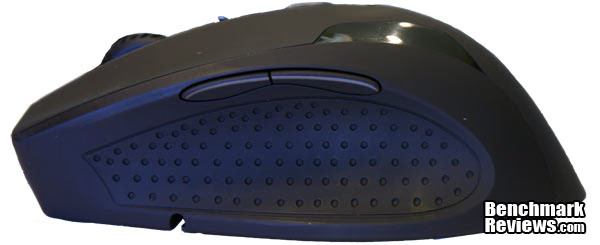
On the left you have a fairly deep impression that is covered in textured rubber helping to make sure in the heat of battle you don't lose grip on the Radon 5K. Situated at the top of this grip are two more mouse buttons that can be programed to do anything you would like through the included software. For some users the ability to set macros to their mouse may save time in programs such as Photoshop where you may be doing the same actions many times on different parts of the photo. For gamers these buttons can be used to lighten the load that your keyboard hand has and therefore give you the ability to focus more of your time on movement rather then moving your hand out of position to talk or reload.

On the bottom of the Radon 5k you have a removable sections that contains the customizable weights. One feature I would like to see on all wired mice is the customizable route for the cable to take. This makes it so that based on where you keep you mouse your cable be easily routed to the path that provides the least amount of resistance.

The Radon 5k comes with five 4.5 gram weights that can be used to customize the weight of the mouse. At first I thought this would drastically change the weight of the mouse but I found that the amount of weight added was not enough to really change how Radon 5k felt to use. In the future I hope that Ozone will include higher weight sets with the Radon 5k in order to give greater customizability to the Radon 5k.
Ozone Gaming Radon Software
With so many mice using the Philips PLN2032 sensor the differentiating factor between the different mice on the market beyond their exterior is the software that is included with it. The days of just plugging in a mouse and using it are quickly dying off with many options for the tweaking mice to your liking. The Radon 5k uses its on board memory to store its configurations, which makes it great for LAN's because gamers can setup their settings at home and when at the LAN the settings are usable without installing any drivers, great for moving between workstation for different games. Even better if a gamer wanted to change their configuration there are no drivers to install as the Radon 5k's software is self contained and can run off a flash drive without being installed.
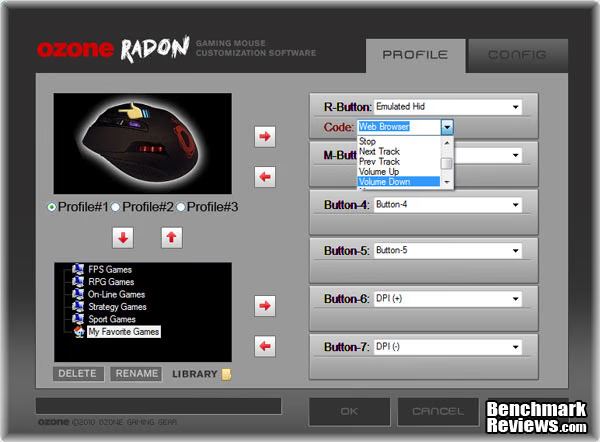
The first page of the Radon 5k's software includes everything that is needed to make pre-made profiles that can be easily switched through using the profile switch button on the Radon 5k. This software can also easily save multiple profiles for different types of games and then load them into the memory of the mouse easily. On the otherside of this window are drop down menus that let users select what they would like each button to do ranging from macro's, to windows commands, to starting programs.

The second page contains all the settings pertaining to the DPI settings and the USB report rate. Users can individually set the DPI settings for between 100 and 5600 DPI. One interesting setting is the "Allowed DPI Levels" which lets games limit the number of levels on that can be selected for use . This feature can be used for example when a gamer only need two settings: one for sniping, and one for everything else but they don't want to accidently choose any other level.
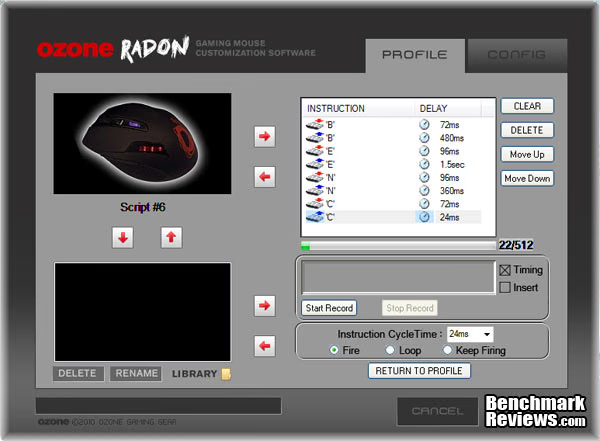
An important part of the Radon 5k's software is the ability to easily make macro's for your each button on the mouse. These can be as simple as a repeated button press or as elaborate as you can possibly imagine and fit into a 512 byte command. When making a macro a gamer would just press the buttons they would like to use and the software will record exactly as you do including timing. This is particularly helpful if a gamer is making macro's that require timing for something like bunny hopping (not that anyone here would ever do that).
Testing & Results
Testing Methodology
I spent about 2 weeks using the Ozone Radon 5k day in and day out at my computer while doing various activites including gaming, photo editing, and normal work. By looking at all aspects of the Radon 5k it allows you to see if this mouse is not only good for gaming but also activities which are outside of gaming. Unfortunately although I am able to tell you of my experience with the Radon 5k it does not reflect the experiences of everyone. Depending on your hand size and grip preference my observation may not hold true to your experience with the Radon 5k.
Programs Tested
- Adobe Photoshop CS5
- Fallout New Vegas
- Civilization 5
- Half-Life 2
Results
I found the Radon 5k to be very comfortable even in long stints at my computer. The button placement is particularly comfortable and I found changing between DPI levels was easy to do without the need re-situate my hand. While doing work and play the sensitivity settings that you can quickly switch between on the Radon 5k starts to shine. When doing Photoshop work it is nice to be able to quickly change your sensitivity settings so that you can easily make detailed edits on small sections while at the same time retaining the ability make large sweeping actions for large edits.
When it came to the gaming front the Radon 5k really starts to shine as its buttons are incredibly responsive with the ability to react as fast as I can click, especially compared to my old Logitech with its much more traditionally designed buttons. I found that the rubber covering really helped to make enjoyable gaming experience when the action got hot helping me to keep a grip on the mouse with sweaty palms, a condition that frequently lead to me losing grip on my Logitech. I did find although comfortable the Radon 5k using the tried and true egg shape is still not as comfortable as my Razer Deathadder 3.5G. I wish more companies would try to design new ideas for mice, I love that the Razer Deathadder, Mamba, and Lachesis with their more slender drawn out bodies fit my grip style a bit better. Overall though the Radon 5k is a excellent design with well made drivers, a comfortable design, and features designed to give gamers that edge they need.
Ozone Gaming Radon 5K Final Thoughts
The Radon 5k has lots of potential to make a great mouse, especially for a company that has previous to the Radon 5k/3k series made one mouse. With the ability to quickly switch profiles, and DPI settings, this mouse gives you the ability to quickly change everything about your mouse without having to fiddle with drivers in order to do so. Other features like the customizable weights, bags for easy transport, and having all settings stored in the on-board-memory help make the Radon 5k into a great mouse for LAN's
Although as previously stated the Radon 5k is a very good mouse there is still some room for improvements. My biggest complaint pertaining the customizable weight system with the weights only being 4.5g the amount of weight that can be added is only about the .05 of a pound which really doesn't make that much of a difference. It would be nice to see the Radon 5k series contain extra weights ranging from 4.5g to 18g weights to let you add quite a bit more weight overall to this mouse.
Ozone Gaming Radon 5K Conclusion
The performance of the Ozone Radon 5k is as to be expected from a mouse in this price range. The 1000Hz report rate and a 5600 DPI sensor you are given impart a incredible sensitivity to even the smallest movements. This translates to better aiming in game, more accurate editing in Photoshop, and less movement in your overall experience when moving around your screen in day-to-day life.
The all black rubber that covers the Radon 5k leads to it having a very nice look that is not to flashy, even with the large Ozone logo on the side of it. Overall the rest of the design works together to make a very uniform looking product that does not stand out on a typical desk.
Construction felt well made without any warping or movements at the joints even during times of duress in a game (I am incredibly competitive). For some the lack of weight could make it feel cheap (although this can be easily fixed with some heavier weights), but overall I found the quality to be on par with my Razer and Logitech mice I have used in the past.
First and foremost the main function of a mouse is to let you easily navigate around you computer with all other functions falling into secondary and tertiary needs. Ozone understands this and with the Radon 5k it gives you a very accurate responses to your movement while at the same time providing great support for features like programmable key's and macro recording.
Value mostly pertains to the user of the product, for those of us who want every last bit of edge over our opponents the extra price can easily be worth it for those extra couple of points. For many other types of people they may not understand why we would pay $70 for a mouse but ideally I would see this as a good value keeping its price right in line with its competition from Razer, Logitech, and Steelseries. Still $70 is very expensive for a product that ideally is just a expanded version of a product that be bought for $15 or is even given away with many prepackaged PC's.
With Ozone being a relatively new entrant into the competitive market of gaming peripherals the Radon 5k is a very solid entry with its 5600DPI sensor, on-board-memory, programmable buttons, and macro recorder. Hopefully Ozone will continue to bring out good products and help bring new ideas to the table which will help gamers be the best they can possibly be with the best possible hardware.
Pros:
+ 5600DPI Sensor
+ Comfortable Design
+ Customizable Weights
+ LAN Friendly Design
+ Easy Profile and DPI Switching
+ Routeable Cables
Cons:
-Price
-Weights could use more difference in actually weight
Ratings:
-
Performance: 9.5
-
Appearance: 9.00
-
Construction: 9.5
-
Functionality: 9.00
-
Value: 8.00
Final Score: 9 out of 10.
Questions? Comments? Benchmark Reviews really wants your feedback. We invite you to leave your remarks in our Discussion Forum.
Reader comments from the original article
4 comments were posted before commenting closed. They are preserved as written. Original avatars no longer resolve and are shown as a placeholder.
Egg Shape A Giallombardo Permalink:
I like egg shape mouses; however, I have a very small hand and this mouse did not feel comfortable in my hands. I did like the easy sensitivity adjustments though over Razer's Imperator! The Imperator doesn't always seem to respond to the changes.
Razer Rules gamers mouse Permalink:
try the razer mamba bit expensive but worth every penny spent.Click here!
RE: Ozone Radon 5K Laser Gaming Mouse Victor Permalink:
I have the mouse it has a very good grip and feeling , i hate that the cursor oscilates or sticks , on the screen and i can't do anything to fix it , hope its nothing serios if this model is doomed maybe ill buy another mouse
HELP!!!!!!!!!!!!!!!! Mostafa Permalink:
I've had the ozone radon 5k for about 6 months & the LEDs suddenly turned off & the cursor gets stuck very frequently! Is the problem from the hardware or software? Plz help!