
Logitech QuickCam Ultra Vision SE Webcam
Introduction: Ultra Vision SE
Sometimes being involved with technology makes me remember back to when I was a young child watching Sci-Fi movies. Hollywood tried its very best to help make our dreams of the future unfold into a silver screen reality. One of the most popular ideas, at least the most likely to become a reality, was the video phone. In the late 1960's (and a decade before my time), AT&T demonstrated the Picturephone prior to introducing it for public sale in the early 1970's. Back then, telephones still had dials, and video meant a television set smaller than most monitors reading this article today. However, due to corporate problems the Picturephone project never saw broad distribution beyond a few major east coast cities before ultimately fading away. Without being old enough to know it, the future came and just as quickly it had passed.
The video communications project would be reborn again in the mid 1990's: this time as AT&T's VideoPhone. Again it suffered from horrible public reviews; the experience was poor at best and the price was too high for most consumers. This once Sci-Fi technology would become a reality done several times over, with the idea still fascinating among a small group of (usually corporate) people. And so technology evolves, and another decade passes.
Just as early as the VideoPhone was breathing its last breath, the webcam was making headlines. Of course, those early headlines were usually (and rightfully) associated with the pornography industry, since there weren't too many people willing to look at choppy video for any other reason. But once again, technology (dial-up Internet) was crippling the idea. It would have to wait until the turn of the century before people would finally give Webcams, grandson of the PicturePhone, its day.
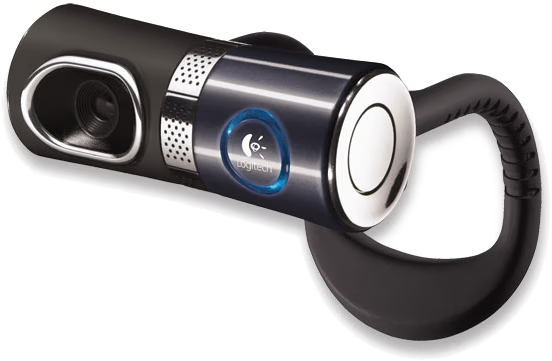
Perhaps the time has finally come; or perhaps it has already returned and we are in the middle of the third act. Either way, the World Wide Web introduced the most recent vision of the video communications: the aptly named Webcam. Logitech, one of the industries pioneering forces, has constantly offered consumers reliable peripheral solutions. In this review, Benchmark Reviews will evaluate the progression of technology into a product which hopes to establish itself as the pinnacle of PicturePhone evolution: Logitech's QuickCam Ultra Vision Special Edition Webcam.
Enthusiasts will enjoy true-to-life video calls with twice the image clarity of conventional Webcams, thanks to the precision-engineered, 5-element glass lens. QuickCam Ultra Vision uses Logitech RightLight2 Technology to give you the highest quality image regardless of your lighting, and RightSound for clear, echo-free audio. It´s video calling that truly is true-to-life.
About the Company: Logitech
Logitech is a world leader in personal peripherals, driving innovation in PC navigation, Internet communications, digital music, home-entertainment control, gaming and wireless devices. The company's products combine essential core technologies, continuing innovation, award-winning industrial design and excellent price performance. 
Logitech International is a Swiss public company traded on the SWX Swiss Exchange under the symbol LOGN and on the NASDAQ Global Select Market under the symbol LOGI. In January 2007, Logitech was added to the NASDAQ-100 Index.
Logitech's origins lie in the OEM sector, which remains an important part of its business, and represented 11.6 percent of the company's total sales in Fiscal 2006. To meet the demands of its OEM customer base, which includes most of the world's largest PC manufacturers, Logitech offers high-volume manufacturing with focused quality control, worldwide distribution and logistics, and the ability to leverage its infrastructure under changing demand conditions.
Logitech continues to broaden its product offering and its presence in the retail sector. This is fueled by a trend among consumers to enhance their basic PC systems with more fully featured personal peripherals that add functionality and cordless freedom to their desktops. They are also purchasing supplementary devices designed for new applications and specific purposes such as gaming, multimedia, or audio and visual communication over the Internet. Further, Logitech's retail business includes personal peripherals for platforms beyond the PC, such as gaming consoles, portable music players, mobile phones and home-entertainment systems.
Today, Logitech's retail business accounts for 88.4 percent of its revenue. To provide the market with a broadening array of best-of-category products, Logitech's business model calls for supplementing its internal engineering and manufacturing strength with additional products and technologies through a combination of strategic acquisitions and industry partnerships.
More information about Logitech is available on their company website.
Questions? Comments? Please visit the Benchmark Reviews Discussion Forum with your thoughts.
Closer Look: Ultra Vision SE Webcam
Most consumers go to their local retail store and purchase an item which looks like it will do the job. Unfortunately, in this day and age the products are all beginning to look more and more alike, which means that uneducated consumers could be doing themselves some harm by not learning the features. The webcam industry may have a catalog of products which seem very similar on the outside, but like everything else in this world it's what you have on the inside that counts most.
Take for example Logitech's QuickCam Ultra Vision Special Edition webcam. It may look similar to most of the other products sitting on store shelves, but it is in fact very different. To begin with, it features a five-element glass lens system which works together to render 640x480 video quality on the level of high-end security cameras. Then, add to it a 1.3 megapixel sensor, and the still-image resolution climbs to 1280x960. Finally, mix in a few unique touches: a snapshot and video button, video activity signal, echo-free audio, adjustable angle lens, and a counter-balanced flexible stand. When it's all taken into consideration, the QuickCam Ultra Vision shares very little with the competition.
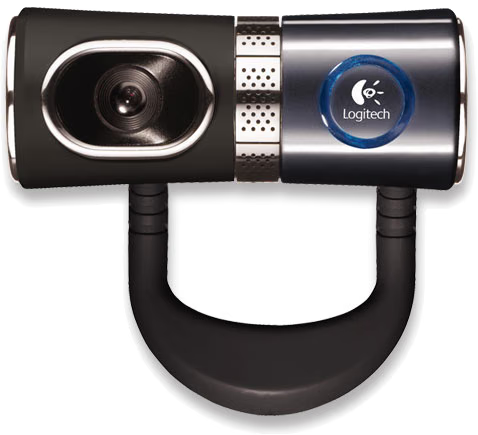
| The difference between Logitech's QuickCam Ultra Vision Special Edition and the non-Special Edition version is the finish. The SE has a nice black (graphite gray really) finish, and the Logitech's QuickCam Ultra Vision has a silver finish. | |||||||||||||||
Features
|
|||||||||||||||
Specifications
|

One of the most unique, if not peculiar features of the Logitech QuickCam Ultra Vision Webcam is the flexible counter-weighted stand. It seems obvious that the webcam industry has been fighting with the problem of mounting their product to various surfaces; especially ever since LCD displays took away the nice flat surface which the much larger CRT monitors used to afford them.
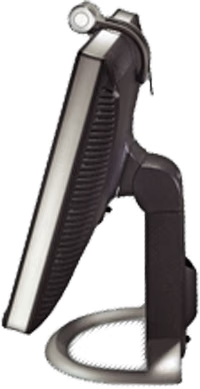
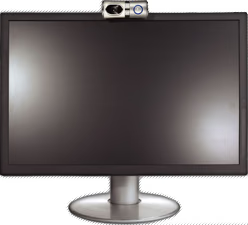
Since most users now own an LCD display, the technology used by Logitech to mount the QuickCam Ultra Vision is more towards the unique side. Utilizing a weighted flexible rubber "clip", the QuickCam is designed to mount itself to the screen by using gravity to apply pressure from the front (behind the camera). Even on very thin monitors, such as my SyncMaster 204B, the QuickCam Ultra Vision had no problem staying in place. What the images here don't show you is that the webcam actually twists in the middle. So even if your mounting position is too high, you can simply aim the lens portion (left half) of the QuickCam Ultra Vision down to meet the focus point.
Questions? Comments? Please visit the Benchmark Reviews Discussion Forum with your thoughts.
Closer Look: QuickCam Software
Installation was extra-simple; so easy that even your grandmother could install the QuickCam Ultra Vision (assuming grandma has a Pentium 4 2.4GHz PC with Windows 2000, XP, or Vista). A tag is attached to the cap which covers the USB port on the QuickCam, so there's no excuse for not installing the software before you start plugging in the camera. Initially, I installed the software from the included CD-ROM (version 10.5) . Make sure to get the latest software for the QuickCam Ultra Vision Special Edition direct from Logitech here before you start, because you will be sent there anyway if the software on the CD is older (which it was).
Logitech offers a service called VideoCall. This would be a good time to refresh your memory regarding my long introduction which included the VideoPhone of another era. Logitech's VideoCall software allows you to share conversations with friends and family in real time using Logitech VideoCall for Broadband. After a relatively easy configuration process you can begin experiencing the clear audio and smooth video provided by VideoCall. The software even allows you to share pictures while you talk!
Logitech Video Effects is a fun application, designed exclusively for compatible Logitech web cameras such as the QuickCam Ultra Vision, which enables you to personalize your on screen appearance using Avatars and Face Accessories. The avatars are fully-animated 3D renderings that replicate the facial movements of the webcam user, and Face Accessories are 2D images such as hats or glasses that are superimposed on your video image. If you or aren't a very exciting subject, you can dress up dull images by adding glasses, a mustache, a hat or a crown. Video Effects face accessories use the same fundamental technology as the avatars so that the accessory moves with you. Unlike the avatars, the original source video is kept intact and the animated accessory is overlaid on top of the image.
Working with the video can be fun, even for a seasoned professional like me. At first I thought this would turn into a boring review (hopefully it hasn't), and then I discovered that Logitech offers dozens of free video avatars and video effects for facial mockups on their site. I was so excited to see some animated figure taking on my facial likeness.
Unfortunately, due to either QuickCam and IE7 compatibility issues, or software engineering issues, my playtime was cut short. I tried for hours to make the Video Effects feature to work, and even using QuickCam v10.5.1 build 2029 (latest version at the time of this article) didn't help. Later I learned that I am not alone, because there are at least a few reviews mentioning the quirks of the Video Effects feature in Logitech's QuickCam software. Furthermore, the Logitech support forums seems to have some very informed members, because they are not only aware of the problem but they have suggested how Logitech can fix it. Hopefully Logitech will learn to listen.

Here is a video example of what I could have been playing with. Additionally, a the images below give a basic idea as to what the Video Effects are capable of. Until Logitech releases a new version of their software, it looks like I will have to wait to play with Video Effects.
Questions? Comments? Please visit the Benchmark Reviews Discussion Forum with your thoughts.
Final Thoughts: Ultra Vision SE
Overall, the QuickCam Ultra Vision performed extremely well. This is what you would expect out of Logitech's flagship webcam release. I approached this review with the anticipation of offering a video of myself showing the QuickCam Ultra Vision is action. But after all of the stored video was reviewed, I discovered that this webcam is not helping me to look any younger. The fact that I had just finished a Brazilian Jiu-Jitsu tournament in Las Vegas didn't help make me any more attractive for the camera, either.
So instead of torturing all of the readers with images ugly enough to give them nightmares, I choose to use footage of the QuickCam Ultra Vision in action on someone else instead: Video #1 and Video #2. I'm certain you will enjoy these video's far more than watching me.
Logitech is doing a great job of packaging consumer-friendly products, and the QuickCam is another fine example of this. The Logitech QuickCam Ultra Vision Special Edition certainly establishes what a webcam should be made of to satisfy today's market. This is fine... for today's market. But as I am probably more involved with the industry than most, I am aware that there is a market waiting for change just as soon as tomorrow comes. I would like to see Logitech deliver cross-platform technology into their webcams, since this will help their products evolve.
One particular example of this is IR technology. While the QuickCam Ultra Vision offers the software based RightLight 2 technology, nothing compares to the real thing. Practically all surveillance cameras in production today offer multiple IR LED lighting technology for very-low light and no-light situations. It would be an inexpensive improvement to add, since LED's are cheap and consume nearly no power at all. Additionally, it would correct the landscape lighting for an otherwise poorly lit environment whenever the user cannot provide the optimum lighting themselves and RightLight cannot correctly adjust gamma brightness.
Conclusion
Even if I wanted to dwell on the only problem I encountered, the QuickCam Ultra Vision Special Edition rates praise. I really wanted to see myself as a talking Unicorn or Marionette, so I am very let down. Despite this, I cannot help but to be impressed with how well everything else worked. Right out of the box the QuickCam software installed effortlessly, and the configuration was almost completely automatic. Since I am a stickler for high-quality video and images, the QuickCam Ultra Vision consistently offered me a reason to appreciate the five-element lens system. The best part of the package is how well the QuickCam Ultra Vision integrates into related applications such as skype, along with a handful of major messenger programs.
At the time of this writing, the Logitech QuickCam Ultra Vision Special Edition was available at NewEgg.com for $99.99, which is at the highest end of the price spectrum. Although this is Logitech's crown jewel for webcams, they also manufacture more webcam products than anyone else on the planet, so NewEgg is sure to carry a Logitech webcam which best fits your needs. If you are looking for a compact high-performance solution, and cost is not the biggest concern, the QuickCam Ultra Vision series is perfect for you.
Pros:
+ High Quality 1.3MP Images
+ Excellent recording performance
+ 640x480 Video resolution at 30 FPS
+ Convenient snapshot and video buttons
+ Unique balance-adjustable clip base
+ Easy to install and use without effort
+ Better than expected sound quality
+ 2-Year warranty
Cons:
- Software enhanced images (4MP) lack sharp clarity
- Video Effects software feature is unstable
- No built in IR LEDs to correct no-light environements
Ratings:
-
Presentation: 8.75
-
Appearance: 9.5
-
Construction: 9.0
-
Functionality: 8.25
-
Value: 7.25
Final Score: 8.55 out of 10.
Questions? Comments? Please visit the Benchmark Reviews Discussion Forum with your thoughts.
Reader comments from the original article
2 comments were posted before commenting closed. They are preserved as written. Original avatars no longer resolve and are shown as a placeholder.
Webcam needed soon BILL DAVIS Permalink:
Hello ,, is there any good HD Webcam that will work Correctly with Yahoo Messenger , Skype and all other very Popular Chat programs ??? Loigitech 9000 Pro is CRAP !! ,, i have tried for 2 days to try to get it to work Correctly with Yahoo Messenger , Skype . And their Support is Dumber than i am or at least it looks that way to me . My Gateway laptop with a 1.3 Webcam works with Yahoo Messenger , Skype and more . But it is not an HD webcam . Is there any HD webcam that will wolrk with most or all chat programs ? Facevision N1 seemed really good but you said it only works with Skype . 760-746-1913 after 10am California time
RE: Logitech QuickCam Ultra Vision SE Webcam gary wenzel Permalink:
This is the one that I have and I think it will work with windows