
Microsoft LifeCam Cinema 720p HD-Webcam
Microsoft LifeCam Cinema Review
With the release of the LifeCam Cinema 720p HD Webcam H5D-00001, Microsoft has provided the world with the first webcam that has a full 720p HD sensor and a 16:9 aspect ratio. During the 2010 International CES, the LifeCam Cinema received an Innovations Honoree Award. From the CES website, "Microsoft's LifeCam Cinema brings cinematic video into the home as the first consumer webcam to offer widescreen video with a native 720p sensor." This is a real breakthrough for webcams and for communications in general. I recently learned that, in an effort to provide affordable health care, retail giants such as Wal-Mart and Walgreens are offering appointments with licensed practitioners from their stores over webcam. The doctor can even check ears, nose, and throat through the webcam. How much more accurate could the diagnosis be with the relatively cheap availability of High Definition video over webcam.
But that's just one possible use for the LifeCam Cinema's 720p HD functionality. Because of my job, my daughter lives almost 1000 miles from her grandparents and many of her other relatives. We get to see them very rarely, maybe once a year. We all have computers, of course, and MSN Messenger, Skype, Google Chat, or something similar. We have long been communicating over webcam so those distant relatives can feel like they are a part of our lives, not missing out on the wonderful milestones of a new baby. But inevitable frustrations arise with the use of most webcams available on the market today. The sound doesn't match up with the video. The video is so blurry or choppy that it makes it difficult to watch. Sometimes we wonder if my daughter is even able to recognize who is on the other side of the call.

In this article, Benchmark Reviews will attempt to test the amazing feature set provided by the Microsoft H5D-00001 LifeCam Cinema 720p HD Webcam. One can only hope that such a breakthrough in communication through the use of personal computer peripherals will provide the webcam experience that we have been waiting for; an experience previously reserved for extremely high-cost and low-availability equipment. While the LifeCam Cinema will probably not give us the video quality found in the movies, it will be a success if it brings us even one step closer to that dream.
About Microsoft Hardware Group
Founded in 1975, Microsoft (Nasdaq "MSFT") is the worldwide leader in software, services and solutions that help people and businesses realize their full potential.
For more than 26 years, the Hardware Group has employed innovative engineering, cutting-edge industrial design and extensive usability testing to create products of exceptional quality and durability that enhance the software experience and strengthen the connection between consumers and their PC.

Microsoft LifeCam Cinema Features
-
720p HD widescreen
-
Auto Focus
-
High-precision glass element lens
-
ClearFrame Technology
-
Digital Microphone
-
Aluminum Body
The Microsoft LifeCam Cinema captures full 720p HD video at 30 fps, utilizing a glass element lens with auto-focus. It comes with a built in digital microphone with noise canceling, all packaged in a tiny aluminum body. Below the main body the camera mounts to a flexible stand allowing it to mount to most monitors and laptops with ease. On top of the camera's body sits the mic, and a single push call button tied into Windows Live Messenger.
H5D-00001 Specifications
| 720p HD Widescreen |
720p Sensor captures true HD quality video at up to 30 FPS. |
|---|---|
| Auto Focus |
Images stay sharp and detailed even during close-ups. |
| High-precision Glass Element Lens |
High quality lens delivers more accurate colors and sharper video. |
| ClearFrame Technology |
ClearFrame Image-processing technology delivers smooth, detailed video, even in low light conditions. |
| Digital Microphone | Digital microphone with noise cancelling technology helps improve speech quality for crystal clear audio. |
| Aluminum Body |
Aluminum body reduces weight and improves the durability of the webcam body. |
| Windows Live Movie Maker | Start a movie project with one click, then upload widescreen video to social networking sites. |
| Windows Live Photo Gallery |
Easily upload a photo that you can edit, tag, and share with friends and family. |
| LifeCam Dashboard |
Add special effects and control your webcam - all from the Windows Live Messenger window. |
| Windows Live Call Button |
It's simple to start video calls. One touch of the Windows Live Call Button lets you see who's online, and you're on your way to making a video call. |
| Flexible Stand |
Bend, fold and shape the flexible base for the best angel on laptop screens, flat panels and traditional monitors. |
| Video Effects |
Discover a fun way to express yourself with these entertaining video effects built into the LifeCam dashboard. |
| Works With |
Windows Live, Yahoo! Messenger, AOL Instant Messenger, Skype |
| Warranty |
3-year limited hardware warranty. |
Closer Look: LifeCam Cinema
When the Microsoft LifeCam Cinema arrived at my door, I was actually very surprised by the size. It was tiny! All the pictures I had seen had made me think it was much larger than it actually is. All that really means is that it is even more impressive that the LifeCam Cinema can provide widescreen 720p HD video. The LifeCam Cinema easily fits in the palm of my hand. It arrived in the familiar red packaging that accompanies almost any Microsoft peripheral.
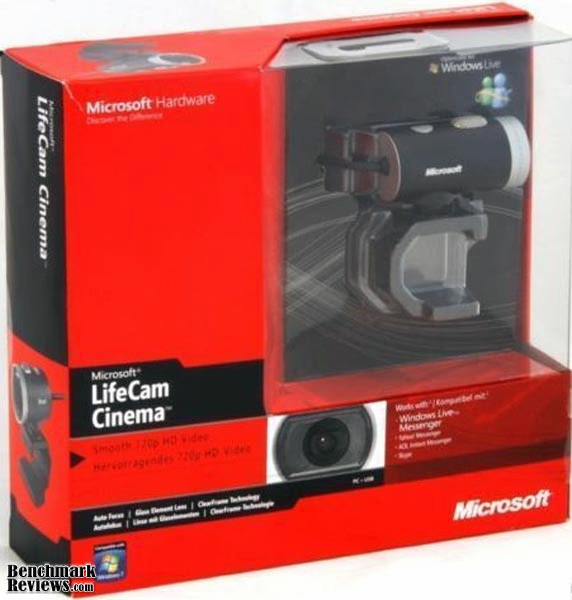
Inside the package of the LifeCam Cinema was a user manual and the installation CD that includes the Microsoft LifeCam 3.0 program. The cable for the LifeCam Cinema is decently long, though I would have liked to see it be a little bit longer. The cable is contained by an innovative clip that is much easier to use, and works a lot better, than the normal twist-tie that most peripherals come with. I played around with the clip for a little while, but didn't end up using it at all because the cord is just barely long enough to reach from the top of my TV to my HTPC.
The LifeCam Cinema has a rubber base that is very flexible. I was kind of worried when I first took the H5D-00001 out of the box that the base wouldn't work any better than the much cheaper webcams I was used to. I was pleasantly surprised, however, when the flexible, rubber base provided great support for the camera on almost any surface. The LifeCam Cinema fits onto the top of both my monitor and my television with ease. It also stands upright on the desk just as well. That little rubber based impressed me right from the start, even before I installed the webcam to check out picture quality.

The Microsoft LifeCam Cinema body swivels on the base from left to right a full 360 degrees, though I haven't found myself needing that kind of flexibility. The head also moves up and down with about a 90 degree range of motion. The range is quite excellent compared to other personal webcams. Many that I have used only move up and down, and refrain completely from allowing the user a side to side motion. Combine that motion with the fact that the LifeCam Cinema captures in widescreen and you have a winning combination.

There are a few webcams on the market today that offer a widescreen view. This is typically becoming more normal as most television and computer screens are widescreen. The field of view offered by a widescreen picture captures so much more than the alternative. Another major move in almost every aspect of video production now is the move to HD. Microsoft is the first to offer a low-cost webcam with both widescreen and HD capability. The LifeCam Cinema can produce video with a resolution up to 720p. While this is a great move for High Definition recorded video, most programs for video chat over the web don't offer the option to stream in High Definition. For now, this isn't a major setback, as a very top of the line computer is required on both ends, with a high speed internet connection, to achieve any sort of meaningful HD video chat experience. With the release of the LifeCam Cinema, however, I'm positive we are very close to an HD revolution in video chat as well.
Microsoft H5D-00001 Detailed Features
The Microsoft LifeCam Cinema H5D-00001 webcam features a stunning top resolution of 1280x720p. It does so at 30 frames per second. While that may not sound like all that much, it's pretty impressive as far as webcams go. If you thought about playing your favorite first-person shooter game at 30 frames per second, you probably wouldn't be very happy. That is quite understandable. But many webcams struggle to offer video at much, much lower resolutions than the LifeCam Cinema, and at far lower frames per second. In reality, 30 FPS at 720p resolutions would be quite a feat, if the H5D-00001 can live up to it.
While it would be pretty amazing to chat with your friends and family at 30 FPS and 720p resolution, like I said before, that's not very possible right now. The main uses for the high resolution and fast frames per second offered by the LifeCam Cinema H5D-00001 can, in reality, only be experienced to the finest degree when capturing videos. That being said, if you post a lot of video to youTube, your blog or website, or if you have another use for recording videos from your computer, then the Microsoft LifeCam Cinema H5D-00001 is just what you have been looking for. And, as I mentioned, even if you haven't found a work-around to make Skype compatible with 720p, I think you will be quite impressed with the great video quality that the LifeCam Cinema offers at lower resolutions. In fact, with the higher frame rates, I find the lower resolution video for chatting to be quite superb.

I mentioned earlier that the LifeCam Cinema was much smaller than I had anticipated. Since I had seen pictures of the product before, I want to give you a realistic look at exactly how small the camera actually is. The LifeCam Cinema sits just over 2" tall when the rubber mounting fixture is curved under the device, as seen below in both images. If the stand is extended outward so the LifeCam Cinema can be mounted on a monitor, it loses almost an inch and stands less than 1.5" above the monitor. From front to rear, the main body of the LifeCam Cinema is under 2" long. That huge looking microphone mounted on the top of the camera is under half an inch long. Finally, the LifeCam Cinema measures almost exactly 1" in diameter.

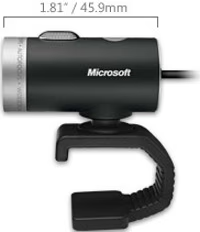
Despite the tiny size of this beast of a webcam, the LifeCam Cinema was very impressive during performance tests. I will share the results of those test with you later, but I want to make sure that you don't underestimate the power of this little device prematurely and based solely on the fact that it is smaller, even, than the $30 Philips SPC710NC webcam I tested it against. While that microphone is in actuality so much smaller than it looks in the pictures, it really has a kick to it. It picked up even the smallest of noises with precision. There were some unexpected setbacks with the microphone, but we will explore those later as well.
Microsoft LifeCam Software
The Microsoft LifeCam Software installs much like any other program, with a little bit of a catch. Microsoft throws a little present in there in the form of a Windows Live Essentials download. So if you don't already have Windows Live Essentials, which includes Windows Live Call, Windows Live Messenger, Windows Live Mail, Windows Live Movie Maker, Windows Live Photo Gallery, and Windows Live Writer. Even if you already have the non-Live versions of these programs installed (which is likely if you are running Windows Vista or 7), you will get the Live versions from this install. This isn't really a big deal if you already use Messenger or Windows Live in any sort of a capacity. And if you don't, then you can skip the download and installation. Just make sure you are quick, as it can sneak up on you in a hurry and you will have all these extra programs before you know it!

During the installation of the LifeCam Software, Microsoft makes sure to give you some tips for using the LifeCam for various functions. I didn't pay much attention to them during the install, but now I wish I would have. Those first two avoids on the list below are key to maintaining good audio and video quality, whether it be for recorded video or a video call. The LifeCam Cinema is excellent at picking up small sources of light and adjusting accordingly, but if your light is behind you it will drown out picture somewhat. Especially if the light is a lamp or other type of light with a small bulb that doesn't illuminate the entire room. Room lighting is easily adjusted for.

Also, while the microphone on the LifeCam Cinema is very good, and even adjust for noise cancellation, that noise cancellation can be troublesome. If you have any semi-loud background noises, such as a loud PSU or system fan, the microphone will pick up on that noise and try to cancel it. It actually does a great job at canceling the noise, but for some reason, it replaces it will a high pitched squeal. The squeal isn't overly loud or obnoxious, but it is annoying. It exponentially less distinguishable when you ensure that you have no background noise. Also, when using the webcam in Linux, the squeal isn't there. This is probably because the drivers are generic webcam drivers and they don't utilize the noise cancellation feature. You can't get to 720p in Linux either, unless you have a program you can force to go that high.

In the instruction manual, and during the install, Microsoft asks that you don't plug the LifeCam Cinema into your computer before installing the drivers. It will cue you at some point during the installation, and you won't be able to continue until you plug in the device. I did try, however, just plugging the device in, before installing the software on my HTPC. It is running Windows 7 Home Premium. The LifeCam Cinema installed perfectly as a plug and play device and I automatically received an option to download the latest Microsoft LifeCam Software and Windows Live Essentials. I declined, then removed the hardware completely and reinstalled it the way the manual suggests.

Pictured above is the Microsoft LifeCam Software. It provides you with the ability to take still photographs, record audio, and record video. The settings tab allows you to choose a webcam, even though I believe it will only allow you to select a LifeCam product. With the Philips SPC710NC also installed I was unable to choose it from the drop down menu, even though other programs did let me select it. Here you can also select the microphone volume and pick a resolution. There are a wide range of resolution options for the LifeCam Cinema, they are 160x120, 320x240, 424x240, 640x360, 800x448, 960x544, and 1280x720 HD. The settings tab also lets you adjust brightness, gamma, and color levels, as well as set the frequency to that of your monitor to reduce flicker.

By clicking the stars, the settings page is replaced with an effects page. Both of these pages can be closed by clicking the arrow next to the capture image. The effects aren't anything extraordinary, but they were a lot of fun to play around with. My daughter found them to be quite hilarious when she herself on the TV with silly hair, a cat face, or wearing a cowboy hat. There are a lot of distortions and add-ons, which really take advantage of the LifeCam Cinema's impressive ability to find and pick out a face. Even with multiple faces in the picture, unless I was turned sideways, the LifeCam Cinema was nearly always able to pick out my face. This is a plus for the autofocus feature as well as the effects.
Webcam Testing and Results
Testing Methodology
Considering the fact that I couldn't pick up my other webcam through the Microsoft LifeCam 3.0 software, I had to use some other software items to get conclusive results. I ended up using Windows Live Messenger, Skype 4.1, and Google Video Chat. The two webcams I used were the LifeCam Cinema, of course, and the Philips SPC710NC webcam. The LifeCam Cinema costs $57.99 at Newegg.com and the Philips runs about $30, but it is pretty old and difficult to find.
I will explain the results of each of my tests, but I have only included two pictures showing the differences between the cameras. I did this on purpose. Although the differences that I will detail were very clear, when I tried to capture screenshots of them put them together for this review, I noticed a distinct lack of clarity on the edited screenshots. I deliberated and finally decided that I would not include the pictures as they might construe a different effect than what is really offered by the LifeCam Cinema. In many cases, the pictures looked nearly equal as I looked at the screenshots, when side by side on the screen during live capture, the LifeCam Cinema clearly provided superior quality.Test System
-
Motherboard: Intel BOXDG41MJ LGA775 Intel G41 Mini ITX
-
System Memory: 2 X WINTEC AMPX 2GB 240-Pin DDR2 SDRAM DDR2 800 (PC2 6400)
-
Processor: Intel Pentium E5300 Wolfdale 2.6GHz LGA775 65W Dual-Core
-
Audio: Realtek ALC888VC
-
Video: Intel GMA X4500
-
Disk Drive 1: Western Digital Caviar Blue WD3200AAJS 320GB 7200 RPM SATA 3Gb/s
-
Optical Drive: Panasonic DVD/RW Slim Drive
-
Enclosure: SilverStone SUGO SST-SG06B
-
PSU: 300W
-
Monitor: Olevia 227V 27" HDTV
-
Operating System: Windows 7 Home Premium x32
Results
I started off the testing by making quite a few calls through each of the video chat programs listed above to various friends and family. During the call I would switch from the LifeCam Cinema to the Philips SPC710NC and ask them to detail the difference in picture quality. I started with Windows Live Messenger, which surprised me by being the most difficult to use, in my opinion. During the call, at a resolution of 320x240 for both cameras, everyone I talked to was quite surprised by the wide field of view on the LifeCam Cinema compared to the Philips webcam. When I started with the LifeCam Cinema, no one really noticed that they were seeing much more of me and the room, but they definitely commented when I switched cameras. Overall, the lighting was better while using the LifeCam Cinema, as was the picture quality and detail.
As I moved on to the other two video chat programs, Skype 1.4 and Google Video Chat, I found the same consistencies in the performance of the LifeCam Cinema over the Philips Camera. Every person that I talked to was amazed at the difference in picture quality and the level of detail. The most exciting factor for everyone was, however, the increased field of view. Skype offered me the highest resolution, letting me go up to 640x480, but it took some tweaking. I found a third party app for skype as well that would let me bump up to 720p, but just as I had suspected, it was a very unpleasant experience for the person on the other end of the call. The frame rates were well below 30 FPS, probably somewhere around 5. But at 640x480, they were very good.
So, since Skype offer the best chance and showing the true power of the LifeCam Cinema, I took the screenshots below from that. I'm sure without saying anything you can tell which is the LifeCam Cinema, if only from the wider field of view. Also, these pictures were both taken with no lights on in the room. The only light coming into the room was from the window to my left, which had the blinds pulled halfway shut. As you can see, the LifeCam Cinema does a much better job of filling the room with light and even lighting my face and other features in the room. If you look at the I Love Lucy calendar hanging on the wall behind me, not only will you learn something about my wife, but you can see that the detail is much clearer in the picture with the LifeCam Cinema.


Looking at that back wall you can also see that the colors are kept much more natural by the LifeCam Cinema. The wall is white, but the Philips webcam almost makes it seem blue. As you can see just above desk behind me, the LifeCam Cinema really takes advantage of all the extra light, as I mentioned earlier. It really washes out some of the features behind me because of where the outside light was hitting.
As far as the High Definition function goes, it really performed great when I was recording video using the LifeCam 3.0 software. However, even though my computer meets the minimum requirements of the LifeCam Cinema, High Definition video calls were certainly not feasible. I have to blame my internet connection in part for that, as well as my less-than-enthusiast speed computer. Still being able to record videos for youTube, blogs, or websites in High Definition and widescreen without breaking your wallet is an excellent achievement for the tiny LifeCam Cinema.
LifeCam Cinema Final Thoughts
Overall, the little Microsoft LifeCam Cinema H5D-00001 was enough to impress me a lot. The recorded video quality at 720p was amazing. The color quality is definitely an improvement over older webcams, and where it isn't exact, you can always adjust the settings. I found that the best resolution for quality, clarity, and frame rates, was at 640x360. This provides a widescreen view while still maintaining smooth movements and quality that can't be found at the High Definition resolution of 720p.
I was quite impressed as well with the audio recording capability of the LifeCam Cinema. While using the Philips SPC710NC I was forced to use a secondary mic because the one built into the webcam couldn't clearly pick up many sounds. The LifeCam Cinema microphone picks up everything down to the lowest sounds and even uses noise cancellation technology to get rid of background noise. Unfortunately, you will suffer from a very quiet high pitch tone due to the noise cancellation.
The size of the LifeCam Cinema makes it ideal for portability, as does the flexible rubber bottom piece that allows it to easily sit anywhere or attach to any screen. Used as a portable device, you should have no problem with the length of the cord. The handy cable organizer attached to the cord works very well. However, for in home use, you may find that you need a hub or an extension for the USB cable. It is decently long, but not quite long enough. I believe that the LifeCam Cinema will open the way for a new generation of webcams that can provide widescreen, High Definition video for use in a variety of situations. Very soon we will be video chatting from our living rooms in HD with our family and friends.
Microsoft H5D-00001 Conclusion
The Microsoft LifeCam Cinema H5D-00001 far outperformed my expectations of it, especially after seeing how small it is. The camera lens is able to pick out small details, recognize faces, autofocus, and capture 720p High Definition video at an amazing 30 frames per second. Even filming in low light situations can't stop the LifeCam Cinema from performing beautifully. The only issues I found with the performance of the LifeCam Cinema was its tendency to wash out the background if there was too much light and the high pitched tone that is emitted when the microphone uses its noise cancellation technology. The wash out can be fixed by adjusting the settings, however, and the high pitch tone can be virtually done away with by avoiding background noises such as loud fans or power supplies.
The LifeCam Cinema was quite a bit smaller than I had imagined it to be. Even so, it looks very cool, with its smooth metal barrel design. It looks a lot like a actual movie camera, in a way, but on a much smaller scale. The LifeCam Cinema's appearance is conducive to its performance. Even as small as it is, it just looks like it should provide top notch video and audio. Coming in a large box may hurt the LifeCam Cinema on a retail shelf, where the size of the camera compared to the box is so small. Maybe a smaller, completely plastic packaging would show off the LifeCam Cinema better. Even so, it doesn't look like your typical webcam, which is good, because it doesn't perform like one either.
Even as small as it is, the LifeCam Cinema is build very sturdily. The barrel casing enclosing the lens and camera components is durable and tough. The metal mesh covering of the microphone looks like it could withstand a beating and come out ahead. I think the LifeCam Cinema could survive the drops and dings that portability might bring with it, even without a carry bag or case that is notably absent. The only concern would be scratching the lens, which is quite possible with no lens cover. Even the rubber base of the LifeCam Cinema is strong and durable. It's not flimsy and thin, as I would have guessed when opening, but is instead very sturdy, enabling it to hold the camera in place wherever you see fit to put it.
The LifeCam Cinema H5D-00001 offers the most functionality in its class for the time being. With 720p High Definition picture and a widescreen view, it makes for the most versatile webcam out there. The picture clarity and quality live up to the Microsoft hardware reputation. I even enjoyed the LifeCam 3.0 software, surprisingly enough. It's simplicity really amazed me. The main window only has three buttons, for the three functions of the webcam, video capture, still image capture, and audio capture. It also offered plenty of fun effects that take advantage of the LifeCam Cinema's features.
As of March 2010 the Microsoft LifeCam Cinema HD-webcam, model H5D-0001, can be purchased from NewEgg for $69.99. Other online retailers also stock the LifeCam Cinema, so make sure to compare prices before making a purchase. A webcam that offers High Definition video and widescreen formats is hard to find for such a reasonable price. Even my old Philips SPC710NC, which was valiantly destroyed by the superior performance of the LifeCam Cinema costs $30. I would lay down the extra cash in a second for such a top-notch product. Even faster if I were an avid youTube user or if I video blogged much. The quality of this camera is worth much more than the price being asked for it.
If you have ever wanted to create your own youTube channel, post video commentary to your blog, or add personal videos to a website, this camera is perfect for you. The price and performance has set a new bar. Even if you just love to video chat with friends and family and therefore, the High Definition function of the camera is somewhat mitigated, the widescreen quality and clarity offered by the LifeCam Cinema is still enough to warrant it's purchase. And I have a feeling that in the near future, more and more software will released taking advantage of High Definition video chat.
Pros:
+ 720p High Definition Capture
+ Widescreen View
+ Noise Cancellation Microphone
+ Good Software; Simple Design
+ Small, yet Very Powerful
+ Lighting, Quality, Clarity of Picture
+ Low Light Enchancement
+ Excellent Value at under $60
Cons:
- Limited Video Chat HD Use due to Software Restrictions
- Very CPU intensive at higher resolutions
- Slight Washout with Bright Backlighting
- High Pitch Tone when Noise Cancellation is Used
Ratings:
-
Performance: 9.50
-
Appearance: 9.00
-
Construction: 9.00
-
Functionality: 9.50
-
Value: 9.50
Final Score: 9.3 out of 10.
Excellence Achievement: Benchmark Reviews Golden Tachometer Award
Questions? Comments? Benchmark Reviews really wants your feedback. We invite you to leave your remarks in our Discussion Forum.
Reader comments from the original article
16 comments were posted before commenting closed. They are preserved as written. Original avatars no longer resolve and are shown as a placeholder.
RE: Microsoft LifeCam Cinema 720p HD-Webcam Don Cox Permalink:
My dad has just installed a microsoft lifcam that I sent to him. I have a logitech system and we can't figure out how to get him to accept my invitaion. The logitech logo invite show up on his screen but he has not indicator to accept. What should we do?
Fix James Permalink:
i don't kniw :) bt you need to suck it up and fix it urself u can do it just reed and research
RE: Fix Les Permalink:
Rude comment and you also need to learn how to spell....
"Functionality" Warren Hurd Permalink:
For an HD WonderCam, the design and software seem to be deliberately limitting; ie the blue light, the glass over the lens preventing any adaptations that would otherwise be very simple. The software is extremely limitted, except for the silly stuff. I am sorry I bought this camera, and am offended by the level of its limitations given its potential, as these limitations could not possibly be missed by a design team and are quite obviously planned obsolescence. Pretty shameful device, given what it Could de, and Not worth the hype Microsoft gives it. Sincerely, I want my money back.
RE: Microsoft LifeCam Cinema 720p HD-Webcam marko Permalink:
This camera does not support 30fps at 720p. Or well, that hardware does but the software doesn't. If you want true 720p 30fps video, you have to uninstall the LifeCam software. After that you can choose 30fps when using MJPG format.
RE: Microsoft LifeCam Cinema 720p HD-Webcam luce Permalink:
The drivers don't support 720p at 30fps, but it's still all right except for the mic. Video and pictures were still a lot better than your average webcam, but I would always go back to using my earphones with built-in mic to talk with. Overall, it's really good and I really like the build. Certainly better than the usual plastic. For the price, I'd say it's worth it.
Just bought camera cannot make it works Karin Permalink:
Just bought WebCam Cinema. installed everything but it doesn not capture image. I cannot make it work, I am sure must e something to enable on the computer but I don't know what. I have Windows Vista. Any uggestions??
Mrs Odette Fowler Permalink:
Please let me know where I can download the manual for this LifeCam Cinema 720 HD that I own. Thank you
Lifecam Cinema Ernest Brownlee Permalink:
I have two of the Microsoft Lifecam Cinemas. The picture is very good and even in poor light the color stays sharp. I would like to use it for a security camera, does anyone know of a converter that would take the USB to AV output so I can connect it to VCR Or TV?
webcam Andrew Permalink:
i not sure if you can get usb to av but i know if you get a usb extension and "jumicam" from the app store you can view the webcam from afar if you decide to do that and have problems just reply back ok.
Webcam 720p HD boris Permalink:
Habe sterben Cam angeschlossen , Hut Sich Allein Die installierte und gut funktioniert . Müsste SIE Nochmals Deinstallationsprogr amm ! Jetzt funktioniert SIE trotzdem, hab keine Verknüpfung ABER Auf dem Desktop und Unter Programm finde ich sterben Cam Auch NICHT MEHR . Kann auch keine einstellungen vornehmen ! ! Wer Kann helfen?
lifecam cinema bilal Permalink:
i would like to say that i have lifecam cinema hd,i try to install after installed,it shows me your cam is not connect plz can you help me about this i really don't know what i do hope you can help me
RE: Lifecam Cinema Dennis Permalink:
Google search Yawcam. Download the program and use your computer as a image capture. Program has motion detection and you can set where you want it to detect. You may have to get some extra cable for your web cam so that you can move it,or on a laptop no problem good luck, Love mine
RE: Microsoft LifeCam Cinema 720p HD-Webcam Andrew Permalink:
what i meant to say was if you get jumicam for your iphone or ipod touch and install the jumicontroller on your pc you can view your webcam from anywhere if you have internet connection on your iphone or ipod touch
It's a piece of junk Marcel Permalink:
Despite all the features that are promised and all the hype thingies this webcam performs like crap! The picture it gives is blurry and not even in focus. The autofocus seems to be on holiday cuz it just aint working. Oh well, with Windows (whatever version) in the back of my head, what else could we expect from a product coming from Microsoft????
Poor software compatibility Greg Permalink:
I have tried several video chatting and remote webcam viewer programs with this camera. None of them has been able to display the camera image in anything other than 320x240 resolution. It will not even operate in the standard high-quality resolution of 640x480. If only they had added 640x480 compatibility, then most of these programs would work. Very disappointed with this camera.