
Intel SSD 520 Series Solid State Drive
Intel SSD 520 Series Solid State Drive Review
Manufacturer: Intel Corporation
Product Name: Intel SSD 520 Series Solid State Drive
Model Number: SSDSC2CW240A3 (240GB)
MSRP: 60GB $149, 120GB $229, 180GB $369, 240GB $509, 480GB $999
Full Disclosure: The product sample used in this article has been provided by Intel.
For the past several years, consumers searching through the available selection of Solid State Drive (SSD) storage devices have noticed that capacity continues to favor the hard disk drive counterpart. While it could be a few more years before any SSD matches terabyte capacity with the HDD, Intel's NAND Flash produced at 20nm is closing that gap in terms of price and storage space. In this article, Benchmark Reviews tests the Intel SSD 520 Series Solid State Drive against the leading competition to see if it's capable of delivering SATA 6 Gb/s speeds up to 550 MB/s and 80,000 maximum 4K random write IOPS.
In our previous tests with the SATA 3GB/s Intel SSD 320, there was evidence of untapped potential resting within the 25nm NAND Flash components. Utilizing a unique hardware and firmware architecture, the Intel Solid-State Drive 520 Series implements on-board data compression, a feature that helps increase performance and endurance by automatically compressing data sent to the SSD. Cherryville's hardware-level compression results in data that requires less storage space, and potentially grows the capacity of the Intel SSD 520.
Compressing data has other advantages, too. Intel's SSD 520 Series provides an AES 256-bit hardware-based mechanism for encryption and decryption of user data. Utilizing a 256-bit encryption key, AES encryption helps protect user data when combined with an ATA drive password. That data is further protected with end-to-end data protection by using cyclic redundancy check (CRC), parity, and error correction code (ECC) checks in the data path from the host interface to the NAND, and back.

Solid State vs Hard Disk
Despite decades of design improvements, the hard disk drive (HDD) is still the slowest component of any personal computer system. Consider that modern desktop processors have a 1 ns response time (nanosecond = one billionth of one second), while system memory responds between 30-90 ns. Traditional hard drive technology utilizes magnetic spinning media, and even the fastest spinning mechanical storage products still exhibit a 9,000,000 ns / 9 ms initial response time (millisecond = one thousandth of one second). In more relevant terms, the processor receives the command and must then wait for system memory to fetch related data from the storage drive. This is why any computer system is only as fast as the slowest component in the data chain; usually the hard drive.
In a perfect world all of the components operate at the same speed. Until that day comes, the real-world goal for achieving optimal performance is for system memory to operate as quickly as the central processor and then for the storage drive to operate as fast as memory. With present-day technology this is an impossible task, so enthusiasts try to close the speed gaps between components as much as possible. Although system memory is up to 90x (9000%) slower than most processors, consider then that the hard drive is an added 1000x (100,000%) slower than that same memory. Essentially, these three components are as different in speed as walking is to driving and flying.
Solid State Drive technology bridges the largest gap in these response times. The difference a SSD makes to operational response times and program speeds is dramatic, and takes the storage drive from a slow 'walking' speed to a much faster 'driving' speed. Solid State Drive technology improves initial response times by more than 450x (45,000%) for applications and Operating System software, when compared to their mechanical HDD counterparts. The biggest mistake PC hardware enthusiasts make with regard to SSD technology is grading them based on bandwidth speed. File transfer speeds are important, but only so long as the operational IOPS performance can sustain that bandwidth under load.
Bandwidth Speed vs Operational Performance
As we've explained in our SSD Benchmark Tests: SATA IDE vs AHCI Mode guide, Solid State Drive performance revolves around two dynamics: bandwidth speed (MB/s) and operational performance (IOPS). These two metrics work together, but one is more important than the other. Consider this analogy: bandwidth determines how much cargo a ship can transport in one voyage, and operational IOPS performance is how fast the ship moves. By understanding this and applying it to SSD storage, there is a clear importance set on each variable depending on the task at hand.
For casual users, especially those with laptop or desktop computers that have been upgraded to use an SSD, the naturally quick response time is enough to automatically improve the user experience. Bandwidth speed is important, but only to the extent that operational performance meets the minimum needs of the system. If an SSD has a very high bandwidth speed but a low operational performance, it will take longer to load applications and boot the computer into Windows than if the SSD offered a higher IOPS performance.
Closer Look: Intel SSD 520 Series
SSDs quickly gained popularity because they work equally well in PC, Linux, or Apple computer systems. Likewise, they easily install into both desktop and notebook platforms without modification. For this article Benchmark Reviews is testing the Intel Solid State Drive 520 Series, which is specified to reach sustained speeds of 550 MB/s for sequential reads and 520 MB/s sequential writes (for 180/240/480GB versions). The 240GB model we received for testing is built using the 25nm Intel-Micron NAND flash components.
Intel offers several capacities for their SSD 520 series of solid state drives: 60/120/180/240/480 GB. Read performance remains 550 MB/s for all capacites, but write specifications increase with capacity: 475 MB/s for 60GB, 500 MB/s for 120GB, and 520 MB/s for 180/240/480. All of the Intel SSD 520 models share the same part numbers with a capacity designator: SSDSC2CW240A3 stands for 240GB.

The Intel SSD 520 Series is best suited for performance-orientated personal computers, but could also work well for SOHO computer workstation systems. Intel 520 SSDs have been designed with a focus on high-performance operational and data transfer speeds, and includes 256-bit encrypted data protection and improved NAND wear-leveling and logevity through their NAND flash compression technology.
The Intel SSD 520 Series is finished with a subtle aluminum chassis that keeps to a minimalist approach. Once installed the SSD is usually hidden away from view, which explains why Intel has remained conservative towards the appearance of their solid state drive. Standard 2.5" drive bay mounting points are pre-drilled and threaded into the SSD chassis, and an included black plastic spacer is attached to the top side of the SSD to enable the Intel 520 Series to fit into notebook computers using SATA drive connections. Both halves of the enclosure are made of metal, with a textured finish on the top panel and flat finish on the bottom.
Standard 2.5" drive bay mounting points are pre-drilled and threaded into the Intel SSD 520 Series chassis, which allows for quick upgrade or addition into any existing notebook and other compact computer system. Using a 3.5" to 2.5" tray adapter, this SD easily installs into ATX desktop computers. The SSD mounting positions matched up to the drive bracket on my notebook computer, and after only a few minutes of upgrading I was booting from a restored Windows 7 System Backup Image with ease.

Unlike sensitive Hard Disk Drive (HDD) storage products, SSDs are nearly impervious to impact damage and do not require (or benefit from) any kind of special vibration dampening or shock-proof enclosures. Intel utilizes a standard two-piece metal enclosure for their 520-series SSDs, which reveals the internal components after removing four small counter-sunk screws located along the sides of this solid state drive. Intel offers a five-year warranty on all SSD 520 Series storage products.

The Intel SSD 520 Series draws from three generations of SSD engineering experience, and uses compute-quality Intel 25nm multi-level cell (MLC) NAND Flash memory manufacturing processes on an architecture that employs 10 parallel NAND flash channels. Native Command Queuing that enables up to 32 concurrent operations empowers the Intel SSD 520 Series to outperform traditional hard disk drives. Minimal write amplification and a unique wear-leveling design improve NAND longevity, and the Intel SSD 520 Series comes pre-configured with Advanced Encryption Standard (AES) 256-bit encryption capabilities when a BIOS-level password has been configured to enable user-unique encryption.
In the next few sections we'll test the Intel SSD 520 Series storage device, comparing this solid state drive to other retail products intended for notebook and desktop installations.
Intel SSD 520 Series Features
Source: Intel Corporation
New Level of Performance
Built with compute-quality Intel 25 nanometer (nm) NAND Flash Memory, the Intel SSD 520 Series accelerates PC performance where it matters most. With random read performance up to 50,000 input/output operations per second (IOPS)1 and sequential read performance of up to 550 megabytes per second (MB/s)2, your PC will blaze through the most demanding applications and will handle intense multi-tasking needs. Couple that read performance with random writes up to 80,000 IOPS3 and sequential writes of 520 MB/s2 to unleash your applications. With the Intel SSD 520 Series, Intel continues to deliver solutions designed to satisfy the most demanding gamers, media creators and technology enthusiasts.4
Superior Data Protection Features
The new Intel SSD 520 Series offers the best security features of any Intel® Solid-State Drive to date and comes pre-configured with Advanced Encryption Standard (AES) 256 bit encryption capabilities. In the event of theft or loss of your computer, you have the peace of mind that your personal data is secured by an advanced encryption technology. Additionally, the Intel SSD 520 Series contains "End to End Data Protection" ensuring integrity of stored data from the computer to the SSD and back.
Proven Reliability with Lower Operating Costs
With no moving parts, the Intel SSD 520 Series reduces your risk of data loss due to laptop bumps or drop, all while consuming less power than a traditional hard drive-so you can stay mobile longer. Now that your work is safe, use the world-class performance of the Intel SSD 520 Series to dominate your gaming competition or to reach new levels of creativity and productivity. The choice is yours!
|
Feature |
Intel SSD 320 Series |
Intel SSD 510 Series |
Intel SSD 520 Series |
|---|---|---|---|
|
Capacities |
MLC: 40/80/120/160/300/600 |
MLC: 120/ 250 |
MLC: 60/120/180/240/480 |
|
NAND Litho |
25nm |
34nm |
25nm |
|
Interface |
SATA 3Gbps |
SATA 6Gbps |
SATA 6Gbps |
|
Sequential Performance*1 (MB/sec) |
Up to 260 / 210 |
Up to 500/315 |
Up to 550 / 520 |
|
Random performance*1 R/W (IOPS) |
Up to 39.5K / 23K |
Up to 20K / 8K |
Up to 40K / 70K (max 80k write IOPS) |
|
Power (W)*2 (active / idle) |
150 mW /100 mW |
380 mW /100 mW |
850 mW /600 mW |
|
Form Factors |
2.5" |
2.5" |
2.5" |
|
Security |
AES-128 encryption |
NA |
AES-256 encryption |
|
Data Reliability - Surplus Array |
Yes |
No |
Yes |
|
Data Path Protection |
LBA Tag Checking |
NA |
E2E Data Protection |
|
Low Halogen |
Yes |
Yes |
Yes |
|
Warranty |
5 Year |
3 Year |
5 Year |
Intel SSDSC2CW240A3 Specification
- Capacity: 60/120/180/240/480 GB
- Components: Intel 25nm Multi-Level Cell (MLC) NAND Flash Memory
- Form Factor: 2.5-inch
- Thickness:
- 7 mm: 120/180/240 GB
- 9.5 mm: 60/120/180/240/480 GB
- Weight: Up to 78 grams
- SATA 6Gb/s Bandwidth Performance1 (Iometer* Queue Depth 32)
- Sustained Sequential Read: Up to 550 MB/s
- Sustained Sequential Write: Up to 520 MB/s
- Read and Write IOPS1 (Iometer Queue Depth 32)
- Random 4 KB Reads: Up to 50,000 IOPS
- Random 4 KB Writes: Up to 80,000 IOPS2
- Latency (average sequential)
- Read: 80 μs (TYP)
- Write: 85 μs (TYP)
- Data Compression
- AES 256-bit Encryption
- End-to-End Data Protection
- Compatibility:
- Intel SSD Toolbox with Intel® SSD Optimizer
- Intel® Data Migration Software
- Intel® Rapid Storage Technology
- Intel® 6 Series Express Chipsets (with SATA 6Gb/s)
- SATA Revision 3.0
- ACS-2
- SSD-enhanced SMART ATA feature set
- Native Command Queuing (NCQ) command set
- Data Set Management Command
- Trim attribute
- Power Management
- 5 V SATA Supply Rail
- SATA Link Power Management (LPM)
- Power
- Active (MobileMark* 2007 Workload):
- 850 mW (TYP)
- Idle: 600 mW (TYP)
- Temperature
- Operating: 0o C to 70o C
- Non-Operating: -55o C to 95o C
- Reliability
- Uncorrectable Bit Error Rate (UBER): < 1 sector per 1016 bits read
- Mean Time Between Failures (MTBF): 1,200,000 hours
- Shock (operating and non-operating): 1,500 G/0.5 msec
- Vibration
- Operating: 2.17 GRMS (5-700 Hz)
- Non-operating: 3.13 GRMS (5-800 Hz)
- Certifications and Declarations:
- UL*
- CE*
- C-Tick*
- BSMI*
- KCC*
- Microsoft* WHQL
- VCCI*
- SATA-IO*
- Product Ecological Compliance
- RoHS*
1. Performance values vary by capacity.
2. Random 4 KB writes measured using out-of-box SSD.
SSD Testing Methodology
Solid State Drives have traveled a long winding course to finally get where they are today. Up to this point in technology, there have been several key differences separating Solid State Drives from magnetic rotational Hard Disk Drives. While the DRAM-based buffer size on desktop HDDs has recently reached 64 MB and is ever-increasing, there is still a hefty delay in the initial response time. This is one key area in which flash-based Solid State Drives continually dominates because they lack moving parts to "get up to speed".
However the benefits inherent to SSDs have traditionally fallen off once the throughput begins, even though data reads or writes are executed at a high constant rate whereas the HDD tapers off in performance. This makes the average transaction speed of a SSD comparable to the data burst rate mentioned in HDD tests, albeit usually lower than the HDD's speed.
Comparing a Solid State Disk to a standard Hard Disk Drives is always relative; even if you're comparing the fastest rotational spindle speeds. One is going to be many times faster in response (SSDs), while the other is usually going to have higher throughput bandwidth (HDDs). Additionally, there are certain factors which can affect the results of a test which we do our best to avoid.
SSD Testing Disclaimer
Early on in our SSD coverage, Benchmark Reviews published an article which detailed Solid State Drive Benchmark Performance Testing. The research and discussion that went into producing that article changed the way we now test SSD products. Our previous perceptions of this technology were lost on one particular difference: the wear leveling algorithm that makes data a moving target. Without conclusive linear bandwidth testing or some other method of total-capacity testing, our previous performance results were rough estimates at best.
Our test results were obtained after each SSD had been prepared using DISKPART or Sanitary Erase tools. As a word of caution, applications such as these offer immediate but temporary restoration of original 'pristine' performance levels. In our tests, we discovered that the maximum performance results (charted) would decay as subsequent tests were performed. SSDs attached to TRIM enabled Operating Systems will benefit from continuously refreshed performance, whereas older O/S's will require a garbage collection (GC) tool to avoid 'dirty NAND' performance degradation.
It's critically important to understand that no software for the Microsoft Windows platform can accurately measure SSD performance in a comparable fashion. Synthetic benchmark tools such as HD Tach and PCMark are helpful indicators, but should not be considered the ultimate determining factor. That factor should be measured in actual user experience of real-world applications. Benchmark Reviews includes both bandwidth benchmarks and application speed tests to present a conclusive measurement of product performance.
Test System
- Motherboard: ASUS P8P67 EVO (Intel P67 Sandy Bridge Platform, B3 Stepping)
- Processor: Intel Core i7-2600K 3.4 GHz Quad-Core CPU
- System Memory: 4GB Dual-Channel DDR3 1600MHz CL6-6-6-18
- SATA 6Gb/s Storage HBA: Integrated Intel P67 Controller
- AHCI mode - Intel Rapid Storage Technology Driver 10.1.0.1008
- SATA 3Gb/s Storage HBA: Integrated Intel P67 Controller
- AHCI mode - Intel Rapid Storage Technology Driver 10.1.0.1008
- Operating System: Microsoft Windows 7 Ultimate Edition 64-Bit with Service Pack 1
Storage Hardware Tested
The following storage hardware has been used in our benchmark performance testing, and may be included in portions of this article:
- Crucial RealSSD-C300 CTFDDAC256MAG-1G1 256GB SATA 6Gb/s MLC SSD
- Intel X25-E Extreme SSDSA2SH032G1GN SATA SLC SSD
- Intel SSD 311 Series Larson Creek SSDSA2VP020G2E
- Intel SSD 320 Series MLC Solid State Drive SSDSA2CW160G3
- Intel SSD 520 Series MLC Solid State Drive SSDSC2CW240A3
- OCZ Agility OCZSSD2-1AGT120G 120GB SATA MLC SSD (Firmware version 1.5)
- OCZ Agility 2 'Extended' OCZSSD2-2AGTE120G 120GB MLC SSD
- OCZ Agility 3 AGT3-25SAT3-240G 240GB MLC SSD (Firmware version 2.06)
- OCZ RevoDrive OCZSSDPX-1RVD0120 120GB MLC PCI-Express SSD
- OCZ RevoDrive X2 OCZSSDPX-1RVDX0240 240GB MLC PCI-E SSD
- OCZ RevoDrive3 X2 RVD3X2-FHPX4-480G 480GB MLC PCI-E SSD
- OCZ Vertex OCZSSD2-1VTX120G 120GB SATA SSD (Firmware 1.5)
- OCZ Vertex Turbo OCZSSD2-1VTXT120G 120GB SATA SSD (Firmware version 1.5)
- OCZ Vertex 2 'Extended' OCZSSD2-2VTXE120G 120GB MLC SSD (Firmware version 1.2)
- OCZ Vertex 3 VTX3-25SAT3-240G 240GB MLC SSD (Firmware 1.1)
- OCZ Vertex 3 Max IOPS VTX3MI-25SAT3-240G MLC SSD (Firmware 2.06)
- Patriot Torqx 2 PT2128GS25SSDR 128GB MLC SSD
- Seagate Momentus XT Hybrid ST750LX003 750GB SSHD
- Seagate Barracuda-XT ST32000641AS 2TB 7200RPM SATA 6Gb/s Hard Drive
- Western Digital VelociRaptor WD3000HLFS 300GB 10,000 RPM SATA Hard Disk Drive
- WD SiliconEdge-Blue SSC-D0256SC-2100 256GB SATA SSD
Test Tools
- AS SSD Benchmark 1.6.4067.34354: Multi-purpose speed and operational performance test
- ATTO Disk Benchmark 2.46: Spot-tests static file size chunks for basic I/O bandwidth
- CrystalDiskMark 3.0.1a by Crystal Dew World: Sequential speed benchmark spot-tests various file size chunks
- Iometer 1.1.0 (built 08-Nov-2010) by Intel Corporation: Tests IOPS performance and I/O response time
- Lavalys EVEREST Ultimate Edition 5.50: Disk Benchmark component tests linear read and write bandwidth speeds
- Futuremark PCMark Vantage 1.02: HDD Benchmark Suite tests real-world drive performance
Test Results Disclaimer
This article utilizes benchmark software tools to produce operational IOPS performance and bandwidth speed results. Each test was conducted in a specific fashion, and repeated for all products. These test results are not comparable to any other benchmark application, neither on this website or another, regardless of similar IOPS or MB/s terminology in the scores. The test results in this project are only intended to be compared to the other test results conducted in identical fashion for this article.
AS-SSD Benchmark
Alex Schepeljanski of Alex Intelligent Software develops the free AS SSD Benchmark utility for testing storage devices. The AS SSD Benchmark tests sequential read and write speeds, input/output operational performance, and response times. Because this software receives frequent updates, Benchmark Reviews recommends that you compare results only within the same version family.
Beginning with sequential transfer performance, the Intel SSD 520 Series solid state drive produced speeds up to 504.58 MB/s for reads and 298.28 MB/s writes. Because this benchmark uses compressed data, sequential file transfer speeds are reported lower than with other tools using uncompressed data. For this reason, we will concentrate on the operational IOPS performance for this section.
Single-threaded 4K IOPS performance tests deliver 21.70 MB/s read and 62.60 MB/s write, while the 64-thread 4K reads recorded 241.38 MB/s and write performance was 234.08 MB/s. All of these results were extremely similar to the fastest 6GB/s SandForce SF2281 SSDs we've tested.

AS-SSD 64-thread 4KB IOPS performance results are displayed in the chart below, which compares several enthusiast-level storage products currently on the market. In these 64-thread 4KB IOPS performance tests the Intel SSD 520 Series outperformed all other SSDs, even surpassing the OCZ Vertex 3 Max IOPS Edition. The chart below is sorted by total combined performance, which helps illustrate which products offer the best operational input/output under load:

In the next section, Benchmark Reviews tests transfer rates using ATTO Disk Benchmark.
ATTO Disk Benchmark
The ATTO Disk Benchmark program is free, and offers a comprehensive set of test variables to work with. In terms of disk performance, it measures interface transfer rates at various intervals for a user-specified length and then reports read and write speeds for these spot-tests. There are some minor improvements made to the 2.46 version of the program that allow for test lengths up to 2GB, but all of our benchmarks are conducted with 256MB total length. ATTO Disk Benchmark requires that an active partition be set on the drive being tested. Please consider the results displayed by this benchmark to be basic bandwidth speed performance indicators.
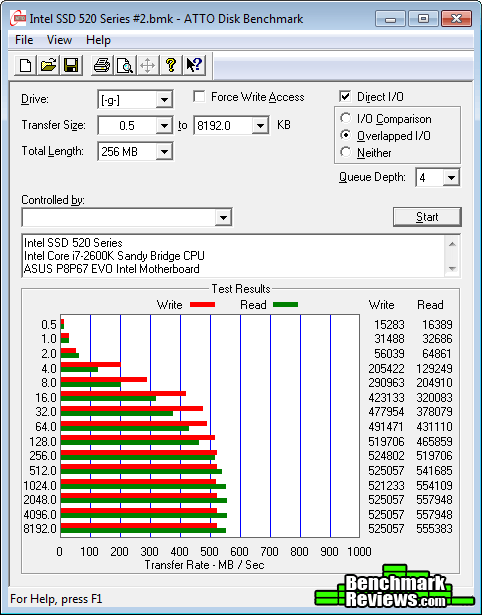
ATTO Disk Benchmark: Queue Depth 4 (Default)
Our bandwidth speed tests begin with the Intel SSD 520 Series solid state drive attached to the Intel P67-Express SATA 6Gb/s controller operating in AHCI mode. Using the ATTO Disk Benchmark tool, the test drive performs basic file transfers ranging from 0.5 KB to 8192 KB. This 240GB model reports 558 MBps maximum read speeds that plateau from 512-8192 KB file chunks, and 525 MBps peak write bandwidth plateaus from 64-8192 KB. These results both match Intel's own performance specifications for the SSD 520 Series solid state drive.

In the next section, Benchmark Reviews tests sequential performance using the CrystalDiskMark 3.0 software tool...
CrystalDiskMark 3.0 Tests
CrystalDiskMark 3.0 is a file transfer and operational bandwidth benchmark tool from Crystal Dew World that offers performance transfer speed results using sequential, 512KB random, and 4KB random samples. For our test results chart below, the 4KB 32-Queue Depth read and write performance was measured using a 1000MB space. CrystalDiskMark requires that an active partition be set on the drive being tested, and all drives are formatted with NTFS on the Intel P67 chipset configured to use AHCI-mode. Benchmark Reviews uses CrystalDiskMark to illustrate operational IOPS performance with multiple threads. In addition to our other tests, this benchmark allows us to determine operational bandwidth under heavy load.
CrystalDiskMark uses compressed data in its benchmark tests, so sequential file transfer speeds appear lower compared to those tested with other tools using uncompressed data. This section concentrates on operational IOPS performance using compressed data.
CrystalDiskMark 3.0 reports sequential speeds reaching 473.8 MB/s reads and 300.2 MB/s writes. 512K test results reached 399.9 MB/s read and 285.8 MB/s write performance. 4K tests produced 28.09 read and 76.26 write performance. We've save the best for last...

Maximum 4KB IOPS performance results at queue depth 32 are reported in the chart below. These values represent the performance levels for several enthusiast-level storage solutions, and illustrates which products offer the best operational performance under load:

In the next section, we continue our testing using Iometer to measure input/output performance...
Iometer IOPS Performance
Iometer is an I/O subsystem measurement and characterization tool for single and clustered systems. Iometer does for a computer's I/O subsystem what a dynamometer does for an engine: it measures performance under a controlled load. Iometer was originally developed by the Intel Corporation and formerly known as "Galileo". Intel has discontinued work on Iometer, and has gifted it to the Open Source Development Lab (OSDL). There is currently a new version of Iometer in beta form, which adds several new test dimensions for SSDs.
Iometer is both a workload generator (that is, it performs I/O operations in order to stress the system) and a measurement tool (that is, it examines and records the performance of its I/O operations and their impact on the system). It can be configured to emulate the disk or network I/O load of any program or benchmark, or can be used to generate entirely synthetic I/O loads. It can generate and measure loads on single or multiple (networked) systems.
To measure random I/O response time as well as total I/O's per second, Iometer is set to use 4KB file size chunks over a 100% random sequential distribution at a queue depth of 32 outstanding I/O's per target. The tests are given a 50% read and 50% write distribution. While this pattern may not match traditional 'server' or 'workstation' profiles, it illustrates a single point of reference relative to our product field.
All of our SSD tests used Iometer 1.1.0 (build 08-Nov-2010) by Intel Corporation to measure IOPS performance, using a SandForce-created QD30 configuration: 4KB 100 Random 50-50 Read and Write.icf. The chart below illustrates combined random read and write IOPS over a 120-second Iometer test phase, where highest I/O total is preferred:
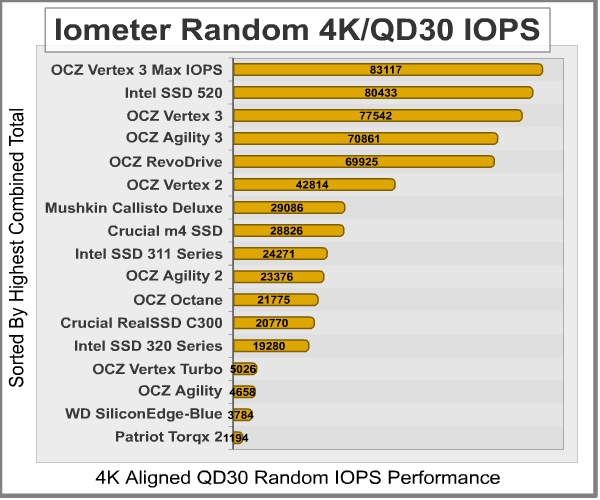
In our Iometer tests, which is configured to use 32 outstanding I/O's per target and random 50/50 read/write distribution, SandForce SSDs generally outperform the competition when tested with this large queue depth. The latest SATA 6Gb/s storage solutions lead the pack, and while the 240GB OCZ Vertex 3 Max IOPS Edition is on top with 83,117 IOPS, the 240GB Intel SSD 520 Series solid state drive produced 80433 peak combined IOPS. This high level of I/O is beyond the needs of casual users, and would certainly appeal to access-intensive computing environments such as database transaction workstations.
In our next section, we test linear read and write bandwidth performance and compare its speed against several other top storage products using EVEREST Disk Benchmark. Benchmark Reviews feels that linear tests are excellent for rating SSDs, however HDDs are put at a disadvantage with these tests whenever capacity is high.
EVEREST Disk Benchmark
Many enthusiasts are familiar with the Lavalys EVEREST benchmark suite, but very few are aware of the Disk Benchmark tool available inside the program. The EVEREST Disk Benchmark performs linear read and write bandwidth tests on each drive, and can be configured to use file chunk sizes up to 1MB (which speeds up testing and minimizes jitter in the waveform). Because of the full sector-by-sector nature of linear testing, Benchmark Reviews endorses this method for testing SSD products, as detailed in our Solid State Drive Benchmark Performance Testing article. However, Hard Disk Drive products suffer a lower average bandwidth as the capacity draws linear read/write speed down into the inner-portion of the disk platter. EVEREST Disk Benchmark does not require a partition to be present for testing, so all of our benchmarks are completed prior to drive formatting.
Linear disk benchmarks are superior bandwidth speed tools in my opinion, because they scan from the first physical sector to the last. A side affect of many linear write-performance test tools is that the data is erased as it writes to every sector on the drive. Normally this isn't an issue, but it has been shown that partition table alignment will occasionally play a role in overall SSD performance (HDDs don't suffer this problem).

The high-performance storage products we've tested with EVEREST Disk Benchmark are connected to the Intel P67-Express SATA 6Gb/s controller and use a 1MB block size option. Read performance on the Intel SSD 520 Series solid state drive measured average speeds of 489.4 MB/s, with a relatively close maximum peak speed of 495.5 MB/s. Everest linear write-to tests were next...

The waveform chart below illustrates how well the Intel SSD 520 Series manages file transfers, and makes linear write performance appears relatively even. The results seen here are still relatively consistent compared to most other SSD products we've tested in the past. The Intel SSD 520 Series-series solid state drive recorded an average linear write-to speed of 467.2 MB/s, with maximum performance reaching 474.4 MB/s.
The chart below shows the average linear read and write bandwidth speeds for a cross-section of storage devices tested with EVEREST:

Linear tests are an important tool for comparing bandwidth speed between storage products - although HDD products suffer performance degradation over the span of their areal storage capacity. Linear bandwidth certainly benefits the Solid State Drive, since there's very little fluctuation in transfer speed. This is because Hard Disk Drive products decline in performance as the spindle reaches the inner-most sectors on the magnetic platter, away from the fast outer edge.
In the next section we use PCMark Vantage to test real-world performance...
PCMark Vantage HDD Tests
PCMark Vantage is an objective hardware performance benchmark tool for PCs running 32- and 64-bit versions of Microsoft Windows Vista or Windows 7. PCMark Vantage is well suited for benchmarking any type of Microsoft Windows Vista/7 PC: from multimedia home entertainment systems and laptops, to dedicated workstations and high-end gaming rigs. Benchmark Reviews has decided to use the HDD Test Suite to demonstrate simulated real-world storage drive performance in this article.
PCMark Vantage runs eight different storage benchmarks, each with a specific purpose. Once testing is complete, results are given a PCMark score while and detailed results indicate actual transaction speeds. The 240GB Intel SSD 520 Series solid state drive produced a total PCMark Vantage (secondary) HDD Test Suite score of 53059, with specific speeds shown below:

Our tests were conducted on an Intel P67-Express Sandy Bridge motherboard using the onboard native SATA 6Gb/s controller with 64-bit Windows 7. Performance results are displayed in the chart below:

In the next section I share my conclusion and share the final product rating.
Intel SSD 520 Series Conclusion
IMPORTANT: Although the rating and final score mentioned in this conclusion are made to be as objective as possible, please be advised that every author perceives these factors differently at various points in time. While we each do our best to ensure that all aspects of the product are considered, there are often times unforeseen market conditions and manufacturer changes which occur after publication that could render our rating obsolete. Please do not base any purchase solely on our conclusion, as it represents our product rating specifically for the product tested which may differ from future versions. Benchmark Reviews begins our conclusion with a short summary for each of the areas that we rate.
Intel seldom receives the praise it deserves for innovating technology for everyone else in the industry, especially the solid state storage market. Intel's 25nm NAND Flash components are used inside Intel SSDs first and foremost, but then they quickly find their way into the vast majority of competing storage products. Thanks to Intel, consumers win either way regardless of brand and build. In the case of a shrinking NAND Flash construction process, a denser die means lower material costs and higher per-unit storage capacity. More for less is the best way to win consumer support, and it's obvious Intel's formula has been working to its favor.
Our performance rating considers how effective the Intel SSD 520 Series solid state drive performs in file transfer operations against competing storage solutions. For reference, 160-420GB models of the Intel SSD 520 Series are specified to produce 550 MB/s read speeds and 520 MB/s writes. In our storage benchmark tests, the 240GB Intel SSD 520 Series solid state drive (model SSDSC2CW240A3) performed at or above this speed, surpassing nearly every other SATA-based SSD we've benchmarked. Our test results demonstrated the Intel SSD 520 Series was good for delivering 559/528 MB/s peak read and writes speeds using ATTO Disk Benchmark SSD speed tests. Linear file transfers with Everest Disk Benchmark produced 489/497 MB/s, which exceeds performance of the OCZ Vertex 3 Max IOPS Edition SSD.
The Intel SSD 520 Series SSD sent to us for testing is advertised to deliver 80,000 maximum combined IOPS, although it's unclear which tools and configuration settings were used to produce this particular figure. Using Iometer operational performance tests configured to a queue depth of 32 outstanding I/O's per target, our benchmarks produced 83,117 combined IOPS performance and delivered the best SATA performance results to date. Iometer proved that the Intel SSD 520 Series could outperform every other SATA-based storage product currently on the market, including the premium OCZ Vertex 3 Max IOPS Edition SSD based on the SandForce SF2281 processor. In the 4K 32QD tests with AS-SSD and CrystalDiskMark, the Intel SSD 520 Series SSD again dominated the field, besting every 3.5" consumer drive ever made.
Solid State Drives are low-visibility products: you see them just long enough to install and then they're forgotten. Like their Hard Disk Drive counterparts, Solid State Drives are meant to place function before fashion. Anything above and beyond a simple metal shell is already more than what's expected in terms of the appearance. Intel uses a textured metal finish on the SSD 520 Series, with a branding label on the top for identification. As solid state storage controllers become faster and more advanced, heat dissipation through the enclosure walls may demand that chassis designs become more beneficial than they previously needed to be. This isn't the case yet, and a smooth metal chassis suits modern SSDs nicely.
Construction is probably the strongest feature credited to the entire SSD product segment, and Intel products have never offered any exception. Solid State Drives are by nature immune to most abuses, but add to this a hard metal shell and you have to wonder what it would take to make this drive fail. If any Intel 520 Series SSD product fails during the limited 5-year warranty period, end-users can contact Intel's customer support. I've personally used Intel's warranty service, and found their customer support to be among the very best on the Planet.
As of 06 February 2012, the Intel SSD 520 Series launches with the following models and suggested prices:
- 60GB (SSDSC2CW060A3): $149 MSRP
- 120GB (SSDSC2CW120A3): $229
- 180GB (SSDSC2CW180A3): $369
- 240GB (SSDSC2CW240A3): $509
- 480GB (SSDSC2CW480A3): $999
In conclusion, Intel's SSD 520 Series sets a new standard for future solid state drive storage devices to strive for. It's the fastest SATA-based SSD we've ever tested, and Intel's specifications were either met or exceeded in our benchmarks. Intel's 25nm NAND Flash was easily capable of producing more than 83K IOPS and nearly 560 MB/s transfers, leaving us to imagine what they have in store for us when the switch to 20nm is soon made. Additionally, an upcoming release of Intel's Rapid Storage Technology software is expected to finally translate TRIM garbage collection commands to solid state drive assembled in RAID arrays. So if you're shopping for a solid state drive with SATA 6.0 GB/s performance and the industry's best MLC NAND flash components, I urge you to consider the Intel SSD 520 Series solid state drive. Transfer speeds and operational performance surpass competing storage products, yet pricing still closely matches those same products at the same capacity. Add Intel's five-year warranty to the drives phenomenal performance, and there's a good chance the Intel SSD 520 Series could easily please users for the lifetime of the computer system its installed into.
Pros:
+ Fastest SATA storage device ever tested
+ Delivers over 83K IOPS performance in IOMeter
+ Outstanding 559/528 MBps read/write speed with ATTO
+ Built-in 256-bit AES data encryption
+ Hardware-level data compression preserves NAND longevity
+ 5-Year Intel product warranty support
+ Enhanced power-loss data protection
+ Lightweight compact storage solution
+ Resistant to extreme shock impact
+ Low power consumption may extend battery life
Cons:
- Expensive enthusiast-level product
Ratings:
- Performance: 10.0
- Appearance: 8.50
- Construction: 9.75
- Functionality: 9.50
- Value: 8.00
Final Score: 9.15 out of 10.
Excellence Achievement: Benchmark Reviews Golden Tachometer Award.
Benchmark Reviews invites you to leave constructive feedback below, or ask questions in our Discussion Forum.
Reader comments from the original article
17 comments were posted before commenting closed. They are preserved as written. Original avatars no longer resolve and are shown as a placeholder.
"As of 06 February 201, the Intel SSD 520 Series launches..." Dan Permalink:
Wow, so long ago. The age when Caracalla ruled. Did they have SSDs back then?
RE: "As of 06 February 201, the Intel SSD 520 Series launches..." Olin Coles Permalink:
There's always got to be at least one person... the typo's been fixed smartass. :)
LOL! realneil Permalink:
Good review Olin. Now I want one of these too. As a matter of fact, it's on the top of the list.
RE: LOL! Olin Coles Permalink:
Thanks! This is a VERY FAST drive that costs the same as SandForce SSDs, and with a five year Intel warranty you really can't go wrong.
RE: Intel SSD 520 Series Solid State Drive Jerry Record Permalink:
Thanks for the review. I have been looking at these for some time, but still straddling the fence. My concerns are longevity of the drive. The Intel 520 & 320 series have the best reviews with the fewest number of DOA's & BSOD's with in a short time period after installation. I also understand Intel has a 5 yr waranty. But, when it holds you OS and all you software and dies. It is a hassle. Just thought I would check and see if you had any insight into the real world life expectancy of the SSD today.
RE: Intel SSD 520 Series Solid State Drive Endocine Permalink:
Unfortunately your question can not be easily answered. But my anecdotal observation from running intel SSD's for a couple years now, in laptops and desktops - I have never seen a failure personally. I wouldn't rely on SSDs for long term data storage, and regardless of their failure rate or life expectancy, always do data backups, if you do not then you are asking for a hassle. Don't put anything critical on a consumer SSD and always do backups. While these drives are appreciably more expensive than equally performing models from other companies, one would hope that a lot more testing and quality controls went into making them, and there's no way to test for reliability between brands in a review like this, you need to run tests for a long period of time using large numbers of drives and the expense and time of such an undertaking would be beyond the capabilities of a review site.
AES 256-bit Encryption Bill McGovern Permalink:
I currently use a 'standard' hard drive. I keep all data on a partition other than the OS partition. I use TrueCrypt to encrypt the data partition. I am concerned with the 520's reliance on the bios password for encryption. Isn't the bios password fairly easy to hack? If my laptop 'walks off' is my data really 100% secure or is it readily available to anyone who can garner the bios password?
RE: AES 256-bit Encryption Olin Coles Permalink:
Hello Bill: Although I do not use it personally, it is my understanding that TrueCrypt works perfectly on an SSD.
RE: RE: AES 256-bit Encryption Bill McGovern Permalink:
Sorry if I wasn't clear....I'm interested in utilizing the 520's native encryption, not TrueCrypt. My understanding is that using a software encryption program will cause additional performance and wear issues. My concern is with the 520's native, hardware encryption reliance on the bios password.
RE: RE: RE: AES 256-bit Encryption Olin Coles Permalink:
Because SSDs feature automatic data encryption from the moment they initialize, there's an inherit problem giving users password-controlled access to data. There are several articles around the web (search: SandForce SSD Encryption Demystified) that explain how this happens, but in summary it's a problem that has existed as long as self-encrypting drives. Intel offers an SSD toolkit to work with the encryption key on their drives: downloadcenter.intel.com/Detail_Desc.aspx?agr=Y&DwnldID=18455
RE: RE: RE: RE: AES 256-bit Encryption Bill McGovern Permalink:
Olin, many thanks for the response(s). Not sure I still have a definitive answer. I'm not a security expert, nor do I want to be one. I'm simply someone who has enough computer smarts (barely) to realize the need for encryption and be able to install and utilize TrueCrypt. I am hoping that the Intel 520 eliminates the need for me to be concerned about encryption. I don't require DOD level security. I store my financial info on my laptop. If it is stolen, is my data at risk by anyone who can google for "bios password recovery"? Or would it take some very high tech hacking to get access to my SSD data? Thanks for your patience.
RE: RE: RE: RE: RE: AES 256-bit Encryption Olin Coles Permalink:
The short answer is to use a third party software or tool, because if your drive is stolen it can be plugged into any other computer and read.
RE: RE: RE: RE: RE: RE: AES 256-bit Encryption Bill McGovern Permalink:
Thanks again for your time and patience. I've been doing some web searching in addition to the links / strings you suggested. I ran across #dfarq.homeip.net/2011/05/more-on-the-new-intel-320-ssd/ which talks about Intel 320 SSD encryption. If the same applies to the 520, their opinion is that the encryption is sufficient for personal or corporate use. Does their explanation negate the ability to bypass security by "plugging it into any other computer and read", or using the widely available bios password obtaining schemes?
RE: RE: RE: RE: RE: RE: RE: AES 256-bit Encryption Olin Coles Permalink:
I don't share their opinion, and believe a drive should have more than a BIOS password to protect it.
Missunderstanding - ATA HD encryption is sufficient for personal or corporate use Bjoern Permalink:
Sorry, but you mix up BIOS password protection and the ATA HD security command. This seems to be a very common mistake since you can read it all over the net. I think the origin for this mixup is coming from the first sandforce controlled SSDs - they encrypted the data on the memory chips, but users had no way to enter a password since ATA HD security was not supported. back then it was no security enhancement at all. encryption was just used as a cheap way to randomly scatter data over the NAND as a wear leveling tool. Setting up a ATA HD password with a selfencrypting ssd like the intel 520 series will securly encrypt all data and you won't be able to read or write to the drive without the password. the drive cannot be pluged into another computer and be accessed there. It will show up as a locked drive until you enter the correct ATA master- or user password. you won't even be able to secure erase the drive without a password - better don't loose it or you have to dump your drive. However, your mainburd has to support ATA HD security. That is a still little hard to find... this is also not what the article you reffere to (SandForce SSD Encryption - Demystified) is stating. the articel you reffered to was mainly questioning the security of such a "black box" solution in spite of an open source solution like truecrypt. The article is also quite old. to get a clearer view of how it actually works see the document: ##hgst.com/tech/techlib.nsf/techdocs/F08FCD6C41A7A3FF8625735400620E6A/$file/HowToGuide_BulkDataE ncryption_final.pdf It seems to be just a logical step to use ondisk encryption whenever possible with a SSD since SSDs loose up to 80% performance if you use truecrypt. @Bill: Yes, ATA HD encryption is sufficient for personal or corporate use. Best Bjoern
RE: Missunderstanding - ATA HD encryption is sufficient for personal or corporate use Bill McGovern Permalink:
Bjoern, thanks so much for your time. From your comments, my understanding is that if my motherboard supports ATA Security, I can set a password that is unrelated to the BiOS password and is not stored in the BIOS. Correct? One other question, if my motherboard does NOT support ATA Security, can the Intel toolkit be used to set the SSD ATA password? Do I then continue to use the toolkit to provide the password and enable access?
RE: RE: Missunderstanding - ATA HD encryption is sufficient for personal or corporate use Bjoern Permalink:
Dear Bill, 1.) Yes. The PW will be hashed and the hash will be saved in the drive. the PW can then be used to decrypted the key used for the encryption of the data on the drive itself. You can also use the drive in another computer supporting ATA security - at least if it is the same mainboard and therefore BIOS implementation of ATA security. 2.) If your BIOS does not support ATA security there is no way to use a password protected disk. the disk would be locked - without a supporting BIOS you cannot enter the password. Most systems would not even boot with a locked drive on any SATA channel. that is also the reason why you cannot set the password using the intel toolkit. imagin you would set a password in windows and then be unable to access your system anymore, because your bios actualy does not support it. Therefore, the entire handling of the password is quite uncomfortable and you have a risk of loosing your hardware. allways remember - if you loose the password you loose not only the data but also the drive itself. It would be bricked forever.