
12GB Corsair Dominator 1600MHz DDR3 Memory Kit
Corsair Dominator 12GB DDR3 Memory Kit Review
System memory, or RAM as it's better known, is a tricky topic of discussion for PC hardware enthusiasts. The marketing propaganda has done an excellent job of spreading misinformation to would-be consumers, and tech websites are often over-the-top with their approach towards explaining the obvious. There are also the many questions that get asked: how much memory is best? high speed or low latency? dual- or triple-channel? Considering the situation, you can't blame anyone for asking because the truth takes some work to find... or test and discover for yourself.
In our previous tests of the Corsair Dominator-GT 2000MHz DDR3 RAM kit, Benchmark Reviews discovered that system memory has very little impact on video game performance, and that high-speed low-latency RAM delivers only a small improvement over low-speed high-latency kits... at least in regard to real-world performance. Sure, the benchmarks all favor high clock speeds or low timings, or both; but when it came time to actually use the computer and run the programs, the differences weren't so apparent.
64-Bit Operating Systems allow PCs to utilize more than 4GB of system memory, which is great news for multimedia professionals who need the extra RAM. Intel's X58-Express platform delivers triple-channel DDR3 performance, giving PC hardware enthusiasts and power-users the opportunity to choose between 3, 6, or 12GB system memory kits. In this article, Benchmark Reviews compares 12GB DDR3 memory kits against various 6GB versions. The 12GB Corsair Dominator CMD12GX3M6A1600C8 1600MHz CL8-8-8-24 DDR3 memory kit will be at the center of our attention as we discover exactly where that extra RAM is most helpful on our six-core Intel Core i7-980X Extreme Edition 'super-computer'.
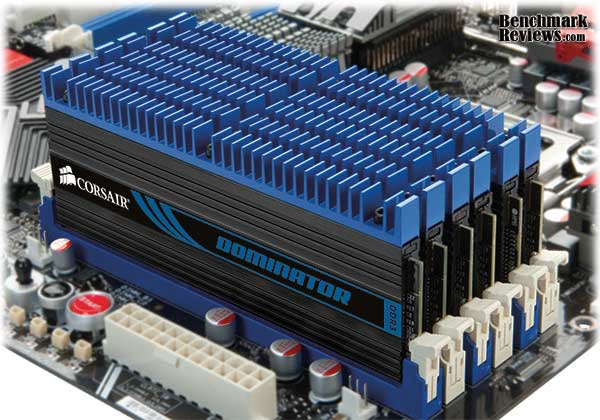
Adding more memory to your computer system is one of the easiest ways to improve performance, but adding high-speed memory is also an excellent way to reach that impossible overclock. By allowing the system more headroom to move with the changing interface or bus speeds, high-speed memory can keep up with the overclocked CPU. Video game enthusiasts also stand to gain added performance, since levels and maps will load faster and graphics frame rates will improve.
Microsoft Windows PCs often suffer from memory starvation. It's true. System memory is one of the most over-looked hardware components in computer systems. Making matter worst, when it comes to 32-bit Operating Systems such as Windows XP or Vista, no more than 4GB of memory can be mapped and utilized. However, the introduction of Microsoft Windows 7 has brought 64-bit computing to the mainstream, and now only the physical limitations of the motherboard can restrict the user-mode virtual address space. So with applications demanding greater memory overhead, once again it has better to utilize as much memory as can be installed into the system.
Not all memory is made the same; and even memory of the same speed can have different consumer targets. Corsair offers something for everyone, and it seems that there's a Dominator memory upgrade for every platform used. Casual users can take advantage of their warranty and support, as well as getting tips from their website for better performance. Enthusiasts and overclockers can match the memory kit that best suits their needs.
About Corsair Memory Inc
Founded in 1994, Corsair Memory, Inc., is a worldwide leader in high-performance components for personal computers. Specializing in very high performance memory and ultra-efficient power supplies, our flagship products, Including Dominator memory modules, are the choice of overclockers, enthusiasts, and gamers everywhere. Our expertise in design and manufacturing is also evident in our complete line of Flash Voyager and Flash Survivor USB storage devices. Corsair offers 24/7 customer support via forums and the Tech Support Express helpdesk.
Closer Look: Corsair Dominator DDR3
For anyone not familiar, DDR3 RAM uses a unique 240-pin DIMM (Dual Inline Memory Module) architecture. This new design does not allow for backwards compatibility, and it offers many design differences from the DDR2 predecessor it replaces. First revealed in dual-channel kits for the Intel P35-Express platform, the latest iteration is offered in triple-channel kits for Intel's Core i7 / X58 Platform.
Corsair's Dominator memory upgrade kit is comprised of six 256M x 64-bit 2GB (2048MB) DDR3-1600MHz CL8 SDRAM (Synchronous DRAM) memory modules, based on sixteen 128M x 8-bit DDR3 FBGA components per module. Each module has been tested to run at DDR3-1600MHz at a latency timing of 8-8-8-24 with 1.65 volts, which is the kits only XMP eXtreme Memory Profile. The SPDs are programmed to JEDEC standard latency DDR3-1333MHz timing of 9-9-9 at 1.5V. Each 240-pin DIMM uses gold contact fingers and requires +1.5V.
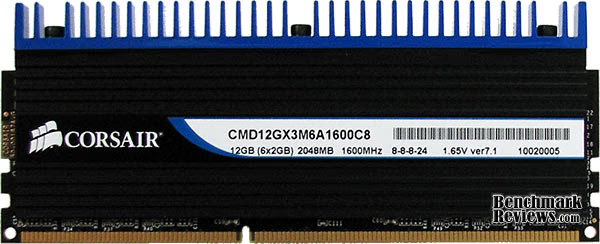
Basic DDR3 memory modules aren't much to look at naked; just a printed circuit board with DRAM ICs soldiered to it. But by adding a tall heat-spreader heatsink to the memory module, it gives the computer system an exciting look that identifies with PC hardware enthusiasts. The Corsair Dominator DDR3-series fierce looks, and matching function.
Many triple-channel X58-Express motherboards offer six DIMM slots, which means the 12GB Corsair Dominator CMD12GX3M6A1600C8 offers enough RAM to fill the entire system. Benchmark Reviews is testing the Corsair Dominator 12GB 1600MHz kit on the ASUS P6X58D-Premium motherboard, using the Windows 7 64-bit operating system to map the entire 12GB of memory space.
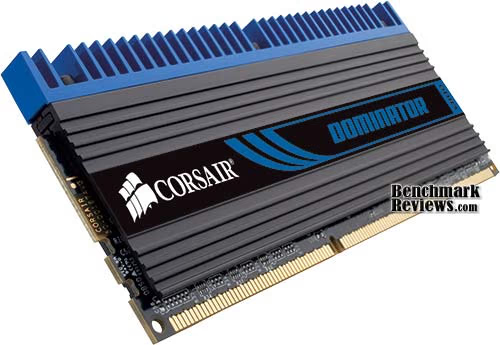
Corsair Dominator modules use a tall profile, which makes them ideal for desktop-based installation. The CMD12GX3M6A1600C8 kit uses an anodized black aluminum heat-spreader with a blue heatsink attached by Allen screws, something that separates the Dominator kit from their other system memory products. Unlike their dual-channel counterparts, triple-channel DDR3 kits are usually slower in speed and/or latency timing because they much use lower operating voltage. Corsair carefully selects modules that can achieve decent operating speeds with acceptable latency, and adhere to the low-voltage requirements of Intel's X58-Express platform.
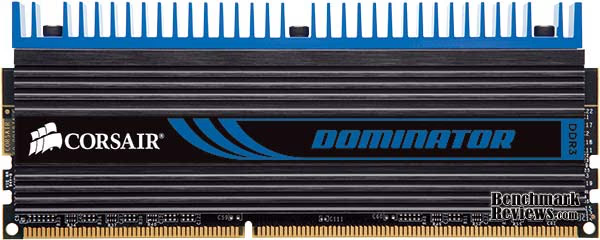
Because triple-channel kits use a much lower maximum voltage (to avoid Core i7 processor damage), extreme cooling is unnecessary for these modules unless you push them. The Corsair Dominator series is meant to be pushed to 1600MHz using CL8-8-8-24 timings when all six modules are installed. Under stress at 1.65V, the Corsair CMD12GX3M6A1600C8 memory modules were barely warm to the touch. After explaining how DDR3 works in the next few sections, we test to see how much difference it makes if a triple-channel kit operates at high speed or low latency... as we compare the 12GB Corsair Dominator memory kit to several others using the Intel Core i7-980X Extreme Edition processor.
Introduction to DDR3
This section offers a very brief overview of DDR3 technology, however Benchmark Reviews also offers the comprehensive article: DDR3 RAM - System Memory Technology Explained. The new generation of DDR3 is meant to avoid a bottleneck between the CPU and the system memory; especially in highly overclocked scenarios. With the high-speed variety of DDR3, which presently includes everything beyond the highest 1600MHz JEDEC standard, you increase the Front Side Bus (FSB) and CPU clock speed without being forced to slow the system memory to remain stable. Here are a the primary benefits of DDR3 SDRAM:
Features:
- Now supports a system level flight time compensation
- Mirror-friendly DRAM pin out are now contained on-DIMM
- CAS Write latency are now issued to each speed bin
- Asynchronous reset function is available for the first time in SDRAM
- I/O calibration engine monitors flight time and correction levels
- Automatic data bus line read and write calibration
Improvements:
- Higher bandwidth performance increase, up to 1600 MHz per spec
- DIMM-terminated 'fly-by' command bus
- Constructed with high-precision load line calibration resistors
- Performance increase at low power input
- Enhanced low power features conserve energy
- Improved thermal design now operates DIMM cooler
Each generation of DDR is more than just an update to the memory speed, it is also a more technologically advanced production process and a lower operating voltage and better heat dissipation. The previous generation of DDR2 is manufactured on a 110nm node, whereas the new DDR3 has receives a fab process shrink down to a 90nm node (although some use 80nm) with either 55/45nm prepared for later into 2008. Together, this all helps the hardware enthusiast reach higher clock speeds at the expense of higher latencies. This is why the new DDR3 generation of memory needs a significantly higher clock speed deliver better performance than the preceding generation of DDR2 technology.
In additional to the logically progressive changes, there are also improvements made to the architectural design of the memory. One particularly important change introduced with DDR3 is in the prefetch buffer: up from DDR2's four bits to an astounding eight bits per cycle. This translates to a full 100% increase in the prefetch payload; not just a small incremental improvement as there have been in the other area's.
DDR2-400 Memory is equal in performance to DDR-400, which is why it must operate at DDR2-667 speed to carry incentive. The same scenario is generally true with DDR3 when compared to DDR2. While in theory DDR2-1066 offers the same performance as DDR3-1066, this generally means that DDR3 requires a DDR3-1333 speed to show any benefit over DDR2-800. Memories within the same generation (DDR/DDR2/DDR3) are downwards compatible, meaning that if you have DDR3-1600 RAM, you can configure it to operate at 1066 and 1333 MHz speeds.
Testing Methodology: DDR3 RAM
Before the testing really begins, there are several settings to be adjusted in the BIOS. Many combinations of the CPU base clock and multiplier are paired to the memory multiplier, giving us the desired RAM (and CPU) operating speed. In all tests, the processor was intentionally reduced to keep nearest to the original default clock speed. When I first begin this process and start benchmarking for a baseline, the memory voltage and timing are always left at the manufacturer's default values.
After each and every change to the BIOS, the system is restarted and all RAM modules are automatically tested with MemTest86+ for one full pass. Since the modules are not yet overclocked, one pass is usually sufficient to determine if a bad part exists. Later, once I begin to overclock the memory, these tests are a good way of quickly pre-screening stable configurations. Once the test pass is complete, I move onto the synthetic benchmark tests. Here at Benchmark Reviews we use the following test suites and applications:
- Lavalys EVEREST Ultimate Edition v5.30
- Futuremark PCMark Vantage v1.0.2
- Cinebench R11.5 Benchmark
- Retouch Artists Adobe Photoshop-CS4 Action Script
- Far Cry 2 v1.02 PC Video Game
Test System
- Motherboard: ASUS P6X58D-Premium (Intel X58-Express/ICH10R Chipset)
- Processor: Intel Core i7-980X Extreme Edition BX80613I7980X (Six-core 3.3GHz CPU)
- Graphics: ASUS GeForce GTX 285 ENGTX285 TOP (Forceware 197.13)
- Primary Drive: OCZ Agility-EX SLC SSD OCZSSD2-1AGTEX60G firmware 1.50
- Operating System: Microsoft Windows 7 Ultimate 64-Bit Edition
Memory Tested
- OCZ Platinum 1333MHz CL7-7-7-20-1 DDR3 OCZ3P1333LV6GK (6GB Memory Kit 3x2GB)
- Kingston HyperX 2000MHz CL8-8-8-24-1 DDR3 KHX2000C8D3T1K3 (6GB Memory Kit 3x2GB)
- Corsair Dominator-GT 2000MHz CL7-8-7-20-2 DDR3 CMG6GX3M3A2000C7 (6GB Memory Kit 3x2GB)
- Corsair Dominator 1600MHz CL8-8-8-24-1 DDR3 CMD12GX3M6A1600C8 (12GB Memory Kit 6x2GB)
- Crucial 1333MHz CL9-9-9-25-1 DDR3 CT3KIT51264BA1339 (12GB Memory Kit 3x4GB)
Benchmark Reviews tests each memory kit to validate manufacturers specifications and ensure system stability. Each memory module will overclock differently, so it's unrealistic to test headroom on our memory samples when the another kit may be meet specification by yield no additional overclock.
In each synthetic benchmark test Windows 7 was booted fresh and the application was opened. Task manager was then utilized to end the explorer.exe (Windows) process so that only the most essential services were running and consuming system memory. This procedure allowed the RAM to be as isolated as possible for our testing. Once the system was ready, I perform a single test-run of the benchmark, followed by three recorded tests. At the end of the series, I average the three results for the final score.
Sometimes it is very difficult to get broad results between the memory modules tested, so we use several different speeds of memory from participating manufacturers. Benchmark Reviews is very serious about performance, which is why we test the products against as many benchmarks as reasonably possible. Not every test suite is effective in these reviews, and some often calculate processor and other system components into the score. This is what makes a RAM review difficult: unless all of the modules compared have the exact same rating and the CPU operates at the exact same speed for each and every test, the comparison is always going to be subjective.
System Benchmark Tests
In this section, each memory kit is tested for system performance using several different benchmark tools. The objective of these tests is to show both theoretical and realistic performance differences between DDR3 memory kits, using the manufacturer specified speed and timing. In each test, ask yourself if high speed or low latency prevailed, and if there was a difference between 6GB and 12GB kits.
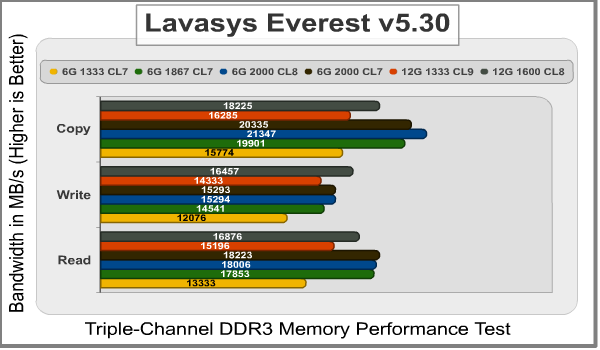
Using the Cache and Memory Benchmark tool within Lavalys EVEREST, we tested memory Read, Write, and Copy performance. In terms of read performance, Everest rates the Corsair Dominator-GT (2000MHz CL7) and Kingston HyperX (2000MHz CL8) kits high, while the OCZ Gold (1333MHz CL7) and 12GB Crucial (1333MHz CL9) kit lowest. Write performance favors the 12GB Corsair Dominator 1600MHz CL8 kit as the best memory for write performance, followed by the Kingston HyperX and Corsair Dominator-GT kits, which demonstrate that higher speeds and density prevail. In the memory copy test, the Kingston HyperX 2000MHz kit shined brightest with a clear lead over the others.
Using the Memories test suite in PCMark Vantage, each triple-channel kit was benchmarked using several different scenarios. CPU Image manipulation favored both the low latency 6GB OCZ Gold 1333MHz CL7 kit as well as the 12GB Corsair Dominator (1600MHz CL8) kit, followed closely by the 6GB Corsair Dominator-GT and Kingston HyperX 2000MHz kits. Using the 1867MHz XMP setting for the Kingston HyperX DDR3 kit, CPU Image manipulation performance was only slightly the same kit with higher speeds. The same overall performance trends held true for the DV-WMV9 video transcoding test, and also the VC-1 to WMV9 transcoding test; which both held the 12GB Corsair Dominator kit in high esteem.

GPU Image manipulation is primarily a graphics processor-dependant test, but it's still relative to game performance (if system memory could impact this task). The higher-speed memory kits offer better performance in this benchmark, but all four kits performed nearly identical. The final chart shows the overall PCMark Vantage memory score, giving favor towards high speeds and low latency.

Test Summary
Here's what these benchmark tests have indicated so far:
- Lowest-latency triple-channel memory kits are best for multimedia encoding, where speed has little impact. They also improve CPU-dependant tasks, such as image manipulation.
- Highest-speed triple-channel memory kits are best suited for memory-specific applications, which include large file/application fetches. Some video games may also see minuscule improvements.
- 6GB Memory kits offer enough RAM for most PC tasks, but high-density 12GB system memory kits further extend multimedia encoding performance to higher levels than the high-speed kits.
Memory Tested
- OCZ Platinum 1333MHz CL7-7-7-20-1 DDR3 OCZ3P1333LV6GK (6GB Memory Kit 3x2GB)
- Kingston HyperX 2000MHz CL8-8-8-24-1 DDR3 KHX2000C8D3T1K3 (6GB Memory Kit 3x2GB)
- Corsair Dominator-GT 2000MHz CL7-8-7-20-2 DDR3 CMG6GX3M3A2000C7 (6GB Memory Kit 3x2GB)
- Corsair Dominator 1600MHz CL8-8-8-24-1 DDR3 CMD12GX3M6A1600C8 (12GB Memory Kit 6x2GB)
- Crucial 1333MHz CL9-9-9-25-1 DDR3 CT3KIT51264BA1339 (12GB Memory Kit 3x4GB)
Graphics Benchmark Tests
In the last section, each triple-channel memory kit was tested with primarily CPU- or RAM-dependant benchmarks. In this section, Benchmark Reviews tests these DDR3 memory kits using CPU-generated graphics and video game frame rate performance.
Cinebench is a free benchmark tool that tests CPU performance. Since the CPU is closely tied to system memory performance, the two are loosely relevant. In our Cinebench R11.5 OpenGL benchmark tests, each kit performed extremely close to the next while processing the video graphics for this tool. While the low-latency 1333MHz CL7-7-7-20 kit did outperform the faster 1867MHz CL7-8-7-20 kit, both were a full frame behind the 1600MHz Corsair Dominator 12GB kit. At the central processor level, system memory speed has very little impact on graphics performance, and low latency combined with high density memory can make up for the difference in speed.

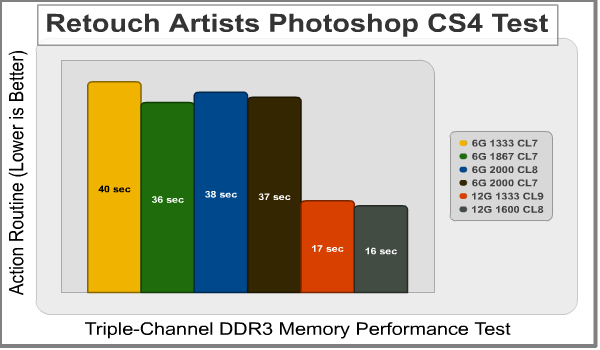
The Retouch Artists Photoshop CS4 test is a free action script that renders and transforms a specific image. While not exactly a benchmark, primarily because it doesn't report a result (you have to record the start/stop time), it's a very good tool for illustrating real-world performance from system memory differences. The downside to this test is that it relies heavily on the storage device used for the program, and results are not comparable between systems.
Our tests were repeated several times before charting the average time below, but from the results we've received it seems that higher speed is nearly as important at low latency... but not nearly as important as density. This is generally the rule to shop by for graphic artists and multimedia creators: low latency and high speed combined with copious of memory density... the best of both worlds.
Using the absolute lowest possible settings for Far Cry 2, our benchmark tests become dependant on system memory and the Intel Core i7-980X processor in our test system. The minimum and average FPS results are charted below, which illustrates that even in an artificial game environment where RAM is forced to be more relevant than normal, system memory still has very little impact on performance. Using 640x480 system-dependant settings, there was an 8 FPS difference between a 1333MHz and 2002MHz kit. While the Kingston HyperX DDR3 kit offered the best minimum frame rate, the Corsair Dominator-GT memory kit offered the best average FPS.

Turning the settings all the way up enables Far Cry 2 to play like it will on most computer systems: GPU-dependant. Powered by the ASUS GeForce GTX 285 ENGTX285 TOP video card, there was only 3 FPS between the 1333MHz and 2002MHz kits. The Kingston HyperX DDR3 kit offered the best minimum frame rate by nearly one full FPS, and nearly tied performance with the Corsair Dominator-GT memory kit for the average FPS.

Obviously, if you're using an X58-based computer system, you probably aren't going to keep the CPU at the stock speed anyway; and you probably also use a video card that makes up for the very small gains delivered by overclocked system memory. This means that faster RAM allows for a faster CPU, and in turn produces a faster frame rate. But in the world of system memory benchmarks, comparing the different sets of RAM using video games is nearly meaningless.
Test Summary
Here's what the graphics benchmark tests have shown us:
- Low latency triple-channel memory kits are good for CPU-dependant tasks, such as image manipulation in Photoshop, and can make up for memory speed differences in generated graphics.
- High speed triple-channel memory has a small edge over lower-speed kits when compared in PC video games, but the difference is made minimal because of GPU-dependence. With ultra-high settings, there was only a 3 FPS difference between 1333 and 2002MHz.
- Applications such as Photoshop, Illustrator, and Premier are all dependant on large amounts of system memory for to perform at their best. The 12GB DDR3 memory kits delivered excellent performance with these tasks, regardless of speed or latency.
Memory Tested
- OCZ Platinum 1333MHz CL7-7-7-20-1 DDR3 OCZ3P1333LV6GK (6GB Memory Kit 3x2GB)
- Kingston HyperX 2000MHz CL8-8-8-24-1 DDR3 KHX2000C8D3T1K3 (6GB Memory Kit 3x2GB)
- Corsair Dominator-GT 2000MHz CL7-8-7-20-2 DDR3 CMG6GX3M3A2000C7 (6GB Memory Kit 3x2GB)
- Corsair Dominator 1600MHz CL8-8-8-24-1 DDR3 CMD12GX3M6A1600C8 (12GB Memory Kit 6x2GB)
- Crucial 1333MHz CL9-9-9-25-1 DDR3 CT3KIT51264BA1339 (12GB Memory Kit 3x4GB)
Triple-Channel DDR3 Final Thoughts
Don't make the mistake of thinking DDR2 has anything in common with DDR3. Unlike DDR2 memory kits, which generally have a dependency on speed over latency, DDR3 reserves itself to performing better with lower latency kits than those of higher speed. The architecture between the two standards is quite different, as we've detailed in our DDR3 RAM: System Memory Technology article. On top of these differences, DDR2 memory kits never made it out of dual-channel configurations and are not compatible with Intel's triple-channel motherboards.
The new tri-channel configuration for the Intel Core i7 CPU & X58-Express Platform certainly has its benefits, but some of the old traditions are lost in the new standard. Because of the high penalty for round trip cycles, latency offers a bigger performance incentive than clock speed. Sure, it's nice to reach 2400MHz or faster with a DDR3 kit, but if it takes one or two extra strobe cycles to generate that speed then the benefits are lost. This essentially divides triple-channel memory kits into the following preference order:
- Low Latency (CL6 or lower) + High Speed (1600MHz or faster) = Most Preferred
- Low Latency (CL6) + Standard Speed (1333MHz) = More Preferred
- Standard Latency (CL7) + High Speed (1600MHz or faster) = Preferred
- Standard Latency (CL7) + Normal Speed (1333MHz) = Acceptable
- High Latency (CL8) + High Speed (1600MHz or faster) = Less Preferred
- High Latency (CL8 or higher) + Low Speed (1066MHz or slower) = Least Preferred

Memory module profile can often make or break a system build. Computers with large CPU-coolers may not combine well with RAM kits utilizing large/tall heatsinks. Additionally, low-profile and HTPC computer systems may not offer the clearance if there are other components located overhead (such as an optical drive).
As the Far Cry 2 benchmark tests have shown, in a popular game with realistic settings and hardware the performance difference between a low-speed triple-channel DDR3 and high-speed kits is barely 3 FPS. If you're a gamer looking for faster graphics, my advice is to invest the money into a better video card. If you're running an audio or video editing system, look for low-latency memory with a fast storage drive (such as SSDs). While there is some small degree of performance to be gained by faster memory modules, the real argument for high-speed RAM is the added overclocking headroom.
If there's a decision between 3GB triple-channel DDR3 kits, and those of 6- or 12GB density, the answer is simpler. If you use a 32-bit Operating System such as Windows XP or Vista, you're limited to 4GB total. You might think that there's a 1GB gap between the 3GB supplied and the 4GB limit, but if you're using a video card with a large frame buffer, this amount gets added into the limit and fills the gap. If you're using a 64-bit Operating System, such as 64-bit Windows-7 or Vista, my advice is to use as much RAM as allowed by the motherboard but not more than you'll realistically use.
It's all about tailoring your needs, because if you install 12GB of DDR3 and your workload never utilizes more than 4-5GB, then the unused memory becomes a penalty for data strobes through the system. Use the Windows Task Manager to monitor your memory usage, and if you're within 80% of capacity when workloads are at their heaviest, then it's time to install more RAM. This was especially true in our Photoshop CS4 tests, which illustrated how high-density memory improves application performance in memory-hungry programs.
12GB Corsair Dominator DDR3 Conclusion
Although the rating and final score mentioned in this conclusion are made to be as objective as possible, please be advised that every author perceives these factors differently at various points in time. While we each do our best to ensure that all aspects of the product are considered, there are often times unforeseen market conditions and manufacturer changes which occur after publication that could render our rating obsolete. Please do not base any purchase solely on our conclusion, as it represents our product rating for the sample received which may differ from retail versions. Benchmark Reviews begins our conclusion with a short summary for each of the areas that we rate.
Our performance rating considers how effective the 12GB Corsair Dominator DDR3 system memory kit performs in operations against direct competitor DDR3 triple-channel RAM storage products. For reference, Corsair specifies the CMD12GX3M6A1600C8 modules to perform at 1600MHz CL8-8-8-24 on 1.65V. This memory kit competes directly with Crucial's model CT3KIT51264BA1339 12GB DDR3 kit, which has higher latency and a slower speed than the Corsair Dominator kit. It also compete with all 6GB DDR3 RAM kits, even though they offer different densities. In many of the synthetic benchmark tests the benefit of having more memory delivered higher performance, or in some cases matched performance with higher-speed modules. The 12GB Corsair Dominator kit produced much faster CPU-bound frame rates in Cinebench, and also topped our Adobe Photoshop CS4 and PCMark Vantage video transcoding results.
The anodized aluminum heatspreaders and attached blue heatsink add appeal to these memory modules, and help an otherwise mundane hardware component stand-out inside your computer system. Since 1.65V causes only a moderate amount of heat on the module, the attached heat-spreader is more than enough and the included cooling fan is really only something that comes in handy with higher voltages. Considering this, I personally think that Corsair has combined equal parts function and fashion, and deliver an appealing product with no sacrifice in performance.
When it comes to after-sales product support, Corsair leads the industry in customer care. Backed by a Corsair 'Lifetime' warranty protecting consumers for all of their memory kits, you can't really go wrong. The permanently secured tall-fin heat-spreader helps protect the DRAM IC modules, so all that remains for concern is static discharge damage. Even then, the warranty has you covered. If a Corsair memory product does happen to fail during the warranty period, end-users can contact Corsair technical support via the company website or support forums. Fortunately, there's also a toll-free telephone number for support or customer service questions in the US (888-222-4346).
While the 1600MHz Corsair Dominator 12GB DDR3 kit may not offer overclockers a lot of extra headroom beyond the 1600MHz XMP profile for tweaking their memory to match the processor, the large among of system RAM helps to deliver incredible performance in memory-intensive applications. In our tests, all six Corsair Dominator DDR3 memory modules matched-up extremely well with the Intel Core i7-980X Extreme Edition processor installed on our ASUS P6X58D-Premium test motherboard. Using this PC for massive image and video editing projects, the production time was increased for batch and encoding processes.
As of April 2010, the 12GB Corsair Dominator memory kit is available at several online retailers. The 1600MHz CL8-8-8-24 DDR3 kit we've tested for this article (model CMD12GX3M6A1600C8) is listed for $430.99 at NewEgg, but if you're not so concerned about the latency there's also a CL9 1600MHz 12GB RAM kit avialable for $369.99. Considering the relative performance to price, you're getting plenty of RAM for the money.
12GB is a lot of RAM, but as the Golden Rule says: "it's better to have and not need then to need and not have". Likewise, Corsair's lifetime product warranty ensures that this will be the last RAM upgrade you'll need for quite a while. For power-users working on a 64-bit O/S, this 12GB kit fits perfectly on Intel's X58-Express motherboard platform. The Corsair Dominator DDR3 triple-channel memory kits offer the best of both worlds: high speeds and relatively low latency. In addition to speed and timings, the 12GB Dominator memory kit has proven it can handle Photoshop CS4 much better than any 6GB kit ever could. For multimedia power-users and PC hardware enthusiasts who can afford the purchase price, this memory kit could improve productivity and transcoding times.
Pros:
+ 1600MHz CL8-8-8-24 Bandwidth
+ 12GB RAM Kit is ideal for 64-bit enthusiasts
+ Lifetime warranty and support
+ Very good for multimedia transcoding
+ Extremely effective cooling solution
Cons:
- Large-profile heat-spreaders my not fit some installations
- Six 2GB modules instead of three 4GB parts
Ratings:
- Performance: 8.75
- Appearance: 9.75
- Construction: 9.50
- Functionality: 8.75
- Value: 7.00
Final Score: 8.75 out of 10.
Quality Recognition: Benchmark Reviews Silver Tachometer Award.
Questions? Comments? Benchmark Reviews really wants your feedback. We invite you to leave your remarks in our Discussion Forum.
Reader comments from the original article
2 comments were posted before commenting closed. They are preserved as written. Original avatars no longer resolve and are shown as a placeholder.
justaguy BruceBruce Permalink:
Best looking RAM on the planet, bar none! I like my OCZ Reapers, but they're ugly.
Great Memory Proud Owner Permalink:
I have this kit in my workstation for over 3 month now and am extremely happy with it. I can run 4 instances of VMWare with 2 GB each with no issues (I work a lot with wmware). I have to say that I am using it at 1600 and had not tries to overclock it... but at 1600 works as advertised. oh.. a bit pricey though...