
ASUS RT-N16 Wireless-N Gigabit Router
ASUS RT-N16 Wireless-N Gigabit Router Review
Benchmark Reviews brings to you today, the ASUS RT-N16 Multi-funtional Wireless N Router, which boasts up to 700% faster wireless throughput than 802.11g, has two USB 2.0 ports for connecting printers or USB storage medium such as a USB HDD or USB flash drive, NTFS support for attached storage and 4 Gigabit LAN ports to name just a few of the features of this router. A wireless router offers flexibility in that you can share your high speed broadband with a mixture of wired and wireless connectivity or just pure wireless connectivity without the need of the main computer being switched on. Wireless networking has proliferated homes and offices around the world, network vendors release new devices on a regular basis, you now have so many options that it's hard to make a choice. The truth of the matter is, regardless of how many things a wireless router or access point can do, the two most important things about them are their speed and their range.
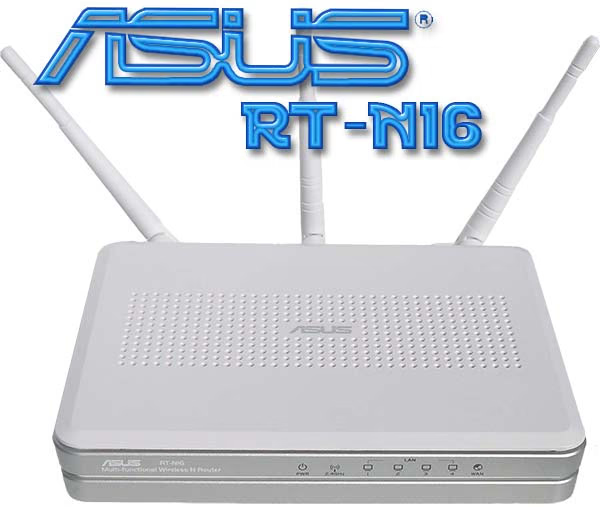
ASUS have presented us with a router that has more functions than I can fit into one paragraph, there are also reports around the web of support for open source firmwares such as DD-WRT or Tomato. I am not one to talk here as I have never used custom firmware on a router before, and with this router I truly don't think I will need to. The setup was simple, no CD required, just plug in open a browser follow the steps and you are set up and protected in under 5 minutes. Next we shall take a look at the feature list and get a good look at the design of the router itself.
About ASUSTeK Computer Inc.
ASUS, a technology-oriented company with a global staff of more than ten thousand and blessed with one of the world's top R&D teams, is renowned for high-quality products and cutting-edge innovation. As a leading company in the new digital era, ASUS offers a complete product portfolio to compete in the new millennium.
ASUS has an unyielding commitment to innovation and quality, a fact borne out by its corporate slogan-"Inspiring Innovation - Persistent Perfection"-and the numerous media, industry and governmental accolades it receives every year. In 2008, ASUS won 3,056 awards-receiving over 8 awards on average every day. The company's revenue for the same year was 8.1 billion U.S. dollars, and it topped the IT Hardware Category of the annual league table of Taiwan's Top 10 Global Brands with a brand value of 1.324 billion U.S. dollars. ASUS also ranks among the top 10 IT companies in Business Week's "InfoTech 100", and has been on the listing for 11 consecutive years.
Inspired by the diverse needs of consumers in all areas and phases of life, ASUS' foremost mission is to deliver truly innovative solutions that in turn inspire consumers to reach for greater heights of productivity and fun. By leveraging its intimate understanding of the requirements of today's digital home, digital office and digital person, ASUS has the honor of claiming many world's firsts-such as the introduction of the groundbreaking Eee PCTM, the ingenious use of renewable materials like leather and bamboo in notebooks and the incorporation of its proprietary power-saving Super Hybrid Engine technology into its notebooks and motherboards. By pioneering many new innovations, trends and technologies that have had a genuine impact on its customers' lives and the Earth at large, ASUS hopes to garner mindshare as well as market share.
To succeed in the ultra-competitive IT industry, ASUS focuses on speed-to-market, cost and service. That is why every ASUS employee strives to master the "ASUS Way of Total Quality Management" in order to fulfill the "Persistent Perfection" promise of the brand. Guided by these precepts, ASUS has developed a strong advantage in product design, technology, quality and value/cost. These advantages in turn constitute ASUS' formula for success-allowing marketing to communicate these strengths to win our consumers' hearts.
ASUS Wi-Fi Router Features
Ok, so the two most important things about routers are their speed and their range, but that doesn't mean that we have to suffer the loss of other important features such as QOS bandwidth management, Gigabit LAN and WAN ports, Support up to 300,000 sessions for extensive P2P clients, USB2.0 ports : All-in-1 printer server and FTP file sharing. You know, some of the things that one product better than the next.
Wireless
-
Designed to IEEE802.11n Draft 2.0 Specifications
-
Wireless connections up to 300Mbps
Security
-
Easy setup with WPS (wireless protected setup) button on rear of unit (requires compatible device)
-
Firewall: NAT and SPI (Stateful Packet Inspection), intrusion detection including logging
-
Filtering: Port, IP packet, URL keyword, MAC address
-
Authentication: Open, WPA2 Personal, WPA2 Enterprise, WPA Personal, WPA Auto Personal, WPA Enterprise, WPA Auto Enterprise, Radius with 802.1x and shared key
Convenience
-
Built in DHCP server and UPnP media server
-
USB 2.0 ports for Printer sharing and/or attched storage - with NTFS support
-
Simple yet well designed GUI web browser configuration
-
WAN x 1, LAN x 4 RJ-45 for 10/100/1000 Base T Support Ethernet and 802.3 with max. bit rate 10/100/1000 Mbps and auto cross-over function(MDI-X)
Performance
-
CPU: Broadcom BCM4718 533MHZ RAM: 128MB (2x 64MB)
-
EZ QOS bandwidth management allows you to specify which type of traffic to give priority
ASUS RT-N16 Specifications
| LAN Ports | WAN x 1, LAN x 4 RJ-45 for 10/100/1000 Base T Support Ethernet and 802.3 with max. bit rate 10/100/1000 Mbps and auto cross-over function(MDI-X) |
|---|---|
| Antenna |
3 x external antenna (Detachable) |
| USB port | USB 2.0 x 2 |
| Power Adapter | AC input: 100V ~ 240V(50~60HZ) DC output: 12V with max. 1.25A current |
| Size | 216 x 161.9 x 40.5 mm |
| Weight | 470g |
| Operating Frequency | 2.4GHz ~ 2.5GHz |
| Data rate | 802.11n Draft: up to 300Mbps ; 802.11g: 6, 9, 12, 18, 24, 36, 48, 54Mbps; 802.11b: 1, 2, 5.5, 11Mbps |
| Output Power | n mode: 15.8~19.5dBm g mode: 15.5~16.5dBm b mode: 15.8~19.5dBm |
| Sensitivity | at 54Mbps data rate ANT0 -75dBm ANT1 -75dBm |
| Encryption | Supports 64/128-bit WEP WPA-PSK, WPA2-PSK WPA-Enterprise, WPA2-Enterprise Radius with 802.1x |
| Management | EZQoS (Easy Quality of Service): Allow multiple network activities (FTP, Game, P2P) to work smoothly at the same time. DHCP Server: Supports up to 253 IP addresses; Changeable DHCP lease time, IP pool, domain name; Static mapped IP Web-based administration: Support IE 5.5 or later, Firefox 2.0.0.1 or later; Managed from LAN and Internet; Password Setting System Event Log Firmware Upgrade: Web Interface, Bootloader Save/Restore Configuration File |
| Network Protocol | Automatic IP ,Static IP, PPPoE(MPPE supported), PPTP, L2TP |
| Security |
Firewall: NAT and SPI (Stateful Packet Inspection), intrusion detection including logging Logging: Dropped packet, security event, Syslog Filtering: Port, IP packet, URL keyword, MAC address |
Closer Look: ASUS RT-N16
Lets take this opportunity to get a good look at the ASUS RT-N16 Wireless-N Gigabit Router and what it has to offer us.
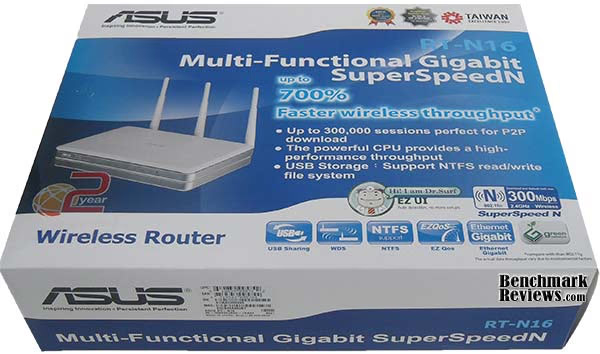
The RT-N16 ships in a pretty big box, much bigger than I was expecting although the router body only takes up half the box. Inside was very well organised and protected. There is plenty of information about the router and its features and functions on all sides of the box.
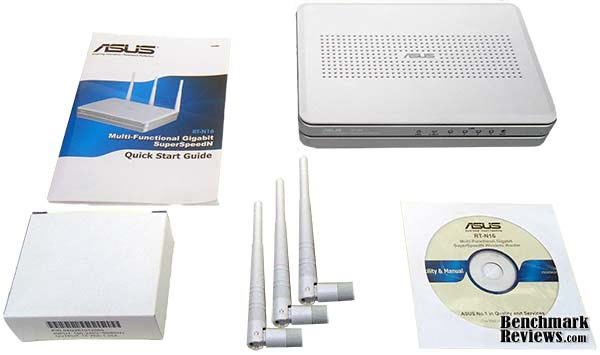
Inside the box was the unit itself, a 110-240v power adaptor to provide the RT-N16 with 12v, a 2 meter Cat5 LAN cable, a quick start guide to aid with setting up the router, a utility and manual CD and three detachable antennae. The addition of detachable antennae is a nice addition as they can be changed/upgraded to improve signal strength or performance.
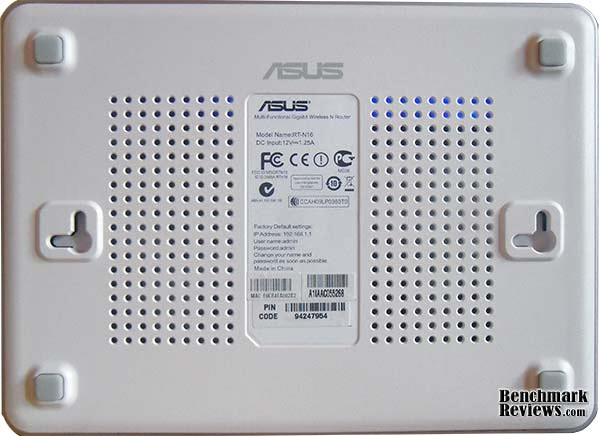
Bottom shot of the RT-N16 shows plenty of much needed ventilation, the unit does get quite warm but then again it has got a processor clocked at 533MHz. The sticker in the middle has the normal info found on the underside of a router such as, model name, power requirements, default IP, Username and Password for access to the router setup and some words of wisdom telling the end user to change the default Username and Password as soon as possible. Also you should have noticed the cut-out's for mounting the router on the wall, I'm not too sure why you would want mount the router on your wall, but the option is there all the same.
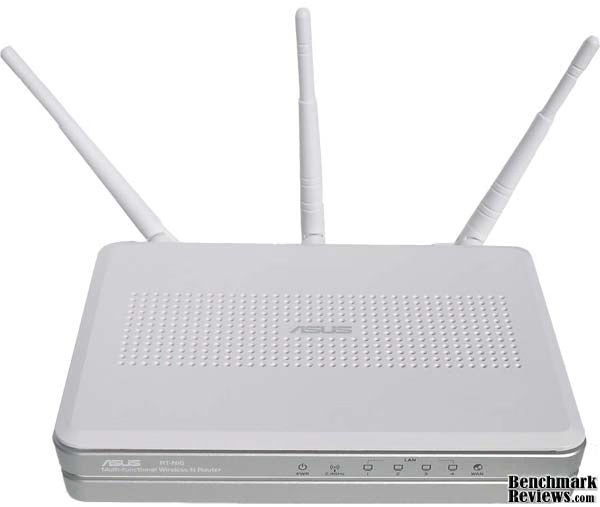
A great portion the top of the RT-N16 router has also been utilized for ventilation and the ASUS logo is in a prominent position right in the center. ASUS have chosen an interesting colour scheme for the RT-N16 which I think works quite well, the silver centre strip doesn't stand out too much and it breaks the mould of all white tacky plastic routers that have come and gone before it. I would also like to bring your attention to the three over-sized antennae protruding from the back, more so to the way they are set out - ASUS recommend that the antennae be set up as such so as to reduce signal interference between the three.
ASUS RT-N16 Detailed Features
One feature standard to wireless N routers are the 3 antennae providing multiple-input and multiple-output, or MIMO for short - Designed to offer better range and speed. ASUS builds on this and gives us some more features (some that you don't see on most routers) and I would like to discuss them here.
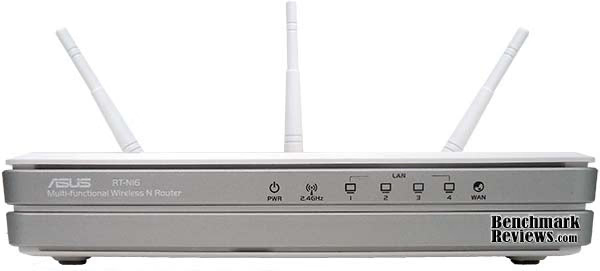
This shot gives us a good look at the design of the RT-N16 router, the status icons are etched out of the silver plastic and when active all glow blue, this surely won't be any help with diagnostics as the only options would be flashing, solid and off. The feet give a little bit of ground clearance for airflow, albeit not much but some is better than nothing.
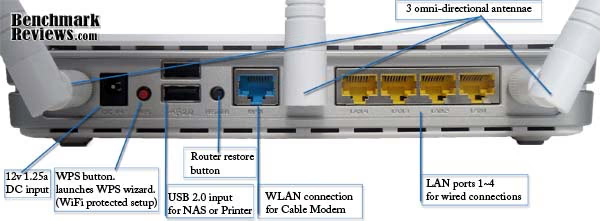
There is no space wasted on the back of the ASUS RT-N16 which I like to see. The three removable antennae seem perfectly spaced apart. The WAN and LAN ports are full Gigabit ports meaning you can connect at 1000/100/10 speeds respectively, On the left is the power in point, next to that is the WPS button, short for Wireless Protected Setup, which allows users with a configured compatible device to seamlessly connect to the router without the usual user / password method. Next are the USB 2.0 ports for connecting a printer or USB storage device be it a USB HDD or a USB memory stick / flash drive. Then finally in the middle is the little button for restoring factory defaults of the router's settings.
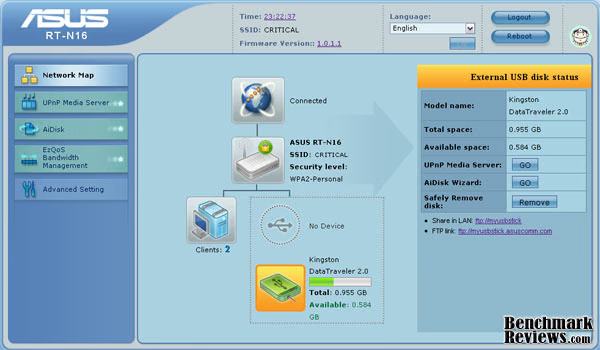
Once you have completed the setup and after each subsequent login you are greeted with the above screen, ASUS have designed an visually pleasing and functional setup menu for the RT-N16. This screen shows the network map of all connected devices to the router, each icon is can be clicked for detailed information of the attached device. From the top you have your wired connection info and status such as Connection status, WAN IP, DNS Server IP's, Connection type and Gateway IP. Next is the icon for your current wireless settings, then down and to the left are the currently connected computers this is particularly good for detecting and blocking anybody that may be hijacking your Internet connection. Then finally shown in the screenshot above we have the devices currently connected to the USB 2.0 ports on the rear of the RT-N16.
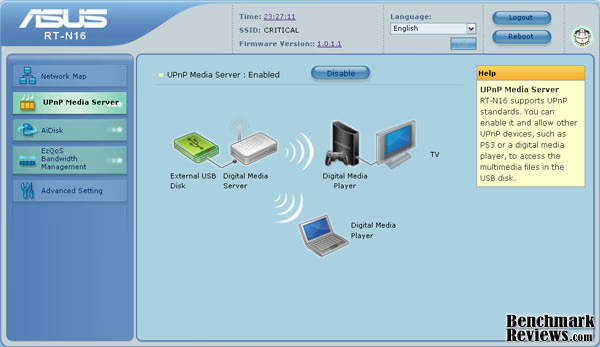
This next screen show a bonus feature of the ASUS RT-N16 wireless router, yes it can also serve as a UPnP Media Server accessing data from attached storage. The only option you have on this screen is Enable or Disable UPnP, for further info on this feature you have to load up the CD manual to find out how to access the data on your compatible devices. It is rather straight forward if you have done something like this before but a beginner might have to refer to the documentation on the CD whereas ASUS could have quite possibly put the information right here on this screen.
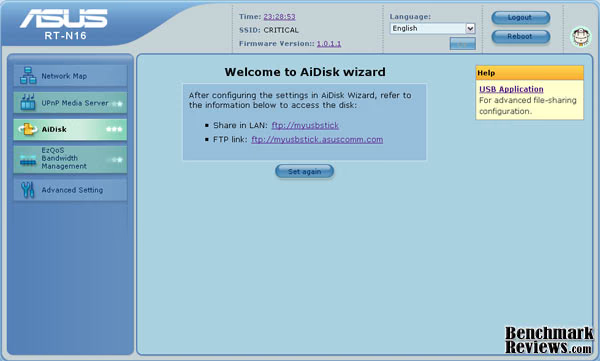
The next feature That I would like to share with you here is the AiDisk feature. There are three simple steps to setup access to your attached storage, 1) How you wish to share files on the device - limitless, limited or admin. Limited and admin allow you to set read write rights and a password to access data. 2) Create a domain name via the ASUS DDNS services to allow you to access the data over the Internet, you can choose anything you like to go between the ftp:// and .asuscomm.com, you can also choose to skip this setting so the data is only shared over the LAN. 3) Confirm your settings and make the USB storage accessible and then you are greeted with the above screen that shows two possible ways of accessing the data, LAN or FTP. With this setup you can access the data on the drive anywhere you have access to the Internet - no need to carry that sensitive data around with you means you won't lose it.
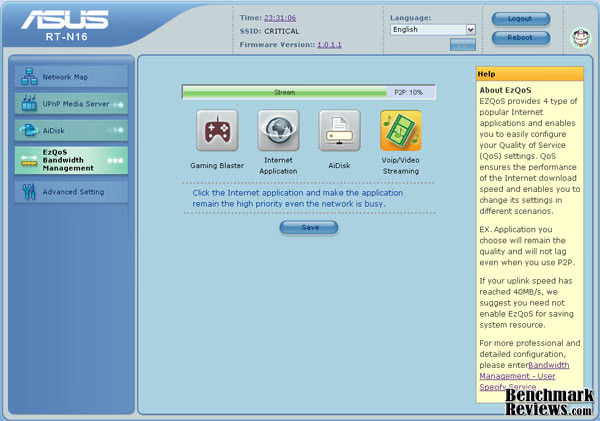
Next we have the EzQoS screen which speaks for itself in a way. The four main different types of Internet activity are each given an icon and when you click on an icon it is given priority over the others, if no icon is selected then the RT-N16 defaults to P2P traffic. Multiple types of traffic can be selected to be given equal priority and from the looks of things P2P is bottlenecked as a result. Quite how the router identifies the different types of traffic is not made clear.
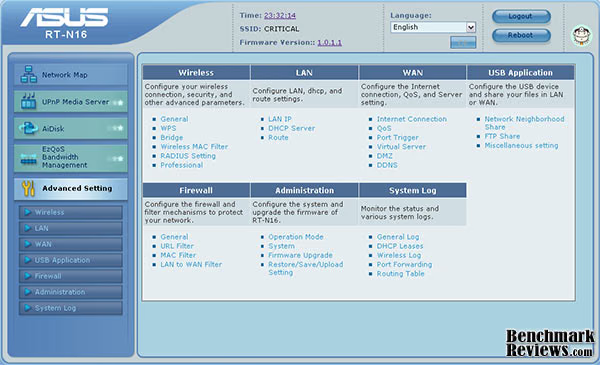
Now we have the advanced settings screen, way to much here for me to go into great detail in this review otherwise you and I both would be asleep before we got to the end. Rest assured that the advanced settings provide a lot of customization for advanced users to get their teeth into, most will not need to concern themselves with the advanced settings as the router runs just fine without need to change any. ASUS have provided a mini site that allows you to preview the setup menu of the RT-N16 wireless router which can be found here
Testing & Results
Testing Methodology
To fully test RT-N16 and find its true potential it would have been ideally paired up with either a wireless N PCI card or USB network adapter from ASUS, Unfortunately this wasn't available and I had to make do with what I had, an Atheros AR5007 802.11b/g Wi-Fi adaptor build into my Compaq Presario CQ61-110SA laptop.
There are many different ways of testing your network and for this review I wanted to concentrate on the following things;
-
How range and proximity might affect the speed of my wireless Internet connection
-
Can the RT-N16 cover me with a strong wireless signal throughout my house
-
Would I lose speed as a result of being at a distance from the router
To measure speed I have used the online speed test @ speedtest.net. I went to different locations within my home and ran the speed test 3 times, I averaged out the 3 results to give each location its score. I tested in six different rooms, three downstairs - Living room, Kitchen, Utility room and three upstairs - Bedroom's 1, 2 and 3. The living room test location is 2m away from the router, the kitchen and utility room test locations were both approximately 5 meters from the router. Bedroom 1 test location is approximately 4 meters away from the router (in a straight line) Bedroom 2 test location is directly above the router around 3m away and bedroom 3 test location is furthest away about 7m
Test System
-
Laptop Model: Compaq Presario CQ61-110SA
-
System Memory: 3Gb PC2-6400
-
Processor: Pentium Dual Core T4200 @ 2.0Ghz
-
Disk Drive: WD Scorpio Blue 160 GB SATA
-
Wi-Fi adaptor: Integrated Atheros AR5007 802.11b/g
-
Operating System: Windows Vista Basic
Results
There are a lot of aspects that can affect your wireless network such as signal reflection, Channel population, Channel pollution and the power to reach ratio - corporate Wi-Fi hotspots will have a much more powerful antenna providing a much stronger signal providing better range and speed. Lets now see how the RT-N16 Multi Functional Wireless N router performs.
I have a 20Mbps package with my ISP, I did a speed test on my PC through a wired connection for reference purposes to see how the wireless speed compares. Wired speed was on average 19.52 Mb/s throughout the duration of the test and on occasion that speed was also achieved through the wireless connection but unfortunately not consistently. Average results are shown below.

Throughout my home the ASUS RT-N16 Wireless Router provides a signal strength that was consistently excellent (5 bars on the Vista scale) and there was only one point during testing where I got a very good signal, The router didn't give me the same speed wireless as wired but it did come close on occasion. Testing was done with encryption set to WPA2 personal and with no encryption and speeds recorded were on average the same under both conditions.
There are also going to be times when you may want to access your wireless connection outside your home so I have taken the time to also see if the ASUS RT-N16 will provide enough coverage to use my laptop in the back garden. My outside test location is approximately 20m from the router, the signal strength was still very good (4 bars) and connection speeds were reported between 8.00Mb/s and 11.59Mb/s which is more than sufficient for my needs.
ASUS RT-N16 Final Thoughts
When the ASUS RT-N16 arrived I was a surprised by the size of the box, after opening up the box though I was pleasantly surprised to find that the router wasn't as big as huge as I was expecting it to be, it is a little oversize but it isn't an eyesore. It is a shame that a new product such as the RT-N16 with all of its features couldn't be made dual band also, some wireless N routers produced recently have the ability to operate simultaneously on both of the 2.5Ghz and 5Ghz bands which would have made this a top notch router instead of a very good router. During my research into this router I have come across reports saying that the range of the router was not very good, I will have to say that my findings do not really agree with these reports, so either they were using different firmware and the current firmware installed has made some improvements or maybe there were other factors at work, the wireless networks around my home are all far too weak to really make a difference to my connection. I am not usually a fan of white plastic products but I think I can make an exception here as the silver strips running through the middle of the RT-N16 really give it a distinguished and individual look that I think works very well.
ASUS RT-N16 Conclusion
Where performance is concerned the ASUS RT-N16 has shown that wireless speeds can match wired speeds, albeit not consistently but the wireless speeds achieved are still very good. The fact that it has a 533Mhz CPU and 128mb ram made me giggle a little as there are still working computers running on those specs.
The RT-N16 breaks the mould of your typical white plastic box style that has become so common with routers of yesterday, the silver / white combination gives it an original look and the blue LED status lights also shine backwards and are visible through the vents on the top of the router which is a nice effect at night.
The RT-N16 is a very well made piece of equipment as with all things of the ASUS legacy. A great choice of lightweight materials and clever design not only on the hardware but also in the software as well.
Functionality is where the ASUS RT-N16 comes into its own, from the super easy setup to the in-depth advanced configuration settings, there isn't much that you could want from a router that the RT-N16 doesn't do. I haven't tested all of the features of this router such as printer sharing or media server but they are not features I currently need or use.
You can currently purchase the ASUS RT-N16 from NewEgg for $92.01. That's a saving of $17.98 on the original price of $109.99 which to be honest is not exactly cheap, but based on the features that this router has, I think it is a fair price to pay.
After all said and done, There are features of this router that I may not use, so if you only need to distribute your Internet connection to one or two computers then this may be too advanced for your needs. Whereas, if what you have read today about the RT-N16 has you interested then I would definitely recommend you to purchase it for its ease of use and advanced configuration and intuitive setup menus.
Pros:
+ Interesting design 
+ Simple effortless and quick setup
+ Detachable antennae
+ 2 x USB 2.0 ports for printers and attached storage
+ Gigabit LAN ports
+ Great signal strength and range
+ 533MHZ CPU and 128MB RAM
+ Lightweight but sturdy construction
+ Fair price to pay for a feature rich router
Cons:
- Slightly oversize profile
- Does get quite warm to the touch
- 2.4 ~ 2.5 Ghz only no 5Ghz band
- No dual-band support
Ratings:
-
Performance: 8.50
-
Appearance: 8.00
-
Construction: 9.50
-
Functionality: 9.00
-
Value: 8.00
Final Score: 8.6 out of 10.
Recommended: Benchmark Reviews Seal of Approval
Questions? Comments? Benchmark Reviews really wants your feedback. We invite you to leave your remarks in our Discussion Forum.
Reader comments from the original article
6 comments were posted before commenting closed. They are preserved as written. Original avatars no longer resolve and are shown as a placeholder.
RE: ASUS RT-N16 Wireless-N Gigabit Router gordon Permalink:
Could this be compared to the D-Link DGL-4500? I own one and I like it a lot, but i don't own a wireless N reciever for my PS3, which means only G speeds! Thus watching hi def movies via my media server over Win Media Player does not do well, it has intermittent chokes and freezes to alllow some buffering. Its actually better to just copy the movie to the PS3 HDD, so i wonder if this would be a better buy...?
RE: RE: ASUS RT-N16 Wireless-N Gigabit Router Steven Iglesias-Hearst Permalink:
You have a good router in the D-Link DGL-4500, stick with it and find a way to hook up your ps3 to wireless N and set it to the 5Ghz band.
RE: ASUS RT-N16 Wireless-N Gigabit Router Andrew G - Stevens, PA Permalink:
Thank you for thorough review. I just found and purchased this unit for $86.00. It is replacing a Linksys WRT54g that is locking up, rebooting for no reason and giving me slow results. I am also experiencing my wireless devices in the house loosing wifi and grabbing a neighbor's unsecured linksys for no reason. I am hoping for a good "flood" of a signal in my home to avoid the wifi drops. I look forward to experience the amazing browsing you speak of and I have read elsewhere. THANK YOU!!
Network security key HesSINGAPORE Permalink:
Can't get the setup to work with my Motorola SBVS120 modem. When setup it requires a Network Security Key!? Pls advice ASAP!
Benchmark the actual router Vidar Permalink:
Can this thing actually do 300Mbps? You just benchmark your uplink speed, which isn't nearly as interesting.
CCE Arvind Permalink:
The next feature That I would like to share with you here is the AiDisk feature. There are three simple steps to setup access to your attached storage, 1) How you wish to share files on the device - limitless, limited or admin. Limited and admin allow you to set read write rights and a password to access data. 2) Create a domain name via the ASUS DDNS services to allow you to access the data over the Internet, you can choose anything you like to go between the ftp:// and .asuscomm.com, you can also choose to skip this setting so the data is only shared over the LAN. 3) Confirm your settings and make the USB storage accessible and then you are greeted with the above screen that shows two possible ways of accessing the data, LAN or FTP. With this setup you can access the data on the drive anywhere you have access to the Internet - no need to carry that sensitive data around with you means you won't lose it.