
Roccat Kova[+] Optical USB Gaming Mouse
Roccat KOVA[+] Optical Gaming Mouse Review
Manufacturer: Roccat
Product Name: Kova[+]
Model Number: ROC-11-520-AS
Price As Tested: $59.99 (Amazon)
Full Disclosure: The product sample used in this article has been provided by Roccat.
Roccat is a European manufacturer of gaming products that's becoming increasingly popular in North America. Their sporty design and bright lighting makes it an ideal eye-candy for gaming setups. The Kova[+] is one of two gaming mice that Roccat has revamped latety, giving it increased functionality. Benchmark Reviews will be using the Roccat Kova[+] gaming mouse in games and everyday applications to see how well this fancy device handles the real test.
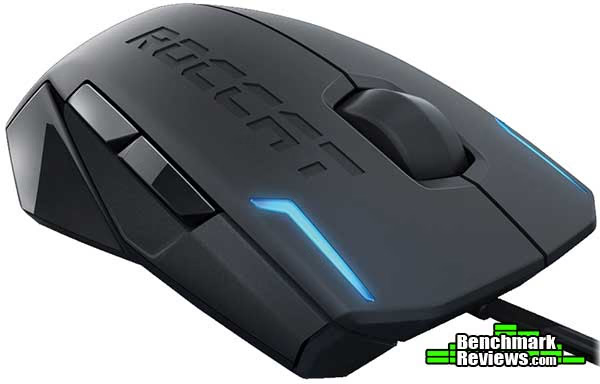
The Roccat Kova[+] is a 7-button (another +2 for scroll up and down) configurable mouse. The software allows each button to be customized. Together with their trademark EasyShift[+] functionality, the Kova[+] allows up to 16 different button functionalities at any one time with 1 dedicated "shift" button. The driver supports custom macro keys as well as a large set of predefined ones, so this could be an alternative to keyboard macros. DPI settings range from 400 to 3200, sufficient for gamers of any caliber. The Roccat Kova[+] uses an optical sensor for tracking, which strongly encourages the use of a gaming mouse pad.
Based on these specs, the fancy design, and a price tag of $59.99, the Roccat Kova[+] seems like a compelling buy. Benchmark Reviews will test this thoroughly to see if it really offers all the perks listed on paper.
Roccat KOVA[+] Features
- 3200DPI Pro-optic gaming sensor with enhanced optical sensor technology
- Hardware based configuration for rapid use and simple operation
- 20G acceleration ensures smooth and precise movements
- V-Shape ergonomic fit for left and right handers
- ROCCATTM GripTech side areas with non-slip stabilization surface
- Coated mouse wheel with optimum grip + comfort
- Customizable light system for your favorite color
- DPI change feedback LEDs indicate the selected dpi setting
- 5(+2) mouse buttons with core task configurations
- Full system compatibility works with Mac® and Windows® OS
Roccat KOVA[+] Specifications
- Size: 12cm maximum length x 6.5cm maximum width
- Weight: Approx. 90g (excluding cable)
- System Requirements: Windows® XP/Windows Vista®/Windows® 7, Macintosh OS®, USB 1.1 Port
- 3200dpi optical gaming sensor
- 40 inch per second maximum speed
- 20G acceleration
- Integrated lighting
- 2m USB cable
- Package Contains: ROCCATTM Kova - Pure Performance Gaming Mouse, Inari Case Mission Book with ID Card, Quick Install Guide
- Documentation in EN, DE, FR, ES, PL, RU, TR, DK, FI, SE
Closer Look: Roccat KOVA[+]
The Roccat Kova[+] packs a lot of functionality into a tiny form factor. At a mere 90 grams, the Kova[+] is easy to maneuver and offers very little resistance. Its compatibility with both Windows and Mac make it an outstanding choice in a market where Macs are often overlooked. The Kova[+] builds on top of its ancestor, mainly enhancing usability. Whereas the previous generation used button combinations to carry out commands, the Kova[+] delivers a solid mouse with extensive drivers that allows personalization in every way.

The Kova[+] package includes the Roccat Kova[+] optical gaming mouse, Inari Case Mission Book with ID Card, Quick Install Guide, and a driver CD. This package gets you started right off the bat without needing to search for installation files online. The mouse works even without drivers installed if the default behavior is all that's needed.

The Roccat Kova[+] is designed for fingertip or claw grip (using finger tips only, or with palm). People that enjoy gripping and resting their palm on the mouse will find the Kova[+] both too small and too light. The fine design of the Kova[+] seems to be inspired Lamborghini. The official website has a picture of the Lamborghini Reventon as one of the pictures under gallery, and if you look closely and squint, there is actually some resemblance.

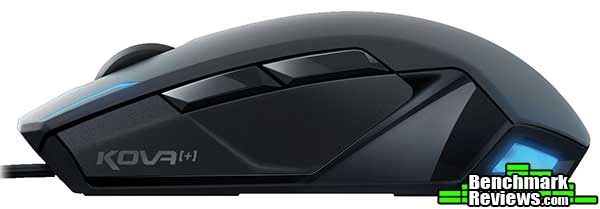
The Roccat Kova[+] is ergonomically designed for both left and right-handed users. It's perfectly symmetrical, with 2 sets of lights (2 front 2 back) and 2 auxiliary buttons on each side. It has a length of 12cm and width of 6.5cm. This is considered to be one of the smaller gaming mice, about 1-2cm shorter and it would fit in the category of mobile mice.

Everywhere that contact is expected between mouse and hand, Roccat has taken the time to add rubber coating. While comfortable, the type of coating they chose to use attract a lot of finger smudges from hand oils, and is only marginally better than plastic for enhancing grip. The rubber coating on the scroll wheel on the other hand is the type of rubber that generates a lot of friction and resistance, giving the scroll wheel an incredibly solid feel.
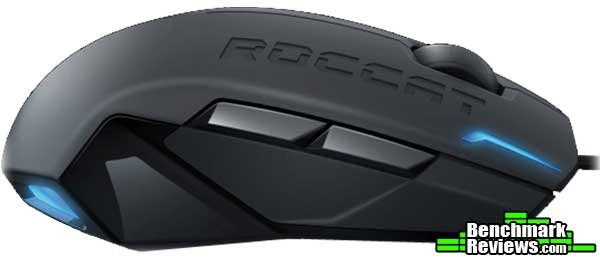
The auxiliary buttons are positioned and designed to be non-intrusive, so if you're not a common user for these buttons, it's almost like they don't exist. However for power users, the Kova[+] allows a large number of actions (including custom macros) to be defined and ran based on a mouse click. However trying to reach for the programmable buttons with a pinky or ring finger is extremely awkward, so those 2 buttons should be reserved for on-the-fly mouse adjustments (such as DPI, sensitivity, and toggling profiles) that won't be accidently used in game.

One of the other problems for the Roccat Kova[+] is how much the Teflon feet attract dust and how difficult it is to remove it. Typically most gaming mice have this problem, it's a trade off between less friction and cleanliness. The optical sensor for the Kova[+] is not located in the middle, so for those that prefer a centered sensor that ignores rotation must look elsewhere.

Roccat KOVA[+] Detailed Features
Before diving into the specific functionalities that the Roccat drivers enable us, I just want to point out the details Roccat goes into for delivering a compelling product with polished designs. Even the USB cable is designed to match the look and feel of the Kova[+]. The most other companies have done is coat it in gold, which delivers only slight performance improvements.

The main feature of the Roccat Kova[+] is its comprehensive driver that makes use of every aspect of the hardware. A lot of the function may seem duplicate (sensitivity, DPI, and pointer speed) but for power users these individual configurations all matter. My typical preference is leaving DPI at its highest setting to be able to detect even the slightest movement, leave windows pointer speed (software level scaling) at default, and adjust sensitivity until it feels "right".

Macro assignment is where the Kova[+] becomes interesting. Similar to keyboard macros, the Kova[+] drivers allow the creation of keyboard macros (series of keyboard inputs). For more complex inputs, the macro manager allows time-based inputs. This allows users to assign macros from simple spell shortcuts and complex timed combos. Out of box the Kova[+] driver includes integration with all major browsers and multimedia programs, as well as some two dozen games.
One of the more interesting functionalities is the ability to set a timer for one of the buttons (maximum 999 seconds). This is perfect for in-game reminders. For example in League of Legend, players will never have to remember when the next dragon will spawn. Simply press the timer button after killing a dragon and when the time comes a VOICE will automatically tell you.
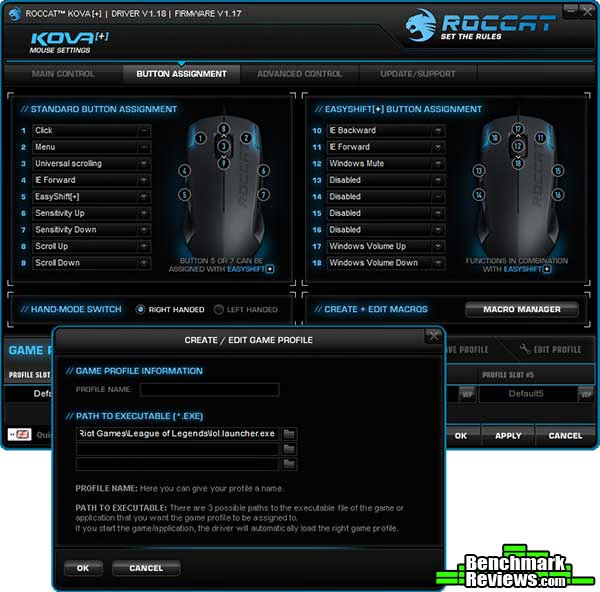
Beyond raw functionality, the Roccat Kova[+] allows plenty of other customization. Polling rate, for gamers, should always be set to 1000Hz. Many mouse commands/functionalities will trigger voice feedback, and those options can be adjusted as well. The Alienware-style lighting options are great for those trying to match the colors of their home setup and desktop lighting. In fact this mouse would visually go very well with an Alienware system.
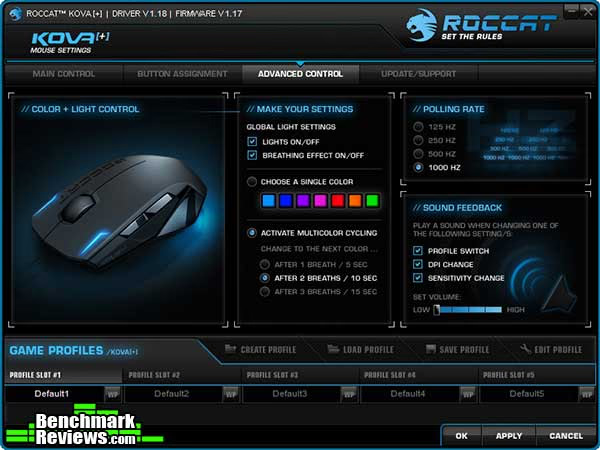
All of the above mentioned changes can be associated with profiles, which can be toggled on the fly. Last but not least Roccat has given users an easy way to find links on their website as well as file support cases and questions. This can save time if you're running into problems.

Roccat has delivered a very comprehensive driver full of customization options, integration points, and software goodies. The hardware specs, the software, and the price all seem to indicate this mouse to be one of the best choices on the market. In the next section Benchmark Reviews will test the performance and usability of the Roccat Kova[+] to see if it really is the awesome buy it's shaping up to be.
Testing & Results
Testing Methodology
This mouse was used as the primary mouse over a period of 3 weeks. In addition to producitivty software and everyday browsing, the mouse was tested in several games: Warcraft III - TFT, StarCraft 2, League of Legends, and Might & Magic VI.
Test System
- Processor Intel i7-920
- Video Card: Nvidia GTX 285
- RAM: 16GB DDR3
- Monitor resolution: 1920x1080 pixels
Test Software
- Warcraft III - TFT
- StarCraft II
- League of Legends
- Might & Magic VI
- MouseRate

Results
Upon taking up the Roccat Kova[+], there were two things I instantly noticed: the Kova[+] was light and glides with minimal resistance. I have used a wide variety of gaming mice from Razer, Steelseries, Logitech and Microsoft. So if there was one thing I was good at, it would be getting used to a new mice. The Kova[+] felt a little small for my hand but the positioning of the buttons are great. They do not interfere with normal use at all, but on the flip side they take an effort to actually press. Game-critical macros do not work well on the Kova[+]. For MMORPGs the Razer Naga is a better bet. That's not to say the Kova[+]'s programmable buttons are inferior. Roccat gives user the ability to customize the functionalities of the auxiliary buttons down to every detail. The buttons can be assigned to change mouse setting, enhance browsing experience, integrate with numerous applications like Skype and Xfire, or activate built-in timers. These are use cases that go extremely well with the Kova[+], and is often lacking in other gaming mice.
On paper the Roccat Kova[+] supports up to 18 different mouse functionalities. In reality, only the thumb buttons (2) and standardized buttons (4, right/left click and scroll up/down) can be easily used in game, and if one of those are dedicated to be the EasyShift[+] button, then there are, realistically, 6 additional button functions, which is still impressive. Other 7-button mice have, at best, 5 additional button functionalities. While the button positioning is superb, the actual design of the auxiliary buttons were too centered around the look than functionality. The inward slope where the 2 buttons meet is exactly where the thumb ends up for clicking. The buttons also offer too much resistance. These two facts together is another reason why it doesn't make sense to assign game-critical macros on the Kova[+].
Polling rate is also an extremely important feature for gaming mice, it measures how fast the mouse will respond when moving. The Roccat Kova[+] has a 1000Hz polling rate, or equivalently 1ms response time. That is essentially the fastest response time available these days. Using the MouseRate program, we found that while the mouse is moving the polling rate reaches 1000Hz without problem, the average depends on how much movement is going on. Without a doubt the response time is suitable for gaming.
The Roccat Kova[+]'s drivers have been optimized for functionality and in return takes an extremely long time (>40 seconds) to apply setting changes. Other than the above three potential drawbacks (button design, weight, and software lag), there is very little to complain about the Kova[+] in terms of performance and functionality
The optical sensor tracks accurately and smoothly, however to perform well, a rough surface or good mouse pad is required. The scroll-wheel and click feedback is well tuned and hits a sweet spot. After getting used to the grip, the Kova[+] becomes quite comfortable to work with for long durations. For competitive games, once you get over the initial "why is this so light" phase, the Roccat Kova[+] delivers everything you possibly need in a gaming mouse.
Gaming Mouse Final Thoughts
For the price, the Roccat Kova[+] delivers functionality like no other. Under its slick design, The Kova[+] is light, efficient and packed with features. For most gaming mice out there, I deem most auxiliary buttons useless. Not only does it hinder performance as you reach for buttons, but also because macros on the keyboard are much easier. As of today there really isn't a game that requires the use of both keyboard and mouse macros.
However this applies less to the Roccat Kova[+]. The goal for mouse macros isn't to replace keyboard functionality, but to solve new scenarios that have not yet been covered by existing products. The tight integration with current lineup of games, and features such as the 1-button timer, meet gamers' needs in ways that other products simply have not accounted for. In this respect, the programmable buttons become a real usable feature and not just a paper-feature used for marketing.
Roccat KOVA[+] Conclusion
The Roccat Kova[+] is a great light-weight mouse packed full of functionality. In terms of comfort and tactile feedback, it may not be the best in the price range, but it certainly holds up its end of the bargain in terms of performance. While optical sensors may be inferior to laser in certain conditions and surfaces, in general a 3200DPI optical sensor is accurate enough to work on most surfaces and performance is the equivalent of a laser mouse. However I strongly encourage a mouse pad to be paired with the Kova[+] as glass and other surfaces may cause skipping, or the tracking may simply not work.
Roccat is a company that uses lighting extensively, and they put a lot of thought into their designs. Inspired by the Lamborghini Reventon, the Kova[+] has a slick outer shell lighting system. They pay great attention to details too, designing an eye-catching mouse from head to toe (even the USB cable features a similar design). The only company that can compare is Razer, as both go for the extravagant eye-candy design.
Partially because of its light weight, the Roccat Kova[+] at times feels a little cheap. The construction is solid, though I do wish they designed the Teflon feet better. Over 3 weeks of testing, it has accumulated a lot of dust and is difficult to clean. The rubberized surfaces, which span about 50% of the surface area, help define the value and power of the Kova[+]. Overall the buttons have solid feedback and resistance and there are no noticeable flaws.
In terms of functionality, the Roccat Kova[+] really shines. The Kova[+] driver features one of the most comprehensive customization and button programming UI. One of my favorite features is the "Timer button" where in 1 click you can trigger a timer that will give you voice cues as it comes to an end. This is perfect for games like League of Legends where certain creeps have spawn times based on when they were last killed. Now all of this can be accurately tracked. In addition to the "timer feature", the Kova[+] has a full macro-key manager for creating and editing advanced macro combinations, including time-based inputs. This can replace the need for having a programmable keyboard. Even without customization, the Roccat Kova[+] delivers a large amount of integration and input profiles based on 2 dozen games and about a dozen applications including Skype and Xfire. Functionality is definitely a strength of the Roccat Kova[+], as it really did pack everything a gamer would need.
At $59.99 (Amazon), the Roccat Kova[+] really does stand out. It delivers a great set of features under a well-designed exterior. Competing products typically will have similar hardware specs, so it all boils down to usability, comfort, design, and customization, and the Roccat Kova[+] does superb in all of those areas.
The Roccat Kova[+] may not be the best travel mouse, but for gamers with a mouse pad the Kova[+] offers great return on your money. There are quite a good number of competing products at this price level from popular companies like Razer and SteelSeries, but in terms of functionality I would find it hard for Roccat to lose.
Pros:

+ 3200DPI optical sensor more than enough for most gamers
+ EasyShift[+] allows up to 16 macro keys and customization
+ Almost every aspect is customizable, from lighting to scroll speed, all done in one place
+ Slick modern design
+ Integration with numerous games
+ Awesome and highly usable proprietary functionalities like built-in timer and EasyShift[+]
+ Ergonomic, for both left or right-handed people
+ Voice feedback for many features, including timer.
Cons:
- Configurations takes over 40 seconds to apply
- Unable to customize weight
- Hard to clean dust off and keeps finger smudges
- Auxiliary buttons are not shaped ideally and offers too much resistance for critical macros
Ratings:
- Performance: 8.75
- Appearance: 9.00
- Construction: 8.75
- Functionality: 9.50
- Value: 9.00
Final Score: 9.0 out of 10.
Excellence Achievement: Benchmark Reviews Golden Tachometer Award.
Benchmark Reviews invites you to leave constructive feedback below, or ask questions in our Discussion Forum.
Reader comments from the original article
11 comments were posted before commenting closed. They are preserved as written. Original avatars no longer resolve and are shown as a placeholder.
Universally Generic Sun Down Permalink:
Like the title said, it's getting too generic. I don't doubt that this mouse is good for gaming and designing, but there's nothing much of it the stands out of the crowd. Sure it's designed based on a Reventon, but somehow it doesn't stand out much. For example, Razer DeathAdder: organic predator. Cyborg Rat 3: complex mechanics. SteelSeries Kinzu: minimalistic design. Logitech and Microsoft already fills the 'generic' look gap IMO. This mouse, tries to fit everything, but it's just not strong enough. It won't have much appeal, but I'd still give it a consideration.
RE: Universally Generic WhyNotV2 Permalink:
Your statement is probably why I've yet bought a newer generation "gaming" mouse preferring to stick with Logitech...nothing really sets anything apart as the must have. I have an original G5 that I've been wanting to replace for a couple of years now and I'm still waiting for that true game changer in the realm of the mouse before I make the switch/upgrade. Until then...
Hard Click Buttons Mergatroid Permalink:
"but the positioning of the buttons are great. They do not interfere with normal use at all, but on the flip side they take an effort to actually press" I have found that the death knell for any mouse I have used, especially light easy to move mice, is hard to press buttons. Often when a fine movement is required just pressing the button can cause the mouse to move slightly, enough to make the system not register a double-click for instance. I really like the look, and the optical sensor is interesting (almost enough for me to buy it just to try it). I really like the software and the timer function too. I prefer a fairly heavy mouse myself, but I can get used to a really good light mouse too. Pity about the buttons.
RE: Roccat Kova[+] Optical USB Gaming Mouse Sun Down Permalink:
I have a lot of qualms with these ''gaming'' mouse. I mean, why can't the 'adjustable weight' system be finger/front and palm/rear oriented like a car? Why can't we set how sensitive the click is? Why can't they just put an almost full teflon feet for the mouse instead of 3 huge ones?
Roccat nuclear Permalink:
@Sun Down: Because three feet will never wiggle, thats statics. A huge single feet could differ in attrition and start getting round or by glueing it on the plastic surface its not plane, or its just more expensive. Well and an adjustable weight system for front and rear, who really needs that? I would say nobody. But Roccat really needs to fix their quality. I bought the kova[+] half year ago. But already at start it was totally inaccurate, the arrow was jumping.... And that on all surfaces I tried (mousepad,wood,plast ic). After that I bought Deathadder....
RE: Roccat Sun Down Permalink:
You underestimate how much of a change weight distribution can make. My weight transfer idea comes from cars. My preferred weight distribution is palm heavy with light fingers. To be honest, saying 'nobody uses the weights' is a bold statement.
Roccat nuclear Permalink:
I don't say that nobody uses weights. Adjustable weight can make a mouse more comfortable (well I don't need it, but I agree that it can be an advantage because you don't need to get used to some other weight). I just say that changing the weight balance between front/rear is more or less senseless. In the car the optimum is 50/50, same like in mouses, they just should put the weight in the center of your hand on the mouse. Regularly thats, like you described the tail (well not the side where the cable is, maybe a bit confusing where the tail is^^). In a car other weight constellations can make sense, because you need more grip at the drive. Other reasons are, that for more easy handling a understeer is prefferred, or for fun cars oversteer. But these are all effects you don't have in a mouse xD. Well and don't forget the cable of your mouse. If I look at mine, the cable stiffness is a much bigger force, than the inertia of the front. Well, but thats just my opinion, if someone thinks, he needs such a variable mouse I don't complain^^,. I think for companys it wouldn't be attractive. It's a small marked and cost-performance ratio is bad.
RE: Roccat Sun Down Permalink:
''these are all effects you don't have in a mouse''. You're only looking at the mouse moving forward. On FPS games the mouse moves left and right a lot, assuming the mouse is wireless (R.A.T. 9/Mamba), difference in weight distribution can affect the comfort of the gamer where each has it's own tastes. Sure the mouse isn't moving forward, but that's not what I was referring to in a mouse, it's the movement towards left and right. Not everybody prefers a 50/50 distribution you know, just like how I prefer racing with a front-engine car rather than a mid-engine car. YMMV.
Depends on grip and hand size Mergatroid Permalink:
Where you want the centre of gravity on a mouse depends on how you grip it and how large your hand is. If you have a smaller hand and use the "claw" grip you may want extra weight at the back so the mouse doesn't lean forward when you pick it up. If you use a palm grip and have a larger hand you may want more weight at the front. Where the center of gravity should be depends on how you pick the mouse up, not on inertia. If you never picked the mouse up then it wouldn't make any difference where the centre of gravity is. When I'm in the midst of a game and I pick my mouse up to move it over and put it back down without the pointer (or whatever) moving then I don't want the front or back weighing more, but again that depends on where you grip the mouse. Saying the balance weight system doesn't make sense is just not true.
RE: Roccat Kova[+] Optical USB Gaming Mouse nuclear Permalink:
a weight outside of the center would lead to, that your hand has to do an additional torque to hold the mouse straight. Desirable? And like you described, you prefer it in the center, like I think everyone. Weightbalance in cars is like I already said something completely different, there are pros and cons in breaking, steering and safety (e.g. mid-engine car is hard to controle but fastest).
Sensor JUMPS transce Permalink:
Roccat Kova+ sensor JUMPS "google for mouse jumping". It is a manufacturing defect, there are good and bad batches. Buy at your own risk. Mouse jumping is so bad that even the $10 mouse you grab from a bookstore can perform better. Read more for more evidence: ##overclock.net/t/1022422/roccat-kova-good-mouse/10