

| D-Link DWA-652 Xtreme N Notebook PCMCIA Adapter |
| Reviews - Featured Reviews: Network | |||||||||||||||||||||||||||||||||||||||||||||||||||||||||||||||||||||||||||||||||||||||
| Written by Nitin Kumar - Edited by Olin Coles | |||||||||||||||||||||||||||||||||||||||||||||||||||||||||||||||||||||||||||||||||||||||
| Wednesday, 10 October 2007 | |||||||||||||||||||||||||||||||||||||||||||||||||||||||||||||||||||||||||||||||||||||||
D-Link DWA-652 AdapterWireless N is the new emerging standard in wireless networking, which provides greater range over a longer distance and extreme speed. Today at Benchmark Reviews we have the new D-Link DWA-652 Xtreme N wireless notebook adapter for testing purposes. Let us find out if the DWA-652 delivers performance as promised. The D-Link Xtreme N Notebook Adapter (DWA-652) is a draft 2.0 802.11n wireless client that delivers unrivaled wireless performance for your notebook computer. This wireless adapter delivers up to 14x faster speeds and 6x farther range than 802.11g while staying backward compatible with 802.11g and 802.11b networks. Once connected, you can share a high-speed Internet connection, photos, files, music, videos, printers, and storage. The Xtreme N Notebook Adapter is powered by Xtreme N technology to provide superior wireless reception in your home or office. This adapter is designed for use in larger homes and offices, or for users running multiple bandwidth-intensive applications. This adapter enables you to simultaneously make or receive Internet phone calls (VoIP), surf the Web, transfer files, and stream High-Definition (HD) media when connected to an Xtreme N Gigabit Router (DIR-655)*. The DWA-652 supports WEP, WPA, and WPA2 encryption that allow you to connect securely to a wireless network. 
D-Link’s Quick Adapter Setup Wizard guides you step-by-step through the installation process. Configure this notebook adapter without having to call a networking expert to help you. The D-Link Wireless Manager is also included with this product to keep track of all your most frequently accessed networks so that you can join them quickly and easily. With unmatched wireless performance, reception, and security, the D-Link Xtreme N Notebook Adapter (DWA-652) is the best choice for easily adding or upgrading wireless connectivity to your notebook computer. The adaptor looked very similar to most notebook adaptor and it becomes very hard differentiate them in looks, but I personally prefer the black and silver finish it comes with. About the company: D-Link
|
|||||||||||||||||||||||||||||||||||||||||||||||||||||||||||||||||||||||||||||||||||||||

| Standards |
|
||||||||||||||||
| Interface |
|
||||||||||||||||
| Wireless Frequency Range |
|
||||||||||||||||
| Security |
|
||||||||||||||||
| LEDs |
|
||||||||||||||||
| Certifications |
|
||||||||||||||||
| Dimensions |
|
||||||||||||||||
| Weight |
|
||||||||||||||||
| Warranty |
|
||||||||||||||||
| Recommended System Requirements |
|
||||||||||||||||
| Minimum System Requirements |
|
||||||||||||||||
| Package Contents |
|
Closer Look
Now Lets move on to take a closer look at the adapter itself. Below I have included several images of the adapter and the included software utility.

The adapter comes in an anti-static bag, along with the included installation CD.
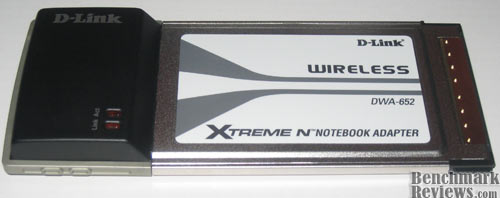
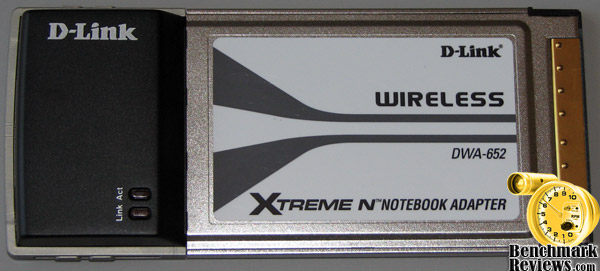
As mentioned before the adapter has a very distinct look to it, the black and silver finish will match most laptops.

Another look at the adapter from an angle, here you will realize if you have two PCMCIA slots on your notebook, it will cover both.

Here is a screenshot of the installation menu, when you insert the included CD the above menu will appear on your screen.
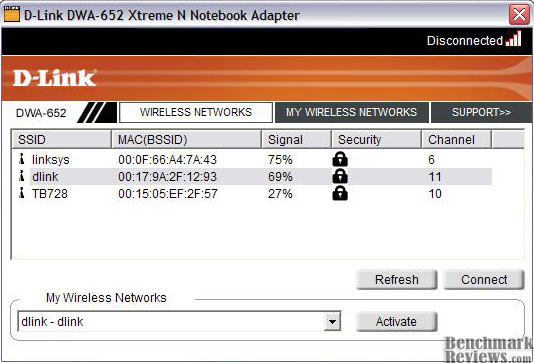
This is the included software utility which allows you to configure the wireless connection. The support tab will provide a quick explanation of the included features of the software utility. My Wireless Networks tab allows you to create and save different profiles for different wireless networks.
Testing & Results
Testing Methodology
To fully take advantage of the DWA-652's wireless N feature you have to have compatible wireless N router, in this case I already have D-Link Wireless N router. I tested the adapter on my notebook computer, after completing the installation process I tested the card throughout my house to test the range, and also transferred files over my local network to test the sustained transfer rate.
Test System
-
Notebook Computer: Toshiba Satellite A105-S1013
-
Operating System: Windows XP SP2 32bit
Test Results
The adapter did fairly well, It worked throughout my house with least amount of Interference. The wireless connection strength always stayed close to seventy percent no matter where I was inside my house, so the connection strength was excellent. I had absolutely no problems sharing and transferring files over the network, infact I was able to transfer files at few megabytes per second, which is great over wireless connection. So overall I had no problem during the testing procedure.

At first I was not able to establish a connection speed of 300MB per second as advertised, it would not have been fair if I didn't troubleshoot to rule out anything that could have been an issue associated with the router settings, which infact was the case. I have a D-Link DIR-635 and I had WPA security mode enabled which did not allow a wireless transfer rate more than 54MB/s, once I switched the security mode to WPA2 I was able to connect at 300MB/s. This allowed even better transfer rate, and my download speed almost doubled. It seemed as if I was connected to my router with a dedicated connection. I have a Verizon FIOS connection and my download speed is close to 1.75MB/S on average with a wired connection, and I have to say my download speed doubled compared to onboard wireless connection, which allowed me to download around an average speed of 800KB/S, but DWA-652 doubled that speed to 1.65MB/S. Great results Indeed.
Final Thoughts
D-Link is one of the highly recognized companies for designing wired and wireless networking products. DWA-652 is another example of an excellent product they have designed. I would have loved to see the DWA-652 only cover one PCMCIA slot, but I would not hold it against them because to my knowledge Wireless N is still a growing technology and I have not seen any other company making a Wireless N adapter that would only cover one slot, and hopefully we will shortly start seeing products of that particular type in a few months.
Conclusion
DWA-652 was overall a very solid product from a very reputable company. The adapter was a pleasure to work with, and required easy software installation and simple plug in. I was surprised to see that the software installation allowed me to choose whether if I wanted to use the built in Windows Zero Configuration utility, which is a great option to have. I personally prefer the WZC utility for the ease of use it has to offer. I also prefer the black and silver finish which goes along with most of the notebooks, other than that the product has nothing special to offer other than it's functionality, great range, and superb speed.

The adapter also comes with free basic version of Network Magic software, also a very handy software tool to manage network computers and files. If you already have a Wireless N router and you are shopping for a wireless adapter than I will highly recommend this adapter, it will allow you to download very close to a dedicated Ethernet connection, I can't recommend this to someone who does not have a Wireless N router, as it will have nothing special to offer. The only negative I can think of is the current price. The adapter could be purchased for US $85 online, which is really a high price to pay for a wireless adapter. If you want the best speed than it is certainly a price worth paying for.
Pros:
+ Easy installation
+ User friendly software utility
+ Connection up to 300mb/s
+ Great range
+ Compatible with Wireless B & G routers
Cons:
- Price, Price, Price
Ratings:
-
Presentation: 9.0
-
Appearance: 9.5
-
Construction: 9.5
-
Functionality: 10.0
-
Value: 7.0
Final Score: 9.0 out of 10.
Excellence Achievement: Benchmark Reviews Golden Tachometer Award.
Questions? Comments? Benchmark Reviews really wants your feedback. We invite you to leave your remarks in our Discussion Forum.
Related Articles:
- NZXT Cryo X60 Notebook Cooler RN-CRX60-B1
- Diamond Viper ATI Radeon HD 3870 512MB Video Card
- D-Link DIR-655 Xtreme N Gigabit Router
- Sunbeam SATA-IDE-USB Adapter
- Arctic USB Charger PRO 4 Rev.2
- Warpia Wireless USB Display Adapter SWP100
- ZOTAC GeForce 8800 GT 512MB Video Card
- Edova Innovations Xpad Notebook Heat Shield
- Titan G4TZ Magic Pad Notebook Cooler
- ASUS P5K3 Deluxe Wi-Fi-AP Intel P35 Motherboard