
Sunbeam SATA-IDE-USB Adapter
Many people keen on PC hardware find themselves having a few spare hard drives laying around. Also, may people in the IT profession might find that they have hard drives that need to be checked to see if there is any data on these drives, or whether these drives work at all. Often, it can be a royal pain to tear apart a working desktop, plug a drive or two in just to have to boot them each up individually to see what the status is. Many times, you have a SATA drive with no free SATA ports, or vice versa with IDE drives. And, even worse, you may have some laptop drives with no laptop around, or only desktop drives when you just have a laptop. In comes the Sunbeamtech SATA and IDE harddrive to USB Adapter. This little device claims to be able to solve all of the aforementioned dilemmas, plus a few more.

About the company: Sunbeamtech
Sunbeamtech is a fairly new name in the world of computer accessories. Back in 2000, they got into the game making CCFLs, and then further expanded into the scene by introducing other products such as PSUs, Cases, Fans, and other accessories. They focus on inexpensive, but quality products. They are based out of Taipei, Taiwan. More products and information can be found on their website, www.sunbeamtech.com.
Features
-
USB 2.0 transfer rates.
-
Supports USB High-Speed and Full-Speed Operation.
-
Support ATA/ATAPI LBA48 Addressing mode.
-
Support for both SATA and IDE hard drives 2.5" and 3.5" in size.
-
Plug and Play/Hot Swappable
-
External Universal Power Cord for All Device (with power switch)_
-
OS Supported: Win98SE/ME/2k/XP/Vista/7, Linux, Mac OS 8.6 and above.
-
Two hard drives can be used simultaneously.
-
AC Adapter Power Protection:
o Over Current Protection
o Over Voltage Protection
o Short Circuit Protection
Specifications
-
Interface: USB 2.0 up to 480Mb/s backward compatible. Full-Speed 12Mb/s transfer.
-
AC Adapter: Input 100-240V AC 50-60Hz, Output: 12V/2A DC
-
Dimension: 65.5 x 62 x 15.5 (LxWxH)mm
System Requirements
-
Minimum Intel Processor II 250mhz, 64mb RAM with Windows 98SE or higher.
-
Minimum Apple G3 processor, 64mb RAM with OS 8.6 or higher.
-
Linux OS: kernel USB stack
Package Contents
-
USB-HDD Socket Bridge Box (the device itself)
-
Driver Disk and User Guide
-
AC Adapter and DC Power Cord
-
USB Cable (USB > MiniUSB)
SATA-IDE-USB Adapter Closer Look
There really is not much complexity to this device. It consists of the USB cable, the DC power cord, the power adapter with on/off switch, and the device itself.

Each side of the device has a different connection for each different possibility of HDD you can connect to it, and one side for the power and USB.
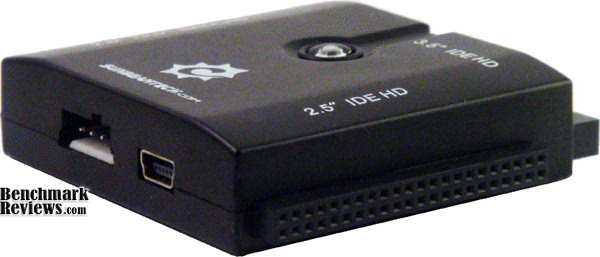
On top, there is a blue activity light, and labels for each connection. That's about it.

Adapter Usage
If you have Windows 98SE, you will need to use the included driver disk. Also, if you use Linux, you will need to download the USB kernel stack. All other compatible operating systems already should simply find it as an additional storage device and install the drivers automatically. I first plugged it into my Windows 7 machine, and it popped right up in the "My Computer" screen as an external storage device. I then proceeded to use it like you would any other external hard drive. For laptop and SATA drives, there is a floppy-drive style power plug that goes into the unit, but for full size IDE and some SATA drives, there is a regular Molex style plug that you must also plug in.
The first thing I used this thing for was to extract some data from a laptop hard drive. I found there were a few little issues with the order that you must do everything in order for it to work properly. I noticed that if you plug in the USB cord before you plug in the drive, or even power the drive on, you will get the familiar chime that you have plugged something in, and it is finding the drivers and etc. But, when you plug in the drive after that point, it doesn't always recognize it. I think the proper order is to plug everything in, power on the drive, and then plug the USB cord in last. Once it found the drive, it was absolutely no trouble at all. The files copied quickly. I was getting on average a sustained transfer rate of about 18-20MB/s from an IDE 2.5" laptop drive. Not too shabby. It copied about 10GB of files in just a matter of ten minutes or so.
I also tried a few other drives such as a full size IDE and SATA drive. Those did not seem to have any trouble connecting either, so long as I did it in the correct order. The device claims that you can use plug multiple drives in at once, but the instruction booklet leads me to believe that this is not recommended. I would recommend using only one drive at a time. Additionally, with the way that the connectors are set up, it makes a tight fit, so if you used an IDE floppy drive, you could not use an IDE desktop drive, because you couldn't get the Molex plug in.
Adapter Final Thoughts
This device is perfect for system builders, enthusiasts, IT professionals, or packrats. If you are anything like myself, you have a pile of hard drives in your basement collecting dust, and you always look at them and wonder whether they still work, and what is on them. This device will answer both those questions in a fraction of the time it would take you to hook them up to a desktop and boot each one up separately. However, this device does not replace an external hard drive enclosure. The way that it connects to the drives is very temporary. It is not to say that the connections are bad or anything, but moving it and bumping it could easily allow the power or data plug to slip out, causing problems. The power switch included is a really nice touch so that you don't have the drive spinning all the time, but it almost serves little purpose, because sometimes you have to unplug the USB, and reboot the drive after you turn it off, and then turn it back on due to the way the USB initializes the device.
Conclusion
In terms of presentation, I don't think Sunbeamtech could have presented this product in any better way. The Sunbeam SATA-IDE-USB Adapter is certainly not the prettiest thing, but it is by far the ugliest. It is made of plastic, but there are no moving parts, and does seem to be fairly sturdy. The Sunbeam SATA-IDE-USB adapter serves a very useful purpose, and certainly serves it well. As of July 2009, the Sunbeam Serial ATA (SATA) or IDE 2.5" and 3.5" to USB 2.0 Cable Converter Adapter is available at NewEgg for $20.99 with a $5 rebate, which makes it very affordable. This adapter can really be a great hassle-free timesaver.
Pros:
+ Inexpensive product
+ Easy to Use
+ Supports both SATA/IDE 2.5" and 3.5" drives with USB 2.0 speeds.
+ Nothing fancy, it just works, and works well.
Cons:
- A little picky on the way you have to plug in the devices, as it can take a couple tries
- Not a long term solution for IDE/SATA HDD to USD (no an external enclosure alternative)
Ratings:
-
Presentation: 9.00
-
Appearance: 9.00
-
Construction: 8.50
-
Functionality: 9.50
-
Value: 9.50
Reader comments from the original article
1 comment were posted before commenting closed. They are preserved as written. Original avatars no longer resolve and are shown as a placeholder.
vice versa with IDE drives? Derek Permalink:
Did you really mean to say that you have "IDE ports with no free IDE drives?" Perhaps you meant to use another Latin phrase besides "vice versa." :)