
Thermaltake Frio OCK CPU Cooler CLP0575
Thermaltake Frio OCK CPU Cooler Review
Manufacturer: Thermaltake Inc.
Product Name: Frio OCK CPU Cooler
Model number: CLP0575
Price As Tested:$74.99 at Newegg or $78.96 at Amazon
Full Disclosure: The product sample used in this article has been provided by Thermaltake Inc.
The time for monster CPU coolers may be drawing to a close: the latest generation of 32nm CPUs from Intel and AMD produce much less heat and thus require less cooling, even when heavily overclocked. Still, there are a lot of very power-hungry, heat producing CPUs out there, and if you have one or are contemplating buying one, then Thermaltake's new Frio OCK cooler may be of interest to you. Benchmark Reviews takes this new product through our test regimen and compares it to the best coolers available.
Speaking of those power-hungry and hot CPUs, one good example such is the overclocked and overvolted Core i7-950 I use in my heat sink test machine.
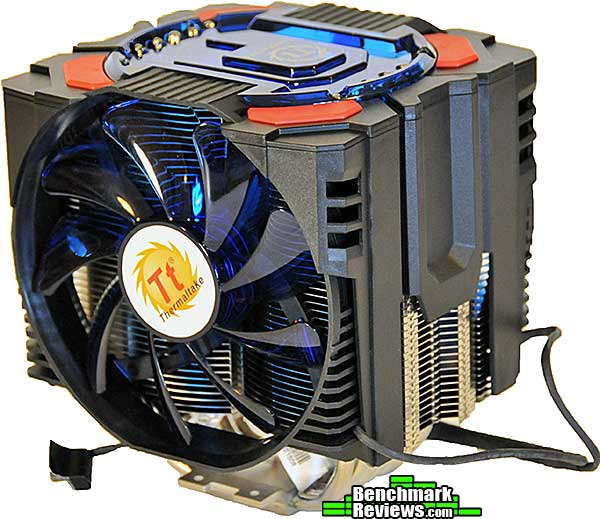
Any CPU cooler's primary task is to cool the CPU. Since retail CPUs come with perfectly adequate coolers, the main reason to buy an aftermarket cooler is for conditions that the stock cooler can't handle...namely, overclocking. From its size alone, one would expect the Silver Arrow to be aimed at the extreme overclocking crowd.
Thermaltake Frio OCK Specifications
| Heatsink Dimension |
143(L) x 136.8(W) x 158.4(H) mm |
|---|---|
| Heatsink Material | Aluminum Fins Aluminum & Copper Base |
| Heatpipe | 6mm (x6) |
| Fan Dimension | 130(L) x 130(H) x 25(W) mm |
| Fan Speed | 1,200 ~ 2,100 RPM |
| Noise Level | 21 ~ 48 dBA |
| Max. Air Flow | 121 CFM |
| Max. Air Pressure | 3.12 mmH2O |
| Power Connector | 3 Pin |
| Rated Voltage | 12 V |
| Started Voltage | 7 V |
| Rated Current | 1.2 A |
| Power Input | 14.4 W |
| MTBF | 50,000 Hrs @ 40 degrees C |
| Weight | 1093g (with 2 Fans) |
Closer Look: Frio OCK Cooler
The Thermaltake Frio OCK is designed for overclocking; in fact, that's what the "OCK" part is all about. This is spelled out on the front of the box just in case you didn't make the connection. The box also tells us the cooler can "support" 240 watts (although if I had a processor dissipating 240 watts, I'd be looking at a chilled water or phase-change cooler, myself); that it comes with two fans, six heat pipes, and a "4 in 1" mounting system.

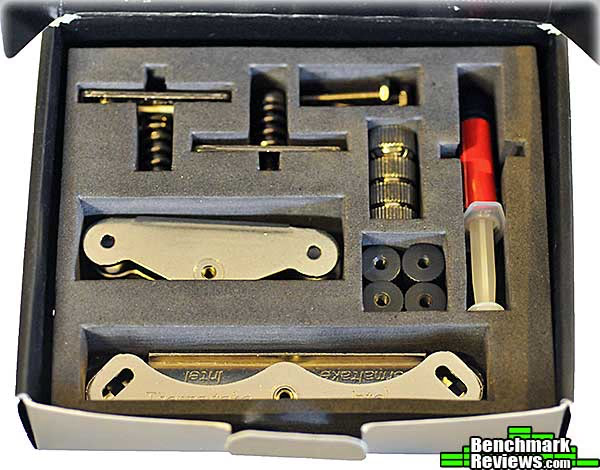
The accessories kit includes a plastic combination backplate (not shown) for all socket types, and this beautifully laid out kit of mounting parts. The various parts are labeled on the inside box top. This is so much nicer than a set of sealed plastic bags, and is the same type of kit Benchmark Reviews saw included with the otherwise disappointing Thermaltake Jing cooler.
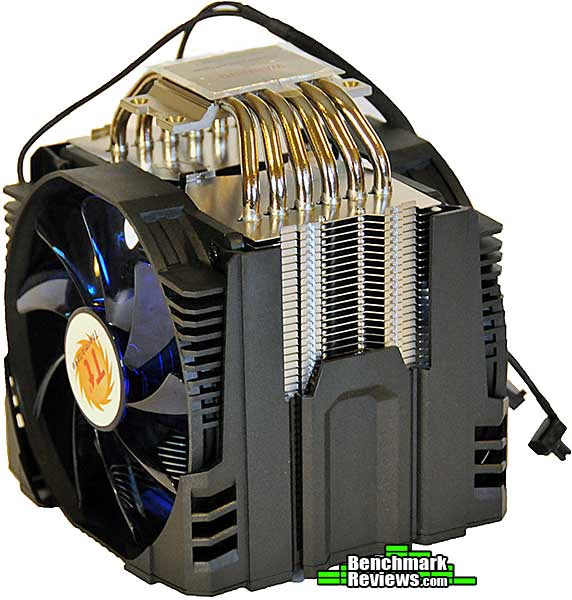
The Frio OCK's two 120mm fans are mounted to a plastic frame that slips over the actual heat sink. Unlike the original Frio, where each fan had its own power cable and speed control knob, the Frio OCK fan's cables are spliced together and controlled with a single knob, and require only a single fan header on your motherboard. Unplugging the knob from the cable causes the fans to run at their lowest speed. That large bar code label you see on the fan header, by the way, has "Warranty void if removed" printed on the other side.

The Frio OCK's shroud and fans easily slip off as a single piece by pulling up lightly at the tabs on the side, between the fans. You'll need to remove this assembly to install the cooler. All the translucent blue plastic looks as if it should be lit somehow, but it's not.
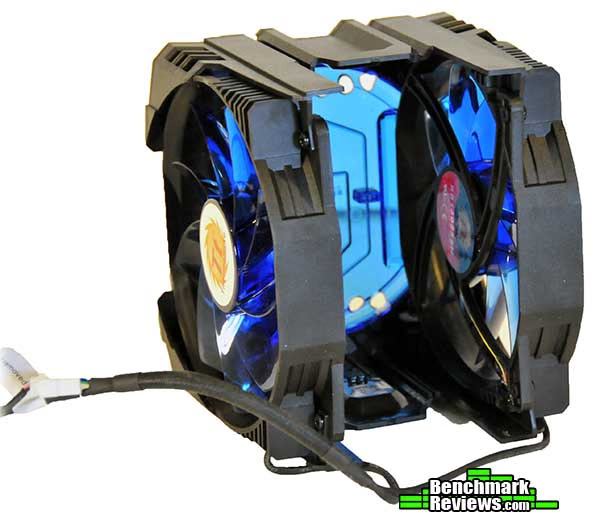
With its fan shroud removed, the Frio OCK bears a startling resemblance to the Prolimatech Megahalems. This 45-pin, 6 heat pipe cooler is a completely different design than the original Thermaltake Frio, and contains a fair amount more metal as well. The Frio OCK weighs about 50 grams more than the Frio.

We'll take a closer look at this cooler, along with mounting it, in the next section.
Thermaltake Frio OCK Detailed Features
The base of the cooler has a finely-grained circular finish. The texture can just barely be discerned with a fingernail. The base seems to be perfectly flat.

The back plate is comprised of black plastic and is of the increasingly popular "universal" design: flip it so that "Intel" shows for mounting to Socket 775, 1155/56, and 1366 systems; flip it the other way (to reveal "AMD") for Socket AM2/AM3 systems.

The mounting method is completely different from the original Frio (which used all-metal mounting hardware), but of a design that's becoming standard for many coolers: screws pass through the backplate and motherboard to locate standoffs, which in this case are knurled black plastic.
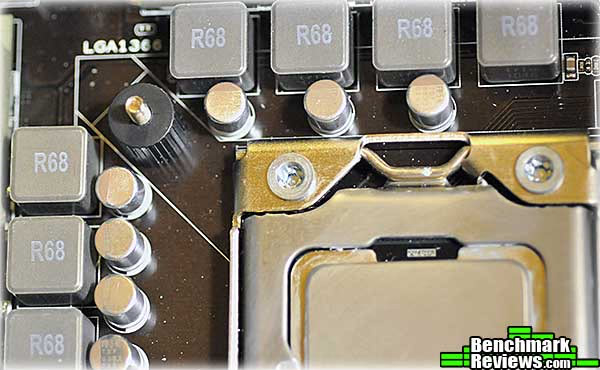
Two mounting plates are secured using the "thumb nuts" provided.

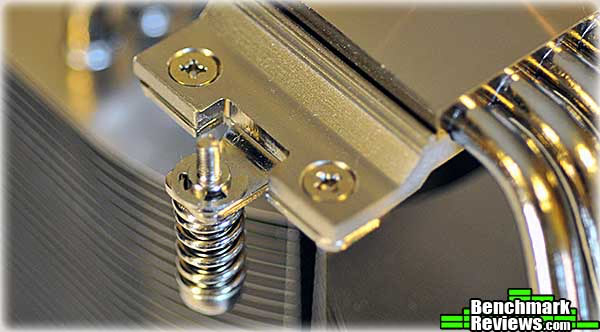
Small brackets attach to each side of the heat sink's base. Captive spring loaded screws will secure the heat sink to its mounting brackets, and the springs will provide the clamping pressure: just tighten the screws until they won't turn any more.
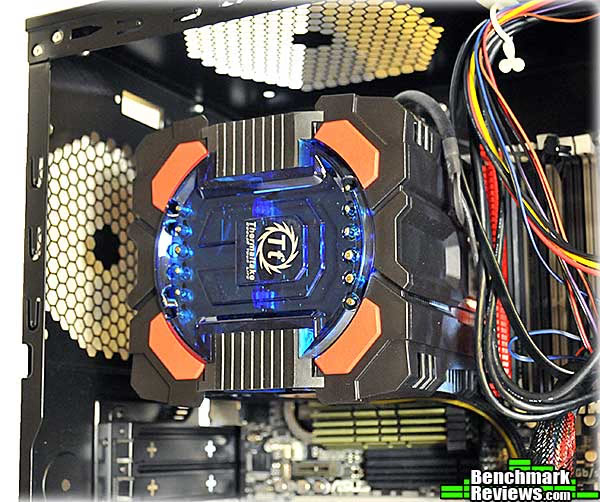
Here's the cooler installed on the ASUS Sabertooth X58 motherboard I use for heat sink testing. In most cases, you'd probably install it with the fans blowing out the rear of the case, but Benchmark Reviews has found that slightly better results can be obtained when the heat pipes are oriented horizontally. Fortunately Intel's square mounting hole layout makes it easy to install most coolers this way. In either orientation, though, this cooler overhangs the first RAM slot in my test motherboard, although the Corsair memory I'm using would fit if I removed the separate fins on top. Low-profile memory is just something a lot of coolers force on your these days, and it's something to keep in mind when buying memory with tall heat spreaders that can't be easily removed.
The original Frio did well in our testing, although the results from that test aren't directly comparable since my new test setup is much more demanding of a cooler's capabilities! Let's see how this one does.
Heat Sink Test Methodology
Benchmark Reviews is obsessed with testing CPU coolers, as our Cooling Section has demonstrated over the past few years. We've solicited suggestions from the enthusiast community, and received guidance from some of the most technical overclockers on the planet. As a result, our testing methodology has changed with every new edition of our Best CPU Cooler Performance series. Because of this, each article is really its own stand-alone product, and cannot be fairly compared to the others. Benchmark Reviews continues to test CPU coolers using the stock included fan (whenever applicable), and then replace it with a high-output fan for re-testing.
Manufacturers are not expected to enjoy this sort of comparison, since we level the playing field for all heat sinks by replacing their included fan with a common unit which is then used for every CPU cooler tested. Many manufacturers include fans with their heat sink products, but many 'stock' fans are high-RPM units that offer great airflow at the expense of obnoxiously loud noise levels, or, conversely, quiet fans that sacrifice performance for low noise. By using the same model of cooling fan throughout our heat sink tests, we can assure our results are comparable across the board. This is one of the more significant changes we have made to our test methodology, since many of the benchmark tests we have conducted in the past have compared the total package. Ultimately we're more interested in the discovering the best possible heat sink, and we believe that you'll feel the same way.
For each test, ambient room temperature levels were maintained within one degree of fluctuation, and measured at static points beside the test equipment with a digital thermometer. The Thermaltake Frio OCK and the comparison coolers used a common Thermal Interface Material of our choosing (listed in the support equipment section below) for consistency. The processor received the same amount of thermal paste in every test, which covered the heat spreader with a thin nearly-transparent layer. The heat sink being tested was then laid down flat onto the CPU, and compressed to the motherboard using the supplied retaining mechanism. If the mounting mechanism used only two points of force, they were tightened in alternation; standard clip-style mounting with four securing points were compressed using the cross-over method. Once installed, the system was tested for a baseline reading prior to testing.
At the start of each test, the ambient room temperature was measured to track any fluctuation throughout the testing period. AIDA64 Extreme Edition is utilized to create 100% CPU-core loads and measure each individual processor core temperature. It's important to note that software-based temperature reading reflects the thermal output as reported from the CPU to the BIOS. For this reason, it is critically important (for us) to use the exact same software and BIOS versions throughout the entire test cycle, or the results will be incomparable. All of the units compared in our results were tested on the same motherboard using the same BIOS and software, with only the CPU-cooler product changing in each test. These readings are neither absolute nor calibrated, since every BIOS is programmed differently. Nevertheless, all results are still comparable and relative to each product in our test bed (see The Accuracy Myth section below).
Since our test processor reports core temperatures as a whole number and not in fractions, all test results utilize ADIA64 to report averages (within the statistics panel), which gives us more precise readings. The ambient room temperature levels were all recorded and accurate to one-tenth of a degree Celsius at the time of data collection.
When each cooler is tested, Benchmark Reviews makes certain to keep the hardware settings identical across the test platform. This enables us to clearly compare the performance of each product under identical conditions. Benchmark Reviews reports the thermal difference; for the purposes of this article, thermal difference (not the same as thermal delta) is calculated by subtracting the ambient room temperature from the recorded CPU temperature.
Please keep in mind that that these test results are only valid within the context of this particular test: as the saying goes, your mileage may vary.
Intel Test System
- Processor: Intel Core i7-950 Bloomfield 3.06GHz LGA1366 130W Quad-Core Processor Model BX80601950, core voltage set to 1.35V
- Motherboard: ASUS Sabertooth X58 Intel X58-Express chipset) with BIOS 0603, BCLK set to 175MHz for a processor speed of 4025MHz
Support Equipment
- AIDA64 Extreme Edition version 1.50.1200
- MG Chemicals Heat Transfer Compound 8610-60G
- Stock fan (for heat sinks without fans): Thermalright TR-FDB-12-1600 (63.7CFM advertised)
- High-speed fan: Delta AFC1212D (113CFM advertised)
All of the tests in this article have been conducted using vertical motherboard orientation, positioned upright in a traditional tower computer case. Air-cooled heat sinks are positioned so that heat pipe rods span horizontally, with the fan blowing air out the top of the chassis. The radiators of water coolers are mounted as per manufacturer instructions. In both cases, fans are connected directly to the power supply (rather than motherboard headers) and run at full speed during the test. At the start of our test period, the test system is powered on and AIDA64 system stability tests are started with Stress CPU and Stress FPU options selected. AIDA64 loads each CPU core to 100% usage, which drives the temperature to its highest point. Finally, once temperatures have sustained a plateau (no observed change in average temperatures for 5 minutes), the ending ambient room temperature and individual CPU core levels are recorded thus completing the first benchmark segment. The time to reach stable temperatures varied between 10 and 20 minutes for the heat sinks in this test; larger heat sinks typically take longer to stabilize.
The second test segment involves removing the stock cooling fan and replacing it with a high-output 120 mm Delta AFC1212D cooling fan, then running the same tests again.
Note: Both the Antec Kühler H2O 620 and the Coolit Vantage A.L.C. are designed to drive their own RPM-controlled fans directly; in the case of the Vantage, an alarm will sound continuously if there is no fan connected. For these coolers, the fans were left connected as designed during stock fan testing. For high-speed fan testing, the Delta fan was connected directly to the power supply (and the alarm on the Vantage ignored).
The Accuracy Myth
All modern processors incorporate an internal thermal diode that can be read by the motherboards' BIOS. While this diode and the motherboard are not calibrated and therefore may not display the actual true temperature, the degree of accuracy is constant. This means that if the diode reports 40°C when it's actually 43°C, then it will also report 60°C when it's truly 63°C. Since the design goal of any thermal solution is to keep the CPU core within allowable temperatures, a processor's internal diode is the most valid means of comparison between different heat sinks, or thermal compounds. The diode and motherboard may be incorrect by a small margin in relation to an actual calibrated temperature sensor, but they will be consistent in their margin of error every time.
Testing and Results
For this test, I used the following heat sinks in addition to the Thermaltake Frio OCK:
- Thermalright Venomous X
- Thermalright Silver Arrow
- Thermalright Macho HR02
- Cooler Master V6 GT
- Prolimatech Super Mega
- Corsair Hydro Series H50
- Corsair Hydro Series H70
- Coolit ECO A.L.C.
- Coolit Vantage A.L.C.
- Antec Kühler H2O 620
For heat sinks without a stock fan, I used a Thermalright TR-FDB-12-1600 fan, which puts out 63.7CFM at 28dBa according to Thermalright. This mid-range fan provides good air flow and reasonable noise levels. For "apples to apples" testing, where each heat sink is tested with the same fan, I used a Delta AFC1212D. This high-performance PWM fan is rated at 113CFM at a claimed 46.5dBa at full speed...which means that while it moves quite a bit of air, it's very loud.
The Intel Core i7-950 I used in this test runs much hotter than the Core i7-920 I've used previously. At 1.35 volts, with a BCLK of 175Mhz, the 4,025Mhz CPU pumps out enough heat to stress the very best heat sinks. AIDA64 would report throttling once any single core reached 100 degrees Celsius; any throttling resulted in canceling the test and recording a "FAIL". This overclocked and overvolted Core i7-950 represents an extreme that many heat sinks cannot handle.
The chart below summarizes the results with the stock fans (hotter temperatures towards the top of the chart, and cooler temperatures towards the bottom). The twin-fan coolers have a real advantage here, since their dual fans generally move more air than the stock single fan of any of the other units. Remember that the lower the thermal difference is, the better the heat sink is performing.
Stock Fan Tests
|
Heat Sink (*=two fans) |
Thermal Difference (degrees Celsius) |
Difference from Frio OCK |
|---|---|---|
| Coolit ECO A.L.C. | 75.2 | +10.0 |
| Corsair H50 | 73.1 | +7.9 |
| Coolit Vantage A.L.C. (extreme) | 73.0 | +7.8 |
| Thermalright Macho HR02 | 71.0 | +5.8 |
| Prolimatech Super Mega | 67.2 | -2.0 |
| Antec Kühler H2O 620 | 65.9 | -0.7 |
| Corsair H70 (high)* | 65.3 | -0.1 |
| Thermaltake Frio OCK* | 65.2 | +0.0 |
| Thermalright Venomous X | 63.0 | -2.2 |
| Thermalright Silver Arrow* | 61.8 | -3.4 |
| Cooler Master V6 GT* | 61.2 | -4.0 |
For stock fan testing, I left the Frio OCK's fans turned to their maximum speed. The fans were audible but less noisy than the Delta fan used in the next test. The Frio OCK turned in excellent results, beaten by only a few other coolers.
Delta High Speed Fan Tests
|
Heat Sink |
Thermal Difference (degrees Celsius) |
Difference from Frio OCK |
|---|---|---|
| Corsair H50 | 68.1 | +3.8 |
| Coolit Vantage A.L.C. | 67.8 | +3.5 |
| Corsair H70 | 64.7 | +0.4 |
| Thermalright Macho HR02 | 64.5 | +0.2 |
| Thermaltake Frio OCK | 64.3 | +0.0 |
| Coolit ECO A.L.C. | 64.3 | +0.0 |
| Cooler Master V6 GT | 59.5 | -4.8 |
| Prolimatech Super Mega | 59.4 | -4.9 |
| Antec Kühler H2O 620 | 58.7 | -5.6 |
| Thermalright Venomous X | 58.0 | -6.3 |
| Thermalright Silver Arrow | 55.8 | -8.5 |
The Frio OCK is designed to be used only with its included fans; there's no way to attach other fans, and the plastic shroud will only accommodate the special fans that come with the cooler...so I had to attach the Delta fan with packing tape, taking care not to obscure any airflow. The Delta fan improved results by less than a degree. The included fans are rated at a higher combine air flow (121CFM) than the Delta (113CFM) and do a pretty good job.
I'll summarize my opinions on this cooler in the next section.
CPU Cooler Final Thoughts
Despite their similarity in names, the Thermaltake Frio OCK has virtually nothing in common with the standard Frio: the heat sink design and fans are quite different. The price is different, too, with the OCK version being about $15 more expensive despite its use of plastic in the mounting system.
I still dislike Thermaltake's use of a corded speed control that can only be reached by removing the side panel of your case and reaching inside the computer, and the fact that unplugging the controller sets the fans to run at their lowest speed is annoying, too. One small advantage over the standard Frio is that the fan cables are spliced together and require only one controller knob and one fan header on your motherboard.
With its standard fans, the OCK was able to keep my test system's CPU adequately cool and indeed was only four degrees off the performance of the top-performing (with stock fans) Cooler Master V6 GT. That's something Thermaltake can be proud of, until we get to the price: at $74.99 at Newegg, the Frio OCK is $15 more than the V6 GT, and the latter provides the advantage of PWM-controlled fans. Better performance and more convenience for less money is a winning combination for Cooler Master, which also provides color-changing LEDs in the bargain. The performance gap widens somewhat in the Delta fan tests, although I can't imagine running a system day to day with this noise level.
I think performance could have been improved a few degrees with a more robust mounting system, i.e. more clamping pressure. The use of a plastic backplate and standoffs at this price level is a little disappointing.
Like most high end coolers these days, the Frio OCK will block one or more of your RAM slots, requiring low-profile RAM. This is something to keep in mind when choosing a cooler (or memory) for your system.
Thermaltake Frio OCK Conclusion
Please remember that these test results reflect our experience with each cooler on a specific motherboard, with a specific processor, BIOS revision, BCLK and voltage settings, and test programs. The results of this test cannot be directly compared to other tests since many factors will have changed.
The Frio OCK is a high quality piece of equipment, and the clever pop-off fan assembly is a nice touch that makes installing the cooler that much easier. Non-PWM fans and plastic bits in the mounting system are disappointing at this price level.
Although the design implies the presence of LEDs or other lighting effects with its use of translucent blue plastic, there's nothing. Although LEDs just for the sake of it can look tacky, a few surface-mount blue or white LEDs lighting the top would have been nice. Otherwise, it's still an attractive piece of kit.
The performance of this cooler was very good, well into the "high performance air cooler" category with its stock fans, although it dropped back a bit in the high speed fan testing. This is mainly of academic interest since you can't really replace the stock fans. Still, it's both cheaper and more effective that most low-end water coolers.
The value part of the equation is this cooler's weakest point: its performance was very good, but for $74.99 at Newegg or $78.96 at Amazon, it should have been even better: that much will by you a Prolimatech Megahalems and a nice fan or two, and less than $10 more will get you the quieter and better performing Thermalright Silver Arrow. The lack of PWM fan control means that you'll have to open your case and twist a fiddly control to get the best performance, or leave the fans on full all the time and live with the noise. Adding PWM fans and dropping the price $10 would make this a much more attractive cooler.
Pros:
+ Good cooling performance
+ Excellent construction quality
+ Easily-removed fans and shroud make mounting simple
+ Twin fan cables spliced together requiring only a single fan header
Cons:
- Plastic backplate and mount standoffs
- Manual fan speed control requires opening your case to access
- Some cheaper coolers offer better performance and features
Ratings:
-
Performance: 8.75
-
Appearance: 9.0
-
Construction: 8.75
-
Functionality: 8.5
-
Value: 7.75
Final Score: 8.55 out of 10.
Recommended: Benchmark Reviews Seal of Approval.
Questions? Comments? Benchmark Reviews really wants your feedback. We invite you to leave your remarks in our Discussion Forum.
Reader comments from the original article
4 comments were posted before commenting closed. They are preserved as written. Original avatars no longer resolve and are shown as a placeholder.
RE: Thermaltake Frio OCK CPU Cooler CLP0575 hbsadf Permalink:
I don't think frio is a good name for a CPU cooler. I don't want my CPU to frio.
RE: RE: Thermaltake Frio OCK CPU Cooler CLP0575 David Ramsey Permalink:
Really? "Frio" means "cold" in Spanish and has connotations of cold even in English.
RE: RE: RE: Thermaltake Frio OCK CPU Cooler CLP0575 vikp Permalink:
He's pronouncing it wrong in his head. He's thinking FRY not FREEze.
RE: Thermaltake Frio OCK CPU Cooler CLP0575 Pinakio Permalink:
Thanks Dave for the review, my friend has the original Frio on his i7 and it has arguably the best pair of fans that comes with an aftermarket cooler. I thought it would be interesting to see how much improvements the 'OCK' version brings to the table but after reading this review I agree with you that it's not worth the extra 15 odd bucks (non OCK is ~$55). But then there is hardly any surprise, you can't do much with a product which is already as good as it comes. BTW that single fan socket is a nice touch, it is only recently that motherboard manufacturers have realized the importance of number of fan headers.