

| Silverstone FP37 SDXC USB 3.0 Front Bay Card Reader |
| Reviews - Featured Reviews: Accessories | ||||||||||||||||||||||||||||||||||||
| Written by Aidan Moore | ||||||||||||||||||||||||||||||||||||
| Thursday, 25 October 2012 | ||||||||||||||||||||||||||||||||||||
|
SilverStone FP37 Card Reader Review
Manufacturer: SilverStone Technology Full Disclosure: The product sample used in this article has been self supplied A media card reader can be a convenient device when it comes to transferring information between cameras, video cameras and a desktop computer. Media card readers based on USB 3.0 should take advantage of the higher interface bandwidth to allow much faster file transfer. In this article, Benchmark Reviews looks at the SilverStone FP37 USB 3.0 front bay media card reader to find out just what kind of features and performance can be expected from this newer generation of media card reader. As the size of DSLR image files continues to increase, so does the need to quickly transfer these files between devices. SilverStone's FP37 is one of a few aftermarket USB 3.0 based devices that potentially allow a faster way to move files between a DSLR camera and the computer. But is there any real advantage to using a USB 3.0 card reader with the media that is available for typical DSLR cameras? The typical read rate for a 400X CompactFlash device is 90 MB per second, which can easily saturate a USB 2.0 port. In theory, there appears to be a definite potential for a card reader to utilize the higher speed offered by a USB 3.0 ports.
Features & Specifications
Closer Look: SilverStone FP37The SST-FP37B is a 3.5" front-bay multi-card reader by SilverStone Technology. Model SST-FP37B sells for $32.99 at Newegg. 
The SilverStone FP37 is designed to fit any 3.5" I/O bay and contains the necessary cabling to connect to a motherboard equipped with a USB 3.0 header. 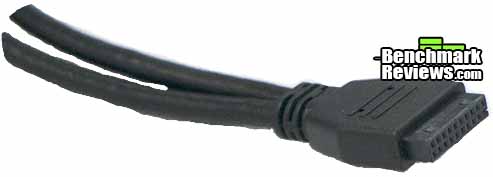
Newer motherboards that support USB 3.0 typically have this header, although care should be taken to ensure that your motherboard is equipped with the proper header. 
Anyone considering purchasing this unit should also ensure that there is an available 3.5" I/O bay on their system, or an adapter bracket and front panel cutout will be needed to make use of a 5 1/4 inch I/O bay. The front panel is well laid out with all media access slots clearly identified. One quirk of the FP37 design is that a CompactFlash card must be inserted upside down into the front of the unit and this information is not made clear on the front panel. It is quite easy to improperly align a CompactFlash card when inserting the card into the slot. Two LEDs on the front panel provide status on device power and the presence of the drive in one of the slots. SilverStone FP37 Detailed FeaturesThe SilverStone FP37 is very simply packaged with only the drive and attached cable, and a half page of instructions included in the box. The instructions reflect the simplicity of installing the device, directing the user to install the card reader in a 3.5" drive Bay and plug the USB cable into the motherboard connector. The front panel of the drive is well laid out with the SD and memory stick slots on the left, CompactFlash and XD in the center, and a single USB 3.0 connector on the right.
All memory slots are polarized, with the exception of the CompactFlash slot. It takes a few tries before a user realizes that the CompactFlash card must be inserted upside down for proper operation. The fact that the CompactFlash slot does not have any mechanical guides compounds the awkwardness of using this slot. Several users have reported damaging the FP37 through improper insertion of a CompactFlash into the slot. The USB 3.0 connector on the front of the FP 37 is a welcome addition to most desktop computers. InstallationIt is a good idea to flip the unit over and record the serial number of the FP37 before attempting to install it in your system. Depending on your particular serial number, one of two firmware upgrades to the device may be required before the FP37 is recognized by the operating system. SilverStone has an interesting way of providing firmware upgrade support for this device. A quick check of their website shows no files available in the download section, however the Q&A section reveals links for two versions of firmware which may be necessary depending on the serial number of the device. Using an Asus X79 motherboard as the test platform, Windows 7 immediately identified the presence of the new hardware when the unit was attached to the motherboard. There were a total of four devices identified, and after a few minutes three devices were successfully installed, and the fourth one appeared to have failed. A reboot was necessary, at which time all four devices were automatically recognized by the Windows operating system. Testing & ResultsTesting MethodologyThe SilverStone FP37 was benchmarked using CrystalDiskMark 3.0.1 to obtain the average read and write speed to the device. The FP37's performance was also compared against a USB 2.0 media card reader on the same computer platform. Test System
ResultsThe table below shows the results of the testing for three different media card types.
It can be clearly seen that a USB 3.0 devices generally faster for all media types, but there is a dramatic increase in speed when accessing high-speed CompactFlash devices. The benefit of using a USB 3.0 media card reader becomes apparent when high-speed CompactFlash devices are the primary means of storing and transferring data. A nearly 4 times increase in transfer speed can result in real time savings. Card Reader Final ThoughtsFor anyone who needs to transfer large files between a DSLR and a computer, a USB 3.0 card reader can be a real timesaver, and the FP37 performs this function very well. The FP37 is not without its quirks. The need to insert a CompactFlash card upside down is made even more confusing by the fact that this requirement is not described on the front panel, and there are no hardware guides to ensure proper alignment of the card to the socket.
SilverStone FP37 ConclusionThe SilverStone FP37 demonstrated very good performance, translating the high speed of the USB 3.0 interface into speedy media card access. Ultimate transfer speeds depend heavily upon type of media used, and the FP37 appears capable of handling these higher bandwidth devices. SilverStone has put some thought into the appearance of this front panel device by including two choices of front panel color. Most desktop PCs can add a bit of high-tech finish to their front panels by choosing either the black or silver front panel option. The device is well constructed and very simple to insert in an available 3.5" front panel bay. It would have been helpful if SilverStone included an adapter for 5.25 inch bays, as most computers have at most a single 3.5 inch front panel bay. The functionality of the FP37 could have been greatly improved if a CompactFlash socket had been a bity more intuitively designed for normal card insertion. The combination of difficult card alignment and upside down insertion somewhat reduces the functionality of this card reader. The SilverStone FP37 is available for $32.99 (Newegg), and represents good value given that an additional USB 3.0 connector is made available on the front panel. The FP37 device is a good choice for systems with an available 3.5" external drive bay and a motherboard with a USB 3.0 header available. Installation is straightforward even with the need to potentially upgrade the device firmware.Pros:
+ Supports most media card formats Cons:
- Upside down CF card insertion Benchmark Reviews invites you to leave constructive feedback below, or ask questions in our Discussion Forum.
Related Articles:
|
||||||||||||||||||||||||||||||||||||



Comments
I'm already running the latest firmware on the FP37 (DP04).
Any ideas?
##msi.com/product/mb/P67A-C43.html#/?div=Detail
- ATX 24-Pin power connector
- 8-pin ATX 12V power connector
- CPU x 1 / System x 4 FAN connectors
- CD-in connector
- Front panel audio connector
- Front panel connector
- 1 x chasis intrusion connector
- 2 x USB 2.0 connectors