
Olevia/Syntax 242T FHD 42-Inch LCD 1080p HDTV
Olevia 242T FHD 42" HDTV
With analog broadcasts terminating in February, you can bet HDTVs will be a hot item this holiday season. What was once considered a luxury, is now becoming mainstream as many HDTVs are approaching the price points of their standard definition counterparts. Olevia is one such company making this a possibility. With their 2-series HDTVs, Olevia is bringing the award-winning technology of their high-end televisions to the average consumer. Today, Benchmark Reviews looks at the Olevia 242T FHD 42" HDTV. Believe it or not, this fully featured, 42" 1080p HDTV can be had for just $849.99.
Of course, price isn't everything. Most consumers want to know what they're getting for their money. That's where Benchmark Reviews has you covered. Today we'll examine the features of this TV that matter most: functionality, capability, and picture quality. In other words, what this TV can do and how well it does it.
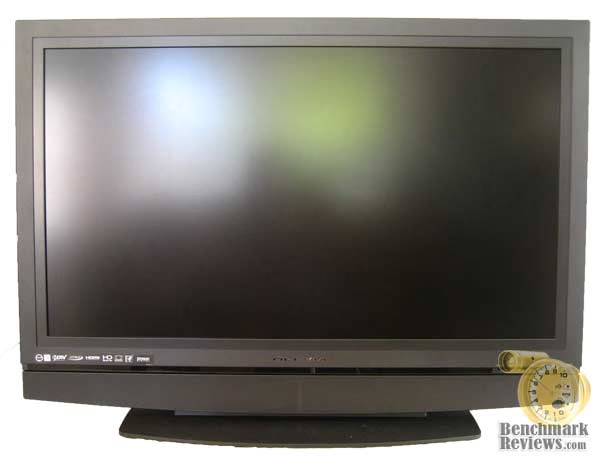
The interesting thing about TV and monitor reviews is there are only a handful of objective tests that can be performed. We can check heat output, power consumption, and color accuracy; but at the end of the day it really comes down to someone's subjective opinion. With that in mind, we'll include several photos throughout the review to supplement our opinions. It can't quite replace seeing the TV in person, but should give you an idea of what we're talking about.
About the company: Olevia
The Olevia brand is manufactured and distributed by the Syntax-Brillian Corporation. Here is what they have to say on their website:
"On November 30, 2005, privately held Syntax Groups Corporation and publicly held Brillian Corporation merged to form Syntax-Brillian Corporation. The company has a commanding presence in the future of high-definition TV: thin-film-transistor liquid crystal display (TFT-LCD) for 65-inch and smaller HDTVs for home theater and commercial HDTV applications. On November 21, 2006, Syntax-Brillian further broadened its product portfolio and distribution network with the acquisition of imaging technology pioneer, Vivitar Corporation.
Today, the company's lead products include its Olevia brand of widescreen HDTV-ready and HD built-in LCD TVs - one of the fastest growing global TV brands; and its Vivitar brand of digital still and video cameras. As a result of its award-winning products, broad sales channels, growing brand recognition and extensive patent portfolio, Syntax-Brillian is uniquely positioned to deliver quality digital entertainment and consumer electronics products to the world market. The U.S.-based company has strong Asian partnerships, well-established, global retail and distributor sales channels, and a worldwide supply chain that allows it to leverage economies of scale to deliver both outstanding quality and value."
There is one other important piece of information that you'll find on their website: Syntax-Brillian recently filed for bankruptcy. While they appear to be making every effort to keep the Olevia brand up and running, you may want to opt for that extended warranty through your retailer.
Olevia LCD Features
Director's Image
Calibrated 6500K color and a full range of brightness, contrast, color, tint, sharpness and mode controls available to tune image quality.
Big Picture Technology
Advanced technology displays up to 37% more of analog images and 11% more of digital broadcast images, without distortion.
User Friendly On-Screen Display
Scrolling icon wheel simplifies use and features preset video and lighting modes for different environments and content types.
Firmware Upgradeable via USB
The latest software updates and quality improvements available from the Olevia website, easily uploadable to your TV through its USB port.
OleviaCare
Live, in-house technical and customer support personnel assure a total quality experience - every time.
Olevia 242T FHD Specifications
PANEL
-
Screen Size 42"
-
Aspect Ratio 16:9
-
HDTV Built-In
-
Native Resolution 1920x1080
-
Response Time 8 ms
-
MTK processor powered by MDDITM Technology
-
Viewing Angle 178°/178°
VIDEO
-
1080p
-
2:2/3:2 Pull Down
-
Digital 3D Comb Filter
-
Progressive Scan
-
Supported Resolutions NTSC & ATSC with High Definition (480i, 480p, 720p, 1080i, 1080p)
AUDIO
-
Audio Output 1 R/L RCA Audio
-
Earphone Output 1 Stereo Mini Jack
-
Speakers 30 watts (2 x 15W)
I/O PORT
-
Component Input 3 Component (VGA connector accepts 3rd component source)
-
Composite Input 2 Composite with R/L RCA Audio (Share with S-Video Input)
-
S-Video Input 2 S-Video with R/L RCA Audio (Share w/Composite Input)
-
Digital Input 2 HDMI w/HDCP, PC + Video, Plug & Play
-
VGA Input 1 15-Pin D-Sub, PC + Video, Plug & Play
-
Optical Audio Output
-
Service Port DB-9
-
TV System Support up to 1080p
FUNCTION
-
Channel Return
-
Closed Caption
-
Favorite Channel
-
Languages: English, French and Spanish
-
MTS
-
PIP/Split Screen
-
Sleep Timer
-
V-Chip Parental Control
WARRANTY
-
Warranty Type One year on-site warranty
OTHER
-
Dimensions 27.5" x 41.4" x 9.8"
-
Net Weight 59.5 lbs
-
PC Resolution Support up to 1920 x 1080 @ 60Hz
-
Power Consumption 271 watts
-
Regulatory Approval FCC-B, UL (Canada & USA), ICES-003, Energy Star, Green Product Compliant
-
Universal Remote
Closer Look: Olevia 42" HDTV
The first thing I noticed upon receiving the Olevia, was the size of the box; it was huge! If you think you're going to cart this thing home in that hot little coupe of yours, you'll be sorely disappointed. Even a moderately sized sedan might give you trouble. After inspecting the packaging, however, the reason for such a large container was clear. I discovered a baseball-sized hole in the side of the box. Lucky for me, the extra 5-inches of dead space between the box and the TV kept it safe from whatever shipping hazard it had encountered.
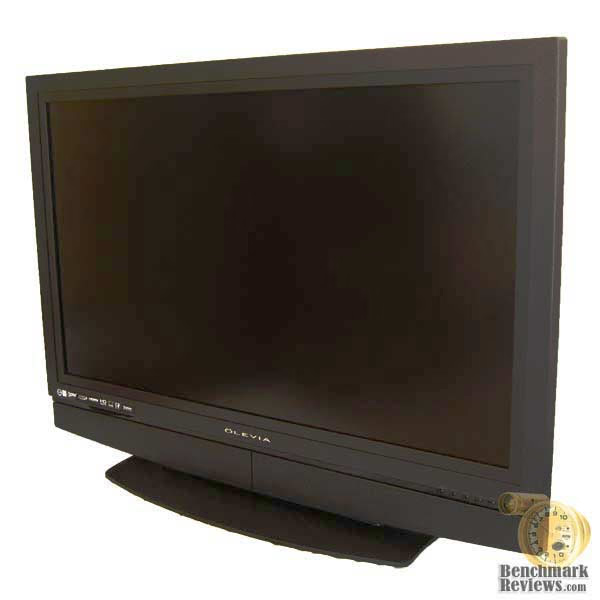
With the Olevia safely unboxed, I was immediately impressed by its modesty. No pretentious high-gloss finish here, just a beautiful screen housed in a flat black bezel. After all, there's no need for a flashy frame competing for your attention.
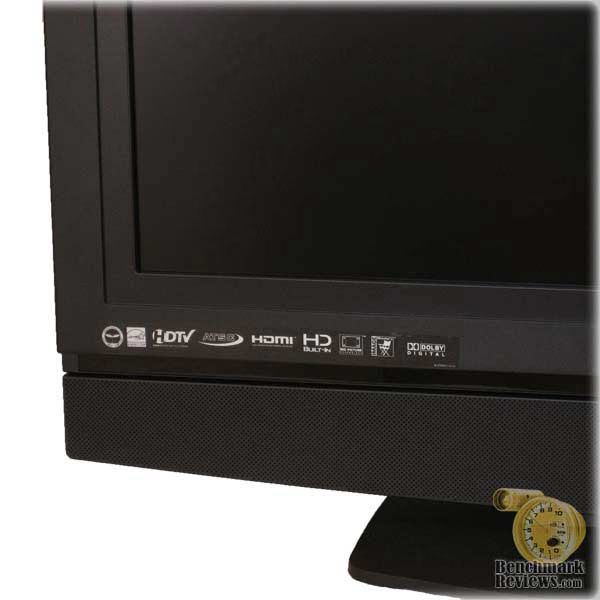
Here you can see the standard logo set. If you've been keeping up with HDTVs, you might notice one common logo is missing: HDCP. This TV is in fact HDCP capable, but it has become so common Olevia probably didn't see a need for it. A careful eye might also catch the small strip of glossy trim just under the logos. This spans the length of the unit and adds a nice aesthetic touch without being too distracting.
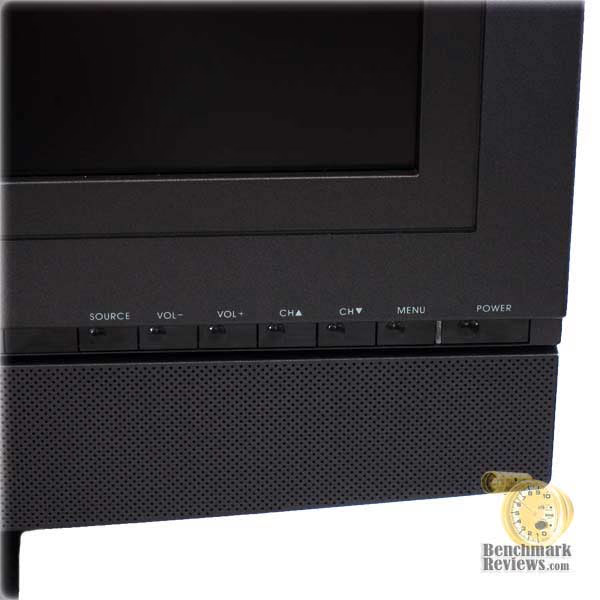
In this shot, you can see the button set. All of the usual suspects are there and should provide enough functionality should you misplace the remote. Just left of the power button is the power LED, which illuminates blue when the set is turned off. This can be changed within the menu system, a feature not often found on sub-$1000 TVs.
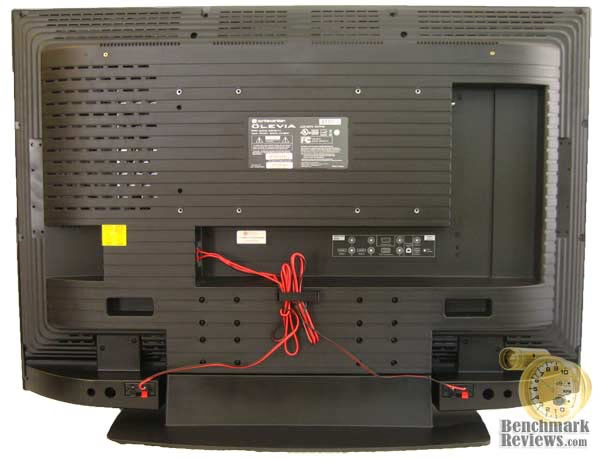
On the back side, are the standard VESA mounts and two hand-holds for easy lifting. The L-shaped cut-out is where the digital and analog outputs are located. This is a great feature for those who plan to mount the TV, as it will make routing the cables through the mounting hardware much easier. And, if you guessed that that's speaker wire running across the back, your are correct. This TV features detachable speakers, which I'll cover below.
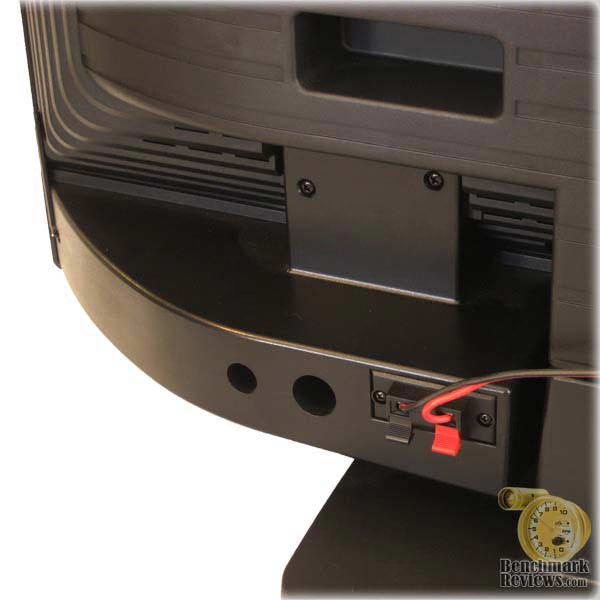
At 15W each, the speakers on this TV are actually quite good. A volume level of about 50% will fill an average size living room. With a screw driver and a few minute of your time, the speakers on this TV are also detachable. This is particularly useful if you plan on mounting the TV, as you can detach the speakers to cut down on some of the bulk. You may also consider removing them if you plan to run a separate audio receiver. Most people, however, will get by quite nicely with just the way they are.
Olevia 242T FHD Detailed Features
So far we've covered the exterior appearance, but most people will want to eventually turn the unit on. This section takes us one step closer to getting there. Although sold at an entry-level price point, this set has a number of premium features that set it apart from the competition.
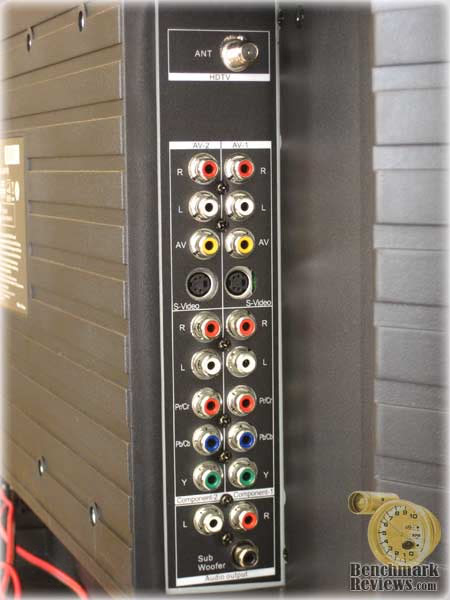
To start with, Olevia separates it's I/O connections into two panels: one analog and one mostly digital. In this view you can see to the analog panel, complete with one coaxial input for the built in QAM tuner, followed by two sets of composite and component inputs. The bottom of the panel is occupied by left and right analog audio outputs with a separate subwoofer output. The tuner works very well, managing to pull in a few stations I didn't receive before. Unfortunately, I still only get one HD channel from the over-the-air broadcasts in my area, which is not necessarily a fault of the TV.
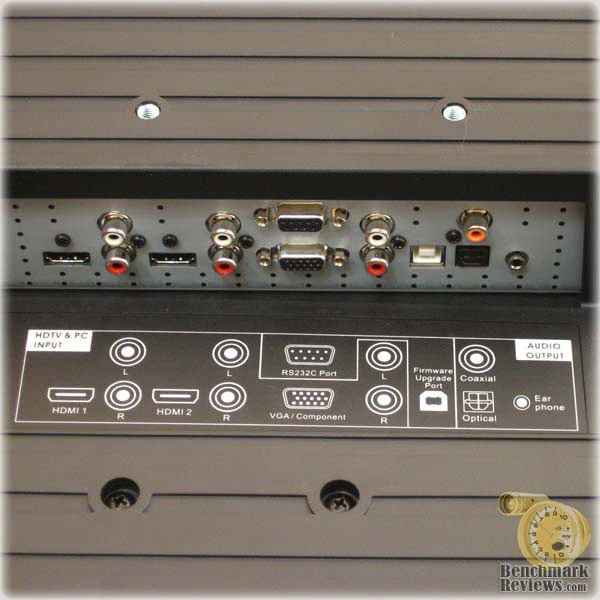
The second I/O panel contains two HDMI inputs with optional analog audio inputs. However, these are auto-sensing jacks with no way to switch between HDMI and analog audio manually, which might be an issue for HTPC owners who like to use a discrete sound card. To the right of the HDMI ports is a VGA port, service port, more audio outputs, and (of particular note) a firmware upgrade port. Firmware upgrades are a win-win for the customer and manufacturer. On one hand, the manufacturer cuts down on service calls by fixing common bugs in-house and distributing the new firmware over the net. On the other hand, the customer benefits by not having to wait on a technician to repair a problem the manufacturer has already provided a fix for.
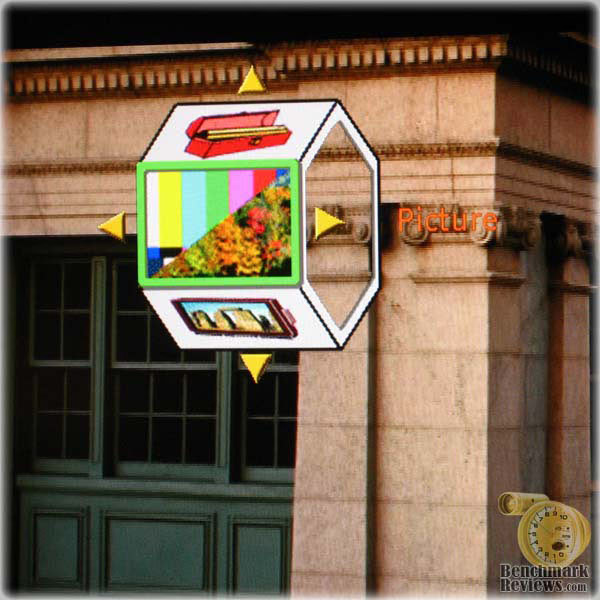
The menu system is one of the most controversial aspects of this TV. Olevia strays from the typical text-based menu system to a pictorial wheel. There are four major categories to choose from initially: Setup, Screen, Picture, and Audio. Selecting one will take you into further sub-wheels, each with its own icon. I had some difficulty with the navigation at first. The "Screen" and "Picture" categories are a bit ambiguous and I often didn't know where to start to find the setting I was looking for. After working with the menu for a few hours, though, it become much more familiar. Nevertheless, I do have a few suggestions for Olevia. The menu can be really hard to see against some video sources. It would be much easier if the wheel were a bit larger and set against a semi-transparent background.
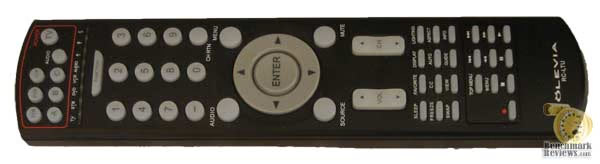
For those who can't stand the new menu system, there is some relief. The remote includes most of the commonly used functions as independent buttons. I found the "Source" and "Aspect" buttons particularly useful.
Testing Methodology
I will be testing the Olevia 242T FHD with a HTPC. The great thing about using a HTPC, is the ability to play a variety of content at varying resolutions and see how the TV responds. You won't find any charts or graphics in this test, though. Instead I will be including photos of the TV in action. With the exception of some JPEG compression and cropping, these photos have been completely untouched and should provide you with in idea of the image quality you can expect.
Test System
-
Motherboard: GA-MA78GM-S2H (Onboard audio and video disabled)
-
System Memory: Wintec AmpX DDR2-800
-
Processor: AMD 4850e (Stock Speed)
-
Video: HIS Radeon HD 4670 (Connected to TV via HDMI adapter)
-
Disk Drive 1: Western Digital Caviar WD6400AAKS 640GB
-
Optical Drive: LG GGC-H20L 16X Blu-ray/HD DVD
-
Enclosure: Antec NSK2480
-
PSU: Antec EarthWatts 380W
-
Operating System: Windows Vista Home Premium SP 1
Results
After working with the Olevia for a few weeks, I have to say that I am very happy with it. I tried a number of the different video sources, including the built-in tuner, a Nintendo Wii (480p & 480i), standard DVDs, Blu-ray, and even a few YouTube and Netflix videos. It handled everything with ease. I did run into a few issues with setup, but nothing that would be considered a deal-breaker. Before I get into that, though, let me first point out what this TV does well:
-
Image quality was amazing, particularly with Blu-Ray Disc content. This might seem obvious, but I've seen a number entry level HDTVs under-perform in this area.
-
Horizontal viewing angles were as advertised. I could move from one side of the TV to the other with very little picture degradation.
-
The TV accepted 1080p resolution from the video card without a hitch. It also features a 1:1 pixel mapping mode, which provides a crisp, distortion free picture. (Remember to turn off any over/underscan settings on the source)
-
Response time kept up with fast action films and gaming. I played several games including COD4, Crisis, and Oblivion with no noticeable ghosting or stuttering. I did experience tearing in some areas, but enabling vertical sync eliminated it.
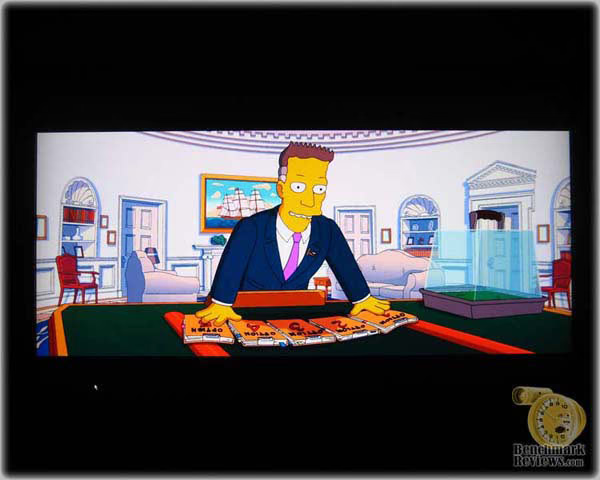
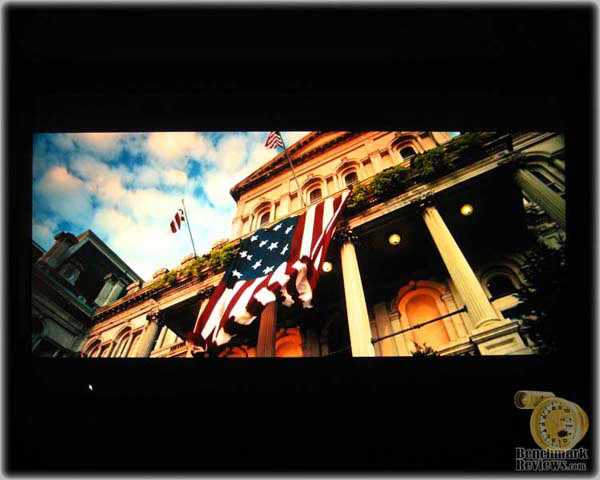
Here you can see an example of 1080p content from the HTPC's Blu-Ray drive. I used PowerDVD with hardware acceleration enabled, a common configuration for most HTPCs. For the sake of variety, I included both animated and live-action movies. (You may notice some artifacts in the image above, however that is strictly a result of JPEG compression and was not visible on the actual TV)

Even after weeks of testing, it was hard to find any complaints. Still, there are a few issues that you should be aware of:
-
Cropping is turned on by default. I spent a good 30 minutes adjusting the video settings before discovering this. If your video source is not completely visible at 1080p, check this first.
-
I could not get picture-in-picture to work with two HDMI sources, although it worked great with one HDMI source and the tuner.
-
While horizontal viewing angles were pristine, vertical viewing angles were not--a common problem for most LCDs. The image starts to lose contrast at about 30 degree above center and gradually gets worse. That said, you'll want to mount this TV at eye-level for best picture quality.
Olevia 42" HDTV Final Thoughts
HDTVs and monitors can be a hard category to review. Unlike most hardware, which has a plethora of objective benchmarks, TVs and monitors come down to subjective opinion. What I can tell you is this TV has stood up to my stringent standards. It's built well and felt very solid to work with. The picture quality is outstanding, much better than I would expect given the price point. The included 1:1 pixel mapping also makes it an ideal choice for a PC connection and if you've never gamed on a big screen, you're definitely in for a surprise. There were a few minor issues, but nothing I couldn't get used to or work around.
Olevia 242T FHD Conclusion
For most of us, the first encounter we have with an HDTV is the display model on the sales floor or a photograph on an e-shopping site. Nevertheless, manufacturers put a great deal of effort into boxing their product; Olevia is no exception. In fact, they do so quite well. The box has full color photographs and detailed specifications of the TV contained within. More importantly though, there is plenty of padding and protection to buffer in the event of a shipping accident.
The appearance of the Olevia 242T FHD is nothing to write home about, but that's exactly what I like about it. I prefer the flat black color of the panel trim. That's not to say there's anything wrong with the high-gloss look, it's just a matter of opinion. In fact, even Olevia varies between the two within its product lines. I do suggest taking a look at your lighting situation before opting either way though. The glossy trims tend to produce considerable glare in the presence of overhead lights.
Appearance and construction quality often get tossed around as synonyms, but believe me, they are not. Manufacturers have discovered all sorts of tricks to throw off our perceptions of quality. Having worked with the Olevia for a few weeks, I can tell you it stood up to my barrage of tests. As with just about all LCD products, though, you always have to be conscious of the screen. A simple scratch or too much pressure can damage the screen permanently.
Functionality testing was a give and take with this particular TV. Olevia provided a great feature set and plenty of I/O options, but there were a few things lacking. I would really like to see picture-in-picture and split screen work with all video sources, not just a few. The menu system also needs a redesign. It's functional, but the learning curve may lead to frustration. That said, the TV does what its supposed to do and does it well. It displays a great picture with rich colors and sharp details, all with minimal set up time.
Value is where this product really shines. Olevia set the MSRP on the 242T at $1399, but recent sales have dropped the price as low as $849.99. Make sure to factor in the cost of that extended warranty, though. Chances are you won't need it, but with the recent bankruptcy filing of Syntax-Brillian, it wouldn't hurt to have an extra layer of coverage.
As entry-level HDTVs go, the Olevia 242T FHD definitely ranks among the top. It offers great picture quality and plenty of features to keep you spinning around that menu wheel. For what you get with this TV, it's hard to justify the higher cost of its siblings, but as always, I recommend taking a trip to your favorite retailer to see it for yourself.
Pros:
+ Excellent picture quality with SD and HD sources
+ True 178 degree viewing angles
+ Fast response time with no ghosting
+ Great I/O options and layout
+ Supports 1:1 pixel mapping
+ Full set of post-processing features
+ Built in QAM tuner
Cons:
- Mediocre vertical viewing angles
- PIP does not work with both HDMI inputs
- Menu system is often confusing or unreadable
- No option to manually switch HDMI audio source
Ratings:
-
Presentation: 9.00
-
Appearance: 8.00
-
Construction: 8.75
-
Functionality: 8.50
-
Value: 9.50
Final Score: 8.75 out of 10.
Questions? Comments? Benchmark Reviews really wants your feedback. We invite you to leave your remarks in our Discussion Forum.
Reader comments from the original article
10 comments were posted before commenting closed. They are preserved as written. Original avatars no longer resolve and are shown as a placeholder.
code kenny Permalink:
tv is great but can't find the code for a universal remote. Can someone help me? Thanks
olevia can't turn on no more juan ramirez Permalink:
i just wondering if is any good technician to fix my problem. well, my 42 inches is damage, when you tried to turn on the tv does not turn on any more but the blue light does. so i wondering if is any one to know how to fix it and fix it for me.
Olivia 42 inch LCD owner richard baker Permalink:
Juan did you find anyone to fix your Olivia Mine is doing the same thing...Best Regards Rick
Merchandise supervisor Jorge Damiani Permalink:
Go to Amazon and buy the kit is 18.0 usd, and fix the problem
Two things Priscilla Permalink:
Juan- the blue light comes on when the TV is off (Odd, I know...) It's like a stand-by light. My problem- I figured the TV is HDCP capable, but the TV and my cable box won't agree on it, so I get an error (once I hook up the HDMI cord) saying the TV doesn't support HDCP and to use the RGB individual component cords. Any help on that?
RE: Two things Olin Coles Permalink:
HDCP is a digital copyright protection technology, which requires digital cable connections. You must use DVI, HDMI, or some other digital cable interface.
Oh! Priscilla Permalink:
Also, I am figuring you mean the LCD bulb gets power but the TV gets no signal? Perhaps there's a problem with the component cords? I don't think it'd be the main power supply... good luck guys!
Mr. Charles Permalink:
My Olivia 42 inch TV will not come on. Is it the power supply system.
RE: Mr. David Ramsey Permalink:
Have you considered...I dunno...maybe contacting Olevia?
Olivea Power Failure Bob Permalink:
The biggest problem with the 42" Olivea is the power board inside. They have used cheap capacitors on the set. search E-bay for the repair kit, which is a whole new set of capacitors, and unsolder/resolder the set. It's really easy to do and would take a novice about 3 hours to do. Someone experienced, about an hour. I've done it and the set works great again.