
Insignia NSLCD32 32 Inch HDTV Widescreen LCD Monitor
Introduction: Insignia NSLCD32
With a 1000:1 contrast ratio and 500 cd/m² brightness, the Insignia 32-Inch 720p HDTV lets you view crisp, clear picture quality from your favorite movies and games. The HDMI input ensures there's no loss of picture quality when you hook up your A/V components. Join Benchmark Reviews in a detailed inspection of the Insignia NSLCD32 32 Inch 720P HDTV Widescreen LCD Monitor.
This TV has a built-In HDTV Tuner, which allows you to add an HD-capable antenna to receive over-the-air high-definition broadcasts, where available. An optional set-top box is required for high-definition cable or satellite programming. This makes the unit forward compatible for the digital changeover we discussed in our Guide: How to shop for your first HDTV.
HDMI input provides an uncompressed all-digital audio/video link for the highest-quality 720p connection and supports copy-protected HD broadcast content. When used with a PC, the native resolution is 1366 x 768 pixels for clear, crisp images. At a sub $600.00 price range, the NS-LCD32 is a display to be reckoned with!
About the company: Insignia
Insignia is a Best Buy brand made exclusively for sale in Best Buy stores only.
The problem with figuring out just who manufactured this TV for Best Buy is that each product is manufactured by different vendors, even within the same product categories. So that while one LCD HDTV might have been terrible, another TV (even the same model) might have been produced up by an entirely different manufacturer, which makes finding out who made yours nearly impossible. Funai and LG are just a couple of the larger manufacturers that produce LCD HDTVs for Best Buy under the brand name “Insignia”.
Features & Specifications
-
16:9 wide-screen aspect ratio delivers a cinema-style entertainment experience
-
High brightness (500 cd/m²) and contrast (1000:1) for a quality viewing experience
-
Wide 176° horizontal and vertical viewing angles make every seat the best in the house
-
3D Y/C digital comb filter delivers state-of-the-art detail and color enhancement
-
2 built-in 7W stereo speakers and amplifier
-
PC video input lets you connect your computer to experience high-resolution images
-
Inputs: 1 S-video, 2 component video, 2 composite A/V, 1 HDMI, 1 VGA and 1 RF
-
Outputs: 1 A/V, 1 audio, 1 earphone and 1 digital audio
-
V-Chip parental controls keep children from being exposed to undesirable material
-
ENERGY STAR compliance assures a high standard of energy efficiency
-
Trilingual (English, French, Spanish) on-screen menus with closed captioning and sleep timer
-
What's in the box: 32" flat-panel LCD 720p HDTV and standard remote
Insignia NSLCD32 Product Details:
-
Warranty Terms - Parts 1 year
-
Warranty Terms - Labor1 year
-
Product Height 24"
-
Product Width 31.8"
-
Product Weight46.3 lbs.
-
Product Depth 11.7"
-
TV Type LCD Flat-Panel
-
Screen Size 32"
-
Aspect Ratio 16:9
-
Display Type Flat-panel LCD
-
Built-In_DVR No
-
Digital Cable Ready No
-
Flat Tube No
-
Digital Capabilities HD built-in
-
Maximum Resolution 1366 x 768
-
Vertical Scanning Lines 720p
-
Active Light Control No
-
Contrast Ratio 1000:1
-
Brightness 500 cd/m²
-
Dark Tube No
-
Comb Filter 3D Y/C
-
Media Card Slot No
-
USB Slot No
-
Digital Convergence Yes
-
HDMI Inputs 1
-
DVI Inputs 1
-
S-Video Inputs 1
-
Component Video Inputs 2
-
Composite Inputs 2
-
PC Inputs 1
-
RF Antenna Input 1
-
Headphone Jacks Yes
-
A/V Outputs 1
-
Audio Outputs 1
-
AM/FM Tuner No
-
Speakers 2
-
Simulated Surround No
-
V-Chip Yes
-
Sleep/Alarm Timer Sleep timer, yes; alarm, no
-
Remote Control Type Standard
-
Energy Star Yes
-
Box Dimensions11-3/4"H x 32"W x 24"D
Closer Look: Insignia NSLCD32
Insignia was not a brand name I’d ever heard of before looking for an LCD HDTV, but when researching an inexpensive HDTV for my HTPC build, the specs were fairly impressive for the price. This project, while not having a particular budget in mind was done “on the cheap”. I wanted something that would connect from my HTPC with DVI to HDMI, get decent resolution for gaming, play my DVDs, record TV shows, and this model fit the bill perfectly.
The Insignia NSLCD32 32 Inch 720P HDTV Widescreen LCD Monitor came packaged in a somewhat attractive, and colorful box with the main specs listed on the outside. The documentation was complete, and just what you’d expect for this particular item. Inside the box looked exactly like many other PC monitors’ packaging. Plenty of Styrofoam on each end of the display along with top and bottom covered in Styrofoam as well.

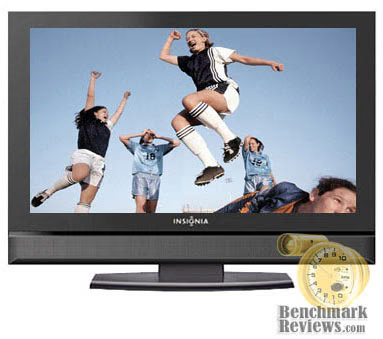
What cannot be seen well in this picture is the high gloss black lacquer like finish around the physical borders of this TV. It gives the appearance of a much costlier brand. Indeed it does look like an expensive HDTV. While the speakers can’t possibly deliver a true surround sound experience, they’re not bad. They’re a bit weak if you’re wanting the punch of theater sound, but once again at this price, you really can’t complain. Personally I run all sound through my surround sound system, never even turning on the TVs built in speakers.

The only drawback to the design of this particular model is the base cannot be adjusted in any way, shape, or form. I ended up wedging a DVD case under the front of the base to get it at the correct viewing angle for my couch.
There are no mounting points on the rear of this TV, and in that respect you’re getting what you’ve paid for. Mine sits on a matching black TV base cart, which holds my HTPC and DVD player, so the lack of mounting points were not a detriment for my needs, although they might be for some.
LCD HDTV Detailed Features
Insignia has positioned the interface buttons on the right side of the 32” HDTV screen.

Here you can access power, channels, volume and the onscreen menu.
The input connections are on the right side as well, just a bit more recessed than the interface buttons.
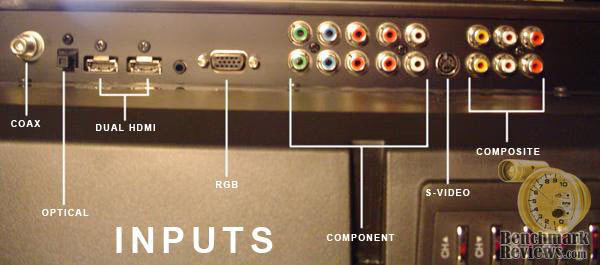
As you can see from the photo, you have coaxial, optical audio, dual HDMI, dual component, s-video, and dual composite inputs, which are very easily accessible, once again on the right side of the HDTV itself.

This photo represents the limited outputs for the HDTV. They sit on the left side of the HDTV itself. There is merely audio left, right, and video composite inputs.
The onscreen menu has everything that the “big boy” brands have and quite frankly everything that you could possibly need.
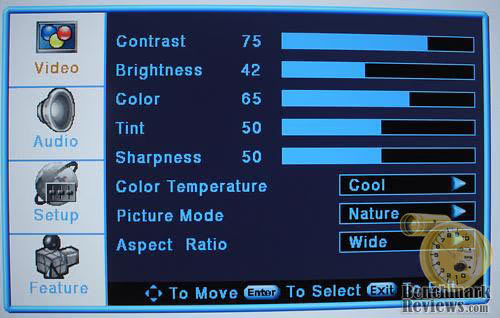
Here is the main menu that pops up when you click the “menu” button on the remote. The first to come up is your video menu. Adjustments for contrast, brightness, color, tint, color temperature, picture mode ( nature, soft, bright, and user defined), and aspect ratio (wide, cinema, normal, and zoom).
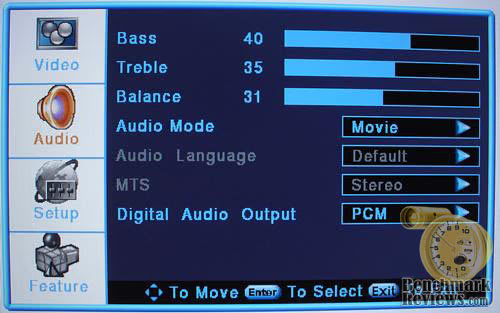
The second sub-menu is Audio. Here you have controls for bass, treble, balance, audio mode (movie, user, news, and music).

The third onscreen menu is “setup” which has settings for tuning band (cable, cable hrc, cable irc, cable auto, and air), auto channel search, add channel search, manual channel set, dtv signal, channel labels, and menu language.

This is the setup menu that is seen when connected via RGB or HDMI to a computer. Menu language is the only available setting.
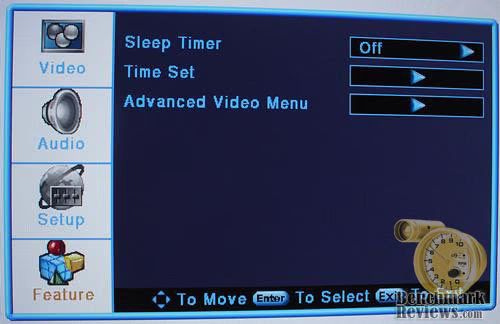
The fourth and final menu screen is “feature” where you can find sleep timer, time set, and advanced video menu which contains three different types of noise reduction.

This is the video source menu where you can switch input sources on the HDTV. When an S-Video source is connected, it will also show up in the menu.
LCD Monitor Testing & Results
Testing Methodology
While the heat output of an HDTV cannot be fairly compared to an LCD computer monitor, it’s still an issue that some are concerned with. That being said, all temperatures on the NS-LCD32 were taken with an IR Thermometer with an ambient room temperature of 21.8 c.
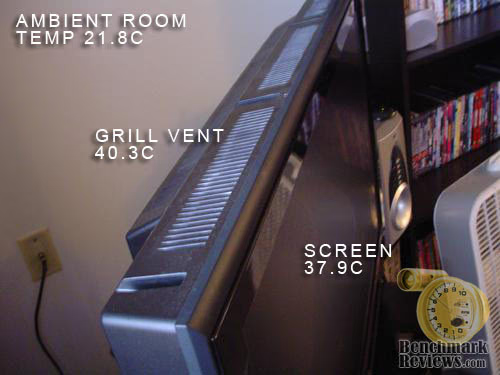
As you can see from the photo, the vent grill has about a 2.4c higher temperature reading than the front panel. While this is higher than say the Soyo 24” SOYO 24-Inch Widescreen LCD Monitor MT-GW-DYLM24D6, this is still considerably lower than most HDTVs. Keep in mind that this is 12” larger in size than the Soyo, and has an HDTV tuner built in as well.
While neither Best Buy, nor Insignia publish ms refresh rates on the NS-LCD32, I can tell you from personal experience that there is absolutely no visible ghosting while gaming. The NS-LCD32 has been through a complete round of the new Medal Of Honor Airborne single player, as well as countless hours of online RB6V, and came though shining like a star, especially considering the price of $529.99 that it was purchased for.
Test System
-
HTPC
-
Motherboard: Asus P5PL2 Motherboard
-
Processor: Intel Pent-D 950
-
Cooling: Asus VR Guard P5P2 CPU Cooler
-
Memory: 2GB Corsair XMS2-6400 DDR2 800
-
Video: MSI NX8600GTS-T2D256E-OC GeForce 8600GTS 256MB
-
Audio Device: Onboard SoundMAX 6 Channel Audio
-
Hard Disk: 80GB Seagate Barracuda Sata Drive and 250GB Seagate Barracuda IDE Drive
-
Optical Drive: LiteOn LH-18A1P IDE DVD/RW
-
Enclosure: Lian-Li PC-V880
-
PSU: ThermalTake TR2-470W 470w PSU
-
TV Tuner Card: AVerMedia 7 95522 96066 5 Digital PCI-Express x1 Interface Video Device
-
Operating System: Windows Vista Ultimate 32
Insignia NSLCD32 Results
The NS-LCD32 was tested for dead pixels with two separate programs, and neither found a dead pixel anywhere on this display. Calibration was done using one of the presets closest to my liking, and to tell you the truth, I couldn’t have done a better job myself.
This display was purchased for use with an HTPC, and a bit of online gaming as well. While the native resolution is listed as 1366 x 768, I can tell you that 1366 x 768 is not an option, at least not using NVidia Vista Drivers. The display defaults to 1360 X 765 at 60 hertz which is close enough for anybody. Running this display at higher resolutions brings the monitor refresh rate down to an unbearable 30 hertz, and running anything lower just doesn’t look as appealing.

In this screen cap of MOHA you can see what 32” of gaming goodness looks like (click photo for full size).

And here is what RB6V looks like in 32” wide-screen; simply stunning in real life (click photo for full size).
While you can’t accurately capture a TV program with any quality (even in Windows Media Center), I can show you a main Media Center screen cap.

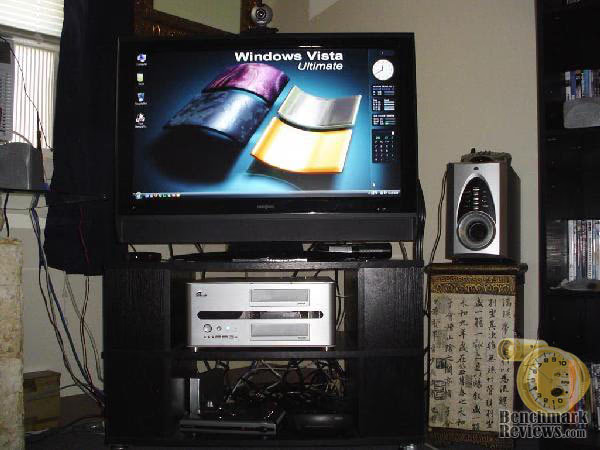
This is the default welcome screen in Windows Media Center (click photo for full size). I can tell you that both the TV and DVI to HDMI produce a stunning picture reminiscent of a much more expensive display.
Considering the least expensive 32” WS PC LCD monitor at newegg is $899.99, this 720p display is a steal at the $529.99 price I purchased it at (regular price is $599.99).
Final Thoughts
To tell you the truth, when I started out shopping for an HDTV to use as an HTPC display in this price range I wasn't expecting much. To say that the NS-LCD32 exceeded my expectations would be a major understatement and an injustice to the display itself. It does everything I need it to do, and then some. The display in TV mode is stunning, giving off warm, vibrant colors, and in PC mode not only is there no visible bleeding around the edges as in some PC displays, but the picture in gaming mode is nothing short of awesome! Watching recorded television shows in Windows Media Center is like watching the live program itself.
Conclusion: Insignia NSLCD32
The Insignia NSLCD32 32 Inch 720P HDTV Widescreen LCD Monitor came packaged well with plenty of documentation, lacking nothing the end user would require. It even included batteries for the remote (something that is going by the wayside as of late).
The NS-LCD32 is a very attractive display with a high gloss black lacquer like finish trim which you see in most of the upper end models.
This unit gives the feel of a much higher end display at a fraction of the cost with regards to construction.
As far as functionality goes, unless I missed something major, there was very little lacking with exception of the speakers, which I stated were somewhat weak, and only one set of A/V outputs. The NS-LCD32 has more than enough inputs to satisfy most, if not everyone.
For an inexpensive 720p HDTV (sub $600.00), it’s going to be tough beating the NS-LCD32; at least until prices start coming down more in this market. The physical construction of the NS-LCD32 is that of a much more expensive display, the inputs and features are on par with a more expensive unit, and the picture it delivers is quite good. So good in fact when looking at them in the store side by side the more expensive displays, it’s tough telling them apart. The only feature I found lacking was an adjustable base, or at the very least a base that tilts. If you watch your local Sunday paper for the Best Buy circular, you can find this display on sale in the low $500.00 price range, which is a steal considering what you get for your money.
In conclusion, if you’re looking for a good inexpensive HTPC display, look no further than the NS-LCD32.
The feature set, construction, and 720p HDTV picture it delivers at this price is very tough to beat. Speaking from personal experience, I can honestly say that I have no regrets over my purchase. The only advice I would give you is to purchase the additional four year warranty for an additional $99.00, if for nothing else than piece of mind.
Pros:
+ Extremely affordable
+ Good Construction
+ Excellent Picture Quality
+ A myriad of inputs
+ 1000:1 Contrast Ratio
+ Classy Finish
+ Excellent display for both TV and PC
+ One year warranty
Cons:
+ Non-adjustable base
+ Weak Speakers
Ratings:
-
Presentation: 9.0
-
Appearance: 9.0
-
Construction: 8.5
-
Functionality: 8.75
-
Value: 9.5
Final Score: 8.95 out of 10.
Questions? Comments? Benchmark Reviews really wants your feedback. We invite you to leave your remarks in our Discussion Forum.
Reader comments from the original article
2 comments were posted before commenting closed. They are preserved as written. Original avatars no longer resolve and are shown as a placeholder.
RE: Insignia NSLCD32 32 Inch HDTV Widescreen LCD Monitor Beauty Permalink:
I really didn't know that about the HDTV Insignia. I have been on the prowl for a new HDTV from DISH and I can't seem to find one that stands out to me. I was told from my DISH co-worker to check out Insignia, so that is what I'm doing here. I need one a new HDTV because I am trying to get HD free for life with DISH. I need to take advantage of this promotion while I still can because you never know when it can end. I think I need to go to the store and see the Insignia itself. I hope it is worth it!
RE: Insignia NSLCD32 32 Inch HDTV Widescreen LCD Monitor David Ramseyd Permalink:
Since this review was written four and a half years ago, the promotion has probably ended...