
ASUS Maximus II Gene mATX Motherboard
ASUS Maximus II GENE
ASUS has some tough shoes to fill. Fortunately, they're familiar shoes; their own, in fact. A long string of high performance motherboards that got adopted simultaneously by the enthusiast and gaming sets, led ASUS to create a specialty brand segment they call "Republic of Gamers". The ROG Creed goes like this: "The Republic of Gamers is committed to delivering the most innovative and best performing PC solutions to enhance the gaming experience of power users." That's a tall order, especially in the competitive PC component market where today's news is already old news. One of the newest members of this Republic is the Maximus II GENE, part of a new group of small form factor components that give nothing away in performance to their larger brethren. Benchmark Reviews is pleased to review this latest offering, based on the Intel P45 and ICH10R, and we put it through the wringer against a well known reference board.

The new ASUS Maximus II Gene motherboard goes by the tagline: Mini Size, Max Mobility. You have to take these marketing lines with a grain of salt, because taken at face value, you might expect a mini-ITX board. Instead we have a micro-ATX (uATX) board that squeezes almost every last feature from its feature-rich ROG brother into the slightly smaller format. A more accurate description might be: Micro Size, Max Performance.
Let's dive in and take a look at what ASUS calls: A new band of ROG heroes, the GENE squad.
About the company: ASUS
ASUS, a technology-oriented company blessed with one of the world's top R&D teams, is well known for high-quality and innovative technology. As a leading company in the new digital era, ASUS offers a complete product portfolio to compete in the new millennium. In 2007, one in three desktop PCs sold was powered by an ASUS motherboard; and the company's 2007 revenues reached US$6.9 billion.
ASUS products' top quality stems from product development. It's like learning Chinese Kung-Fu; one must begin with cultivating the "Chi" and inner strength. Besides innovating cutting-edge features, ASUS engineers also pay special attention to EMI (electromagnetic interference), thermal, acoustics and details that usually go unnoticed to achieve complete customer satisfaction. ASUS notebooks are the first TCO'99-certified notebooks worldwide.
The requirements for this honor include radiation emission control, energy (battery consumption), ecology (environment friendly) and ergonomics. To succeed in this ultra-competitive industry, great products need to be complimented by speed-to-market, cost and service. That's why all 8,000 over employees of ASUS strive for the "ASUS Way of Total Quality Management" to offer the best quality without compromising cost and time-to-market while providing maximum value to all customers through world-class services.
With unyielding commitment to innovation and quality, ASUS won 2,568 awards in 2007, meaning on average, the company received over 7 awards every day last year. BusinessWeek has ranked ASUS amongst its InfoTech 100 for the 10th straight year. ASUS has also achieved the number one title on the annual league table of Taiwan Top 10 Global Brands with a brand value of 11.96 billion US dollars.
Passion for Technology Technology is the heart of ASUS. We continue to invest in our world-class Research and Development so that we are always able to provide leading-edge innovations to people and businesses. Quality Quality is of utmost importance to ASUS. We continue to refine our quality management process to ensure customers receive quality solutions cost effectively. Long-term Relationships Whether they are our customers, media, shareholders or consumers, we believe in growing with our partners at all levels. Relationships with those key stakeholders are one of the most important factors of our continuing success. Perseverance All ASUS employees share the same sense of purpose. We thrive under pressure and we look forward to challenges. And all of us are working to accomplish the same mission, to empower people with innovative IT solutions.
Maximus II GENE Features
The number one feature of the Maximus II Gene is its size. ASUS has created a virtual band of small warriors, with their ROG GENE Series of products: the Rampage II GENE and the Maximus II GENE. Both are micro-ATX form factor motherboards, the Rampage sporting the latest Intel X58 chipset and the Maximus carrying the Intel P45 chipset. The emphasis is quite clear from the marketing materials; these are gaming boards that are meant to be used in smaller chassis for ease of transport to LAN parties. Because of their size, some features are not included, but a surprising number have been squeezed into the smaller format.

The Republic of Gamers consists of only the best of the best. We offer the best hardware engineering, the fastest performance, the most innovating ideas, and we welcome the best gamers to join in.
In the Republic of Gamers, mercy rules are only for the weak, and bragging rights means everything. We believe in making statements and we excel in competitions. If your character matches our trait, then join the elite club; make your presence felt, in the Republic of Gamers.
LGA775 Intel CoreTM2 Extreme/CoreTM2 Quad/CoreTM2 Duo Processor Ready
This motherboard supports DDR2 memory that features data transfer rates of 1200/1066/800/667 MHz to meet the higher bandwidth requirements of the latest operation system, 3D graphics, multimedia, and Internet applications. The dual-channel DDR2 architecture doubles the bandwidth of your system memory to boost system performance, eliminating bottlenecks with peak bandwidths of up to 19.2GB/s.
Intel P45 Chipset
The Intel P45 Express Chipset is the latest chipset designed to support dual-channel DDR2 1066/800/667 architecture, 1600/1333/1066/800/FSB (Front Side Bus), PCIe 2.0, and multi-core CPUs. It especially includes Intel Fast Memory Access technology that significantly optimizes the use of available memory bandwidth and reduces the latency of the memory accesses.
PCIe 2.0 and ATI CrossFireX Technology
This motherboard supports the latest PCIe 2.0 devices for double speed and bandwidth which enhances system performance. ATI´s CrossFireX boosts image quality along with rendering speed, eliminating the need to scale down screen resolutions to get the high image quality you want. CrossFire ignites with the higher antialiasing, anisotropic filtering, shading, and texture settings you desire. Adjust your display configurations, experiment with your advanced 3D settings, and check the effect with a real-time 3D-rendered preview within ATI´s CatalystTM Control Center to rule your CrossFireX system.
Dual-Channel, DDR2 1300 MHz
The motherboard supports DDR2 memory that features data transfer rates of 1300 / 1200 / 1066 / 800 / 667 MHz to meet the higher bandwidth requirements of the latest operation system, 3D graphics, multimedia, and Internet applications. The dual-channel DDR2 architecture doubles the bandwidth of your system memory to boost system performance, eliminating bottlenecks with peak bandwidths of up to 20.8GB/s.
iROG
The iROG is a special IC which enables several ROG highlighted functions that gives users full disposal of the motherboard at any stage! This design allows advanced user control and management to be processed purely at a hardware level. iROG greatly increases fun during overclocking for PC enthusiasts and it offers system maintenance and management with more control and efficiency.
MemOK!
Memory compatibility is among the top concerns when it comes to computer upgrades. Worry no more, MemOK! is the fastest memory booting solution today. This remarkable memory rescue tool requires nothing but a push of a button to patch memory issues and get your system up and running in no time. The technology is able to determine failsafe settings that can dramatically improve system booting success.
Voltminder LED
In the pursuit of extreme performance, overvoltage adjustment is critical but risky. Acting as the "red zone" of a tachometer, the Voltminder LED displays the voltage status for CPU, NB, SB, and Memory in a intuitive color-coded fashion. The Voltminder LED allows quick voltage monitoring for overclockers.
CPU Level Up
Ever wish that you could have a more expansive CPU? Upgrade your CPU at no additional cost with ROG´s CPU Level Up! Simply pick the processor you wanted to OC to, and the motherboard will do the rest!
See the new CPU speed and enjoy that performance instantly. Overclocking is never as easy as this.
Extreme Tweaker
Extreme Tweakers is the one stop shop to fine-tune your system to optimal performance. No matter if you´re looking for frequency adjustment, over-voltage options, or memory timing settings, they´re all here!
COP EX
The COP EX allows overclockers to increase chipset voltages without the worries of overheating. It can also be used to monitor and save an overheating GPU. The COP EX allows more freedom and less constraint for maximum performance achievement.
Loadline Calibration
Maintaining ample voltage support for the CPU is critical during overclocking. The Loadline Calibration ensures stable and optimal CPU voltage under heavy loading. It helps overclockers enjoy the motherboard´s ultimate OC capabilities and benchmark scores.
SupremeFX X-Fi built-in
SupremeFX X-Fi delivers an excellent high definition audio experience to the gamers of ROG. The SupremeFX X-Fi features unique audio innovations for gamers to spot enemies in 3D environment during game play. SupremeFX X-Fi combines the technological quality design of SupremeFX and sound effect technology from Creative Labs to offer games exceptional game sound with absolute quality.
Noise Filter
This feature detects repetitive and stationary noises like computer fans, air conditioners, and other background noises then eliminates it in the incoming audio stream while recording.
External LCD Poster
The new LCD Poster now posts critical POST information in an ever friendly and flexible external display. When system malfunction occurs, the LCD Poster automatically detects device failure and translates the errors on the LCD during POST.
ASUS Q-Connector
The Q-Connector allows you to connect or disconnect chassis front panel cables in one easy step with one complete module. This unique adapter eliminates the trouble of plugging in one cable at a time, making connection quick and accurate.
Onboard Switch
With an easy press during overclock, this exclusive onboard switch allows gamer to effortlessly fine-tune the performance without having to short the pins or moving jumpers!
ASUS EPU-6 Engine
The new ASUS EPU - the world's first power saving engine, has been upgraded to a new 6 engine version, which provides total system power savings by detecting current PC loadings and intelligently moderating power in real-time. With auto phase switching for components (which includes the CPU, VGA card, memory, chipset, hard drives and CPU cooler/system fans), the EPU automatically provides the most appropriate power usage via intelligent acceleration and overclocking - helping save power and money.
3DMark 06 Advanced Edition
3DMark is the most popular and authoritative 3D benchmark application used by professionals around the world. The 3DMark06 is the latest version in the popular 3DMark series, including advanced SM2.0 and HDR/SM3.0 Shader graphics tests and now including single, multiple core and multiple processor CPU tests as part of the 3DMark score! The accurate performance and image quality diagnostic tool, designed for DirectX9.0c, provides you with all the information you need to make all other competitors look bad.
Kaspersky Anti-Virus
Kaspersky Anti-Virus Personal offers premium antivirus protection for individual users and home offices. It is based on advanced antivirus technologies. The product incorporates the Kaspersky Anti-Virus engine, which is renowned for malicious program detection rates that are among the industry´s highest.
Maximus II GENE Specifications
The Maximus II GENE has a surprising full list of specifications: there's so much included that it's hard to tell that this is a purpose built board, targeted at a fairly narrow niche market. One thing I can't figure out is why they bothered to include a PATA connector. If you ditch that, you can get rid of the JMicron JMB363 chip, since the ICH10R Southbridge supports six SATA ports and eSATA to boot. In this day and age, I just don't see what use this extra hardware has, especially in a LAN party box.
|
CPU |
Intel Socket 775 CoreTM2 Quad/CoreTM2 Extreme/CoreTM2 Duo/Pentium dual-core/Celeron dual-core / Celeron Processors Support Intel 45nm Multi-Core CPU |
|---|---|
|
Chipset |
Intel P45 /ICH10R |
|
Front Side Bus |
1600/1333/1066/800 MHz |
|
Memory |
4 x DIMM, Max. 16 GB, DDR2 1300/1200/1066/800/667 Non-ECC,Un-buffered Memory |
|
Expansion Slots |
2 x PCIe 2.0 x16 (single max @ x16,dual @ x8 speed) |
|
Multi-GPU Support |
Support ATI CrossFireXTM Technology |
|
Storage |
Intel ICH10R controller |
|
LAN |
Gigabit LAN |
|
Audio |
SupremeFX X-Fi built-in |
|
IEEE 1394 |
2 x 1394a ports (1 port at back I/O, 1 port onboard) |
|
USB |
12 USB 2.0 ports (6 ports at back I/O, 6 ports onboard) |
|
Overclocking Features |
Keyboard-TweakIt |
|
Special Features |
ASUS MyLogo 3 |
|
Back Panel I/O Ports |
1 x External SATA |
|
Internal I/O Connectors |
3 x USB connectors supports additional 6 USB 2.0 ports |
|
BIOS |
16 Mb Flash ROM |
|
Manageability |
WOL by PME,WOR by PME,PXE |
|
Accessories |
User's manual |
|
Support Disc |
Support DVD: |
|
Form Factor |
uATX Form Factor |
Time to give your eyes a break from all these specs and take a closer look at the actual product: the ASUS Maximus II GENE in all its miniature glory.
Closer Look: Maximus II GENE
When I first got the Maximus II GENE and opened up the box, I was stunned. I'm not sure what I was expecting, but the only thing that I could think of when I spied the diminutive board nestled in the top section of the box was, "Wow, this thing looks like a Faberge egg." In contrast to most other motherboard packages, where the board is wrapped in an anti-static bag, hidden below the assemblage of the included accessories, ASUS used a crystal clear PETE cover on top, and a single sheet of anti-static film below the board to allow an unfettered view of their handiwork as soon as you lift the lid. The effect is impressive, and the board seems well protected to boot.
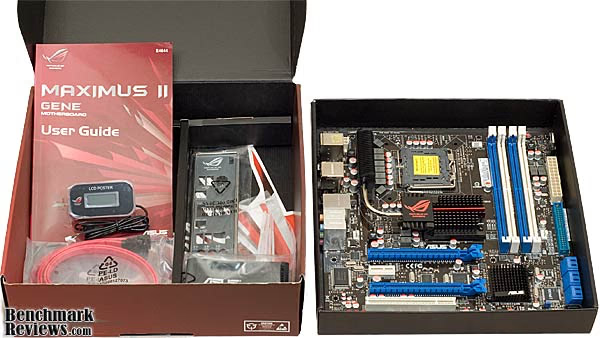
In the accessory tray there are the basic necessities: four SATA cables, two 90 and two straight connectors; an EIDE ribbon cable; the I/O cover, which I'll talk more about later; some mini Nylon wire ties; the handy ASUS Q-Connector Kit; a DVD driver disc; manual; decals; and the star of the show, the LCD POSTER. This clever device plugs into a dedicated socket on the motherboard, and provides status codes during POST in case of a fault.
The two blue PCIe-16X sockets are separated by one PCIe-1X socket, and the lower 16X one is flanked by one PCI socket. Either one of these will be potentially blocked by the presence of a double width video card. It's unlikely that someone buying this board will be using a single width video card in these slots. The distance between the two 16X slots is the standard two-slot pitch, meaning that the basic Crossfire jumper cables that come bundled with your ATI-based video card will fit, with no concerns.

The thermal cooling solution for the chipset is beautifully executed. There's an extra trick up its sleeve, too. The top portion of the heatsink is removable, and there is a mounting plate underneath for a water block. ROG, indeed! The main heat producing elements are connected by a heatpipe; the Northbridge and the power MOSFETS in the CPU Voltage Regulation section. There are two separate aluminum heatsinks for the Northbridge and Southbridge; they are not linked together with a heat pipe. The Southbridge rarely gets overheated by gaming applications; and this is clearly not a server board. The 6mm heatpipe heads out of the custom NB heatsink, towards the rear of the case, and then angles up to the cooling fins sitting atop the MOSFETS. I keep wishing there was a way to get major airflow over these fins, as they have the greatest potential for cooling the Northbridge. Think of how a CPU cooler works and you get the idea.
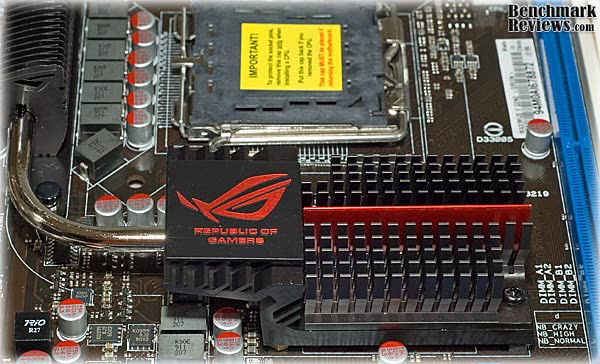
The Southbridge and MOSFET heatsinks are anchored with spring loaded plastic push pins. The Northbridge is anchored with spring loaded screws, installed from the back side of the board, similar to what you might see on a video card. In many cases, the bulk of the load for an effective overclock will rest with the Northbridge, so the substantial cooling capacity on display here is well worth the effort and cost ASUS put into it. Although not specifically provided for, it is possible to mount a 40mm fan on the face of the NB heatsink for additional cooling. Depending upon the airflow arrangement within a smaller uATX type chassis, this may be beneficial.

The ASUS Maximus II GENE features 100% High-quality Japan-made Conductive Polymer Capacitors, with an estimated 5,000hrs lifespan @105°C; 500,000hrs @65°C. They contain a solid organic polymer, have a low equivalent series resistance (ESR), and their service life rating means they will likely last as long as any of the components on the motherboard. All are through-hole mounted types, which are a lot easier to replace than surface mount devices (SMD). It's not common, but people have experienced board failures when a SMD capacitor gets knocked off accidentally. Bent is decidedly better than broken.

Two pairs of DDR2 DIMM sockets are available, color-coded blue and white, and they are located a good distance away from the CPU socket. I was pleased to see this, as some boards have the DIMM sockets too close to the CPU and the first set of DIMMs are blocked, or are tight up against the CPU cooler. This happens too often on full size, ATX spec boards, but it is more likely on a downsized version like this. On this build I'm using some of the most over-the-top RAM and CPU cooling schemes and we'll see how they work together.

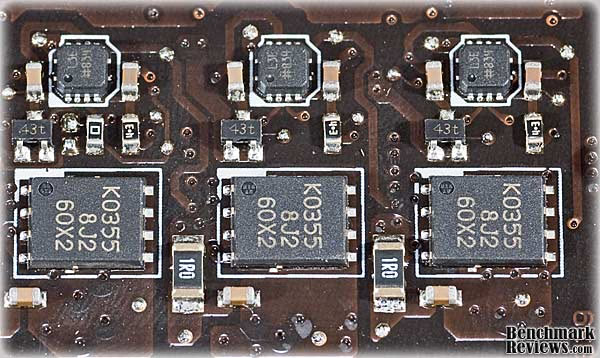
The back of the ASUS Maximus II Gene has only a few components located on it. The VRM section for the CPU has its control and driver circuitry located directly below it on the back side of the board. This is some good lateral thinking on the part of the board designers, there isn't a shorter path to be had than from this location; this pays off in higher bandwidth, lower EMI, and improved thermal performance. Now let's take a look at some of the features on the Maximus II GENE in more detail.
Maximus II Detailed Features
The Intel P45 chipset may seem like a cop-out for a true gaming board, but in the context of a uATX-sized LAN box, there's no room to take advantage of the capabilities offered by an X48 Northbridge. P45 chipsets are manufactured by a 65-nM fabrication process, an improvement over the 90nM process used for earlier chipsets. This improves the thermal performance of the chips, which is one reason they are such willing overclockers. The transistor count has increased, but the thermal dissipation hasn't grown much: P45 TDP = 22 W (9 W idle) versus P35 TDP = 16 W (~6 W idle). When you add the Intel ICH10R Southbridge chipset, with its support for SATA-II RAID 0, 1, 5, and 10 configurations and the Advanced Host Controller Interface (ACHI) for HDDs that support this function, you have a pretty modern and robust environment for the latest 45nM CPUs and 1200+ MHz RAM Modules.

The Maximus II GENE offers two PCI-Express (2.0) slots with CrossFireX support. The first PCI Express slot offers 16 lanes of bandwidth, and the second offers 8 lanes. Used together for multiple video cards, the first one throttles back to 8x, to accommodate the 16 lane limit of the P45 Northbridge. While not the most powerful solution out there, it will work well with all mid-level ATI CrossFireX configurations. Hardcore gamers will wish for 16x out of each slot for their dual 4870X2 cards, but I think you have to be halfway reasonable if you want to lighten the load and go uATX for mobile gaming scenarios.
The ICH10R Southbridge does everything a modern Southbridge needs to do, and has proven to be a good performer with the latest round of SSDs. There isn't a better mainstream solution out there right now for interfacing with SSDs, so go ahead and RAID-0 a couple of the fastest drives and boost your load times beyond belief. There are 6 SATA-II ports running directly off the ICH10R, so there's plenty of room for any configuration, sane or insane. They all point out the front side of the board, so make sure the case doesn't interfere. Mine did, and I could only use the top row of connectors.

Surrounding the processor socket there are the usual power supply components: high power MOSFETs, capacitors, and chokes. ASUS has used a new style of packaging for the chokes on this series of boards. As much as I wanted to rip one of those little gray boxes apart to see what is inside, I didn't dare. I'm not that good of an electronics surgeon.
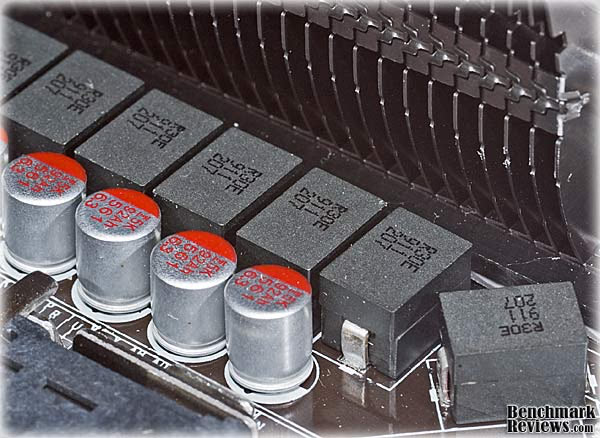
ASUS offers its own version of power-saving design; the Maximus II GENE has an 8-phase VRM power design, it also features separate 2-phase VRMs dedicated to the Northbridge and memory modules. In tandem with the basics of multi-phase voltage regulation, ASUS has supplied a new generation Energy Processing Unit (EPU), which provides total system power management by detecting current PC loadings and intelligently moderating power in real-time. It automatically provides the most appropriate power usage for the CPU, VGA card, hard drives, and CPU/chassis fans.
This was the second time I've used the new foam/foil RF shielding on the I/O panel, and I like it just as much as I did the first time. If you build enough PCs, you get used to gingerly lining up the I/O connectors with the thorny little tensioned fingers on the typical panel. You can usually feel when it's lined up just right, but on occasion things go horribly wrong. It's as if you've stuck your right arm deep into a dense hedge of rose bushes, and there's nothing you can do that won't rip your flesh into ribbons. Anything to avoid that scenario is time and money well spent, IMHO.
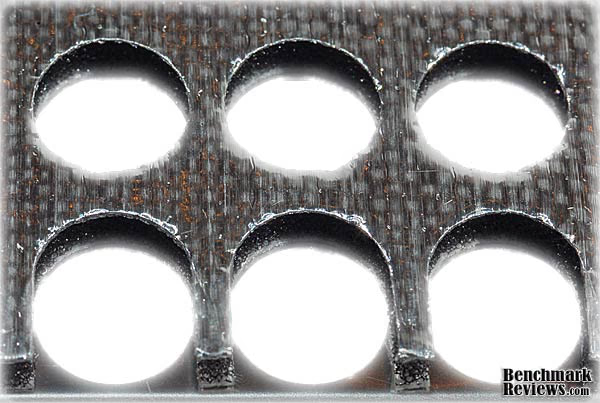
Another nice touch on the Maximus II GENE, are the cool ON/OFF and Reset buttons mounted on the motherboard. They're nice quality switches, with a solid feel and engraved (OK, molded-in) lettering.

There are five fan connectors placed around the board; one for the CPU, two Chassis Fan, and two Optional Fan. The OPT_FAN1 and OPT-FAN2 connectors have a temperature sensor connector beside them which can be used with optional sensors to provide closed loop control of two cooling fans. ASUS recommends using them for the chassis fans if you have two video cards installed, presumably to handle the additional heat load. I don't see how this helps at all; it's not like these two connections can make the case fans exceed their rated output. They can make the PC a little quieter, by throttling back that monster 3000 RPM, 38mm fan when the video cards are idling along, so they can be an enabling feature at best. BTW, only the CPU fan connector has PWM capability. Even though the other four connections are the 4 pin variety, only three of the pins are enabled. I know it sounds like I'm complaining here, but I'm not. It was very useful to have four "extra" fan connectors located right on the board, and I used all of them.

In the next section, component layout is examined, an area that is all too often an unexpected weakness for some motherboards.
Maximus II Gene Layout
The first thing I look for on any new MB is the spacing between the CPU socket and the memory slots. I want to make sure the CPU cooler doesn't interfere with the DIMM sockets. For this build, I looked at a couple of CPU coolers; my old faithful Cooler Master Hyper 212, the Cooler Master Hyper Z600, and the new tower on the block, a Prolimatech Megahalems CPU Cooler. The Hyper Z600 is the largest of the three, at 127mm x 127mm x 160mm tall, and it didn't fit very well, no surprise on a uATX format board. The Z600 is an anomaly, though; most vertical style coolers are rectangular in plan view, not square.
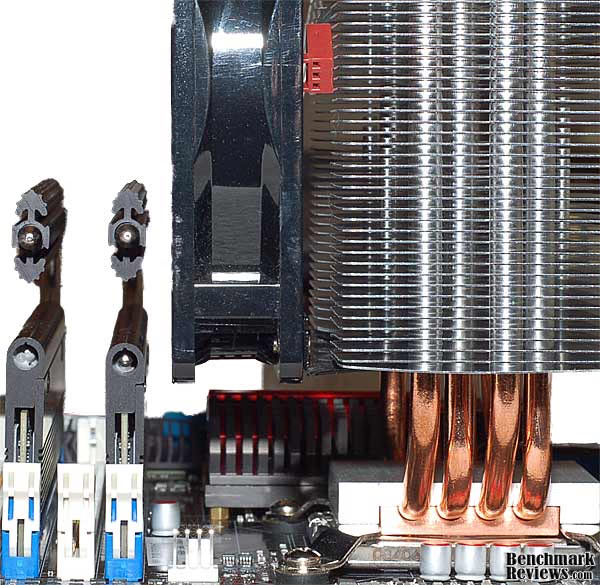
In this image you can see that the Hyper 212 allows mounting of the fan on the side with the DIMM sockets, it didn't interfere at all and I was able to use the massive OCZ Reaper modules. The Hyper 212 is fairly wide, at 73mm; the popular Xigmatek HDT-S1283 is only 50mm wide; an even smaller footprint. In this instance the CPU cooler was exhausting air towards the rear of the case, and the rear exhaust fan. If your LAN case doesn't have a top exhaust fan, this is the best way to mount a vertical style CPU cooler. An added bonus to this configuration was the cool air being drawn directly across the DIMM modules.
In cases with a top exhaust, it's best to turn the CPU cooler 90 degrees, and push air up through the fins towards the top; heat rises, after all. With the cooler turned sideways, it's the width of the fins that matters, as far as clearance. Here we see that even with the top performing Prolimatech MegahalemsCPU Cooler, there's still clearance for the first DIMM slot. CPU temps are not going to be a limitation with this board, almost all the top performing coolers will fit without interference with either the Northbridge or DIMM slots.

The second thing I look for is the cooling solution for the Northbridge. Most overclocking involves increasing the FSB clock, and upping the NB voltage in some cases. You want to make sure the NB stays cool, but again, you have to watch out for interference with the CPU cooler. You can also see that the Northbridge heatsink is very low profile, and not even close to interfering with either CPU cooler. There's enough clearance between the NB and the CPU heatsinks to accommodate mounting a 120mm or even a 140mm fan on this side of the CPU Cooler, plus room for an auxiliary fan on top of the NB heatsink. Although I didn't try one, a horizontal pipe style of CPU HSF should also fare well with this board.

I know I spent a lot of time on heatsink interference, more than on any other motherboard I've reviewed, but for its intended application, gaming in a LAN Party style case, it's a critical part of the success or failure of this product.
The Southbridge heatsink is a very low profile unit that is unlikely to interfere with anything. It seems adequate for the task, as it never got past warm during the tests. The ROG logo is cast into the fin design, but it's not colored red like the Northbridge.

One aspect of component layout that seems to trip some manufacturers up is the placement of the SATA connectors. The Maximus II GENE avoids interfering with the video card, by using six 90 degree connectors for the SATA ports of the ICH10R Southbridge, though there may be interference with the case. I could have used a mixture of both vertical and 90 degree connectors during my build, as I did experience some interference.
Going from left to right on the rear mounted I/O sockets, there is a nearly complete set of connections available. A PS/2 keyboard port is available, just in case your favorite gaming keyboard has a PS/2 interface. A total of six High-Speed USB 2.0 ports populate the I/O panel, with another six available on three motherboard headers, for connection to the case I/O panel. There is a substantial switch next, that acts to clear the CMOS when pressed fully; there is a partial shroud to prevent accidental actuation, but if you are still queasy about having this function out in the open, the switch can be disabled by an internal jumper on the board.

There is one IEEE-1394 Firewire port on the I/O panel; the larger, 6-pin version which is commonly used on larger, stationary devices, such as 3.5" external HDDs. There is also an additional motherboard header available to connect to an IEEE-1394 port on your computer case I/O panel, if one is available. One Ethernet LAN connections is supplied, with activity and link speed indicators at the corner of the RJ-45 port. S/PDIF digital audio OUT is available in optical format only. The external eSATA connector on the rear I/O panel is dedicated to eSATA, and fully functional without any settings or configuration. Eight channels of audio connectors come next, supplied by the VIA VT2010 High Definition Audio CODEC chip. This is a relatively new part and ASUS uses it to full advantage, providing EAX AdvancedTM HD 4.0, X-Fi CMSS-3D, X-Fi CrystalizerTM, and Creative ALchemy functions. Note that preproduction photos of this board show a silver colored module in this location with SupremeFX X-Fi printed on it. I suspect it is just a fancy aluminum cover, I don't think they actually changed the chip. Reviews of production X58-based boards have the enhanced packaging included, so it could be de-contenting for the P45 board, or simply a parts shortage.
The ATX power connections are ideally located, in particular the 12V, 8 position connector for CPU power was perfect. It's usually too close to something in the area, and can only be plugged in or unplugged when the motherboard is loosed from the mounting tray.

There's one more feature that's worthy of mention; the MemOK! button, located between the DIMM sockets and the cute little battery holder. This small, unassuming switch runs a diagnostic and setup routine that adjusts the memory settings in BIOS to practically guarantee a successful boot. Some, very aggressive, memory modules just won't boot at the standard 1.8V setting, no matter what clock speed they're running at. This is a handy feature for getting out of a hardware jam quickly and easily.
In the next section, Benchmark Reviews takes a look at the BIOS included with the ASUS Maximus II GENE, and see how overclocking friendly it is.
Maximus II GENE BIOS
If you're an overclocking enthusiast, then you need to be aware about capabilities of the motherboard BIOS. The BIOS never makes it onto the front page of the news release, it never gets a mention on the slick product packaging, it never gets displayed at CES, but it has a big influence on how well you are going to get along with your new system. All of the heatsinks and heatpipes in the world will not have the impact over the ability to achieve a decent overclock, to the same degree as a well designed BIOS will. The first thing that any hardware enthusiast or overclocker should do is investigate the latest BIOS available from the manufacturer. In some instances, the latest BIOS will only be found on special support forums, and you won't see any mention of it in the official product documentation on the manufacturer's website. That's just downright cruel, IMHO.
You know you are on the bleeding edge when you get a brand new motherboard, unwrap it, plug it in, and find out that there have been two revisions to the BIOS in the last 60 days. Since this is a brand new product, thankfully, I didn't have to do any updates before I could start testing.

ASUS puts most of its system tuning parameters on the "Extreme Tweaker" tab of this AMI BIOS. It is well laid out and all the CPU, memory and chipset tuning options are there. There is no special key combination required to unlock certain function, like some vendors have. The Maximus II GENE BIOS was easy to use for overclocking, as it puts the most commonly changed items in convenient, obvious places on the menu. Even though I used the more comprehensive menus, labeled "Extreme OC", I didn't feel like I had to wade through too much detail to get to the basics. There is a pared down set of menus, called "Gaming", and I could have just as well used that set for what I was doing, but the Extreme OC menus are familiar to me, so I continued to use them.

In this review, I wanted to replicate the BIOS settings from my last P45 motherboard review, and I had no problems getting the ASUS set up with similar parameters. It was an easy task to get my Intel E7300 CPU up to 3.8GHz, and the memory up to 1066 MHz clock speeds with decent timings. I left most of the settings on their default values, "AUTO" in almost all cases, and the board seemed to run a 400MHz FSB easily. I didn't have as much success running the FSB in the 450-500MHz range, but I think with a little more research and testing, it would have been possible. Others with more experience and patience have had great success with the P45 in this regard.
One nice feature of the BIOS screens that isn't conveyed by the screenshots above is that for each of the voltage settings, ASUS provides an on-screen reference of the standard voltage for that particular setting. Too many other manufacturers don't provide that level of info on the screen, right where and when you need it. Nobody likes to have to go looking for some arcane voltage reference, after they changed one of the settings, and the system failed to boot or gave you the BSOD. The ability to recover from exuberant excursions is something we should all value. (My 401k should recover as well...!)
In the next section, Benchmark Reviews begins testing the ASUS Maximus II Gene and we compare it to the Gigabyte GA-EP45-UD3P that I also reviewed recently. The Gigabyte is a full size ATX style board, and a bit lower in price and features, but performance wise, it's a good match up for the Maximus II GENE. For reference, I've also included some comparisons with the ASUS M4A79T Deluxe motherboard, with the Phenom II 720BE in its CPU socket, and DDR3 RAM in its DIMM slots. The boot drive (SSD) and the video card were exactly the same for the AMD and Intel system.
System Testing Methodology
At the start of all tests, the previous display adapter driver is uninstalled and trace components are removed using Driver Cleaner Pro.We then restart the computer system to establish our display settings and define the monitor. Once the hardware is prepared, we begin our testing. The synthetic benchmark tests in 3DMark06 will utilize shader models 2.0 and 3.0. In our higher-end VGA products we conduct tests at the following resolutions: 1280x1024 (19" Standard LCD), 1680x1050 (22-24" Widescreen LCD), and 1920x1200 (24-28" Widescreen LCD). In some tests we utilized widescreen monitor resolutions, since more users have adopted these products for their own computing.
Each benchmark test program begins after a system restart, and the very first result for every test will be ignored since it often only caches the test. This process proved extremely important in the World in Conflict and Supreme Commander benchmarks, as the first run served to cache maps allowing subsequent tests to perform much better than the first. Each test is completed five times, with the average results displayed in our article.
Our site polls and statistics indicate that the over 90% of our visitors use their PC for playing video games, and practically every one of you are using a screen resolutions mentioned above. Since all of the benchmarks we use for testing represent different game engine technology and graphic rendering processes, I feel that this battery of tests will provide a diverse range of results for you to gauge performance on your own computer system. Since most gamers and enthusiasts are still using Windows XP, DirectX 9 will be used for all tests until demand and software support improve for Windows Vista or Windows 7 gains widespread acceptance.
Test System 1
-
Motherboard: ASUS Maximus II GENE (0223 BIOS)
-
System Memory: 2X 1GB OCZ Reaper HPC DDR2 1150MHz (5-5-5-15)
-
Processor: Intel E7300 Core2 Duo 2.66GHz (Overclocked to 3.8 GHz)
-
CPU Cooler: CoolerMaster Hyper 212 RR-CCH-LB12-GP
-
Video: ASUS ENGTX260 MATRIX 896MB GDDR3 (Stock Clocks)
-
Drive 1: OCZ Vertex SSD, 30GB
-
Drive 2: OCZ Core v2 SSD, 30GB
-
Optical Drive: Sony NEC Optiarc AD-7190A-OB 20X IDE DVD Burner
-
Enclosure: SiverStone Fortress FT01BW ATX Case
-
PSU: Corsair CMPSU-750TX ATX12V V2.2 750Watt
-
Monitor: SOYO 24" Widescreen LCD Monitor (DYLM24E6) 1920X1200
-
Operating System: Windows XP SP3
Test System 2
-
Motherboard: Gigabyte GA-EP45-UD3P Rev 1.1 (F7c BIOS)
-
... all the rest is exactly the same
Test System 3
-
Motherboard: ASUS M4A79T Deluxe (0902 BIOS)
-
System Memory: 2X 2GB OCZ Reaper HPC DDR3 1600MHz (7-7-7-24)
-
Processor: AMD Phenom II 720 Black Edition (Overclocked to 3.8 GHz)
-
CPU Cooler: CoolerMaster Hyper Z600
-
Video: ASUS ENGTX260 Matrix 896MB GDDR3 (Stock Clocks)
-
Drive 1: OCZ Vertex Series SSD, 30GB
-
Drive 2: Seagate ST3750330AS 750GB 7200RPM SATAII
-
... all the rest is the same
Benchmark Applications
-
3DMark06 v1.1.0 (8x Anti Aliasing & 16x Anisotropic Filtering)
-
PCMark05 v1.2.0 System Test Suite for Windows XP
-
CINEBENCH Release 10
-
Crysis v1.21 Benchmark (High Settings, 4X and No Anti Aliasing)
-
Devil May Cry 4 Benchmark Demo (Ultra Quality, 8x MSAA)
-
Everest Ultimate Edition v4.60.1594 Beta by Lavalys
Support Equipment
-
P3 International Kill-A-Watt EZ (model P4460)
3DMark06 Benchmark Results
3DMark is a computer benchmark by Futuremark (formerly named Mad Onion) to determine the DirectX 9 performance of 3D game performance with graphics cards. 3DMark06 uses advanced real-time 3D game workloads to measure PC performance using a suite of DirectX 9 3D graphics tests, CPU tests, and 3D feature tests.
3DMark06 tests include all new HDR/SM3.0 graphics tests, SM2.0 graphics tests, AI and physics driven single and multiple cores or processor CPU tests and a collection of comprehensive feature tests to reliably measure next generation gaming performance today. Some enthusiasts may note that Benchmark Reviews does not include CPU-bound tests in our benchmark battery, and that only graphic-bound tests are included.
Here at Benchmark Reviews, we believe that synthetic benchmark tools are just as valuable as video games, but only so long as you're comparing apples to apples. Since the same test is applied in the same controlled method with each test run, I believe 3DMark is a very reliable tool for comparing graphic cards against one-another.
1680x1050 is rapidly becoming the new 1280x1024. More and more widescreen are being sold with new systems or as upgrades to existing ones. Even in tough economic times, the tide cannot be turned back; screen resolution and size will continue to creep up. Using this resolution as a starting point, the maximum settings were applied to 3dMark06 which for these tests include 8x Anti-Aliasing and 16x Anisotropic Filtering.

Flat, flat, flat....completely dominated by GPU performance. It was the same story at 1280x1024 and 1920x1200, too.

The 3DMark05 results are also dead even across all three test systems. All of the motherboard products tested produced nearly identical results. If you want to see variation for this benchmark, I suggest you go look at the video card articles here on Benchmark Reviews. Even comparing apples to oranges, e.g. Intel to AMD, all I got from this benchmark was, "Hey, what kind of video card is that? Check..." Memory architecture and speed, and CPU performance played no part in these results.
Let's look at how the systems stack up on a more broad-based system test suite - PCMark05.
PCMark05 Benchmark Results
Using synthetic benchmarks to compare one product to another has some distinct advantages when testing similar hardware, yet I have never found myself completely satisfied by the process. I have come to understand that they're important for comparing "apples to apples", and that the results are usually very consistent. But as with any synthetic benchmark, the numbers can often mean very little more than just numbers. We don't take a high score on a synthetic benchmark to mean that a product will/should perform well, and neither should you. The difference between projected performance and actual performance is the difference between fire and the fire-fly.
PCMark is a series of computer benchmark tools developed by Futuremark. The tools are designed to test the performance of the user's CPU, read/write speeds of RAM and hard drives. We have used these tests to simulate a battery of applications and tasks, which will produce results we can compare to other systems using similar hardware. After a series of five looped tests, the averages of the results are charted below. Keep in mind that all three systems shared the same GPU and SSD (specified in the Test Methodology section). The idea here was to isolate the motherboard, CPU and memory components to determine if one product and platform performed better than the other.
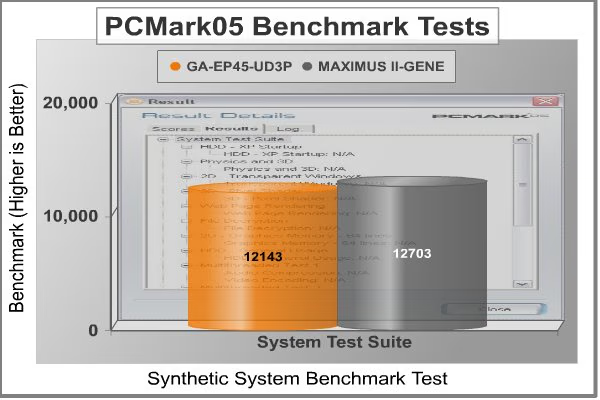
The PCMark05 System Suite benchmark results start to show some differences across the test systems. A 4-5% difference is not major, but it's measurable, if not exactly noticeable. I suspect the default BIOS settings on the ASUS Maximus II GENE are a little more aggressive. The chipsets, CPU, memory, SSDs and video card are all exactly the same in this test.
PCMark05 offers a CPU benchmark suite, with several processor intensive tests combined, to focus on raw CPU processing power. The CPU benchmark suite includes the following tests:
-
File Compression
-
File Decompression
-
File Encryption
-
File Decryption
-
Image Decompression
-
Audio Compression
-
File Compression
-
File Encryption
-
File Decompression
-
File Decryption
-
Audio Decompression
-
Image Decompression

Using the combined test performance to create an artificial score, PCMark05 generates a score called CPU Marks. Taking away most of the outside influence from our testing, and concentrating on CPU-only benchmarks, we can see if the Maximus II GENE has any tricks up its sleeve for manhandling the CPU. With the stock BIOS settings on each board, it looks like the CPUs perform identically. The AMD-based AM3 system puts up better numbers in the full test suite; the ASUS M4A79T, with its Phenom II X3 and 1600 MHz DDR3 memory, beats the Intel-based systems by over 7%.
Of the many tests inside the CPU suite, let's look at one that has a practical impact on many PC users. The Audio Compression benchmark test measures performance with synthetic encoding, and the two P45 based systems post identical numbers. The Phenom II X3 loses ground here, taking 13% longer to encode audio files.
CINEBENCH Release 10 Results
MAXON CINEBENCH is based on MAXON's award-winning animation software, CINEMA 4D, which is used extensively by studios and production houses worldwide for 3D content creation. The test procedure consists of two main components: The first two test sequences are dedicated to the computer's main processor and memory, using a 3D scene file to render a photo-realistic image. The scene makes use of various CPU-intensive features such as reflection, ambient occlusion, area lights and procedural shaders. The predefined benchmark included with the software reports the rendering scores for both a single core (1 CPU) and for all cores (X CPUs).
The third test measures graphics card performance and is run inside the 3D editor window. The project file used can test all graphics cards that support the OpenGL standard. In this scene, only the camera was animated. This scene places medium to low demands on graphics cards and tests the maximum speed with which the scene can be properly displayed.

Here we see two effects in the Scene Rendering tests: the higher efficiency of the Intel CPU core and a measurable gain for the AMD X3/DDR3 system. The 1 CPU benchmark is owned by the single Core2 Duo processor, and the two P45 boards perform within 1% of each other. Once all available cores are in the fight, the AMD X3 system wins convincingly and the two P45-based systems perform roughly the same. In the OpenGL test, the same story holds true, and the AMD X3/DDR3 combination comes out on top by 33%.
Let's look now at one of the most demanding benchmark application, a program that stresses all elements of the system: Crysis.
Crysis Benchmark Results
Crysis uses a new graphics engine: the CryENGINE2, which is the successor to Far Cry's CryENGINE. CryENGINE2 is among the first engines to use the Direct3D 10 (DirectX10) framework of Windows Vista, but can also run using DirectX9, both on Vista and Windows XP.
Roy Taylor, Vice President of Content Relations at NVIDIA, has spoken on the subject of the engine's complexity, stating that Crysis has over a million lines of code, 1GB of texture data, and 85,000 shaders. To get the most out of modern multicore processor architectures, CPU intensive subsystems of CryENGINE 2 such as physics, networking and sound, have been re-written to support multi-threading.
Crysis offers an in-game benchmark tool, which is similar to World in Conflict. This short test does place some high amounts of stress on a graphics card, since there are so many landscape features rendered. For benchmarking purposes, Crysis can mean trouble as it places a high demand on both GPU and CPU resources. Benchmark Reviews uses the Crysis Benchmark Tool by Mad Boris to test frame rates in batches, which allows the results of many tests to be averaged.

With no Anti-Aliasing dialed in, we see some subtle differences between the three systems, favoring the AMD X3/DDR3 based boards by 2-3fps. Nothing noticeable, but one of the reasons for running this test is to rule out any bugs or flaws. If the system is running properly, the GPU should be the dominant factor in this benchmark. Unlike the synthetic benchmarks, other factors do still exert some influence on the final results, especially at the lower resolutions.

With 4X Anti-Aliasing enabled we see a similar story, i.e. minor differences across the three systems. The best way to get better results in Crysis is to buy a better video card, or run multiple GPUs in Crossfire or SLI. There are some incremental differences however, and I wondered where the root cause lay. Hint, I think it gets discovered in the Everest benchmarks...
Devil May Cry 4 FPS Results
Devil May Cry 4 was released for the PC platform in early 2007 as the fourth installment to the Devil May Cry video game series. DMC4 is a direct port from the PC platform to console versions, which operate at the native 720P game resolution with no other platform restrictions. Devil May Cry 4 uses the refined MT Framework game engine, which has been used for many popular Capcom game titles over the past several years.
MT Framework is an exclusive seventh generation game engine built to be used with games developed for the PlayStation 3 and Xbox 360, and PC ports. MT stands for "Multi-Thread", "Meta Tools" and "Multi-Target". Originally meant to be an outside engine, but none matched their specific requirements in performance and flexibility. Games using the MT Framework are originally developed on the PC and then ported to the other two console platforms. On the PC version a special bonus called Turbo Mode is featured, giving the game a slightly faster speed, and a new difficulty called Legendary Dark Knight Mode is implemented. The PC version also has both DirectX 9 and DirectX 10 mode for Microsoft Windows XP and Vista Operating Systems.
It's always nice to be able to compare the results we receive here at Benchmark Reviews with the results you test for on your own computer system. Usually this isn't possible, since settings and configurations make it nearly difficult to match one system to the next; plus you have to own the game or benchmark tool we used. Devil May Cry 4 fixes this, and offers a free benchmark tool available for download. Because the DMC4 MT Framework game engine is rather low-demand for today's cutting edge multi-GPU video cards, Benchmark Reviews uses the 1920x1200 resolution to test with 8x AA (highest AA setting available to Radeon HD video cards) and 16x AF. The benchmark runs through four test scenes, but scene #2 and #4 are the ones that usually offer a challenge.

Devil May Cry 4 is not as demanding a benchmark as it used to be. Only scene #2 and #4 are worth looking at from the standpoint of trying to separate the fastest video cards from the slower ones. Still, it represents a typical environment for many games that our readers still play on a regular basis, so it's good to see what works with it and what doesn't. The Maximus II GENE pulls out a bit of a lead in this benchmark, even at the high resolution we test with. Where most benchmarks would be GPU bound at 1920x1200, DMC4 still puts some strain on the CPU and memory systems. Strangely, it didn't take advantage of the extra power available from the Phenom II X3 CPU or the DDR3-1600 memory available on the ASUS M4A79T board.
Everest Benchmark Results
EVEREST Ultimate Edition is an industry leading system diagnostics and benchmarking solution for enthusiasts PC users, based on the award-winning EVEREST Technology by Lavalys. During system optimizations and tweaking it provides essential system and overclock information, advanced hardware monitoring and diagnostics capabilities to check the effects of the applied settings. CPU, FPU and memory benchmarks are available to measure the actual system performance and compare it to previous states or other systems. Furthermore, complete software, operating system and security information makes EVEREST Ultimate Edition a comprehensive system diagnostics tool that offers a total of 100 pages of information about your PC. All of the benchmarks used in our test bed: Queen, Photoworxx, and AES, rely on basic x86 instructions, and consume very low system memory while also being aware of Hyper Threading, multi-processors, and multi-core processors.
CPU Benchmarks
The AES integer benchmark measures CPU performance using AES data encryption. It utilizes Vincent Rijmen, Antoon Bosselaers and Paulo Barreto's public domain C code in ECB mode and consumes only 48 MB of memory. The AES test is a close call between the two P45 boards, and the ASUS M4A79T with its Phenom II X3 CPU comes along and kills it with a 45% gain.

The Photoworxx benchmark tests for penalties against pipeline architecture. The synthetic Photoworxx benchmark stresses the integer arithmetic and multiplication execution units of the CPU and also the memory subsystem. Due to the fact that this test performs high memory read/write traffic, it cannot effectively scale in situations where more than two processing threads are used. The EVEREST Photoworxx benchmark performs the following tasks on a very large RGB image:
-
Fill
-
Flip
-
Rotate90R (rotate 90 degrees CW)
-
Rotate90L (rotate 90 degrees CCW)
-
Random (fill the image with random colored pixels)
-
RGB2BW (color to black & white conversion)
-
Difference
-
Crop
I've seen some unusual scores for this test recently, and I'm still convinced it's not a good pure CPU test. The Everest documentation hints that this benchmark is highly dependent on memory write speed, and we've see ample evidence of that in prior tests. Here we see a 9% gain by the ASUS Maximus II GENE board, using the same CPU, Memory, Chipset and clock settings. Clearly this test is sensitive to a wider variety of factors than some others. We'll keep an eye on this in the future to see what shakes out, but it looks like this one test is best used for comparing two different CPUs installed in the same test system. In any case, the Phenom II X3 with DDR3 RAM blows the C2D systems out of the water here with a 74% gain, so at least it validates the major performance differences between classes of CPUs.
The EVEREST Queen benchmark shows identical results for the two P45-based systems and a mild increase for the AMD X3.DDR3 system. Like the Photoworxx benchmark, the Queen benchmark focuses on the branch prediction capabilities and misprediction penalties of the CPU. It does this by finding possible solutions to the classic queen problem on a chessboard. At the same clock speed theoretically the processor with the shorter pipeline and smaller misprediction penalties will attain higher benchmark scores. Given the narrow focus on the CPU, the test results are not surprising.
Memory Benchmarks
Given the focus of this article on an apples-to-apples comparison between two P45-based motherboards, it's a good idea to look at a pure memory benchmark. So far we've seen some performance gains by the ASUS Maximus II GENE motherboard, where we didn't expect to see them. Perhaps the memory timings in the BIOS are helping the ASUS along, let's take a look?
EVEREST Ultimate Edition offers three simple memory bandwidth tests that focus on the basics; Read, Write, and Copy. In order to avoid concurrent threads competing over system memory bandwidth, the Memory benchmarks utilize only one processor core and one thread.

The Read benchmark measures the maximum achievable memory read bandwidth. The code behind this benchmark method is written in Assembly and it is extremely optimized for every popular AMD and Intel processor core variants by utilizing the appropriate x86, MMX, 3DNow!, SSE, SSE2 or SSE4.1 instruction set extension. The benchmark reads a 16 MB sized, 1 MB aligned data buffer from system memory into the CPU. Memory is read in forward direction, continuously without breaks.
The Write benchmark measures the maximum achievable memory write bandwidth. The code behind this benchmark method is written in Assembly and it is extremely optimized for every popular AMD and Intel processor core variants by utilizing the appropriate x86, MMX, 3DNow!, SSE or SSE2 instruction set extension. The benchmark writes a 16 MB sized, 1 MB aligned data buffer from the CPU into the system memory. Memory is written in forward direction, continuously without breaks.
The Memory Copy benchmark measures the maximum achievable memory copy speed. The code behind this benchmark method is written in Assembly and it is extremely optimized for every popular AMD and Intel processor core variants by utilizing the appropriate x86, MMX, 3DNow!, SSE, SSE2 or SSE4.1 instruction set extension. The benchmark copies an 8 MB sized, 1 MB aligned data buffer into another 8 MB sized, 1 MB aligned data buffer through the CPU. Memory is copied in forward direction, continuously without breaks.
There is clearly a difference between all three systems, with the AMD-based system favoring memory reads and copies, while the Intel system does slightly better on memory writes. The interesting thing in this benchmark is the difference in READ performance by the ASUS Maximus II GENE. It beats the GA-EP45-UD3P by 16%, a substantial margin. I think we've found the root of the performance advantage that the Maximus II GENE demonstrates over the Gigabyte board in several prior tests.
Maximus Power Consumption
Life is not as affordable as it used to be, and items such as fuel and electrical energy top the list of resources that have exploded in price over the past few years. Add to this the limit of non-renewable resources compared to demand and you can see that the prices are only going to get worse. Planet Earth is needs our help, and needs it badly. With forests becoming barren of vegetation and snow capped peaks quickly turning brown, the technology industry has a new attitude towards Green.

During the test period, four different conditions were examined. For the first, the power supply was plugged in and switched on (the actual ON/OFF switch on the PSU itself). The system doesn't "turn on" at this point, but the PSU is always supplying 5VDC to pin 9 of the ATX 24 pin power connection, so that the front panel power switch can function. This is known in energy management circles as an energy "Vampire", and the U.S. Department of Energy has estimated that this class of devices and operating modes (Instant On Anything, Wall Warts, Docking Stations, and device displays) can suck up 5-10% of an average home's electricity use. Each test was repeated three times, and the averages are displayed (although each test result was identical to the previous).
The second test was to start the system without the video card installed. This gets the motherboard into Power On Self Test (POST) mode, where it stops and does not continue to boot, due to the VGA error. The integrated video capability can't be completely turned off in the BIOS, so this adds some additional load that doesn't show up on most of the motherboards we've tested here at Benchmark Reviews. This condition is really the minimum possible load for an operational system, which include a HDD, a DVD drive, keyboard, and mouse. I unplugged all the extra case fans for these tests, the only fans running were the CPU cooler fan and the GPU cooler for the third and fourth tests.
The third test is a normal boot into Windows. I looked at the power consumption at the login screen and after login, once the OS was finished loading all the programs, processes and services. It turned out to be the same power draw in this case, once the OS settled down to. The fourth test was a synthetic 100% load, created by the System Stability Test in Everest Ultimate Edition, with all loads enabled.
Note: all these tests were performed in the base configuration without any energy saving software installed or operating.
|
ASUS Maximus II GENE |
Volt Amps |
Watts |
Amperes |
Power Factor |
Temperature |
|---|---|---|---|---|---|
|
Vampire Mode (Never really OFF) |
14VA |
4W |
0.11A |
0.30 |
25C |
|
POST Screen (No VGA Installed) |
102VA |
98W |
0.85A |
0.96 |
25C |
|
Windows Boot-Up Screen (Idle) |
155VA |
151W |
1.29A |
0.98 |
25C |
|
Everest Stability Test (100% Load) |
211VA |
208W |
1.77A |
0.99 |
25C |
 The results are just barely higher than the Gigabyte GA-EP45-UD3P I tested in January, and they are considerably lower than the AMD X3/DDR3 board results. The extra core in the AMD X3 CPU really skews those results, but the Gigabyte P45 results are directly comparable.
Results for power testing are not completely standardized across our testing platforms, because different supporting hardware (PSU, HDD, SSD, CPU Cooler, Video card, etc.) is used in many of the reviews. Nevertheless, the results for the ASUS Maximus II GENE are very typical of what a mid-level system will require in terms of power consumption, and very consistent with results that others at Benchmark Reviews have obtained with comparable hardware. If anything, they are on the low side, but the E7300 CPU, with its smaller L3 Cache, has something to do with that.
ASUS Maximus II GENE Final Thoughts
What's in a name...? Micro; it sounds appropriately like a computer tem, and it gives the impression of "smallness". When you think about it, almost every good thing that has happened in the PC industry in the last 20 years has been a byproduct of making things smaller. So why is it that the Build-It-Myself (AKA DIY) market has shunned micro-ATX form factor motherboards and stuck resolutely with the ATX standard?
The first computer I ever built was an AT clone with a motherboard that measured 305mm x 350 mm, or 1068 cm2. My next system was a Baby-AT form factor of 330mm x 216mm, or 713 cm2. Shortly after, I built a machine with the new ATX style motherboard, measuring 305mm x 244mm, or 744 cm2. Wait, you say; that's bigger than the Baby-AT it replaced. True, and this moment in history was an inflection point, where the emphasis switched from making it smaller to making it more powerful. A lot of this is related to the excellent packaging design Intel achieved with the ATX. Any complaints we have today about component layout pale in comparison to the miserable mess of cables you ultimately ended up with, whenever you finished a Baby-AT build.
The ATX specification, and products that met it, appeared in 1995. For awhile, its future was unsure, as there was a large installed base of baby-AT systems out there, and upgrading was as popular then as it is now. Many new cases sold at the time could be adapted to accept either style of motherboard. Eventually though, the superior packaging of the ATX won over all the system builders, and the remaining 14 years is history.

The micro-ATX (uATX) specification was released in late 1997, and products started appearing in 1998. The new board came in at 244mm square; or 595 cm2. This time, there was less of an evolutionary emphasis, and more of a branch in the design tree. ATX would continue for the mainstream segment, and uATX would be used for specialty products. There was still a market for smaller and more attractive systems, the same as today. Ultimately, Apple won over that market, and the large OEMs like IBM, HP, DELL and Compaq competed by using proprietary motherboard designs, or a variant of the emerging BTX spec, in order to squeeze the overall footprint of the system down to the smallest possible size. This left the uATX product lines high and dry for a long stretch of time.
In the last several years, uATX motherboards have made a bit of a comeback, as the Home Theatre PC (HTPC) market has taken off. For some strange reason, this market has not been catered to as aggressively by the OEMs, so home builders have been stuffing uATX boards into attractive little HTPC cases and showing off their talents to members of the family who, until now, never had much appreciation of their resident computer geek's construction skills.
BTX was supposed to be the next generation, but it was too restrictive a specification for adoption by the DIY market. Its fatal flaw was reliance on the PSU fan for case airflow. The ATX form was updated to split the airflow for cooling the PSU and components mounted on the motherboard. This flexibility allowed ATX to meet a wider variety of requirements, and secured its future, as well as the future of its offspring and all the peripheral components that support the system. The power supply section of the ATX spec has been updated many times in 14 years, with two major revisions. Again, the theme for ATX has been adaptability, and it has been a successful one.

Until now, performance of uATX boards has been fractionally lower than their full sized cousins. The inclusion in recent years of on-board (integrated) graphics processors (IGP) have made them ideal for low cost systems that don't have to meet the higher performance requirements or gaming, image processing and graphics production. So, they got a reputation as weak sisters, unable to do the heavy lifting. Well, now that's all changed, with the introduction of the ASUS GENE Squad. Suddenly, there are uATX boards that make no excuses. They may have been developed to meet the narrow requirements of gaming at LAN parties, but this could be a turning point for a format that has lived in the shadow of its larger brother for a long, long time.
ASUS Maximus II GENE Conclusion
The external packaging of the Maximus II GENE is top-notch. I've already praised the WOW factor that you get when you first open it up. The PETE shell that covers the top tray allows a full view of the finely detailed board, as soon as you lift the lid. The exterior is very subtle, with the blood red background, flip-top lid, and only a few diagrams and text describing its features.
The overall appearance of the Maximus II GENE was excellent, neatly bridging the gap between the basic or mid-range product line and the massive overkill products that occupy the extreme top end. The full copper construction of the chipset/VRM heat pipe cooler tells you this board was designed to perform, and the four PCI-e 16X slots confirm it.
The construction of the Maximus II GENE leaves nothing to be desired; I've already compared it favorably to a Faberge egg, which is no faint praise-Google it if you don't know what they are. The fit and finish was first rate for all aspects of the board, all the connectors were name brand, no cheap knock-offs. The layout was very well done, especially considering the size constraints. The entire board looks like it was built by a jeweler.

Any limits on functionality, imposed by the smaller form factor are minor, or non-existent, as far as I can tell. I can't say that I miss a PS/2 mouse port, or a coaxial S/PDIF connector on the back panel (it's available from an internal connector), or a fourth PCIe-16X connector, or a floppy drive connection, or anything else, for that matter. They've done a good job providing all the features one could wish for in a smaller format. Since this is a high performance board, they might have been able to squeeze in the 16 phase power scheme that is available on other, full ATX size, ASUS boards. Each one of those features might make a difference to 2 percent of potential buyers, and the remaining 98% of us wouldn't care a bit. The fact is, the ASUS Maximus II GENE has everything needed to fulfill its mission.
The value proposition is a little vague, without retail pricing information at hand right now. But, it's unlikely that ASUS is going to give these little jewels away. The way I look at it, when a supplier can offer a product that does what no one else's can, as long as they don't use the opportunity for price gouging, it's worth whatever they ask for it. Unfortunately, history, and this industry, is full of examples where manufacturers have exceeded the bounds of "what is reasonable". So we can only hope that the unique feature set of this product doesn't come with too high a price tag. News flash: It's on sale in Namibia for N$2,967.00, which converts to $368 USD. Somehow, I think that's a completely irrelevant price comparison, but I wanted to be the first to report it. LOL.
The big question on my mind when I started this review was, "Is the Maximus II GENE compromised in any way by its uATX form factor?" The answer is an unequivocal "No". There is nothing that this board can't do, that would be remedied by increasing its size. You might say that it can't support three or four video cards, but it's a P45 design, so it can't do that anyways. It's not ASUS' top specified board, it's not even their top specified uATX board, and they have an i7 that tops this one by a large margin. It's aimed at a particular price point, and a market segment that still enjoys building over-the-top Socket 775 systems and it succeeds by being the best that it can be.

Overall, the ASUS Maximus II Gene motherboard impressed me with both its quality and capability. It's not likely to be a bargain piece, but its unique features and performance make a solid recommendation an easy one, as well.
Pros:
+ Component layout optimized for uATX
+ Clearance for full sized CPU cooling solutions
+ ICH10R Southbridge supports SSDs very well
+ Capable heatpipe cooling solution for NB and VRM
+ Full featured BIOS - very suitable for overclocking
+ 8 phase power to CPU, low Vdroop noted
+ Foam/foil RF shielding on the I/O panel
+ Five fan power headers, + temp sensor interface
Cons:
- No foolproof instructions for running 500MHz FSB in the manual
- Some SATA connectors can be blocked by chassis
- Unnecessary PATA connector and associated support chips
Ratings:
-
Presentation: 9.25
-
Appearance: 9.50
-
Construction: 9.25
-
Functionality: 9.50
-
Value: 9.00
Final Score: 9.3 out of 10.
Excellence Achievement: Benchmark Reviews Golden Tachometer Award.
Questions? Comments? Benchmark Reviews really wants your feedback. We invite you to leave your remarks in our Discussion Forum.
Reader comments from the original article
2 comments were posted before commenting closed. They are preserved as written. Original avatars no longer resolve and are shown as a placeholder.
Maximus Gene II Anthony Permalink:
Maximus gene II how much?? thank you
RE: Maximus Gene II David Ramsey Permalink:
$159.99 at Newegg. What, you don't know how to look up prices on the Internet?