
Rosewill Ranger Mid-Tower Computer Case
Rosewill Ranger Computer Case Review
Manufacturer: Rosewill
Product Name: Ranger
Price As Tested: $69.99 (NewEgg)
Full Disclosure: The product sample used in this article has been provided by Rosewill.
A couple of months ago Rosewill sent us a full tower case for review, the THOR v2, and today they have sent Benchmark Reviews their new mid-tower case, the Ranger. Rosewill's Ranger mid-tower case is the latest in Rosewill's case lineup and enters perhaps the most competitive case class there is. With excellent mid-tower cases to be had for 70-80USD, such as the Cooler Master HAF series and the aging but venerable Storm Scout, among others, any manufacturer entering a case into this class is entering into pure case warfare. Even though Rosewill's THOR v2 was a knockoff with some Rosewill specific tweaking, it was a good case and I gave it high marks. Let's see if the Ranger can measures up to its intended market like its big brother did.

Whereas the Cooler Master 912 is a good case, I'm wondering how the new Rosewill Ranger will stack up against it and other competition in the 60.00 to 80.00USD price range. Adding a red motherboard tray is a nice touch, but let's dissect us a Rosewill Ranger to see if it can run with the big dogs, uh, cases.
Rosewill Case Features
Black & Red Two-toned interior coating.
Advanced Cooling System:
-Front 1x 120mm Red LED Fan (pre-installed)
-Rear 1x 120mm Fan (pre-installed)
-Top 2x 140/120mm Fan (1x 140mm pre-installed)
-Side 2x 120mm Fan (option)
-Bottom 1x 120mm Fan (option)
Allow to change side fan's position according to VGA card's length.
Stylish window side panel design.
Screw-less design for 5.25” Devices & 3.5 HDDs.
Top mounted IO ports - 2x USB 3.0, 1x eSATA, Audio out, MIC in. USB 3.0 internal connector to motherboard.
Advanced bottom-mounted PSU design.
Ranger Specifications
Material: Steel
With Power Supply: No
Power Supply Mounted Bottom
Motherboard Compatibility Micro ATX, ATX
With Side Panel Window: Yes
External 5.25" Drive Bays 3
External 3.5" Drive Bays 1
Internal 3.5" Drive Bays 4
Expansion Slots 7
Front Ports 2 x USB 3.0 Ports (Internal connector to MB) 1 x e-SATA Audio In/Out(AC97, HD)
Cooling
-1 x Front 120mm Red LED Fan (pre-installed)
-1 x Rear 120mm Fan (pre-installed)
-2 x Side 120mm Fan (optional)
-1 x Bottom 120mm Fan (optional)
-Top (x2)140/120mm Fan (1 x 140mm pre-insatlled)
Dimensions 7.88” x 18.23”x 18.98” (W x H x D) Weight 12.76 lbs
Closer Look: Exterior
The Ranger is a clean design, perhaps so clean it's dirty, but too clean is better than too busy. Here we have beveled front corners, four 5 1/4" bays, and a non removable front fan intake. What's unclean about this case is that you can't clean the filters behind the front faceplate very easily. The front pops off easily enough; but remember, there are wires coming out of it. Thus, cleaning from the inside is impractical. I guess the only way to clean this front intake is from the outside. Nor can you pop-off the front intake bays because Rosewill saw fit to make the front fan area nonremovable. What's more, the filter material is unremovable from the faceplate itself. If that weren't enough, the bay covers are only removable from the back, and do not come out from the front of the faceplate. This, my friends, is what I meant when I said, “Perhaps so clean it's dirty.”

Here we have the intake side view. Two windows here. If you need to see into your case, you got it. If you need twin 120mm fans (optionally), you got it. It's always nice to see cooling options offered on a gaming case. However, one of the fans may interfere with your video card's power cables, depending on how fat your card is, which means one less side fan.

This is the top and you can see that powerhouse 140mm fan sitting there. Top fans are another plus to any gaming case. Yes, I said "fan(s)" because with the Ranger, you can mount two 140mm or 120mm fans in the top. That, my friends, means we're up to four fans already, and that should make us pretty happy, indeed.

The bottom. Note here the negation of an item: no power supply filter. (Strike One.) Interesting that there are slots for the filter, just no filter. Note the addition of an item: a bottom 120/140mm fan mount, which more than makes up for the missing PSU intake filter. If your PSU is long, only the 120mm bottom fan will fit. Even so, we're now up to five fans, and that's not including the front and the rear. The feet are hard plastic, which means impact tests should be avoided.
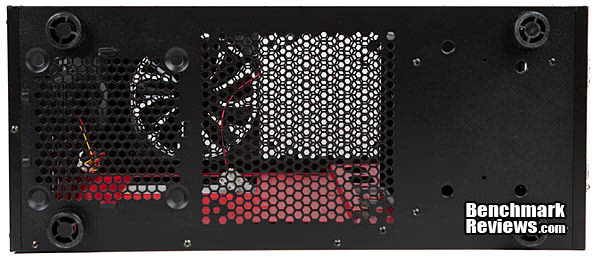
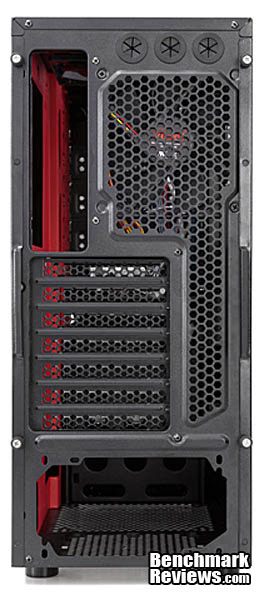
Fairly standard meat and potatoes here. Seven expansion slots, water cooling or party holes, and a darn good looking hole-vent design. The water cooling holes are in the right place too, given you can mount a radiator on the top of this case.
Guess what? There isn't really anything to talk about on the outside of this case, so we're skipping the "detailed" exterior section. The only thing that could have gone in the "Detailed Exterior" section is the front I/O Panel, which you see here. Two USB 3.0 ports (with a real internal connector), an eSATA port, mic and earphone I/O, and a red LED with a reset and power switch.

"Hal, do you detect anything missing from the Rosewill Ranger Closer Look Selection." "No Dave, I do not. Why, is there something missing of which I should be aware?" "No HAL, and if you ever miss anything, I'll shove a 12" screwdriver right up your . . . ." Well, if it's good with Dave and HAL, it's good enough for me, which means we're off to the interior section.
Closer Look: Interior
The interior of the Ranger. The Ranger is starting to look a lot like Christmas! Check it: Red interior! This case is not only looking a lot like Christmas, it's internals are looking a lot like the Cooler Master 912 series cases. Check out the cable routing holes of the 912, and then get a look at the Ranger's. Like the THOR v2, which was a knock off, it looks like Rosewill took some liberties with Cooler Master's 912 case and made it their own, but that's not a negative in the least.
It's always a good sign to see side mounted drive cages. Of course we have the "all the rage" plastic 1/4 "tool-less" mounts that are less tools or mounts than desirable, but that's standard fair. You also only get one side of mounts, and for that reason, you're probably going to want to screw your DVD writer down. But, they look nice. Last, the drive cage is not removable, nor the motherboard tray. I think this nonremovable drive and motherboard tray trend is quickly morphing into the standard. I might not even mention it next time, unless Olin threatens me with a tune-up.
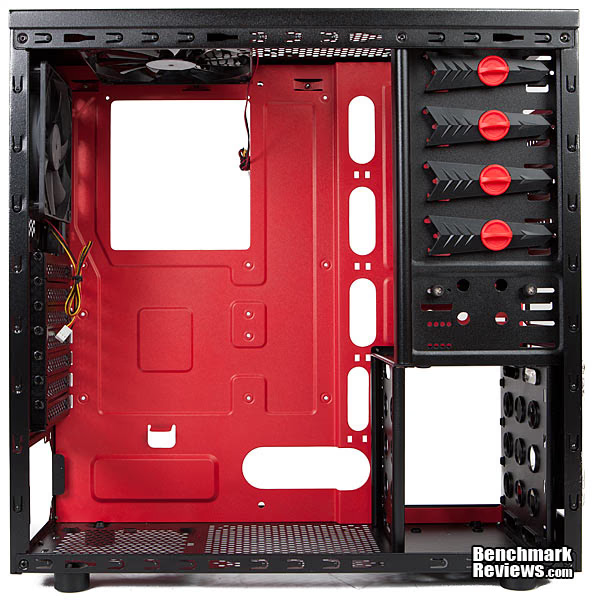
Here's a shot looking from the front to the back fans. You can see the top 140mm and the back 120mm fans. These two fans come with the case, and you can add another top 140mm or a 120mm if you desire.
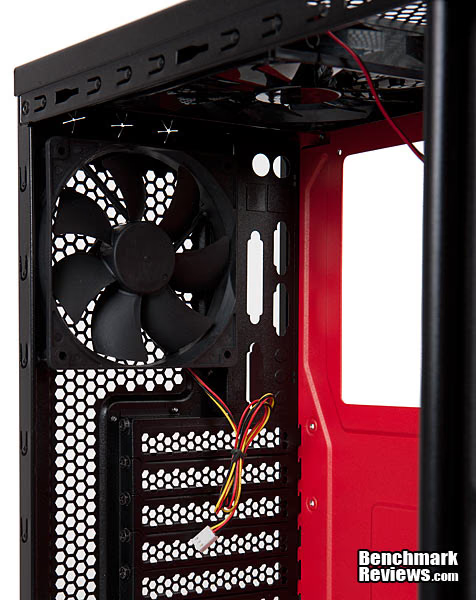
The opposite side. As you can see, the red paint also includes the back side of the motherboard pan. You can also see the side mount drive's cable hole.

This is a shot looking from the back to the front internals. The external 3 1/2” drive carriage is removable and can be remounted elsewhere. I read on Newegg that one person was having trouble mounting a card reader here, stating that it just didn't work because of misaligned holes, so be wary.
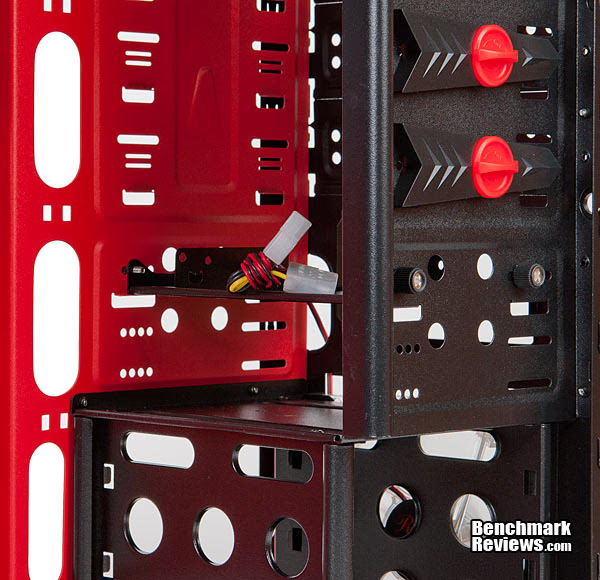
In this image we see the cable routing channel. There isn't a lot of cable room in the Ranger, and the design relies on a channel for cable routing. In the next section, we'll see just how much cable routing space you get.

Here's the mounting hardware. The 3 1/2” drive mounts look exactly like those Cooler Master offers. You can see the pins that go into the drive, and then you slide the drive in. But look here! Why do we have a set with only one pin each, and staggered between the two? Does anyone know? Above the drive mounting strips we have the 5 1/4” tool-less mount, and then the 2.5” drive converter.

That's about it for the internal overview. I would like to add that the paint inside and out looks nice and is of the matte type finish. Cable routing holes look sufficient, but I'm wondering about cable space. We'll check that out in the next section.
Detailed Interior Features
Well, we might as well get the side panels out of the way. They're not as thick as they come, but their folded frame makes them pretty stiff. Here you can see how Rosewill uses a stamped channel folded back and glued to the panel itself in order to stiffen the thinner metal.

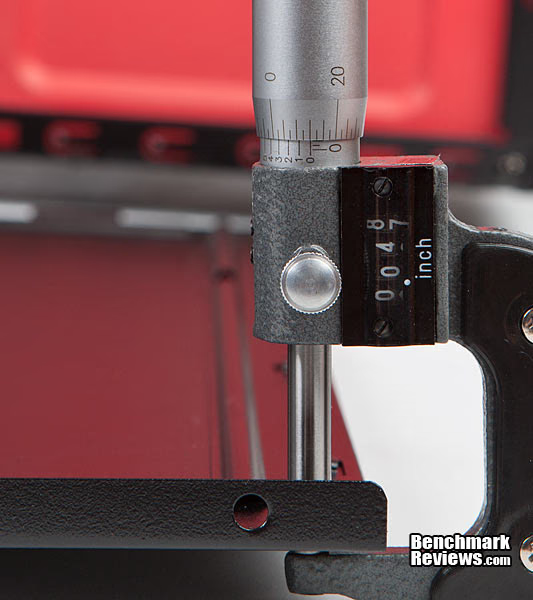
This is thin metal people, make no doubt about it, but it's also standard on many cases. It seems sufficiently sturdy once the panels are on. It's not up to par with higher end cases though, which use a thicker .030” metal. Not only that, but it's not going to stop any IEDs, much less a rifle round. So don't take one off and use it for any improvised bullet-proof applications.
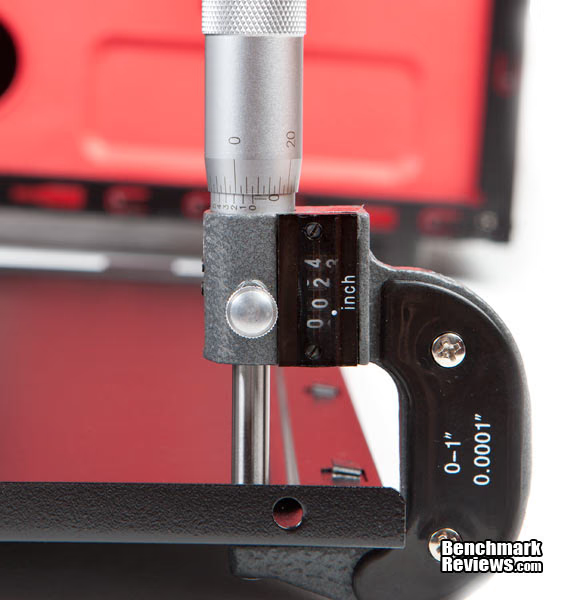
And here you go. By doubling up the edges in thickness and using a punched channel, the solidity of the panels is much increased. Good work by Rosewill on this choice. This also means that if you fold the entire panel in half, you can use it as a riot shield when you play paintball.
Cable space on the Ranger is barely what I'd consider adequate. If you keep everything in the channel, you've got just about 5/8” (1.5cm) of cable space.
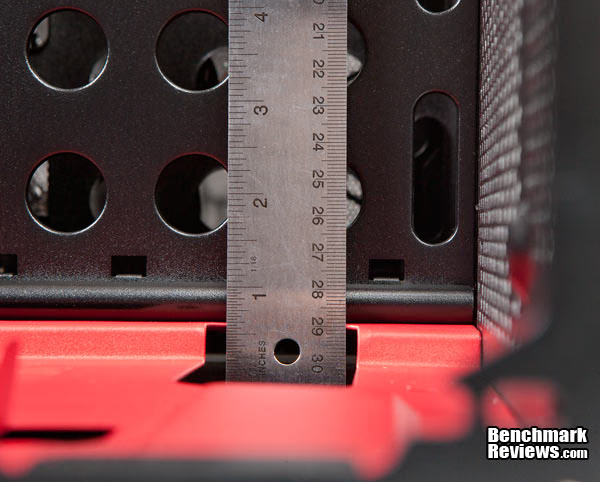
If you wander out of the cable routing channel, you get a measly 1/4” (0.6cm) of cable space.
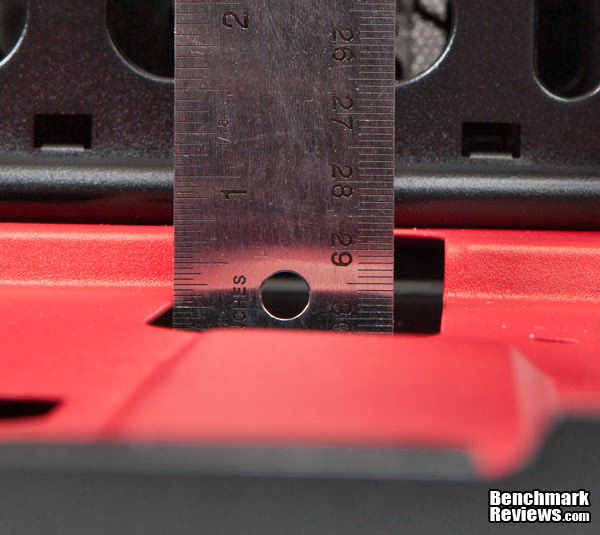
Lots of space for a video card, especially for a mid tower. You're looking at 11” (27.9cm). However, if you have side fans installed, you lose some video card width space, so beware that. What I mean is that if you need all the space you can get for the width of your card (power cables), kiss one side fan goodbye.

For your cooling tower needs, you get just under 6 1/2” (16.5cm) from the motherboard stand off. This is what I'm talking about with the video card width too.
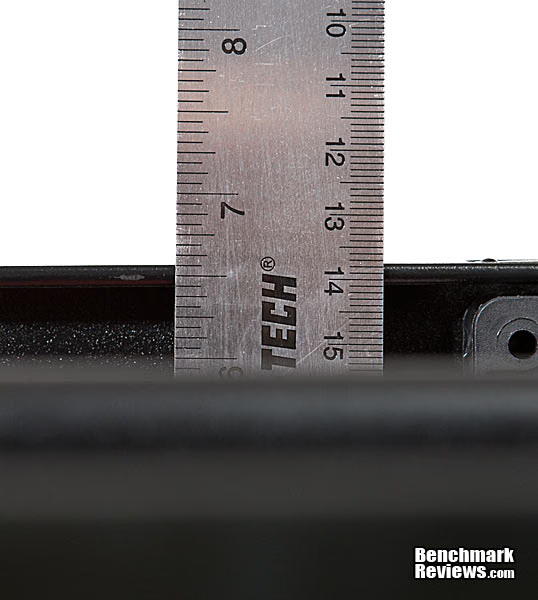
The show's over my people. It's time to get down to the hardest aspect of the review, and that's giving you my opinion on the case (less hard) and then the conclusion and rating (much harder).
Rosewill Case Final Thoughts
I thought the Rosewill THOR v2 was a pretty good case, although I expressed my misgivings at its offering price of 150.00USD, which put it in the middle of the Cooler Master HAF series. I mean it could compete at that price for various reasons, but it would have been a steal for less than 130.00USD. Guess what? You can now purchase the THOR v2 case for 100.00USD, and at that price, it is a steal. Price-wise, I'm feeling the same way about the Ranger. It's not a bad case, but it does have it's rough spots. I don't like the front faceplate and filter design because it's all but impossible to easily clean. I also don't like that the front bay covers only come out from the back of the faceplate, and not from the front.
On the other hand, the side and top fan options are great and bring the total fan count to no less than seven! However, a wide video card may make one of the side fans impossible, and a long PSU negates the bottom 140mm fan option, but you can still use a 120mm fan in the bottom location. So now we're down to six fans, which is still excellent, especially since one is a bottom fan. I would liked to have seen enough side panel width so as to accommodate both fans regardless of video card width, though. That would have been done easily enough by stamping a 1/2” outward bulge on the fan grill. Cable routing is adequate, but just so. I almost forgot to mention, too, that the Ranger has side mounted drives - another big plus!
What's a reviewer to do? Look at the price. The Ranger can be had for 70.00USD. That means it will be in the budget to ultra budget price area soon enough, perhaps down to 60.00 or even 50.00ish USD. At that price, it's a good deal, or is it? Remember, the excellent Cooler Master HAF and Storm series are in that range too, along with the excellent Sentey Optimus Extreme Division case. Perhaps if the Ranger were to drop 15.00USD into the 55.00USD range? It's definitely something to think about, and one reviewer on Newegg said he purchased the Ranger for 55.00USD on sale! And, after an hour of looking around at mid tower cases, I'm still on the fence about giving the Ranger the boot, an award, or even a recommendation. If you look at Newegg, there are some very nice cases to be had even at the 50.00USD range. So, step into my conclusion, and see what I do.
Rosewill Ranger Conclusion
This is a hard case to rate. It's looks are fine, the red interior is a nice touch, and it's cooling is excellent, which is many times lacking in midtowers. On the other hand, as mentioned in the Final Thoughts Section, the front faceplate leaves much to be desired as far as removing bay covers and cleaning the front filter, and cable space is just adequate.
As always, appearance is a matter of taste and is thus subjective. I don't see any aesthetic bloopers on this case, though, and it's a clean look. Conversely, it doesn't amaze me, as he Ranger plays it pretty safe in the looks department. For looks, the Rosewill Ranger gets a Benchmark Reviews Recommendation.
Construction is something that we often overlook when buying a case because we can't “kick the tires.” The Ranger isn't made from the heaviest steel, but it has numerous channels, bends, and folds making the steel fairly stiff. For construction, the Ranger gets a Benchmark Reviews Recommendation.
Functionally speaking, there are some good and there are some not so good aspects to the Ranger. Cable space is adequate, but just adequate. The front faceplate design and it's almost impossible to clean filters, along with the bay covers coming off only from behind and not from the front, are not so desirable. On the upside, you have a lot of space in the Ranger and cooling, wow, it's a virtual wind tunnel, like it's big brother the THOR v2. With two top 140mm fans, two side 120mm fans, a bottom 140mm or 120mm fan and the back and front fans, this thing would probably take off if you cranked the fans to full power.
What you don't get is a fan controller or a PSU filter. You do get a side mounted drive cage, however. For interior space and cooling, the Ranger gets a Gold Tachometer Award. However, for leaving out the PSU filter and the possibility of dropping one side fan due to video card size restrictions, plus limited cable space, the Ranger gets a Benchmark Reviews Recommendation, which splits the two into a final Benchmark Reviews Silver Tachometer Award for functionality.
Value is decent to excellent depending on the price you find this case. As of December 2011 Ranger sells for $70 USD at NewEgg, so it's a decent value, not because there is something wrong with it but simply because of the competition. At $60.00, it gets to be a good value. If you can find Ranger into the $50-60 area it gets a Recommendation, and if you need all of the cooling potential this case has, even at $70, it gets a Benchmark Reviews Recommendation, but at $70 just barely.
What's a shame is that the Ranger could have gotten a Golden Tachometer Award had it just a little more cable room, if the front faceplate had been easy to clean, and there was enough space to accommodate both side fans regardless of videocard size (even leaving out the nonexistent PSU filter). Overall, I'm giving the Rosewill Ranger a Benchmark Reviews Recommendation because for me, Silver and Gold awards are reserved for cases that go above and beyond and astound us with thoughtful design, functionality, and value. What do you all think?

Pros:
+ Excellent cooling potential
+ Aesthetics
+ Expansion card space
+ Roomy
+ Top H2O holes make easy top mounting a radiator
+ Side mounted drives
Cons:
- Adequate but not great cable space
- No PSU filter
- Front fan and bay covers hard to clean and get off
- Plastic feet with no rubber
- Large video cards may prevent installation of both side fans
Ratings:
- Presentation: 8.50
- Appearance: 8.50
- Construction: 8.50
- Functionality: 8.75
- Value: 8.50
Final Score: 8.55 out of 10.
Recommended: Benchmark Reviews Seal of Approval.
Benchmark Reviews invites you to leave constructive feedback below, or ask questions in our Discussion Forum.
Reader comments from the original article
10 comments were posted before commenting closed. They are preserved as written. Original avatars no longer resolve and are shown as a placeholder.
RE: Rosewill Ranger Mid-Tower Computer Case Doug Dallam Permalink:
Subscribing. Simply subscribing.
RE; Rosewill Ranger Mid Tower Case Ben Permalink:
Looks pretty plain to me. I still prefer my old 'Thermaltake Armor+MX" case. I have same problems with the front filters panel, they should have made them same as the rest of the set up, doors just pop open. I am planning on modifying them to open easier. Ben.
RE: Rosewill Ranger Mid-Tower Computer Case WhyNotV2 Permalink:
I like it, but then again I like "plain" cases as well as can be seen with my Lian Li PC-65B case. Simple, elegant and going strong :) I've been looking for an updated case for a few months now and I see a lot of features that I like...bottom mount PSU, better cable routing/management, upper mounted front ports, etc. that my Lian Li doesn't have. Most cases are too gaudy to me. This is the first case in a while that's not crossed that gaudy line. I'll keep my eye on it to see if the price comes down to that $50-ish range.
RE: Rosewill Ranger Mid-Tower Computer Case CHARLEYAM Permalink:
you guys really put this case tru the ringer measuring the thickness of the case and slots for cabling. well made in the old days we would cut a little for cables if needed this seem fine . price still a tad high 75 would be better. Rosewill good maker of cases 1-10 about an 7+
RE: RE: Rosewill Ranger Mid-Tower Computer Case Doug Dallam Permalink:
It's at 70 right now.
RE: Rosewill Ranger Mid-Tower Computer Case dlb Permalink:
I prefer plain looking cases too vs. the garish and gnarly looking "transformer" or "robot/alien" cases, and the overall appearance of this case is OK, but this Rosewill case reminds me too much of a ThermalTake case for me to think it's anything but a ThermalTake w/ a red mobo tray and red accents on the drive clips....
I agree Mergatroid Permalink:
Nice review. I agree with all your points. I do like the design of this case regarding the looks, and the front panel bay covers don't bother me at all. However, the front bezel should really be cleanable. This will make it awkward. However, over all I really do like this case. It has the features I want even if on the lean side. A few grommets would have helped a bit, and painting the interior black would have improved it as well, but for $70 I think it's a great deal. I think for $70 I could dig up a PSU filter too....
RE: I agree Doug Dallam Permalink:
The inside is black, except the MB tray, which is red. You don't like the red?
Blue Mergatroid Permalink:
I prefer a black one given the choice. Having a colour I wouldn't chose myself would be a deal breaker. For someone who prefers red this wouldn't be an issue. Just saying I would prefer black myself.
Mr. James Permalink:
Just saw the end of month Clearence and this case is dropped down to $39.99. Ordering mine as I type this :)