
Lian Li PC7B Plus II Mid-Tower Case
Lian Li PC7B Plus II
The name Lian Li is synonymous with quality computer cases and computer accessories. They've been in the business for over 20 years and have attained ISO 9001 certification for all of their products. They've built some reputation over the years and have received accolades from the computer industry as well as end users; but nobody is perfect. Today Benchmark Reviews will take a look at the Lian Li PC7B Plus II black aluminum mid tower case and see if this reputation for quality and performance still holds true, some 20 years later.
This case has a classic design and in the basic layout resembles many of the plain beige boxes of the past but with many, many refinements. Its clean lines and understated style add a touch of class to any office or home gaming system. Its looks with brushed aluminum hold up well whether under a workstation desk for a minimalist look or front and center on display as your hot gaming rig.

Too many times I've seen products sold with little or no merit, sold strictly on hype. Lian Li seems to have plenty of hype but Benchmark Reviews will see if that hype has the merit. With solid design, construction, and value it seems Lian Li may have a winner for the mainstream chassis market. Let's not take their word for it; lets have a closer look ourselves.
PC7B Plus II Features
The case is made almost entirely from aluminum. The inner chassis is all aluminum while the outer skin is black anodized aluminum. This case is also offered in silver (designated PC7A). The use of aluminum is not saved merely for the box itself but also the entire faceplate as well, save the very top and bottom edges. All of this aluminum adds to the heat dissipation capabilities of the PC7B as well as it's durability.
The Lian Li PC7B Plus II also comes equipped with two 120mm fans, one lower front fan for cool air intake and one mid rear under the PSU for removal of damaging hot air. The front fan is behind a very generous grill built into the easily removable front bezel to offer near unrestricted airflow.
PC7B Plus II Specifications
| Model | PC-7A PLUS / PC-7B PLUS |
|---|---|
| Case Type | Mid Tower |
| Dimensions | 210mm x 450mm x 490mm (W, H,D) |
| Front bezel Material | Aluminum |
| Color | Silver / Black |
| Side Panel | Plain |
| Body Material | Aluminum |
| Net Weight | 5.5kg / 6.8kg |
| 5.25" drive bay (External) | 4 |
| 3.5" drive bay (External) | 2 |
| 3.5" drive bay (Internal) | 3 |
| Expansion Slot | 7 |
| Motherboard | ATX, M-ATX |
| System Fan (Front) | 12cm x 1 |
| System Fan (Top) | |
| System Fan (Rear) | 12cm x 1 |
| I/O Ports | USB2.0x 2, IEEE1394 x 1, MIC x 1; EAR x 1 |
About the company: Lian Li Industrial Co., LTD
Lian Li Industrial Co., LTD was founded in 1983. We are the one of the largest and most reputable manufacturer of aluminum PC case in Taiwan. With over twenty years of experience in the computer products field, our dedicated team of engineers, production specialists and administrative staff provide the finest quality accessories available on the market.
In 1993, Lian-Li Introduced the new lines of computer hardware, including bracket( for case & interfaces), Mobile rack(for H.D.D.), mounting kit(for FDD & HDD), aluminum PC cases, IPC, external cases, server cases and more. We also provide OEM & ODM services, you are assured of designs that will meet your exact specifications, innovative ideas in manufacturing that will give your products an essential market edge.
Our outstanding quality has earned us ISO 9001 certification for all of our products. In addition, we back up our quality assurance with a two-year guarantee on most of our products.
R&D is one of the reasons why Lian Li is able to offer quality products to the market. Whether it is for OEM or ODM projects, our experienced mechanical and electrical engineers are capable of providing our customers with the best solutions in product design.
Closer Look: Exterior
First lets take a look at the box. Hmm, seems a bit plain to me, no flashy graphics, no full color pictures of what's inside the box. There is nothing wrong with the box by definition; it protects the contents perfectly, the drawing acurrately depicts the case inside and the specifications are clearly marked... that's all so utilitarian and really not much fun!

Average Joe could simply overlook this case thinking it's a low end model based on outward appearance. This is one area I feel they could follow the lead of such companies as CoolerMaster or Antec. Both companies have very atractive box art that I'm sure boosts sales. Retail shops have very limited display areas. Would you want this box on display in your front window? I think they really missed the mark with this box. I have seen other Lian Li cases with very nice full color box art, curious this one didn't receive the same treatment.
Let's move on to the case itself. There are several nice features that are immediately noticeable on the outside of this case that give you clues to the cooling capabilities and target audience of this case; gamers and enthusiasts. First on the lower left side you'll notice a large vented area. This is to help cool today's hottest video card setups. It is large enough to cover any SLI or Crossfire setup and offers improved airflow to help cool any monster GPU setup you might have.

You could also install fans in the side door blowing cool air directly onto your video cards. Oddly there is no intel TAC compliant cpu duct, which has been so prevolent lately on almost every case. The top of the case features an 80mm slotted blow hole. Predrilled to accept any standard 80mm case fan. This is a nice addition and usually one of the first modifications done to a case when someone seeks to lower case temps, hats off to Lian-Li for including this, I'm sure most of us would cringe at the thought of setting a hole saw loose on this nice case!

The right side is a solid door with no vents whatsoever. I'm not sure why case makers neglect this side of the case, some of todays motherboard chipsets run hotter than ever with basic heatsinks on the topside. A vent of some kind on this side would do your system a favor to allow some airflow behind and underneath the motherboard. This would be especially true on an all aluminum case such as this where the motherboard tray will naturally work as a heatsink. There are very few manufacturers that currently do this but I think this could change.
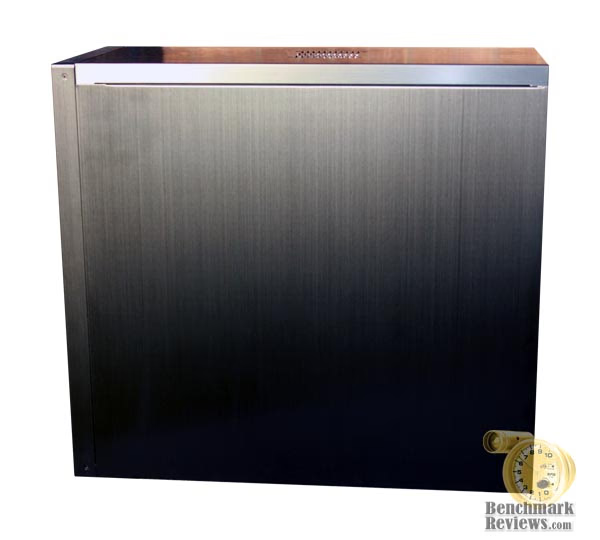
The rear is standard fare for cases with seven expansion slot covers and the I/O panel with one mention worthy addition. At first I was a bit skeptical about this... The removeable PSU mount bracket. I wasn't sure if this would truly be a useful concept or not. After building a system in this case I can absolutely say I do like this PSU bracket. It allows the easiest installation and removal of your heavy PSU. With todays systems and their monster CPU heatsinks, you would never be able to remove/replace a PSU by pulling it out through the side of the case without first removing your heatsink/fan. With a stock heatsink/fan maybe, but still do you really want to risk damaging a component by removing the PSU over top of the motherboard? One more sign this case was designed for serious use by gamers and enthusiasts.

All screws for the side panels and PSU on the rear of the case are thumbscrews, which is helpful to those of us that like to tinker. The front panel has four standard 5.25" external drive bays. This gives you plenty of room for a couple DVD R/Ws and any number of other front panel accessories you might like to use. Also you'll notice two 3.5" external drive bays. This will accept your typical (and typically useless) 3.5" floppy as well as other accessories such as internal memory card readers, small front panel controls or LCD displays etc.
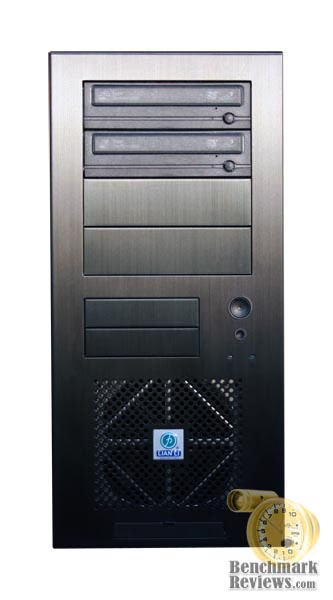
The lower front also features front audio inputs for headphones and a mic as well as USB and Firewire inputs. The quality of this case extends to the powerbutton and reset button as well. Both feel solid; all too often these buttons get overlooked by the manufacturers and cheap and flimsy seem to be the norm. The front is rounded out with one green power LED and one amber HDD activity LED.
Detailed Exterior Features
At the bottom edge of the front bezel you'll find the standard front input panel which inludes mic in, headphone out, USB port as well as a Firewire port. These input ports are along the very bottom edge on the front panel of the case behind a small aluminum drop down door. This works out fine for some users like me, I prefer my tower actually on my desk but the majority will want something higher on the case as they probably have the case on the floor. Inputs this low can prove to be a real pain to get to if kept under a desk. Most front panel ports are used on a temporary basis so some people may prefer this mid way up the case.

I feel it's important to note, all these connections are internal connections to the motherboard rather than simply rear external extentions. Some cases just use an extention that exits the rear of the case and plugs into the rear external motherboard plugs. This is not the case with the PC7B Plus II. Although not as universal I consider this a plus for this case. Anything that cuts down on cable clutter gets points from me. In this day and age, most if not all motherboards will have these connections on them.
As mentioned earlier there are four standard 5.25" external bays and two 3.5" bays. Anything but standard is the aluminum bay covers, no plastic snap in covers here all anodized brushed aluminum. These bay covers actually snap into the chassis not the front panel and are easily removable once the front panel is removed. Finishing off the front details are the reset/power buttons and the HDD LEDs. These buttons fit firmly into the front panel with no wobble.

Designed with years of use in mind I've never once felt these buttons might break like so many other cases have. The buttons actuate momentary switches which are mounted to the front side of the chassis. The HDD and power LEDs are also mounted to the chassis with acrylic inserts snapped into the front bezel to carry the light to the outside.

All of this allows the front bezel to be removed easily with no pesky wires to unplug or wrestle out. Removal of the bezel is done simply by holding under the bottom and pulling up and out. There are four friction pins on the front panel that fit into the chassis on the extreme corners. This is a very welcome design feature. No clumsy plastic hooks, no screws just great engineering and solid design. The front bezel is held on as tightly and firmly as any I've used before and yet a simple but firm tug is all that is needed to remove.

The rear PSU mounting bracket had me scratching my head at first. Not wondering what to do with it but wondering why must I do it? You must first remove this bracket from the case then attach the bracket to the rear of the PSU using the normal four corners and screws. Then insert the PSU through top rear of the case.

Once the PSU is inserted completely flush screw the bracket back onto the case. Again this uses all thumb screws. It was as easy to do as anything I've ever done before yet it seemed so strange to slide the PSU in from the rear of the case. This allows for safe insertion/removal of your PSU without fear of damaging any components. With the bracket installed the PSU cannot accidentally fall and potentially damage anything. The rear bracket simply will not go through the case. Although foreign to me at first, I quickly fell in love with this feature.
Let's move on to the interior.
Closer Look: Interior
The interior of the Lian Li PC7B Plus II is very roomy. Even with the case full of components it appears as if it's not all there; it is. Clearly you can see the three internal 3.5" drive bays. Directly in front of that is the front lower 120mm fan which blows directly over the HDD cage and brings cool air into the case. Above that is the two 3.5" external drive bays for your floppy drive, memory card reader, whathave you. Still above those are the four 5.25" external bays for CD/DVD ROMS, fan controllers or any number of accessory panels. This is a standard size mid tower case with seven rear expansion slots.

There is also a three wire 120mm rear exhaust fan. The PSU is hidden entirely behind a tunnel of sorts that extends from the front external 5.25" bays to the rear of the case. I suspect this has to help with aerodynamics and cooling by directing air up and back towards the psu intake.
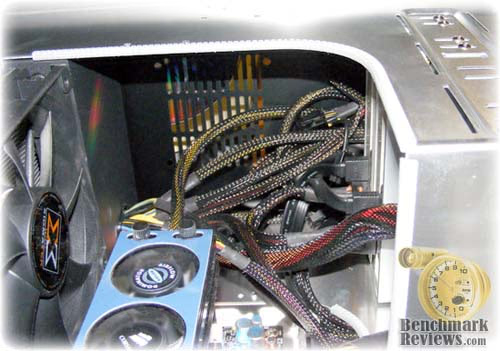
If you have a downward facing PSU fan I doubt you'll notice any cooling benefit from this design but what I like most about this design is it allows me a great place to hide all my excess power supply cables!
Detailed Interior Features
The internal hard drive bay can hold up to three internal 3.5" drives. By default the HDD cage is installed in a front to back orientation. This can be turned to go left to right.
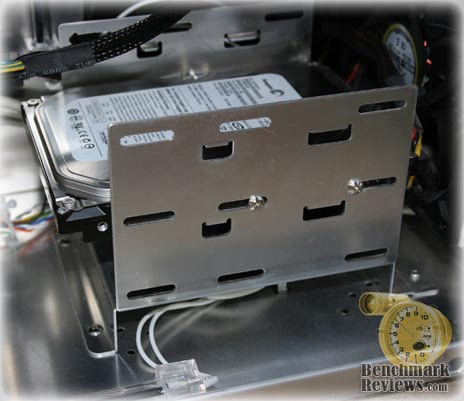
There are benefits to either orientation. Front to back offers superior cooling by allowing the cool air from the front fan to blow directly over the hard disk with minimal obstruction to cool the hard disk itself and allow more air in the case to cool other components. This comes at a cost of cable management ease. The right to left orientation allows better cable management at the cost of a loss of cooling performance and potentially increased turbulence which leads to noise.
The front 120mm fan comes preinstalled from the factory. This fan moves a lot of air. It is not the quietest fan available but it is not the loudest by a longshot. As you can see here the front fan is in a perfect position to bring cool air into the case and blow directly across the hard disk then onto the rear of the PCIe video card.
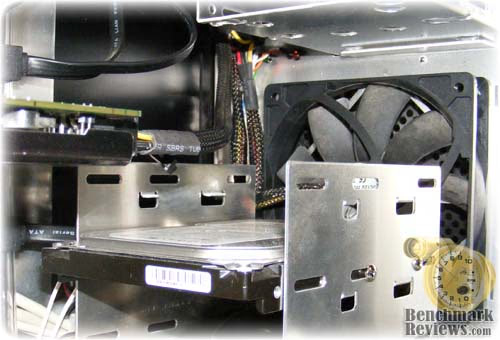
The rear fan is identical to the front, same size, speed and volume of air. The 120mm rear fan is a nice touch; I've seen many many cases still using 80mm fans on the rear. It includes a wire grill to keep any loose wire or clumsy fingers safe from damage although I've removed the grill to increase airflow. The rear fan is almost directly behind the CPU heatsink/fan and helps remove any hot air coming off of the heatsink.

Both fans have a 3 wire plug. The 3 wire plug will allow you to plug directly into your motherboard for power and monitoring. Although not as universal as a molex plug the 3 wire setup allows for a much cleaner install and adds the benefit of monitoring the fan speed. The addition from the factory of two 120mm fans is great, this adds value to the case. Many times I've seen lesser cases come with no fans requiring additional purchases.
I think it's worth mentioning that unlike the PC6 series the PC7 series does not have a removable motherboard tray. I'm sure this is done to keep costs down, but it would be nice all the same.
Lian Li Classical Series Final Thoughts
The Classical series from Lian Li all use basically the same chassis design and layout. The PC7B Plus II is no different. It combines solid construction with an understated classy look. Quite stealthy actually. This case offers more expansion possiblilities than the average person would ever need. I'd say this case would surpass the average persons need for a computer case. Although it would look great in a home or office environment and would serve them well for years to come, a case this good deserves some action. It's perfect for gamers and enthusiasts with a need for quality and perfromance. Lian Li makes a long list of accessories compatible with this case, which helps your average computer gamer to trick out the case without having to be a full on modder; the only downside to this is there seems to be very few outlets for these accessories!
PC7B Plus II Conclusion
The case arrived to me in plain brown box with basic text and line art. Now I'm a bit surprised that a company with such great products and very good customer reputation seemingly rests on their laurels when it comes to packaging. Sure those of us neck deep into computers knows this is probably a quality product and for the most part gamers and enthusiasts may know exactly what they are looking for and want; but what about the people new to computer building, what about the people shopping in retail brick and mortar stores? Luckily my surprise turned to delight when I opened the box and found the PC7B safe and sound. After removing the case from the box and starting my build I wondered why haven't I used this case before? The fit and finish are second to none. The smooth black finish just screams class. It's a gorgeous case, but I realize it may have a bit more of a mature appeal. No flashy lights, no alien eyes. A nice case with clean lines and well laid out options.
The main chassis is made of aluminum and it's riveted together. Rivets provide plenty of strength (think airplane skin) without the added weight of steel screws. I'm sure this case would hold up well to all but the most severe abuse. All of this egineering pays off in the form of great performance. This case has a lot of room inside and with solid design and fan/component placement it cools very well. It does all this fairly quietly too. Aftermarket fans would make this even quieter than it already is.
When you combine the quality and performance of this case you won't find many others that offer this kind of value. Available at $99.99 and constructed to last a lifetime, this case offers incredible value.
I would have zero issue recommending this case to almost anyone. This case has a lot to offer. Whether gamer or not; if quality, performance and value is your goal, Lian Li scores again with the PC7B Plus II.
Pros:
+ Aluminum construction
+ Great looks
+ Superior cooling performance
+ Quiet operation
+ Available in Black or Silver
+ Flawless fit and finish
Cons:
- The fans could be quieter
- Less than attractive packaging
- Limited outlets for accessories
Ratings:
-
Presentation: 6.0
-
Appearance: 9.0
-
Construction: 9.0
-
Functionality: 9.5
-
Value: 9.5
Final Score: 8.6 out of 10.
Questions? Comments? Benchmark Reviews really wants your feedback. We invite you to leave your remarks in our Discussion Forum.