
Antec DF-85 Dark Fleet Full-Tower Case
Antec, Dark Fleet DF-85 Case Review
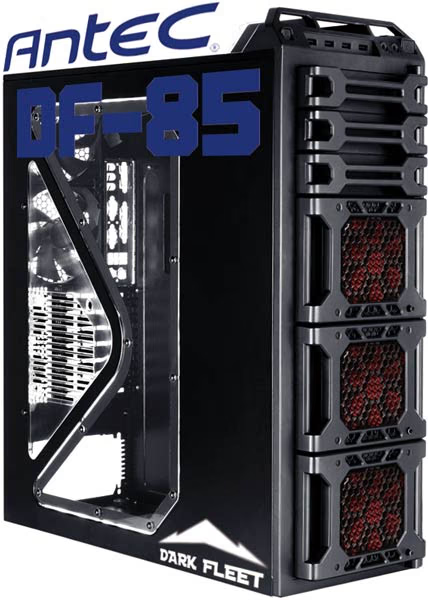
Antec have been rather busy of late, busy creating the Dark Fleet series that is. The Dark fleet series is Antec's newest range of gaming PC cases and consists of three models, the DF-30 and DF-35 Mid Tower cases,, and the DF-85 Full Tower case. Today Benchmark Reviews has the pleasure to bring to you the Dark Fleet DF-85 Full Tower PC, case. The DF-85 comes with a whopping seven fans pre-installed, an external 2.5", SATA Hot-Swap bay, an internal 2.5" SSD, mount and, four movable Fleet Swap Hot-Swap drive interfaces with Fleet Release doors for easy access. This is just the tip of the iceberg though, please read on to see what's hot and what's not with the Antec Dark Fleet DF-85 Full Tower PC case.
The inner dimensions of the Antec DF-85 are great, above the moterboard, there is 10cm of room (without fans) to install a watercooling setup, between the PCI slots and the HDD bays there is room to install up to 12.5" graphics cards, and from the motherboard tray to the side panel there is space to install coolers up to 18.5cm high.
 ,
,
Now bearing in mind that the Dark Fleet DF-85 is a full tower case, I am a little disappointed that there is no support for ULTRA-ATX, E-ATX, or XL-ATX, and there are only seven PCI slots which means no quad GPU setups either. If neither of these are a problem for you,, and you want a case with lots of room and great cooling and storage capabilities, then read on to find out more.
Features and Specifications
- Three Fleet-Release access doors open separately for convenient entry to drives
- Three washable fan filters allow for easy cleaning
- Top 2.5" hot-swap SATA (SSD-compatible) drive bay
- Bottom-mounted power supply isolates heat
- Mounts either a standard size power supply or an Antec exclusive CP Series power supply - Lockable access doors ensure security
- CPU cutout allows for easy installation of CPU coolers
- 14 drive bays:
- Up to 9 x internal 3.5"
- 3 x external 5.25"
- 4 x internal 3.5" Fleet-Swap drives (position changeable)
- 1 x external top 2.5" hot-swap SATA drive bay
- 1 x internal bottom-mounted 2.5" SSD, mount - Advanced cooling system:
- 2 x top 140mm TwoCool fans
- 2 x rear 120mm TwoCool red LED fans
- 3 x front 120mm red LED fans with speed control knobs
- 1 x side 120mm fan to cool graphics cards (optional)
- Water cooling capable - 7 expansion slots to support multiple graphics cards
- Maximum graphics card size: 12.5" / 318 mm
- Cable management ties help keep your case tidier
- Stylish blacked-out interior
- Windowed side panel
- Front ports:
- 1 x USB 3.0
- 3 x USB 2.0
- Audio (AC'97 and HDA compatible) In and Out - Motherboards: Mini-ITX, microATX, Standard ATX
- Power supply not included
- Unit Dimension
- 596mm (H) x 213mm (W) x 505mm (D)
- 23.5" (H) x 8.4" (W) x 19.9" (D) - Package Dimension
- 577mm (H) x 288mm (W) x 510mm (D)
- 22.7" (H) x 11.3" (W) x 20.1" (D) - Weight
- Net : 11.0 kg / 24.2 lb
- Gross : 11.3 kg / 26.3 lb
About Antec, Inc.
Antec, Inc. is the global leader in high-performance computer components and accessories for the gaming, PC upgrade and Do-It-Yourself markets. Founded in 1986, Antec is recognized as a pioneer in the industry and has maintained its position as a worldwide market leader and international provider of quiet, efficient and innovative products. Antec has also achieved great success in the distribution channel, meeting the demands of quality-conscious system builders, VARs and integrators.
Antec's offering of enclosures includes a wide range of cases, such as its advanced Performance One Series, economical New Solution Series and VERIS family of media components designed for the home theater PC market. Antec's products also include front line power supplies, such as its premium Signature Series, powerful TruePower Quattro Series and EarthWatts, one of the most environmentally friendly power supplies available. PC gamers are an increasingly significant consumer of performance components, and many Antec products are designed for the gaming demographic, like the premier gamer enclosure: the Nine Hundred. Antec also offers a line of computer accessories comprising many original products, including its patented LED fans and notebook cooling solutions.
Antec is headquartered in Fremont, California, with additional offices in Rotterdam, The Netherlands, as well as in the UK, Germany, France, Spain, Italy, China and Taiwan. The company's products are sold in more than 40 countries throughout the world. Please visit www.antec.com for more information.
Closer Look: DF-85 Exterior
Time now to get a good look at the Antec DF-85 starting with the exterior.
 ,
,
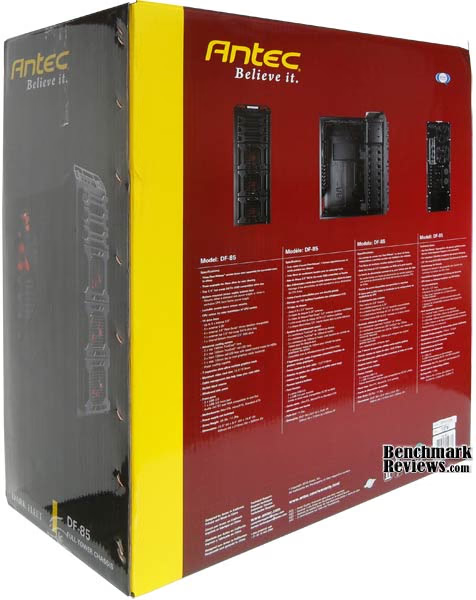
The DF-85 ships in a huge box and is well protected inside, wrapped in a polythene bag and suspended between two really thick pieces of styrofoam. The box has lots of info for a potential buyer to peruse at, the main product image is on the side panel to give more room on the larger sides of the box to display important features of the DF-85 chassis.
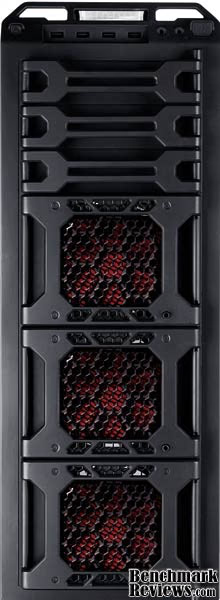
The front view of the DF-85 shows just how big the case is, behind each 'door' is a 120mm red LED fan that is covering three 3.5" HDD bays. Above those doors are three 5.25" bays that also have a cover that swing open, more on these later. The front is constructed almost completely of plastic with the only exception being the steel fan guards. This is definitely a bold design from Antec compared to the 'Hundred' series, and is like nothing they have done before with any of their tower cases.
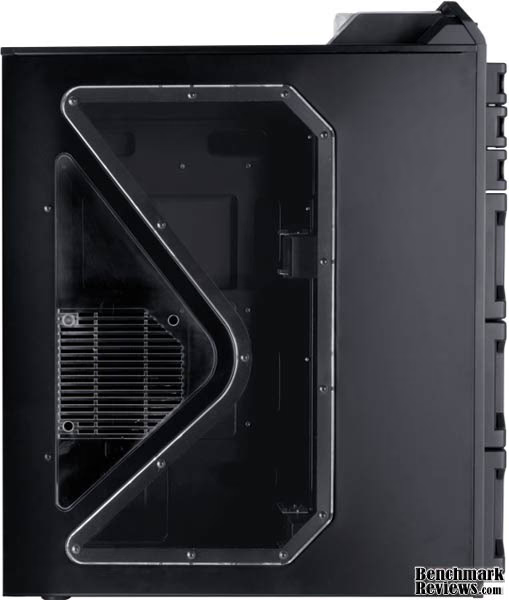
Looking at the side of the, DF-85, uses the same side window, design, as the Twelve Hundred chassis, although the design is the same the build is different. Antec have used a clear perspex piece in the DF-85, for the fan mount section, instead of the mesh, section seen on the Twelve Hundred,, giving you full, view of the, inside of your case. You have the option here to install a 120mm fan to cool your graphics card/s.
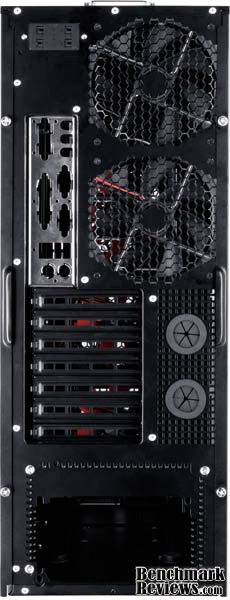
We are going to see a lot of similarities between the DF-85 and the Twelve Hundred as we go through this review, the DF-85 is definitely an improvement over the Twelve Hundred which will be more obvious as we look inside the case. This is a stock image from Antec, the rear 120mm fans are actually red as you will see later in the review. There is a motherboard, I/O plate, included with the DF-85 and apart from being installed upside down it looks like it is meant for a Pentium III / IV motherboard making it a completely useless inclusion. There is plenty of ventilation in the mid section where the watercooling grommets are and also on the PCI backplates.

The back side of the, DF-85, is rather plain, broken only by the embossed 'Antec DESIGN' logo in the bottom, right hand corner.,
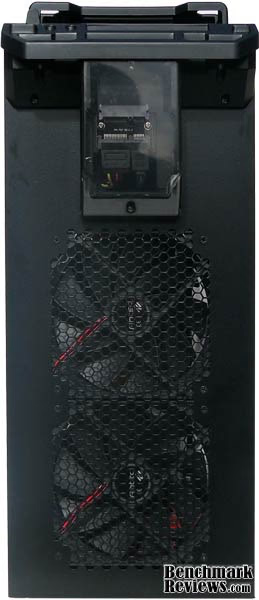
A view from above of the DF-85 shows two 140mm, Antec TWO-Cool fans installed, the honeycomb mesh is cut out of the panel itself and is slightly pronounced from the case, towards the front you can see the clear perspex 2.5", Hot-Swap bay. From a design perspective, the top of the case looks a little naked. I have become accustomed to seeing some sort of plastic panel installed here, on most, if not all, high end, cases and it looks like Antec may have missed out on the chance to add a little more flair to this series of cases.
 ,
,
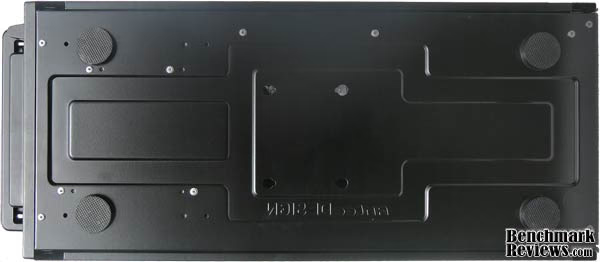
The bottom of the case is equally as plain as the rear side, four rubber feet keep the DF-85, from damaging any surface you mount it upon. Notice the, omission of a PSU, vent under the DF-85 chassis, this is, something that Antec is still yet to catch on to, or maybe they know a good reason to not take air in from underneath. Either way Antec just doesn't do bottom vents on their cases.
Dark Fleet, Exterior Features
Ok, so far so good. Lets, get a good close look at the out of character, bold design of the Antec DF-85 full tower case.
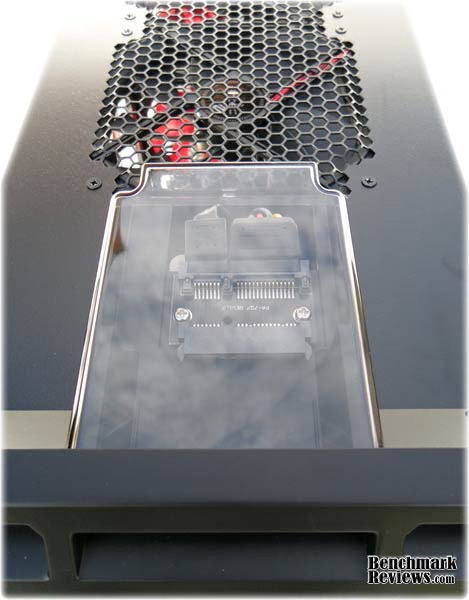
At the top of the DF-85 case you get a very nice, bonus not seen on any other case at the time of writing this review, I am talking about the 2.5", Hot-Swap capable, SATA SSD/HDD bay. While this is a very nice innovation I think there are a couple of things that I would do differently, firstly I would use right angle cable connectors and sit the connector board back a little and I would use a different material for the housing as this sticks out like a sore thumb - almost advertising that you have high value storage connected here.
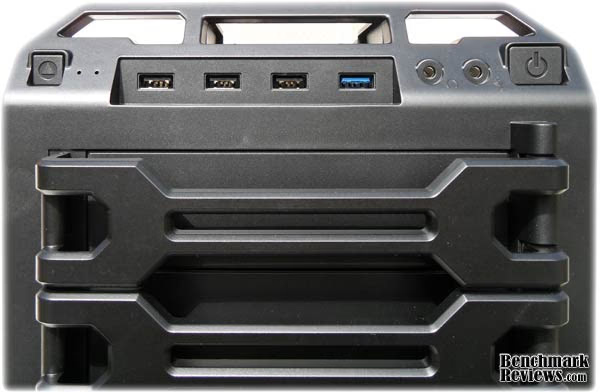
Moving, down slightly and you have the front I/O panel,, from left to right you have the following; Square reset button, Two pin hole activity LED's (blue) - one for power one for HDD activity. Then we have three USB 2.0 ports and one next gen USB 3.0 port (blue), next to those are the earphone and microphone ports and then a nice large power button. Under the I/O port you will notice a wrench type piece of plastic covering the 5.25" bay...
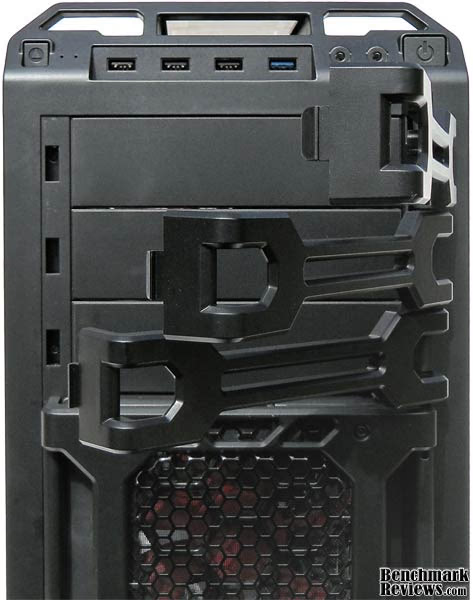
There are actually three and they mask the 5.25" bays, they are pretty much useless from a functional point of view but from a design point of view they make, sense, If they weren't there then the top of the case would look rather silly. They are simple to remove should you find the need to. It would make more sense to just install another 'door', the same as installed, below for a uniform look to the case.
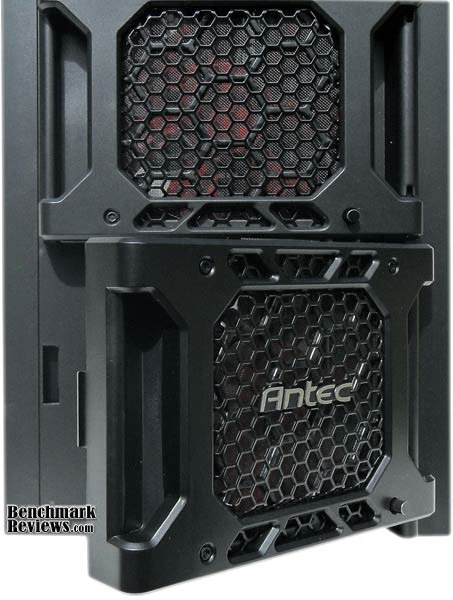
Ok moving down now we get to the interesting part of the Dark Fleet, series of cases, the, Fleet Release doors. I long for every case to have some sort of door, on the front rather than a pull off panel, as it makes for much easier access. Antec have done this job very well with their Fleet Release doors, of which there are three. Installed behind each door is a 120mm fan with speed control knob installed into the door (bottom right).
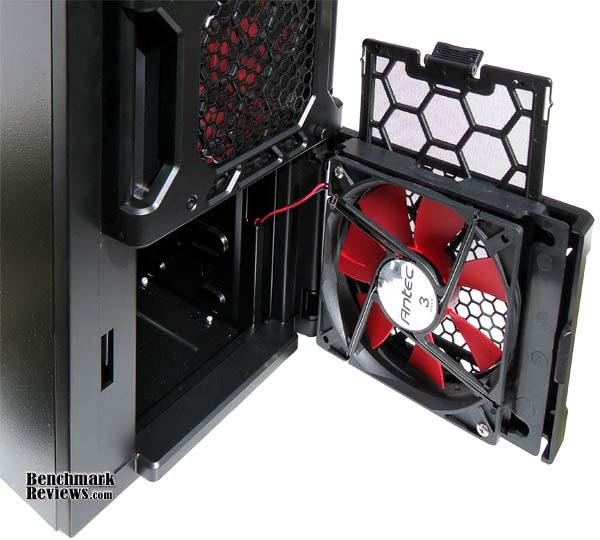
Open the door all the way out to gain access to Antec's next innovation (Fleet Swap) which we will talk about in more, detail later in the review. The 120mm, red LED fans installed behind each door are Antec's own TRI-Cool fans, they operate between 1000 and 2000 rpm (33.3 ~ 66.6 CFM) @ 19.45 ~ 34.5 dBA. They move, plenty of air but make a lot of noise whilst doing so, you can find the perfect balance between airflow and noise level with the previously mentioned speed control knob installed with each fan. Note also there is a filter installed in front of each of the front fans, this filter is easy to remove and is also washable.
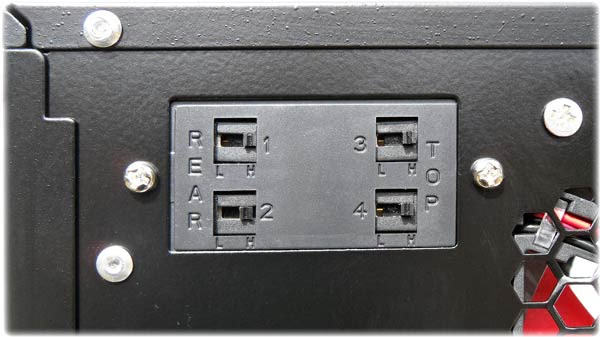
At the back of the, Antec DF-85 case is a fan control panel for the top and rear fans, each fan has two speeds - low or high, more on those later.
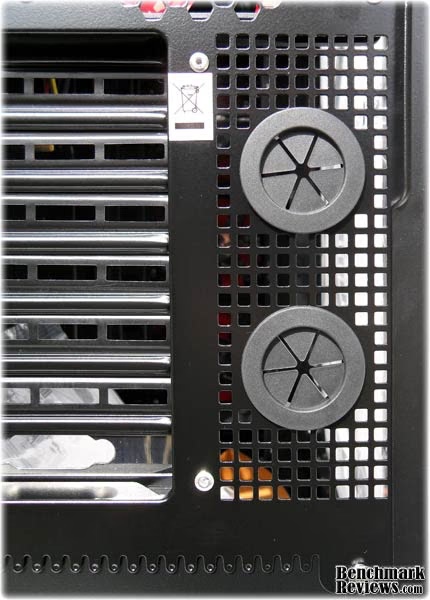
Moving down the back we see the two watercooling holes with pre-installed grommets for protecting your tubes.,
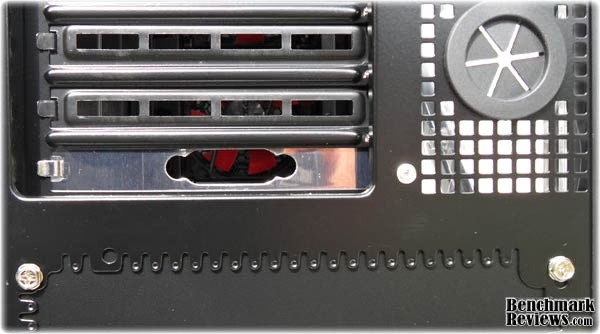
The bottom PCI slot is occupied by the USB 3.0 cable bracket, this is an unfortunate necessity as a USB 3.0 motherboard header design has yet to be decided upon. For now if you want to use the front panel, USB 3.0 port then you will need to route and attach it's extension cable through here and then up to your rear I/O ports of your motherboard. The recently reviewed HAF-X had a much more subtle solution to this problem using a third watercooling grommet, the least Antec could have done would be to, paint it black. Follow onto the next section where we have a good look inside the DF-85.
Closer Look: DF-85 Interior
We are going to delve deeper now into the DF-85 design as we look now to the interior of the case, I thought this would be a good time to mention that getting inside the DF-85 was rather different than most cases. Instead of the traditional slide on /, slide off doors used on most cases, the DF-85 utilizes a different method, where you pull, sideways at the back and then slide it slightly backwards to release, this made it ever so much easier to get into the case compared to the traditional method that makes the side panels fit too tight.
 ,
,
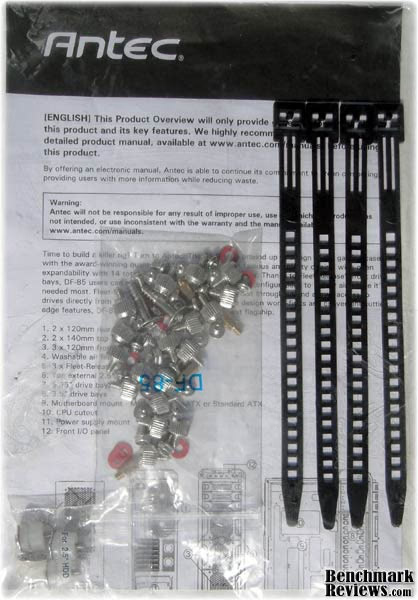
Inside the box with the DF-85 case you get this little zip lock bag with a product overview, four re-usable cable ties, a big bag o' bolts and a smaller bag with the interior mounting kit for 2.5", HDD/SSD. An in depth instruction manual for the DF-85 can be found on Antec's website.,
 ,
,
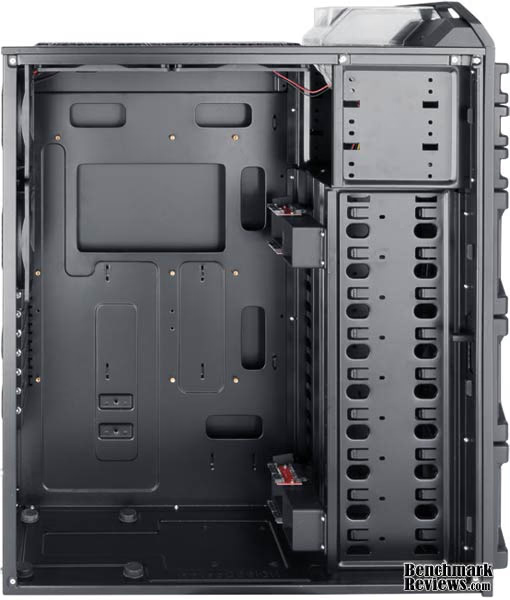
With the side panel removed it becomes even more apparent just how much room there is inside the, DF-85. The important inner dimensions are; 31.8cm between the PCI slots and the HDD bays giving room for up to 12.5", graphics cards, 19cm depth between the side panel and motherboard tray giving room for up to 18.5cm tall CPU coolers, (minus 50mm for motherboard and stand-off's) and up to 10cm (with fans removed) above the motherboard for installing a watercooling radiator or two.
You will probably also notice that there are no tool free options with the DF-85, this is because Antec believe that tool free options add to the noise inside your chassis through vibration, I personally think its just a way to save money, the front fans make more noise than any tool free option I have ever used., There are plenty of cable routing cut-out's,, this shot was taken by Antec, and the design, shown here is, a little different, as you will see below, in a shot from behind the motherboard tray.
 ,
,
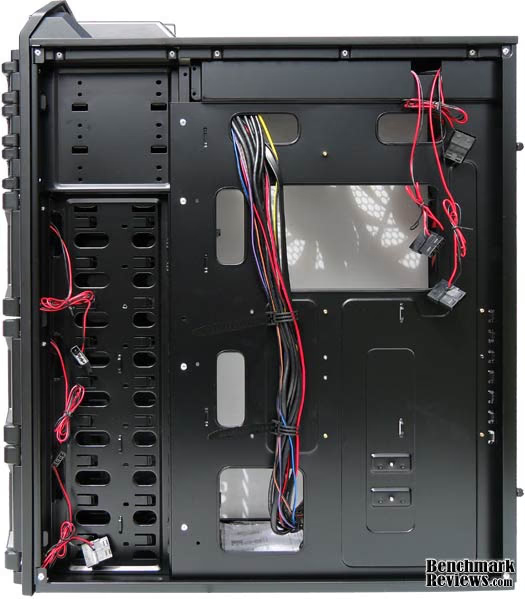
Looking behind the motherboard tray you can see six different, cable routing cut-out's and an extra large CPU backplate cut-out. There is a generous 2cm gap behind the motherboard tray for routing your cables, all the fans have male/female molex connectors so they can be wired in line to one molex connector for front and one molex connector fro the back. The only, bad point here is that the bottom cut-out is on the big side, while it allows you to pass through many wires it also gets all the traffic, two small cut-out;'s next to each other would have been much better.,
 ,
,
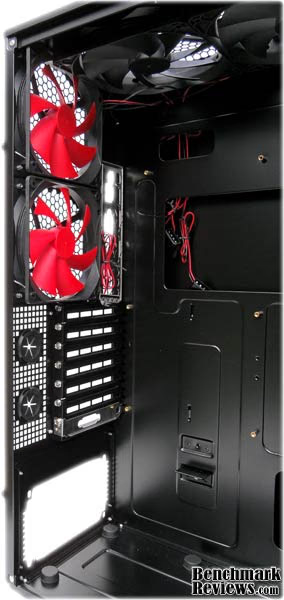
Moving back inside the case, now, looking mainly at the expansion slots but also at the masses of room wasted above the motherboard. This may sound like a bit of a rant, but I think it needs to be said. Why make a full tower PC case that doesn't support ULTRA-ATX, E-ATX or XL-ATX? Especially when, there is more than enough space inside,, Antec allowed more room below the motherboard for their over-sized CP-X power supplies, which is good for them - sales wise,, but wasted, a hell of a lot of room above the motherboard.
I can suggest a design change if Antec is listening,, swap out those two 120mm fans in the rear for two 100mm fans and you will gain 4cm of room needed to offer, another two, maybe three, PCI expansion slots. Then you can join the elite group of, full tower cases that are able to support, the bigger motherboards and quad GPU setup's. There is more than enough, air coming in the front so, it only makes sense to make good use of it. Lets call, my, mod, the DF-95., ,
 ,
,
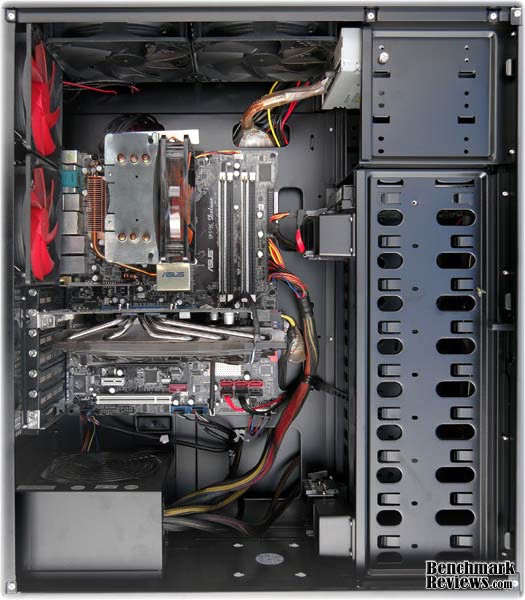
While the install of hardware into the DF-85 case was without trouble,, I had an issue with routing my cables thanks mainly to two design issues covered in this review. The first is the over-sized single cut-out at the bottom, as previously mentioned this cut-out deals with nearly all the cables in the case (PSU wires and front panel wires), and is far too big, as a result the, routing, isn't as tight as I would like. The second issue is due to the orientation of the PSU, which has to be installed upside down -, This means the cables from the PSU have to, stretch that bit, further (compared to being right next to the hole, if it was installed the right way up) which meant that I wasn't able to route the 24-pin motherboard cable behind the motherboard tray.
With a little more time, and maybe even some PSU extension cables (or a new PSU) I will be able to clean up this install, but for now I am a little disappointed.
Detailed Interior Features
Its not all, doom and gloom, inside, the Antec DF-85, there are some interesting features to be noted too as we will see in this next section.
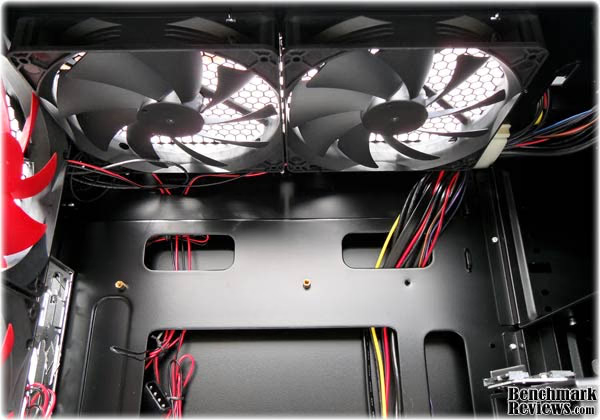 ,
,
In the top there are two 140mm Antec TWO-Cool fans installed, the specs are; 800, ~ 1200 RPM (33.6 ~ 58.9 CFM), @ 21.8 ~ 26 dBA. these are much quieter than the three TRI-Cool fans installed in the front. You will notice that these fans are rather plain and don't sport LED's, this is a result from user feedback collected by Antec and the best way to explain is to quote them, "the Dark Fleet series is adorned with different LED colors for each model - but never the top fans. Why, you might ask? Well, it's so that you get a sweet looking case interior that won't tan your face and light up your room like a 1990s rave party". Interesting.
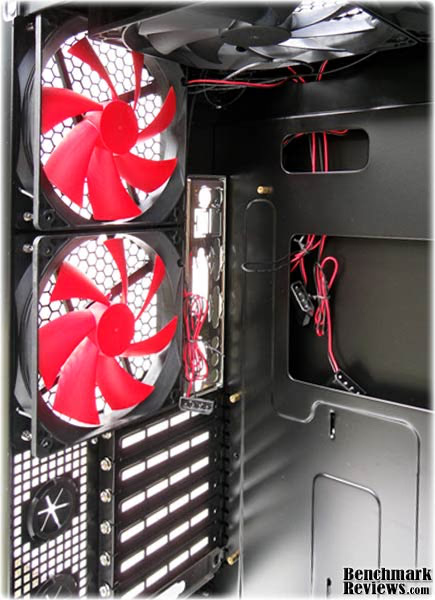 ,
,
The two 120mm fans installed in the back of the case look identical to the front TRI-Cool fans, but are actually TWO-Cool fans. They run slower and are for that reason, much quieter. The specs are as follows; 900 ~ 1500 RPM (30.1 ~ 51.2 CFM) @ 16.9 ~ 27.9 dBA., These fans, along with the two 140mm fans installed in the top, can be set to low or high speed by switches on the back of the case.
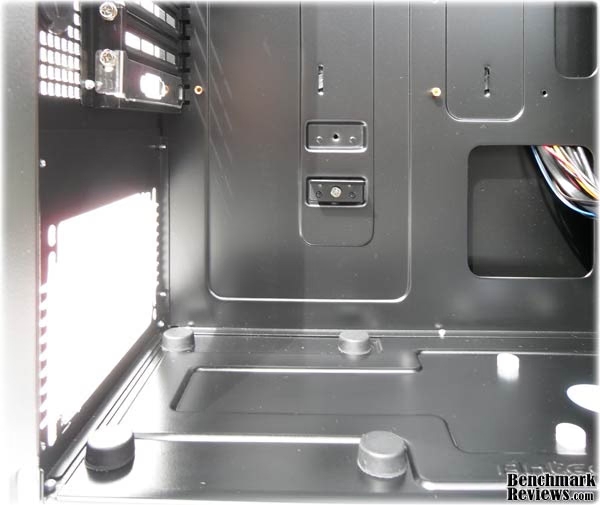 ,
,
Moving down now to the PSU installation area, there are for big rubber mounts to support your, PSU and reduce vibrations. Note that although Antec 'support', the bottom mounting PSU design seen in most, cases these days, they don't include any whiff of bottom ventilation., This means, you have to install your PSU upside down, which in turn means your cables have to stretch even further to get to their relative locations on the motherboard (see install, image in previous section)., There is a little bracket installed above the PSU area that doesn't seem to really serve a purpose other than to provide mediocre support for your PSU should you decide to turn your case upside down.,
In my own opinion, it is quite possible to install your PSU the right way up, here as the rubber mounts provide 8mm of clearance under your PSU, and that hardly restricts air getting in. This, is purely theoretical and would, of course be done at my own risk and no liability would be imposed on Antec if things should go wrong, and should my words inspire you to do the same then you must also do so at your own risk with no liability passed to me the author, or Benchmark Reviews.
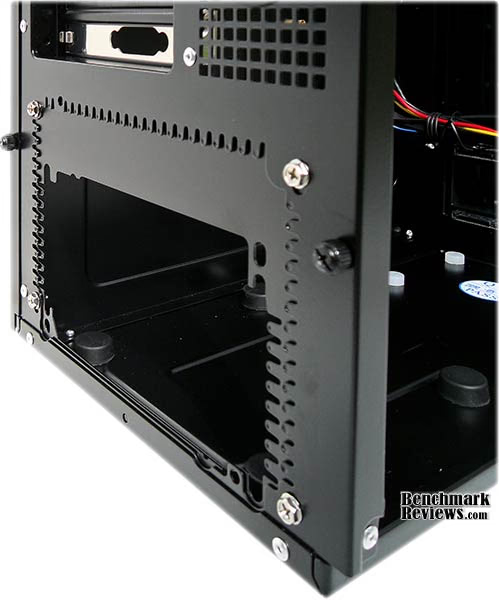 ,
,
The Antec DF-85 case has support for Antec's own CP series of oversised, PSU's. If you wish to install a CP-X power supply here, then you will need to remove the 'plate' installed here (best seen from the outside).
 ,
,
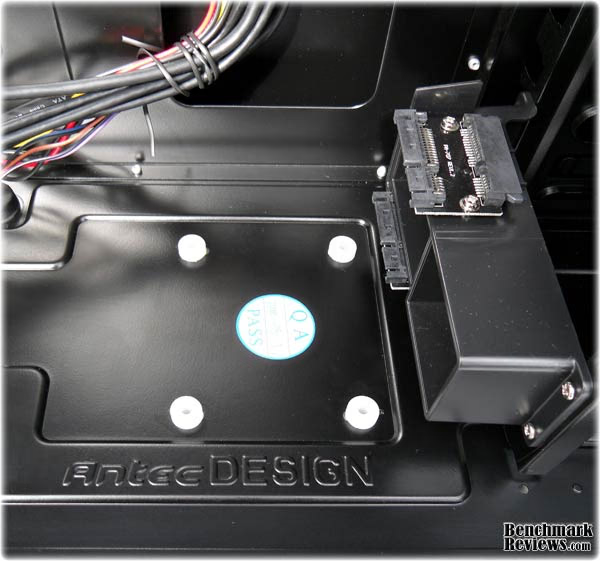
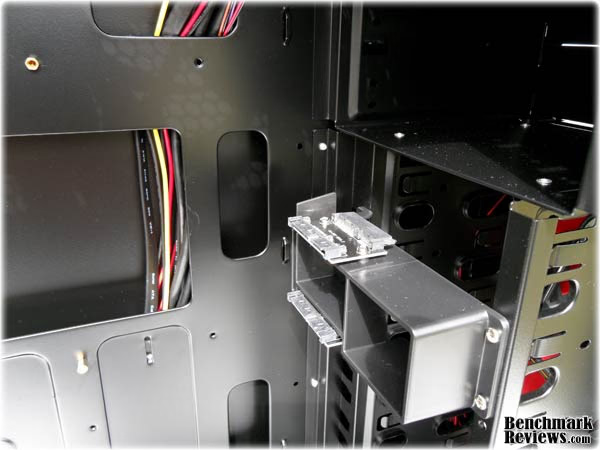
Moving along towards, the front of the case you will find a place in which to mount a 2.5" SSD, the rubber stand off's are not installed by default but are simple to install and there are also, long screws included to fix your drive into place. You can also see in this image, another innovation from, Antec, - the Fleet-Swap Hot-Swap bracket, this bracket supports two 3.5" HDD's and works very well. It is also possible to move this bracket to any of the other 3.5" drive bays by removing the two screws and re-mounting it further up.
 ,
,
There is also another repositionable Fleet-Swap Hot-Swap bracket installed at the top of the nine 3.5" bays allowing you, to have four, internal Hot-Swap drives at any given time.,
 ,
,
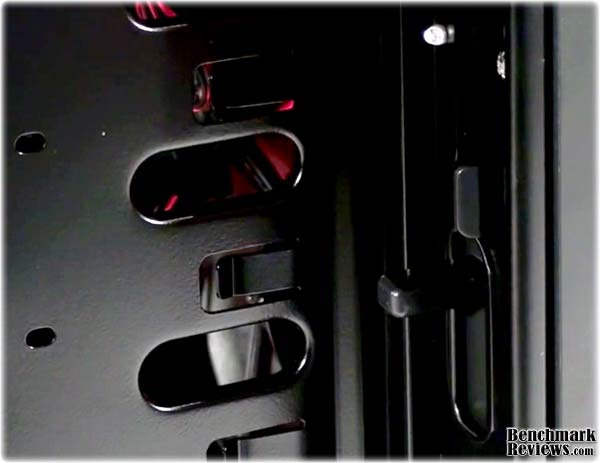
Installed just inside the front of the case is this little lever that allows you to lock the, Fleet-Release doors on the front of the case to keep your, Hot-Swap drives nice and safe.,
Antec, Dark Fleet, Final Thoughts
The Antec DF-85 is more like a Mid Tower feature wise and 9 bays for storage is a little over-kill with the HDD capacities that we are seeing these days. While I like the exterior design, I know already that, the, Dark Fleet, series design, is not to everyone's taste, it's like nothing, Antec have done before and its release came, as, much of a surprise as the Skeleton, cases, did when, they were, released. The Antec 'Hundred' series of cases are the predecessor to the dark Fleet series and will probably be remembered better. There's lots of room inside the DF-85 and much of it was unfortunately wasted, with a little design change this could be rectified and then Antec will really have a winner on it's hands. On the plus side the DF-85 has a unique design, Seven controllable fans pre-installed, an external 2.5" HDD bay,, one internal 2.5" mount,, nine 3.5" bays, (four with Hot-Swap interfaces) and door access to the front of the case which are all strong features delivered by Antec and make a big difference when it comes to comparison against other products on the market.
When it all boils down though you need to ask yourself a question -, You are in the market for a Full Tower case, are you looking for a case with lots of storage options, effective cooling, and plenty of room? Or, are you looking for a case that will support ULTRA-ATX, E-ATX and XL-ATX along with quad GPU setup? If you answer is the latter then this case is not for you, maybe you would be interested in the HAF-X, from Cooler Master,, the Armor+, from Thermaltake or if you are, loaded then try the PC P80 from Lian Li.
Test System
-
Motherboard: Asus P5B-Deluxe WiFi-AP
-
System Memory: 2 x, 1GB PC2-6400 OCZ Platinum Rev2
-
Processor: Core 2 Duo E6600 Overclocked to 3.4Ghz
-
Processor, Cooler: Xigmatek HDT S1283
-
Audio: Onboard 7.1 channel audio
-
Video: PNY GeForce 9800GT
-
GPU Cooler: Xigmatek BiFrost
-
Disk Drive: Western Digital Caviar 200GB 7200RPM SATA
-
PSU: OCZ StealthXStream 500W
-
Operating System: Windows XP Pro SP3

DF-85 Internal temperatures
Temperatures were measured using HWMonitor 1.16, in this, latest version a new sensor has popped up on my motherboard (AUXTIN) and should be ignored as 127°C generally means, ON FIRE - call emergency services'. The ambient room temperature at the time of testing was 29°C, all case fans were on full speed (and noise) the HDT S1283 CPU cooler is using a Xigmatek XLF-F1253 120mm fan for airflow and the 9800GT was using the Xigmatek BiFrost Cooler. With the PC running idle there really wasn't much temperature difference to be noted between low and high speed fan settings, and as a result I have decided to run the exhaust fans on, MAX and the front intake fans on MIN for the, best performance to noise ratio.
Antec DF-85, Conclusion
In this section I am going to write a brief five point summary on the following categories; Performance, Appearance, Construction, Functionality and Value. These views are my own and help me to give the, Antec DF-85, a rating out of 10, a high score does not necessarily mean that it is better than a PC case reviewed by another writer here at Benchmark Reviews, that may have got a lower score, it is however a good indicator of whether the product is good or not. I would strongly urge you to read the entire review if you have not already, so that you can make an educated decision for yourself.
The Antec, DF-85 performs as expected for a case with seven fans pre-installed, the overall airflow is very good, allthough, the intake fans are rather loud at full speed,, intake, airflow, is not obstructed unless you install nine hard drives in the front of the case. There is ample room inside the case to install watercooling, with the right setup this case could be even better.,
The design of the Dark Fleet series is different from all of Antec's other tower cases, especially the Hundred series that redefined the look of the gaming case. The, Dark, Fleet series, appearance is comparable to the taste of Marmite, - 'You either love it, or you hate it' I for one really do like the red and black design of the DF-85 as it stands out from the crowd without being, overly garish.
The DF-85 build quality is second to none, the side panels are quite flexible but whilst installed this, isn't an issue. The plastic fittings on the front of the case (5.25" bay covers and Fleet Release doors) seem a little bit loose when open, but while closed they are as strong as the rest of the case. The case is very sturdy despite having rather small feet for a full tower case.
Functionality wise the DF-85 is a bit of a let down, there are plenty of Mid Tower cases out there with the functionality of the DF-85 which is a Full Tower. There is enough room inside the case to support larger motherboards and quad GPU setup's while still supporting, Antec's over-sized CP series of PSU's, if only it had been realised then the DF-85 would have been a certified winner., Your cable routing, needs are, catered for very well, apart from the massive, hole at the bottom of the motherboard tray that really needn't be so large. The external 2.5" Hard drive bay and internal 2.5" drive mount are an instant hit, as, are the, internal Hot-Swap, mechanism's and Fleet Release doors with their integrated speed control fans, and easily removable filters. The USB 3.0 connectivity is there but not implemented as well as it could have been.
The Antec DF-85 will set you back $169.99, at Newegg.com, which can be considered, a good deal, for a full tower case, while the price is lower than the usual $200 you would expect to pay for a full tower case it lacks the features that the best of the best have, but in turn introduces features that aren't seen from other manufacturers. Overall fairly priced with all things considered. Using our Price Comparison Tool helped locate other good deals on this Dark Fleet computer case.
The Dark Fleet series is not a complete failure, although, Antec set the bar really high with their 'Hundred' series, that makes it really difficult to release another product to take over it. At the end of the day the DF-85 is a nice looking, enthusiast case with lots of room for storage, plenty of room for watercooling and will support triple graphics cards and large PSU's, but the real hardcore players may want to look at the HAF-X, Lian Li PC P80 or the Thermaltake Armor+ for quad GPU and ULTRA-ATX, E-ATX or XL-ATX support.
Pros:
+, Seven fans pre-installed
+ Two 2.5" HDD/SSD options
+ Nice appearance
+ Fairly priced
+ Support for nine 3.5" HDD's
+ One external and four internal Hot-Swap interfaces
+ Intake fans have individual filters
+ All fans have speed control as standard
+ well constructed
+ Full height side window
+, Fleet-Release is good innovation
+ Good performance
+ Fully painted interior and exterior
+ USB 3.0 support on front panel
Cons:
- No support for quad GPU setup
- No XL, ULTRA or E-ATX support
- Space inside is wasted
- Front fans are too loud at full speed
- PSU mount is undesirable (unless you use CP series PSU)
Ratings:
- Performance:, 9.50
- Appearance:, 9.25
- Construction:, 9.00
- Functionality:, 8.00
- Value:, 8.50
Final Score:, 8.85 out of 10.
Quality Recognition: Benchmark Reviews Silver Tachometer Award.
Questions? Comments? Benchmark Reviews really wants your feedback. We invite you to leave your remarks in our Discussion Forum.
Reader comments from the original article
9 comments were posted before commenting closed. They are preserved as written. Original avatars no longer resolve and are shown as a placeholder.
RE: Antec DF-85 Dark Fleet Full-Tower Case David Ramsey Permalink:
Looks as if the DF-85 addressed many of the complaints I had about its little brother, the DF-35. For only $30 more you get a substantially improved (if larger) case. Even so, as you point out, they could have done a better job.
ouch Hsew Permalink:
chalk this one up as a failed sucessor to the 1200. I mean, sure, you've got hot-swap bays, One (why just one, I'll never know...) USB 3.0 port, CPX PSU support, and red led fans (woot), but the whole damn thing is SO FRIGGIN TACKY! I mean, wow, this just screams "prepubescent 10 year old alert"! Not only that, but they didn't have the decency to put in more than 7 slots (as was pointed out in the review). One word for this case: sloppy. Its like they were desperate for something new to release. And what's your beef with Antec's CPX PSUs? I mean, sure, they're ugly and they're huge, BUT, they're godly in terms of low ripple levels and they are insanely well priced compared to other units that come even close to their performance. Well, I guess I shouldn't be too hard on this case. If you're looking for a case with tons of airflow opportunities and an aggressive red/black color scheme that will hold your CP-850, this is the case for you.
All the difference... Bruce Normann Permalink:
It's interesting, that all the design elements that looked really out of place on the smaller case seem to work here, at least aesthetically. Just my guess, but I'm betting the first design layouts and prototypes that got sold to management were probably laid out on this larger canvas.
RE: Antec DF-85 Dark Fleet Full-Tower Case David Ramsey Permalink:
Agreed. I've a weakness for over-the-top styling in cases anyway, but the DF-85 does pull off the look more effectively than the DF-35.
Wasted room? fdsa Permalink:
The room on top of the motherboard is certainly NOT wasted, if you want to mount a radiator there with push pull fans you'll need all the room you can get. And as mentioned above, CPX power supplies provide outstanding performance and reliability for half the price of other comparable power supplies.
How does DF-85 compare vs the HAF X Frozenwaste Permalink:
When the DF-85 came out 3 weeks ago was $209 which is about the same price as the HAF X. It seems like the DF-85 is the successor to the lovely 1200, while the HAF X succeeds the HAF 932. This will be a worthy apples to apples comparison, and I am looking forward to it.
RE: How does DF-85 compare vs the HAF X steven Iglesias-Hearst Permalink:
In case you haven't found this yourself already, here is a direct comparison of the DF-85 and the HAF-X so you can make your own conclusion - ##overclock.net/computer-cases/758936-full-tower-atx-battle-antec-df.html
Could Have Mike Permalink:
Should have done a better job with cable mangment IE: CoolerMaster HAF X
Despite the review..... away Permalink:
Comparisons between the HAF and the DF-85 are all valid (see the link in Steven Inglesias-Hearst's post above) but in the end the number of drive bays won me over. I do hard-core video editing and have nine, 2 TB SATA drives in my current setup. 4 of them are externally mounted by necessity. So when it came time to build a new kit, 9 3.5" baby and two 2.5" mounts in the DF-85 will suit me perfectly. The mobo I chose will also fit and I only need two slots for my Dual DVI graphics card. I think that the cooler running i7 - 2600K will be fin with the fans in this case plud the Antec - Kuhler 690 liquid cooler I got for it. probably the only drawback for me is that I'm an old fart and boofy looking "tart" cases don't mean a lot to me, but I'll put up with it to get the drive bays and the room to mount my CP-1000 PSU.