
NZXT Phantom 630 Computer Case
NZXT Phantom 630 Computer Case Review
Manufacturer: NZXT Corporation
Product Name: Phantom 630
Model Number: CA-PH630-G1
UPC: 815671011152 EAN: 5060301690404
Price As Tested: $179.99 (Newegg / Amazon)
Full Disclosure: NZXT provided the product sample used in this article.
I dug out some of my older computer cases recently, and was reminded and just how much the state of the art has advanced in the past few years. For example, my old Cooler Master Stacker was once one of the most advanced cases you could buy, yet its lack of any drive trays, toolless mounting, or even cable routing features, would make this aluminum monster noncompetitive in today's market.
Today's builder has come to expect more, and vendors who don't deliver it won't do well. NZXT has built their case business on delivering more, but at a lower price than many of the competitors...without sacrificing quality. Their Phantom line combines the latest features with some uniquely NZXT innovations that give the user a great deal of flexibility in their build.

Phantom 630 Features
- Fully modular drive bays allow multiple configurations for 2.5" and 3,5" devices.
- Split-level motherboard tray allowing increased rear cable management.
- Dual SSD mounts behind the motherboard tray.
- Support for multiple radiatiors of multiple sizes.
- Integrated 30-watt single channel fan controller with rear-mounted fan hub.
- All intakes filtered with removable filters.
- Integrated lighting illuminates the rear of the case at the touch of a switch.
- USB 2.0 and 3.0 support along with an integrated SD card reader.
CA-PH630-G1 Specifications
| Material | Steel body with plastic bezel and trim |
|---|---|
| Dimensions | 245mm(W) x 627mm(H) x 600mm(D) |
| Weight | 12.3kg / 27.1lb |
| MB Type | ATX, Micro-ATX, XL-ATX |
| 5.25" Bays | 4 |
| 3.25" Bays | 1x1, 1x2, and 1x3 modular drive cages (6 drives total) |
| 2.5" Bays | 2 (behind motherboard tray) |
| I/O Panel | USB 3.0 x 2 (internal), USB 2.0 x 2, SD card reader x 1 Audio In & Out x 1 (supports HD Audio) |
| Expansion Slots | 9 |
| Cooling System |
Front: 1x200 or 2x140 or 2x120mm (1x200mm fan included) |
Let's take a closer look at this case in the next section.
Closer Look: Exterior
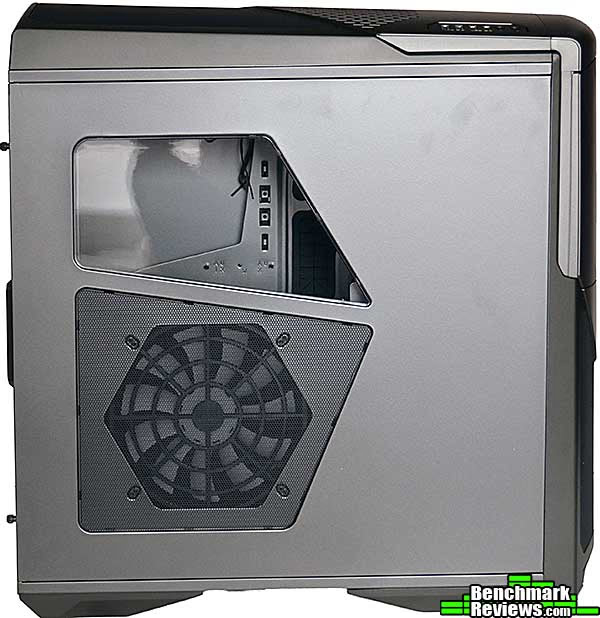
Introduced at the 2013 CES show, the Phantom 630 is an obvious relative to previous NZXT Phantom cases...in fact, it looks like the Phantom 820's younger brother. NZXT is sticking with their "multi window" side panel, where one large cutout is devoted to a side ventilation fan, and another wide is just for viewing. The mesh of the lower panel and the window in the upper panel are both secured from the inside, leading to a clean look for the panel.
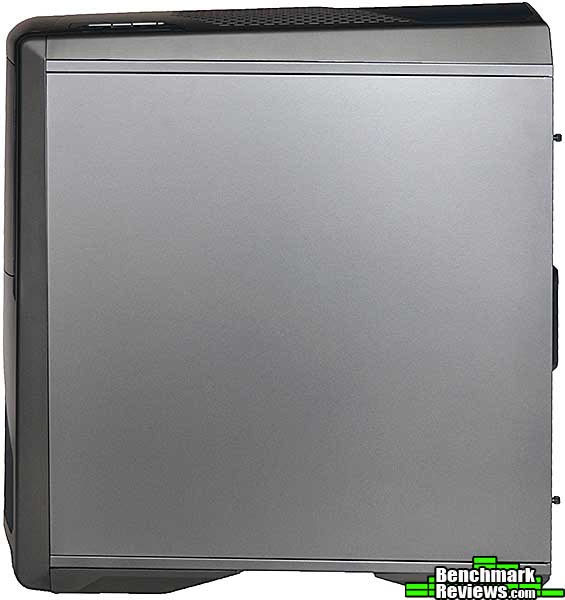
The right side panel, though, is a simple flat piece of steel with no detailing at all.
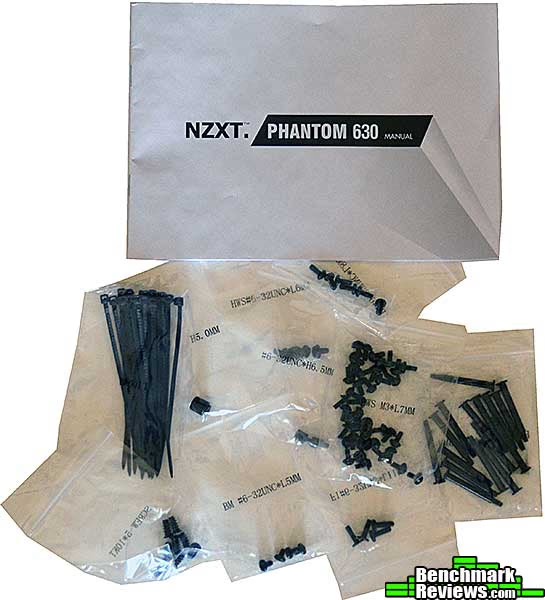
The accessories package is pretty minimal: the standard multi-lingual fold-out manual, and many bags of screws and fasteners. It is nice that all the bags are both clearly labeled and re-sealable.
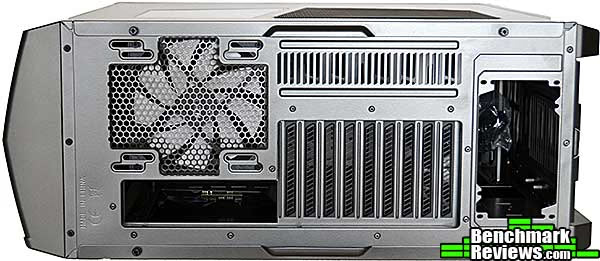
The back of the case has a couple of interesting features. First, there are nine card slots, which means that folks running triple- or quad-card CrossFireX or SLI will have plenty of room. Seconds, the rear exhaust fan can be either a 120mm or 140mm piece, which is nothing new...but NZXT has replaced the standard fixed-position screw holes with slots. This means that you can adjust the position of the exhaust fan to be precisely where you want it to be. This kind of low-cost innovation is something I've come to expect from NZXT.
At the bottom of the case are two slide-out fine mesh air filters. The filter at the right of this image is for the power supply intake fan, while the filter at the left would come into use if you mounted a 2x120mm radiator in the bottom of the case. Many cases these days will simply slap some coarse plastic mesh with tab cut-outs on a case and call it a "filter", but these are fine-mesh filters in sturdy plastic frames.
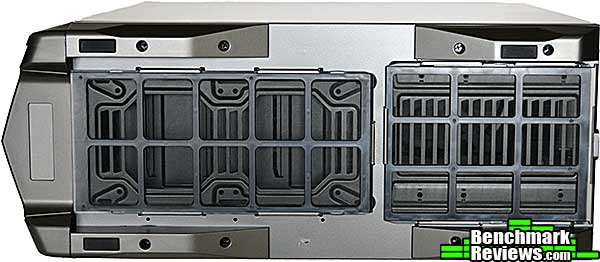
The top of the case houses a single 200mm filtered fan (although only one 200mm fan is included with the case, NZXT includes a 200mm fan filter for the open position). At the top left f this image are the two USB 2.0 and two USB 3.0 ports, with audio input and output jacks, while the power, reset, rear light, and fan controller switches are at the bottom.

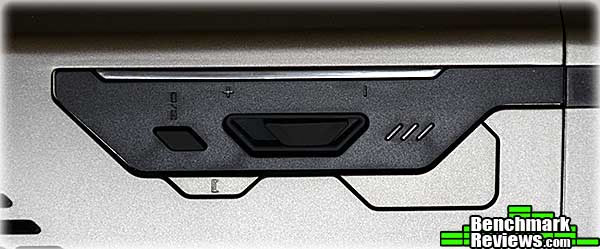
Here's a closer look at the switch cluster. Starting at the top left of the black area, the tiny black switch labeled "I/O" controls the white LEDs that illuminate the rear of the case, which is handy when you're trying to attach cables under your desk. Immediately to the right is a three position slider switch that controls your fan speed, with three LEDs to indicate its setting. The small gray switch is the reset switch while the large unlabeled gray switch is the power switch.
Behind the magnetically latched front door are the four 5.35" device bays, with spring-loaded covers for the unused positions. And see that little slot at the top? That's an integrated SD card reader, a feature we also saw on the Phantom 820. If you do any photography this is a really useful feature to have.

Let's take a look at the interior of this case in the next section...
Closer Look: Interior
The plastic front and top panels of the NZXT Phantom 630 snap off, revealing the case's steel skeleton. The fine mesh filter for the 200mm front intake fan is in the front panel.
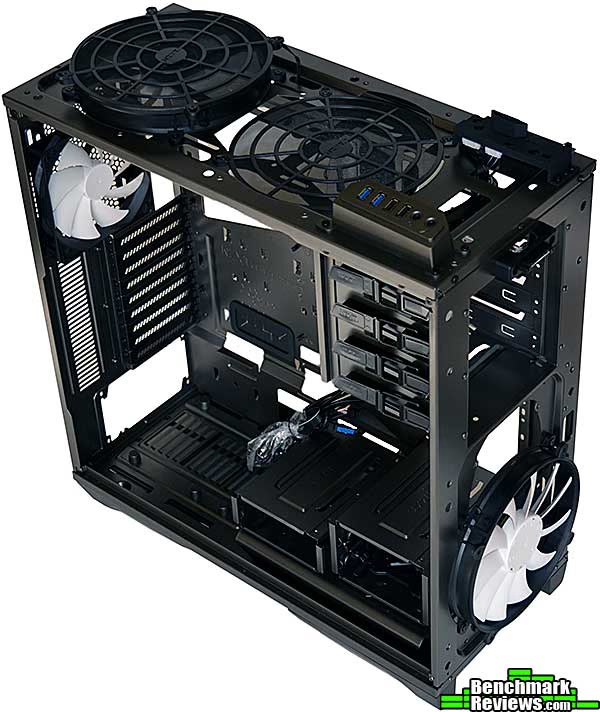
The interior of the case seems at first glance to be a pretty standard design: large motherboard cutout for the CPU cooler, many rubber-grommeted cable routing holes, power supply at the bottom, and 3.5" drive bays below the 5.25" drive bays. But there are some surprises in store. Notice that the 3.5" bays are comprised of three separate sections: a single-drive bay, a dual-drive bay, and a triple-drive bay.
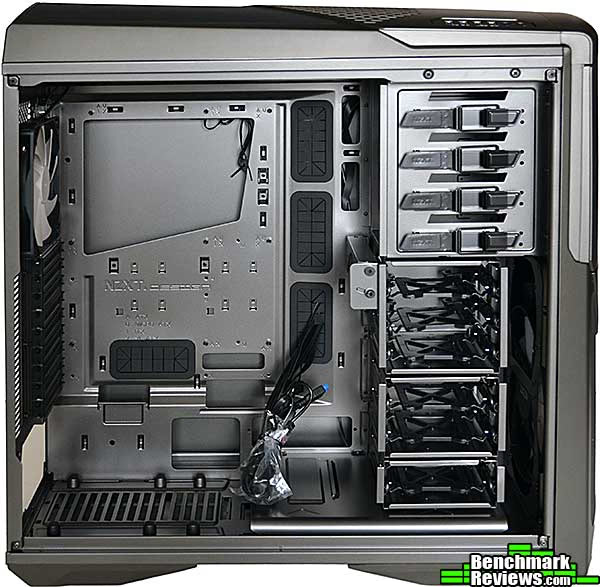
Here's the surprise: all three 3.5" drive bays can be removed by undoing a few thumb screws. Note that the triple-drive bay has a pivoting fan mount that can accommodate a 120mm or 140mm fan.
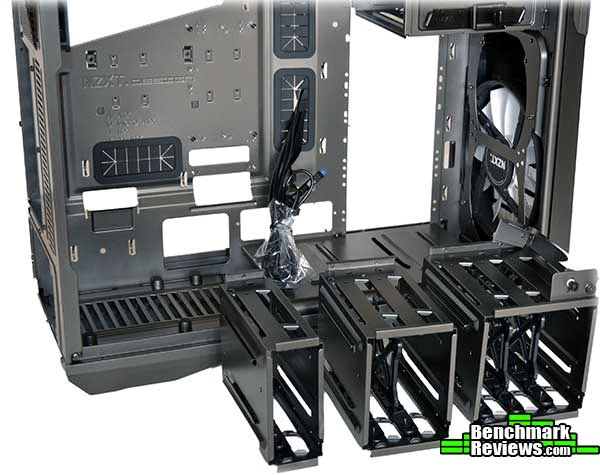
The drive bays can be rearranged to suit the needs of your build. For example, if you have very long video cards or just need extra space for cabling...

Remove the shield under the lowest drive bay and you'll see mounting points for a dual 120mm radiator. And remember, it's got its own dedicated filter, which was removed for this photo.

Let's continue our exploration of this case in the next section.
Detailed Interior Features
Looking behind the motherboard tray, we can see the plastic sleds used to secure the 3.5" drives.

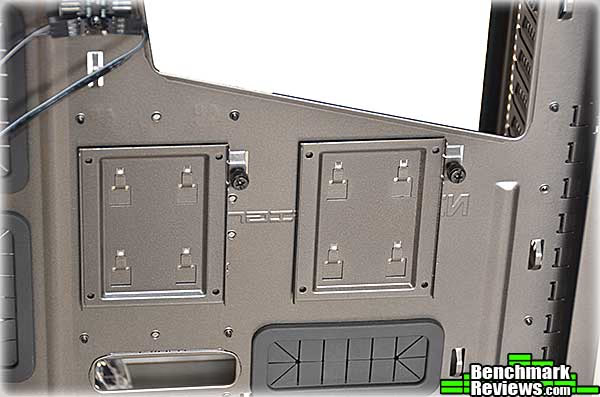
Just below the CPU cooler access cutout are two removable 2.5" drive trays. These are perfect for SSDs or 2.5" hard drives. This is a much nicer implementation as compared to other cases that simply drill four extra holes in the motherboard tray and call it an "SSD mounting point".
Here's the breakout block for the built-in fan controller. It can handle up to 10 fans, but since the entire controller is only rated for 30 watts, be cautious about connecting powerful, high-speed fans and keep track of your total fan wattage.

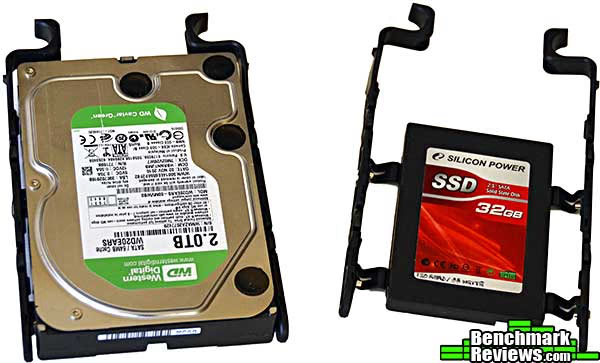
NZXT usually combines a low price with high quality, but they fell down on these drive sleds. The nicest thing I can say about these extremely flimsy bits of plastic is that they work reasonably well for 3.5" drives, whose width serves to keep the sides of the sled far out enough to fully engage the slots in the drive bays. However, there's virtually no tension holding the sides of the sled out, so if you mount a 2.5" drive in the middle of the sled (screws are provided for this), you will almost certainly have problems with the sled not being secure in its drive bay. These are the same flimsy sleds used in the otherwise excellent Phantom 820 case and it's disappointing to see them here as well. If you're mounting a 2.5" device, you can help a little by physically flexing the sides of the drive sled outwards, but beware: it's easy to break the sides off completely.
NZXT seems to be one of the few case companies that actually builds systems in their cases. With over an inch of clearance between the back of the motherboard tray and the side panel, along with copious tie-down points, you should have no trouble finding room for all your cables.

OK, let's actually build a system in this case...
Building a System
NZXT calls the Phantom 630 a "high performance modular ultra tower", and I suppose that's as good a description as any. It's not as large as monsters like the Cooler Master Cosmos II or the Rosewill Blackhawk Ultra, but it's still a pretty big case. Of course one of the main advantages of a large case is that its easy to build a system in. Here we can see that an ASUS P9X79 WS motherboard fits with room to spare, even though it's somewhat larger than the standard ATX form factor.

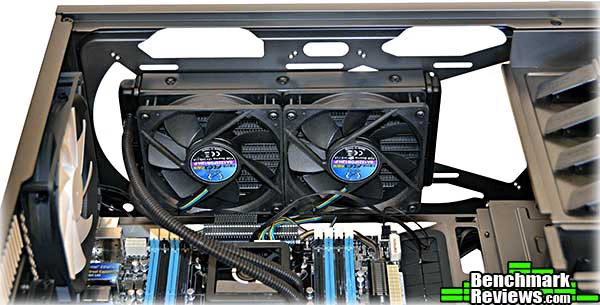
This case is made for water coolers. It will not (quite) fit a double-thick radiator (the XSPC radiator I have can be installed, but occludes the EPS-12V power connector), but something like this Corsair H100 2x120mm radiator is no challenge at all.
Here's one problem I ran into: the snap-off plastic case front has these ridges molded into it. They serve to precisely locate 5.25" devices such as this Blu-Ray drive. As you can see from this image, the drive can't slide back any further into the case. However, this also means that you can't remove the case front (as you might wish to do to clean the front intake filter) without removing any 5.25" devices. In the case of an optical drive as shown below, this is merely an annoyance (remove SATA and power cables, flip release lever, slide drive out). However, if you're using a bay reservoir for your water cooling system, it's much more of a problem.

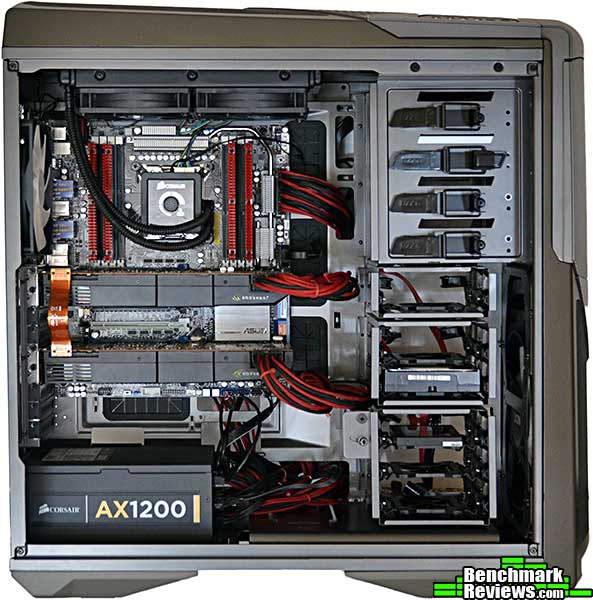
Completely assembled with lots of stuff: ASUS P9X79 WS motherboard, twin NVIDIA GTX 580 video cards, a very large Corsair AX1200 power supply, and a hard drive and SSD. Not only did everything fit with ease, but the space inside the case made neat wiring a snap.
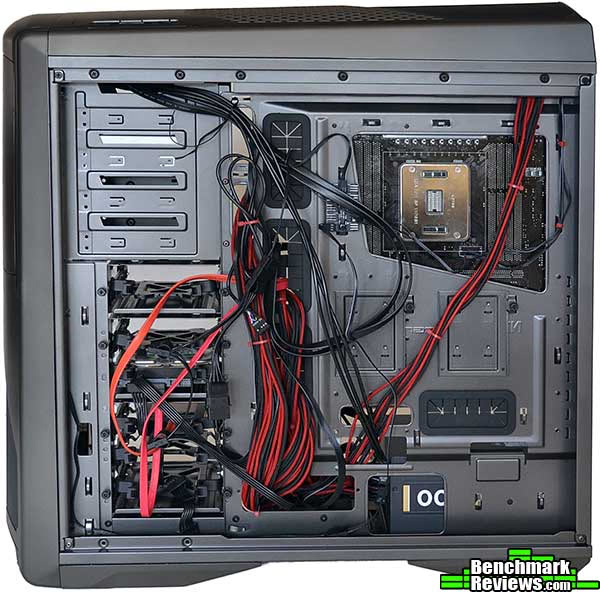
With this tangle of cables on the other side of the system, you'd think it would take a lot of work cleaning things up just to get the side panel on. Nope. Due to the generous 1+ inch of clearance, the side panel fit on easily without any further work.
Once the case is sitting under your desk, these white LEDs will make it easier to see what's going on with your cables and connectors.

In the next section I'll present my final thoughts and conclusion on this case.
Computer Case Final Thoughts
Some of the first reviews I wrote for publication on this site were of NZXT cases. At the time I was somewhat of a case snob, preferring expensive Lian Li and Cooler Master aluminum cases for my builds. I was struck by the quality and features NZXT managed to bring to their sub-$100 cases, and came to realize that design was just as important, if not more so, than just materials and build quality. Of course if a case has all three, that's great!
At an MSRP of $179.99, the NZXT Phantom 630 is facing off against some pretty heavy competition...cases such as Cooler Master's HAF-X and Storm Trooper, or Silverstone's Raven RV03. In the end, of course, it comes down to the features you want and the price you're willing to pay. NZXT includes a raft of convenience features in the Phantom 630: an integrated fan controller block, rear LEDs, an integrated SD card reader, configurable drive cages, and removable filters for all the air intakes, and these features really help this case stand out in an increasingly crowded market segment.
And it does need to stand out. The (vast) majority of computer cases sold are in the sub-$100 market; once you go over the $150 MSRP mark, you're looking at pretty rarefied territory. Like expensive cars in a showroom, these are the cases that "carry the standard" for vendors, and users rightfully expect to get a lot for their money. With the Phantom 630, they do.
Still, it's not perfect. The flimsy drive sleds are an especially jarring note in this case, and I hope that NZXT fixes them in the next iteration. Actually, they're so bad that I'd suggest NZXT consider offering free replacements. Other than that, my only other significant complaint is the single channel fan controller. Some of the competition, like Cooler Master's Storm Trooper, offer multi channel fan controllers, but NZXT has the advantage of the integrated fan power block, which shows well next to the massive tangled bundle of fan and light wiring in the much more expensive Cooler Master Cosmos II case.
Overall, this is a handsome and feature-rich case you'd do well to consider.
Phantom 630 Conclusion
Computer cases are one of the few areas in which an enthusiast can "put their mark" on a system. There's a tsunami of innovation and refinement in case design these days, and just when you thought you'd seen everything it was possible to do with the "ATX tower case" template, something new comes along to show you that other people don't agree.
The NZXT Phantom 630 shares a distinct look with the other member's of NZXT's Phantom case line. It's handsome enough, albeit not particularly dramatic. The Phantom 630 is available in black and white as well as the gunmetal gray of our review sample if you want something with a little more visual zing.
The steel used in the case is very sturdy: I was able to easily pick up a fully loaded case by a top frame rail (with the plastic top panel removed) and didn't notice any flexing at all. With the exception of the plastic drive sleds, all the steel and plastic parts were well made and fit precisely, so the construction quality of the case is up to the high standards we've come to expect from NZXT.
Functionally, the case is more versatile than many of the competition's cases, and is certainly the most water-cooling friendly case I've seen at this price point. Actually, short of monsters like the Rosewill Blackhawk Ultra or super-expensive bespoke cases like Mountain Mods, it's the best case I've seen for water cooling.
As for value: well, there's no getting around the fact that there are a lot of nice cases to choose from at this price point. As of February 2013 the NZXT Phantom 630 sells for $179.99 (Newegg / Amazon). If you have a single video card, only a couple of 2.5"/3.5" devices, and don't particularly care about water cooling, this might not be the case for you. However, if setting up a multi-drive water-cooled tri-SLI or CrossFireX system is what you're planning to do, then this is one of the best options at this price point that you should consider.
This case - flimsy drive sleds aside - marks another design win for NZXT. I'll be interested to see what they come up with next.
Pros:
+ Good industrial design
+ Integrated fan controller, SD card reader, and rear LEDs
+ Configurable drive bays
+ High quality filtering on all intake fans
+ Sturdy construction
+ Excellent cable management
Cons:
- Flimsy drive sleds
- Could use a top mounted carrying handle
- Takes up a lot of room on your desk
- Must remove front panel to clean its dust filter, which means removing any 5.25" devices first.
Ratings:
- Presentation: 9.00
- Appearance: 8.00
- Construction: 9.25
- Functionality: 9.50
- Value: 9.00
Final Score: 8.95 out of 10.
Quality Recognition: Benchmark Reviews Silver Tachometer Award.
COMMENT QUESTION: What do you like most about the NZXT Phantom 630?
Reader comments from the original article
5 comments were posted before commenting closed. They are preserved as written. Original avatars no longer resolve and are shown as a placeholder.
Been looking forward to this one... Tom Jaskulka Permalink:
Great to see this one David! Thanks for the review. I actually had a question that I haven't seen answered anywhere: does this case use custom NZXT 200mm fans? As in, do I need to make sure to purchase the NZXT branded fan if I wanted to add another 200mm to the top?
RE: Been looking forward to this one... David Ramsey Permalink:
It uses NZXT fans, but as far as I can tell they're "standard" in that they seem to use the normal set of 200mm mounting points.
RE: RE: Been looking forward to this one... Tom Jaskulka Permalink:
My Vulcan (and the original Phantoms from what I've heard) all used the "not quite" 200mm fans, so upgrading would have been a deal-breaker for me if this one was the same way. If you ever get a chance to confirm for sure or measure, I'd say thank you again ;) Certainly not a priority though, I appreciate the response!
RE: RE: RE: Been looking forward to this one... David Ramsey Permalink:
There's only one place you can add a 200mm fan (the top of the case), and the fans are $16.99 at Newegg, so it's not a big deal if it's non-standard...unless there are some non-NZXT 200mm fans you really like
RE: NZXT Phantom 630 Computer Case kzinti1 Permalink:
It's high time these case manufacturers realized how easy it is to make room for all the cables behind the motherboard tray. I'd like to see the companies settle on 1.5 inches from the mobo tray to the inside of the back cover. These mobo power cables aren't going to get any smaller any time soon and a little excess space would be a Godsend.