
Lian Li PC-T60 PitStop ATX Test Bench Chassis
Lian Li PC-T60 PitStop ATX Test Bench Review
If you're the kind of computer enthusiast whose case is always open, and you change components in your rig more often than you change your underwear, a "work bench" type fof computer case might be something you could use. These open-air chassis make it easy to swap out components and access areas of your system like diagnostic LEDs and voltage measurement points. Of course, they also make it easy for the dirt and danger of the outside world to get to your system's expensive and delicate electronics, so they're not for everyone. Lian Li's new PC-T60 and PC-T7 Test Bench chassis (for ATX/mini-ATX and Mini-ITX motherboards, repectively) address this market with the brushed aluminum flair the company is known for, and Benchmark Reviews checks out the new Lian Li PC-T60 ATX/Mini-ATX Test Bench chassis in this review.
Lian Li has made a name for themselves with their high-quality aluminum computer cases aimed at the enthusiast market. Their new "Test Bench" chassis are no different: crafted of the same gorgeous brushed aluminum used in their other cases, these chassis are also available in black and red anodized versions as well as the standard silver. Screws and standoffs are silver metal for the silver version of the case, and black metal for the red and black versions, a nice touch.

As I noted, test bench-type open air chassis aren't for everyone. The exposed motherboard electronics are vulnerable to spilled drinks, pet dander, and other environmental detritus. There's no cable management as in similarly-expensive regular cases, and a dropped screw could easily roll under the motherboard and create a short between the motherboard and the supporting metal tray, instantly frying your rig.
The Lian Li PC-T60 ATX/Mini-ATX Test Bench will set you back between $99 and $129, depending on the color (the red version is more expensive). While this might seem high for an open-air case, it's similar to or slightly below the prices of competing products like the all-plastic HSPC Tech Station. How does it compare functionally? We'll see in the coming pages.
PITSTOP Features
-
To ensure user can put everything together easily, Lian Li designer decided to use only standard PC component inside the T60, standard 5.26" optical drive, standard 3.5" hard drives, standard ATX PS/2 power supply units. The parts are easy to get on current market, and it would be easy to upgrade and server in the future.
-
The power supply has rubber pads for both insulation and support. Reduce vibrations and also secure the PSU without scratching the painted surface.
-
There are two space for standard 5.25" optical drive above the power supply unit.
-
T60 features Lian Li patented Anti-virbation HDD cage, which allow user to fit three of 3.5" HDDs. It is easy to use, no tool required, simply using the special thrumb screw to secure the anti-vibration rubber ring to the HDD, and slide the HDD into the cage.
-
T60 is a ATX / Micro-ATX TEST BENCH, it equipped with 8 PCI slots, especially in the advent of adding in new graphics cards.
-
There are two aluminum handles for 2.5" HDDs below the M/B tray, allow user to install or remove 2.5" HDD easier.
-
Multi-media port connectors follow international specification standards, with one connector for easy installation.
-
New USB 3.0 ports, e-SATA, Audio supports HD Audio or AC97 Audio on the front, allow for easy access.
-
T60 support a internal fan Cooler for two of 120mm or 140mm fans, to push the cold air through the motherboard.
PC-T60 Specifications
| Model | T-60 |
|---|---|
| Case Type | ATX / Micro-ATX Test Bench |
| Dimensions | (W) 351mm x (H) 400mm x (D) 330mm |
| Front Bezel | None |
| Color | Black / Silver / Red |
| Side Panel | None |
| Body | Aluminum |
| Net Weight | 1.8KG |
| 5.25" Drive Bay | 2 |
| 3.5" Drive Bay | 3 |
| 2.5" Drive Bay | 2 |
| Expansion Slots | 8 |
| Motherboard | ATX / Micro-ATX |
| System Fan | 120 / 140mm Fan x 2 (Optional) |
| I/O Ports | USB 3.0 x 2 / e-SATA x 1 / HD+AC97 Audio (Optional) |
| Max video card size | None |
 About the company: Lian Li
Lian Li Industrial Co., LTD was founded in 1983. We are the one of the largest and most reputable manufacturer of aluminum PC case in Taiwan. With over twenty years of experience in the computer products field, our dedicated team of engineers, production specialists and administrative staff provide the finest quality accessories available on the market.
In 1993, Lian-Li Introduced the new lines of computer hardware, including bracket (for case & interfaces), Mobile rack (for H.D.D.), mounting kit (for FDD & HDD), aluminum PC cases, IPC, external cases, server cases and more. We also provide OEM & ODM services, you are assured of designs that will meet your exact specifications, and innovative ideas in manufacturing that will give your products an essential market edge.
Our outstanding quality has earned us ISO 9001 certification for all of our products. In addition, we back up our quality assurance with a two-year guarantee on most of our products. R&D is one of the reasons why Lian Li is able to offer quality products to the market. Whether it is for OEM or ODM projects, our experienced mechanical and electrical engineers are capable of providing our customers with the best solutions in product design.
Closer Look: Lian Li PC-T60
The PITSTOP PC-T60 is delivered unassembled: you receive a box of aluminum pieces. Given the style of the case, the only accessories in the box are a few bags of screws and some self-adhesive rubber feet, along with an instruction sheet showing how to assemble the case. The instruction sheet is printed in small text and the accompanying illustrations are small and somewhat fuzzy. There are dozens of screws that sometimes vary only slightly (there are otherwise identical screws whose only difference is 1mm in length) and this can complicate things: several times I had to disassemble parts I had assembled either incorrectly or with the wrong screws. Still, assembly isn't difficult and took only 20 minutes or so.
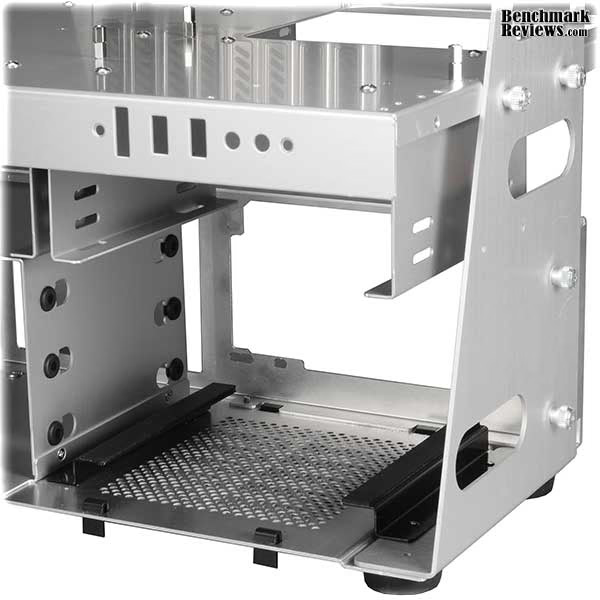
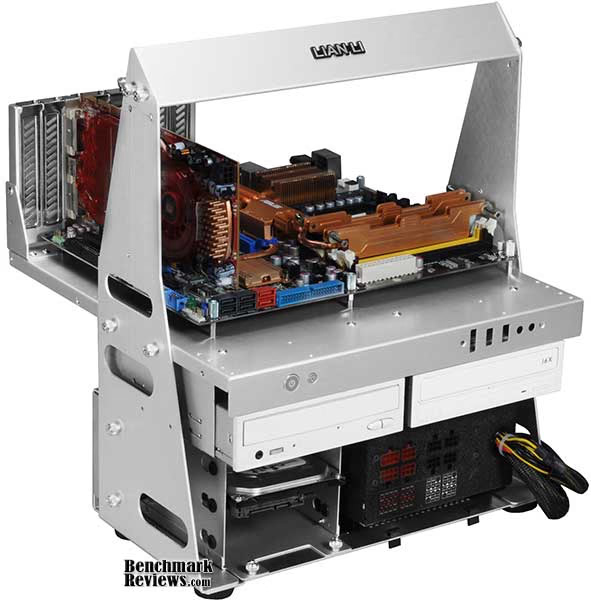
Since the PC-T60 is a "test bench" open-air chassis, the distinction between the interior and exterior vanishes. In effect, it's all interior. The basic layout is simple: two horizontal plates supported by two vertical side plates. The bottom horizontal plate contains the power supply and 3.5" hard drive cage. THe top horizontal plate is the motherboard tray, with the motherboard and card slot backplane on top, while mounts for 5.25" and 2.5" devices are suspended from the bottom of the tray. Power and reset buttons are at the left front of the motherboard tray; the power button also houses the power LED (blue) while the smaller reset button contains the hard drive activity LED (red). In either case the entire button glows with the color of the LED. At the right are cutouts for an optional I/O panel with E-SATA, USB 3.0, and microphone and speaker connections.

The hard drive cage holds three 3.5" drives in vibration-isolating rubber mounts. Lian Li supplies thumbscrews to secure the drives in the cage. Removing the two thumbscrews visible at the lower front of the cage allows it to be slid out of the chassis.

The motherboard tray has a large cutout under the CPU area to make installing CPU coolers easier (but you'll probably need to remove the motherboard tray from the rest of the chassis to access the bottom), and although Lian Li says it's only for motherboards up to ATX size, there was plenty of room for the ASUS Rampage II Extreme, which is longer front-to-back than the ATX standard. It will not, however, accommodate XL-ATX motherboards like the 345mm-wide EVGA X58 Classified 4-Way SLI. Lian Li uses normal standoffs and mounting screws to secure the motherboard, rather than the plastic pegs and rubber pads used by some other test-bench style cases. Screw holes at the front of the motherboard tray are for an optional dual-120mm fan bracket.

The motherboard is secured to the vertical supports by two thumbscrews on each side. This makes removal of the motherboard tray a matter of moments (but remember you'll need to disconnect some cables). There are a total of four mounting holes in each side of the motherboard tray, allowing the tray to be mounted in three different positions. I found that the standard position (shown in the photo below) places a lot of weight at the back of the case, making it somewhat "tippy" towards the rear, especially with video cables and the like connected. Moving the board forwards (i.e. using the rearmost two mounting holes) resulted in a much more stable configuration, although it places the CPU cooler directly under the handle at the top of the case. Large CPU coolers would be problematic here.

The power supply mounts on standoffs for ventilation room and secures at the back of the lower panel with four screws, just as in a "normal" case. Lian Li provides rubber strips for the standoffs to absorb any vibrations from the power supply. A 5.25" device mount is directly above the power supply.
Follow me to the next page as I continue to examine this unique case product.
PC-T60 Detailed Features
At the back of the chassis Lian Li provides a mount for two 2.5" drives. This is a welcome feature considering the growing popularity of SSDs. You can of course also use this bracket to mount laptop-style hard drives as shown below.

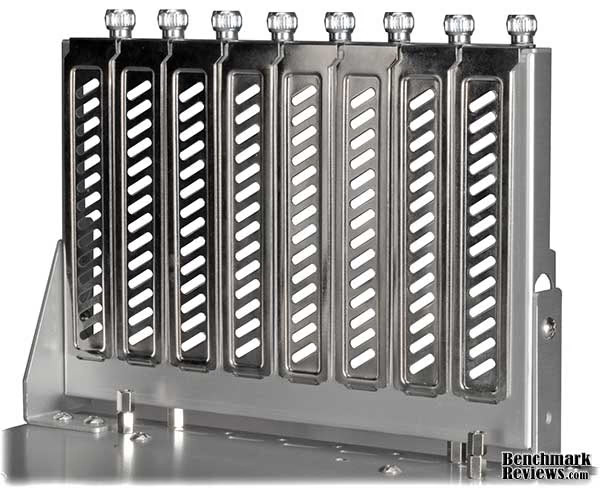
Unlike any other test bench style case, the Lian Li PITSTOP PC-T60 has a standard card backplane with a full 8 slots. Want to set up a system with a double-width video card in the last slot? No problem! The extra bracing provides support for large and heavy video cards that's much more robust than some of the rather "delicate" systems I've seen in other cases of this type.
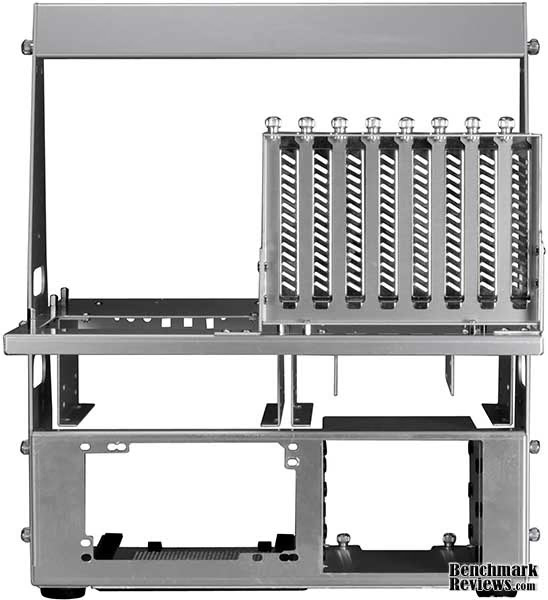
From the rear we can see almost every feature of the case: the power supply mount at the lower left, the 3.5" drive cage to the right, the 2.5" drive cage above the 3.5" cage, and the two 5.25" device mounts suspended from the motherboard tray. All told you can mount a total of seven storage devices. The T60's twin 5.25" bays give you some extra mounting options for non-storage devices, too.
It looks pretty good so far, but what's it like to build and use a system with the PC-T60 Test Bench case? Benchmark Reviews will cover this in the next section.
Lian Li PC-T60 Installation
The design of the PITSTOP T60 means that assembling your rig and the case go hand-in-hand. Specifically, you'll need to install any 5.25" devices in their brackets before attaching the motherboard tray to the vertical supports, since you won't be able to easily reach their securing screws once the case is assembled.
And there are a lot of screws. These days, even "normal" computer cases are moving towards tool-less installation, but the PC-T60 ATX / Micro-ATX Test Bench uses screws for everything. Drives and the power supply mount with screws, and the motherboard screws down to ordinary standoffs, and the backs of expansion cards are secured with large thumbscrews. Lian Li's decision to go with "screws for everything" seems odd in a case whose intended purpose is to make swapping components quick and easy; but the only components you can easily swap out are the 3.5" devices: the mounting cage slides out of the chassis with the removal of two thumbscrews, and the drives in the case are also secure with thumbscrews. At least Lian Li includes extras for most screws.
The open design of the case makes installing the motherboard, power supply, and 3.5" drives a quick and simple process. But as I mentioned above, if you need to add or remove a 5.25" device, you'll need to remove the motherboard tray. This is simple to do since it's secured to the vertical supports by four thumbscrews, but if you're working with an assembled system, you'll have to go to the trouble of unplugging all the power and interface cables connected to your motherboard and video card first. Re-installing a populated motherboard tray with a heavy CPU cooler in the case is a little clumsy; I found it easiest to position the case on its side while re-installing the tray. Removing the motherboard would require removing the same 12 screws (for an ATX motherboard) you'd remove in any other case, although you could always just use enough screws to secure the board rather than putting in all 12. I found that using only the four corner screws worked well.
The 8-slot backplane is nice, offering room for triple-card SLI or CrossFireX systems, and provides a much more secure mount for heavy video cards than other test bench systems. This is especially important since the T60's integrated handle makes it easy to carry around one-handed.
Once you've installed components in your case, it'll look something like this:

This photo shows the motherboard tray mounted in the middle of its three possible positions. As I mentioned earlier in this review, I found the case much more stable with the motherboard moved forward, although the CPU cooler you use might preclude this. While the handle at the top of the case makes it easy and convenient to carry an assembled system, it's only 168mm above the motherboard tray. This isn't much: in contrast, a large tower case like the Cooler Master HAF 932 AMD Edition offers over 200mm of clearance between the motherboard tray and the side of the case. The T60's 168mm clearance is too low for even moderately-size CPU coolers like the Titan Fenrir, which just touches the case handle with the motherboard tray in its middle position.
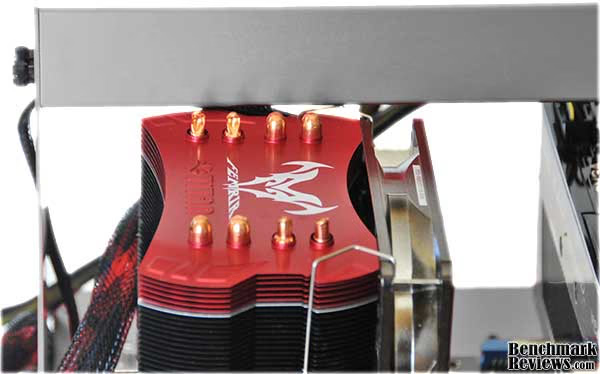
You can of course remove the handle's four securing thumbscrews quickly, and the structural inegrity of the case isn't affected with the handle removed, but the case looks funny without it. The case has cutouts in the vertical supports just above the motherboard tray attachment points that make it pretty easy to carry even a loaded case with two hands.
Test Bench Final Thoughts
Test bench style cases didn't even exist 10 years ago; when I was working at Apple back in the 1980s, we mounted prototype motherboards on pieces of wood for testing. Probably the first popular consumer test bench case was HSPC's Tech Station, but others soon followed, like the Sunbeam Ultra Tech Station, Danger Den Torture Rack, Microcool Banchetto, and the Technofront HardWareDock. The Lian Li case stands out as the only all-aluminum case - the others are largely or completely plastic, often transparent acrylic. The aluminum T60 is both lighter and more attractive than the plastic cases, and Lian Li does add some nice touches: the "real" card backplane, optional front I/O panel, carrying handle, and 2.5" drive mounts. Its price seems reasonable when compared to its competition, some of which is much more expensive.
But although the case is attractive and reasonably priced, Lian Li seems to have missed the point of a test bench case: the design of the case and its use of screws for everything means that swapping out many components is more trouble than it should be; even many "normal" cases with tool-less design elements make it easier and faster to swap components than the Lian Li T60 does. Of course, you still have easy access to the motherboard, so swapping RAM or cards, or checking voltages, will be easy. But it would be just as easy with competitive cases. Lian Li in the past has shown a penchant for striking case designs that seem to value appearance over function, like their snail-shaped bright blue PC-777 Anniversary Edition case and the recently-introduced PC-T1 "Spider" Mini-ITX test bench, which resembles nothing more than a giant mutant arachnid on your desk. I suspect Lian Li knows of the T60's shortcomings: notice that there's no CPU cooler on the system in the publicity shot below.
I have a system built into a Cooler Master HAF 932 case. With the side panel to the case off, it's easier to change hard drives, optical drives, and the CPU cooler than it is to change the same components in the Lian Li PITSTOP T60. Changing motherboard components (RAM, video card, processor) and the power supply is about the same for either case. In fact the only real advantage I can see to the T60 in this comparison is that it's smaller, lighter, and easier to carry around than the HAF 932.
Lian Li PITSTOP PC-T60 Conclusion
Although our rating and final score are made to be as objective as possible, please be advised that every author perceives these factors differently at different points in time. While we do our best to ensure that all aspects of the product are considered, there are often times unforeseen market conditions and manufacturer changes which occur after publication that would render our rating obsolete. Please do not base your purchases solely on our conclusion, as it represents our product rating at the time of publication. Benchmark Reviews begins our conclusion with a short summary for each of the areas that we rate.
Performance in a "normal" computer case would encompass areas like cooling and noise, which don't apply to the T60. In this case I'll judge performance as "How well does this work as a test bench?" It's kind of a hard determination to make since for many uses it will be just fine, but it would not work well for things like troubleshooting optical drives or testing CPU coolers. Pretty though it may be, the T60 simply doesn't measure up to the competition in this area: its design and lack of tool-less feature mean that it's simply not as convenient to use as it should be. A couple of the Lian Li ATX / Micro-ATX Test Bench's features, such as the optional front I/O panel and handle, are useful additions to the genre, but do not fully compensate for its other weaknesses.
The appearance and construction of the case are, as one would expect of Lian Li, exceptional. It's nice to have a choice of colors (a choice Lian Li is spreading to many of its other cases as well), and the finely brushed aluminum finish harmonizes well with the usual impeccable Lian Li construction quality.
The functionality of this case is a cut above most of its competition, mainly for its expanded ability to handle drives. The ability to have two 5.25" as well as two 2.5" devices is very nice, and I wish more test bench cases would accommodate them.
Value-wise, it's kind of a toss-up. The PITSTOP PC-T60's $$99~129.99 price tag might seem a little high, but it's at or below the level of most competitors. You can get the silver version or black version for $99.99 at Newegg, and the red version for $129.99.
Ultimately, it's hard for me to recommend this case. It's an option for those who are willing to sacrifice some functionality for appearance, or who simply want to run a nice open-air case and don't intend to swap parts frequently. But those who really use test bench cases will probably prefer something else.
Pros:
+ Visually striking test-bench style case
+ Typically impeccable Lian Li construction quality
+ Handle makes transporting system easy
+ 8-slot backplane provides firm support for large graphics cards, accomodates tri-SLI / CrossFireX setups
+ Mounts for two 5.25" devices and two 2.5" devices
+ Optional front I/O panel provides USB 3.0 ports
+ Competitive price for cases of this type
Cons:
- Screws used for everything
- Changing 2.5" or 5.25" devices or CPU cooler requires significant tear-down of system
- Handle interferes with many CPU coolers
Ratings:
- Performance: 7.00
- Appearance: 8.50
- Construction: 9.25
- Functionality: 7.50
- Value: 8.50
Final Score: 8.15 out of 10.
Questions? Comments? Benchmark Reviews really wants your feedback. We invite you to leave your remarks in our Discussion Forum.
Reader comments from the original article
6 comments were posted before commenting closed. They are preserved as written. Original avatars no longer resolve and are shown as a placeholder.
RE: Lian Li PC-T60 PitStop ATX Test Bench Chassis Servando Silva Permalink:
I was waiting for this review since I'm looking for a new bench table. I like it but that bar at the top really ruins the design. I know you can take it off but those side bars would still be there. It's still a nice price considering it's a Lian Li's product. David, I'd have love to see more detailed photos from your personal installation but that's just me I suppose. Servando
RE: Lian Li PC-T60 PitStop ATX Test Bench Chassis Doug Permalink:
Why not make a deck the rotates with the power supply on the other side? That way you don't have to disconnect anything except the drives. Is it so hard?
IO expansion? Hsew Permalink:
You mentioned the ability to put an IO plate in there but they are IMPOSSIBLE to find in online retailers. How on earth do you get a hold of these? Seriously!
RE: IO expansion? Olin Coles Permalink:
Are you referring to the I/O panel that comes with the motherboard?
RE: RE: IO expansion? Hsew Permalink:
Yes, I've looked quite hard for the IO panels (they have them on their website under chassis modding > case parts > multimedia I/O ports kit, but when I look up the model number of the one I want in google there are absolutely no results for any etailers. Quite annoying, really.
WAY too many screws The_Assimilator Permalink:
My suggestion for Lian-Li is to release a v2 of this case with the following changes: - support for XL-ATX motherboards - make the 2 aluminium pieces that form the handle at least 2cm taller so that the handle doesn't obstruct tower CPU coolers - widen the motherboard tray by at least 1cm on the right edge (the one where the CPU sits) so that wider CPU coolers don't push up against the aluminium piece that forms the handle - screwless push-button system for mounting the 5.25" devices, e.g. like the HAF 932. Currently this will be problematic but if the tray is widened as proposed above, it will work fine. - add plastic mobo standoffs that allow you to drop the board on/lift it off. Keep the screwable standoffs for people who want to mount their boards more firmly. - drill another set of holes in the mobo tray (between the holes at the back and the holes in the middle) where it attaches to the rest of the chassis, to improve balance