
Gigabyte Ghost Xtreme GM-M8000X Gaming Mouse
Gigabyte GM-M8000X Gaming Mouse Review
When you think about Gigabyte, motherboards usually come to mind. Fierce business competition can force a company to branch out, which is why Gigabyte works with many different products such as PC graphics accelerators and PC peripherals. Gigabyte sent Benchmark Reviews their latest gaming mouse. With a pro-laser 6000 DPI sensor, 32KB built-in memory for combination macros, customizable buttons and a very appealing design, the Gigabyte Ghost Xtreme appears as a very interesting product for hardcore gamers. Benchmark Reviews tests the Gigabyte GM-M8000X Gaming mouse in this article to see if this new contender is good enough for PC gamers.
Gigabyte introduced its first Ghost Mouse on October 2008. The GM-M8000 had a 4000 DPI laser sensor and 8KB built in memory for profiles and macros. Other than that, we can say the new Xtreme version is the same, with a few upgrades and much better software UI. Gigabyte has put all their efforts in order to get you the best gaming mouse experience. This means you can set different profiles which you can change on the fly with different button assignments, macros, DPIs and even LED colors. Additionally, you also have 4 weights which you can combine to add up to 38 grams if needed. Also, the pads at every side of the mouse make the whole experience much more comfortable.

So, basically, Benchmark Reviews will be testing a great mouse, full of features and fascinating specifications. Has someone ever needed 6000 DPI to play? Does the Ghost Xtreme really works at 1KHz report rate? Keep reading the review to find it out.
About Gigabyte United Inc. USA
Gigabyte United Inc., established in December 2006, is assuming the GIGABYTE TECHNOLOGY Co., Ltd. Brand, which for the past 20 years has been a world-renowned leader in the motherboard industry. Continuing to focus on its core businesses of GIGABYTE branded motherboards and graphics cards, Gigabyte United Inc. is committed to providing our valued customers with the highest quality products and services featuring the industry's most innovative design.
In order to meet the challenges of today's intensely competitive channel market, Gigabyte United Inc. fully utilizes its key assets including its cutting-edge research and development team as well as its professional sales and marketing resources to continue to develop technologies to fit a complete range of digital life solutions. Now and for the future, Gigabyte United Inc. will continue to embody the unique spirit and culture, which has made Gigabyte one of the foremost brands in the industry.
Gigabyte Ghost Xtreme Features
- Pro Laser 6000DPI gaming-grade sensor
- Built-in 32KB GHOST TM engine supports not only 70 customizable on-board macros on the go, but 45 button assignments
- Advanced GHOST TM Engine Software features Drag & Drop structure
- 2 time durable Omron 10 million time switch
- Weight tuning 7 combinations of weights, 38grams added.
Gigabyte GM-M8000X Specifications
- Interface: USB
- Tracking System: Pro Laser
- Resolution: Up to 6000 DPI programmable
- FPS (Frame rate per Second): 12000 frames per second
- Maximum Acceleration: 30g
- Maximum Speed: 150 inches/second
- Certificate: CE/FCC/BSMI
- Color: Rubber Black
- Cable Length: 1.8m
- Dimensions: (L)126*(W)74*(H)43 mm
- Weight: 145g (Add up to 38g)
- Packing Contents: Mouse, weights, driver CD, manual, 1 set mouse feet
- Support OS: Windows 98/ME/2000/XP 32 bit/Vista 32-64 bit/Windows 7 32-64 bit

Closer Look: Gigabyte Ghost Xtreme
Once we open the package we can find some interesting stuff inside. Apart from the typical manual and CD drivers, the GM-M8000X includes 4 weights and a feet-set in case yours get too wasted. This is something gamers will appreciate since that kind of accessories aren´t easy to find for retail, and so it´s more probable to end up buying a new mouse than getting a new foot set. The USB cord is sleeved from head to tail and this makes cable-routing easier while adding a nice appearance.

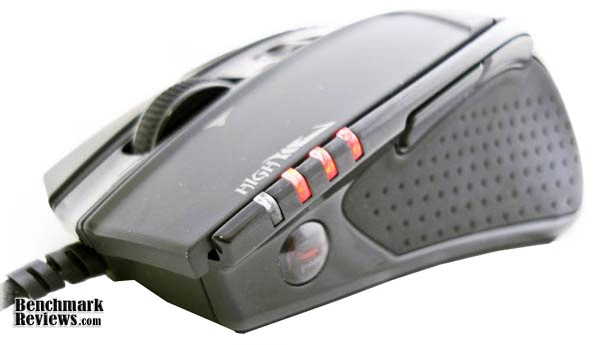
On the left-side of the mouse, we find 2 buttons which can be assigned for different functions, even most commonly they are used to forward or backward. We also find 4 red LEDs which show the DPI grade you´ve set in your Gaming Mouse. They show 4 different states, so let´s say you assign 400,1600,3000,6000 DPI. From low to high, you will know in which state you´re just by looking at the LEDs turned on. Remember that comfortable pads at the sides of the mouse? They really are very cool but also get wasted with time. Finally, who saw the Ghost logo below the DPI LEDs?
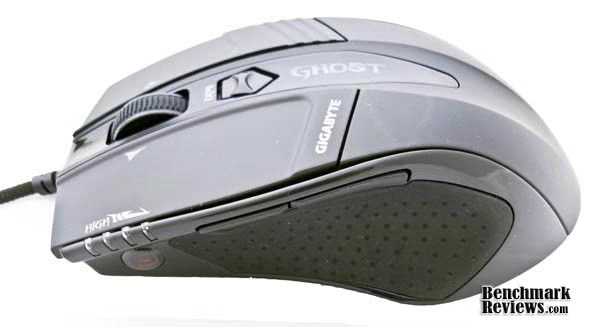
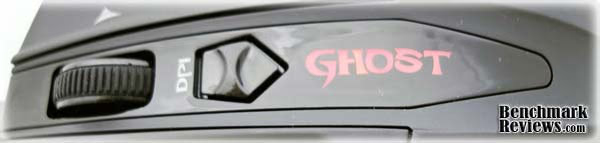
The right side is not as fun as the left one. We have a button which changes profiles every time you press it. The upper side of the mouse carries the Ghost Logo (which will change its color along with the profiles), the DPI button which lets you do changes on-the-fly, and the mouse scroll.

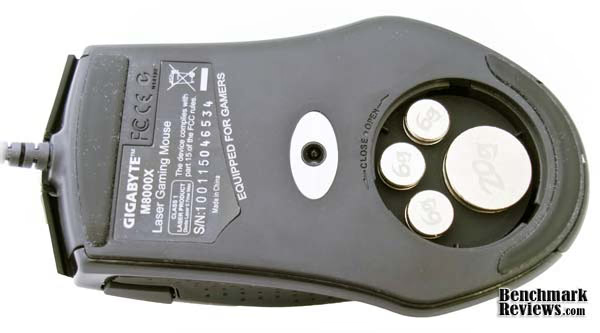
Watching the mouse upside-down you can see the feet which let it move smoothly on your mouse pad. At the center, the pro-laser 6000 DPI sensor and finally, by removing a little tap you can add the included weights in different combinations to achieve your desired configuration.
As you can see, the new GM-M8000X looks more aggressive in black color, and the LED logo has been changed to "Ghost". Other than that, the changes are all internal (hardware/software). Let´s see if the new mouse can give us some advantage over the "old-but-trusty" model which has been phased out.

Left: Gigabyte GM-M8000X | Right: Gigabyte GM-M8000
Gigabyte Ghost Xtreme Software Features
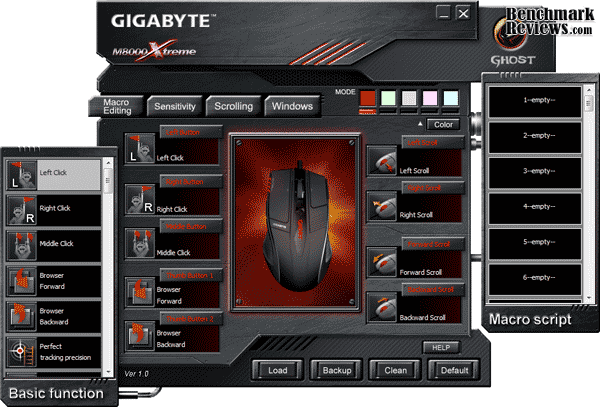
After the physical installation the next thing you want to do is install your software. You can choose either using the CD or downloading the drivers from Gigabyte´s web. The next picture shows the software´s main menu. It really differs from the old and small GM-M8000 Software UI. Here, you can assign different functions for every button and set it to 5 different profiles. Gigabyte offers 27 different colors so you can recognize which profile works for the application you´re using at the moment. At the right, it also shows the macro scripts assigned in the Macro Editing menu.
You can change both vertical and horizontal scrolling speed. For default, the scrolling speed is at its slowest setting and Benchmark Reviews found that this might be the best setting since it works very similar to any other scroll´s wheel on different mice tested.

Sensibility can be adjusted independently on X and Y axis. I prefer to keep them synchronized both there might be some users with large super wide monitors which prefer to set them separately. Here you can also change the report rate frequency, which I recommend to let at 1KHz resulting on 1 ms response. That´s got to be fast enough!

There are plenty of basic functions for your mouse´s buttons. You can basically do whatever you want without your keyboard with this mouse. With 45 button assignments, the limit will probably be your profiles. We snapped some images of the basic functions for you, but this isn´t the whole list. You can select some basic functions like: delete, cut, copy, paste, and assign them to buttons in case you work a lot with text, but you can also add zoom, speed or volume functions as well. If you want a profile for media center PCs there are also play, pause, next, previous functions available.

Here you can create/customize your macros. Gigabyte´s interface is easy to use and very user-friendly. From key strokes to commands, this will help you avoid pressing buttons repetitively. Using the Quick insert bar allows you to insert additional actions to your macros including:
- Time Delay
- Mouse Down
- Mouse Up
- Keyboard Down
- Keyboard Up
- Mouse Scroll

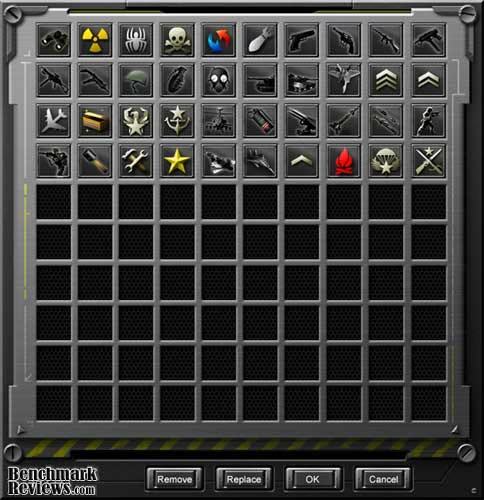
Finally, there are lots of function´s icons to make the interface user-friendly.
Testing & Results
Testing Methodology
The GM-M8000X was tested with different software applications, day to day programs, web surfing, photo editing and games. I have been using this mouse as my main peripheral the last 2 weeks in different surface situations, different ambient temperatures and using as many profiles as I could to check functionality.
Software Tested
- Firefox/Chrome web navigation
- MS Office documents & PDF eBooks
- Adobe Photoshop CS4
- Adobe Dreamweaver CS4
- MS Visual Studio 2008 Pro
- Alien vs. Predator DX11
- Crysis Warhead
- HTPC uses

Results
This isn´t my first gaming mouse. Actually, the last 5 years I´ve been changing my mice since I´ve found it´s one of the most important peripherals for the kind of jobs I usually do. My latest purchases include Logitech MX518, Logitech G5 and the Gigabyte GM-M8000. While I didn´t considered to notice a big difference between the xtreme-not extreme versions, I´ve found this mouse works great. While surfing on the web, reading PDFs, writing code and editing photos this mouse just works as it should. It has precise movements and the weight adjustment allows you to personalize it just as you´d like it to be. Without the additional weights, the mouse is pretty light and it seems to float nicely on your mouse pad. Adding the weights really makes a difference which I appreciate, especially when working on photo editions were I need accuracy. The laser works very well I must recognize. I don´t have expensive mouse-pads but I like to keep them clean and the mouse movement is very smooth thanks to the feet included on the base.
Using your GM-M8000X on different surfaces isn´t a problem. The laser worked well in every surface I tested with different background colors too. Basically, you can take your mouse and put it on your pants or skin and it will still move as you want it to move. Moving to FPS Games I found myself being pretty bad, but not because of the mouse which worked excellent, but more to my lack of practice in the last months. Time response for hardcore FPS gamers is just as you want it to be. Macros programming is easily done and changing functions on different profiles with the included software isn´t the exception. The comfortable cushion pads at the sides of the Ghost Xtreme are sometimes confusing, and I found myself feeling an oily mouse while it wasn´t the case. The feet pads didn´t got very wasted in these days and they will probably live for a pair of years. Don´t forget Gigabyte included a new feet set in case you are a hardcore gamer or use your mouse in different surfaces, so you can add an extra pair of years to your mouse´s total life.
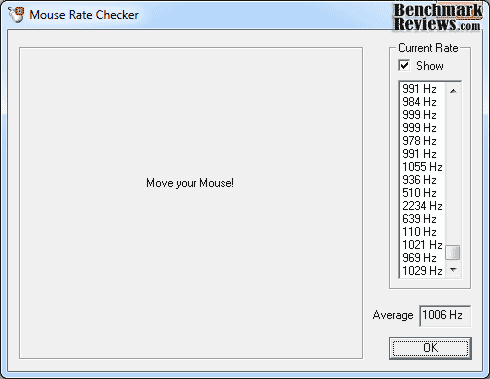
A quick view on Mouse Rate Checker shows us the Average Report Rate. 1KHz=1ms Response Time.
Finally, I created lots of different profiles assigning different functions to every button I could. It was interesting to have the "Copy-Paste" controls on the mouse, and a little bit weird being able to control Windows Media Player songs without the use of a keyboard or a GUI. Finally, you can save your profiles in a portable device and modify them in other PCs, but even better, you don´t have to program your profiles and settings every time you connect the GM-M8000X in a different PC because all the changes are saved in the built-in 32KB memory. This means once you fully customized your mouse in your main PC, it will work the same way in every other PC, without installing the software again!
Gigabyte Ghost Xtreme Final Thoughts
I am very satisfied with the Gigabyte GM-M8000X, but not overly impressed; but that´s because I have already been using the Gigabyte GM-M8000 mouse for the last 10 months and it feels very similar to the Xtreme version. The Software UI was improved a lot and it makes the setup feel like a "breeze in the air". I love the USB cord as it´s sleeved in an original way and the length should be enough for the vast majority of the users. Changing DPI on-the-fly is great for many applications like photo/video editing or games. Have you ever shoot a sniper-gun using a high DPI? But that doesn´t means that you want a low DPI all the time.
While this is a gamers mouse, I found it very comfortable and accurate in all other applications. The Gigabyte Ghost Xtreme is excellent for high-resolution monitors (2560X1600) thanks to the super high 6000 DPI supported. A gamer on the other hand, will probably not use more than 2000-3000 DPI, but a big number like that just means the laser-precision is better. It is good to know this version is replacing the old GM-M8000. That means Gigabyte is listening to customers and optimizing their products. Finally, this mouse might not be a good choice for big-handed gamers, and of course, there is no place for left-handed either.
GM-M8000X Conclusion
Performance with the Gigabyte GM-M8000X is near-perfection. The mouse answers to the smallest, minimal movement. Accuracy and precision is something this mouse won´t ever lack. There is no stuttering in any conditions, and the laser will work in almost every surface you throw at it. Functions and profiles work as they should and the User Interface (UI) has been improved from the last product. In other words, if you really want a gamer mouse, you can´t miss this one. It will give you the necessary weapons to play your favorite game and not to stand behind the competition.
Appearance is pretty subjective. I love this mouse in black color, but others might prefer it grey/platinum or any other color. The DPI LEDs look great along with the "Ghost" logo which reminds you which profile you´re using at the moment. Gigabyte keeps elegance while adding some interesting arrangements so it won´t look top pimp, and that´s definitively something many users will thank.
This mouse has a solid construction. The weights system works as expected and it really stands as a very solid product. The base feet are well positioned and the side cushions are excellent to add some extra comfort to one of the most used peripherals. The DPI button and the scroll are everything but cheap, and they don´t seem they´ll lose their strength anytime soon.
The Ghost Xtreme adds tons of functions to your mouse. You can use text and multimedia functions, which practically leaves the keyboard out of the game in the proper conditions. Macros work as they should and the 5 different profiles it can store in the built-in memory will work on any other PC without installing the software again.
High-end gaming mice sometimes cost up to $80 USD. Gigabyte is approaching to consumers with a $64.99 retail price, which isn´t too expensive, but neither too cheap. But considering the 6000 DPI laser, all the functions included in the software, the solid construction and built-in memory, the mouse worth's every penny you´re paying for. For non-gamer users $64.99 might be very expensive, but Benchmark Reviews recommends looking for other mice depending on your necessities. If you´re a hardcore gamer, the GM-M8000X won´t disappoint you. This mouse works just as good as it should.
Pros:
+ Top-notch Solid Construction
+ Real-time DPI/Profile LEDs
+ Sleeved USB cord
Cons:
Ratings:
-
Performance: 9.50
-
Appearance: 9.00
-
Construction: 9.00
-
Functionality: 9.50
-
Value: 8.50
Final Score: 9.1 out of 10.
Excellence Achievement: Benchmark Reviews Golden Tachometer Award.
Questions? Comments? Benchmark Reviews really wants your feedback. We invite you to leave your remarks in our Discussion Forum.
Reader comments from the original article
4 comments were posted before commenting closed. They are preserved as written. Original avatars no longer resolve and are shown as a placeholder.
Finally ! SiliconDoc Permalink:
Thanks for noting under cons "no left hand version available". Good job, it's about time 10% + of the gaming population got a break.
RE: Gigabyte Ghost Xtreme GM-M8000X Gaming Mouse Dan Permalink:
I wanted to get this mouse, but it seems that a lot of NewEgg customers had problems with mouse. Perhaps they had a bad shipment or simply bad quality control on Gigabyte's side but had to opt out of buying one since Newegg was the only reasonable (price and reputation) retailer. Unfortunate since this is a really beautiful mouse.
RE: Gigabyte Ghost Xtreme GM-M8000X Gaming Mouse Hider141 Permalink:
Thanks for this great review. Now I'm convinced this is the perfect mouse for me.
RE: Gigabyte Ghost Xtreme GM-M8000X Gaming Mouse marian Permalink:
6000dpi all the time so +++ no overkill at all