
CM Storm Xornet Optical Gaming Mouse
CM Storm Xornet Optical Gaming Mouse Review
Manufacturer: Cooler Master Co., Ltd.
Product Name: CM Storm Xornet Mouse
Model Number: SGM-2001-BLON1
Price As Tested: $24.99 (Newegg)
Full Disclosure: The product sample used in this article has been provided by Cooler Master.
When it comes to PC gaming, precision control begins with the mouse. You can have the best computer and display, but without a durable pointing device to transmit your intentions, the entire system becomes point-less. Cooler Master has a plan: pack only the most essential performance features into a solid gaming mouse, and sell it for less than any other. Behold, the CM Storm Xornet 2000 DPI Gaming Mouse, model SGM-2001-BLON1. In this article Benchmark Reviews compares the value-priced CM Storm Xornet to the more expensive Logitech G9x and previous CM Storm gaming peripherals.
Gaming peripherals are in high demand these days, which explains why our Input Device section is filled with new product reviews. Cooler Master previously debuted their CM Storm Sentinel Advance, CM Storm Inferno, and Spawn mouse series to gamers, and while they've all received good reviews their asking price is higher than some gamers wish to pay in a strained economy. In addition to previous CM Storm gaming hardware, this article will compare to the Logitech G9x, which has been on the market for several years but remains so popular it still sells for $65 at Newegg.
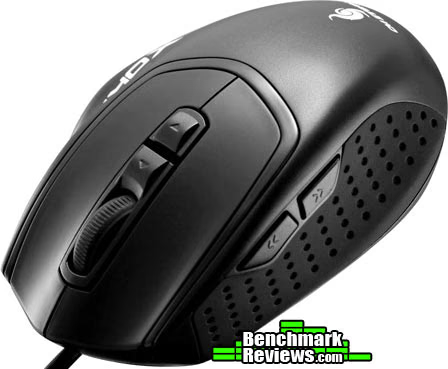
CM Storm Xornet Features
The Xornet gaming mouse is lightweight, ergonomically designed and forged with a reassuringly solid design. It is built for professional FPS gamers that prefer a claw grip. Engineered to execute precise in-game tactics, Xornet comes loaded with a high-performance 2000 DPI sensor that includes on-the-fly adjustment, an ultra-step wheel encoder - providing extremely accurate scrolling, and Japanese-made Omron micro-switches that are meant to endure up to five million clicks. Presented in a eye-catching crimson stealth black high-gloss finish, Xornet lends its truly breathtaking appeal as the focal point of a gamer's setup.
Precision Anti-Drift Control Sensor
Xornet utilizes the latest high performance optical engine ensuring extreme stability and reliability. Based on an anti-drift architecture, it delivers stable and precise tracking in mouse lift and drop scenarios. Angle snapping can be enabled or disabled for exact swift crosshair movements enabling amazing skill-shots and incredible aiming accuracy.
Omron Micro Switches (5 million clicks)
Only the best is good enough! Omron's patented ultra tactile micro switches enable unsurpassed tactile feedback and speed. You will be able to reach an incredible amount of clicks per second while still feeling and controlling every single click. Omron guarantees a minimum amount of 5 million clicks for these highest grade switches, giving Xornet an extended life-span even for hardcore gamers.
DPI On the Fly
Conveniently placed under the scroll wheel, you can switch the DPI resolution between 500, 1000 and 2000 within an instant.
Rubberized Anti-Slip Design
A Special sweat proof rubber compound on both sides of Xornet gives you maximum grip. Even in heated hour long matches and during quick lift and drop moves you retain full control while repositioning and racing Xornet over the mousepad.
SGM-2001-BLON1 Specifications
| Model | SGM-2001-BLON1 |
|---|---|
| Available Color | Black |
| Material | Rubber Grip / ABS Plastic |
| Dimension | (L) 107 X (W) 75 X (H) 35 mm / (L) 4.2 X (W) 4 X (H) 1.3 inch |
| Weight | 142 g / 0.313 lb |
| Sensor Temp Range | 2000 DPI Storm Tactical Optical Sensor |
| Maximum Tracking Speed | 160 IPS |
| Maximum Acceleration | 23 g |
| Polling Time | 1.0 ms |
| Speed Measurement | 6700 FPS |
| Onboard Memory | 8 Kb |
| Form Factor | Right Hand Ergonomic |
| Button Assignment | 5 mouse buttons+ 2 fix function buttons |
| Weight System | No |
| UPC Code | 884102011634 |
Features and Specifications courtesy Cooler Master
Closer Look: CM Storm Xornet
The CM Storm Xornet is a budget-priced gaming mouse with nearly all the same features you'll find on $60-100 products. Model SGM-2001-BLON1 comes in one color: black, and is designed for right-handed users. Those familiar with the CM Storm Spawn series will recognize an immediate similarity. Think of Xornet as a Spawn-sized mouse with the most desirable features retained and scaled down to trim back product costs.
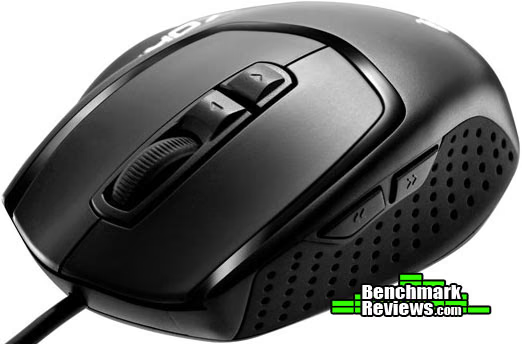
CM Storm Xornet weighs 142 g / 0.313 lb, and measures 4.2"L x 4"W x 1.3"H. Touting a 1.0 ms polling time, the CM Storm Xornet requires a High-Speed USB 2.0 cable connection but is also USB 1.0/1.1 backward compatible. If used on a SuperSpeed USB 3.0 interface, Xornet will operate at USB 2.0 speed.
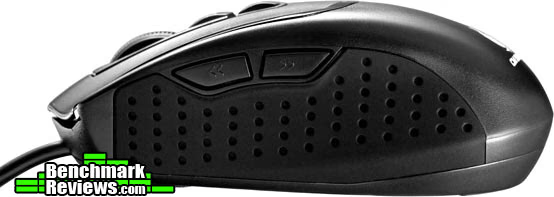
The CM Storm Xornet features an 8KB microprocessor that provides space to store custom button assignments, advanced macros, and other mouse customizations to enable the user to have their own settings ready at the push of a button.

The up/down arrow buttons behind the scroll wheel control DPI stepping, allowing the CM Storm Xornet to adjust the high-precision 2000 DPI optical sensor between 500, 1000, and 2000 DPI presets.
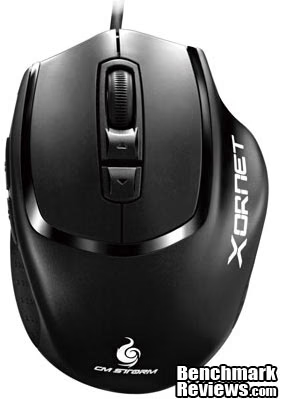
Rated for 2600 FPS image processing, the optical Tactical Sensor is ready for precision sniping and snap-fast action. Cooler Master also calls this sensor a 'Precision Anti-Drift Control Sensor', and true to its name the mouse did not drift on a black textured gaming surface or wood tabletop.
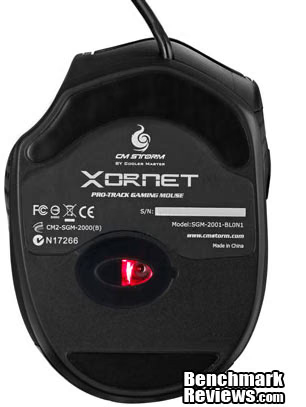
There's a lot to like about a $30 gaming mouse that delivers all the functionality of a device that costs twice the price. Cooler Master was wise to drop all the backlit buttons and injection-molded design artwork, and stick to what works: functionality.
CM Storm Xornet Test Results
I play PC games of all sorts, from first-person-shooter's like BF3 to real-time-action games such as World of Tanks. Because my needs are as varied as my open selection of video games, the mouse absolutely must offer a versatile design. In many ways, it's unfair to compare the $30 CM Storm Xornet against products that cost twice as much (or more), but that's what it costs to include every feature I use. The Logitech G9/G9x series gaming mouse offers everything I need, and what most gamers want, so it seems to be a well-suited competitor. Of course, what works for me might not work for you, so keep your own needs in mind while I go through the list.
To begin, the CM Storm Xornet uses a claw-style shell that I would consider best suited for those with average hands or are prone to grasping the mouse with their fingertips. My hands fit the large body shell of the Logitech G9 series, while the CM Storm Xornet is closer to the standard G9 shell. While the CM Storm Xornet fits my large hand, I find my fingers curling into the mouse more than laying atop it as I'm used to. The primary and secondary buttons use Japanese Omron micro-switches guaranteed to deliver at least 5,000,000 clicks, and both are exactly as crisp as the Logitech G9x. The forward/back thumb buttons also feel clean, and are positioned high enough to avoid unintentional bumps. The anti-slip rubberized grip pads work nicely, and Teflon feet allow the mouse to glide over smooth surfaces. But the Devil is in the details as they say.
Unlike the Logitech G9 series, the CM Storm Xornet scroll wheel lacks a free-wheel function, which I tend to use while web browsing and with certain games. Some people want nothing to do with this function and prefer to feel a click between movements, but I want both. Additionally, there doesn't seem to be any mouse software or instruction that accompanies the Xornet mouse, so unless the user unlocks the mystery of saving macro functions, Xornet's 8K of memory goes to waste.
Some items are a matter of personal preference, and may not mean anything to most people. Xornet features a ring-finger rest along the right side, illustrated with the Xornet logo in the image below. While a nice feature for sure, the Logitech G9x has a similar rest for the thumb (but not the ring finger). Both tend to drag on the surface, so I'd like to have had something supporting each side. Finally, this mouse lacks a custom weight system, which I might add is preferable to me but desired by others.

CM Storm Xornet Conclusion
Not everyone expects a mouse to deliver everything including the kitchen sink, but it's nice to know Cooler Master has touched on the most important functions with their CM Storm Xornet mouse. This gaming mouse performs exceptionally well, and aside from a few missing premium features such as a free-spinning scroll wheel and button assignment software, the Xornet really performs quite nicely. The instruction manual claims "For software download please visit: https://www.cmstorm.com/en/products/peripherals/xornet/", however no software was available at the time of this writing.
Some gamers feed off of hardware that glows, blinks, and shines. CM Storm Xornet isn't that animal, and an all-black appearance replaces chrome accents and flashing LED lights. Minimalist is the fashion, but functionality is quite the opposite. In reality though, your hand covers the mouse so fancy designs usually go to waste anyway. The same goes for dressy gimmicks such as cloth-covered cords, which tend to collect dust and grime.
Of all the things I like most about Xornet, its the durable construction that gets high marks. It's simple, yet solid. The lack of tiny levers and complicated pieces ensure that Xornet stands the test of time and can take a beating. With seven buttons available (primary, secondary, scroll wheel button, DPI up/down, and back/forward thumb buttons), the Xornet keeps functionality high while maintaining a familiar level of natural ergonomics. It would be great for Cooler Master to have software available that custom tunes the DPI steps, creates macro functions, or binds actions to the scroll wheel and thumb buttons.
As of October 2011, Cooler Master has just launched the CM Storm Xornet onto the retail market with a MSRP of $29.99 USD. Once inventory is available online, we'll update current market pricing.
Overall I really like the CM Storm Xornet gaming mouse. It's worth every bit of $24.99 (Newegg), and performs essential gaming functions flawlessly. If you're looking for a solid gaming mouse with long-lasting durability, Cooler Master's CM Storm Xornet has my recommendation. If you're looking for just a few more specialty features, expect to pay more than twice as much for the small difference in functionality.
Pros:
+ Excellent functionality for a value-priced mouse
+ Omron micro-switches guaranteed for 5,000,000 clicks
+ 2000 DPI / 2600 FPS optical sensor
+ 1000 Hz / 1.0 ms USB 2.0 polling rate
+ Teflon feet glide effortlessly over gaming surfaces
Cons:
- No macro software or keybind instructions
Ratings:
-
Performance: 8.50
-
Appearance: 8.75
-
Construction: 9.50
-
Functionality: 8.25
-
Value: 8.75
Final Score: 8.75 out of 10.
Quality Recognition: Benchmark Reviews Silver Tachometer Award.
Benchmark Reviews invites you to leave constructive feedback below, or ask questions in our Discussion Forum.
Reader comments from the original article
1 comment were posted before commenting closed. They are preserved as written. Original avatars no longer resolve and are shown as a placeholder.
Looks pretty good Mergatroid Permalink:
It looks like it would make a pretty good mouse. The price is exceptional. Personally I would prefer another button or two but all the basics are there. My spare mouse is a G9x, and I love it. If it was wireless and offered swappable batteries it would be my primary mouse. I agree 100% about the free scroll. I don't use it as much on the G9x because you have to turn it over to activate it. The perfect wheel was on the MX Revolution, where a simple flick of the finger would make the wheel free scroll, and when it stopped it would go back to click mode. Logitech had a real winner in that design, I don't know why they don't use that same part in their other mice. Kudos to Cooler Master, looks like they came up with a good product.