
Mad Catz Cyborg RAT 9 Wireless Gaming Mouse
Mad Catz Cyborg R.A.T. 9 Gaming Mouse Review
Gamers represent a dream demographic for computer and computer accessory vendors: they're the market segment that drives the development and sales of things like $400 cases, $500 video cards, and in this case, $150 mice. While they comprise a tiny fraction of the overall computer market, their influence is disproportionate to their numbers. Most computer users would doubtless roll their eyes at the thought of spending more money on a video card than most people spend on their entire systems, but innovations in hardware tend to trickle down, so the features in today's high-end product eventually show up in tomorrow's mass-market offering.
Since the consumer computer mouse was introduced in the early 1980s, we've seen design innovations like the scroll wheel (1995), the wireless mouse and optical mouse sensor (2001), and the laser-based mouse sensor (2005). Various companies have added extra programmable buttons, internal LED lighting, and even built-in fans to cool your sweaty hands. Today's gamers have a plethora of high-performance gaming mice to choose from. Is there anything else left to innovate? Mad Catz thinks so, and Benchmark Reviews checks out their latest mouse, the Mad Catz Cyborg R.A.T. 9 wireless gaming mouse, to see if they're right.

The original green-buttoned Microsoft Mouse of the early 1980s use a metal mouse ball, and metal bearings for support. It plugged into a serial (DB9) port, and made a lot of noise as you rolled it about your desk. The Macintosh mouse was considered much more advanced since it had a rubber-coated ball and Teflon feet, and internally it used optical-chopper encoders instead of the delicate copper feeler encoders of the Microsoft mouse.
Mad Catz' Cyborg R.A.T.-9 mouse is as different from these early mice as the Space Shuttle is from a Model T. Looking as if it were designed to be used by the company's namesake cyborgs, it's the top-end version of Mad Catz' "R.A.T." line, which comprises the R.A.T. 3, R.A.T. 5, R.A.T. 7, and R.A.T. 9. Aimed directly at hard-core gamers, the R.A.T. 9 boasts extremely high resolution, on-the-fly configuration, adjustable weights, and can be configured to fit almost any hand (as long as it's your right hand).
At a suggested retail price of $149.99 (direct from Mad Catz), the R.A.T. 9 is one of the most expensive consumer mice available. Fortunately, NewEgg offers the R.A.T. 9 at a pre-release price of $99.99. In this article, Benchmark Reviews will see if you get your money's worth.
Manufacturer: Mad Catz
Product Name: Cyborg R.A.T. 9
Model Number: CCB437090002/02/1
Price As Tested: $99.99 at NewEgg or Amazon
Full Disclosure: The product sample used in this article has been provided by Mad Catz.
Mad Catz Cyborg R.A.T. 9 Features
-
Zero Latency 2.4Ghz Wireless Technology - A staggering 1ms response time ensures that your lightning fast reactions remain lightning fast.
-
Wireless Receiver/Recharge Dock - Keeps gaming for as long as the gamer, the R.A.T. 9 is a 24/7 wireless beast, shipping with 2 custom built lithium-ion battery cells. One powers the R.A.T. while the other one charges in the dock, allowing the gamer to perform a ‘hot swap' whenever and wherever needed.. Up to 9 hours continuous gaming ,Up to 4 days normal use.
-
Interchangeable Pinkie grips and Palm rests
-
Perfect your grip - How do you hunt? Whether you ‘palm' the mouse or ‘claw' it, the R.A.T. can quickly and easily adapt by adjusting in length to suit your hand size and grip style. In addition, the Thumb Panel of the R.A.T. 9 moves forwards, backwards, and pivots outwards, giving you perfect positioning for effortless gaming.
-
Custom Weight System - Like it light or heavy? Maybe you change the weight to suit your game? No matter, the R.A.T. has you covered. Five 6-gram weights can be added or subtracted in an instant, giving you the perfect weight for a perfect feel. When not in use, the weights can be safely stored in the supplied Weight Storage Container and kept safe in the supplied Charging Dock.
-
Precision Aim Mode - Hit your target the first time every time. Use the ST Programming Software to set your desired Precision Aim speed (mouse sensitivity), then hold down the Precision Aim button to slow down mouse movement to a level that works for you. A deadly weapon that will hit your enemy where it hurts.
-
5600 DPI - Featuring a new generation 'twin eye' laser sensor that reads each axis separately for pinpoint accuracy, the R.A.T. 9 tracks up to a stunning 6 meters per second. Pro gamers who favor low sensitivity with high movement speed preferences will always experience correct tracking and precision.
-
4 Custom DPI Settings - Use the Rocker Switch to toggle between your custom DPI settings.
-
5 Programmable Buttons - Combine your Programmable Buttons with 2 regular left and right mouse buttons and give yourself a total of 7 buttons available to punish your competition. Assign your choice of key gaming actions to Programmable Buttons to create your own custom profiles.
-
3 Cyborg Modes - Toggle between three individual R.A.T. modes at the touch of a button. Change sensitivity or Programmable Button actions in an instant and gain immediate access to a mind-boggling 15 commands!
-
Powerful ST Programming Software - Change your DPI, cursor sensitivity, create custom profiles for each game, and assign commands to your Programmable Buttons. Easy, quick and the power you need right on your desktop.
-
Lightweight Metal Chassis - Strong yet nimble, the solid metal frame forms the core of the R.A.T. 9 for enhanced rigidity.
CCB437090002/02/1 Specifications
- DPI range - 25-5600dpi (in 25dpi steps)
- Acceleration - 50G
- Polling Rate - Dynamic up to 1000Hz
- Tracking Speed - Up to 6m/sec
- Always On
- Up to 9 hours continuous gaming, up to 4 days normal use
- PTFE "Slick" Feet
- Gold plated connector
- Braided USB cable
Features and specifications provided by Mad Catz.
Closer Look: Mad Catz Cyborg R.A.T. 9
The Mad Catz Cyborg R.A.T. 9 comes in a box as edgy as the mouse within.
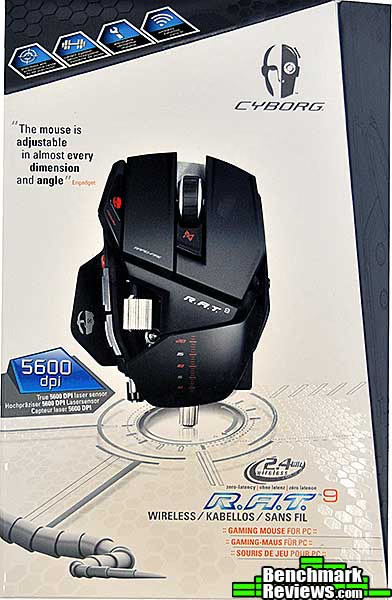
The angled front flap of the box is magnetically secured (making the Velcro fasteners ASUS uses on its Republic of Gamers motherboards seem cheap) and opens to reveal the mouse within, showing the detailed technical features of the mouse on the inside of the flap.
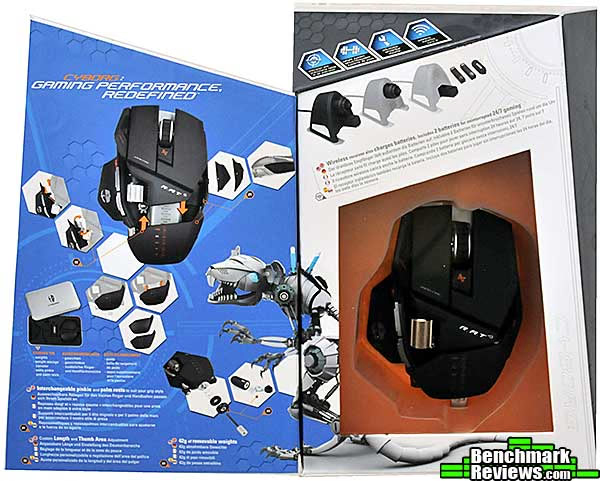
Once you finish unpacking the box, you'll find the mouse, the USB receiver/charger, two color-coded batteries for the mouse, a driver CD, and a metal box with extra mouse parts and weights. What you won't find is much in the way of documentation: a multi-language fold-out single page stuffed inside the CD sleeve is all you get. There is no documentation on the CD.
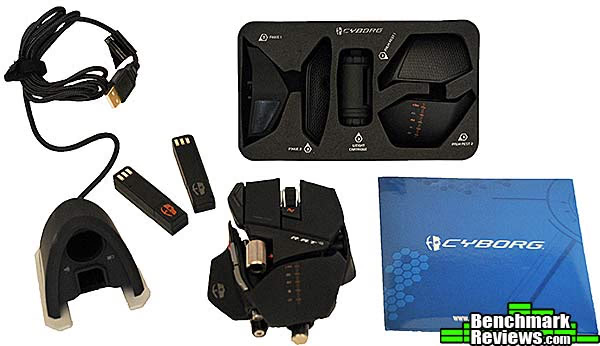
The mouse itself is likely the most visually impressive piece of hardware you'll ever have sitting next to your keyboard. Its broken, angular shape conjures visions of Stealth bombers, or advanced weapons prototypes.

The R.A.T. 9's angular aspect is in stark contrast to the smooth, organic shape of most modern mice. It looks as if it would be uncomfortable, but the mouse's adjustability and the rubberized coating that covers the entire surface of the mouse make it surprisingly nice to hold. The ridged cylinder above the thumb rest is a separate scroll wheel, operated by your thumb.
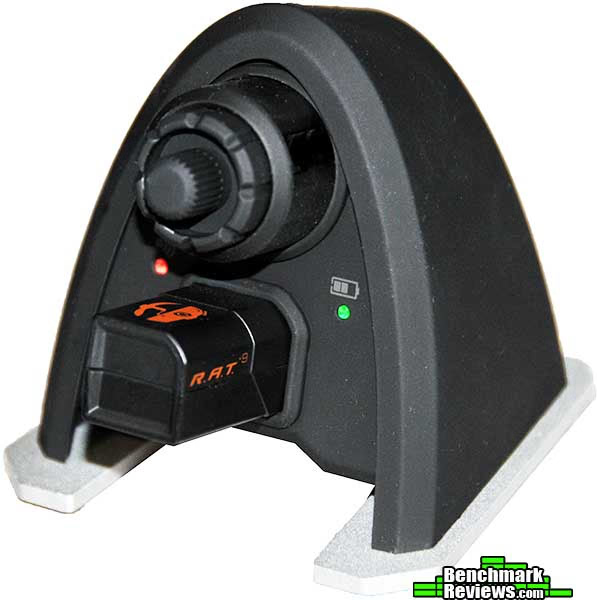
The R.A.T. 9 is functionally identical to Mad Catz' R.A.T. 7 mouse, which we reviewed here. The difference is that it's wireless. Thus, instead of a USB cable connecting the mouse to your computer, there's a (nicely sleeved) USB cable connecting a radio receiver to the computer. The receiver is rather large (especially compared to Logitech's minuscule "Unifying receiver"), but serves to charge the mouse battery as well as providing storage space for extra mouse weights (the knurled cylinder at the top of the receiver is the weight container). Two LEDs on the receiver show the mouse connection (left LED) and battery charge state (right LED). The batteries are color-coded, one with red markings and the other with gray markings, so you can keep track of them.
In the next section, I'll take a detailed look at this device.
CCB437090002/02/1 Detailed Features
Mad Catz' Cyborg R.A.T. 7 and R.A.T. 9 mice are unique in the degree of adjustability they have. And I'm talking about adjusting the size and shape of the mouse itself, rather than tweaking button functions in software (although they can do that, too). The R.A.T. 9 comes with three different palm rests and three different pinkie grips. The palm rests can be described as "normal", "raised" (sits about 3/8" higher than the normal palm rest), and a version with a textured rubber pad. The pinkie panels are "normal", "rubber padded", and "extended"; the last providing a shelf for your ring and little fingers to rest on. A separate plastic cylinder with a screw-on cap serves as a storage area for extra mouse weights, but is kept in the receiver.

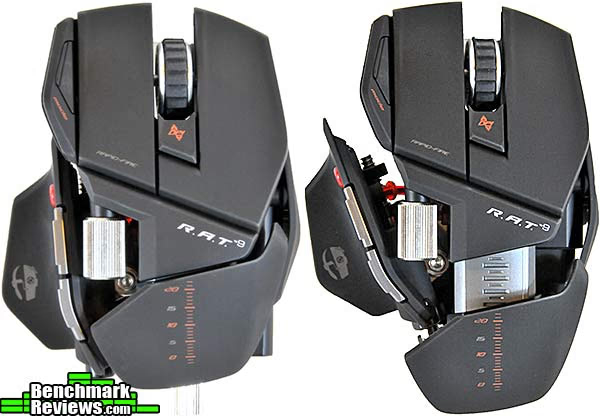
In addition to replacing the panels, you can slide the palm rest in and out, and adjust the thumb grip forwards and backwards along the length of the mouse, as well as pivot it in and out. The photo below shows the R.A.T. 9 with its palm rest and thumb grip all the way in (left) and all the way out (right). This top view of the mouse also shows the resolution adjustment button just below the scroll wheel, and the mode change button on the raised area to the left of the left mouse button. The ability to alter the physical size and shape of the mouse is a wonderful innovation and will enable people with almost any size hands to get a perfect fit...as long as they're right-handed.
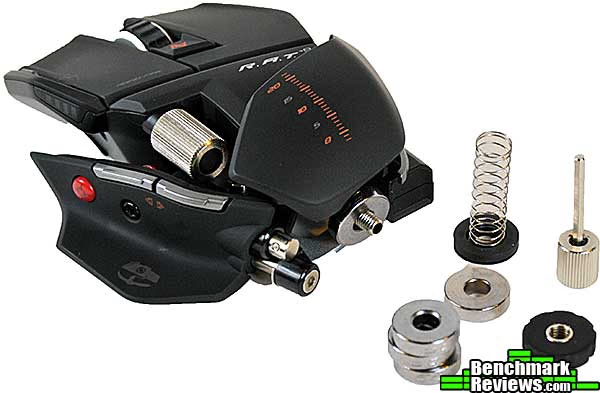
Mad Catz includes a number of 6-gram circular metal weights with the mouse that slide onto a rod under the palm rest. Using these weights you can significantly change the feel of the mouse. The nut that secures the weights also serves as a hex key that's used to loosen the adjustment screws on the mouse, which you need to do to adjust the thumb grip and replace the pinkie rest. While we're looking at the thumb grip, see that bright red button towards the front of it? That's your Precision Aim, aka "sniper mode" button. It's marked with a little crosshair in case you forget what it's for.
While the R.A.T. 9 is functionally identical to the R.A.T. 7, looking at the bottom of both mice shows some differences. The R.A.T. 9 (on the left) gains an on/off switch just to the left of the laser "eye", and its rectangular battery pack can be seen at the upper left rear of the image. The R.A.T. 7 mouse has a large blank area in the same place; it seems as though Mad Catz designed the R.A.T. mice with a wireless version in mind.
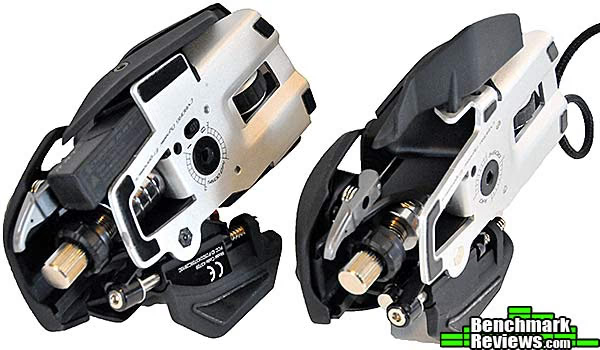
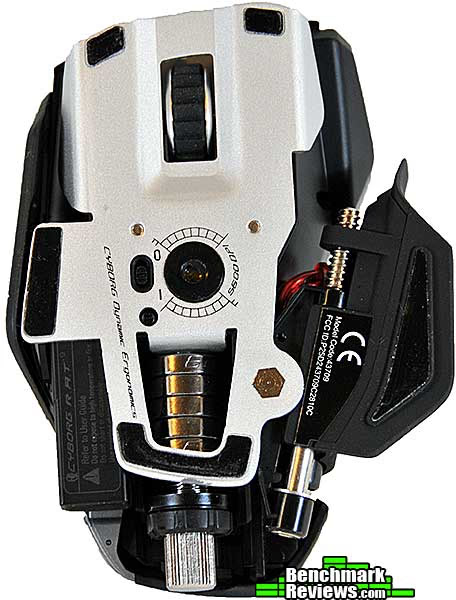
The bottom of the mouse shows the laser sensor and weight stack. While Mad Catz doesn't say, the sensor seems to be the same Phillips PLN2032 "Twin Eye" sensor that's becoming common in high-end gaming mice. This sensor supports extremely high resolution, but some users have reported tracking problems on some surfaces. A marketing phrase on the bottom of the mouse ("CYBORG Dynamic Ergonomics") seems to imply that the mouse shape will change in real time as you use it. Fortunately it does not.
It's not all about hardware, though. The R.A.T. 9 comes with some software to enable you to customize its operations.
Cyborg Profile Editor Software
The included Profile Editor software is where you'll define how the mouse operates. The version I tested was 7.0.2.7 with mouse driver version 7.0.2.3. Once the software is installed, you invoke it from your system tray.
The Profile Editor has two functional parts: in the first part, under "Settings", you can define four different mouse resolutions, easily selectable at any time with the rocker switch just under the scroll wheel. You can even set different resolutions for the X and Y axes! Four LEDs on the left of the mouse (as shown below) illuminate in sequence to show which resolution setting you've selected. One real innovation here that any FPS fan will appreciate is the red "sniper mode" button on the thumb grip: as long as this is held down, resolution will be what's set in the "Precision Mode" slider at the bottom of the Settings window. This allows you to set a high resolution for quick action, and instantly drop it when precise motion (such as, say, sighting through a rifle scope at a distant target) is desired. The top of the Profile Editor also has a battery gauge; unfortunately, invoking the Profile Editor is the only way to check the state of your battery.

The second part is the Programming window, which is where the real work takes place. You can program the main and thumb scroll wheels as well as the forward and back thumb buttons (the main left and right buttons and the Precision Aim button cannot be redefined) to emit anything from simple clicks to character strings to advanced macros that combine both. A collection of these settings is called a "Mode", and each profile can have three of them. For example, in a Crysis Warhead profile, you could have a mode for on-foot action and a separate mode for in-vehicle play, with different button definitions for each. Although you can define actions for the thumb scroller, oddly enough "scroll horizontally" isn't one of them. Granted, this is a gaming mouse, but it still would have been nice to have this function.
Although you can set any profile as the "Startup profile" that will load automatically at boot time, other profiles must be selected manually by clicking on the mouse icon in the system tray and selecting a profile from the list that appears. Some competitive mice will automatically load the appropriate button definitions when a given application is opened, and I was surprised to see this feature missing in the R.A.T. driver.

As with the resolution setting, the mode you're using is indicated by an external LED on the mouse, just to the left of the left mouse button. Mode 1 is indicated by red, mode 2 by blue, and mode 3 by purple. Mad Catz allegedly has a collection of sample game profiles, which you can download by clicking the "Support" link at the top of the Profile Editor, then clicking the "Download Game Profiles" button. However, during the duration of this review, this led only to a screen informing me that game profiles were being updated. The Support link also has a button that will display a programming manual for the Profile Editor. It's brief but adequate, especially since no documentation on this utility is included with the mouse, either printed or on the driver CD.

Although the resolution settings are stored in the mouse (they'll stick around if you use the mouse on a Mac or Linux system), the settings you make in the Programming section of the Profile Editor are kept in the driver, so they only apply to the computer you defined them on.
Testing & Results
Testing Methodology
I used the Cyborg R.A.T. 9 mouse over a period of several days, on systems and applications ranging from Photoshop CS5 editing on a Mac to gaming on a Windows PC with Crysis Warhead, Battlefield: Bad Company 2, Wolfenstein, and Singularity.
The first thing I realized was that while 5600dpi seems to be the new de rigueur feature for high-end gaming mice, it's useless in the real world. Look at it this way: at 5600dpi, a horizontal mouse motion of less than 1/2" will send your cursor all the way across the screen of a 30" monitor at 2650x1200. There may be a real-world use for this high a resolution, but I cannot think of what it might be (and if there is one I've overlooked, I'm sure a commenter will not hesitate to inform me about it!) After some experimentation, I left my R.A.T. 9 at its default resolutions of 800, 1600, 3200, and 5600dpi, and wound up using 1600 most of the time, even in gaming.
As most users will do, I also experimented with the physical configuration of the mouse, rotating through the various replacement panels and adjustments. I settled on the checked-rubber palm rest and extended pinky rest, with the palm rest pulled out almost all the way to the back of the mouse, and with the thumb grip about halfway along its position and width settings. This configuration proved comfortable for extended periods of use, although the overall comfort of my Logitech Performance MX mouse (with its gently rounded shape) still seemed better. However, although I remembered the Performance MX mouse as being quick and responsive when I originally purchased it, after using the Mad Catz Cyborg R.A.T. 9 mouse for a few days, the Logitech product seemed sluggish by comparison, with a very slight but noticeable lag between moving the mouse and seeing the response on-screen. I had not noticed this before using the R.A.T. 9.
The R.A.T. 9 features that turned out to be the most useful were the "Precision Aim" button, which was exceptionally handy for games like Wolfenstein, and the on-mouse ability to change resolution on the fly, which I found useful in Photoshop. While the main scroll wheel has a nice rubber grip and smooth, click-stopped action, I did miss the ability of the Logitech mouse to select between click-stopped and free-spinning action on the scroll wheel, the latter mode being convenient when web browsing. Many current mice also allow the scroll wheel to "tip" horizontally; but neither this nor a free-scrolling feature are particularly useful in gaming, which is what this mouse was designed for.
The switchable modes were also useful, but I found that pressing the Mode button (it's to the left of the left mouse button) required a strong and not-too-comfortable sideways movement of my forefinger. It was almost impossible to do without triggering the left mouse button unless I first removed my hand from the mouse; switching modes rapidly in-game simply wasn't possible for me. However, in my testing, I didn't actually run into any in-game situations in which a very fast mode switch was required (although I'm sure there are some situations in which it would be useful).
I experimented with the user-adjustable weights, and although I could tell the difference between no weights and full weights, it never seemed to make any functional difference to me, even in gaming. The mouse will go to sleep after a period of inactivity, which you'll be able to discern because the LEDs on the mouse will go out. To wake the mouse, you must click a button...just moving the mouse won't do it.
Battery Life and Tracking
Most wireless mice will run days or even weeks on a single battery or charge. Not so the R.A.T. 9, whose ultra-fast polling, mouse LEDs, and extra functions will exhaust one of its fully-charged lithium-ion batteries in less than a day of heavy gaming. Mad Catz claims 9 hours of gaming use or up to four days of normal use. Although the only way to get a detailed battery status report is to open the Profile Editor, the mouse LEDs will start blinking when the battery is down to about 15% remaining charge. In my use I got a minimum of 1.5 days to a maximum of 2.5 days. The short battery life is the price you pay for wireless mouse performance at this level, but since the battery is so easy to change - simply snap it out of the mouse and swap it with the one in the receiver, which takes 15 seconds, tops - it's not that much of a problem. However, you are limited to the proprietary Mad Catz batteries, which are unique to this mouse.
In Benchmark Reviews' previous review of the Mad Catz Cyborg R.A.T. 7 mouse, we noticed some tracking issues when the mouse was picked up and set back down. My personally-owned R.A.T. 7 mouse will only track reliably on my desk surface, which would be fine except that I have a separate keyboard/mouse drawer with a textured black plastic mousing surface. Even third-party mouse pads (admittedly, cheap ones from Best Buy) didn't help: my R.A.T. 7 would lose tracking so frequently that it was all but useless. In normal use the pointer would randomly become slow or jumpy, and sometimes take several seconds to re-sync and start tracking smoothly again.
Although the R.A.T. 9 mouse appears to use the same sensor as the R.A.T. 7, none of these tracking issues occurred during my testing. The R.A.T. 9 tracked perfectly on a variety of surfaces, including my keyboard drawer's integrated mousing surface, the aforementioned cheap mouse pad, and anything else I tried. I can only hope that whatever fix Mad Catz implemented will find its way into the other members of the R.A.T. mouse family.
Gaming Mouse Final Thoughts
A mouse is probably one of the most subjective parts of a computer, especially for serious gamers, and anyone looking for a gaming mouse has many choices. Gamers are very particular about their "choice of weapon", and most probably already have a mouse they like. A $150 mouse had better offer some real advantages given that equivalent responsiveness and programming features can be had in mice costing half as much.
So the question is what that extra money gets you. Well, it gets you what is certainly one of the best-performing wireless mice out there. It gets you the ability to adjust the mouse's size and shape exactly as you want it. It gets you easily-switchable batteries and adjustable weight. It gets you "heavy metal" construction and a mouse that feels as if it can handle anything you throw at it (my Razer DeathAdder mouse feels as if it would blow away in a strong breeze).
And, although it's not a practical consideration, it gets you what is certainly the coolest-looking mouse ever made.

This is the kind of mouse a company builds when money is no object. For the consumer space, I honestly can't think of anything else they could have done to improve the hardware, except perhaps make the design versatile enough to be ambidextrous (in fairness, almost all mice with more than the standard left and right buttons are design for right-handers).
My only real disappointment with Cyborg R.A.T. 9 was with the driver: having to manually load game profiles instead of depending on the driver to detect the game being run and loading the appropriate profile automatically is a real oversight on Mad Catz' part. I can only hope that updated software will provide this basic capability.
Cyborg R.A.T. 9 Conclusion
I'm interested in pointing devices, and have rather a lot of them, including a collection of wired and wireless mice, Bluetooth trackpads, and several standard and thumb-operated trackballs. I loved the feel and features of my R.A.T. 7, but its inconsistent tracking led me to put it aside. Fortunately, the R.A.T. 9 suffered from none of the problems of the R.A.T. 7, and it's become my "pointing device of choice" for most day-to-day work, and certainly for gaming!
The performance of the mouse was stellar, almost too good. Like an 800-horsepower street car, the R.A.T. 9's extremely high resolution and sensitivity demands some concession (i.e. not running at 5600dpi) from the user. Although it's wireless, there is no perceptible difference in performance between it and the wired R.A.T. 7. If you haven't used an ultra-responsive mouse like this before, plan on taking a couple of days to get used to it. It's the equivalent of not doing unintentional burnouts every time the light changes to green.
The appearance of the mouse is startling, especially compared to the smooth, flowing shape of most of its competitors. The first time my wife, a computer professional since the late 1970s, saw it, she didn't recognize it as a mouse at all! Suffice it to say that it's dramatic and engaging, but since your hand will be covering it most of the time, its appearance takes a back seat to its functionality.
The construction quality of the mouse is exceptional. This is where you see where the money went: there's a lot of metal in this mouse, from the solid base to both scroll wheels to the slender spring-loaded metal lever you press to slide the palm rest in and out. Parts of the mouse snick and snap into place perfectly, and nothing feels loose or ill-fitting. The buttons operate with precise, satisfying clicks and the scroll wheels turn with silky precision. My one potential concern is the long-term viability of the thin rubberized coating; I've seen similar coatings peel and flake after extended use on other devices.
The functionality of the mouse is very good. I was a little disappointed in the lack of a way to scroll horizontally (yes, I know, gaming mouse...), and the fact that the profile settings are stored in the driver, rather than in the mouse. The battery doesn't last long, but can be replaced in seconds with no tools. You do need a hex wrench to adjust parts of the mouse and replace some panels, but the hex wrench secures the weights in the mouse, so it's always available. The Cyborg Profile Editor software is a good first effort, but the ability to program buttons to launch applications or select menu items would have made the mouse more useful outside the gaming venue.
The value of the Cyborg RAT 9 mouse is difficult to gauge, since it's pre-release price is $99.99 at NewEgg or Amazon. Aside from specialized commercial mice designed for sound studio or CAD/CAM usage, this is the most expensive mouse I know of. Competitive mice using the same sensor can be had for half as much, or less. What you're paying for is the convenience of wireless operation, the exceptional build quality, and the physical configurability of the mouse itself. The R.A.T. 7 would be a compelling alternative if you didn't need the wireless operation, but until its tracking problems are resolved, it's hard to recommend. Is the most expensive consumer mouse worth it? If you're a serious gamer, the could be "Yes."
Pros:
+ You can adjust and configure the mouse body for a perfect fit.
+ Excellent, heavy-duty construction with lots of metal.
+ On-the-fly selection of resolutions and modes.
+ Instant responsiveness equivalent to the best wired mice.
+ Easily swappable batteries; extra battery charges in the receiver.
+ Precision Aim button!
Cons:
- Expensive mouse solution.
- Profile Editor software somewhat limited; must manually load game profiles.
- Profile data stored in the driver, not the mouse.
- No "free scrolling" option on the scroll wheel.
- Minimal documentation.
Ratings:
-
Performance: 9.75
-
Appearance: 9.00
-
Construction: 9.75
-
Functionality: 8.75
-
Value: 7.25
Final Score: 8.9 out of 10.
Quality Recognition: Benchmark Reviews Silver Tachometer Award.
Questions? Comments? Benchmark Reviews really wants your feedback. We invite you to leave your remarks in our Discussion Forum.

Reader comments from the original article
11 comments were posted before commenting closed. They are preserved as written. Original avatars no longer resolve and are shown as a placeholder.
RE: Mad Catz Cyborg RAT 9 Wireless Gaming Mouse Robert17 Permalink:
Good review. I note you mention the sensitivity @ 5600 dpi and not finding it very useful (for this reviews purposes). I see your point. I use a Logitech wireless 1100 enhanced MX and although very sensitive, when using it on a 42" LCD I think a couple more DPIs may come in handy, reducing the horizontal motions a bit. Maybe not up to 5600, but still...... I thought also, as gamer oriented as this mouse is, a person with arthritis, or some malformation of the hand may find this a useful prosthetic, surpassing less worthy solutions. Just a thought. Thanks again.
RE: RE: Mad Catz Cyborg RAT 9 Wireless Gaming Mouse Servando Silva Permalink:
I have a daily configuration of 5760x1080, so it would be a pain if I didn't use a 4000+ DPI mouse. I normally use it at 4000-4500DPI, but I've tried more and it's too sensitive even for 5760 pixels. Perhaps, someone using 2560x1600 monitors in eyefinity/surround (7680x1600) could take advantage of 5600 DPI, but who knows. Many people can't afford for a 3 monitor setup, especially if they're as expensive as 30"-32" solutions. Nice Review David.
RE: Mad Catz Cyborg RAT 9 Wireless Gaming Mouse scottykarate Permalink:
They are not built for people with big hands. I have a 7 and really like it. I just wish they made a palm piece that was longer so I could rest my whole hand on the mouse.
longer palm peice dave Permalink:
You can extend the palm rest if you chose so it fits almost every hand :-)
One Bad $#@ Mouse Mark S. Hall Permalink:
I think this is one bad to the bone mouse..... A little expensive.... But, well worth it......
RE: One Bad $#@ Mouse David Ramsey Permalink:
I have to admit the price of the mouse is daunting. But if you're a serious gamer, it's arguably worth it. It makes every other mouse I've used feel cheap.
Mr Ian Hall Permalink:
It's very hard to get a definitive UK release date for UK stores even from Mad Catz themselves - will it be available before Christmas 2010?
RE: Mad Catz Cyborg RAT 9 Wireless Gaming Mouse roger klado Permalink:
??QUOTE (and if there is one I've overlooked, I'm sure a commenter will not hesitate to inform me about it!) QUOTE?? In Window's mouse properties "pointer options" tab.> Select a pointer speed> Enjoy the breathing room of 5600 dpi in yer dual/tri monitor rig with as much control and precision you want. While in that tab disable "Enhance pointer precision" Read this article from the cyborg blog on acceleration considerations and download their registry hack: ##cyborggaming.com/blog/post/2010/06/04/So-what-is-Mouse-Acceleration.aspx In a video game you may have to re-adjust with mouse sensitivity options. There are no z tracking issues in the crop of R.A.T 9's I got. I can hop around my desk up to 9 times without a single cursor budge. On the other hand, I am having trouble with this mouse not wanting to wake up with any cursor movement happening. ( even though button clicks show the mouse is receiving signals! ) The occurences are increasing. :-( Also the thumb angle I have extended will come loose every4 days or so... requiring re-tightening. ( hopfully I don't strip anything ) Also my mouse feet are scratching away easily. invested in a quality gaming mouse fer the first time in my life. Hopefully Cyborg will ( like razer provides ) release extra feet and spare batteries! soon. ( battery paranoia )
RE: RE: Mad Catz Cyborg RAT 9 Wireless Gaming Mouse roger klado Permalink:
P.S. Found that the mode toggle button was designed to be applied very easily and without any of the frustrating accidental left click problems. By clicking the outside edge of the button instead. The top angle of that edge Is "raised"( above the cyborg "head logo" ) That is the actual button! ( just like the raised ledges on the side buttons ). Like the author I had a hell of a time trying to push the "center". ignoring that raised ledge which provides an easier grip/handle.
RE: Mad Catz Cyborg RAT 9 Wireless Gaming Mouse Jason Permalink:
ive had my rat 9 for a year. I won't be buying it again, Frequently loses signal, battery dies twice a day, not ergonomic. Not worth the cost.
not true BoneDigger Permalink:
Guys from Benchmark reviews says "- Profile data stored in the driver, not the mouse." under "cons" section, and that is not true. I have that mouse and im student who travels back home every weekend and every time i plug mouse in my laptop it loads my profiles even without driver. So please check that again.