
Corsair Graphite 600T Computer Case
Corsair Graphite 600T Computer Case Review
Manufacturer: Corsair
Product Name: Graphite Series 600T
Model Number: CC600T
Price As Tested:$159.90 at Amazon or $159.99 at Newegg
Full Disclosure: The product sample used in this article has been provided by Corsair.
It seems that vanity has no limit, as there aren't many markets more entwined in style and appearance than the consumer electronics industry. It makes sense, since these are called Personal Computers, after all. Identity is everything to consumers, which is what makes computer cases such a personal choice for system builders. Corsair is helping to make these decisions a little easier for enthusiasts by offering their Corsair Graphite 600T computer case. Like most things that come from this performance-orientated company, the Graphite series of computer enclosures delivers what people want most. In this article, Benchmark Reviews investigates the CC600T model for functionality and value.
Although desktop PC's have remained strong into 2011, the rest of the industry has gone small. Not in terms of interest or consumer base mind you, but more specifically with regard to actual product sizes. Notebook computers and smartphones have shrunk the industry year after year, and yet the demand for high-quality desktop computer hardware remains a big part of the overall market. Corsair built their brand name by offering overclockers and enthusiasts some of the best high-performance system memory components available, and using that momentous popularity they've expanded into audio, cooling, power supply units, storage devices, and computer enclosures.
The Corsair Graphite Series provides full-tower features in a mid-tower sized case, with an emphasis on performance and style. Whether you are an expert or on your first build, the Graphite Series makes it easy to build a world-class gaming system. With excellent cooling from the dual 200mm fans, eight PCI-E expansion slots to accommodate multiple graphics cards, and plenty of room for large, power-hungry components, the Graphite Series 600T can handle just about anything you can throw at it. Impressively engineered and stylishly designed, the highly functional 600T is designed to make your system outperform, outlast, and outdo.
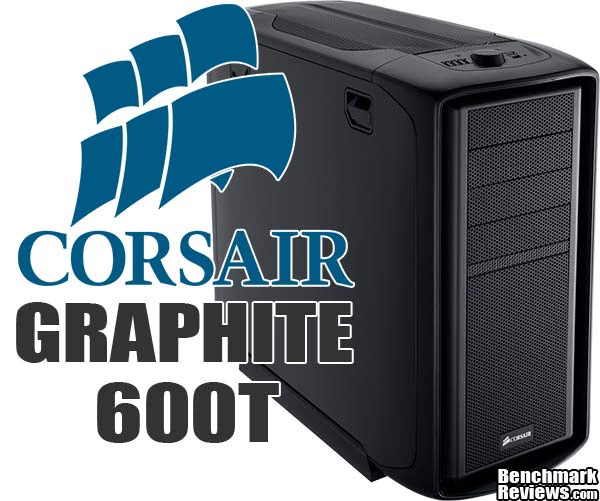
Graphite 600T Features
-
Twin 200mm cooling fans with white LEDs for excellent cooling
-
Eight expansion slots provides you flexibility for multiple graphics card solutions
-
Unique cable routing holes guarantees you a clean and clutter-free installation
-
Integrated fan controller, for up to four fans, gives you the choice of noise vs. performance
-
Tool-free optical drive installation makes building your system faster than ever
-
CPU backplate cutout makes upgrading your CPU heatsink easy
-
2.5" and 3.5" hard drive compatibility for up to 6 drives - straight out of the box!
-
Two year warranty with Corsair's world-class customer service and technical support
CC600T Specifications
-
Dimensions: 20" (H) x 23.3" (L) x 10.4" (W) - (507mm x 592mm x 265mm)
-
MB Support: ATX and mATX
-
Expansion Slots: 8
-
Form Factor: Mid-tower
-
Material: Steel structure with molded ABS plastic accent pieces
-
Drive Bays: (x4) 5.25" (x6) 3.5"/2.5" Drive Caddies
-
Cooling: (x2) 200mm Fans w/White LEDs (x1) 120mm Fan
-
Front I/O: (x4) USB 2.0 (x1) USB 3.0 (x1) IEEE1394 (x1) Headphone, (x1) MIC
Note: Features and specifications provided by Corsair.
Closer Look: Graphite 600T Exterior
As of 2011, Corsair offers two different lines of computer case: Obsidian and Graphite. Benchmark Reviews has already tested the Corsair Obsidian 700D, which is joined by the 650D and 800D model variations of the same premium design. In this review we test the Graphite 600T, a black mid-tower computer case for mainstream consumers. In addition to the standard Graphite 600T, Corsair offers a special edition white version that features a white exterior with both glossy and satin black accents, as well as an all-black interior and windowed side panel.
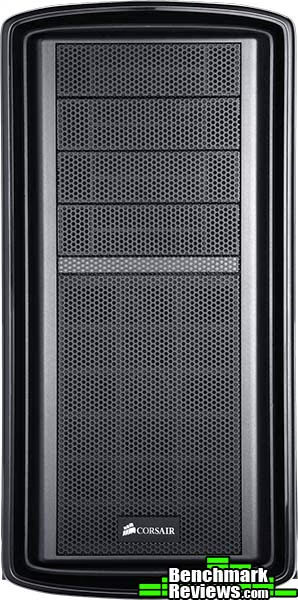
Corsair has a checklist of items they strive to deliver in their products, and the Graphite series of computer cases is not different. At the top is performance, an attribute that often earns Corsair products the reputation they now enjoy. Of course, you can't have a high-performance computer case without making some compromises, and with Graphite that compromise is size.
Measuring 20" tall, the Corsair Graphite 600T adopts a standard mid-tower profile that reaches 23.3" deep and 10.4" wide. Four 5.25" expansion bays are available for optical drives, fan controllers, or whatever else fits your fancy. Removable metal mesh grills cover each expansion bay plate, as well as the drive bay cage fan.

Comprised primarily of painted steel components, the Corsair Graphite 600T sparingly uses molded ABS plastic accent pieces around the edges and base. The steel side panel doors lift up and away using tool-less handles that allow builders instant access into the enclosure.

One particular feature that separates the Corsair Graphite 600T from other computer cases is its ability to deliver eight total expansion slots - a huge perk for hardcore gamers with multi-card graphics hardware. While SLI/CrossFire are easily accommodated by most cases, Corsair's 600T extends itself to the realm of triple video card configurations.
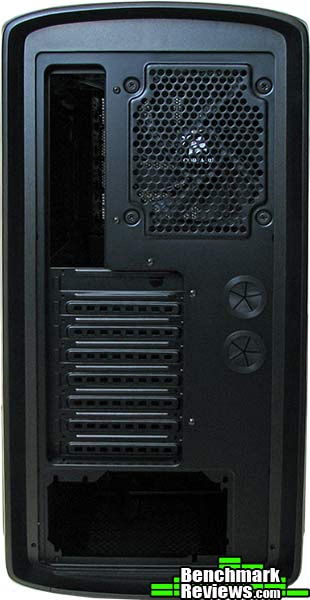
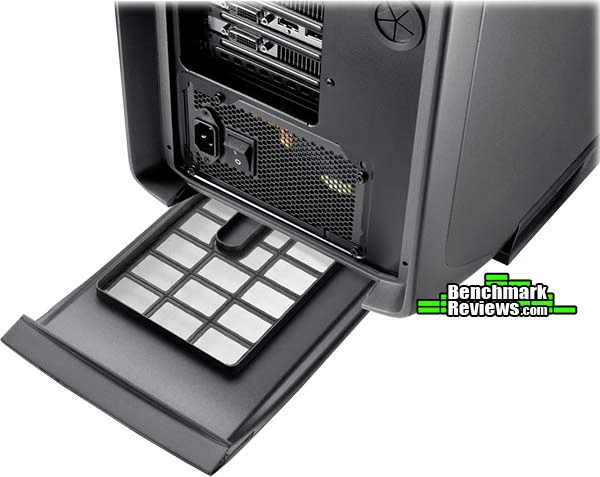
Corsair positions the power supply unit at the bottom of the Graphite 600T, and enables the PSU to be mounted with the intake fan in either an upward or downward position. This allows the system builder to decide on drawing intake air from inside the Graphite 600T, or through the bottom of the case through a filtered vent.
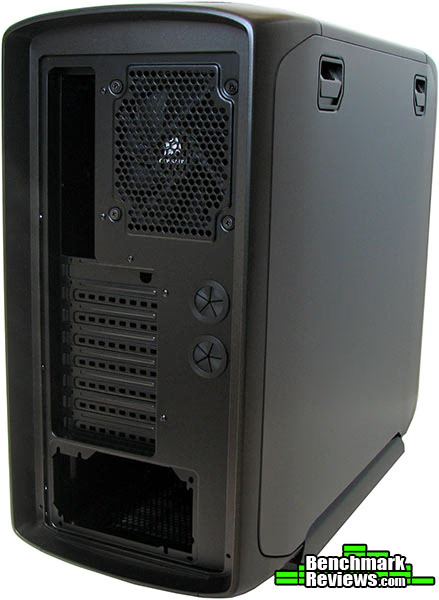
A single 120mm fan occupies the upper-rear exhaust position, and can removed for products like the Corsair Hydro CPU cooler series. The Graphite 600T can fit an entire self-contained water cooling system inside the enclosure, or the 600T's soft rubber grommets can ensure hoses are handled with the utmost care for users wanting to mount radiators or chillers outside of the Graphite case.
CC600T Detailed Exterior Features
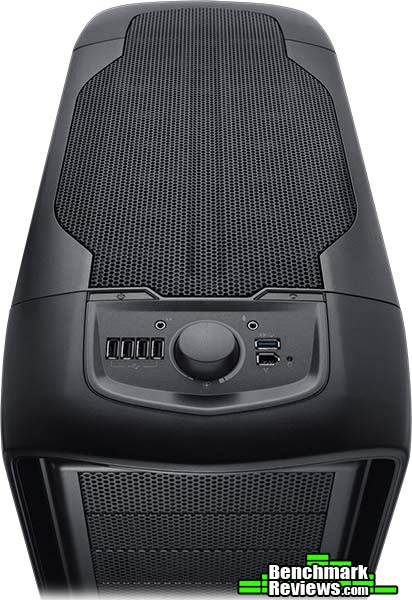
Viewed from above, the Corsair Graphite 600T offers plenty of breathable ventilation. Back in the day when an enclosure could offer positive (or negative) chamber pressure, builders had to ensure that their system would operate as desired by using various fan sizes. Now, with such large portions of surface area dedicated towards open vents, even the novice system builder can construct an effectively ventilated computer system.
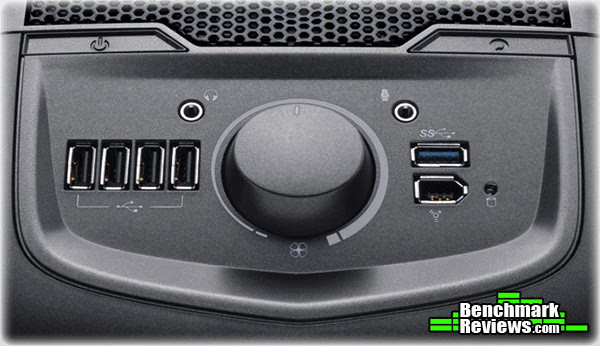
The Corsair Graphite 600T user interface adopts an ergonomic approach to button and control layout. Flush-mounted power and reset buttons are located atop other controls, safe from accidental contact. There are four USB 2.0 ports located to the left of an integrated fan control dial, along with a single SuperSpeed USB 3.0 and IEEE 1324 Firewire port. Corsair's choice of positioning for the audio input and output jacks might have been better located below the other ports, since the cables for these devices with interfere with fan control and USB/Firewire access.
Positioned in front of the Graphite's internal drive cage, a foam filter is built into the removable fan grill for the front 200mm cooling fan. This panel is removable for easy cleaning, and snaps into place.

The power supply unit receives similar treatment, but instead of a foam filter a fine-pitch screen is used. This screen is integrated into the removable filter panel, and can be easily cleaned for reuse.
Corsair is readily aware that hardware enthusiasts are making the switch from hard disk storage to solid state drives. As a direct result, the removable drive trays house both 2.5" and 3.5" storage devices.

The Corsair Graphite 600T includes six plastic "drive caddies" with the CC600T model, which is more than most builders will require for building personal computer systems. For those wanting a fashionable pedestal server, the Corsair Graphite 600T is built ready for the task.
Closer Look: Graphite 600T Interior
Utilizing the large internal volume afforded by a robust frame, the Corsair Graphite 600T delivers high-performance cooling features and numerous cable-routing channels to help system builders construct a system that truly stands apart from the mainstream. In this section, we'll cover the internal layout for the Graphite 600T.
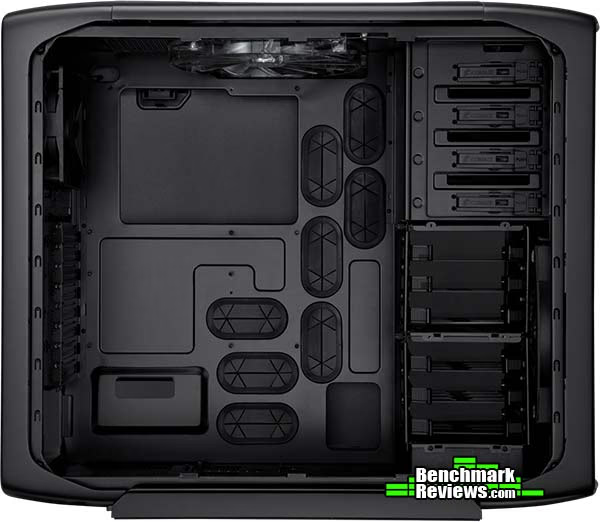
Corsair includes a variety of pre-cut holes in the motherboard tray with rubber grommets, giving plenty of room behind the motherboard to route cables for an uncluttered interior. When grommets aren't necessary, such as the CPU backplate cutout, the sheet metal edges have been rolled to allow upgrading your CPU heatsink without worry of sharp edges.

There are also knock-out points above the motherboard to accommodate fan wires and other cables. An oval near the upper-rear corner of the motherboard tray allows system builders to cleanly wire power to the 4-pin P4 or 8-pin EPS motherboard receptacles. There is approximately 3/4" of clearance between the door panel and most portions of the motherboard tray, so thick primary cables will have room to flex and turn.

Corsair includes eight tool-less drive trays with the Graphite 600T. Each of these plastic trays releases from the cage by squeezing the tabs in towards the middle. Drives are fastened to the tray by using well-placed pins inserted into screw holes, instead of screws.

Users can remove the top drive cage on the Corsair Graphite 600T case, but the lower cage requires tools in the unlikely event you'd prefer not to have any trays installed. The entire cage system is cooled by a 200mm fan that is illuminated by white LEDs.
Detailed Interior Features
In this section, we inspect the fit and finish of a fully-equipped computer installation to illustrate how much room the Graphite 600T offers to demanding system builders. Using the EVGA X58 SLI X3 ATX motherboard (model 131-GT-E767-TR) with a collection of video cards and Corsair Dominator-GT memory, then pairing them with Corsair's AX1200 extended power supply unit, it still looks like there's plenty of room remaining inside the Graphite 600T.

Switching from the Corsair H50 to the new twin-fan/double-thick radiator Corsair Hydro H70 Liquid CPU Cooler, the Graphite 600T fits them both with plenty of room to spare. I measured approximately 7.0-inches from the motherboard to the side panel, so large air-cooled heatsinks will fit nicely. In the image above, power supply cables were routed behind the motherboard tray, while the image below illustrates cable management with a simulated non-modular PSU installation.

After installing a full-size ATX motherboard, there's approximately 3.5 inches of space between the closest edge and the drive cage column. For video card clearance, the Graphite 600T fits a 12-inch long Radeon HD 5970 with 1.75-inches to spare, thus giving a 13.75-inch span between the rear wall and drive cage column.
The 'ceiling' fan on the Corsair 600T offers a compromise of location and size. Located just slightly behind the halfway point, this large white-LED 200mm fan gets as close as possible to the CPU and other components without leaving the central air channel.
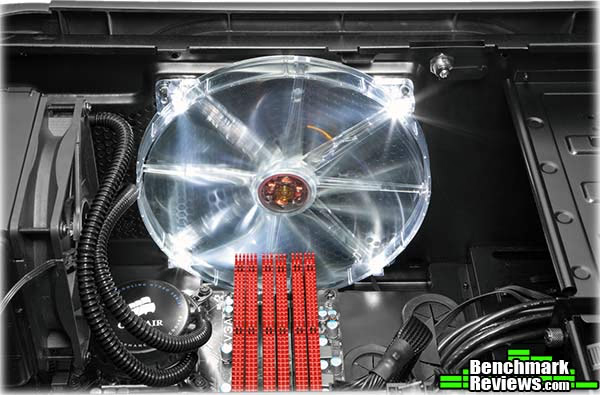
With one 200mm fan drawing air in from behind the drive cage and another pushing it out through the top, the Graphite 600T offers a very strong airflow pattern for components positioned between them. This enables overclockers to enjoy a cooler internal operating environment, and prolongs the lifetime of other heat-sensitive components.

Since Corsair builds the Graphite 600T from steel and plastic, it weighs more than it looks. It's nearly 26 LBS empty, and once filled with components the total unit weight grows to over 35 LBS. In other words, the Graphite 600T is not a portable unit you'll be dragging around with you to LAN parties. At least not unless you eat your Wheaties.
Corsair CC600T Conclusion
IMPORTANT: Although the rating and final score mentioned in this conclusion are made to be as objective as possible, please be advised that every author perceives these factors differently at various points in time. While we each do our best to ensure that all aspects of the product are considered, there are often times unforeseen market conditions and manufacturer changes which occur after publication that could render our rating obsolete. Please do not base any purchase solely on our conclusion, as it represents our product rating specifically for the product tested which may differ from future versions. Benchmark Reviews begins our conclusion with a short summary for each of the areas that we rate.
Performance is a difficult variable to quantify with computer enclosures because every system will be different, and the manufacturer may implement fan components supplied by various vendors with differing specifications. For these reasons, it's best to consider products of the same general profile size and purpose. Corsair's Graphite 600T is a steel mid-tower ATX computer enclosure designed for mainstream builders and enthusiasts. There's a single 200mm intake fan positioned behind the drive cage column, with a second 200mm fan exhausting air from the top and a 120mm fan positioned at the upper-back. In an enclosed environment this would create negative chamber pressure, but the Graphite series offers so much mesh ventilation that pressure is neutral.
Appearance is yet another subjective matter, since this rating doesn't have benchmark scores to fall back on. In my opinion, the Corsair Graphite 600T looks very attractive without being too bold. It's the little things that earn my approval: soft edges around all corners, depressed 'spine' across the top, and a simple yet elegant grill system that stretches from the front to rear. My personal tastes usually run positive towards dark black-colored cases, but white cases catch my attention if they're designed right. With this in mind, the Special Edition White Graphite Series 600T computer case (model CC600TWM-WHT, not yet in stores) might help to offer something for everyone.
Craftsmanship and construction are two key components to the success behind Corsair's Graphite series. There are a lot of fancy computer cases on the market, many of which use expensive material (aluminum) to cover an otherwise weak design. Corsair has taken an affordable material (steel) and used their experience and design skills to produce a solid product that looks good without the extra costs involved. Like the Corsair Obsidian 700D we recently tested, the Graphite series of enclosures is equally durable, and could be considered the better-looking option between the two product lines.
Functionality is where the Corsair Graphite 600T truly shines brightest. For a mid-tower ATX enclosure, the Corsair Graphite 600T delivers more than most builders will ask of it. Eight expansion bays are a rare commodity on mid-tower computer cases these days, and not too many enclosures with fit three double-size externally-exhausting video cards like the Graphite series can. The CC600T model lacks a side-panel window, but the white Special Edition model CC600TWM-WHT incorporates this feature. Most users will enjoy the ergonomic access to USB, Firewire, and eSATA ports from the forward top-mounted location. If there were design changes to be considered in future models, I would like to see a second SuperSpeed USB 3.0 port on this panel and to relocate the audio jacks to a position below the dial.
As of late February 2011, the model CC600T Corsair Graphite 600T computer case sells online for $159.90 at Amazon or $159.99 at Newegg. This is near the top end of mainstream mid-tower pricing and might be considered too high, but the 600T certainly delivers on it's value and makes it well worth the premium purchase price. Still, we can't ignore how Benchmark Reviews has tested more than a few bargain-priced computer cases that delivered nearly as much for under $40.There's no shortage of options in the computer enclosure market, so budget-conscious consumers should take their time and shop around for discounts and deals. At the time of this writing, there was a limited mail-in rebate that reduced pricing on the Graphite 600T even lower.
As I opine in our editorial's section, computer cases are continually shrinking with small form factor (SFF) creeping its way into vogue. So then, in a world of hand-held devices, it's nice to see Corsair keep the larger products looking sharp and performing at the top of their game. The Corsair Graphite 600T wasn't designed to be the cheapest case in town, because it takes material to offer eight expansion slots and clearance for extended-length video cards. It's true that the price is not exactly pandering to the budget market, but those cases usually fail to deliver the total package. Corsair delivers an original look that demands attention, and the Graphite series does this without going overboard by using obtuse angles and alien color schemes. Corsair's 600T is a great pick for hardware enthusiasts and functionality-driven system builders, and it earns our Golden Tachometer Award for overall excellence.
Pros:
+ Visually appealing contours and design
+ Great cooling potential for overclocked systems
+ 13.75" video card clearance to drive cage
+ 7.0" clearance for tall CPU coolers
+ Excellent cable management with 5/8~3/4" clearance
+ Large back-panel opening gives heatsink access
+ Soft rubber grommets protect cables and hoses
+ Two very-quiet 200mm cooling fans, plus 120mm at rear
+ Intake vent openings have cleanable lint filters
+ Tool-less side panels, bezel, and drive bays
+ Tall mid-tower design offers four 5.25" and eight 3.5/2.5" bays
Cons:
- Top-mounted audio plugs may interfere with dial/port access
- No sound dampening material
- May be too tall for any location other than floor
- Heavy-weight steel product
Ratings:
- Performance: 9.50
- Appearance: 9.25
- Construction: 9.25
- Functionality: 9.00
- Value: 8.00
Final Score: 9.0 out of 10.
Excellence Achievement: Benchmark Reviews Golden Tachometer Award.
Would you buy a Corsair Graphite 600T case? Already have one? Leave your comment below, or start a discussion in our Forum.
Reader comments from the original article
22 comments were posted before commenting closed. They are preserved as written. Original avatars no longer resolve and are shown as a placeholder.
Should be able to install 120/140mm on the front! Alvin Permalink:
Olin, great review! I love that you really installed long GPUs & everything except, of course an ODD(why? does it interfere w/ the 200mm fan @ the top? What if I installed 2x 120mm on top, & an ODD?). Your case reviews should be all done this way, w/ every user seeing how they will use the case.But concerning the 200mm front fan, it should be able to install either 2x 120mm/140mm fans, if the case is used w/ multiple GPUs, to truly aid cooling of the GPUs specially if the top drive cage is removed. Or they should sell a different version of the case w/ a left side panel that a user will able to install 2x 120mm/140mm side fans for the GPU. I think the stock fans are great if the user will just use one GPU, but not w/ multiple GPUs.
RE: Should be able to install 120/140mm on the front! Olin Coles Permalink:
That top 200mm fan is set back far enough to give about 1.5-inches of clearance behind the optical drive, so it won't get in the way.
nope Jub Permalink:
The front won't take 2x140 as i`ve just measured the space, which is 265mm from bottom to top(just below the drive bays to case bottom).So you should be able to fit 1x120 and 1x140 in there.
Thanks Jub! Alvin Permalink:
Great! Thanks Jub! For $160 though, I shouldn't have to mod the case to install both a 120mm & 140mm fans. They could have just listened to consumers to add screw holes for those fans, instead of a 200mm, which doesn't push much straight air to begin with to aid cooling of multi-gpu rigs!
RE: Corsair Graphite 600T Computer Case Hammer Computers Permalink:
I so wish that I grabbed one of these instead of this CM690-II. Can't put a 360 rad in a CM690-II
It's impressive RealNeil Permalink:
This case has it on looks alone. The fact that it cools well is an afterthought,....Ha-Ha! I found it for $131.00 online too.
RE: Corsair Graphite 600T Computer Case Servando Silva Permalink:
I love this case. Especially the White Edition with a windowed panel. It looks like a killer combo for a mid-size PC Case.
RE: Corsair Graphite 600T Computer Case Notso Permalink:
Essentially what we have here is an updated version of the Cooler Master Storm Sniper minus the third 200mm fan and the top reinforced carry handles.
RE: RE: Corsair Graphite 600T Computer Case Hammer Computers Permalink:
I've seem both this case and the Sniper in action at out local LAN party. This thing is miles above the sniper in terms of quality!
Storm Sniper not even close Mergatroid Permalink:
If you'd ever seen those two cases in person you wouldn't say that. This case is in an entirely different class from the Storm Sniper.
I Build Rigs For A Living! Notso Permalink:
I have built three gaming rigs using the Storm Sniper (Black) and two using the Corsair Graphite 600T. As far as quality of construction there is little difference. The only thing I can rate the corsair higher on is the size of the back panel cutout for mounting CPU aftermarket coolers. The additional expansion slot I find to be a non issue. The scaling factor for three video cards is 16X, 8X, 8X. This makes adding a third video card for triple SLI/Cross Fire a waste of money. The major item I rate the Storm Sniper with a huge advantage is case cooling. With three adjustable 200mm fans (blue not a garish white) the interior temperature in the Storm Sniper, using identical configurations, is five degrees Celsius cooler with the fans adjusted to mid range. At this setting the noise profile for both cases is the same.
Me too....for 20 years Mergatroid Permalink:
You mention two things that make the 600T better in your own comment. There are more, such as the painted interior, better cable management system, additional expansion slot which is an issue for some people, as is the CPU cutout (I've seen people have to remove a mobo for a cooler even though they have a big cutout, something that will never happen with the 600T). The 600T is a modders delight. Of course, with the mesh side panel installed (which comes stock with the white version and is available as an option on the graphite version) the cooling with 4 mounted 120mm fans is as good as any other case. On top of this the extra hidden area at the top of the case for housing more fans is a great addition. Using that area I have managed to mod the case to accept an H100 using four fans in push/pull, completely inside the case. As I said, these are two different classes of case. Go read this: ##tomshardware.com/reviews/crossfire-sli-3-way-scaling,2865.html before you tell us tri-fire is a waste of money.
RE: Corsair Graphite 600T Computer Case ehume Permalink:
Thanks again for a fine review. The element that jumps out at me is the generous window in the mb try for cpu access. Thanks for giving us a feel for how much space there is behind the mb. With a curvy side panel, your approximating was most appropriate. I tend to like top intake rather than top exhaust. Can the 200mm fan be mounted far enough forward to mostly clear a big tower cooler like the D14? As usual, great work.
RE: RE: Corsair Graphite 600T Computer Case Olin Coles Permalink:
The top 200mm fan cannot be repositioned forward or back, as the 'ceiling' is molded to fit just one location.
Fan Controller Hammer Computers Permalink:
Any idea of how many watts the fan controller can handle?
RE: Fan Controller Olin Coles Permalink:
Corsair does not provide specification on this, but I'm sure that it can handle most case fans designed with three-pin connections.
RE: RE: Fan Controller Hammer Computers Permalink:
What about putting all the fan in parallel or series? That's my main concern. I know some of my customers would like to have that kind of feature without it costing a boat load just to be able to control all their fans with just one knob.
RE: RE: RE: Fan Controller Olin Coles Permalink:
That would require some fan cable extensions, because I don't think that anything other than the two 200mm will reach. My best advice is try this out for yourself.
White Special edition Robert Johnson Permalink:
I have the white special edition on pre-order right now and hope it will be in stock in the next few weeks or days. For any questions about case specifics post them in the Corsair forums and hopefully Corsair_George can answer them. I do have some good news by the way. Corsair_George is working on an accessory side window cover for the black model.
RE: Corsair Graphite 600T Computer Case Tom Permalink:
I have the large Thermaltake Toughpower 1200W Powersupply. Would this fit in there? Looks like it would be a tight fit.
RE: RE: Corsair Graphite 600T Computer Case Olin Coles Permalink:
It has plenty of room, because the AX1200 pictured in the 'Detailed Interior Features' section looks like it has enough room to fit another PSU right beside it.
Good review Mergatroid Permalink:
Just a couple of notes. This is a medium flow case at best and cannot compete with the best air flow cases. The fan controller is not very good, but just adequate for up to four fans. A separate side panel is available that comes with both a window and a mesh so you can either have a nice window or a mesh that can mount up to 4 120mm fans. A new version comes with a windowed side panel and the white SE version comes with windowed panel and an optional mesh for mounting fans. Note the 200mm fans are meant to reduce noise level, which is why they did not include 120 or 140mm mounting holes at the front, although you can mount 2 x 120mm at the top between the two sets of mesh. Reviewer did not mention the top mesh can be removed by simply pressing on it, and under it is room for 2 120mm fans or a dual 120mm rad. If the 200mm fan is removed, a rad can be mounted inside with two 120mm fan mounted in the top space between the two sets of mesh. The drive cages can also be mounted just in front of the psu to allow better air flow from the front 200mm fan. Side panels are convex allowing large CPU coolers on the left side and lots of space for cable management on the right side. This is a very large mid tower and many people complain they did not realize how large it is and it will not fit in their computer space. Check your measurements before purchase. All in all a great case and I'm glad I bought one. For awesome builds using this case check out overclocker.net and look into the graphite series thread/club.