
PowerColor AX6990 4GBD5-M4D Video Card
PowerColor Radeon HD 6990 Video Card Review
Manufacturer: PowerColor (TUL Corporation)
Product Name: Radeon HD 6990 4GB GDDR5
Model Number: AX6950 4GBD5-M4D
Price As Tested:$749.99 at Newegg
Full Disclosure: The product sample used in this article has been provided by PowerColor.
AMD's new Radeon HD 6990 video card reclaims the top spot in their overall GPU product hierarchy. There is no single-GPU card that can compete with two 6900 series Radeon processors running in tandem. This was also true for the HD 5970, and at first glance the HD 6990 looks like a one-for-one replacement, but is it? Not really; it's better, or I should say it's more better. I'll explain the tortured linguistics in a minute.
Last month we looked at a PowerColor PCS++ HD 6950 video card that used the built-in BIOS switching capability to provide an unbelievably simple upgrade from HD 6950 specifications to full HD 6950 GPU specs, for both clocks and shaders. The Radeon HD 6990 takes a slightly different tack, as the full numbers of shaders (1536) are always available from each GPU. On the 6990, the BIOS switch unlocks the core clock and the GPU voltage for the more adventurous among us. Normally that kind of enhancement-on-a-switch might seem a bit ho-hum, but with the power of two Cayman class GPUs on board, there are physical limits that must be respected. Heat and power go hand in hand and they are the defining elements that shaped the design of this card. Some say it's folly to try and pack this much power into a single package; it's better to have two cooling systems, and two slots, and two sets of PCI-E power connectors to spread the load. They may be right; we'll just have to see... Follow along with Benchmark Reviews as we put the PowerColor AX6990 4GBD5-M4D to the test.
Closer Look: PowerColor Radeon HD 6990
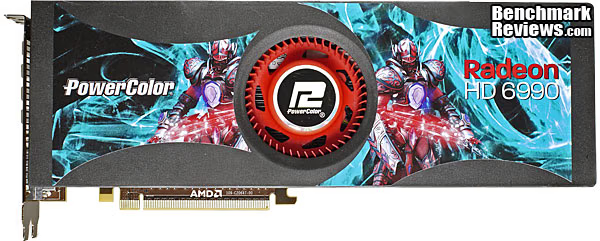
The PowerColor AX6950 4GBD5-M4D is based 100% on the AMD reference card, which is a completely new design. As of the moment there are no AIB partners that are game enough to design and produce their own version of this card. At best, I expect one or two may offer a different cooling solution, but the board design is probably going to remain the same for the foreseeable future. Let's start at the top.
The first thing you notice when you pick up this video card is that it's very long, and relatively thin, or at least not thicker than any other reference card. The second thing you notice is the weight and the fact that's it's both better balanced and distributed along its length. None of this should be a surprise if you think about it for a second, but no one stops to think when they're unboxing the most powerful graphics card in the world. Oops, did I let the cat out of the bag? Too late, I think AMD got there first.

The fan shroud is a completely sealed-off design; there are no extra relief vents anywhere to be seen. Both ends are relatively open and the airflow path is as uncluttered as they could make it. The straight through design of the fin assemblies and the lack of restrictions at both ends help out on the noise performance as well. NVIDIA did the same thing with their GTX 580, with the same general effect.
The single 80mm radial fan is placed right at the center of the card and pushes air out in two directions, along the length of the shroud. The two GPUs are spaced out a fair distance from the center and each has its own dedicated fin assembly sitting atop it. The component level on the PC board is cooled by full size cast aluminum heat spreaders on both the front of the card and the back. The one on the front catches the heat from all the Voltage Regulator Modules, as well as half the installed GDDR5 DRAM. The other half of the 4GB total is mounted on the back surface of the board and they are pretty much the only major heat producers located there.

The cooling fin assemblies do away with heatpipes completely, and use full-sized vapor chambers instead. They operate on the same principle as heat pipes: using specially selected refrigerant fluids that change phase at the operating temperature involved, and naturally occurring convective currents. As the gas rises, it is cooled by the aluminum fins and returns to its liquid state. This type of evaporative cooling is one of the most efficient heat transfer methods and is used in lots of high temperature applications such as nuclear power plants and inside the exhaust valves of high performance combustion engines. In that case, sodium is used as a very high temperature coolant inside the valve stem, transferring heat away from the valve face which is getting pummeled by a couple thousand explosions every minute the engine is running at normal highway speeds. The liquid inside these vapor chambers is more like the FreonTM that's inside your typical refrigerator or air conditioning system.
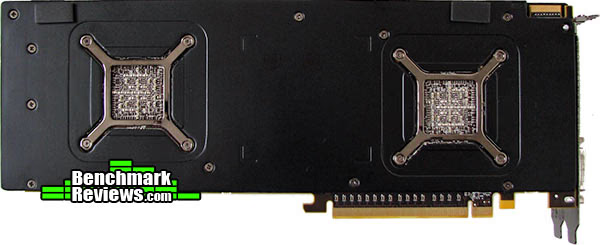
The back of the card is almost completely covered with a black anodized heat spreader, with cutouts for each GPU, and the tensioned skeleton backplate that holds the mounting screws for the heatsink/fin assembly. It's too bad no one has figured out a good way of removing heat from the back side of the board, right underneath the GPU. This section gets plenty hot, but there are over a hundred small capacitors and resistors in this area that you don't want to short out. Thermal tape to the rescue?
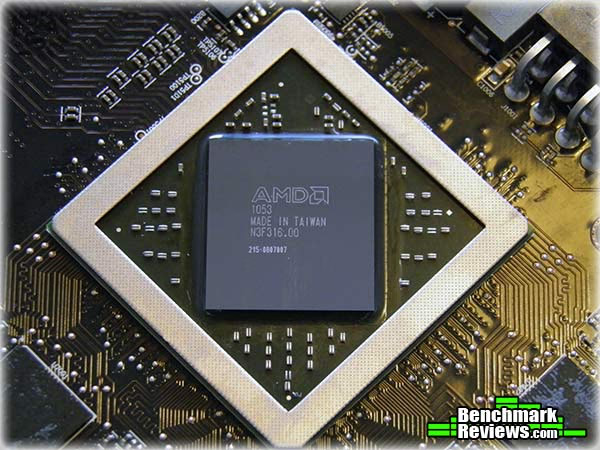
The thermal interface material (TIM) used by AMD on this card is a new "Phase Change" type of material that few people have had hands-on experience with. AMD warned all the media contacts that the performance of the card would be permanently degraded if it was disassembled, due to the unique properties of this TIM. Many thanks to W1zzard over at techPowerUp, who showed no fear and disassembled his card to report on this mystery TIM. Info from the US Patent Office (#6,620,515) calls this class of materials: "A phase change composition comprises: a matrix comprising an organofunctional silicone wax, and a thermally conductive filler. The composition can be used as a thermal interface material in electronic devices. The composition is formulated to have any desired phase change temperature." That's a pretty broad description, but the bottom line is that the usual grease-based carrier material has been replaced with a wax-like substance that thins out better at typical operating temperatures. This minimizes the impact of the carrier material and allows the filler material, which is many times better at conducting heat, to make better contact with the surfaces of both the heat source and sink.
I have never had the thermal performance of a video card degrade after I've taken it apart and reassembled it with a smaller amount of high quality TIM paste, but this time I think I've met my match. The thermal design of this card is so close to the edge of meltdown that I don't want to mess with it. Show me a full coverage waterblock that I can bolt on, and then I'll take it down to its bare essentials. For those braver than I, who end up succumbing to their curiosity and DIY spirit, please read the thorough discussion of best practices for applying TIM available here.
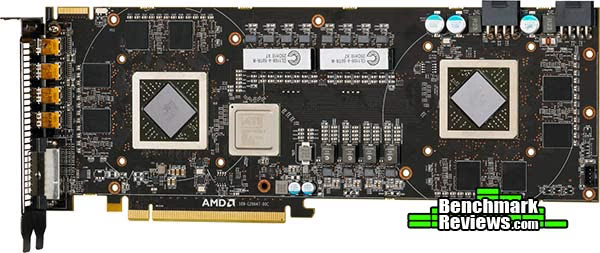
The layout on the front and back of the printed circuit board is very unusual, just as you would suspect, given the design brief. The current paths for power are made as short as possible by grouping the main voltage regulator module sections between the two GPUs, and by locating the highest current ones feeding the two GPUs along the top edge of the board, where they are closer to the power input connectors. As the highest of high-end graphics cards, the PowerColor Radeon HD 6990 is a necessarily complex and tightly constrained product. The designers at AMD had very little design flexibility when faced with the overwhelming amounts of power and heat that are involved here.

One final thing we need to look at is the installation of this oversized card in a modern gaming case. Owners of the previous model HD 5970 are well aware that the length of the card could be a problem when choosing a PC chassis. I measured 305mm from front to rear on my sample. Thankfully, this number doesn't need to be fudged with some imprecise allowance for PCI-E power connectors, as the two 8-pin connectors are located along the top edge. In my test bed PC case, which is a CM Storm Sniper, I had 35mm of extra room left over between the far end of the card and the drive cage framework. I had no problems getting the card in or out with this much clearance, especially since I didn't have to worry about accessing any power connectors on the end of the card. And yes, I know my cable management is a mess, and yes that is painter's tape on my CPU cooler. You wouldn't believe the amount of air that comes barging out from the gap between the fan housing and the fin assembly without it.
In the next section, let's take a more detailed look at some of the new components on this non-reference board. I didn't do a full tear-down, but AMD graciously provided some detailed images that will allow us to see everything of importance.
PowerColor Radeon HD 6990 Detailed Features
Each GPU gets its own PWM-based VRM power section, with an independent 4-phase supply delivered directly to each Cayman-class GPU. The power MOSFETs and their driver transistors are integrated into a DrMOS design from Volterra, although I don't think they use that name for their products. They're the eight shiny IC packages below the large white inductor modules. The power supply chokes for the GPU circuit are from Cooper Bussmann, one of the oldest trade names in the power component business. AMD is using these modular chokes on almost all their high power reference designs lately; I think they first showed up on the HD 5870.
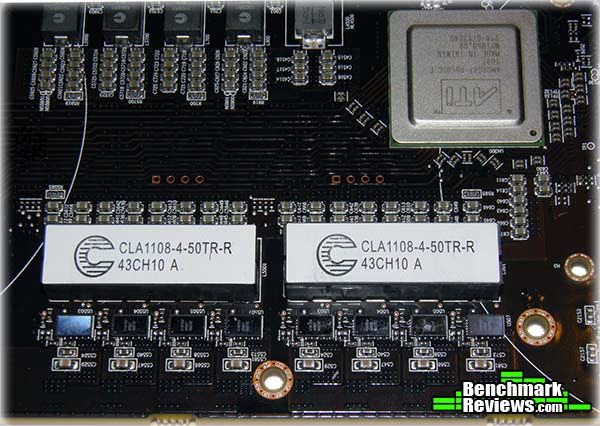
There are two Volterra VT1556 PWM controllers mounted on the back side of the PCB, providing all the high level voltage control functions. This part is a holdover from the Radeon HD 6950 and HD 6970 reference cards, where only one controller was required for the single GPU. The controller offers I2C communication and control, so someone will undoubtedly build an interface into their monitoring and control software. The fact that every HD 6900 series card uses the same controller pretty much guarantees it.
The memory and the PCI Express bridge chip get their power from a smaller set of PWM power supply sections located in the center again, only along the bottom edge. The individual filter chokes can be seen at the top of the image above, and it looks like the memory is getting 2-phase power with the PCI Bridge getting a single-phase. Speaking of the bridge chip, it is a re-branded PLX item, and is the same part that was used on the Radeon HD 5970 card. I'm guessing that AMD had a large stock of them from previous orders, because they still have the ATI logo on them.
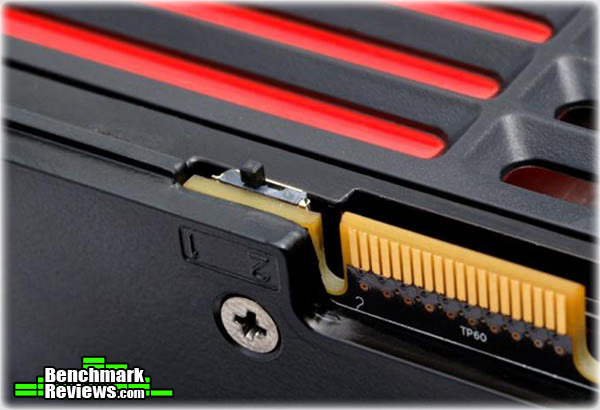
This little switch is what unlocks the power of this card, literally. The board ships with the switch in position 2, where it limits the GPU core clock speed to 830 MHz, and the core voltage to 1.120 volts. Capping those two parameters keeps the overall power consumption at or below 375 watts, which is technically all the various connectors are supposed to be able to supply. It also keeps the heat down, to where the fan is not overly loud in order to keep the GPU temps below 80C in continuous gaming use. If you want to take it further, you first have to remove the yellow warning sticker which refers you to the product manual for all the dire consequences that can occur if you proceed. Once you agree to void the product warranty and flip the switch to position 1, the GPU clock is automatically bumped up to 880 MHz and the default GPU core voltage goes up from 1.120V to 1.175V.
WARNING: AMD's product warranty does not cover damages caused by overclocking, even when overclocking is enabled via AMD software and/or the Dual-BIOS Function on the AMD Radeon HD 6990. This restriction is carried through by PowerColor and almost every other AMD AIB partner.

All of the reference Radeon HD 6990 cards feature 4GB of GDDR5 frame buffer memory, and surprisingly, the memory modules used are the lower speed devices that were previously seen on the HD 6950. The Hynix H5GQ2H24MFR-T2C components are rated at 1250 MHz and can reach 5.0 Gbps bandwidth with a 1.5V supply, which is what AMD is using in this application. The stock Radeon HD 6970 cards have a 1375 MHz memory clock, and require the "-ROC" version of this chip to run at that speed.

The PC board had good solder quality and precision component placement, as you can also above. I've not seen this much bare traces before on any card; most times the solder flows over the entire pad, leaving nothing exposed. It's not a case of not enough solder being used for the joints, each connection I see has an ample amount to serve its dual function of holding the part in place and an electrical connection. This is the area on the back side of the board, directly below the GPU, and it's one of the most crowded sections of any graphics card. On my LCD screen, this image is magnified 20X, compared to what the naked eye sees. The smallest SMD capacitors located in this view are placed on 1mm centers. The board surface was also quite clean, which is always a good thing.

The I/O plate has a new configuration that is optimized for both airflow and multi-monitor display setups, AKA Eyefinity. By putting all the display connectors in one row, the size of the cooling vent could be maximized, which is critical for this high-powered beast. The use of all mini Display Port connections allowed a total of five connections, although only four can be active at any one time. PowerColor includes three miniDP adapters in the package: 1-Passive miniDP to Single Link DVI, 1- Active miniDP to Single Link DVI, and 1-Passive miniDP to HDMI. That's an impressive collection of adapters, which should help all of us who are just getting used to Display Port and still require support for legacy monitors.
Before we move into the testing phase of the review, let's take a detailed look at the features and specifications for the new AMD Radeon HD 6990 video card. AMD and PowerColor have supplied us with a ton of information, so let's go....
AMD Radeon HD 6990 GPU Features
AMD Radeon HD 6990 GPU Feature Summary:
- High Speed 256-bit GDDR5 memory interface
- PCI Express 2.1 x16 bus interface
- "Eye-Definition" graphics
- New and advanced architecture
- Full DirectX 11 support
- Scalable geometry processing technology
- Shader Model 5.0
- DirectCompute 11
- Dual advanced programmable hardware tessellation units
- Accelerated multi-threading
- HDR texture compression
- Order-independent transparency
- OpenGL 4.1 support
- Image quality enhancement technology
- Up to 24x multi-sample and super-sample anti-aliasing modes
- Adaptive anti-aliasing
- Enhanced Quality Anti-Aliasing (EQAA)
- Morphological Anti-Aliasing (MLAA)
- 16x angle independent anisotropic texture filtering
- 128-bit floating point HDR rendering
- AMD Eyefinity multi-display technology1
- Native support for up to 6 simultaneous displays
- Independent resolutions, refresh rates, color controls, and video overlays
- Display grouping
- Combine multiple displays to behave like a single large display
- AMD EyeSpeed visual acceleration2
- AMD Accelerated Parallel Processing (APP) technology
- OpenCL 1.1 Support
- DirectCompute 11
- Double Precision Floating Point
- Accelerated video encoding, transcoding, and upscaling
- UVD 3 dedicated video playback accelerator
- MPEG-4 AVC/H.264
- VC-1
- MPEG-2 (SD & HD)
- Multi-View Codec (MVC)
- MPEG-4 part 2 (DivX, Xvid)
- Adobe Flash
- Enhanced Video Quality features
- Advanced post-processing and scaling
- Dynamic contrast enhancement and color correction
- Brighter whites processing (Blue Stretch)
- Independent video gamma control
- Dynamic video range control
- Dual-stream HD (1080p) playback support
- DXVA 1.0 & 2.0 support
- AMD Accelerated Parallel Processing (APP) technology
- AMD HD3D technology
- Stereoscopic 3D display/glasses support
- Blu-ray 3D support
- Stereoscopic 3D gaming
- 3rd party Stereoscopic 3D middleware software support
- AMD CrossFireXTM multi-GPU technology6
- Dual, triple or quad-GPU scaling
- Cutting-edge integrated display support
- DisplayPort 1.2
- Max resolution: 2560x1600 per display
- Multi-Stream Transport
- 21.6 Gbps bandwidth
- High bit-rate audio
- HDMI 1.4a with Stereoscopic 3D Frame Packing Format, Deep Color, xvYCC wide gamut support, and high bit-rate audio
- Max resolution: 1920x1200
- Dual-link DVI with HDCP
- Max resolution: 2560x160
- DisplayPort 1.2
- Integrated HD audio controller
- Output protected high bit rate 7.1 channel surround sound over HDMI with no additional cables required
- Supports AC-3, AAC, Dolby TrueHD and DTS Master Audio formats
- AMD PowerPlayTM power management technology3
- AMD PowerTune technology
- Intelligent power management hardware
- Dynamic power management with low power idle state
- Ultra-low power state support for multi-GPU configurations
- AMD PowerTune technology
- AMD CatalystTM graphics and HD video configuration software
- Software support for Windows 7, Windows Vista, and Windows XP
- AMD CatalystTM Control Center - AMD CatalystTM software application and user interface for setup, configuration, and accessing features of AMD Radeon products.
- Unified Graphics display driver - AMD CatalystTM software enabling other PC programs and devices to use advanced graphics, video, and features of AMD RadeonTM products.
Now, here are the usual disclaimers:
2010 Advanced Micro Devices, Inc. All rights reserved. AMD, the AMD Arrow logo, Catalyst, CrossFireX, PowerPlay, Radeon and combinations thereof are trademarks of Advanced Micro Devices, Inc. Microsoft, Windows, Windows Vista, and DirectX are registered trademarks of Microsoft Corporation in the U.S. and/or other jurisdictions. PCI Express is a registered trademark of PCI-SIG. Other names are for informational purposes only and may be trademarks of their respective owners.
Additional hardware (e.g. Blu-ray drive, HD or 10-bit monitor, TV tuner) and/or software (e.g. multimedia applications) are required for the full enablement of some features. Not all features may be supported on all components or systems - check with your component or system manufacturer for specific model capabilities and supported technologies.
- AMD Eyefinity technology works with games that support non-standard aspect ratios, which is required for panning across multiple displays. To enable more than two displays, additional panels with native DisplayPortTM connectors, and/or DisplayPortTM compliant active adapters to convert your monitor's native input to your cards DisplayPortTM or Mini-DisplayPortTM connector(s), are required. SLS ("Single Large Surface") functionality requires an identical display resolution on all configured displays.
- AMD EyeSpeed is a set of technologies designed to improve video quality and enhance application performance. Full enablement of some features requires support for AMD Accelerated Parallel Processing (APP) technology and/or AMD's Universal Video Decoder (UVD).
- AMD PowerPlayTM and AMD Accelerated Parallel Processing (APP) are technology platforms that include a broad set of capabilities offered by certain AMD RadeonTM HD GPUs. Not all products have all features and full enablement of some capabilities and may require complementary products.
- Requires application support for AMD Accelerated Parallel Processing (APP) technology. AMD Accelerated Parallel Processing technology works with applications designed to take advantage of its GPU acceleration capabilities.
- AMD HD3D is a technology designed to enable stereoscopic 3D support in games, movies and/or photos. Requires 3D stereo drivers, glasses, and display.
- AMD CrossFireXTM technology requires an AMD CrossFireX Ready motherboard, an AMD CrossFireXTM Bridge Interconnect (for each additional graphics card) and may require a specialized power supply.
AMD Radeon HD 6990 GPU Detail Specifications

GPU Engine Specs for PowerColor Radeon HD 6990:
-
Fabrication Process: TSMC 40nm Bulk CMOS
-
Die Size: 778mm2
-
No. of Transistors: 5.28 Billion
-
SIMD Engines: 48
-
Stream Processors: 3072
-
Texture Units: 192
-
ROP Units: 64
-
Engine Clock Speed: 830 MHz
-
Texel Fill Rate (bilinear filtered): 159.4 Gigatexels/sec
-
Pixel Fill Rate: 53.1 Gigapixels/sec
-
Maximum board power: 375 Watts
-
Typical gaming power load: 350 Watts
-
Minimum board power: 37 Watts
Memory Specs:
-
Memory Clock: 1250 MHz - DDR
-
Memory Configurations: 2x 2 GB GDDR5
-
Memory Interface Width: 256-bit
-
Memory Data Rate: 5.0 Gbps/GPU
-
Memory Bandwidth: 160.0 GB/sec/GPU
Display Support:
-
Maximum DVI Resolution: 2560x1600
-
Maximum VGA Resolution: 2048x1536
-
Maximum Display Output: 4x - 1920x1200
-
Standard Display Connectors:
- One Dual-Link DVI
- Four Mini Display Port v1.2
Graphics Card Dimensions:
-
Height: 110 mm
-
Length: 305 mm
-
Width: 38 mm (Dual-slot)
Source:AMD.com and PowerColor.com
Now that we've had the grand tour of the PowerColor AX6990 4GBD5-M4D, inside and out, it's time to put it to the test. Well, Benchmark is our first name, so don't worry. There are a wide variety of tests waiting for you in the next several sections, including some new entries. Let's start off with a complete description of the Video Card Testing Methodology.
Video Card Testing Methodology
With the widespread adoption of Windows7 in the marketplace, and given the prolonged and extensive pre-release testing that occurred on a global scale, there are compelling reasons to switch all testing to this highly anticipated, operating system. Overall performance levels of Windows 7 are favorable compared to Windows XP, and there is solid support for the 64-bit version, something enthusiasts have anxiously awaited for years. After almost a year of product testing with Win7-64, I can vouch for its stability and performance; I can't think of any reasons why I would want to switch back to XP.
Our site polls and statistics indicate that the over 90% of our visitors use their PC for playing video games, and practically every one of you are using a screen resolutions mentioned below. Since all of the benchmarks we use for testing represent different game engine technology and graphic rendering processes, this battery of tests will provide a diverse range of results for you to gauge performance on your own computer system. All of the benchmark applications are capable of utilizing DirectX 10 or DirectX 11, and that is how they were tested. Some of these benchmarks have been used widely for DirectX 9 testing in the XP environment, and it is critically important to differentiate between results obtained with different versions. Each game behaves differently in DX9 and DX10 formats. Crysis is an extreme example, with frame rates in DirectX 10 only about half what was available in DirectX 9.
At the start of all tests, the previous display adapter driver is uninstalled and trace components are removed using Driver Cleaner Pro. We then restart the computer system to establish our display settings and define the monitor. Once the hardware is prepared, we begin our testing. According to the Steam Hardware Survey published at the time of Windows 7 launch, the most popular gaming resolution is 1280x1024 (17-19" standard LCD monitors) closely followed by 1024x768 (15-17" standard LCD). However, because these resolutions are considered 'low' by most standards, our benchmark performance tests concentrate on the higher-demand resolutions: 1680x1050 (22-24" widescreen LCD) and 1920x1200 (24-28" widescreen LCD monitors).
Each benchmark test program begins after a system restart, and the very first result for every test will be ignored since it often only caches the test. This process proved extremely important in several benchmarks, as the first run served to cache maps allowing subsequent tests to perform much better than the first. Each test is completed five times, the high and low results are discarded, and the average of the three remaining results is displayed in our article.
A combination of synthetic and video game benchmark tests have been used in this article to illustrate relative performance among graphics solutions. Our benchmark frame rate results are not intended to represent real-world graphics performance, as this experience would change based on supporting hardware and the perception of individuals playing the video game.

Intel P55 Express Test System
-
Motherboard: ASUS P7P55D-E Pro (1002 BIOS)
-
System Memory: 2x 2GB GSKILL Ripjaws DDR3 1600MHz (7-8-7-24)
-
Processor: Intel Core i5-750 (OC @ 4.0 GHz)
-
CPU Cooler: Prolimatech Megahalems (Delta AFB1212SHE PWM Fan)
-
Video: PowerColor Radeon HD 6990 4GB GDDR5 (Catalyst 8.840.3.0)
-
Drive 1: Corsair P64 SSD, 64GB
-
Drive 2: Western Digital VelociRaptor, 150GB
-
Optical Drive: Sony NEC Optiarc AD-7190A-OB 20X DVD Burner
-
Enclosure: CM STORM Sniper Gaming Case
-
PSU: Corsair CMPSU-750TX ATX12V V2.2 750Watt
-
Monitor: SOYO 24"; Widescreen LCD Monitor (DYLM24E6) 1920X1200
-
Operating System: Windows 7 Ultimate Version 6.1 (Build 7600)
DirectX 9/10 Benchmark Applications
- 3DMark Vantage v1.02
- Extreme Settings: (Extreme Quality, 8x Multisample Anti-Aliasing, 16x Anisotropic Filtering, 1:2 Scale)
- Just Cause 2
- Extreme Settings: (Max Display Settings, 8x Anti-Aliasing, 16x Anisotropic Filtering, Motion Blur ON, GPU Water Simulation OFF, Bokeh OFF)
- Mafia II
- Extreme Settings: (Antialiasing, 16x AF, High Shadow Quality, High Detail, High Geometry, Ambient Occlusion, PhysX Off)
DirectX 11 Benchmark Applications
-
Aliens vs Predator
-
Extreme Settings: (Very High Quality, 4x AA, 16x AF, SSAO, Tessellation, Advanced Shadows)
-
-
BattleField: Bad Company 2
-
Extreme Settings: (Highest Quality, HBAO, 8x AA, 16x AF, 180s Fraps Single-Player Intro Scene)
-
-
DiRT-2 Demo
-
Extreme Settings: (Ultra Preset, 8x MSAA)
-
-
H.A.W.X. 2
-
Extreme Settings: (8x AA, Max Quality Levels, Terrain Tessellation)
-
-
Lost Planet 2
-
Extreme Settings: (8x CSAA, High Shadow Detail, High Texture, High Render, High DirectX 11 Features)
-
-
METRO 2033
-
Extreme Settings: (DX11, Very High Quality, 16x AF, 4x MSAA, PhysX Off, Tessellation On, Depth of Field On)
-
-
Unigine Heaven Benchmark 2.1
-
Normal Settings: (High Quality, Normal Tessellation, 16x AF, 4x and 8x AA)
-
Video Card Test Products
|
Graphics Card |
Cores |
Core Clock |
Shader Clock |
Memory Clock |
Memory |
Interface |
|---|---|---|---|---|---|---|
| MSI GeForce GTX 460 (N460GTX Cyclone 1GD5/OC) |
336 |
725 |
1450 |
900 |
1.0 GB GDDR5 |
256-bit |
| MSI Radeon HD 6870 (R6870-2PM2D1GD5) |
1120 |
900 |
N/A |
1050 |
1.0 GB GDDR5 |
256-bit |
|
PowerColor Radeon HD 5870 (PCS+ AX5870 1GBD5-PPDHG2) |
1600 |
875 |
N/A |
1250 |
1.0 GB GDDR5 |
256-bit |
| PowerColor PCS++ Radeon HD6950 (AX6950 2GBD5-P22DHG) |
1408 |
800 |
N/A |
1250 |
2.0 GB GDDR5 |
256-bit |
| Gigabyte GeForce GTX 480 (GV-N480SO-15I Super Over Clock) |
480 |
820 |
1640 |
950 |
1536 MB GDDR5 |
384-bit |
| PowerColor Radeon HD 6990 (AX6990 4GBD5-M4D) |
3072 |
830 |
N/A |
1250 |
4.0 GB GDDR5 |
256-bit |
-
MSI GeForce GTX 460 (N460GTX Cyclone 1GD5/OC - Forceware v266.58)
-
MSI Radeon HD 6870 (R6870-2PM2D1GD5 - Catalyst 8.820.2.0)
-
MSI GeForce GTX 560 Ti (N560GTX-Ti Twin Frozr II/OC - Forceware v266.56)
-
PowerColor PCS+ Radeon HD 5870 (AX5870 1GBD5-PPDHG2 - Catalyst 8.820.2.0)
-
PowerColor PCS++ Radeon HD 6950 (AX6950 2GBD5-P22DHG - Catalyst 8.820.2.0)
-
Gigabyte GeForce GTX 480 (GV-N480SO-15I - Forceware v266.58)
-
PowerColor Radeon HD 6990 (AX6990 4GD5-M4D - Catalyst 8.840.3.0)
3DMark Vantage Performance Tests
3DMark Vantage is a computer benchmark by Futuremark (formerly named Mad Onion) to determine the DirectX 10 performance of 3D game performance with graphics cards. A 3DMark score is an overall measure of your system's 3D gaming capabilities, based on comprehensive real-time 3D graphics and processor tests. By comparing your score with those submitted by millions of other gamers you can see how your gaming rig performs, making it easier to choose the most effective upgrades or finding other ways to optimize your system.
There are two graphics tests in 3DMark Vantage: Jane Nash (Graphics Test 1) and New Calico (Graphics Test 2). The Jane Nash test scene represents a large indoor game scene with complex character rigs, physical GPU simulations, multiple dynamic lights, and complex surface lighting models. It uses several hierarchical rendering steps, including for water reflection and refraction, and physics simulation collision map rendering. The New Calico test scene represents a vast space scene with lots of moving but rigid objects and special content like a huge planet and a dense asteroid belt.
At Benchmark Reviews, we believe that synthetic benchmark tools are just as valuable as video games, but only so long as you're comparing apples to apples. Since the same test is applied in the same controlled method with each test run, 3DMark is a reliable tool for comparing graphic cards against one-another.
1680x1050 is rapidly becoming the new 1280x1024. More and more widescreen are being sold with new systems or as upgrades to existing ones. Even in tough economic times, the tide cannot be turned back; screen resolution and size will continue to creep up. Using this resolution as a starting point, the maximum settings were applied to 3DMark Vantage include 8x Anti-Aliasing, 16x Anisotropic Filtering, all quality levels at Extreme, and Post Processing Scale at 1:2.
3DMark Vantage GPU Test: Jane Nash

Our first synthetic test shows the base HD 6990 configuration establishing a firm lead over all the other graphics cards. This is in the 830 MHz configuration; we'll look at the "overclocked" settings later. These synthetic tests really thrive on shaders, the more the better. There's a catch, though as the new VLIW4 shaders in the HD 6000 series is more efficient than the VLIW5 units in the HD 5000 series, So despite the fact that the CrossFireX combination of HD 5870 cards brings 3200 shaders to the party, the HD 6990 with only 3072 shaders tops it, operating with a 45 MHz core clock deficit no less. The top 3 performers in this test all have a combination of 64 ROP units on the back end, which equalizes their performance somewhat. It's a bit surprising to see the HD 6870 duo doing so well, but the 6870 has some unique talents that help it to keep up with its bigger brothers in some benchmarks.

At 1920x1200 native resolution, things are much the same as the lower screen size; just the absolute values are lower, the ranking stays the same. Once again, the PowerColor Radeon HD 6990 puts on a stellar performance. This benchmark was running smooth as silk with the 6990, even at its lower clock rate of 830 MHz for the core.
Let's take a look at test #2 now, which has a lot more surfaces to render, with all those asteroids flying around the doomed planet New Calico.
3DMark Vantage GPU Test: New Calico

In the medium resolution New Calico test, the GeForce cards show a little extra muscle, particularly the GTX 460 SLI pairing which jumps into third place ahead of the HD 6870 CrossFireX duo. The PowerColor Radeon HD 6990 pulls way ahead, which is exactly what I would expect, based on the cards I used in this comparison.

At the higher screen resolution of 1920x1200, the PowerColor HD 6990 once again comes out swinging and leaves the lower-spec cards gasping for air. The consistent performance gains that the 6990 shows over a CrossFireX pair of HD 5870 cards is a good sign that the architecture improvements of the HD 6000 series are working well. Don't forget, these are the 830 MHz (keep my warrantee) numbers for the Radeon HD 6990. We'll look at the overclocked performance later in the article.
Our next test is a relatively new one for Benchmark Reviews. It's a DirectX 10 game with all the stops pulled out. Just Cause 2 uses a brand new game engine called Avalanche Engine 2.0, which enabled the developers to create games of epic scale and with great variation across genres and artistic styles, for the next generation of gaming experiences. Sounds like fun, let's take a look...
|
Graphics Card |
Cores |
Core Clock |
Shader Clock |
Memory Clock |
Memory |
Interface |
|---|---|---|---|---|---|---|
| MSI GeForce GTX 460 (N460GTX Cyclone 1GD5/OC) |
336 |
725 |
1450 |
900 |
1.0 GB GDDR5 |
256-bit |
| MSI Radeon HD 6870 (R6870-2PM2D1GD5) |
1120 |
900 |
N/A |
1050 |
1.0 GB GDDR5 |
256-bit |
|
PowerColor Radeon HD 5870 (PCS+ AX5870 1GBD5-PPDHG2) |
1600 |
875 |
N/A |
1250 |
1.0 GB GDDR5 |
256-bit |
| PowerColor PCS++ Radeon HD6950 (AX6950 2GBD5-P22DHG) |
1408 |
800 |
N/A |
1250 |
2.0 GB GDDR5 |
256-bit |
| Gigabyte GeForce GTX 480 (GV-N480SO-15I Super Over Clock) |
480 |
820 |
1640 |
950 |
1536 MB GDDR5 |
384-bit |
| PowerColor Radeon HD 6990 (AX6990 4GBD5-M4D) |
3072 |
830 |
N/A |
1250 |
4.0 GB GDDR5 |
256-bit |
Just Cause 2 Performance Tests
"Just Cause 2 sets a new benchmark in free-roaming games with one of the most fun and entertaining sandboxes ever created," said Lee Singleton, General Manager of Square Enix London Studios. "It's the largest free-roaming action game yet with over 400 square miles of Panaun paradise to explore, and its 'go anywhere, do anything' attitude is unparalleled in the genre." In his interview with IGN, Peter Johansson, the lead designer on Just Cause 2 said, "The Avalanche Engine 2.0 is no longer held back by having to be compatible with last generation hardware. There are improvements all over - higher resolution textures, more detailed characters and vehicles, a new animation system and so on. Moving seamlessly between these different environments, without any delay for loading, is quite a unique feeling."
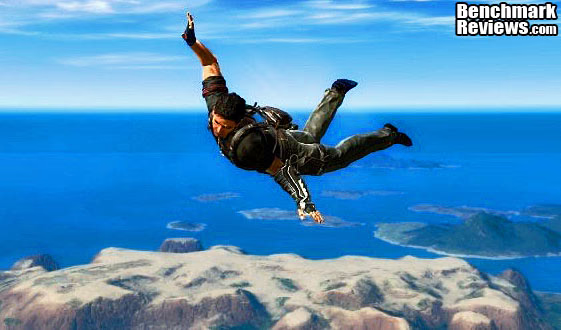
Just Cause 2 is one of those rare instances where the real game play looks even better than the benchmark scenes. It's amazing to me how well the graphics engine copes with the demands of an open world style of play. One minute you are driving through the jungles, the next you're diving off a cliff, hooking yourself to a passing airplane, and parasailing onto the roof of a hi-rise building. The ability of the Avalanche Engine 2.0 to respond seamlessly to these kinds of dramatic switches is quite impressive. It's not DX11 and there's no tessellation, but the scenery goes by so fast there's no chance to study it in much detail anyway.
Although we didn't use the feature in our testing, in order to equalize the graphics environment between NVIDIA and ATI, the GPU water simulation is a standout visual feature that rivals DirectX 11 techniques for realism. There's a lot of water in the environment, which is based around an imaginary Southeast Asian island nation, and it always looks right. The simulation routines use the CUDA functions in the Fermi architecture to calculate all the water displacements, and those functions are obviously not available when using an ATI-based video card. The same goes for the Bokeh setting, which is an obscure Japanese term for out-of-focus rendering. Neither of these techniques uses PhysX, but they do use specific computing functions that are only supported by NVIDIA's proprietary CUDA architecture.
There are three scenes available for the in-game benchmark, and I used the last one, "Concrete Jungle" because it was the toughest and it also produced the most consistent results. That combination made it an easy choice for the test environment. All Advanced Display Settings were set to their highest level, and Motion Blur was turned on, as well.

The results for the Just Cause 2 benchmark show an interesting comparison between the various contenders. They look similar to the ones we saw for the New Calico test on 3DMark vantage, just compressed a bit. Obviously, they use completely different rendering engines, but both tests have massive amounts of environment to render. The similar performance of the Radeon HD 6870 and HD 5870 is telling, as an example of how AMD was able to match performance levels with 1/3 less silicon this time around, with the 6870. The HD 6990 continues to perform well above both of them in CrossFireX configuration, showing no signs of any performance slippage due to immature drivers or other potential hiccups.
Let's take a look at one more popular gaming benchmark, which was released recently with PhysX support, yet it relies on DirectX 9 features. It's a wonderful blend of modern graphics technology and classic crime scenes, called Mafia II.
|
Graphics Card |
Cores |
Core Clock |
Shader Clock |
Memory Clock |
Memory |
Interface |
|---|---|---|---|---|---|---|
| MSI GeForce GTX 460 (N460GTX Cyclone 1GD5/OC) |
336 |
725 |
1450 |
900 |
1.0 GB GDDR5 |
256-bit |
| MSI Radeon HD 6870 (R6870-2PM2D1GD5) |
1120 |
900 |
N/A |
1050 |
1.0 GB GDDR5 |
256-bit |
|
PowerColor Radeon HD 5870 (PCS+ AX5870 1GBD5-PPDHG2) |
1600 |
875 |
N/A |
1250 |
1.0 GB GDDR5 |
256-bit |
| PowerColor PCS++ Radeon HD6950 (AX6950 2GBD5-P22DHG) |
1408 |
800 |
N/A |
1250 |
2.0 GB GDDR5 |
256-bit |
| Gigabyte GeForce GTX 480 (GV-N480SO-15I Super Over Clock) |
480 |
820 |
1640 |
950 |
1536 MB GDDR5 |
384-bit |
| PowerColor Radeon HD 6990 (AX6990 4GBD5-M4D) |
3072 |
830 |
N/A |
1250 |
4.0 GB GDDR5 |
256-bit |
Mafia II DX9+SSAO Benchmark Results
Mafia II is a single-player third-person action shooter developed by 2K Czech for 2K Games, and is the sequel to Mafia: The City of Lost Heaven released in 2002. Players assume the life of World War II veteran Vito Scaletta, the son of small Sicilian family who immigrates to Empire Bay. Growing up in the slums of Empire Bay teaches Vito about crime, and he's forced to join the Army in lieu of jail time. After sustaining wounds in the war, Vito returns home and quickly finds trouble as he again partners with his childhood friend and accomplice Joe Barbaro. Vito and Joe combine their passion for fame and riches to take on the city, and work their way to the top in Mafia II.
Mafia II is a DirectX 9 PC video game built on 2K Czech's proprietary Illusion game engine, which succeeds the LS3D game engine used in Mafia: The City of Lost Heaven. In our Mafia-II Video Game Performance article, Benchmark Reviews explored characters and gameplay while illustrating how well this game delivers APEX PhysX features on both AMD and NVIDIA products. Thanks to APEX PhysX extensions that can be processed by the system's CPU, Mafia II offers gamers equal access to high-detail physics regardless of video card manufacturer. Equal access is not the same thing as equal performance, though.
With PhysX technology turned off, both AMD and NVIDIA are on a level playing field in this test. In contrast to many gaming scenes, where other-worldly characters and environments allow the designers to amp up the detail, Mafia II uses human beings wearing ordinary period-correct clothes and natural scenery. Just like how high end audio equipment is easiest to judge using that most familiar of sounds - the human voice, graphics hardware is really put to the test when rendering things that we have real experience with. The drape of a woolen overcoat is a deceptively simple construct; easy to understand and implement, but very difficult to get perfect.

At medium resolutions, the NVIDIA cards do very well in this benchmark, which is based on DirectX 9, surprisingly. The top three Radeon sets all perform much alike, with only 10 FPS separating the HD 6870 pair in CrossFire and the HD 6990. The older HD 5870 still does well in this test, which is understandable since this benchmark is limited to DX9 function calls. Despite the fact that Mafia II makes excellent use of PhysX and 3D as described in our NVIDIA APEX PhysX Efficiency: CPU vs GPU article, both areas where NVIDIA has an edge, this test seems equally suited to either AMD or NVIDIA solutions. Of course that's only true in the land of benchmarks, because it's so difficult to imagine turning PhysX off once you've experienced it.

At the higher screen resolution of 1920x1200, the NVIDIA cards start to lose some ground relative to the ATI clan. For a game clearly developed using NVIDIA hardware, it surprises me a bit to see the Radeon series doing so well. Of course, I DO miss the PhysX features, which are always turned off during comparison testing. Since Mafia II can't rely on tessellation for enhancing realism, it leans heavily on PhysX. If tessellation were in the mix, the new and improved tessellation engines in the HD 6xxx and the GTX 5xx series cards would be pushing those numbers up. Here is a game where brute force, meaning the number of shader processors, pays off and you can see that in the strong performance by the good old HD 5870. The PowerColor HD 6990 stretches out its lead a bit at 1920x1200, a trend I would expect to see carried on at even higher resolution and with multiple display arrangements.
Our next benchmark of the series is not for the faint of heart. Lions and tiger - OK, fine. Guys with guns - I can deal with that. But those nasty little spiders......NOOOOOO! How did I get stuck in the middle of a deadly fight between Aliens vs. Predator anyway? Check out the results from one of our toughest new DirectX 11 benchmarks in the next section.
|
Graphics Card |
Cores |
Core Clock |
Shader Clock |
Memory Clock |
Memory |
Interface |
|---|---|---|---|---|---|---|
| MSI GeForce GTX 460 (N460GTX Cyclone 1GD5/OC) |
336 |
725 |
1450 |
900 |
1.0 GB GDDR5 |
256-bit |
| MSI Radeon HD 6870 (R6870-2PM2D1GD5) |
1120 |
900 |
N/A |
1050 |
1.0 GB GDDR5 |
256-bit |
|
PowerColor Radeon HD 5870 (PCS+ AX5870 1GBD5-PPDHG2) |
1600 |
875 |
N/A |
1250 |
1.0 GB GDDR5 |
256-bit |
| PowerColor PCS++ Radeon HD6950 (AX6950 2GBD5-P22DHG) |
1408 |
800 |
N/A |
1250 |
2.0 GB GDDR5 |
256-bit |
| Gigabyte GeForce GTX 480 (GV-N480SO-15I Super Over Clock) |
480 |
820 |
1640 |
950 |
1536 MB GDDR5 |
384-bit |
| PowerColor Radeon HD 6990 (AX6990 4GBD5-M4D) |
3072 |
830 |
N/A |
1250 |
4.0 GB GDDR5 |
256-bit |
Aliens vs. Predator Test Results
Rebellion, SEGA and Twentieth Century FOX have released the Aliens vs. Predator DirectX 11 Benchmark to the public. As with many of the already released DirectX 11 benchmarks, the Aliens vs. Predator DirectX 11 benchmark leverages your DirectX 11 hardware to provide an immersive game play experience through the use of DirectX 11 Tessellation and DirectX 11 Advanced Shadow features.

In Aliens vs. Predator, DirectX 11 Geometry Tessellation is applied in an effective manner to enhance and more accurately depict HR Giger's famous Alien design. Through the use of a variety of adaptive schemes, applying tessellation when and where it is necessary, the perfect blend of performance and visual fidelity is achieved with at most a 4% change in performance.
DirectX 11 hardware also allows for higher quality, smoother and more natural looking shadows as well. DirectX 11 Advanced Shadows allow for the rendering of high-quality shadows, with smoother, artifact-free penumbra regions, which otherwise could not be realized, again providing for a higher quality, more immersive gaming experience.
Benchmark Reviews is committed to pushing the PC graphics envelope, and whenever possible we configure benchmark software to its maximum settings for our tests. In the case of Aliens vs. Predator, all cards were tested with the following settings: Texture Quality-Very High, Shadow Quality-High, HW Tessellation & Advanced Shadow Sampling-ON, Multi Sample Anti-Aliasing-4x, Anisotropic Filtering-16x, Screen Space Ambient Occlusion (SSAO)-ON. You will see that this is a challenging benchmark, with all the settings turned up and a screen resolution of 1920 x 1200; it takes an HD5870 card to achieve an average frame rate higher than 30FPS.

Now we get into the full DirectX 11 only benchmarks, so we're looking at the full potential for graphics rendering that's available on only the latest generation of video cards. AvP is a tough benchmark, but it has been a fair one so far, and it's very useful for testing the newest graphics hardware. The relatively high frame rates you see above are a testament to the very high performance of the latest and greatest cards, especially when paired up in SLI or CrossFireX.
The performance of the PowerColor Radeon HD 6990 really jumps up in this Aliens vs. Predator benchmark. The purpose-built multi-GPU solution beats the CrossFireX pair of HD 5870 cards by 36% and it beats the highly overclocked Gigabyte GTX 480 SOC by an astounding 87%. This is definitely one of those games that need the right blend of hardware elements to come together for peak performance, and the Radeon HD 6900 series seems to have the right mix. AvP needs shaders more than tessellation, and the new VLIW4 units from AMD really sing on this benchmark.
In our next section, Benchmark Reviews looks at one of the newest and most popular games, Battlefield: Bad Company 2. The game lacks a dedicated benchmarking tool, so we'll be using FRAPS to measure frame rates within portions of the game itself.
|
Graphics Card |
Cores |
Core Clock |
Shader Clock |
Memory Clock |
Memory |
Interface |
|---|---|---|---|---|---|---|
| MSI GeForce GTX 460 (N460GTX Cyclone 1GD5/OC) |
336 |
725 |
1450 |
900 |
1.0 GB GDDR5 |
256-bit |
| MSI Radeon HD 6870 (R6870-2PM2D1GD5) |
1120 |
900 |
N/A |
1050 |
1.0 GB GDDR5 |
256-bit |
|
PowerColor Radeon HD 5870 (PCS+ AX5870 1GBD5-PPDHG2) |
1600 |
875 |
N/A |
1250 |
1.0 GB GDDR5 |
256-bit |
| PowerColor PCS++ Radeon HD6950 (AX6950 2GBD5-P22DHG) |
1408 |
800 |
N/A |
1250 |
2.0 GB GDDR5 |
256-bit |
| Gigabyte GeForce GTX 480 (GV-N480SO-15I Super Over Clock) |
480 |
820 |
1640 |
950 |
1536 MB GDDR5 |
384-bit |
| PowerColor Radeon HD 6990 (AX6990 4GBD5-M4D) |
3072 |
830 |
N/A |
1250 |
4.0 GB GDDR5 |
256-bit |
Battlefield: Bad Company 2 Test Results
The Battlefield franchise has been known to demand a lot from PC graphics hardware. DICE (Digital Illusions CE) has incorporated their Frostbite-1.5 game engine with Destruction-2.0 feature set with Battlefield: Bad Company 2. Battlefield: Bad Company 2 features destructible environments using Frostbit Destruction-2.0, and adds gravitational bullet drop effects for projectiles shot from weapons at a long distance. The Frostbite-1.5 game engine used on Battlefield: Bad Company 2 consists of DirectX-10 primary graphics, with improved performance and softened dynamic shadows added for DirectX-11 users. At the time Battlefield: Bad Company 2 was published, DICE was also working on the Frostbite-2.0 game engine. This upcoming engine will include native support for DirectX-10.1 and DirectX-11, as well as parallelized processing support for 2-8 parallel threads. This will improve performance for users with an Intel Core-i7 processor.
In our benchmark tests of Battlefield: Bad Company 2, the first three minutes of action in the single-player raft night scene are captured with FRAPS. Relative to the online multiplayer action, these frame rate results are nearly identical to daytime maps with the same video settings.
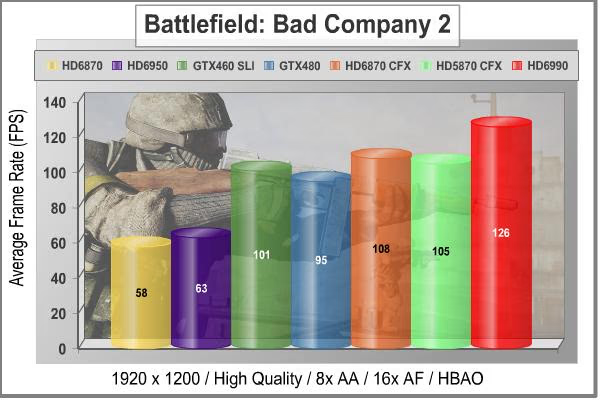
This is a game that favors the Green Team, without a doubt. Across the board, we've routinely seen competitive matchups where the NVIDIA card puts up better numbers. The Radeon HD 6990 finally gets a leg up for AMD and posts FPS numbers that are roughly 20 FPS better than the competition from either side. Of course, there is that $700 purchase price to consider... This is not as tough a benchmark as some others; the developers trod a fine line between juicing up the visuals and keeping the performance levels up. This benchmark does not utilize tessellation, so as in our DX10 testing, the strength of the newest GPUs in this area are not having an impact here. Don't worry; we'll see some results later that will show clear differences between the generations with some tessellation-heavy titles.
The little-documented feature in the basic game setup, which allows the application to choose which DirectX API it uses during the session, is not a factor here. All of the tested cards here are DX11-capable, and the game was running in DX11 mode for all the test results reported here. Even though this is primarily developed as a DX10 game, there are DX11 features incorporated in BF:BC2, like softened shadows. That one visual enhancement takes a small, but measureable toll on frame rates. It doesn't have as big an impact as aggressive use of tessellation would, either from the visuals standpoint or the computing perspective.
In the next section we use one of my favorite games, DiRT-2, to look at DX11 performance. Life isn't ALL about shooting aliens; sometimes you just need to get out of the city and drive...!
|
Graphics Card |
Cores |
Core Clock |
Shader Clock |
Memory Clock |
Memory |
Interface |
|---|---|---|---|---|---|---|
| MSI GeForce GTX 460 (N460GTX Cyclone 1GD5/OC) |
336 |
725 |
1450 |
900 |
1.0 GB GDDR5 |
256-bit |
| MSI Radeon HD 6870 (R6870-2PM2D1GD5) |
1120 |
900 |
N/A |
1050 |
1.0 GB GDDR5 |
256-bit |
|
PowerColor Radeon HD 5870 (PCS+ AX5870 1GBD5-PPDHG2) |
1600 |
875 |
N/A |
1250 |
1.0 GB GDDR5 |
256-bit |
| PowerColor PCS++ Radeon HD6950 (AX6950 2GBD5-P22DHG) |
1408 |
800 |
N/A |
1250 |
2.0 GB GDDR5 |
256-bit |
| Gigabyte GeForce GTX 480 (GV-N480SO-15I Super Over Clock) |
480 |
820 |
1640 |
950 |
1536 MB GDDR5 |
384-bit |
| PowerColor Radeon HD 6990 (AX6990 4GBD5-M4D) |
3072 |
830 |
N/A |
1250 |
4.0 GB GDDR5 |
256-bit |
DiRT-2 Demo DX11 Benchmark Results
DiRT-2 features a roster of contemporary off-road events, taking players to diverse and challenging real-world environments. This World Tour has players competing in aggressive multi-car, and intense solo races at extraordinary new locations. Everything from canyon racing and jungle trails to city stadium-based events. Span the globe as players unlock tours in stunning locations spread across the face of the world. USA, Japan, Malaysia, Baja Mexico, Croatia, London, and more venues await, as players climb to the pinnacle of modern competitive off-road racing.
Multiple disciplines are featured; encompassing the very best that modern off-roading has to offer. Powered by the third generation of the EGOTM Engine's award-winning racing game technology, DiRT-2 benefits from tuned-up car-handling physics and new damaged engine effects. It showcases a spectacular new level of visual fidelity, with cars and tracks twice as detailed as those seen in GRID. The DiRT-2 garage houses a collection of officially licensed rally cars and off-road vehicles, specifically selected to deliver aggressive and fast paced racing. Covering seven vehicle classes, players are given the keys to powerful vehicles right away. In DiRT-2 the opening drive is the Group N Subaru, essentially making the ultimate car from the original game the starting point in the sequel, and the rides just get even more impressive as you rack up points.
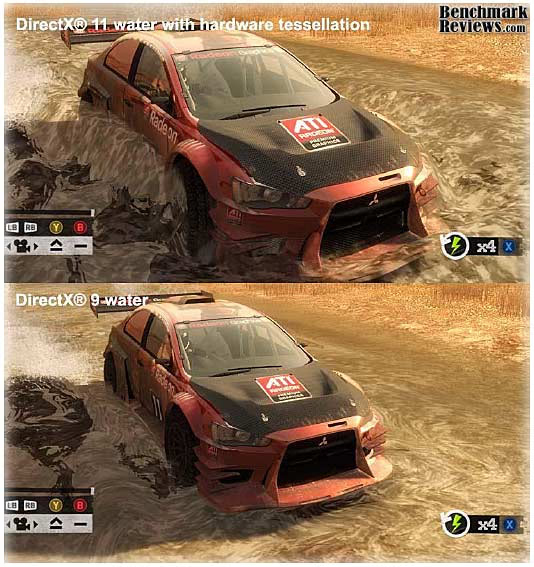
The primary contribution that DirectX-11 makes to the DiRT-2 Demo benchmark is in the way water is displayed when a car is passing through it, and in the way cloth items are rendered. The water graphics are pretty obvious, and there are several places in the Moroccan race scene where cars are plowing through large and small puddles. Each one is unique, and they are all believable, especially when more than one car is in the scene. The cloth effects are not as obvious, except in the slower-moving menu screens; when there is a race on, there's precious little time to notice the realistic furls in a course-side flag. I should also note that the flags are much more noticeable in the actual game than in the demo, so they do add a little more to the realism there, that is absent from the benchmark.

The race winner is the PowerColor Radeon HD 6990, but not by much. The GTX 460s in SLI get within 6% of the mighty Antilles. For a title that was developed on AMD hardware, this is a somewhat surprising result, or it would be if I hadn't already seen the GTX 460 pick a fight with every high end card it encountered. The entire Radeon lineup suffers by comparison in this benchmark; the HD 6870 and HD 5870 results look pretty lackluster and the HD 6990 can only beat up on its AMD siblings. The GTX 460 SLI pair really steals the show here, in terms of performance vs. cost. Fortunately, every setup I tested with here did a great job rendering all of the various scenes. As I said above, this is one of my favorite games, and I can confirm that the results above are not far off from real gameplay. There has been some concern in the community about the veracity of the Demo Benchmark compared to the in-game one, and/or FRAPS results. Despite that, I like to use the Demo version because everyone has access to it, and can easily compare results obtained with their own hardware.
In the next section we'll take a look at one of the newest benchmarking tools, H.A.W.X. 2. It's a high flying aerial adventure filled with lots of tessellated terrain, blown-up airplane bits, and masses of blue sky as a background.
|
Graphics Card |
Cores |
Core Clock |
Shader Clock |
Memory Clock |
Memory |
Interface |
|---|---|---|---|---|---|---|
| MSI GeForce GTX 460 (N460GTX Cyclone 1GD5/OC) |
336 |
725 |
1450 |
900 |
1.0 GB GDDR5 |
256-bit |
| MSI Radeon HD 6870 (R6870-2PM2D1GD5) |
1120 |
900 |
N/A |
1050 |
1.0 GB GDDR5 |
256-bit |
|
PowerColor Radeon HD 5870 (PCS+ AX5870 1GBD5-PPDHG2) |
1600 |
875 |
N/A |
1250 |
1.0 GB GDDR5 |
256-bit |
| PowerColor PCS++ Radeon HD6950 (AX6950 2GBD5-P22DHG) |
1408 |
800 |
N/A |
1250 |
2.0 GB GDDR5 |
256-bit |
| Gigabyte GeForce GTX 480 (GV-N480SO-15I Super Over Clock) |
480 |
820 |
1640 |
950 |
1536 MB GDDR5 |
384-bit |
| PowerColor Radeon HD 6990 (AX6990 4GBD5-M4D) |
3072 |
830 |
N/A |
1250 |
4.0 GB GDDR5 |
256-bit |
H.A.W.X. 2 DX11 Benchmark Results
H.A.W.X. 2 has been optimized for DX11 enabled GPUs and has a number of enhancements to not only improve performance with DX11 enabled GPUs but also greatly improve the visual experience while taking to the skies.
-
Level maps are 128 Km per dimension creating a level area of 16384 Km².
All of the terrain in this area is rendered using a powerful tessellation implementation. -
The game uses a hardware terrain tessellation method that allows a high number of detailed triangles to be rendered entirely on the GPU when near the terrain in question. This allows for a very low memory footprint and relies on the GPU power alone to expand the low res data to highly realistic detail.
-
Quad patches with multiple displacement maps aim to render 6-pixel-wide triangles typically creating 1.5 Million triangles per frame not including planes, trees, and buildings!
-
The game uses bi-cubic height filtering and fractal noise to give realistic detail at this grand scale. The wavelength and amplitude of the fractal noise is carefully tuned for maximum realism on each level working with the complex tessellation shaders to ensure highest level detail without cracks in the terrain surface.
-
These factors make H.A.W.X. 2 the perfect title for benchmarking the current and future generation of DX11 enabled GPUs.

The H.A.W.X.2 benchmark test is not quite the tessellation monster that Unigine Heaven is. It is supposed to represent an actual game, after all. However, the developers have taken full advantage of the DirectX 11 technology to pump up the realism in this new title. The scenery on the ground in particular is very detailed and vividly portrayed, and there's a lot of it that goes by the window of the F-35 Lightning that is your point of view. The blue sky, not so much....
The enhanced ability of the NVIDIA GPU designs to handle tessellation is quite evident here. This benchmark was launched by NVIDIA and AMD had limited access during game development, so they were pretty far behind with regard to drivers. The latest AMD drivers help to boost each of the Radeon cards by about 10 FPS, compared to their earlier performance. The Radeon HD 6990 ends up on the top of the pile in this test, because it has the most shaders, but the GTX 480 places a strong second based on the fact that all the early GTX 4xx designs were heavily focused on tessellation performance.
Let's take a look at another DX11 benchmark, a fast-paced scenario on a Lost Planet called E.D.N. III. The dense vegetation in "Test A" is almost as challenging as it was in Crysis, and now we have tessellation and soft shadows thrown into the mix via DirectX 11.
|
Graphics Card |
Cores |
Core Clock |
Shader Clock |
Memory Clock |
Memory |
Interface |
|---|---|---|---|---|---|---|
| MSI GeForce GTX 460 (N460GTX Cyclone 1GD5/OC) |
336 |
725 |
1450 |
900 |
1.0 GB GDDR5 |
256-bit |
| MSI Radeon HD 6870 (R6870-2PM2D1GD5) |
1120 |
900 |
N/A |
1050 |
1.0 GB GDDR5 |
256-bit |
|
PowerColor Radeon HD 5870 (PCS+ AX5870 1GBD5-PPDHG2) |
1600 |
875 |
N/A |
1250 |
1.0 GB GDDR5 |
256-bit |
| PowerColor PCS++ Radeon HD6950 (AX6950 2GBD5-P22DHG) |
1408 |
800 |
N/A |
1250 |
2.0 GB GDDR5 |
256-bit |
| Gigabyte GeForce GTX 480 (GV-N480SO-15I Super Over Clock) |
480 |
820 |
1640 |
950 |
1536 MB GDDR5 |
384-bit |
| PowerColor Radeon HD 6990 (AX6990 4GBD5-M4D) |
3072 |
830 |
N/A |
1250 |
4.0 GB GDDR5 |
256-bit |
Lost Planet 2 DX11 Benchmark Results
A decade has passed since the first game, and the face of E.D.N. III has changed dramatically. Terra forming efforts have been successful and the ice has begun to melt, giving way to lush tropical jungles and harsh unforgiving deserts. Players will enter this new environment and follow the exploits of their own customized snow pirate on their quest to seize control of the changing planet.
-
4-player co-op action: Team up to battle the giant Akrid in explosive 4 player co-operative play. Teamwork is the player's key to victory as the team is dependent on each to succeed and survive.
-
Single-player game evolves based on players decisions and actions
-
Deep level of character customization: Players will have hundreds of different ways to customize their look to truly help them define their character on the battlefield both on- and offline. Certain weapons can also be customized to suit individual player style.
-
Beautiful massive environments: Capcom's advanced graphics engine, MT Framework 2.0, will bring the game to life with the next step in 3D fidelity and performance.
-
Massive scale of enemies: Players skill on the battlefield and work as a team will be tested like never before against the giant Akrid. Players will utilize teamwork tactics, new weapons and a variety of vital suits (VS) to fight these larger-than-life bosses.
-
Rewards System- Players will receive rewards for assisting teammates and contributing to the team's success
-
Multiplayer modes and online ranking system
-
Exciting new VS features- Based on fan feedback, the team has implemented an unbelievable variety of Vital Suits and new ways to combat VS overall. The new VS sytem will have a powerful impact on the way the player takes to the war zone in Lost Planet 2
Test A:
The primary purpose of Test A is to give an indication of typical game play performance of the PC running Lost Planet 2 (i.e. if you can run Mode A smoothly, the game will be playable at a similar condition). In this test, the character's motion is randomized to give a slightly different outcome each time.

In Test A of Lost Planet 2, we see a familiar pattern. That is, the newest games are implementing the latest software technology and the newest graphics cards are optimized to handle exactly that. The HD 6990 does quite a bit better here than it did with the H.A.W.X. 2 benchmark. The GTX 460 SLI takes a surprise second spot with the CrossFireX HD 6870s right behind. This test runs very fluidly with the 6990, better than I've ever seen with any individual or combination of cards. I saw none of the usual "slowdowns" during the test with the PowerColor HD 6990 that I have seen before, with lesser AMD cards. They've always remained during the second and third runs of the benchmark, so it wasn't a map loading issue. It occurs at the beginning of scene two which is the most demanding, no matter what card is installed. In fact it's usually tougher than Test B. For simplicity's sake, we are reporting the average result, as calculated by the benchmark application. It is not an average of the individual scores reported for the three scenes.
The new GeForce GTX 560 Ti is the most impressive performer in this challenging test, providing the best frame rates for the money. The results for the Radeon HD 5870 show why you don't want to use anything but the most recent DX11-capable hardware for these new games. The developers are really warming up to the enhanced visual tools that are available in DirectX 11, and hopefully we'll see more titles like this that make the unreal, real. As long as you are happy with the story lines, characters, scoring systems, etc. of these new games, you can enjoy a level of realism and performance that was only hinted at with the first generation of DX11 software and hardware. I keep thinking of some of the early titles as "tweeners", as they were primarily developed using the DirectX 10 graphics API, and then some DX11 features were added right before the product was released. It was a nice glimpse into the technology, but the future is now.
Test B:
The primary purpose of Test B is to push the PC to its limits and to evaluate the maximum performance of the PC. It utilizes many functions of Direct X11 resulting in a very performance-orientated, very demanding benchmark mode.
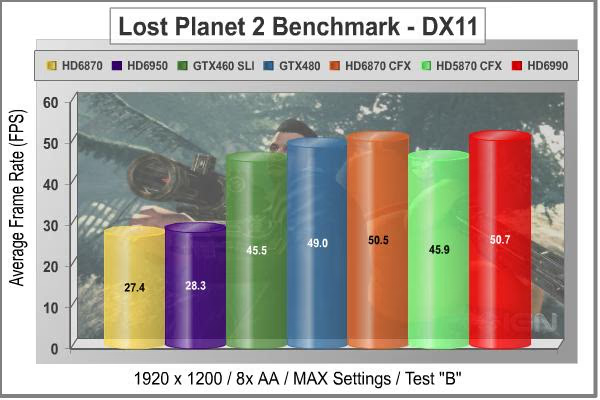
Test B shows completely different ranking than Test A, and for some reason the Radeon HD 6990 completely lost its way in this benchmark. It just ties with a pair of HD 6870 cards, where it should have at least a 30% advantage. Don't forget that the HD 6870 GPU is not "half" of a 6890, like the HD 5xxx series was, where every step up in the product line was a doubling of the die size and transistor count. The 6870 has 1120 shader cores, compared to 1536 in each of the 6990 GPUs, not even close to a 1:2 ratio. So I wasn't expecting a massive performance gains by moving up to the HD 6990, but I expected a little more than nothing!
The sea monster (I can't quite say "River Monster" for some reason...it reminds me of River Dance) is a prime candidate for tessellation, and given the fact that it is in the foreground for most of the scene, the full level of detail is usually being displayed. The water effects also contribute to the graphics load in this test, making it just a little bit tougher than Test A, overall.
In our next section, we are going to continue our DirectX 11 testing with a look at our most demanding DX11 benchmarks, straight from the depths of Moscow's underground rail system and the studios of 4A Games in Ukraine. Let's take a peek at what post-apocalyptic Moscow looks like in the year 2033.
|
Graphics Card |
Cores |
Core Clock |
Shader Clock |
Memory Clock |
Memory |
Interface |
|---|---|---|---|---|---|---|
| MSI GeForce GTX 460 (N460GTX Cyclone 1GD5/OC) |
336 |
725 |
1450 |
900 |
1.0 GB GDDR5 |
256-bit |
| MSI Radeon HD 6870 (R6870-2PM2D1GD5) |
1120 |
900 |
N/A |
1050 |
1.0 GB GDDR5 |
256-bit |
|
PowerColor Radeon HD 5870 (PCS+ AX5870 1GBD5-PPDHG2) |
1600 |
875 |
N/A |
1250 |
1.0 GB GDDR5 |
256-bit |
| PowerColor PCS++ Radeon HD6950 (AX6950 2GBD5-P22DHG) |
1408 |
800 |
N/A |
1250 |
2.0 GB GDDR5 |
256-bit |
| Gigabyte GeForce GTX 480 (GV-N480SO-15I Super Over Clock) |
480 |
820 |
1640 |
950 |
1536 MB GDDR5 |
384-bit |
| PowerColor Radeon HD 6990 (AX6990 4GBD5-M4D) |
3072 |
830 |
N/A |
1250 |
4.0 GB GDDR5 |
256-bit |
METRO 2033 DX11 Benchmark Results
Metro 2033 is an action-oriented video game with a combination of survival horror, and first-person shooter elements. The game is based on the novel Metro 2033 by Russian author Dmitry Glukhovsky. It was developed by 4A Games in Ukraine and released in March 2010 for Microsoft Windows. Metro 2033 uses the 4A game engine, developed by 4A Games. The 4A Engine supports DirectX-9, 10, and 11, along with NVIDIA PhysX and GeForce 3D Vision.
The 4A engine is multi-threaded in that only PhysX has a dedicated thread, and it uses a task-model without any pre-conditioning or pre/post-synchronizing, thus allowing tasks to be done in parallel. The 4A game engine can utilize a deferred shading pipeline, and uses tessellation for greater performance, and also has HDR (complete with blue shift), real-time reflections, color correction, film grain and noise, and the engine also supports multi-core rendering.
Metro 2033 featured superior volumetric fog, double PhysX precision, object blur, sub-surface scattering for skin shaders, parallax mapping on all surfaces and greater geometric detail with a less aggressive LODs. Using PhysX, the engine uses many features such as destructible environments, and cloth and water simulations, and particles that can be fully affected by environmental factors.

NVIDIA has been diligently working to promote Metro 2033, and for good reason: it is the most demanding PC video game we've ever tested. When an overclocked GeForce GTX 480 struggles to produce 29 FPS, you know that only the strongest graphics processors will generate playable frame rates. All of my tests use the in-game benchmark that was added to the game as DLC earlier this year. Advanced Depth of Field and Tessellation effects are enabled, but the advanced PhysX option is disabled to provide equal load to both AMD and NVIDIA cards. All tests are run with 4x MSAA, which produces the highest load of the two anti-aliasing choices.

The Radeon HD 6990 cleans up in Metro 2033, finally getting well and truly above that line in the sand that's drawn at 30 FPS. Don't compare these results directly with our first HD 6990 test; this one was done with the more challenging 4x MSAA, compared to the AAA setting on the earlier tests. It makes a big difference in the results, and not so much on the screen. I don't think the added realism is worth it, and normally use the AAA for gameplay, but it makes sense to use the most demanding settings for benchmarking. Unfortunately, PhysX is disabled for all testing, although it only extracted about a 2 FPS penalty when it was enabled with an NVIDIA card installed. The minor hit in frame rates is fully justified in terms of the additional realism that PhysX imparts to the gameplay. It adds a lot more credibility to the graphics than any amount of anti-aliasing, no matter what type...

At the higher screen resolution of 1920x1200, the PowerColor HD 6990 continues to pull away from the rest of the graphics cards. The extra shaders and the 2 GB of memory for each GPU really help out with this game at higher resolutions. The Radeon HD 6950 put in its best performance on this, the toughest benchmark we have in the whole test suite, and the HD 6990 continues the tradition. Most of these are all barely playable frame rates, however. The Radeon HD 6990 is the only card that's in the mix today that can play this game with all the stops pulled out.
In our next section, we are going to complete our DirectX 11 testing with a look at an unusual DX11 benchmarks, straight from mother Russia and the studios of Unigine. Their latest benchmark is called "Heaven", and it has some very interesting and non-typical graphics. So, let's take a peek at what Heaven v2.1 looks like.
|
Graphics Card |
Cores |
Core Clock |
Shader Clock |
Memory Clock |
Memory |
Interface |
|---|---|---|---|---|---|---|
| MSI GeForce GTX 460 (N460GTX Cyclone 1GD5/OC) |
336 |
725 |
1450 |
900 |
1.0 GB GDDR5 |
256-bit |
| MSI Radeon HD 6870 (R6870-2PM2D1GD5) |
1120 |
900 |
N/A |
1050 |
1.0 GB GDDR5 |
256-bit |
|
PowerColor Radeon HD 5870 (PCS+ AX5870 1GBD5-PPDHG2) |
1600 |
875 |
N/A |
1250 |
1.0 GB GDDR5 |
256-bit |
| PowerColor PCS++ Radeon HD6950 (AX6950 2GBD5-P22DHG) |
1408 |
800 |
N/A |
1250 |
2.0 GB GDDR5 |
256-bit |
| Gigabyte GeForce GTX 480 (GV-N480SO-15I Super Over Clock) |
480 |
820 |
1640 |
950 |
1536 MB GDDR5 |
384-bit |
| PowerColor Radeon HD 6990 (AX6990 4GBD5-M4D) |
3072 |
830 |
N/A |
1250 |
4.0 GB GDDR5 |
256-bit |
Unigine Heaven 2.1 Benchmark Results
The Unigine "Heaven 2.1" benchmark is a free, publicly available, tool that grants the power to unleash the graphics capabilities in DirectX 11 for Windows 7 or updated Vista Operating Systems. It reveals the enchanting magic of floating islands with a tiny village hidden in the cloudy skies. With the interactive mode, emerging experience of exploring the intricate world is within reach. Through its advanced renderer, Unigine is one of the first to set precedence in showcasing the art assets with tessellation, bringing compelling visual finesse, utilizing the technology to the full extend and exhibiting the possibilities of enriching 3D gaming.
The distinguishing feature in the Unigine Heaven benchmark is a hardware tessellation that is a scalable technology aimed for automatic subdivision of polygons into smaller and finer pieces, so that developers can gain a more detailed look of their games almost free of charge in terms of performance. Thanks to this procedure, the elaboration of the rendered image finally approaches the boundary of veridical visual perception. The "Heaven" benchmark excels at the following key features:
- Native support of OpenGL, DirectX 9, DirectX-10 and DirectX-11
- Comprehensive use of tessellation technology
- Advanced SSAO (screen-space ambient occlusion)
- Volumetric cumulonimbus clouds generated by a physically accurate algorithm
- Dynamic simulation of changing environment with high physical fidelity
- Interactive experience with fly/walk-through modes
- ATI Eyefinity support

Starting off with a lighter load of 4x MSAA, we see the PowerColor Radeon HD 6990 with another massive lead. I never thought that AMD would get the measure of this tessellation torture test, but the HD 6900 series does very well here. Even in the "normal" tessellation mode, this is a graphics test that really shows off the full impact of this DirectX 11 technology. The first generation Fermi architecture has so much more computing power designated for and available for tessellation, that it's no small surprise to see the GTX 480 doing so well here against several multi-GPU setups. The HD 6990 takes the crown of Heaven 2.1 by leaps and bounds here, though.
There is no jerkiness to the display at this resolution with the top GPUs represented here; now that I've seen the landscape go by for a couple hundred times, I can spot the small stutters pretty easily. This test was run with 4x anti-aliasing; let's see how the cards stack up when we increase MSAA to the maximum level of 8x.
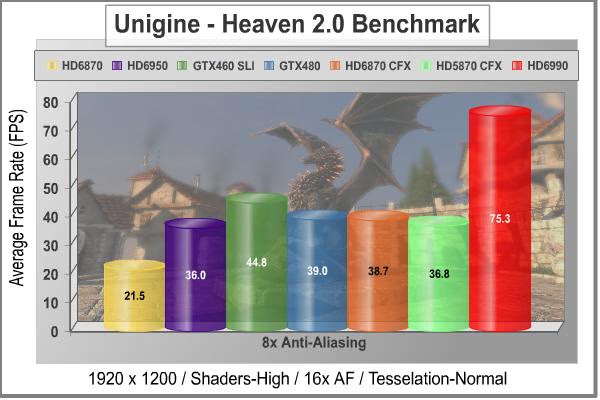
Increasing the anti-aliasing just improved the excellent performance of the PowerColor Radeon HD 6990, relative to all of the other cards in this test. There's no denying that the Fermi chip is a killer when called upon for tessellation duty, but the HD 6900 series does surprisingly well in this benchmark. The GTX 460 SLI combination comes in second place, and the single GPU GTX 480 narrowly leads the HD 6870 and HD 5870 CrossFireX pairs. It's really a three way tie for third place, they are so close. I honestly never thought that AMD could beat out NVIDIA on this test, because the Fermi chips are so aggressive in their tessellation performance, but that Cayman GPU really loves tearing up the streets of Heaven.
In our next section, we investigate the thermal performance of the PowerColor Radeon HD6990 video card, and see how well this brand new reference cooler design works when forced to do double duty on AMD's top GPU.
|
Graphics Card |
Cores |
Core Clock |
Shader Clock |
Memory Clock |
Memory |
Interface |
|---|---|---|---|---|---|---|
| MSI GeForce GTX 460 (N460GTX Cyclone 1GD5/OC) |
336 |
725 MHz |
1450 MHz |
900 MHz |
1.0 GB GDDR5 |
256-bit |
| MSI Radeon HD 6870 (R6870-2PM2D1GD5) |
1120 |
900 |
N/A |
1050 |
1.0 GB GDDR5 |
256-bit |
|
PowerColor Radeon HD 5870 (PCS+ AX5870 1GBD5-PPDHG2) |
1600 |
875 |
N/A |
1250 |
1.0 GB GDDR5 |
256-bit |
| PowerColor PCS++ Radeon HD6950 (AX6950 2GBD5-P22DHG) |
1408 |
800 |
N/A |
1250 |
2.0 GB GDDR5 |
256-bit |
| Gigabyte GeForce GTX 480 (GV-N480SO-15I Super Over Clock) |
480 |
820 |
1640 |
950 |
1536 MB GDDR5 |
384-bit |
| PowerColor Radeon HD 6990 (AX6990 4GBD5-M4D) |
3072 |
830 |
N/A |
1250 |
4.0 GB GDDR5 |
256-bit |
PowerColor HD 6990 Temperatures
It's hard to know exactly when the first video card got overclocked, and by whom. What we do know is that it's hard to imagine a computer enthusiast or gamer today that doesn't overclock their hardware. Of course, not every video card has the head room. Some products run so hot that they can't suffer any higher temperatures than they generate straight from the factory. This is why we measure the operating temperature of the video card products we test.
To begin testing, I use GPU-Z to measure the temperature at idle as reported by the GPU. Next I use FurMark 1.8.2 to generate maximum thermal load and record GPU temperatures at high-power 3D mode. The ambient room temperature remained stable at 25C throughout testing. I have a ton of airflow into the video card section of my benchmarking case, with a 200mm side fan blowing directly inward, so that helps alleviate any high ambient temps.
I tested the PowerColor Radeon HD6990 4GB GDDR5 video card with both BIOS settings, figuring that a higher clock would have a definite effect on the GPU temperature. I was right, there was a measureable difference, but you'll see that it wasn't a major one. With just the basic Windows Aero desktop running I recorded 41C in idle mode, with a moderate idle fan speed of 27%, as dialed up by the internal fan controller. Both GPU temperatures increased to 77C after 30 minutes of stability testing in full 3D mode, at 1920x1200 resolution, and the maximum MSAA setting of 8X. With the fan set on Automatic, the speed rose to a 45% under full load, which shows how much thermodynamic muscle is required to keep two of these top GPUs under control. I then did a run with manual fan control and 100% fan speed. I was rewarded by a significant increase in fan noise and a matching reduction in load temperature to 60C.
|
Load |
Fan Speed |
GPU Temperature |
|---|---|---|
|
Idle |
27% - AUTO |
41C |
|
Furmark |
45% - AUTO |
77C |
|
Furmark |
100% - Manual |
60C |
77C is not a particularly low result for temperature stress testing, but considering how much power was coursing through the PCB traces of the board, it's a wonder that it wasn't any higher. I'm used to seeing video card manufacturers keep the fan speeds low, especially with radial blower wheels that make a racket at higher speeds, but AMD had to run it up to nearly half speed to cool off two of their biggest and hottest graphics cores. I was able to knock an impressive 17 degrees off the load temps by running the fan at either 90% or 100%, which is what I recommend for sustained gaming. Heat kills electronic components, and there's no joy in assisted suicide for your video card, but you'll need some decent gaming headphones with closed backs. It's only because I am obsessive about heat that I say this, as the stock settings keep the GPUs within reasonable temperature limits.
|
Load |
Fan Speed |
GPU Temperature |
|---|---|---|
|
Idle |
27% - AUTO |
41C |
|
Furmark |
50% - AUTO |
81C |
|
Furmark |
100% - Manual |
65C |
I then tested the PowerColor Radeon HD6990 with the overclocking BIOS settings, and there was a measurable effect on the GPU temperature. With Windows Aero desktop running I recorded the same 41C in idle mode, at the same idle fan speed of 27%, because the GPU was still running at the same speed and voltage. The GPUs increased to 81C after 30 minutes of stability testing in full 3D mode, at 1920x1200 resolution, and the maximum MSAA setting of 8X. With the fan set on Automatic, the speed rose to 50% under full load, which is significantly higher than you will ever see with a single-GPU card that has a blower wheel. The run with manual fan control and 100% fan speed brought back the fan noise and reduced the load temperature to 65C. As I said earlier, it's a measurable increase in temps, but nothing to worry about.

Load temps got up to a maximum of 81C when running continuous gaming benchmarks with the most challenging titles, at the lower 830 MHz clocks and automatic fan speeds. This is a few degrees above the stress-test-maximums, so it's pretty obvious that AMD and PowerColor are using some power throttling techniques to keep temperatures in check when using what they have called "Power Virus" tools like FurMark. They've publicly said as much, and I can't blame them, as it's obviously a big balancing act to keep the GPU running at peak performance while staying within the power and temperature envelopes that the modern PC can handle. I still think that FurMark is doing a good job of emulating a real-world graphics load, at least compared with today's DirectX 11 graphics titles. I was able to reduce the hottest games down to 69C with 90% fan speed, so for those of us who aren't afraid to use higher fan speeds and can live with the noise, the stock GPU cooler will easily do the job.

FurMark does do two things extremely well: drive the thermal output of any graphics processor higher than any other application or video game, and it does so with consistency every time. While FurMark is not a true benchmark tool for comparing different video cards, it still works well to compare one product against itself using different drivers or clock speeds, or testing the stability of a GPU, as it raises the temperatures higher than any program. But in the end, it's a rather limited tool.
In our next section, we discuss electrical power consumption and learn how well (or poorly) each video card will impact your utility bill...
Overclocking and Power Consumption
I promised a look at overclocking performance, with the BIOS setting in position 1, and here it is. Even with the overclocking BIOS engaged, it ran perfectly without a hiccup. I didn't have a lot of luck pushing it very far past the 880 MHz level, but I didn't have a lot of time either, and overclocking is a sport that rewards patience over haste.
GPU Overclocking Results (1929 x 1200)
| Test Item | Standard GPU | Overclocked GPU | Improvement | |||
|---|---|---|---|---|---|---|
| Radeon HD 6990 | 830 MHz | 880 MHz | 50 MHz GPU | |||
| DX9+SSAO: Mafia II | 95.0 | 96.1 | 1.1 FPS (1.1%) | |||
| DX10: 3dMark Jane Nash | 60.1 | 62.0 | 1.9 FPS (3.2%) | |||
| DX10: 3dMark Calico | 46.2 | 48.2 | 2.0 FPS (4.3%) | |||
| DX10: Just Cause 2 | 71.8 | 74.2 | 2.4 FPS (3.3%) | |||
| DX11: Aliens vs Predator | 77.4 | 80.7 | 3.3 FPS (4.4%) | |||
| DX11: Battlefield BC2 | 126 | 131 | 5.0 FPS (4.0%) | |||
| DX11: DiRT-2 Demo | 118 | 121 | 3.0 FPS (2.5%) | |||
| DX11: H.A.W.X 2 | 160 | 164 |
4.0 FPS (2.5%) |
|||
| DX11: Lost Planet (Test B) | 50.7 | 52.7 | 2.0 FPS (3.9%) | |||
| DX11: Metro 2033 | 39.0 | 39.8 | 0.8 FPS (2.0%) | |||
| DX11: Heaven 2.1 | 75.3 | 78.3 | 3.0 FPS (4.0%) |
None of the resulting increases crosses 5%, and only one of them is in the 1% range. The next lowest is at 2%, and the HD6990 frame rates in Metro 2033 blow away the competition anyways, so it's a moot point. Overall the average improvement is 3%, which is not as good as you might expect for a 6% increase in core clocks. Someone will have to get these GPUs under water before we get a real sense of the scaling that can be achieved. It's a pity that AMD chose the lower-clocked memory modules to put on this card, the "-ROC" spec memory chips run a full 10% faster, at 1375 MHz, and could have kept up a little better once the Cayman bits get cooled down to sub-ambient temperatures.
When you look at the idle clock rates that AMD programmed into the BIOS for this GPU; they're a little higher than I'm used to seeing with the latest cards. This is definitely not the bleeding edge of what the industry is doing today, in terms of speed throttling to save energy. I was running Catalyst Control Center 2 at the time, but Overdrive was not enabled which is the usual culprit for messing with the factory power reduction schemes. I'm pretty sure the BIOS are designed this way to ensure absolute stability with this fairly complex system of systems. It's a fair trade, since the last thing you want is the BSOD when your computer is just idling. Trust me, there's been way too many instances of that exact behavior in the last few years; you just need to be aware that you are sacrificing the last few measures of power saving to get the increased performance of a single-slot CrossFireX solution.
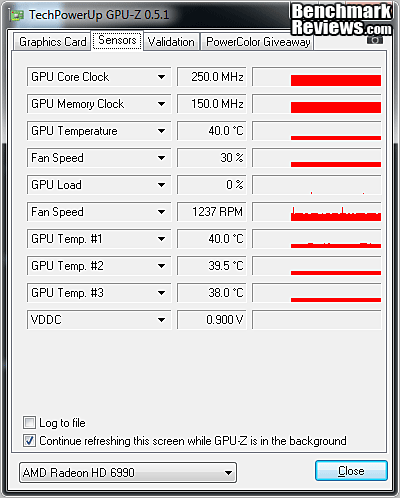
I used a slightly different approach to power measurement this time, as I wanted to provide the best power solution I could for testing, so I used a slightly more complex PSU arrangement. I have a dedicated GPU power supply from Thermaltake that is 100% dedicated to supplying the PCI Express connectors on a modern graphics card. It's rated for 650 watts, and JonnyGuru tested it to slightly higher limits with good noise performance to boot, so I felt comfortable that it could easily supply the significant power requirements of the Radeon HD 6990. The performance of this card is just as much about power management as it is about the graphics performance. That is, the real design challenge was to get twice the performance of an HD 6970 in the space of a dual slot card and stay within the power and thermal constraints that a single card is limited to.
The PCI Express connector on the motherboard is officially limited to 75W of 12V DC power. Each of the two 8-position PCI Express power connectors on a modern graphics card is limited to 150W. So, the theoretical maximum that the Radeon HD 6990 is "allowed" to consume is 375W. I measured just the power being consumed by the PCI Express power connectors this time. This provides a more accurate reflection of the power that is going directly to the video card, as any CPU load is completely isolated from the dedicated GPU power supply. OTOH, the power that comes into the video card from the PCI Express 2.1 motherboard connector is not accounted for in the measurement. It's at times like this that I really miss the power measurement capability that ASUS built into their iTracker monitoring & control software.
To measure isolated video card power consumption, I used the Kill-A-Watt EZ (model P4460) power meter made by P3 International. A baseline test is taken without a video card installed inside our computer system, which is allowed to boot into Windows and rest idle at the login screen before power consumption is recorded. Once the baseline reading has been taken, the graphics card is installed and the system is again booted into Windows and left idle at the login screen. Our final loaded power consumption reading is taken with the video card running a stress test using FurMark. Below is a chart with the isolated video card power consumption (not system total) displayed in Watts for each specified test product:
VGA Product Description(sorted by combined total power) |
Idle Power |
Loaded Power |
|---|---|---|
NVIDIA GeForce GTX 480 SLI Set |
82 W |
655 W |
NVIDIA GeForce GTX 590 Reference Design |
53 W |
396 W |
ATI Radeon HD 4870 X2 Reference Design |
100 W |
320 W |
AMD Radeon HD 6990 Reference Design |
46 W |
350 W |
NVIDIA GeForce GTX 295 Reference Design |
74 W |
302 W |
ASUS GeForce GTX 480 Reference Design |
39 W |
315 W |
ATI Radeon HD 5970 Reference Design |
48 W |
299 W |
NVIDIA GeForce GTX 690 Reference Design |
25 W |
321 W |
ATI Radeon HD 4850 CrossFireX Set |
123 W |
210 W |
ATI Radeon HD 4890 Reference Design |
65 W |
268 W |
AMD Radeon HD 7970 Reference Design |
21 W |
311 W |
NVIDIA GeForce GTX 470 Reference Design |
42 W |
278 W |
NVIDIA GeForce GTX 580 Reference Design |
31 W |
246 W |
NVIDIA GeForce GTX 570 Reference Design |
31 W |
241 W |
ATI Radeon HD 5870 Reference Design |
25 W |
240 W |
ATI Radeon HD 6970 Reference Design |
24 W |
233 W |
NVIDIA GeForce GTX 465 Reference Design |
36 W |
219 W |
NVIDIA GeForce GTX 680 Reference Design |
14 W |
243 W |
Sapphire Radeon HD 4850 X2 11139-00-40R |
73 W |
180 W |
NVIDIA GeForce 9800 GX2 Reference Design |
85 W |
186 W |
NVIDIA GeForce GTX 780 Reference Design |
10 W |
275 W |
NVIDIA GeForce GTX 770 Reference Design |
9 W |
256 W |
NVIDIA GeForce GTX 280 Reference Design |
35 W |
225 W |
NVIDIA GeForce GTX 260 (216) Reference Design |
42 W |
203 W |
ATI Radeon HD 4870 Reference Design |
58 W |
166 W |
NVIDIA GeForce GTX 560 Ti Reference Design |
17 W |
199 W |
NVIDIA GeForce GTX 460 Reference Design |
18 W |
167 W |
AMD Radeon HD 6870 Reference Design |
20 W |
162 W |
NVIDIA GeForce GTX 670 Reference Design |
14 W |
167 W |
ATI Radeon HD 5850 Reference Design |
24 W |
157 W |
NVIDIA GeForce GTX 650 Ti BOOST Reference Design |
8 W |
164 W |
AMD Radeon HD 6850 Reference Design |
20 W |
139 W |
NVIDIA GeForce 8800 GT Reference Design |
31 W |
133 W |
ATI Radeon HD 4770 RV740 GDDR5 Reference Design |
37 W |
120 W |
ATI Radeon HD 5770 Reference Design |
16 W |
122 W |
NVIDIA GeForce GTS 450 Reference Design |
22 W |
115 W |
NVIDIA GeForce GTX 650 Ti Reference Design |
12 W |
112 W |
ATI Radeon HD 4670 Reference Design |
9 W |
70 W |
The PowerColor HD 6990 4GB GDDR5 Video Card pulled 35 (41-6) watts at idle and 248 (254-6) watts from the two 8-pin PCI-E power connectors when running full out with standard HD 6990 BIOS settings, using the test method outlined above. The results when running the enhanced BIOS settings were 35 (41-6) watts at idle and 285 (291-6) watts when running at full GPU load. Note: Don't compare these results with the chart, as a different test method was used.
I ran all these tests at stock voltages in the PowerColor HD 6990 BIOS, which GPU-Z reported as 0.900V at idle, 1.000V in 2D graphics mode, 1.120V in full 3D mode, and 1.175V in overclocked 3D mode. The core GPU voltage was increased by the overclocked BIOS configuration, but only the full power voltages were affected.
Next, I'll offer you some final thoughts, and my conclusions. On to the next page...
AMD Radeon HD 6990 Final Thoughts
Approximately four months after the release of the first Radeon HD 6000 series card, the ultimate expression of AMD's Southern Islands family arrives. The death-defying balancing act on display here between processing power and electrical power reminds us that real products have to live within real physical limits. Our collective experience, of overclocking the donuts out of various CPUs and GPUs through the years, has taught us a false lesson: that limits are arbitrary. It would be unfair to blame the Radeon HD 6990 for bringing us back to reality, even though it is supposed to be a 'halo product' that's supposed to engender fantasy.
That reality takes the form of a small yellow sticker and a strict clause in the warranty language that basically says, "You cook it, you bought it." At first blush, this looks like a drastic step, meant to rebuff the rights of overclocking tyros around the globe. The reality is (there's that !@#$ word again...) that stuffing all those transistors into the predefined volume of a two-slot video card creates the potential for electrical overload. Keeping the BIOS switch in the shipping position prevents that from occurring; moving it over to the bad boy mode provides you the opportunity to exercise restraint or go for broke. Literally, $700 worth of broke! If you want to blame someone or something, take it out on the fact that the HD 6990 sticks to an arbitrary standard that says "Graphics cards should not occupy any more than two adjacent slots." That's just a gentlemen's agreement, not a Standard. So I have to ask, why are we playing by the rules here?

It's only a matter of time before some water cooling blocks are available, but that still doesn't solve the electrical power problem. As crazy as it seems, I think this card would have really benefitted from a third 8-pin power connector. Yes, it violates the norm, but all progress does. George Bernard Shaw puts it this way, "The reasonable man adapts himself to the world; the unreasonable one persists in trying to adapt the world to himself. Therefore, all progress depends on the unreasonable man."
How about it, AIB partners? Who's going to be the first to throw the rule book out the window?
PowerColor Radeon HD 6990 Conclusion
IMPORTANT: Although the rating and final score mentioned in this conclusion are made to be as objective as possible, please be advised that every author perceives these factors differently at various points in time. While we each do our best to ensure that all aspects of the product are considered, there are often times unforeseen market conditions and manufacturer changes which occur after publication that could render our rating obsolete. Please do not base any purchase solely on our conclusion, as it represents our product rating specifically for the product tested which may differ from future versions. Benchmark Reviews begins our conclusion with a short summary for each of the areas that we rate.
From a performance standpoint, it's hard to argue with the fact that this is the fastest PC Graphics card on the planet. At some level, it doesn't matter that they used two GPUs, or three or seven, or however many it takes. From a user's perspective, I take a card out of the box, plug it in, and sit back and enjoy the smooth display. From a technical perspective I get to worry about CrossFireX driver support, voltage droop from pulling the maximum rated power from two 8-pin PCI-E connectors, where the "extra" heat from the second GPU is going (inside the case), and whether or not I should bite the bullet and flip the BIOS into overclocking mode. That's when the real worrying kicks in, because I just invalidated the warranty.
The real performance story for this card is how well the engineers and designers were able to push this card to the very edge of the single-card power envelope and keep it stable. It's easy enough to buy two HD 6970 cards and drop them in an X58 motherboard with two x16 PCI-E slots. I've got twice the physical volume available for heatsinks and fans and I've got four PCI Express power connectors I can draw power from. Now I've got 750 watts to play with, and better cooling to boot... But what if I don't have a motherboard that supports two 16 x PCI-E slots? This card is the answer, and I'm specifically thinking of all the LGA 1156 systems out there that have plenty of CPU power for gaming but only one 16x slot for a video card.
The appearance of the PowerColor HD 6990 4GB GDDR5 video card is attractive in a stark, utilitarian sort of way. Let's face it; it's a big black brick with a red turbine poking out of the middle. The thing is, when you're looking for performance, that's just the sort of thing that looks attractive, or at least very capable. PowerColor have accented the face with some warrior androids and their logo on a couple of stickers, but they don't dominate the visual package. When installed in a typical ATX-style PC case, the fans point down towards the ground and all you really see are the red stripes inset into the top surface, followed by a couple of 8-pin power connectors sticking out the top. It's the classic AMD reference look, and it's just as subtle and refined as the day they first introduced it with the HD 6870.
The build quality of the PowerColor Radeon HD 6990 card was well above average, which is critical for this segment of the video card gaming market. The overall impression of the card is very solid; it feels like a dense block. The lack of any openings on most of the shroud imparts a definite rigidity to the assembly. The packaging was good quality and reasonably informative, and the box itself is smaller than some in this price segment, which is fine by me. I really like the latest PowerColor packaging, because there's less waste and it takes up less space. (Spoken like the true hardware hoarder that I am...) All of the subsystems used high quality parts, and the power supply is a respectable 4+2 design for each twosome of GPU/DRAM. The cooling system is compact and straightforward, thanks to the use of the large vapor chambers. They make a welcome change to the tangle of heatpipes that I'm used to seeing.
Measuring the functionality of this card is about two things: how well do the two GPUs function together on one PCB with a dedicated PCI-E bridge between them, and how well does the card functions as a whole, given the constraints of electrical power that could potentially hold it back. The PowerColor HD 6990 does well on both counts. I never had any problems with the two GPUs working in tandem, maybe the new catalyst 10.4 preview driver helped there, but you can't always count on new drivers to make things run smartly; sometimes the exact opposite happens. As for the function of the whole, I think AMD has done a brilliant job sailing right up to the edge of thermal and electrical disaster and holding it together. Even with the overclocking BIOS engaged, it ran perfectly without a hiccup. I didn't have a lot of luck pushing it very far past the 880 MHz level, but I didn't have a lot of time either, and overclocking is a sport that rewards patience over haste.
I would be remiss if I didn't highlight the multi-monitor Eyefinity capabilities that this design brings to the gaming table. With four mini DisplayPort 1.2 connectors on the card, and three miniDP adapters included free in the box, the HD 6990 supports four monitors easily without having to utilize display chaining. The latest version of Catalyst also supports a new display configuration of five displays, side-by-side in portrait mode. That's quite a large viewport on the world: 6000 x 1920.
As of mid March 2011, the price for the PowerColor HD 6950 4GBD5 Video Card is slightly higher than MSRP, if you can find one in stock. Newegg currently has the PowerColor AX6950 4GBD5-M4D for $749.99. Considering the benefits of a single card arrangement with the power of Crossfire Caymans, the card is easily worth the cost of two single Radeon HD 6970 cards. It's been true for some time that the best place to spend your money if you want the best gaming performance is on the video card. Here's a perfect opportunity; forget the 'enthusiast' motherboards with expensive chipsets, and LGA1366 processors. Buy a P67 or even a P57 and one of these multi-GPU Radeon cards with the money you save.
Pros:
 + If you want the fastest, this is it
+ Cooling system handles dual GPUs gracefully
+ CrossFireX Performance on most games is excellent
+ Lower power than HD 5970, especially at idle
+ Both BIOS settings are absolutely stable
+ Build quality is top notch
+ Price/performance ratio is reasonable
+ Extremely flexible output connections
+ 2GB GDDR5 per GPU handles higher resolutions
+ Release driver runs this card very well
Cons:
- Use of BIOS switch voids warranty
- Cooling fan is noisy above 50% fan speed
- Two HD 6970 cards in the right system are faster and cooler
- Tessellation lags behind Fermi
- 3 slot cooler and third PCI-E connector could've removed all limitations
- The graphics industry completely missed the 32nm technology node
Ratings:
- Performance: 9.50
- Appearance: 9.00
- Construction: 9.25
- Functionality: 9.50
- Value: 9.00
Final Score: 9.25 out of 10.
Excellence Achievement: Benchmark Reviews Golden Tachometer Award.
Questions? Comments? Benchmark Reviews really wants your feedback. We invite you to leave your remarks in our Discussion Forum.
Reader comments from the original article
19 comments were posted before commenting closed. They are preserved as written. Original avatars no longer resolve and are shown as a placeholder.
RE: PowerColor AX6990 4GBD5-M4D Video Card Robert17 Permalink:
Well done Bruce. After all the effort, sacrifice, and no telling how many years of enthusiasm/experience you bring to the fray, I feel compelled to offer a sacrifice of my own. Since the card is out of warranty, I volunteer to take it off your hands for long term testing, say a couple of years, and deal with any and all warranty issues in your stead. I know, I know, my altruism knows no bounds. (wink, wink, nudge, nudge) Good job.
Counter Offer BruceBruce Permalink:
Thanks for the props, Robert. As for your boundless altruism, I'll go you one better. You put gas in my wife's car for the time that you have the card, and it's a deal. [%^)
RE: Counter Offer Robert17 Permalink:
Does she actually drive it?
Just got mine Com-Tek Chris Permalink:
I know this was written for the PowerColor card but I just received my HIS yesterday and installed it last night. I guess my bottle neck is my resolution and my monitor. I have a 28" 60Hz, 1920x1200 Hanns-G monitor with 3ms response. I just don't see the gain from this series and going back to my 2x 465 GTX Nvidias or my 2x 580 GTX's in SLI. For the ATI fans I also have 2x 5850's in X-Fire and they also run like beasts. Its kinda like having a Race Car that does 205+ MPH but because you live in a heavy school zone there are always police which limits your choice to either follow the law or get arrested (Kind of a bad analogy but I'm sure you get my drift). So now I have spent $720 on this card, damn I need a new hobby, I've now spent over $2,500 on video cards in the last 6 months.
RE: Just got mine Olin Coles Permalink:
I'm curious what kind of games you're playing, because that could be an indication of your bottleneck. Anything will play Battlefield or Starcraft at high frame rates, but the same cannot be said for titles such as Metro 2033.
RE RE: Just got mine Com-Tek Chris Permalink:
I'm playing Battlefield Bad Company 2 and a few other FPS games. I figured that was my problem. And BFBC2 is more CPU intensive, I playing Battlefield on my AM3 1090T 6 Core which is more than enough for that game. I need to start HA (Hardware Anonymous) for geeks, but I'm afraid it would be a blood bath of which brand name was better, lol.
A thought Com-Tek Chris Permalink:
How come we are pitting this against the Nvidia 400 series and not a set of 560ti's in SLI or a single 580 GTX? I notice that the scores are up against a set of 460 GTX's in SLI and a couple of 6xxx series in cross-fire mode but none of the big cards from Nvidia in SLI. Was this because of a price to power thresh hold? Or because of availability in cards? I know my 2 580 GTX's his the $1,100 mark when I purchased both so maybe it is unfair to compare it to a single card that is $400 less, but still it would be nice to have the scores posted for comparison for both sides of the fan base. Hands down though, I love this 6990, its fast, sweet, and feels like there is a lot of technology in it. Even Nvidia Fan Boys would be impressed with the sheer speed of this card.
RE: A thought Olin Coles Permalink:
If we had two of everything, we'd put them in SLI or CrossFire. Since one card arrives as another is ready to launch, we're restricted by deadlines and must move to the next project.
RE RE: A thought Com-Tek Chris Permalink:
Do you have to send back the cards your given? If not what do you do with them? Or do I dare ask, lol.
RE: RE RE: A thought Olin Coles Permalink:
Only a few products get returned, but it's a matter of finding time to review more than one product of the same series before the next arrives. These reviews take more time than you could imagine (I invite you to try sometime), and after one article in published a manufacturer usually has something new in our hands. All of my video cards sit in a giant cardboard box, and get sold about 16 months after they've launched and gone EOL.
RE: RE RE: RE: A thought Com-Tek Chris Permalink:
I have done Bench Marking in the past with all new hardware, always trying to squeeze that extra 100 points out, lol, I don't do much anymore just because of the time it takes. I am a business owner and there are days where I start at 6am and get home at 10pm only to find that I have a 1/2 dozen build outs that are to be done by the next am, so I pull a 24hr shift that turns into a good 36hr shift, lol, did I mention I have a wife and 5 kids?...................so the drama continues in the life of "Im a computer engineer/network security consultant/Father/Guy who likes to game/Guy who races cars in the SCCA in the season which is here now/Guy who builds computers and provides support for local residents and business's and also donates computers to new local schools that burnt down 2 years, lol, yes I love life and all it offers..........did I mention I love Chinese food and hot pockets?
RE: RE: RE RE: RE: A thought Olin Coles Permalink:
Replace kids with friends, keep computer engineer/network security consultant/SCCA racer, and add target shooting enthusiast. Also replace Chinese food with Thai, and hot pockets for Wheat Thins, and we're on the same page.
Thanks Bruce Com-Tek Chris Permalink:
Thanks Bruce for the in-depth article, it was very informative and I'm sure will encourage decisions on owning this card. Keep up the good work.
You're Welcome BruceBruce Permalink:
Olin's spot on about product availability v. time to do the review. As Einstein said, "The reason time exists is so that everything doesn't all happen at once." My corollary to that is, "Space exists so that everything doesn't all happen at the same place." So, check out Olin's HD 6990 reviews for comparisons to the GTX 570 and 580 cards. I was surprised that the 580 SLI didn't wipe the mat with the competitors. It was faster, but not in another league, you know.... I'm very curious to see how well NVIDIA manages the balance between electrical power, heat and processing power with their rumored dual-GPU card. At this stage of the game (40nm GPUs), there's only so much juice that you can pump through a single card and the winner is the one that's more efficient per watt. We'll have to wait another week or so, to see. FWIW, I prefer Triscuits....LOL
RE: You're Welcome Olin Coles Permalink:
Ah, Triscuits and wine cheese. One of my nostalgic favorites! PS: Check back here at 6AM PST on 03/24 for "The Next Big Thing".
RE: RE: RE RE RE: RE: A thought Com-Tek Chris Permalink:
My wife pushes the wheat thins/Crackling Oat Bran Cereal.....a lot! And I just tried Thai recently, the curry wasn't to bad. My goal is to lose 30 pounds this year. I just got over the Flu and I have kept 12 pounds of that off, lol, its going to be a good year. Now if I can just get my hands a new AM3+ 8 Core, another 6990 for X-Crossfire Mode, now that would finish the year off with a POW!
PC Case Size Vaughn Janes Permalink:
What PC Case do you have in that picture, I hope its not really expensive. If it is do you think you could link a cheaper Pc case?
CM Storm Sniper BruceBruce Permalink:
It's a CM Storm Sniper, which I reviewed here: /index.php?option=com_content&task=view&id=398&Itemid=61 It's not cheap, unfortunately, unless you find a deal. The good news is that there have been a ton of inexpensive gaming chassis reviewd on this site recently, and I'd bet at least half of them would be able to handle this card, at 305 mm long.
Forgot to make it a reply Vaughn Janes Permalink:
Ok Coolio, its way cheaper than the one I found (##shopbot.ca/pp-corsair-obsidian-800d-corsair-price-208226.html) Thanks.