
PowerColor Go! Green Radeon HD5670
PowerColor Go! Green HD5670 Video Card
For the environmentally, economically and otherwise interested parties, PowerColor has introduced a new line of graphics cards under the "Go! Green" banner. These cards aim to reduce power consumption by half while still competing with and beating the competition. Benchmark Reviews has obtained the AX5670 1GBD5-NS3H which has been modified from the HD 5670 reference design to include an extra 512MB of memory as well as reduce power consumption. This review will test the lofty goals set by PowerColor as well as reveal the truth about going green.
When first released and tested, the reference HD 5670 consistently under-performed close competitors like NVIDIA's 9800GT. As a result the 5670 was initially priced to closer to the GTS 240. Since that time the price on the 9800GT has dropped into a competitive range. Part of the performance anemia in the reference design may be due to ATI's stance on RAM. It has been consistently claimed that 512MB of memory is enough to support computations. Yet third parties like PowerColor consistently bolster the reference design by adding more and faster memory. In the case of the Go! Green AX5670 only the quantity was increased, possibly in hopes to step above the limitations of the reference design and close the gap on the competition. Another smart move by PowerColor was choosing reference cards with already low power consumption to performance ratios and making them even better.

The Go! Green claim is to reduce power consumption the HD 5750 model with a result of halving the 584 kgs of carbon dioxide emitted from a video card in a year. The most obvious change is the use of a passive GPU cooler rather than a fan. As they say on their site, "Silence is Green." Does this claim hold true for their HD 5670? Two great decisions by PowerColor poise the card to have impressive results, but the numbers and graphs will tell the real story.
About the company: PowerColor
PowerColor, established by Tul Corporation in 1997, is a graphics industry leading brand name now and well known for its outstanding performance and innovative technology. As a leading provider of graphics card, PowerColor offers powerful, reliable and cost-effective solutions to customers worldwide.
PowerColor is the platform of choice for avid PC gamers and video prosumers looking to get the best possible performance out of the latest graphics processors from ATI. PowerColor graphics cards deliver every-last-drop of super-charged performance from ATI's most advanced visual processing units (VPU). Running a PowerColor graphics card, today's gamers are able to unleash the 3D graphics performance of their favorite game playing it the way it was meant to be played.
Go! Green AX5670 Features
PowerColor Go! Green Features:
-
Silent Operation
- Performance that beats competition
-
Lower power consumption than competition
-
Lead Free
-
Products conform to e-waste standards
-
RoHS compliant
-
Up to 90% efficient
HD 5670 Video Card Features:
- 627 million 40nm transistors
- TeraScale 2 Unified Processing Architecture
- 400 Stream Processing Units
- 20 Texture Units
- 32 Z/Stencil ROP Units
- 8 Color ROP Units
- GDDR5 memory interface
- PCI Express 2.1 x16 bus interface
- DirectX 11 support
- Shader Model 5.0
- DirectCompute 11
- Programmable hardware tessellation unit
- Accelerated multi-threading
- HDR texture compression
- Order-independent transparency
- OpenGL 3.2 support
- Image quality enhancement technology
- Up to 24x multi-sample and super-sample anti-aliasing modes
- Adaptive anti-aliasing
- 16x angle independent anisotropic texture filtering
- 128-bit floating point HDR rendering
- ATI Stream acceleration technology
- OpenCL support
- DirectCompute 11
- Accelerated video encoding, transcoding, and upscaling
- Native support for common video encoding instructions
- ATI CrossFireXTM multi-GPU technology
- Dual GPU scaling
- ATI Avivo HD Video & Display technology
- UVD 2 dedicated video playback accelerator
- Advanced post-processing and scaling
- Dynamic contrast enhancement and color correction
- Brighter whites processing (blue stretch)
- Independent video gamma control
- Dynamic video range control
- Support for H.264, VC-1, MPEG-2, and Adobe Flash
- Dual-stream 1080p playback support
- DXVA 1.0 & 2.0 support
- Integrated dual-link DVI output with HDCP
- Max resolution: 2560x1600
- Integrated DisplayPort output
- Max resolution: 2560x1600
- Integrated HDMI 1.3 output with Deep Color, xvYCC wide gamut support, and high bit-rate audio
- Max resolution: 1920x1200
- Integrated VGA output
- Max resolution: 2048x1536
- 3D stereoscopic display/glasses support
- Integrated HD audio controller
- Output protected high bit rate 7.1 channel surround sound over HDMI with no additional cables required
- Supports AC-3, AAC, Dolby TrueHD and DTS Master Audio formats
- ATI PowerPlaypower management technology
- Dynamic power managementwith low power idle state
- Ultra-low power state support for multi-GPU configurations
- Certified drivers for Windows 7, Windows Vista, and Windows XP
AX5670 1GBD5-NS3H Specifications
The HD 5670 was definitely built with gaming in mind. When Benchmark Reviews first tested the HD 5670 it performed in a class behind the HD 5770 and HD 5750 but still output respectable performance. Even though it performed decently it was bested by the HD 4830 making it a mid-range card. Regarding specifications, not much has changed in the Go! Green version. The following table shows the specifications of PowerColor's Go! Green HD 5670.
| Graphics Engine | RADEON HD5670 |
|---|---|
| Video Memory | 1GB GDDR5 |
| Engine Clock | 775MHz |
| Memory Clock | 1000MHz (4.0Gbps) |
| Memory Interface | 128bit |
| DirectX Support | 11 |
| Bus Standard | PCIE 2.1 |
| Standard Display Connectors | DL-DVI/HDMI/VGA |
|
Feature Support |
|
| DirectX Support | 11 |
| OpenGL | Support |
| CrossFireX Technology | Support |
| ATI Stream Technology | Support |
| ATI Eyefinity Technology | |
| ATI Hypermemory Technology | |
|
Display Support |
|
| VGA Output | On Board |
| DVI Output | Dual Link DVI-I x1 |
| DisplayPort | |
| HDMI | On Board |
| TV Output | |
| HDTV Output | |
| HDCP Support | Support |
|
Maximum Resolution |
|
| VGA | 2048x1536 |
| DVI | 2560x1600 |
| DisplayPort | |
| HDMI | 1920x1200 |
|
Power Specs + Board Dimensions |
|
| Board Dimensions | 205mmx131mmx38mm |
| Minimum System Power requirement (W) | 400W |
Closer Look: PowerColor AX5670
Clear branding is one sign of a successful company or product. PowerColor uses bright colors centered on a green palette to accentuate their Go! Green products. The result is eye catching and helps convey their purpose of saving not only power but the environment.

When ATI released the HD 5670 it came with a slim heat sink and fan that allowed the card to fit into a single PCI slot. In order to reduce power consumption for the Go! Green series, PowerColor replaced the cooling fan with a passive cooler. This bulky heat pipe and radiator may improve the power consumption but comes at the cost of real-estate. Like many top end video cards, the Go! Green cards require two PCI slots. Since most motherboards are now designed to accommodate such designs this should not be a big issue. However, the features of this card make it a good candidate for an HTPC where space is more critical. Many HTPC cases aren't sized to house a dual-slot high performance video card.
Despite consuming more space, the passive cooler adds a flare to the card that the reference card lacked. It makes it look more impressive. When first considering this configuration I noted the potential for extra stress on the PCB due to the cooler being mounted on the side of the card. If the card is oriented vertically in the case then the weight of the heat sink will put a constant torque on the PCB. If the card is oriented horizontally then the weight of the heat sink will put torque on the PCI connector. The manufacturing limitations on PCBs results in stiffer boards which may help reduce the strain, but in the long term the inflexibility could be a reliability problem.

Once the card was mounted, most of these potential concerns were reduced. The heat sink is quite light and does not add much more torque than a typical fan and case assembly. It is mounted very firmly using a typical cooling mount.

The back of the PCB is standard fare with the exception of several mini heat sinks bonded directly to the ICs. This seems like a smart move for improving both performance and power consumption. A cooler chip has lower resistance and can perform slightly faster. Also, less resistance also means less voltage drop across internal components which also means less power consumed.

While the ATI reference design allowed for a DisplayPort connector, PowerColor opted for HDMI, DVI and VGA instead. This positions the card better as a multi-purpose card rather than specifically targeting the HTPC role.
HD5670 1GB GDDR5 Detailed Features
The passive cooling unit on the AX5670 is comprised of four heat pipes which transfer the heat from the GPU to an aluminum radiator mounted to the front side of the card.
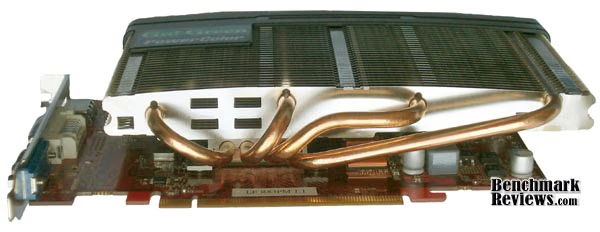
Above the GPU, four slots are punched vertically through the radiator fins from the bottom to the top. The purpose of these slots is unclear, but it could be for styling or better cooling. The hot GPU will tend to add more heat to parts of the radiator that are in close proximity. These slots will allow greater air flow and may even cause a miniature convection loop over the GPU.

The top of the radiator is capped in plastic for design and to provide a place for a pretty logo. From this perspective additional heat sinks can be seen on the ICs on the front side of the card. These will help improve performance and reduce power consumption by lowering the normal operating temperature of the IC's.

A closeup of the actual heat sink assembly shows an aluminum block which clamps the heat pipes to a copper heat transfer block. Copper is a great choice since the thermal conductivity of copper is 1.6 times higher than aluminum. It costs more but is more effective.

One final note on the quality of construction. The PCB received for testing contained a white residue on the back of the PCB. A closeup of one small area can be seen in the image above. There are a myriad of things that can cause residue on a PCB ranging from the benign to the damaging. Typically it will result from the soldering or cleaning process. In all cases it results in a dirty board. In this case the card functioned well enough so the residue may have simply been a nuisance.
Video Card Testing Methodology
VGA Testing Methodology
Benchmarks and test settings are chosen to be as demanding as possible for the lowest card in the series being tested. The rest of the cards are then compared using these settings. According to the April 2010 Steam Hardware Survey, 50% of the systems use DirectX 10, 25% use DirectX 10 and 11 compliant GPUs while only 3% are dedicated DirectX 11 machines. The most popular gaming resolution is 1280x1024 (17-19" standard LCD monitors) closely followed by 1680x1050 (20-22" standard LCD).
Since the HD 5670 GPU is aimed at the middle range performance market this review used applications and settings targeted at these bulk populations. In addition the range of cards tested is larger than normal. There are still a significant number of gamers who still use DirectX 9, low display resolutions and aging hardware who should consider an upgrade. New games like Battlefield: Bad Company 2 are keeping pace with technology trends and do not even offer many low end resolutions. The range of cards tested in this review will help show the differences in performance and show what gains can be had by upgrading.
At the start of all tests, the previous display adapter driver is uninstalled and trace components are removed using Driver Cleaner Pro. We then restart the computer system to establish our display settings and define the monitor. Once the hardware is prepared, we begin our testing. In each benchmark test there is one 'cache run' that is conducted, followed by five recorded test runs. Results are collected at each setting with the highest and lowest results discarded. The remaining three results are averaged, and displayed in the performance charts.
Test System
- Motherboard: Gigabyte GA-MA790X-UD4P
- Processor: AMD Phenom II X4 965 BE CPU HDZ965FBGIBOX
- System Memory: OCZ Gold 4GB 800MHz DDR2
- Disk Drive: SAMSUNG HD251HJ (232 GB)
- PSU: Antec EA500 EarthWatts 500W PSU
- Operating System: Windows 7 Professional
Benchmark Applications
- 3DMark Vantage v1.0.2 (All settings at Entry)
- Street Fighter 4 Benchmark (DX10, High Quality, 8x AA, 16x AF, Low Self Shadow)
- Resident Evil 5 Benchmark (DX10, Super-High Quality, 8x MSAA)
- Devil May Cry 4 Benchmark Demo (Ultra Quality, 8x MSAA)
- Unigine Heaven Benchmark 2.0 (DX10, 2x AA, 4x AF, Low Shaders)
Video Card Test Products
| Product Series | PowerColor HD 3850 | PowerColor AX5670 | PowerColor AX5670 OC | ASUS EN9800GT | Palit GeForce GTX 260 Sonic 216SP |
|---|---|---|---|---|---|
| Stream Processors | 320 | 400 |
400 |
112 |
216 |
| Core Clock (MHz) | 666 | 775 | 825 | 600 | 625 |
| Shader Clock (MHz) | N/A | N/A | N/A | 1500 | 1348 |
| Memory Clock (MHz) | 1650 | 1000 | 1015 | 1800 | 1100 |
| Memory Amount | 256 GDDR3 |
1 GB GDDR5 |
1 GB GDDR5 |
512 DDR3 | 896 MB GDDR3 |
| Memory Interface | 256-bit | 128-bit | 128-bit | 256-bit | 448-bit |
- PowerColor AX3850 256MD3-H (666 MHz GPU/1650 MHz RAM - Catalyst 10.4 Preview)
- PowerColor AX5670 1GBD5-NS3H (775 MHz GPU/1000MHz RAM - Catalyst 10.4 Preview)
- ASUS EN9800GT/DI/512MD3 (600 MHz GPU/1500 MHz Shader/1800 MHz RAM - Forceware 197.13)
- Palit GeForce GTX 260 Sonic 216SP(625 MHz GPU/1348 MHz Shader/1100 MHz vRAM - Forceware 197.13)
3DMark Vantage GPU Tests
3DMark Vantage is a PC benchmark suite designed to test the DirectX10 graphics card performance. FutureMark 3DMark Vantage is the latest addition the 3DMark benchmark series built by FutureMark corporation. Although 3DMark Vantage requires NVIDIA PhysX to be installed for program operation, only the CPU/Physics test relies on this technology.
3DMark Vantage offers benchmark tests focusing on GPU, CPU, and Physics performance. Benchmark Reviews uses the two GPU-specific tests for grading video
3DMark Vantage GPU Test: Jane Nash
Of the two GPU tests 3DMark Vantage offers, the Jane Nash performance benchmark is slightly less demanding. In a short video scene the special agent escapes a secret lair by water, nearly losing her shirt in the process. Benchmark Reviews tested this DirectX-10 scene at 1280x1024 and 1680x1050 resolutions using Entry quality settings and a 1:2 scale. This combination provided the highest level of graphical demand possible for the lowest performance card in this test series.

The video card market has a glut of options for consumers. To some an HD 3850 may still seem like a new card. But the mid range performance cards of this generation output twice the performance. At 1280x1024 the AX5670 nets 50 FPS at default clocks and 3 frames more overclocked. This beats out the competing 9800GT by 4 FPS. The GTX 260 easily produced 86FPS proving that top performance cards are still in a world of their own. The results are similar at 1680x1050 with the HD3850 netting 12.6 FPS, the AX5670 39.3 FPS, the 9800GT 37.4 FPS and the GTX 260 70.1 FPS.
3DMark Vantage GPU Test: New Calico
New Calico is the second GPU test in the 3DMark Vantage test suite. Of the two GPU tests, New Calico is the most demanding. In a short video scene featuring a galactic battleground, there is a massive display of busy objects across the screen. Benchmark Reviews tested this DirectX-10 scene at 1280x1024 and 1680x1050 resolutions using Entry quality settings and a 1:2 scale. This combination provided the highest level of graphical demand possible for the lowest performance card in this test series.

The results from this more demanding test pronounce the differences between generations. The HD 3850 obtains only 30% of 50 FPS produced by the AX5670 and 9800GT while the GTX 260 obtains 66% more frames. In both cases the 9800GT pulls slightly ahead of the AX5670 at default speeds. When overclocked the AX5670 gains a few frames to be comparable to the 9800GT.
| Product Series | PowerColor HD 3850 | PowerColor AX5670 | PowerColor AX5670 OC | ASUS EN9800GT | Palit GeForce GTX 260 Sonic 216SP |
|---|---|---|---|---|---|
| Stream Processors | 320 | 400 |
400 |
112 |
216 |
| Core Clock (MHz) | 666 | 775 | 825 | 600 | 625 |
| Shader Clock (MHz) | N/A | N/A | N/A | N/A | 1348 |
| Memory Clock (MHz) | 1650 | 1000 | 1015 | 1800 | 1100 |
| Memory Amount | 256 GDDR3 |
1 GB GDDR5 |
1 GB GDDR5 |
512 GDDR3 | 896 MB GDDR3 |
| Memory Interface | 256-bit | 128-bit | 128-bit | 256-bit | 448-bit |
The 3DMark Vantage results are typical of the remainder of the tests, but the differences between cards is much higher.
Street Fighter 4 Benchmark Results
One of the most popular fighting games of the 90s gets a 3D face-lift to become Street Fighter 4. The Street Fighter 4 benchmark utility was released as a novel way to test your system's ability to run the game. It uses a few dressed-up fight scenes where combatants kick the crap out of each other. Feet, fists and magic fill the screen with a flurry of activity. Due to the rapid pace, varied lighting and the use of music this is one of the more enjoyable benchmarks. Benchmark Reviews tested at resolutions of 1280x1024 and 1680x1050 and High Quality settings. In order to accommodate the HD 3850, Self Shadow was set to Low to obtain consistent frame-rates.

A couple nuances should be noted about the benchmark. First, while testing there seemed to be a tendency for the benchmark to push frame-rates to increments of 30. While initially choosing quality settings the frame-rates initially tended towards 30 FPS until a critical limit was reached in quality settings. Once the quality settings were high enough the frame-rates jumped to around 60 FPS. There seemed to be no middle ground. In other words, the benchmark seemed to try to run at either 0, 30, 60 or 90 FPS.
Second, there also seemed to be a caching effect. When changing resolutions the benchmark would often run at the same frame-rates as the previous test as if it did not acknowledge the change in resolution. This would occur despite changing te OS resolution, restarting the benchmark and rebooting the computer. After enough retries and fiddling the benchmark would finally snap to the expected performance as if acknowledging the change.
When choosing quality settings the shader settings seemed to make the most difference in performance between cards. The cards without dedicated shader clocks ran much lower in both tests. The HD 3850 and AX5670 ran between 25 and 40 FPS across both resolutions. The 9800GT and GTX 260 ran from 60 to 85 FPS across both resolutions. When overclocking the AX5670 the results are inconsistent. It netted 60 FPS at 1680x1050 but only 30 FPS at 1280x1024. These results were consistent after multiple tests and retests. This may be due to the software nuances previously noted, but it may also be due to instability as a result of overclocking. In either case, the results from this benchmark should be taken lightly.
Resident Evil 5 Benchmark Results
Built upon an advanced version of Capcom's proprietary MT Framework game engine to deliver DirectX-10 graphic detail, Resident Evil 5 offers gamers non-stop action similar to Devil May Cry 4, Lost Planet, and Dead Rising. The MT Framework is an exclusive seventh generation game engine built to be used with games developed for the PlayStation 3 and Xbox 360, and PC ports. MT stands for "Multi-Thread", "Meta Tools" and "Multi-Target". Games using the MT Framework are originally developed on the PC and then ported to the other two console platforms.
On the PC version of Resident Evil 5, both DirectX 9 and DirectX-10 modes are available for Microsoft Windows XP and Vista Operating Systems. Microsoft Windows 7 will play Resident Evil with backwards compatible Direct3D APIs. Resident Evil 5 is branded with the NVIDIA The Way It's Meant to be Played (TWIMTBP) logo, and receives NVIDIA GeForce 3D Vision functionality enhancements.
NVIDIA and Capcom offer the Resident Evil 5 benchmark demo for free download from their website, and Benchmark Reviews encourages visitors to compare their own results to ours. Because the Capcom MT Framework game engine is very well optimized and produces high frame rates, This review uses the DirectX-10 version of the test at multiple resolutions. Super-High quality settings are configured, with 8x MSAA post processing effects for maximum demand on the GPU. The results from the fixed benchmark were collected and displayed in the chart below.

Both resolutions show the same relative differences between cards only differing in magnitude. At 1680x1050 the HD3850 managed to obtain 40 FPS compared to the AX5670's 58 FPS at default clocks. The AX5670 outperformed the 9800GT, which only got 41 FPS, in both default and overclocked speeds. The GTX 260 was again the clear winner at 61 FPS.
| Product Series | PowerColor HD 3850 | PowerColor AX5670 | PowerColor AX5670 OC | ASUS EN9800GT | Palit GeForce GTX 260 Sonic 216SP |
|---|---|---|---|---|---|
| Stream Processors | 320 | 400 |
400 |
112 |
216 |
| Core Clock (MHz) | 666 | 775 | 825 | 600 | 625 |
| Shader Clock (MHz) | N/A | N/A | N/A | N/A | 1348 |
| Memory Clock (MHz) | 1650 | 1000 | 1015 | 1800 | 1100 |
| Memory Amount | 256 GDDR3 |
1 GB GDDR5 |
1 GB GDDR5 |
512 GDDR3 | 896 MB GDDR3 |
| Memory Interface | 256-bit | 128-bit | 128-bit | 256-bit | 448-bit |
Devil May Cry 4 Benchmark
Devil May Cry 4 was released on PC in early 2007 as the fourth installment to the Devil May Cry video game series. DMC4 is a direct port from the PC platform to console versions, which operate at the native 720P game resolution with no other platform restrictions. Devil May Cry 4 uses the refined MT Framework game engine, which has been used for many popular Capcom game titles over the past several years.
MT Framework is an exclusive seventh generation game engine built to be used with games developed for the PlayStation 3 and Xbox 360, and PC ports. MT stands for "Multi-Thread", "Meta Tools" and "Multi-Target". Originally meant to be an outside engine, but none matched their specific requirements in performance and flexibility. Games using the MT Framework are originally developed on the PC and then ported to the other two console platforms.
On the PC version a special bonus called Turbo Mode is featured, giving the game a slightly faster speed, and a new difficulty called Legendary Dark Knight Mode is implemented. The PC version also has both DirectX 9 and DirectX 10 mode for Microsoft Windows XP and Vista Operating Systems.
It's always nice to be able to compare the results we receive here at Benchmark Reviews with the results you test for on your own computer system. Usually this isn't possible, since settings and configurations make it nearly difficult to match one system to the next; plus you have to own the game or benchmark tool we used.
Devil May Cry 4 fixes this, and offers a free benchmark tool available for download. Because the DMC4 MT Framework game engine is rather low-demand for today's cutting edge multi-GPU video cards, Benchmark Reviews tests with 8x AA (highest AA setting available to Radeon HD video cards) and 16x AF. The benchmark runs through four test scenes, but scene #2 and #4 are the ones that usually offer a challenge. Displayed below is our result for the test.

At 1280x1024 the relative differences between cards is similar to the Resident Evil 5 test. The GTX 260 is in a league of its own getting over 90 FPS at both resolutions while the HD 3850 again manages 40FPS in Scene #2 and 52 FPS in Scene #4. This time the AX5670 exactly matched the 9800GT at default speed in Scene #4 with 68.6 FPS. In Scene #2, however, the 9800GT beats out even the overclocked AX5670 with 61.4 FPS versus 57.6 FPS.

The results from 1680x1050 practically mirror those from 1280x1024. The GTX 260 dropped the most frames to come down to 76.9 FPS in scene #2 and 80.3 FPS in Scene #4. The rest of the cards dropped around 10 FPS yielding the same comparisons seen at the lower resolution.
| Product Series | PowerColor HD 3850 | PowerColor AX5670 | PowerColor AX5670 OC | ASUS EN9800GT | Palit GeForce GTX 260 Sonic 216SP |
|---|---|---|---|---|---|
| Stream Processors | 320 | 400 |
400 |
112 |
216 |
| Core Clock (MHz) | 666 | 775 | 825 | 600 | 625 |
| Shader Clock (MHz) | N/A | N/A | N/A | N/A | 1348 |
| Memory Clock (MHz) | 1650 | 1000 | 1015 | 1800 | 1100 |
| Memory Amount | 256 GDDR3 |
1 GB GDDR5 |
1 GB GDDR5 |
512 GDDR3 | 896 MB GDDR3 |
| Memory Interface | 256-bit | 128-bit | 128-bit | 256-bit | 448-bit |
Unigine Heaven Benchmark Results
The Unigine "Heaven 2.0" benchmark is a free publicly available tool that grants the power to unleash the graphics capabilities in DirectX-11 for Windows 7 or updated Vista Operating Systems. It reveals the enchanting magic of floating islands with a tiny village hidden in the cloudy skies. With the interactive mode, emerging experience of exploring the intricate world is within reach. Through its advanced renderer, Unigine is one of the first to set precedence in showcasing the art assets with tessellation, bringing compelling visual finesse, utilizing the technology to the full extend and exhibiting the possibilities of enriching 3D gaming.
The distinguishing feature in the Unigine Heaven benchmark is a hardware tessellation that is a scalable technology aimed for automatic subdivision of polygons into smaller and finer pieces, so that developers can gain a more detailed look of their games almost free of charge in terms of performance. Thanks to this procedure, the elaboration of the rendered image finally approaches the boundary of veridical visual perception: the virtual reality transcends conjured by your hand. The "Heaven" benchmark excels at providing the following key features:
- Native support of OpenGL,
DirectX 9, DirectX-10 and DirectX-11 - Comprehensive use of tessellation technology
- Advanced SSAO (screen-space ambient occlusion)
- Volumetric cumulonimbus clouds generated by a physically accurate algorithm
- Dynamic simulation of changing environment with high physical fidelity
- Interactive experience with fly/walk-through modes
- ATI Eyefinity support
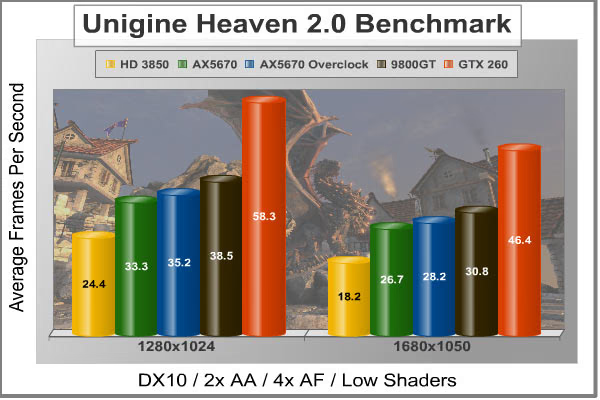
Due to the repeatability of this benchmark, the comparisons that result are extremely reliable for the chosen test settings. Through most of the benchmarks the 9800GT and Go! Green HD 5670 have been relatively equal in performance sometimes with one leading and sometimes with the other leading. If the parts are truly equal then the minor differences in performance are due to variation rather than real performance differences. The Heaven benchmark has very low variation and better shows the true differences in performance for at least one method of benchmarking.
With this in mind the HD3850 as caboose and GTX 260 as the engine don't come as any surprise. However, the 9800GT clearly stands above the default AX5670 and the overclocked AX5670. This seems about right since in previous tests when the 9800GT led it typically beat out even the overclocked AX5670.
| Product Series | PowerColor HD 3850 | PowerColor AX5670 | PowerColor AX5670 OC | ASUS EN9800GT | Palit GeForce GTX 260 Sonic 216SP |
|---|---|---|---|---|---|
| Stream Processors | 320 | 400 |
400 |
112 |
216 |
| Core Clock (MHz) | 666 | 775 | 825 | 600 | 625 |
| Shader Clock (MHz) | N/A | N/A | N/A | N/A | 1348 |
| Memory Clock (MHz) | 1650 | 1000 | 1015 | 1800 | 1100 |
| Memory Amount | 256 GDDR3 |
1 GB GDDR5 |
1 GB GDDR5 |
512 GDDR3 | 896 MB GDDR3 |
| Memory Interface | 256-bit | 128-bit | 128-bit | 256-bit | 448-bit |
PowerColor HD5670 Temperatures
Since PowerColor replaced the traditional fan with a heat sink, steady state temperatures could become critical. The best cooling occurs when there are lots of cold molecules banging against a hot surface. Fans work well because they create a turbulent stream of air which is cooler on average due to the rate at which it is drawn into the case. A passive cooler relies on convection to move the air which means less turbulence and warmer air since the refresh rate is slower.
The test system used has two fans which force air into and out of the case as well as a CPU cooler with a mounted fan. By chance the fan on the CPU cooler is situated such tha the air is drawn from right next to the video card. Fluid flow is quite complex, but this arrangement most likely improves the cooling of the video card and will likely result in lower than normal temperatures on the video card.
When taking measurements the video card is first idled in 2D mode to obtain an idle temperature using GPU-Z.Then Furmark 1.7.0 is used to stress the GPU and raise the card temperatures until they are steady. Temperatures are again recorded from GPU-Z under this stressed scenario. Tests were performed using default clock speeds and an overclock of 50MHz on the GPU and 15 MHz on the memory. During testing the ambient temperature remained steady at 21°C.
FurMark does do two things extremely well: drive the thermal output of any graphics processor higher than any other application of video game, and it does so with consistency every time. While I have proved that FurMark is not a true benchmark tool for comparing video cards, it would still work very well to compare one product against itself at different stages. FurMark would be very useful for comparing the same GPU against itself using different drivers or clock speeds, of testing the stability of a GPU as it raises the temperatures higher than any program. But in the end, it's a rather limited tool.
The temperatures recorded for the PowerColor Go! Green AX5670 1GBD5-NS3H are recorded in the table below.
|
Absolute Temperatures |
Degrees Above Ambient |
|||||
|---|---|---|---|---|---|---|
|
Default Clock |
Overclocked |
Default Clock |
Overclocked |
|||
|
Idle |
34°C |
39°C |
Idle |
12°C |
17°C |
|
|
Load |
52°C |
63°C |
Load |
30°C |
41°C |
|
When Benchmark Reviews tested the reference HD 5670 it recorded an absolute of 38°C at idle and 60°C under load which was 15°C and 37°C above ambient. Amazingly, the passive cooler design and on-chip heat sinks resulted in better cooling performance than the reference design. Even when overclocked the Go! Green version of the HD 5670 stayed near the reference model's temperatures proving that performance is indeed better than the competition. But is the performance better while cutting the power? That is the topic of the next section.
Go! Green Power Consumption
Much of the confabulation in the media regarding energy and environment centers around "being green". While the science predicting the fate of our planet has yet to mature, the idea that something must be done remains resolute. It is unclear whether the planet requires humankind to take radical measures to survive, like population reduction, or whether it has more resilience than we ever thought possible. What is clear is that we should live responsibly until those things are determined.
It is unlikely that developed countries will completely abandon technology while waiting for answers, and rightly so due to the benefits offered by such technology. Likewise, you're not going to stop working and gaming because modern society relies on computers. But if you want to be proactive then selecting power conserving hardware like PowerColor's Go! Green series provides a happy medium.
To measure isolated video card power consumption, Benchmark Reviews uses the Kill-A-Watt EZ (model P4460) power meter made by P3 International. A baseline test is taken withouta video card installed inside our computer system, which is allowed to boot into Windows and rest idle at the login screen before power consumption is recorded. Once the baseline reading has been taken, the graphics card is installed and the system is again booted into Windows and left idle at the login screen. Our final loaded power consumption reading is taken with the video card running a stress test using FurMark. Below is a chart with the isolated video card power consumption (not system total) displayed in Watts for previously tested products:
VGA Product Description(sorted by combined total power) |
Idle Power |
Loaded Power |
|---|---|---|
NVIDIA GeForce GTX 480 SLI Set |
82 W |
655 W |
NVIDIA GeForce GTX 590 Reference Design |
53 W |
396 W |
ATI Radeon HD 4870 X2 Reference Design |
100 W |
320 W |
AMD Radeon HD 6990 Reference Design |
46 W |
350 W |
NVIDIA GeForce GTX 295 Reference Design |
74 W |
302 W |
ASUS GeForce GTX 480 Reference Design |
39 W |
315 W |
ATI Radeon HD 5970 Reference Design |
48 W |
299 W |
NVIDIA GeForce GTX 690 Reference Design |
25 W |
321 W |
ATI Radeon HD 4850 CrossFireX Set |
123 W |
210 W |
ATI Radeon HD 4890 Reference Design |
65 W |
268 W |
AMD Radeon HD 7970 Reference Design |
21 W |
311 W |
NVIDIA GeForce GTX 470 Reference Design |
42 W |
278 W |
NVIDIA GeForce GTX 580 Reference Design |
31 W |
246 W |
NVIDIA GeForce GTX 570 Reference Design |
31 W |
241 W |
ATI Radeon HD 5870 Reference Design |
25 W |
240 W |
ATI Radeon HD 6970 Reference Design |
24 W |
233 W |
NVIDIA GeForce GTX 465 Reference Design |
36 W |
219 W |
NVIDIA GeForce GTX 680 Reference Design |
14 W |
243 W |
Sapphire Radeon HD 4850 X2 11139-00-40R |
73 W |
180 W |
NVIDIA GeForce 9800 GX2 Reference Design |
85 W |
186 W |
NVIDIA GeForce GTX 780 Reference Design |
10 W |
275 W |
NVIDIA GeForce GTX 770 Reference Design |
9 W |
256 W |
NVIDIA GeForce GTX 280 Reference Design |
35 W |
225 W |
NVIDIA GeForce GTX 260 (216) Reference Design |
42 W |
203 W |
ATI Radeon HD 4870 Reference Design |
58 W |
166 W |
NVIDIA GeForce GTX 560 Ti Reference Design |
17 W |
199 W |
NVIDIA GeForce GTX 460 Reference Design |
18 W |
167 W |
AMD Radeon HD 6870 Reference Design |
20 W |
162 W |
NVIDIA GeForce GTX 670 Reference Design |
14 W |
167 W |
ATI Radeon HD 5850 Reference Design |
24 W |
157 W |
NVIDIA GeForce GTX 650 Ti BOOST Reference Design |
8 W |
164 W |
AMD Radeon HD 6850 Reference Design |
20 W |
139 W |
NVIDIA GeForce 8800 GT Reference Design |
31 W |
133 W |
ATI Radeon HD 4770 RV740 GDDR5 Reference Design |
37 W |
120 W |
ATI Radeon HD 5770 Reference Design |
16 W |
122 W |
NVIDIA GeForce GTS 450 Reference Design |
22 W |
115 W |
NVIDIA GeForce GTX 650 Ti Reference Design |
12 W |
112 W |
ATI Radeon HD 4670 Reference Design |
9 W |
70 W |
The AX5670 test system used 64W at idle without a video card.
The temperatures recorded for the PowerColor Go! Green AX5670 1GBD5-NS3H are recorded in the table below.
|
Absolute Power |
Watts Due to AX5670 |
|||||
|---|---|---|---|---|---|---|
|
Default Clock |
Overclocked |
Default Clock |
Overclocked |
|||
|
Idle |
83W |
90W |
Idle |
19W |
26W |
|
|
Load |
163W |
189W |
Load |
99W |
125W |
|
The numbers here are not as impressive as the temperature results. The reference power consumption is listed as 14W at idle and 61W under load. The numbers recorded in this test were well over those values. There are a few possible explanations. 1) The PSU used in this test is an Antec EarthWatts EA 500 which uses active PFC and boasts an efficiency of up to 88%. This would mean that 12% of the power consumed at the plug is dissipated by the PSU and at most 88% is sent to the system. This would give an idle power consumption of 15W which is closer to but still higher than the specified value. We should expect much better performance from a green product. 2) In addition to the efficiency curve, there may be other unaccounted losses within the test. For example, the no-GPU baseline did not account for any non-GPU resources required to run FurMark. 3) Manufacturing variability results in some cards that meet spec and some that are out of spec. Perhaps the card reviewed is an out of spec card and does not represent most G0! Green video cards.
It is the opinion of this tester that the above losses should be small and that a card claiming to reduce power by half would show some performance improvement despite other minor losses. The large jumps in overclocked power consumptions are revelatory. Slight increases in clock speeds make big differences in power consumption. It may be that the card is just performing higher than expected and therefore draws more power.
PowerColor Video Card Final Thoughts
With so much political and social pressure on organizations to produce green technology, the ideas being put forth range from those that would only be implemented by idiots to those that actually merit attention. Taking something that already performs well and improving upon it is not only a good idea but will rovide additional learning, insight and gains. The reference HD 5670 is a decent performance card with good features that performas at the bottom of the power consumption ladder. PowerColor made a smart choice when they decided to use it as a vehicle for the Go! Green series. They made some surface and likely internal modifications to improve not only performance, but also reduce power consumption. Such gains are commendable, if only they can be realized.
While the performance was as good or better than the reference and as good as some close competitors, the power consumption was not better. Perhaps better testing methods or a more accurate and detailed analysis could have shown lower power consumption, but a microscopic focus should not be required. In order to make true and lasting gains with respect to the environment, reductions need to be drastic. A product that claims a 50% reduction should not test at 100%, even with small inefficiencies. A drastic reduction will be obvious even under rudimentary circumstances.
It is possible that the sample received does not accurately represent the population of Go! Green HD 5670 cards produced by PowerColor (as suggested by the white residue). Comments and tests of Go! Green products by other reviewers support the conclusion of unsuccessful design rather than a bad sample. While the efforts of PowerColor are laudable, the goal has yet to be met. Hopefully these result will not deter PowerColor from continuing to pursue a worthy goal. Perhaps more drastic measures need to be taken to reduce power consumption. There are features that some users may never use that could be eliminated, and since it is a specialty product some users may even be willing to take a small performance hit is it means big power gains. However, unless initial green designs prove successful, either performance wise or economically, then it is unlikely we will continue to see green designs until the designs becomes feasible either by technology or by force.
As the card currently stands it may still fit a niche market. The card made absolutely no noise and ran very cool. These are the things I want when I build an HTPC. I don't mind the fan hum on my performance computer because I usually have explosions and yelling and the like pounding in my ears. But when I watch movies even the whine of a DVD can be annoying, especially during quiet scenes. Thus the earlier statement, "Silence is Green" can still be applied. The price premium on this card may be worth the excellent heat sink even if the power consumption remains constant.
Go! Green HD5670 Conclusion
The performance claims made by PowerColor for their Go! Green series includes better performance while using half the power. The performance was indeed better than the reference and nearly matched its 9800GT rival. An overclock consistently gave a few more frames that were often enough to push it beyond the 9800GT. All this was accomplished without sacrificing any of the original features of the HD 5670. When it comes to power the card was a letdown. The only wow relating to power was, "Wow! That used way more power than I expected." While the consumption was not high compared to most video cards, it was not close to half of the reference design.
The Go! Green series has excellent product presentation including good branding, excellent color schemes and motivating features. Most people feel good about doing even minor things to reduce their potential impact on the earth. The product packaging, labeling and specifications are clear and easy to understand. The website provides good information and easy access to drivers. With the large heat sink on the front of the card it has an unique but not entirely alien appearance. Heat sinks and radiators are common, just not on video cards. It makes the card bulkier and looks funny at first, but after some time the look grows on you.
PowerColor used solid and sturdy construction in the PCB, connectors and heat sink. At first glance it looks like the heat sink would be too much for the card to handle, but after wielding the card any concerns were diminished. There is a good balance between cost and performance by using aluminum for non-critical surfaces and copper for surfaces that matter most in transferring heat. As a result the passive cooler outperformed the reference fan and heat sink!
The Go! Green HD 5670 also managed to keep all the original features of the HD 5670 which was quite impressive. A modest card packs in too many features to list in a single line or hardly a single page. Traditionally the drawback of buying a budget video card has been a cut in both features and performance. But as we've seen here that does not have to be the case. The AX5670 is a versatile card that will game, work, and recreate.
The price premium for the Go! Green modifications is surprisingly small. NewEgg carries the AX5670 1GBD5-NS3H for $119.99 which is only $5 more than comparable competitors. The extra 512MB of memory bumps the premium up to the $25 range. When considering the power consumption the price premium offers no value. For better cooling and reduced noise this offers substantial value over the competition. When it comes to pure performance there is much more wiggle room. A beefed-up 9800GT can be had for $20 less, the GTS 250 on price point, and at the time of this writing an HD 5750 on price point. Thus strictly on performance there are much better deals to be had.
Considering the card in a specialty class considering the collective performance of temperature, power, noise and frame-rates this card provides an excellent value. If PowerColor had met the power consumption projections the card would be unmatched in it's specialty class. Overall this is a decent buy, but as it is this card is not going to save the planet.
Pros:
+ Silent operation
+ Improved performance
+ Low operating temperatures
+ Neat heat sink
Cons:
- Requires 2 PCI slots
- No reduction in power consumption
Ratings:
-
Performance: 8.75
-
Appearance: 8.0
-
Construction: 8.75
-
Functionality: 8.5
-
Value: 8.5
Final Score: 8.5 out of 10.
Recommended: Benchmark Reviews Seal of Approval.
Questions? Comments? Benchmark Reviews really wants your feedback. We invite you to leave your remarks in our Discussion Forum.
Reader comments from the original article
4 comments were posted before commenting closed. They are preserved as written. Original avatars no longer resolve and are shown as a placeholder.
Power consumption and heat testing Matt Permalink:
I am a little sad that in the review the Powercolor NON-Go! Green 5670 card wasn't compared to its Go! Green sibling. This would have been a much more valid test to compare actual temperatures and power consumptions. Not that it doesn't seem like the Go! Green 5670 power consumption savings numbers seem a bit inflated, but it still isn't a very validating test (at least of the Go! Green 5750 it seems like the power consumption numbers do seem to be about 25% lower than an actual side-by-side tested 5750 (non-Go! Green) based on a benchmark of that card). Final comment is on the design (owning a Go! Green 5570), fanless? Sure quieter, but a 1w silent fan could probably save 2-3w on a low power card and 5-8w on a high draw card by reducing temperatures 10-15c. My 5570 benchmarks in my case at 56c using furmark and with a 1.4w 80mm held up against it drops to 35c stable (21c drop). That has gotta be worth a few watts through better electrical efficiency running 21c cooler.
residue Justin Permalink:
My video card has the same type of residue as that card, and it quit working after two years.
Your Card BruceBruce Permalink:
What brand and model was it? Can you tell us more about the failure mode?
RE: Your Card Justin Permalink:
My computer came with a nvidia 9800 Gt. Since about a week ago I have been unable to play a video game or use windows media center. If I ever start a video game or windows media center the program crashes and I get the error message, "nvlddmkm.sys has stopped responding and has recovered." Some times I get A blue screen message and the computer has to restart. I have reinstalled drivers and even restored my computer's software to the original factory condition. About a year ago I noticed my computer screen would get dark, as if i was wearing sunglasses. I would restart my computer and the screen would look normal again. I replaced my video card and found white layers of crusty residue.