
Gigabyte HD5870 SOC Video Card GV-R587SO-1GD
Gigabyte Radeon HD5870 Super Over Clock
When intense gaming action demands absolute attention, the last thing anybody wants is noise distracting them. Gigabyte's Radeon HD 5870 Super Over Clock delivers top-level graphics performance for DirectX-11 video games with an 950MHz overclocked Cypress-XT GPU, and thanks to twin 80mm cooling fans this GV-R587SO-1GD model keeps noise whisper quiet. Priced at $500, the Gigabyte HD5870 SOC competes directly with the NVIDIA GeForce GTX-480. In this article, Benchmark Reviews tests the Gigabyte HD5870 SOC against some of the most powerful video cards on the market.
It used to be that PC video games such as Crysis and Far Cry 2 were as demanding as you could get, but that was all back before DirectX-11 brought tessellation and DirectCompute to the forefront of graphics. DX11 now adds heavy particle and turbulence effects to video games, and titles such as Metro 2033 demand the most powerful graphics processing available. ATI's Cypress GPU is AMD's first graphics processor to support DirectX-11 features such as tessellation, and the Gigabyte Radeon HD5870 SOC offers an excellent combination of performance and value for PC gamers.
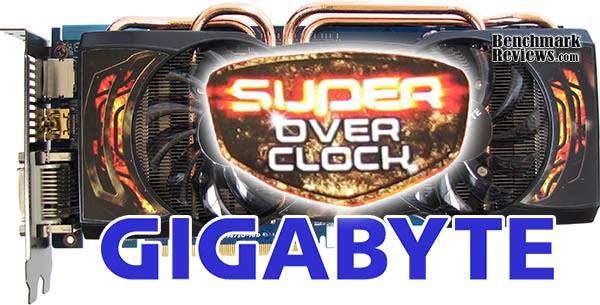
Gigabyte Radeon HD 5870 Super Over Clock GV-R587SO-1GD
Modeled on the full DirectX-11 specification, the ATI Radeon HD 5800 series of graphics cards delivers up to 2.72 TeraFLOPS of compute power in a single card, translating to superior performance in the latest DirectX 11 games, as well as in DirectX 9, DirectX 10, DirectX 10.1 and OpenGL titles in single card configurations or multi-card configurations using ATI CrossFireX technology. Benchmark Reviews tests graphics frame rate performance of the Gigabyte Radeon HD 5870 Super Over Clock video card using several of the most demanding PC video game titles and benchmark software available. Some old DirectX-10 favorites such as Crysis Warhead, Far Cry 2, Resident Evil 5, as well as PCMark Vantage are all included. New to the scene are Battlefield: Bad Company 2, Metro 2033, BattleForge, and the recently announced Unigine Heaven 2.0 benchmark.
AMD originally launched the Radeon 5870 as their first assault on their multi-monitor ATI Eyefinity Technology feature, using native HDMI 1.3 output paired with DisplayPort connectivity. The Cypress GPU features the latest ATI Stream Technology, which is designed to utilize DirectCompute 5.0 and OpenCL code. These new features improve all graphical aspects of the end-user experience, such as faster multimedia transcode times and better GPGPU compute performance. AMD has already introduced the ATI Stream SDK v2.1 to help positions developers with AMD Fusion APUs, and the recent Open Physics Initiative with Pixelux promises to offer physics middleware built around OpenCL and Bullet Physics.
So far, 2010 has been an exciting year for game developers. Microsoft Windows 7 (and updated Windows Vista) Operating Systems introduced gamers to DirectX-11, allowing video games released for the PC platform to look better than ever. DirectX-11 is the leap in video game software development we've been waiting for. Screen Space Ambient Occlusion (SSAO) is given emphasis in DX11, allowing some of the most detailed computer textures gamers have ever seen. Realistic cracks in mud with definable depth and splintered tree bark make the game more realistic, but they also make new demands on the graphics hardware. This new level of graphical detail requires a new level of computer hardware: DX11-compliant hardware. Tessellation adds a tremendous level of strain on the GPU, making previous graphics hardware virtually obsolete with new DX11 game titles.
About Gigabyte United Inc. (G.B.T. Inc. USA)
Gigabyte United Inc., established in December 2006, is assuming the Gigabyte TECHNOLOGY Co., Ltd. Brand, which for the past 20 years has been a world-renowned leader in the motherboard industry. Continuing to focus on its core businesses of Gigabyte branded motherboards and graphics cards, Gigabyte United Inc. is committed to providing our valued customers with the highest quality products and services featuring the industry's most innovative design.
In order to meet the challenges of today's intensely competitive channel market, Gigabyte United Inc. fully utilizes its key assets including its cutting-edge research and development team as well as its professional sales and marketing resources to continue to develop technologies to fit a complete range of digital life solutions. Now and for the future, Gigabyte United Inc. will continue to embody the unique spirit and culture, which has made Gigabyte one of the foremost brands in the industry.
Radeon HD 5870 Features
- Microsoft DirectX 11 Support
- ATI Eyefinity Technology
- ATI Stream Technology Designed for DirectCompute 5.0 and OpenCL
- Accelerate Video Transcoding
- 40 nm Process Technology
- Advanced GDDR5 Memory Technology
- 2nd Generation TeraScale Engine
- Microsoft Windows 7 Support
- ATI CrossFireX Technology
- Enhanced Anisotropic Filtering
- Accelerated Video Transcoding
- Display Flexibility, Supports DL-DVI, DP, HDMI and D-Sub
- HDMI 1.3 support with Deep Color and 7.1 High Bitrate Audio
- On chip HDCP Support
- ATI CrossFireX multi-GPU support for highly scalable performance. (Use up to four discrete cards with an AMD 790FX based motherboard)
- ATI Avivo HD Support
- ATI Unified Video Decoder 2 (UVD) for Blu-ray and HD Video.
- Accelerated Video Transcoding (AVT)
- DVD Upscaling
- Dynamic Contrast
- Built-in HDMI with 7.1 surround sound support
- Dynamic power management with ATI PowerPlay technology including memory clocks
- Dolby TrueHD and DTSHD Master Audio Support
Gigabyte SOC Specifications
- SKU: GV-R587SO-1GD
- AISC: Gigabyte Radeon HD 5870 Super Over Clock
- Bus Interface: PCI-E x16 (PCI-E 2.0)
- Memory: 1024MB / 256-bit GDDR5
- Clock Speed: 950 MHz GPU / 1250 MHz GDDR5 Memory
- Cooling System: Dual slot Fan with auto fan control
- Bracket: Full Height
- Display Support: Dual DL-DVI-I, Display Port, HDMI, VGA (Via adaptor)
- HDCP: Supported
- Crossfire Support: Native Hardware Crossfire
- External Power: PCIe Graphic External 2 x 6 pin
- Accessories:
- Crossfire Interconnect Cable x 1
- DVI to VGA Adaptor x 1
- 6 PIN to 4 PIN Power Cable x 2
ATI Video Card Attributes
| Reference Design Attribute | Radeon HD 4870 | Radeon HD 5850 | Radeon HD 5870 |
|---|---|---|---|
|
Process |
55nm |
40nm |
40nm |
|
Transistors |
956M |
2.15B |
2.15B |
|
Engine Clock |
750 MHz |
725 MHz |
850 MHz |
|
Stream Processors |
800 |
1440 |
1600 |
|
Compute Performance |
1.2 TFLOPs |
2.09 TFLOPS |
2.72 TFLOPs |
|
Texture Units |
40 |
72 |
80 |
|
Texture Fillrate |
30.0 GTexels/s |
52.2 GTexels/s |
68.0 GTexel/s |
|
ROPs |
16 |
32 |
32 |
|
Pixel Fillrate |
12.0 GPixels/s |
23.2 Gpixel/s |
27.2 GPixel/s |
|
Z/Stencil |
48.0 GSamples/s |
92.8 GSamples/s |
108.8 GSamples/s |
|
Memory Type |
GDDR5 |
GDDR5 |
GDDR5 |
|
Memory Clock |
900 MHz |
1000 MHz |
1200 MHz |
|
Memory Data Rate |
3.6 Gbps |
4.0 Gbps |
4.8 Gbps |
|
Memory Bandwidth |
115.2 GB/s |
128.0 GB/s |
153.6 GB/s |
|
Maximum Board Power |
160W |
170W |
188W |
|
Idle Board Power |
90W |
27W |
27W |
ATI Eyefinity Multi-Monitors
ATI Eyefinity advanced multiple-display technology launches a new era of panoramic computing, helping to boost productivity and multitasking with innovative graphics display capabilities supporting massive desktop workspaces, creating ultra-immersive computing environments with super-high resolution gaming and entertainment, and enabling easy configuration and supporting up to six independent display outputs simultaneously.
In the past, multi-display systems catered to professionals in specific industries. Financial, gas and oil, and medical are just some industries where multi-display systems are not only desirable, but a necessity. Today, even graphic designers, CAD engineers and programmers are attaching more than one displays to their workstation. A major benefit of a multi-display system is simple and universal - it enables increased productivity. This has been demonstrated in industry studies which have shown that attaching more than one display device to a PC can significantly increase user productivity.
The early multi-display solutions were non-ideal. The bulky CRT monitors claimed too much desk space, thinner LCD monitors were very expensive, and external multi-display hardware was inconvenient and also very expensive. These issues are much less of a concern today. LCD monitors are very affordable and current generation GPUs can drive multiple display devices independently and simultaneously, without the need for external hardware. Despite the advancements in multi-display technology, AMD engineers still felt there was room for improvement, especially regarding the display interfaces. VGA carries analog signals and needs a dedicated DAC per display output, which consumes power and ASIC space. Dual-Link DVI is digital, but requires a dedicated clock source per display output and uses too many IO pins from our GPU. If we were to overcome the dual display per GPU barrier, it was clear that we needed a superior display interface.

In 2004, a group of PC companies collaborated to define and develop DisplayPort, a powerful and robust digital display interface. At that time, engineers working for the former ATI Technologies Inc. were already thinking about a more elegant solution to drive more than two display devices per GPU, and it was clear that DisplayPort was the interface of choice for this task.
In contrast to other digital display interfaces, DisplayPort does not require a dedicated clock signal for each display output. In fact the data link is fixed at 1.62Gbps or 2.7Gbps per lane, irrespective of the timing of the attached display device. The benefit of this design is that one reference clock source can provide the clock signals needed to drive as many DisplayPort display devices as there are display pipelines in the GPU. In addition, with the same number of IO pins used for Single-Link DVI, a full speed DisplayPort link can be driven which provides more bandwidth and translates to higher resolutions, refresh rates and color depths. All these benefits perfectly complement ATI Eyefinity Multi-Display Technology.

ATI Eyefinity Technology from AMD provides advanced multiple monitor technology delivering an incredibly immersive graphics and computing experience with innovative display capabilities, supporting massive desktop workspaces and super-high resolution gaming environments. Legacy GPUs have supported up to two display outputs simultaneously and independently for more than a decade. Until now graphics solutions have supported more than two monitors by combining multiple GPUs on a single graphics card. With the introduction of AMD's next-generation graphics product series supporting DirectX 11, a single GPU now has the advanced capability of simultaneously supporting up to six independent display outputs.
ATI Eyefinity Technology is closely aligned with AMD's DisplayPort implementation providing the flexibility and upgradability modern user's demand. Up to two DVI, HDMI, or VGA display outputs can be combined with DisplayPort outputs for a total of up to six monitors, depending on the graphics card configuration. The initial AMD graphics products with ATI Eyefinity technology will support a maximum of three independent display outputs via a combination of two DVI, HDMI or VGA with one DisplayPort monitor. AMD has a future product planned to support up to six DisplayPort outputs. Wider display connectivity is possible by using display output adapters that support active translation from DisplayPort to DVI or VGA.

The DisplayPort 1.2 specification is currently being developed by the same group of companies who designed the original DisplayPort specification. This new spec will include exciting new features for our customers. Its feature set includes higher bandwidth, enhanced audio and multi-stream support. Multi-stream, commonly referred to as daisy-chaining, is the ability to address and drive multiple display devices through one connector. This technology, coupled with ATI Eyefinity Technology, will re-introduce multi-display technology and AMD will be at the forefront of this transition.
Closer Look: Gigabyte HD5870 SOC
The Gigabyte HD5870 Super Over Clock (SOC) takes the original ATI design and cranks-up the Cypress-XT GPU and GDDR5 memory speeds to produce the fastest performance possible. The added voltage and overclock increase thermal loads on the electronic components, which are cooled with a custom twin-fan heatsink unit. As of May 2010, NewEgg sells the GV-R587SO-1GD model for $499.99.
Gigabyte's GV-R587SO-1GD retail package is fairly basic: graphics card, support manual, driver software, CrossFire bridge component, a pair of four-pin Molex PSU into six-pin PCI-E power adapters, and DVI-to-VGA adapter. The kit does not include any bundled free PC video games, which seems like a necessary perk for a product that costs $110 more than the least expensive Radeon HD 5870.
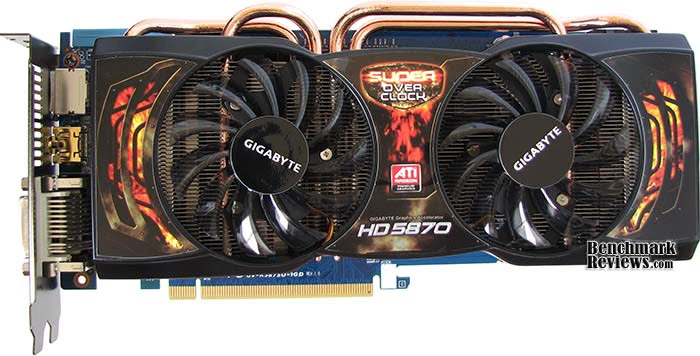
Unlike other ATI partners, Gigabyte has redesigned their HD5870 SOC to use a custom printed circuit board (PCB) and thermal management system. The Gigabyte Radeon HD 5870 Super Over Clock video card measures 10.5" long, which is 1/2-inch shorter than the reference ATI Radeon HD 5870, but identical to the 10.5"-long GeForce GTX-480 that it competes with. Gigabyte's proprietary cooler reduces fan noise while keeping temperatures within tolerance and retaining a dual-slot profile.
Most overclocker-enthusiasts prefer an externally-exhausting VGA cooler (such as the one used on reference-design Radeon HD 5870 video cards) over a cooler that vents back into the computer case. While the vast majority of heated exhaust air is pushed to either end of the video card, a very small amount does pass through the vent on the I/O plate (which is only 0.5 x 1.5" in diameter). Temperature is discussed in detail later on in this article.

Two new editions to the ATI Radeon series are DisplayPort output and a native HDMI 1.3 port, which are available on all Radeon HD 5870 video cards and not specific to the Gigabyte GV-R587SO-1GD model. Two DVI digital video outputs are connected to monitors for dual-view, or a third monitor can be added via DisplayPort to enable ATI Eyefinity technology.

The enhanced cooling unit on the Gigabyte Radeon HD 5870 SOC video card is held tight to the 40nm "Cypress" GPU by four screws in the edge-reinforced metal backplate. Considering the Cypress GPU die size is a rather large 334 mm2, and fits 2154 million transistors, the overall heat dissipation is spread over a suitable landscape. The double-height cooler does a very good job of cooling the 5870, but there is still a tremendous amount of heat that builds up on backside of the PCB. If you're an overclocker, there isn't much that can be done to help cool the unit from the reverse side of the circuit board unless a fan is positioned to blow directly on the backside of this video card.

Thanks to Gigabyte's UltraDurable-3 technology, their factory-overclocked Radeon HD5870 SOC video card requires the same dual 6-pin power connectors that a reference-speed unit requires.
Four copper 6mm heat-pipe rods span from an all-copper contact base that mates the entire heatsink to the GPU. The forward portion of the aluminum finsink is shorter than the aft because of header components (primarily the DVI ports), and each of the two 80mm slim-profile cooling fans are angled 15° away from the Cypress GPU.

Gigabyte's custom PCB features a series of six green LEDs that each illuminate in relation to the number of power phases activated by the optional (and included) Gigabyte OC Guru software. Without the software installed, all six power phases are active full-time.
At first glance, it may appear that Gigabyte added GDDR5 memory to the backside of the PCB, but in fact these are actually NEC-Tokin Proadlizer (prompt broadband stabilizer) film capacitors which make one-chip decoupling possible. Four NEC Proadlizer's are dedicated to the Cypress GPU, while another manages memory. Each Proadlizer is marked 'NEC/Tokin OE907', which signifies rated voltage (2.5V) and capacitance (900 μF). Although each IC is also marked OC29C00377, the actual NEC part number is PFAF250E907MCBTE.
Ignore the graphics performance, factory-overclock, and custom cooling solution, and Gigabyte's decision to include Proadlizers could very well justify the added product price. Each film capacitor reduces high-frequency noise problems, such as video card whine, while lowering capacitor Equivalent Series Resistance (ESR) while improving electrical current capacity.

In next several sections, Benchmark Reviews explains our video card test methodology, followed by a performance comparison of the Gigabyte HD5870 SOC against several of the most popular graphics accelerators available. The reference ATI Radeon HD 5870 normally competes on price against the NVIDIA GeForce GTX 470; but the added cost of this factory-overclocked video card positions it directly with the GeForce GTX 480 so we'll be keeping a close eye on comparative performance and value.
VGA Testing Methodology
The Microsoft DirectX-11 graphics API is native to the Microsoft Windows 7 Operating System, and will be the primary O/S for our test platform. DX11 is also available as a Microsoft Update for the Windows Vista O/S, so our test results apply to both versions of the Operating System. The majority of benchmark tests used in this article are comparative to DX11 performance, however some high-demand DX10 tests have also been included.
According to the Steam Hardware Survey published for the month ending April 2010, the most popular gaming resolution is 1280x1024 (17-19" standard LCD monitors). However, because this 1.31MP resolution is considered 'low' by most standards, our benchmark performance tests concentrate on higher-demand resolutions: 1.76MP 1680x1050 (22-24" widescreen LCD) and 2.30MP 1920x1200 (24-28" widescreen LCD monitors). These resolutions are more likely to be used by high-end graphics solutions, such as those tested in this article.
In each benchmark test there is one 'cache run' that is conducted, followed by five recorded test runs. Results are collected at each setting with the highest and lowest results discarded. The remaining three results are averaged, and displayed in the performance charts on the following pages.
A combination of synthetic and video game benchmark tests have been used in this article to illustrate relative performance among graphics solutions. Our benchmark frame rate results are not intended to represent real-world graphics performance, as this experience would change based on supporting hardware and the perception of individuals playing the video game.
Cost to Performance Ratio
For this article Benchmark Reviews has included cost per FPS of graphics performance results. Only the least expensive price is calculated, and does not consider tax, freight, promotional offers, or rebates into the cost. All prices reflect product series components, and do not represent any specific manufacturer, model, or brand. These retail prices for each product were obtained from NewEgg.com on 10-May-2010:
-
$200 Radeon HD 4890
-
$350 GeForce GTX 285
-
$310 Radeon HD 5850
-
$350 GeForce GTX 470
-
$390 Radeon HD 5870
-
$500 Gigabyte 5870 SOC
-
$500 GeForce GTX 480
-
$700 Radeon HD 5970
Intel X58-Express Test System
- Motherboard: Gigabyte GA-X58A-UD7 (Intel X58/ICH10R/Marvell SE9128)
- Processor: Intel Core i7-920 Nehalem 2.66 GHz (BX80601920)
- CPU Cooler: Prolimatech Megahalems
- System Memory: Kingston HyperX 2000MHz CL8-8-8-24-1 DDR3 KHX2000C8D3T1K3 (3x2GB)
- Primary Drive: OCZ Agility-EX SLC SSD OCZSSD2-1AGTEX60G firmware 1.50
- Power Supply Unit: OCZ Z-Series Gold 850W OCZZ850
- Monitor: 26-Inch Widescreen LCD (up to 1920x1200@60Hz)
Benchmark Applications
-
3DMark Vantage v1.02 (Extreme Quality, 8x Multisample Anti-Aliasing, 16x Anisotropic Filtering, 1:2 Scale)
-
BattleField: Bad Company 2 (High Quality, HBAO, 8x Anti-Aliasing, 16x Anisotropic Filtering, Single-Player Intro Scene)
-
BattleForge v1.2 (Very High Quality, 8x Anti-Aliasing, Auto Multi-Thread)
-
Crysis Warhead v1.1 with HOC Benchmark (DX10, Very High Quality, 4x Anti-Aliasing, 16x Anisotropic Filtering, Airfield Demo)
- Far Cry 2 v1.02 (DX10, Very High Performance, Ultra-High Quality, 8x Anti-Aliasing, HDR + Bloom)
-
Resident Evil 5 Benchmark (DX10, Super-High Quality, 8x MSAA)
-
Metro 2033 (Very-High Quality, DirectX-11, AAA, 16x AF, Scene 1 Intro)
-
Unigine Heaven Benchmark 2.0 (DX11, Normal Tessellation, 16x AF, 4x AA)
Video Card Test Products
| Graphics Card | Radeon HD4890 | GeForce GTX285 | Radeon HD5850 | GeForce GTX470 | Radeon HD5870 | GeForce GTX480 | Radeon HD5970 |
|---|---|---|---|---|---|---|---|
| GPU Cores | 800 | 240 | 1440 | 448 | 1600 | 480 | 3200 (1600 per GPU) |
| Core Clock (MHz) | 850 | 670 | 725 | 608 | 850 | 700 | 725 |
| Shader Clock (MHz) | N/A | 1550 | N/A | 1215 | N/A | 1401 | N/A |
| Memory Clock (MHz) | 975 | 1300 | 1000 | 837 | 1200 | 924 | 1000 |
| Memory Amount | 1024 MB GDDR5 | 1024MB GDDR3 | 1024MB GDDR5 | 1280MB GDDR5 | 1024MB GDDR5 | 1536MB GDDR5 | 2048MB GDDR5 |
| Memory Interface | 256-bit | 512-bit | 256-bit | 320-bit | 256-bit | 384-bit | 512-bit (256-bit per GPU) |
-
ATI Radeon HD 4890 Reference Design (850 MHz GPU/975 MHz vRAM - ATI Catalyst Driver 10.4)
-
ASUS GeForce GTX 285 ENGTX285 TOP (670 MHz GPU/1550 MHz Shader/1330 MHz vRAM - Forceware 197.45)
-
ATI Radeon HD 5850 Reference Design (725 MHz GPU/1000MHz vRAM - ATI Catalyst Driver 10.4)
- ZOTAC GeForce GTX 470 ZT-40201-10P (608 MHz GPU/1215 MHz Shader/837 MHz vRAM - Forceware 197.55)
-
ATI Radeon HD 5870 Reference Design (850 MHz GPU/1200MHz vRAM - ATI Catalyst Driver 10.4)
-
ZOTAC GeForce GTX 480 ZT-40101-10P (701 MHz GPU/1401 MHz Shader/924 MHz vRAM - Forceware 197.55)
-
ATI Radeon HD 5970 Reference Design (725 MHz GPU x2/1000MHz vRAM - ATI Catalyst Driver 10.4)
-
Gigabyte Radeon HD 5870 Super Over Clock (950 MHz GPU x2/1250MHz vRAM - ATI Catalyst Driver 10.4)
-
NVIDIA GeForce GTX 480 combined SLI pair (701 MHz GPU/1401 MHz Shader/924 MHz vRAM - Forceware 197.55)
3DMark Vantage GPU Tests
3DMark Vantage is a PC benchmark suite designed to test the DirectX10 graphics card performance. FutureMark 3DMark Vantage is the latest addition the 3DMark benchmark series built by FutureMark corporation. Although 3DMark Vantage requires NVIDIA PhysX to be installed for program operation, only the CPU/Physics test relies on this technology.
3DMark Vantage offers benchmark tests focusing on GPU, CPU, and Physics performance. Benchmark Reviews uses the two GPU-specific tests for grading video card performance: Jane Nash and New Calico. These tests isolate graphical performance, and remove processor dependence from the benchmark results.
3DMark Vantage GPU Test: Jane Nash
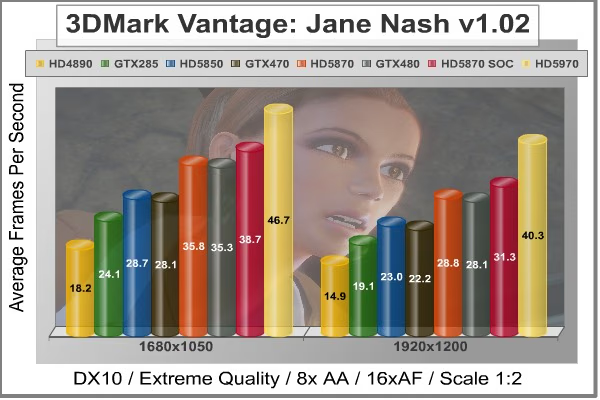
Of the two GPU tests 3DMark Vantage offers, the Jane Nash performance benchmark is slightly less demanding. In a short video scene the special agent escapes a secret lair by water, nearly losing her shirt in the process. Benchmark Reviews tests this DirectX-10 scene at 1680x1050 and 1920x1200 resolutions, and uses Extreme quality settings with 8x anti-aliasing and 16x anisotropic filtering. The 1:2 scale is utilized, and is the highest this test allows. By maximizing the processing levels of this test, the scene creates the highest level of graphical demand possible and sorts the strong from the weak.
Cost Analysis: Jane Nash (1920x1200)
- Radeon HD 4890: $13.42 per FPS
- GeForce GTX 285: $18.33 per FPS
- Radeon HD 5850: $13.48 per FPS
- GeForce GTX 470: $15.77 per FPS
- Radeon HD 5870: $13.54 per FPS
- Gigabyte 5870 SOC: $15.97 per FPS
- GeForce GTX 480: $17.79 per FPS
- Radeon HD 5970: $17.37 per FPS
- GeForce GTX480 SLI: $20.12 per FPS
3DMark Vantage GPU Test: New Calico
New Calico is the second GPU test in the 3DMark Vantage test suite. Of the two GPU tests, New Calico is the most demanding. In a short video scene featuring a galactic battleground, there is a massive display of busy objects across the screen. Benchmark Reviews tests this DirectX-10 scene at 1680x1050 and 1920x1200 resolutions, and uses Extreme quality settings with 8x anti-aliasing and 16x anisotropic filtering. The 1:2 scale is utilized, and is the highest this test allows. Using the highest graphics processing level available allows our test products to separate themselves and stand out (if possible).

Cost Analysis: New Calico (1920x1200)
- Radeon HD 4890: $16.95 per FPS
- GeForce GTX 285: $25.18 per FPS
- Radeon HD 5850: $18.02 per FPS
- GeForce GTX 470: $20.00 per FPS
- Radeon HD 5870: $17.89 per FPS
- Gigabyte 5870 SOC: $21.55 per FPS
- GeForce GTX 480: $22.32 per FPS
- Radeon HD 5970: $20.59 per FPS
- GeForce GTX480 SLI: $23.92 per FPS
Test Summary: If you take 3dMark Vantage at face value, the Gigabyte Radeon HD 5870 Super Over Clock outpaces the NVIDIA GeForce GTX-480. However, none of the next eleven DX10/11 tests in this review corroborate these results. Regardless of validity, the Gigabyte 5870 SOC costs nearly $4 more per FPS than a standard ATI Radeon HD 5870.
| Graphics Card | Radeon HD4890 | GeForce GTX285 | Radeon HD5850 | GeForce GTX470 | Radeon HD5870 | GeForce GTX480 | Radeon HD5970 |
|---|---|---|---|---|---|---|---|
| GPU Cores | 800 | 240 | 1440 | 448 | 1600 | 480 | 3200 (1600 per GPU) |
| Core Clock (MHz) | 850 | 670 | 725 | 608 | 850 | 700 | 725 |
| Shader Clock (MHz) | N/A | 1550 | N/A | 1215 | N/A | 1401 | N/A |
| Memory Clock (MHz) | 975 | 1300 | 1000 | 837 | 1200 | 924 | 1000 |
| Memory Amount | 1024 MB GDDR5 | 1024MB GDDR3 | 1024MB GDDR5 | 1280MB GDDR5 | 1024MB GDDR5 | 1536MB GDDR5 | 2048MB GDDR5 |
| Memory Interface | 256-bit | 512-bit | 256-bit | 320-bit | 256-bit | 384-bit | 512-bit (256-bit per GPU) |
Battlefield: Bad Company 2
The Battlefield franchise has been known to demand a lot from PC graphics hardware. DICE (Digital Illusions CE) has incorporated their Frostbite-1.5 game engine with Destruction-2.0 feature set with Battlefield: Bad Company 2. Battlefield: Bad Company 2 features destructible environments using Frostbit Destruction-2.0, and adds gravitational bullet drop effects for projectiles shot from weapons at a long distance. The Frostbite-1.5 game engine used on Battlefield: Bad Company 2 consists of DirectX-10 primary graphics, with improved performance and softened dynamic shadows added for DirectX-11 users.
At the time Battlefield: Bad Company 2 was published, DICE was also working on the Frostbite-2.0 game engine. This upcoming engine will include native support for DirectX-10.1 and DirectX-11, as well as parallelized processing support for 2-8 parallel threads. This will improve performance for users with an Intel Core-i7 processor. Unfortunately, the Extreme Edition Intel Core i7-980X six-core CPU with twelve threads will not see full utilization.
In our benchmark tests of Battlefield: Bad Company 2, the first three minutes of action in the single-player raft night scene are captured with FRAPS. Relative to the online multiplayer action, these frame rate results are nearly identical to daytime maps with the same video settings.
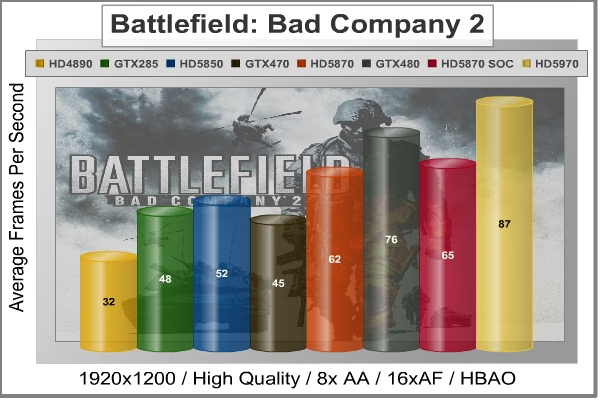
The Frostbite-1.5 game engine in Battlefield: Bad Company 2 appears to equalize our test set of video cards, and despite AMD's sponsorship of the game it still plays well using any brand of graphics card.
Cost Analysis: Battlefield: Bad Company 2
- Radeon HD 4890: $6.25 per FPS
- GeForce GTX 285: $7.29 per FPS
- Radeon HD 5850: $5.96 per FPS
- GeForce GTX 470: $7.78 per FPS
- Radeon HD 5870: $6.29 per FPS
- Gigabyte 5870 SOC: $7.69 per FPS
- GeForce GTX 480: $6.58 per FPS
- Radeon HD 5970: $8.05 per FPS
- GeForce GTX480 SLI: $9.09 per FPS
Test Summary: Battlefield: Bad Company 2's Frostbite-1.5 game engine doesn't appear to give much extra-credit towards the factory overclocked Gigabyte Radeon HD 5870 SOC, and frame rates improve by only 3 FPS. As a direct result to performance, the cost per FPS rises above the NVIDIA GeForce GTX-480, and well ahead of the reference-speed Radeon HD 5870.
| Graphics Card | Radeon HD4890 | GeForce GTX285 | Radeon HD5850 | GeForce GTX470 | Radeon HD5870 | GeForce GTX480 | Radeon HD5970 |
|---|---|---|---|---|---|---|---|
| GPU Cores | 800 | 240 | 1440 | 448 | 1600 | 480 | 3200 (1600 per GPU) |
| Core Clock (MHz) | 850 | 670 | 725 | 608 | 850 | 700 | 725 |
| Shader Clock (MHz) | N/A | 1550 | N/A | 1215 | N/A | 1401 | N/A |
| Memory Clock (MHz) | 975 | 1300 | 1000 | 837 | 1200 | 924 | 1000 |
| Memory Amount | 1024 MB GDDR5 | 1024MB GDDR3 | 1024MB GDDR5 | 1280MB GDDR5 | 1024MB GDDR5 | 1536MB GDDR5 | 2048MB GDDR5 |
| Memory Interface | 256-bit | 512-bit | 256-bit | 320-bit | 256-bit | 384-bit | 512-bit (256-bit per GPU) |
BattleForge Performance
BattleForge is free Massive Multiplayer Online Role Playing Game (MMORPG) developed by EA Phenomic with DirectX-11 graphics capability. Combining strategic cooperative battles, the community of MMO games, and trading card gameplay, BattleForge players are free to put their creatures, spells and buildings into combination's they see fit. These units are represented in the form of digital cards from which you build your own unique army. With minimal resources and a custom tech tree to manage, the gameplay is unbelievably accessible and action-packed.
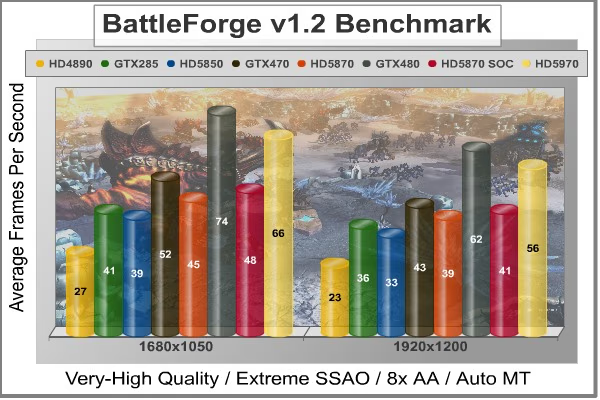
Benchmark Reviews uses the built-in graphics benchmark to measure performance in BattleForge, using Very High quality settings (detail) and 8x anti-aliasing with auto multi-threading enabled. BattleForge is one of the first titles to take advantage of DirectX-11 in Windows 7, and offers a very robust color range throughout the busy battleground landscape. The charted results illustrate how performance measures-up between video cards when Screen Space Ambient Occlusion (SSAO) is enabled.
Cost Analysis: BattleForge (1920x1200)
- Radeon HD 4890: $8.70 per FPS
- GeForce GTX 285: $9.72 per FPS
- Radeon HD 5850: $9.39 per FPS
- GeForce GTX 470: $8.14 per FPS
- Radeon HD 5870: $10.00 per FPS
- Gigabyte 5870 SOC: $12.20 per FPS
- GeForce GTX 480: $8.07 per FPS
- Radeon HD 5970: $12.50 per FPS
- GeForce GTX480 SLI: $9.71 per FPS
Test Summary: With an unbiased appetite for raw DirectX-11 graphics performance BattleForge appears to be ambiguous towards ATI and NVIDIA products, despite sponsorship from AMD. When high-strain SSAO is called into action, Gigabyte's HD5870 SOC adds only 2 FPS over the stock Radeon HD 5870 for a total of 41 FPS at 1920x1200, but is obliterated by the GeForce GTX-480's score of 62 FPS. Making matters worse, the expensive price tag pushes the Gigabyte HD5870 SOC to the top of our cost-per-frame results with $12.20 per FPS, compared to $8.07 for the GTX-480 and $10.00 for the reference HD5870. So far, the improvements have all be extremely small while the added costs have all be high.
| Graphics Card | Radeon HD4890 | GeForce GTX285 | Radeon HD5850 | GeForce GTX470 | Radeon HD5870 | GeForce GTX480 | Radeon HD5970 |
|---|---|---|---|---|---|---|---|
| GPU Cores | 800 | 240 | 1440 | 448 | 1600 | 480 | 3200 (1600 per GPU) |
| Core Clock (MHz) | 850 | 670 | 725 | 608 | 850 | 700 | 725 |
| Shader Clock (MHz) | N/A | 1550 | N/A | 1215 | N/A | 1401 | N/A |
| Memory Clock (MHz) | 975 | 1300 | 1000 | 837 | 1200 | 924 | 1000 |
| Memory Amount | 1024 MB GDDR5 | 1024MB GDDR3 | 1024MB GDDR5 | 1280MB GDDR5 | 1024MB GDDR5 | 1536MB GDDR5 | 2048MB GDDR5 |
| Memory Interface | 256-bit | 512-bit | 256-bit | 320-bit | 256-bit | 384-bit | 512-bit (256-bit per GPU) |
Crysis Warhead Tests
Crysis Warhead is an expansion pack based on the original Crysis video game. Crysis Warhead is based in the future, where an ancient alien spacecraft has been discovered beneath the Earth on an island east of the Philippines. Crysis Warhead uses a refined version of the CryENGINE2 graphics engine. Like Crysis, Warhead uses the Microsoft Direct3D 10 (DirectX-10) API for graphics rendering.
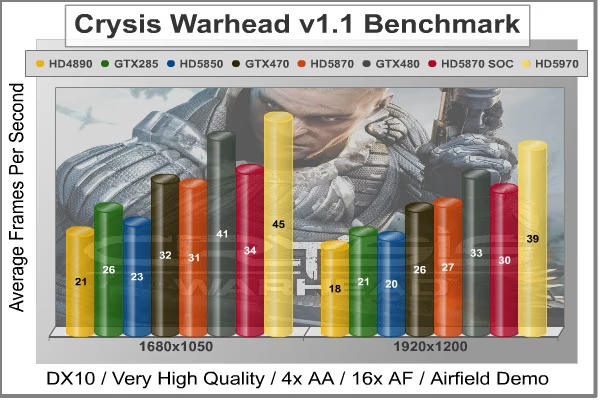
Benchmark Reviews uses the HOC Crysis Warhead benchmark tool to test and measure graphic performance using the Airfield 1 demo scene. This short test places a high amount of stress on a graphics card because of detailed terrain and textures, but also for the test settings used. Using the DirectX-10 test with Very High Quality settings, the Airfield 1 demo scene receives 4x anti-aliasing and 16x anisotropic filtering to create maximum graphic load and separate the products according to their performance.
Using the highest quality DirectX-10 settings with 4x AA and 16x AF, only the most powerful graphics cards are expected to perform well in our Crysis Warhead benchmark tests. DirectX-11 extensions are not supported in Crysis: Warhead, and SSAO is not an available option.
Cost Analysis: Crysis Warhead (1920x1200)
- Radeon HD 4890: $11.11 per FPS
- GeForce GTX 285: $16.67 per FPS
- Radeon HD 5850: $15.50 per FPS
- GeForce GTX 470: $13.46 per FPS
- Radeon HD 5870: $14.44 per FPS
- Gigabyte 5870 SOC: $16.67 per FPS
- GeForce GTX 480: $15.15 per FPS
- Radeon HD 5970: $17.95 per FPS
- GeForce GTX480 SLI: $20 per FPS*
* Possible maximum frame rate limit imposed by either the PC video game or HOC benchmark tool.
Test Summary: The CryENGINE2 graphics engine used in Crysis Warhead responds well to both ATI and NVIDIA products. The Gigabyte Radeon HD 5870 Super Over Clock adds 3 FPS to the stock version, but trails behind the GeForce GTX-480 by the same distance at 1920x1200.
| Graphics Card | Radeon HD4890 | GeForce GTX285 | Radeon HD5850 | GeForce GTX470 | Radeon HD5870 | GeForce GTX480 | Radeon HD5970 |
|---|---|---|---|---|---|---|---|
| GPU Cores | 800 | 240 | 1440 | 448 | 1600 | 480 | 3200 (1600 per GPU) |
| Core Clock (MHz) | 850 | 670 | 725 | 608 | 850 | 700 | 725 |
| Shader Clock (MHz) | N/A | 1550 | N/A | 1215 | N/A | 1401 | N/A |
| Memory Clock (MHz) | 975 | 1300 | 1000 | 837 | 1200 | 924 | 1000 |
| Memory Amount | 1024 MB GDDR5 | 1024MB GDDR3 | 1024MB GDDR5 | 1280MB GDDR5 | 1024MB GDDR5 | 1536MB GDDR5 | 2048MB GDDR5 |
| Memory Interface | 256-bit | 512-bit | 256-bit | 320-bit | 256-bit | 384-bit | 512-bit (256-bit per GPU) |
Far Cry 2 Benchmark
Ubisoft has developed Far Cry 2 as a sequel to the original, but with a very different approach to game play and story line. Far Cry 2 features a vast world built on Ubisoft's new game engine called Dunia, meaning "world", "earth" or "living" in Farci. The setting in Far Cry 2 takes place on a fictional Central African landscape, set to a modern day timeline.
The Dunia engine was built specifically for Far Cry 2, by Ubisoft Montreal development team. It delivers realistic semi-destructible environments, special effects such as dynamic fire propagation and storms, real-time night-and-day sun light and moon light cycles, dynamic music system, and non-scripted enemy A.I actions.
The Dunia game engine takes advantage of multi-core processors as well as multiple processors and supports DirectX 9 as well as DirectX-10. Only 2 or 3 percent of the original CryEngine code is re-used, according to Michiel Verheijdt, Senior Product Manager for Ubisoft Netherlands. Additionally, the engine is less hardware-demanding than CryEngine 2, the engine used in Crysis.
However, it should be noted that Crysis delivers greater character and object texture detail, as well as more destructible elements within the environment. For example; trees breaking into many smaller pieces and buildings breaking down to their component panels. Far Cry 2 also supports the amBX technology from Philips. With the proper hardware, this adds effects like vibrations, ambient colored lights, and fans that generate wind effects.
There is a benchmark tool in the PC version of Far Cry 2, which offers an excellent array of settings for performance testing. Benchmark Reviews used the maximum settings allowed for DirectX-10 tests, with the resolution set to 1920x1200. Performance settings were all set to 'Very High', Render Quality was set to 'Ultra High' overall quality, 8x anti-aliasing was applied, and HDR and Bloom were enabled.
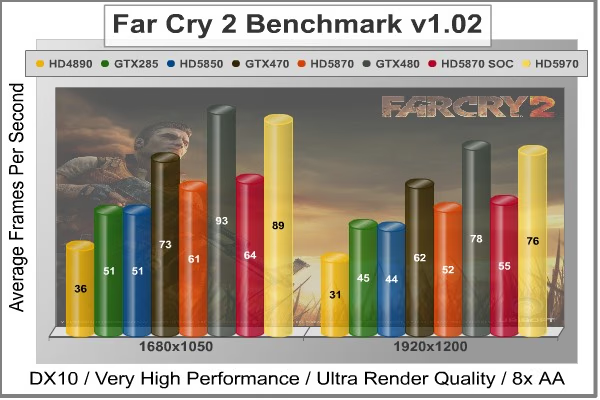
Although the Dunia engine in Far Cry 2 is slightly less demanding than CryEngine 2 engine in Crysis, the strain appears to be extremely close. In Crysis we didn't dare to test AA above 4x, whereas we used 8x AA and 'Ultra High' settings in Far Cry 2. The end effect was a separation between what is capable of maximum settings, and what is not. Using the short 'Ranch Small' time demo (which yields the lowest FPS of the three tests available), we noticed that there are very few products capable of producing playable frame rates with the settings all turned up.
Cost Analysis: Far Cry 2 (1920x1200)
- Radeon HD 4890: $6.45 per FPS
- GeForce GTX 285: $7.78 per FPS
- Radeon HD 5850: $7.05 per FPS
- GeForce GTX 470: $5.65 per FPS
- Radeon HD 5870: $7.50 per FPS
- Gigabyte 5870 SOC: $9.09 per FPS
- GeForce GTX 480: $6.41 per FPS
- Radeon HD 5970: $9.21 per FPS
- GeForce GTX480 SLI: $8.07 per FPS
Test Summary: The Dunia game engine appears preferential to NVIDIA products over ATI, but consistency should count for something because the Gigabyte Radeon HD 5870 SOC has routinely added 3 FPS to the stock version of the same video card. Unfortunately, the NVIDIA GeForce GTX-480 trounces it in both frame rate and cost per FPS.
| Graphics Card | Radeon HD4890 | GeForce GTX285 | Radeon HD5850 | GeForce GTX470 | Radeon HD5870 | GeForce GTX480 | Radeon HD5970 |
|---|---|---|---|---|---|---|---|
| GPU Cores | 800 | 240 | 1440 | 448 | 1600 | 480 | 3200 (1600 per GPU) |
| Core Clock (MHz) | 850 | 670 | 725 | 608 | 850 | 700 | 725 |
| Shader Clock (MHz) | N/A | 1550 | N/A | 1215 | N/A | 1401 | N/A |
| Memory Clock (MHz) | 975 | 1300 | 1000 | 837 | 1200 | 924 | 1000 |
| Memory Amount | 1024 MB GDDR5 | 1024MB GDDR3 | 1024MB GDDR5 | 1280MB GDDR5 | 1024MB GDDR5 | 1536MB GDDR5 | 2048MB GDDR5 |
| Memory Interface | 256-bit | 512-bit | 256-bit | 320-bit | 256-bit | 384-bit | 512-bit (256-bit per GPU) |
Resident Evil 5 Tests
Built upon an advanced version of Capcom's proprietary MT Framework game engine to deliver DirectX-10 graphic detail, Resident Evil 5 offers gamers non-stop action similar to Devil May Cry 4, Lost Planet, and Dead Rising. The MT Framework is an exclusive seventh generation game engine built to be used with games developed for the PlayStation 3 and Xbox 360, and PC ports. MT stands for "Multi-Thread", "Meta Tools" and "Multi-Target". Games using the MT Framework are originally developed on the PC and then ported to the other two console platforms.
On the PC version of Resident Evil 5, both DirectX 9 and DirectX-10 modes are available for Microsoft Windows XP and Vista Operating Systems. Microsoft Windows 7 will play Resident Evil with backwards compatible Direct3D APIs. Resident Evil 5 is branded with the NVIDIA The Way It's Meant to be Played (TWIMTBP) logo, and receives NVIDIA GeForce 3D Vision functionality enhancements.
NVIDIA and Capcom offer the Resident Evil 5 benchmark demo for free download from their website, and Benchmark Reviews encourages visitors to compare their own results to ours. Because the Capcom MT Framework game engine is very well optimized and produces high frame rates, Benchmark Reviews uses the DirectX-10 version of the test at 1920x1200 resolution. Super-High quality settings are configured, with 8x MSAA post processing effects for maximum demand on the GPU. Test scenes from Area #3 and Area #4 require the most graphics processing power, and the results are collected for the chart illustrated below.

Resident Evil 5 has really proved how well the proprietary Capcom MT Framework game engine can look with DirectX-10 effects. The Area 3 and 4 tests are the most graphically demanding from this free downloadable demo benchmark, but the results make it appear that the Area #3 test scene performs better with NVIDIA GeForce products compared to the Area #4 scene that favors ATI Radeon GPUs.
Cost Analysis: Resident Evil 5 (Area 4)
- Radeon HD 4890: $3.50 per FPS
- GeForce GTX 285: $4.32 per FPS
- Radeon HD 5850: $3.97 per FPS
- GeForce GTX 470: $3.61 per FPS
- Radeon HD 5870: $3.98 per FPS
- Gigabyte 5870 SOC: $4.95 per FPS
- GeForce GTX 480: $4.24 per FPS
- Radeon HD 5970: $5.69 per FPS
- GeForce GTX480 SLI: $5.85 per FPS
Test Summary: It's unclear if Resident Evil 5 graphics performance fancies ATI or NVIDIA, especially with two test scenes that alternate favoritism. Although this benchmark tool is distributed directly from NVIDIA, and Forceware drivers likely have optimizations written for the Resident Evil 5 game, there doesn't appear to be any decisive tilt towards GeForce products over ATI Radeon counterparts from within the game itself. Test scene #3 certainly favors NVIDIA products, but in test scene #4 the Radeon video cards appear more competitive. Nevertheless, the Gigabyte HD5870 SOC adds (you guessed it) 3 FPS onto the reference Radeon version, and still trails behind the GeForce GTX-480 by 17 FPS.
| Graphics Card | Radeon HD4890 | GeForce GTX285 | Radeon HD5850 | GeForce GTX470 | Radeon HD5870 | GeForce GTX480 | Radeon HD5970 |
|---|---|---|---|---|---|---|---|
| GPU Cores | 800 | 240 | 1440 | 448 | 1600 | 480 | 3200 (1600 per GPU) |
| Core Clock (MHz) | 850 | 670 | 725 | 608 | 850 | 700 | 725 |
| Shader Clock (MHz) | N/A | 1550 | N/A | 1215 | N/A | 1401 | N/A |
| Memory Clock (MHz) | 975 | 1300 | 1000 | 837 | 1200 | 924 | 1000 |
| Memory Amount | 1024 MB GDDR5 | 1024MB GDDR3 | 1024MB GDDR5 | 1280MB GDDR5 | 1024MB GDDR5 | 1536MB GDDR5 | 2048MB GDDR5 |
| Memory Interface | 256-bit | 512-bit | 256-bit | 320-bit | 256-bit | 384-bit | 512-bit (256-bit per GPU) |
Metro 2033 DX11 Performance
Metro 2033 is an action-oriented video game with a combination of survival horror, and first-person shooter elements. The game is based on the novel Metro 2033 by Russian author Dmitry Glukhovsky. It was developed by 4A Games in Ukraine and released in March 2010 for Microsoft Windows. Metro 2033 uses the 4A game engine, developed by 4A Games. The 4A Engine supports DirectX-9, 10, and 11, along with NVIDIA PhysX and GeForce 3D Vision.
The 4A engine is multi-threaded in such that only PhysX had a dedicated thread, and uses a task-model without any pre-conditioning or pre/post-synchronizing, allowing tasks to be done in parallel. The 4A game engine can utilize a deferred shading pipeline, and uses tessellation for greater performance, and also has HDR (complete with blue shift), real-time reflections, color correction, film grain and noise, and the engine also supports multi-core rendering.
Metro 2033 featured superior volumetric fog, double PhysX precision, object blur, sub-surface scattering for skin shaders, parallax mapping on all surfaces and greater geometric detail with a less aggressive LODs. Using PhysX, the engine uses many features such as destructible environments, and cloth and water simulations, and particles that can be fully affected by environmental factors.

NVIDIA has been diligently working to promote Metro 2033, and for good reason: it is the most demanding PC video game we've ever tested. When their flagship GeForce GTX-480 struggles to produce 27 FPS with DirectX-11 anti-aliasing turned two to its lowest setting, you know that only the strongest graphics processors will generate playable frame rates.
Cost Analysis: Metro 2033
- Radeon HD 5850: $16.32 per FPS
- GeForce GTX 470: $16.67 per FPS
- Radeon HD 5870: $17.73 per FPS
- Gigabyte 5870 SOC: $20.83 per FPS
- GeForce GTX 480: $18.82 per FPS
- Radeon HD 5970: $20.00 per FPS
- GeForce GTX480 SLI: $21.74 per FPS
Test Summary: There's no way to ignore the graphical demands of Metro 2033, and only the most powerful GPUs will deliver a decent visual experience. The graphical demands make our selection of DX11 video cards appear flat, especially when two combined GTX-480's only produce 46 FPS. For what it's worth, the Gigabyte Radeon HD5870 SOC trailed behind the GeForce GTX-480 by a mere 3 FPS - which is also the same difference it leads the stock Radeon HD 5870. Cost-per-FPS results all ran high, but the Gigabyte HD5870 SOC was more expensive than every other card in our test group (except for the SLI set).
| Graphics Card | Radeon HD4890 | GeForce GTX285 | Radeon HD5850 | GeForce GTX470 | Radeon HD5870 | GeForce GTX480 | Radeon HD5970 |
|---|---|---|---|---|---|---|---|
| GPU Cores | 800 | 240 | 1440 | 448 | 1600 | 480 | 3200 (1600 per GPU) |
| Core Clock (MHz) | 850 | 670 | 725 | 608 | 850 | 700 | 725 |
| Shader Clock (MHz) | N/A | 1550 | N/A | 1215 | N/A | 1401 | N/A |
| Memory Clock (MHz) | 975 | 1300 | 1000 | 837 | 1200 | 924 | 1000 |
| Memory Amount | 1024 MB GDDR5 | 1024MB GDDR3 | 1024MB GDDR5 | 1280MB GDDR5 | 1024MB GDDR5 | 1536MB GDDR5 | 2048MB GDDR5 |
| Memory Interface | 256-bit | 512-bit | 256-bit | 320-bit | 256-bit | 384-bit | 512-bit (256-bit per GPU) |
Unigine Heaven Benchmark
The Unigine "Heaven 2.0" benchmark is a free publicly available tool that grants the power to unleash the graphics capabilities in DirectX-11 for Windows 7 or updated Vista Operating Systems. It reveals the enchanting magic of floating islands with a tiny village hidden in the cloudy skies. With the interactive mode, emerging experience of exploring the intricate world is within reach. Through its advanced renderer, Unigine is one of the first to set precedence in showcasing the art assets with tessellation, bringing compelling visual finesse, utilizing the technology to the full extend and exhibiting the possibilities of enriching 3D gaming.
The distinguishing feature in the Unigine Heaven benchmark is a hardware tessellation that is a scalable technology aimed for automatic subdivision of polygons into smaller and finer pieces, so that developers can gain a more detailed look of their games almost free of charge in terms of performance. Thanks to this procedure, the elaboration of the rendered image finally approaches the boundary of veridical visual perception: the virtual reality transcends conjured by your hand. The "Heaven" benchmark excels at providing the following key features:
-
Native support of OpenGL, DirectX 9, DirectX-10 and DirectX-11
-
Comprehensive use of tessellation technology
-
Advanced SSAO (screen-space ambient occlusion)
-
Volumetric cumulonimbus clouds generated by a physically accurate algorithm
-
Dynamic simulation of changing environment with high physical fidelity
-
Interactive experience with fly/walk-through modes
-
ATI Eyefinity support

Although Heaven-2.0 was recently released and used for our DirectX-11 tests, the benchmark results were extremely close to those obtained with Heaven-1.0 testing. Since only DX11-compliant video cards will properly test on the Heaven benchmark, only those products that meet the requirements have been included.
Cost Analysis: Unigine Heaven
- Radeon HD 5850: $12.92 per FPS
- GeForce GTX 470: $11.67 per FPS
- Radeon HD 5870: $13.45 per FPS
- Gigabyte 5870 SOC: $16.13 per FPS
- GeForce GTX 480: $13.51 per FPS
- Radeon HD 5970: $14.89 per FPS
- GeForce GTX480 SLI: $14.71 per FPS
Test Summary: Our test results with the Unigine Heaven benchmark tool appear to deliver fair comparisons of DirectX-11 graphics cards. Like clockwork, the Gigabyte Radeon HD5870 SOC tacks on another 3 FPS over the reference design... which is promptly outperformed by the NVIDIA GeForce GTX-480 (and nearly the GTX-470 as well). Reviewers like to say "Nobody plays a benchmark", but it seems evident that we can expect to see great things come from a tool this detailed. For now though, those details only come by way of DirectX-11 video cards. It's worth noting that if there was a cost involved with Unigine's Heaven, the HD5870 SOC would cost more per frame than every other DirectX-11 video card.
| Graphics Card | Radeon HD4890 | GeForce GTX285 | Radeon HD5850 | GeForce GTX470 | Radeon HD5870 | GeForce GTX480 | Radeon HD5970 |
|---|---|---|---|---|---|---|---|
| GPU Cores | 800 | 240 | 1440 | 448 | 1600 | 480 | 3200 (1600 per GPU) |
| Core Clock (MHz) | 850 | 670 | 725 | 608 | 850 | 700 | 725 |
| Shader Clock (MHz) | N/A | 1550 | N/A | 1215 | N/A | 1401 | N/A |
| Memory Clock (MHz) | 975 | 1300 | 1000 | 837 | 1200 | 924 | 1000 |
| Memory Amount | 1024 MB GDDR5 | 1024MB GDDR3 | 1024MB GDDR5 | 1280MB GDDR5 | 1024MB GDDR5 | 1536MB GDDR5 | 2048MB GDDR5 |
| Memory Interface | 256-bit | 512-bit | 256-bit | 320-bit | 256-bit | 384-bit | 512-bit (256-bit per GPU) |
VGA Temperature Comparison
Benchmark tests are always nice, so long as you care about comparing one product to another. But when you're an overclocker, gamer, or merely a PC hardware enthusiast who likes to tweak things on occasion, there's no substitute for good information. Benchmark Reviews has a very popular guide written on Overclocking Video Cards, which gives detailed instruction on how to tweak a graphics cards for better performance. Of course, not every video card has overclocking head room. Some products run so hot that they can't suffer any higher temperatures than they already do. This is why we measure the operating temperature of the video card products we test.
To begin my testing, I use GPU-Z to measure the temperature at idle as reported by the GPU. Next I use FurMark's "Torture Test" to generate maximum thermal load and record GPU temperatures at high-power 3D mode. The ambient room temperature remained at a stable 20°C throughout testing, while the inner-case temperature hovered around 37°C.
FurMark does two things extremely well: drive the thermal output of any graphics processor higher than applications of video games realistically could, and it does so with consistency every time. Furmark works great for testing the stability of a GPU as the temperature rises to the highest possible output. The temperatures discussed below are absolute maximum values, and not representative of real-world performance.
Gigabyte HD5870 SOC
Whenever a manufacturer replaces the stock thermal management design with their own custom engineering, it's reasonable to expect cooling performance to improve as a result. Considering the factory-overclocked condition of the Gigabyte Radeon HD5870 SOC, the average enthusiast might consider the proprietary cooling unit to be a necessity for maintaining reasonable temperatures with the added voltage and heat. This is true, but in many ways the dual 80mm cooling fans on a large aluminum finsink surround four 6mm copper heatpipe rods delivers less impressive results than first expected.
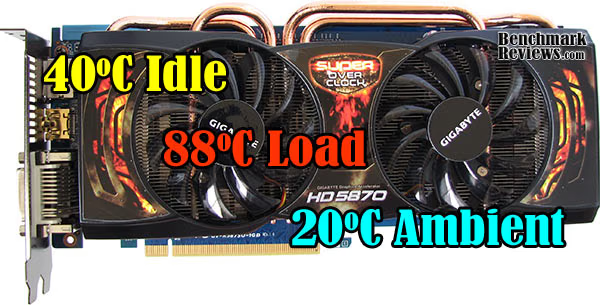
To begin, let's identify that the Gigabyte HD5870 Super Over Clock video card competes on a price level with NVIDIA's GeForce GTX-480, and on a FPS performance level with the GeForce GTX-470. Keeping this in mind, we'll compare temperature output between the three new DirectX-11 graphics solutions. Housed in a mid-tower computer case with no additional cooling airflow, the Gigabyte HD5870 SOC video card produced a lukewarm 40°C in idle 2D mode and increased to 88°C in sustained 100% mode using FurMark's torture test.
Gigabyte Radeon HD5870 SOC Video Card Temperatures
Best-Case Scenario
Traditional tower-style computer cases position internal hardware so that heat is expelled out through the back (rear) of the unit. While this design is better than nothing at all, there's still a fundamental problem: heat rises. Using the transverse mount design featured on the SilverStone Raven-2 chassis, Benchmark Reviews re-tested the Gigabyte Radeon HD5870 SOC video card to determine the 'best-case' scenario.
Sitting idle at the Windows 7 desktop with a 20°C ambient room temperature, the Gigabyte Radeon HD5870 SOC rested at 38°C (nearly matching the inner-case temperature). Pushed to abnormally high levels using the FurMark torture test, the HD5870 SOC operated at 80°C with a very quiet cooling fan. Using the Gigabyte F3 video card BIOS, the well-designed Raven-2 computer case with added cooling features has helped to make an even bigger difference.
GeForce GTX-470
Sharing similar graphics performance characteristics, the retail GeForce GTX-470 video card produced temperatures of 40°C in idle 2D mode and increased to 88°C in sustained 100% mode using FurMark's torture test... identical to the Gigabyte Radeon HD5870 SOC.
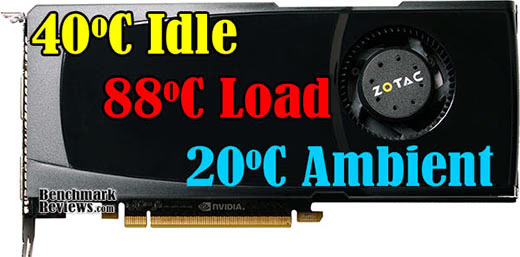
Zotac GeForce GTX 470 Video Card Temperatures
GeForce GTX-480
While the GeForce GTX-480 is a much higher-performing video card, it shares the same price point as Gigabyte's Radeon HD5870 SOC. Compared to the GeForce GTX-480 retail kit, temperatures are extremely close. The image below illustrates temperatures on the GTX-480 using FurMark to produce maximum load:

ZOTAC GeForce GTX480 Video Card Temperatures
Many new graphics cards from NVIDIA and ATI will expel heated air out through exhaust vents, which does not increase the internal case temperature. The Gigabyte Radeon HD5870 SOC does not. Our test system is an open-air chassis that allows the video card to depend on its own cooling solution for proper thermal management. Most gamers and PC hardware enthusiasts who use an aftermarket computer case with intake and exhaust fans will usually create a directional airflow current and lower internal temperatures a few degrees below the measurements we've recorded.
VGA Power Consumption
Life is not as affordable as it used to be, and items such as gasoline, natural gas, and electricity all top the list of resources which have exploded in price over the past few years. Add to this the limit of non-renewable resources compared to current demands, and you can see that the prices are only going to get worse. Planet Earth is needs our help, and needs it badly. With forests becoming barren of vegetation and snow capped poles quickly turning brown, the technology industry has a new attitude towards turning "green". I'll spare you the powerful marketing hype that gets sent from various manufacturers every day, and get right to the point: your computer hasn't been doing much to help save energy... at least up until now.
For power consumption tests, Benchmark Reviews utilizes the 80-PLUS GOLD certified OCZ Z-Series Gold 850W PSU, model OCZZ850. This power supply unit has been tested to provide over 90% typical efficiency by Chroma System Solutions. To measure isolated video card power consumption, Benchmark Reviews uses the Kill-A-Watt EZ (model P4460) power meter made by P3 International.
A baseline test is taken without a video card installed inside our test computer system, which is allowed to boot into Windows-7 and rest idle at the login screen before power consumption is recorded. Once the baseline reading has been taken, the graphics card is installed and the system is again booted into Windows and left idle at the login screen. Our final loaded power consumption reading is taken with the video card running a stress test using FurMark. Below is a chart with the isolated video card power consumption (not system total) displayed in Watts for each specified test product:
VGA Product Description(sorted by combined total power) |
Idle Power |
Loaded Power |
|---|---|---|
NVIDIA GeForce GTX 480 SLI Set |
82 W |
655 W |
NVIDIA GeForce GTX 590 Reference Design |
53 W |
396 W |
ATI Radeon HD 4870 X2 Reference Design |
100 W |
320 W |
AMD Radeon HD 6990 Reference Design |
46 W |
350 W |
NVIDIA GeForce GTX 295 Reference Design |
74 W |
302 W |
ASUS GeForce GTX 480 Reference Design |
39 W |
315 W |
ATI Radeon HD 5970 Reference Design |
48 W |
299 W |
NVIDIA GeForce GTX 690 Reference Design |
25 W |
321 W |
ATI Radeon HD 4850 CrossFireX Set |
123 W |
210 W |
ATI Radeon HD 4890 Reference Design |
65 W |
268 W |
AMD Radeon HD 7970 Reference Design |
21 W |
311 W |
NVIDIA GeForce GTX 470 Reference Design |
42 W |
278 W |
NVIDIA GeForce GTX 580 Reference Design |
31 W |
246 W |
NVIDIA GeForce GTX 570 Reference Design |
31 W |
241 W |
ATI Radeon HD 5870 Reference Design |
25 W |
240 W |
ATI Radeon HD 6970 Reference Design |
24 W |
233 W |
NVIDIA GeForce GTX 465 Reference Design |
36 W |
219 W |
NVIDIA GeForce GTX 680 Reference Design |
14 W |
243 W |
Sapphire Radeon HD 4850 X2 11139-00-40R |
73 W |
180 W |
NVIDIA GeForce 9800 GX2 Reference Design |
85 W |
186 W |
NVIDIA GeForce GTX 780 Reference Design |
10 W |
275 W |
NVIDIA GeForce GTX 770 Reference Design |
9 W |
256 W |
NVIDIA GeForce GTX 280 Reference Design |
35 W |
225 W |
NVIDIA GeForce GTX 260 (216) Reference Design |
42 W |
203 W |
ATI Radeon HD 4870 Reference Design |
58 W |
166 W |
NVIDIA GeForce GTX 560 Ti Reference Design |
17 W |
199 W |
NVIDIA GeForce GTX 460 Reference Design |
18 W |
167 W |
AMD Radeon HD 6870 Reference Design |
20 W |
162 W |
NVIDIA GeForce GTX 670 Reference Design |
14 W |
167 W |
ATI Radeon HD 5850 Reference Design |
24 W |
157 W |
NVIDIA GeForce GTX 650 Ti BOOST Reference Design |
8 W |
164 W |
AMD Radeon HD 6850 Reference Design |
20 W |
139 W |
NVIDIA GeForce 8800 GT Reference Design |
31 W |
133 W |
ATI Radeon HD 4770 RV740 GDDR5 Reference Design |
37 W |
120 W |
ATI Radeon HD 5770 Reference Design |
16 W |
122 W |
NVIDIA GeForce GTS 450 Reference Design |
22 W |
115 W |
NVIDIA GeForce GTX 650 Ti Reference Design |
12 W |
112 W |
ATI Radeon HD 4670 Reference Design |
9 W |
70 W |
As a note of interest, the added premium on the Gigabyte Radeon HD 5870 Super Over Clock is partially due to NEC-Tokin Proadlizer components, which Gigabyte asserts to help maintain power efficiency. These thin film capacitors really did cure high-frequency noise problems, such as video card whine, but power consumption was among the highest we've seen from any Radeon HD 5870.
The Gigabyte HD5870 SOC requires two six-pin PCI-E power connections to work properly. Resting at idle, the power draw consumed 48 watts of electricity. Putting this into perspective: the reference ATI Radeon HD 5870 consumed only 25W at idle, and the NVIDIA GeForce GTX-470 consumed 42W. Already matching the GeForce GTX-480 in price, the Gigabyte HD5870 SOC now also matches idle power consumption as well.
Once 3D-applications begin to demand power from the GPU, electrical power consumption really begins to climb. Measured at full 3D 'torture' load, the Gigabyte HD5870 SOC consumed 265 watts. This is slightly better than the GeForce GTX-470's loaded consumption of 278 watts, but also higher than the reference Radeon HD 5870 that used only 240W. Thankfully, the Gigabyte HD5870 SOC doesn't come anywhere near the 355W demanded at load by the GeForce GTX-480.
Editor's Opinion: Radeon 5000
As a child video games such as Street Fighter, Double Dragon, and Rampage down at the local arcade cost 25¢ to play. Years later arcades would require two quarters per play, and much of my early teenage earnings went towards their commercial rent. Well into my thirties, I'm old enough to have fathered children that would be repeating this cycle, but these days arcades have been replaced with PC's and console gaming systems. There was big money in arcade video games back when I was young, but the more things change the more they stay the same. These days, video games cost between $30~60 each, and PC video cards can cost as much as entire gaming console.
AMD originally launched the Radeon 5870 as their first assault on their multi-monitor ATI Eyefinity Technology feature, using native HDMI 1.3 output paired with DisplayPort connectivity. The Cypress GPU features the latest ATI Stream Technology, which is designed to utilize DirectCompute 5.0 and OpenCL code. These new features improve all graphical aspects of the end-user experience, such as faster multimedia transcode times and better GPGPU compute performance. AMD has already introduced the ATI Stream SDK v2.1 to help positions developers with AMD Fusion APUs, and the recent Open Physics Initiative with Pixelux promises to offer physics middleware built around OpenCL and Bullet Physics.

Given that NVIDIA has finally answered back to ATI's early jump on DirectX-11 graphics with their Fermi GPU, AMD is left to decide just how long they'll ride this out. As it stands now the GeForce GTX-480 is the industry's most powerful single-GPU video card, and it comes with a premium price tag. That being the case, ATI has been afforded the opportunity to actually raise prices on their high-end Radeon HD5850 and HD5870 products to profit from their competition with NVIDIA. ATI has already shown its hand, so to speak, because the Cypress GPU architecture isn't getting any better over time. The world has yet to see what the full 512 cores of a full-blown Fermi GPU can accomplish.
AMD may not have launched with more than a few hundred full-fledged 40nm ATI Cypress-XT GPUs having all eighty texture units, but they made it to market first and created a strong consumer demand for a limited supply of parts. NVIDIA decided on an alternate route, and binned their GPU yields based on streaming multiprocessors. The GF100 GPU is designed to have 16 streaming multiprocessors and 512 discrete cores, yet one SMP is disabled on the GeForce GTX 480 and two SMPs are disabled on the GTX 470. It would seem that a full 16-SMP 512-core version could receive the GeForce "GTX-490" name, and a price tag around $650... and there's still room for a dual-GPU graphics card in the family.
Industry Tactics
How much video frame buffer do your favorite PC video games require? There are countless articles that have discussed this for the better part of two decades, and the answer is always changing. Ultimately you'll only need as much vRAM as the game is written to utilize, and this depends on the type of game and style of 3D world. For example, Age of Conan has a very distant field of depth it can draw, so long as the hardware offers the capacity. On the other hand, many first person shooters such as Call of Duty and Battlefield only draw as much depth as necessary, as to preserve performance and reduce overhead. Either way, today's video games will scale with the frame buffer they're given.
The truth is that graphics card partners are using this opportunity as a marketing tool. When the ATI Radeon HD 5870 series first launched with 1GB of GDDR5 vRAM, partners focused on the $350 price point. Nearly eight months later, we're seeing the same exact products selling for $50 more, or fitted with higher-density GDDR5 and wearing 2GB of vRAM with an additional $100 added to the price. Complicating matters, overclocked versions of the Radeon HD 5870 have moved the price point between $500 and $520. The justification? ATI suggests Eyefinity multi-monitor capability, but most partners have cited the added overclocking headroom through GPU binning and higher-end electronic components, or more video memory than the NVIDIA-built alternative.
At the end of the day, consumers just aren't buying up $500 video cards as quickly as they're offered. Overclocked or otherwise, gamers simply want the most value from their money to buy them the best video game performance. There's no denying that a special market exists for brand-loyal buyers, but at some point the current business model needs to adapt to a hardware market that concentrates on top-value, and not necessarily top performance. This is what made the Radeon HD 5770 so popular, and to a lesser extent the Radeon HD 5850; yet manufacturers aren't spending the same amount of time to offer a more affordable video card. Instead, it's all about selling bigger and better product with premium price tag to maximize margins. But how long can a shrinking desktop-PC market exist with these industry tactics? In my professional opinion, it's of greater benefit to the PC hardware industry to sell a million products at an affordable price than a thousand at a premium.
Gigabyte HD5870 SOC Conclusion
Although the rating and final score mentioned in this conclusion are made to be as objective as possible, please be advised that every author perceives these factors differently at various points in time. While we each do our best to ensure that all aspects of the product are considered, there are often times unforeseen market conditions and manufacturer changes which occur after publication that could render our rating obsolete. Please do not base any purchase solely on our conclusion, as it represents our product rating for the sample received which may differ from retail versions. Benchmark Reviews begins our conclusion with a short summary for each of the areas that we rate.
Our performance rating considers how effective the Gigabyte Radeon HD 5870 SOC DirectX-11 video card performs against competing products from both ATI and NVIDIA. Overall, the Gigabyte HD5870 SOC added approximately 3-FPS to video games played at 1920x1200 when compared to the stock reference version. Using Gigabyte's OC Guru software, the HD5870 SOC stretched the hardware even farther to produce 1000MHz GPU with 1300MHz GDDR5, but most results remained the same or increased only by a single frame per second. In our comparison tests the Gigabyte HD5870 SOC performed slightly ahead of NVIDIA's GeForce GTX-470, with occasional results swinging wide towards one card or another. The Gigabyte HD5870 SOC produced a tremendous lead over the GeForce GTX-470 in Battlefield: Bad Company 2, yet succumbs to the GTX-470 in BattleForge and Far Cry 2.
There are certain features in the custom Gigabyte Super Over Clock design that I've learned to accept, and others that I'd love to see changed. The dual 80mm cooling fans certainly look nicer than a single blower-fan, and they operate with slightly less noise, but the large aluminum finsink didn't seem to have the same 'best-in-class' feel that other components on this video card offered. The entire heatsink and shroud cover are held to the GPU by only four screws, and even when they're at their tightest, there's a but of wobble (sorry for all the homophones). Overall the Gigabyte HD5870 SOC is a great looking product, but it just doesn't command the attention a ultra-premium graphics card should. While the graphics card doesn't need to look exciting in order to get the job done, there's a lot of competition that will win over buyers with added product presentation.
Designed from ATI's fastest Radeon HD 5870 graphics card, Gigabyte has engineered an exceptionally improved design that extends the electronic durability for this product. In addition to Gigabyte Ultra Durable VGA, which features a 2oz printed circuit board, the industry-unique Proadlizer film capacitors have cured the high-pitch whine present on other video cards. Japanese manufactured SMD solid state capacitors which contain a solid organic polymer and lower equivalent series resistance (ESR), are implemented throughout this board and will likely outlast the useful life of the product. Several ferrite core chokes help to minimize electromagnetic (and radio) interference signal noise and create a cleaner electrical circuit. Also, a lower Resistance from Drain to Source rDS (ON) MOSFET array allows for transitional power steps.
Overclocking the Gigabyte Radeon HD 5870 SOC may seem like overkill to an already factory-overclocked product, but it's entirely possible. Taken from 850 to 950MHz for this model, the Cypress-XT GPU was able to also reach 1000MHz using Gigabyte's bundled OC Guru software. The GDDR5 memory was already factory overclocked from 1200 to 1250MHz, but also achieved 1300MHz using OC Guru. While these settings can be permanently written to the video card BIOS through a firmware update, it's best to allow the HD5870 SOC to retain the factory overclock and for software to manage any additional overclock so that a simple computer restart will restore functionality.
As of May 2010, NewEgg sells the Gigabyte GV-R587SO-1GD model for $499.99. Defining product value means something different to everyone. Some readers take noise, heat, and power consumption into consideration, while others are only concerned with FPS performance. With regard to value, there are several ways to look at the Gigabyte HD5870 SOC and compare it to the closest rivals: either the stock-speed $349.99 Radeon HD 5870, the $350 GeForce GTX-470, or the similarly priced $500 GeForce GTX-480. Here's a breakdown of the average USD cost per FPS recorded for nine of the tests conducted in this article:
- Radeon HD 5850: $11.40 per FPS
- GeForce GTX 470: $11.42 per FPS
- Radeon HD 5870: $11.65 per FPS
- Gigabyte 5870 SOC: $13.90 per FPS
- GeForce GTX 480: $12.54 per FPS
- Radeon HD 5970: $14.03 per FPS
At this price point, Gigabyte's Radeon HD 5870 SOC video card costs as much as NVIDIA's GeForce GTX-480 (Gigabyte GV-N480D5-15I-B). In terms of product price to FPS performance, the Gigabyte 5870 SOC is one of the most expensive DirectX-11 video cards available, and is completely out of its class in terms of performance value. In every video game benchmark test conducted the Gigabyte HD5870 Super Over Clock was outperformed by the GTX-480, which leaves very little room for competitive value. Alternatively, the Gigabyte GeForce GTX-470 delivers the same game performance for $150 less.
To summarize my thoughts on the Gigabyte Radeon HD 5870 Super Over Clock graphics card, it would be fair to say that I think it's a tremendously-built video card with plenty of enthusiast perk, but the price point is too high and it lacks any bundled incentives such as full-version DirectX-11 video games. The operating noise is very minimal under load, which is important to me as an alert gamer - but it consumes more power than any other Radeon HD 5870 we've tested and idle power draw is identical to NVIDIA's well-admonished GeForce GTX-480. It's unlikely that I would ever purchase the Gigabyte HD5870 SOC at its current $500 price point, but given a sizable rebate or price reduction, and anything's possible.
Pros:
+ Very quiet fans under heavily-loaded operation
+ 1600 GPU cores at 950 MHz
+ Great performance for high-end games
+ Outperforms stock Radeon HD 5870 versions
+ Adds DisplayPort monitor interface
+ Native HDMI 1.3b uncompressed audio and video output
+ Eyefinity Technology through DisplayPort and DVI (x2)
+ 1080p HDMI Audio and Video supported for HDCP output
+ Supports CrossFireX functionality
Cons:
- Overpriced premium-level product
- Consumes 38W at idle and 269W under full load
- Heated air is exhausted back into case
- Lacks free bundled DX11 video game
Ratings:
- Performance: 9.25
- Appearance: 9.25
- Construction: 9.50
- Functionality: 9.00
- Value: 5.00
Final Score: 8.40 out of 10.
Benchmark Reviews encourages you to leave comments (below), or ask questions and join the discussion in our Forum.
Reader comments from the original article
2 comments were posted before commenting closed. They are preserved as written. Original avatars no longer resolve and are shown as a placeholder.
mmmm Ignacio Permalink:
In my country the GTX 480 is 250 dollars more expensive than the ATI 5870... mmm... the 470 is at the same price just 4 dollars more expensive than the ati 5870... I think your review is a little biased...
sorry Ignacio Permalink:
Sorry, now I read the entire article... you are so right! The industry is always pushing things farther than they should. I also have the Radeon 5770 and is so fresh, Vapor-X version :)... I didn'tknow much about VGA's but I think I was lucky getting that exact card. Nice review and sorry again.