
SilverStone SST-TS01B RFID External Drive Kit
SilverStone TS01B RFID
External HDD Enclosures are plentiful and cheap these days. It's tough for a manufacturer to differentiate its products in the marketplace, and the competition on price is never-ending. Silverstone Technology has introduced a new product that is completely unique in the market, with a security system that you won't see anywhere else. Instead of relying on passwords to allow access to the encrypted data on the HDD, the SilverStone SST-TS01B uses a small RFID "Key" to identify an authorized user. This is not new technology, it's in commercial use in other markets, but it's the first time I've seen it used to unlock an encrypted HDD.
Security is a tough application space, in that absolute security always gets compromised in order to achieve real-world functionality. Is a 4 digit PIN absolutely secure...heck no? How about your typical 8 character password? Better, but not really secure. OK, add in two upper case letters, two lower case, two numbers and one special character....feel more secure? Now change it every 30, 60, or 90 days and don't repeat any previous passwords. Don't write any of them down or store them in a file. Don't use any words that are found in a college dictionary, they're not allowed; and yes, the sign-on software checks you. Now the coup ‘de grace: repeat the above process for all 27 applications you need to access in a typical work week. Welcome to my world; neither my company nor the Federal Agency I support has instituted a secure single-sign-on application for the majority of the workforce. Now, do you see why I am so excited about this product? It's easy to build 128-bit encryption into this type of system because you don't have to remember the Password from Hell; the plastic RF Key remembers it for you.

Benchmark Reviews has looked at some HDD enclosures in the past and they have all done what they were intended to do, but in my mind, there was something missing. None of them really stood out, in terms of features or performance. None of them said, "BUY ME" in no uncertain terms. This one does. Let's see how it performs on the bench and in daily use.
About the company: SilverStone Technology

Founded in 2003, SilverStone is an established leader in its field, with an elite team of engineers; we started our quest of providing products that create inspirations. We have since expanded the lines of products as well as types of products we produce, giving our customers a wide selection of choices.
With distribution centers in different areas of the globe, SilverStone products can be seen all over the world, not just for computer users but also for home entertainment use. Providing leisure with integration of advanced technologies that is functional and making them enjoyable to use.
Here at SilverStone Technology, we continue to pride ourselves in providing the highest level of standards in designing and manufacturing computer enclosures, power supplies, and accessories. Our pursuit for the first class aesthetic appeal is relentless; our teams of devoted engineers are constantly searching for the best technologies that suit end-users with different needs and will make our products as technologically sound as they are beautiful.
If you have any doubts about SilverStone Technology's ability to stay on the leading edge of technology, take a look at just two of the 2008 Milestones listed on their website:
-
January - SilverStone NVIDIA ESA Certified Chassis, Temjin J10-ESA announced
-
July - SilverStone announced ZM1200 & ZU1200 to support GTX 280 in 3-way SLI
Treasure Series
Integrated with RFID encryption technology, SilverStone created an incredible mobile storage product, the Treasure TS01B. Utilizing a unique encryption function, the TS01B not only ensures high security of your files with convenient accessing method but also support 2.5" high capability SATA hard drive. It connects to the PC via USB 2.0 high-speed interface which enables data transfer with maximum compatibility and stability, making TS01B the best choice for taking important data on the go.
Features:
-
RFID hard drive encryption includes two RFID sensor keys.
-
No additional software installation needed for accessing data.
-
Slim and light portable aluminum enclosure.
-
Support 2.5" SATA hard drive.
-
Plug and Play & Hot-swappable connection.
-
Includes High quality leather case.
-
Maximum compatibility with USB2.0 (480Mbits)
Minimum System Requirements
-
Computer with USB 2.0 or 1.1 interface
-
PC: Intel Pentium 233MHz-compatible processor or greater, minimum 32MB RAM
-
Windows 2000/XP, and Windows Vista
-
RFID function not supported in Windows 98SE/Windows ME and previous version
-
Mac: G3 processor or greater
-
Mac OS 9.x (Apple USB support 1.3.5 and greater) and Mac OS 10.1, 10.2, 10.3, and 10.4
SST-TS01B Specifications
Model No.: SST-ST01B(Black)
Enclosure material: Aluminum
Color: Black
Power requirement: 5Vdc
Drive size support: 2.5" Hard Disk
Drive interface support: SATA Hard Disk
Enclosure interface: USB 2.0 (480Mbits) Interface
Operating systems: Windows 2000, XP, Vista, Mac OS and Linux
Chipset: INNMAX IM7206
Net Weight: 85g
Dimension: 131.2(L)×81.7(W)×14.1(H)mm
Package Includes:
-
TS01B External Hard Drive Kit
-
USB 2.0 cable
-
Screws
-
Quick User Guide
-
RFID key x 2
-
Leather case for TS01B
Closer Look: SilverStone TS01B
The SilverStone TS01B is a very slim, attractive enclosure, measuring just 14mm thick. The majority of the enclosure is made from an aluminum extrusion with black anodizing on a fine grained finish. The two end caps are molded plastic parts with a good color match to the anodizing, but the matte finish doesn't match the grained texture of the aluminum. The silk-screened lettering and logos are crisp, bright white. All in all, it has a classic functional appearance rather than a highly stylized one. It's attractive, as I said, but you can tell that the engineers were left to do the design on their own. I'm not complaining; as a mechanical engineer, I'd rather see the money spent on my own profession. As we'll see later, there are some benefits to this approach.

The sides of the enclosure, as part of the aluminum extrusion are ridged, with small ridges nested between two larger ridges that flow from the chamfered edges. Once again, form followed function in this design, on a couple different levels. The larger ridges, with a 6mm space between them, make it very easy to pick up the TS01B from a flat surface. Some of the smoother (bar of soap) designs on the market are difficult to get a good purchase on. You have to wrap your hand around them to feel comfortable when carrying them around. That might work with the tiny 1.8" drives, but a 2.5" drive isn't something that nestles in your palm. So, kudos to SilverStone for paying attention to Human Factors Engineering in a product that's meant to be handled. On a more technical level, the shape of the edges follows good design practice for the extrusion process. The result is fewer manufacturing defects and a flatter surface on the large thin sections. I'm sure the extrusion supplier had a lot to do with this, but at least SilverStone didn't demand a shape that was difficult to produce.
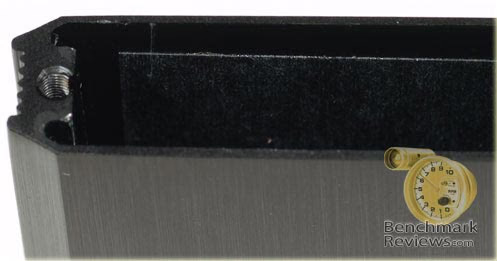
The two Phillips head screws holding the end caps on are M2.5 x 0.45, which sounds small, but actually they are much bigger than the ones I have encountered on other portable HDD enclosures. They also have true machine screw threads and are not the self-tapping variety. They screw into real tapped threads in the aluminum body of the enclosure, engaging at least ten threads. I belabor this fact because so many consumer products these days opt for the absolute cheapest fastening hardware, and if the sun and the moon don't align with Jupiter while you are putting it together for the third time, at least one of them will render itself useless despite your best efforts. I know....most normal people only put something together once and then they let it be. But we're tweakers, optimizers, perfectionists who will reinstall the motherboard three times, in a crowded PC case, just to change the cable routing. Don't deny it, just accept your fate, and be happy when you find a product that can be reassembled 20 times without damaging the hardware.

All of the electronics are mounted inside one of the plastic end caps, all standard ultra-miniature surface mount components. The only thing that looks out of place is the tall copper coil wound with fine gauge wire. That's the magnetic coupling device that interacts with a slightly smaller coil inside the RFID Keys and through the wonder of inductive coupling, exchanges messages back and forth to identify you as the rightful owner of the device. It's not as cool as the micro coils that are printed on tiny plastic strips and sewn into the seams of your underwear, but it's fast and robust, and the overall design optimizes the combined size, cost, and power requirements for both halves of the RF circuit. The PC board snaps into the end cap, where it stays put, unless you want to take it out like this.

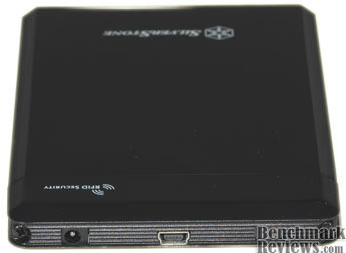
The power connector, Mini-B USB connector and LED indicator all line up on one end, and are recessed a bit, between the two larger ridges mentioned earlier. The screw heads also fit within large recesses, so there are no sharp, exposed edges. Definitely something you could carry in your shirt pocket without worrying about damaging the fabric.
SilverStone TS01B Details
Do we have to talk about the leather case? I dislike most any case for small personal objects that are meant to be carried around. I don't want the extra bulk; what was a 14mm thick product is now a 26mm thick product. It doesn't fit conveniently in my pocket anymore, it bulges out, and I will NOT wear it on my belt. I would rather have a few scuffs and scratches on the product, than be burdened with a case. The case gets beat up, right, so you're carrying around damaged goods either way. Now that I've gotten that out of the way....
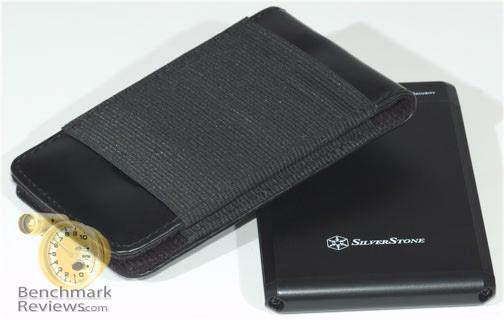
The case included with the TS01B is a black leather affair that's completely open on one end. The smooth leather has a pretty soft hand and is stitched around the edges. The two leather sides are held together by a band of elastic material that wraps all the way around the back side to form what looks like a belt loop. I cannot imagine why I would need a HDD on my belt, but perhaps the loop has other uses. You can stuff the USB cable in there, I suppose; it's pretty snug elastic and even though it's open on both ends, it holds the cable securely. I suppose for sheer deviousness, you could leave a slip of paper in there with a phony password, in case you lost it. Or if you prefer to see the glass as half full, you could leave a business card in there with a hand written note offering a reward for the safe return of the drive. Or...if you are sharing the drive with someone else, you can put one of the RFID keys back there; that's a little risky perhaps, unless you are just walking down the hallway with it.
There are two USB cables included. One, very short one, works well when you have a laptop on your desk and set the TS01B right next to it. The longer cable has two full-sized Type A USB connectors on the computer end, to suck a little more current for the HDD. The FAQ in the instruction manual says that this is likely overkill for any 2.5" drives. The Spec Sheet for my WD Scorpio Black lists a maximum of 500mA during Read/Write operations, which is the maximum allowed in the official USB specification. All the current Scorpio drives have the same current rating in their Spec Sheets, so maybe it's a "marketing spec". The label on the drive itself lists 0.55A, go figure.
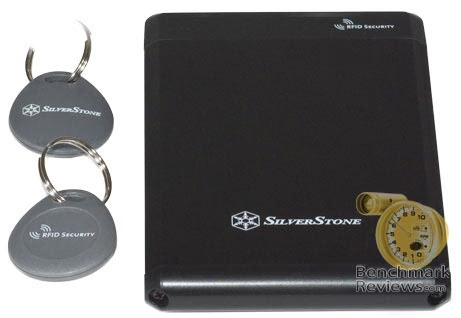
The RFID Keys are dark grey, ovoid shaped bits of plastic. They are only 7mm thick and 30mm x 36mm in plan view, much smaller than the typical automotive keyless remote fob. There are no switches, plugs or batteries involved, the key gets its power from the inductive coupling of the two coils, one inside the key and the larger one in the enclosure. Each key comes with a chromed split ring, which can be removed to attach it to an existing key ring, if desired.
The manual is clear and concise with only English included in the version I received. The printing and paper quality were excellent, a cut above the norm for such an inexpensive product. My eyes aren't that good and I didn't have to break out a magnifying glass to read it, so 99% of the population should be OK. The physical and software installation are both covered in enough detail for the novice to feel comfortable, but it's not overly "chatty". Once again, it looks like the engineers did it, and I think they did a nice job. There are instructions covering the removal of the encryption, how to set up multiple drives in the one enclosure, and what to do if you lose one key or if the enclosure electronics get damaged. BTW, don't lose both keys; there is no way to recover the data if you do this. There is no "master" key, and SilverStone does not keep a "spare" key for you. They come in matched pairs and if you lose one key, they recommend that you use the remaining key to get access to the HDD and then do a full data transfer off the drive. I know it sounds harsh, but it's prudent and replacement keys are available from SilverStone, as long as you still have one of them available. Once you have to matched keys in your possession again, you can reset the encryption using the new keys.
SilverStone TS01B Installation
Installation of the Hard Drive into the SilverStone TS01B enclosure was a snap; well a screw or two, but that doesn't sound quite right..... Using the supplied Phillips screwdriver, remove the two machine screws from the end cap with the USB connector. Attach this end to the SATA connections on the HDD; there's only one way to do this, as there are two dissimilar, keyed connectors involved.

Now, slide these two together into the cavity of the aluminum extrusion. It's important to orient the drive correctly as it is inserted into the enclosure, as there is insulating tape one only one interior wall of the aluminum case. The bottom surface of the drive (the one with the exposed printed circuit board) needs to be on the side with the insulating tape. This not mentioned in the instructions; the only clue is that the end cap comes pre-installed that way, and all the product photos and diagrams in the manual show the end cap oriented with the "RFID Security" text on the same side as the company name and logo. The Insulating tape on one inside wall is also a clue, albeit a subtle one.

The HDD I used, a Western Digital Scorpio-Black, fit easily and snugly into the enclosure with no binding, scraping, or real force required. Once the end cap screws were installed, I tested for rattles and found none. It feels like a solid brick, just not as heavy as one. The SilverStone TS01B enclosure weighs 85 grams and the Scorpio adds an additional 99 grams to the overall package. For reference the OCZ 64 GB Core Series SATA II 2.5-Inch SSD OCZSSD2-1C64G, which was just tested here on Benchmark Reviews, weighs in at 77 grams.

Once everything is screwed back together, the real fun begins. Since the security features of the TS01B are hardware based, they need to be set up before the drive is partitioned and formatted. The instructions are pretty clear here:
-
Use the supplied cable to plug the TS01B into a USB port on your computer
-
Wait for the three short and one long beep from the TS01B
-
Touch one of the RFID Keys to the RFID Security symbol on the face of the TS01B
-
The TS01B will beep and the LED will flash Green
-
Touch the second RFID Keys to the RFID Security symbol on the TS01B (within 3 minutes of touching the first one)
-
The TS01B will beep and the LED will stay Green
-
Move the RFID Keys away from the drive
-
Partition and format the drive as normal
There is a pretty good Flash presentation on their website that will imprint all this in your mind if you are a visually oriented person like me. There are also instructions for configuring it with a Mac, for those inclined to eat from the Apple tree. I didn't see any Linux instructions, but that somehow feels right. Everyone I know that uses Linux, doesn't need the instructions.
Removing the TS01BB from the attached computer requires one additional step, because of the hardware encryption system. Once the Safely Remove USB Storage Device routine is complete, and Windows is done disowning the HDD, touch one of the RFID Keys to the RFID Security symbol on the face of the TS01B. The TS01BB will beep once and the Green LED will go dark. Now, the drive is locked and ready to remove. Later I'll test these procedures to see how strictly they have to be followed before the security system cries "Foul".
Testing & Results
Testing Methodology
I'm going to use a combination of synthetic benchmarks and real-world scenarios to test this product. HD Tach RW testing will be performed on the bare drive, using the SATA 300 connection, and on the installed drive, in the SilverStone TS01BB via the built-in USB 2.0 connection. I will also compare its performance to several other portable 2.5" and 3.5" drives to see if the TS01B has an edge.
The most common applications for a portable HDD like this is transferring large files or data sets between locations or using it as a data "briefcase". In either case, sequential read/write speed is the dominant performance factor. The synthetic benchmarks should tell us everything we need to know, but just in case, I tested some real world file transfers. I copied 1GB and 10 GB files to and from the external drives to my primary data drive, a Seagate ST3750330AS-SD04, 7200.11 series with 250GB platters and a 32MB cache, in my standard test system.
Test System
-
Motherboard: Gigabyte GA-P35-DS3L Rev 2.0
-
System Memory: 4X 1GB H-P PC2-5300 DDR2 667MHz
-
Processor: Intel E2180 Core 2 Duo 2.00GHz (Overclocked to 3.0 GHz)
-
CPU Cooler: CoolerMaster Hyper 212 RR-CCH-LB12-GP
-
Audio: On-Board Realtek ALC888 Audio
-
Video: EVGA 256-P2-N751-TR GeForce 8600GT 256MB GDDR3 PCI-E
-
GPU Cooler: Zalman VF900-Cu
-
Disk Drive 1: Western Digital WD6400AAKS 640GB (320GB/Platter) SATAII
-
Disk Drive 2: Seagate ST3750330AS 750GB 7200RPM SATAII
-
Optical Drive: Sony NEC Optiarc AD-7190A-OB 20X IDE DVD Burner
-
Enclosure: Antec Sonata II Mid-Tower ATX Case
-
PSU: Corsair CMPSU-550VX ATX12V V2.2 550Watt
-
Monitor: NEC MultiSync 97F CRT 1280X1024
-
Operating System: Windows XP Home SP3
File Transfer Benchmarks
As I mentioned in the test methodology section, I copied 1GB and 10 GB files to and from the external drives and my primary data drive, a Seagate ST3750330AS-SD04 (7200.11 series with 250GB platters and a 32MB cache). After calculating out the data transfer speeds (in MB/sec), it was obvious that the 10GB numbers and the 1GB numbers were basically identical. The 1GB tests ran less than 0.5% faster, so to simplify things, I'm only reporting the transfer speeds for the 10GB files. The rank order didn't change from the results obtained with the synthetic benchmarks, and the actual transfer speeds obtained in a real world scenario are consistently lower than the synthetic results, by a small amount. The bottom line is that you can expect to transfer 10GB of data, to or from the SilverStone TS01B, in roughly five and a half minutes and 1GB files take about 33-34 seconds each.
|
File Transfer Speed @ 10GB |
MB/s |
% Δ |
MB/s |
% Δ |
|---|---|---|---|---|
|
Test |
Read |
(from best) |
Write |
(from best) |
|
SilverStone TS01B |
30.3 |
----- |
29.6 |
----- |
|
Buffalo Mini-Station |
30.1 |
-0.7% |
29.1 |
-1.7% |
|
Maxtor OneTouch-II |
27.5 |
-9.2% |
28.2 |
-4.5% |
|
Vantec NexStar NST-350U2 & Maxtor 6B250R0, PATA133 |
23.4 |
-22.9% |
21.6 |
-27.2% |
The SilverStone TS01B eked out a small margin of victory over the Buffalo drive, showing once again that the dominant factor in overall performance is the standard USB 2.0 interface. The older external drives, which both sport EIDE interfaces on the bare HDD, bring up the rear.
It looks like some optimization occurred during the design of the Maxtor One-Touch II unit, which is only natural since it is an in-house design by Maxtor. They also managed to achieve better write speeds than read speeds; a very unusual result, but a welcome one in a data backup application.
HD Tach Results
HD Tach is a well known benchmarking product and we use it often at Benchmark Reviews. I tested the SilverStone TS01B with a Western Digital Scorpio Black 2.5" 7200 RPM HDD (WD1600BEKT) installed, against three other external drives on hand. One 2.5" 5400 RPM unit from Buffalo served to show what influence the rotational speed might have in this application, where we limited ourselves to the USB 2.0 interface for compatibility, and two 3.5" 7200RPM drives to see how the 2.5" HDDs compare against their 3.5" counterparts. I also tested the WD1600BEKT in a standalone configuration, to see how much influence the USB 2.0 interface had on performance. For grins, I'm also showing the read and burst results from my boot drive, a Western Digital 3.5" SATA300 HDD with 320GB platters.
Here are the results:
|
Interface |
Raw SATA 300 |
Raw SATA 300 |
Raw SATA 300 |
USB 2.0 |
USB 2.0 |
USB 2.0 |
|---|---|---|---|---|---|---|
|
Test |
Read |
Write |
Burst |
Read |
Write |
Burst |
|
SilverStone TS01B & WD1600BEKT, 7200RPM |
64.6 |
60.5 |
238.8 |
34.9 |
32.6 |
35.2 |
|
Buffalo Mini-Station HD-PHS120U2, 5400RPM |
30.9 |
30.7 |
35.1 |
|||
|
Maxtor OneTouch-II 300GB, Model E-HO11 |
29.1 |
30.8 |
30 |
|||
|
Vantec NexStar NST-350U2 & Maxtor 6B250R0, PATA133 |
25.7 |
23.5 |
26.9 |
|||
|
WD 6400AAKS-03B01 320GB/Platter, SATA300 |
93.6 |
242.3 |
First off, it's no surprise that my boot drive smokes all the external drives, and that it beats the WD1600BEKT by close to 50% in read speed in native SATA 300 mode. The linear speed is much higher, on average for the larger platter. The burst speed is primarily a function of the interface type, with some influence by the cache size and speed, and the drive electronics. I may do a more detailed analysis in the future comparing the 2.5" and 3.5" 7200 RPM drives, just to see how close you can get to standard desktop performance in a notebook drive without going to an SSD.
With the external drives, it's obvious that the USB 2.0 interface is crippling their performance. One look at the different HD Tach results for the WD1600BEKT operating with a USB 2.0 interface and its native SATA300 interface tells the whole story:

We're giving up a huge amount of HDD performance by limiting our choices to the most ubiquitous of interfaces. The burst speed delta is huge (6.8X) and the USB read/write speeds are only a little better than half of the SATA300 average speeds.
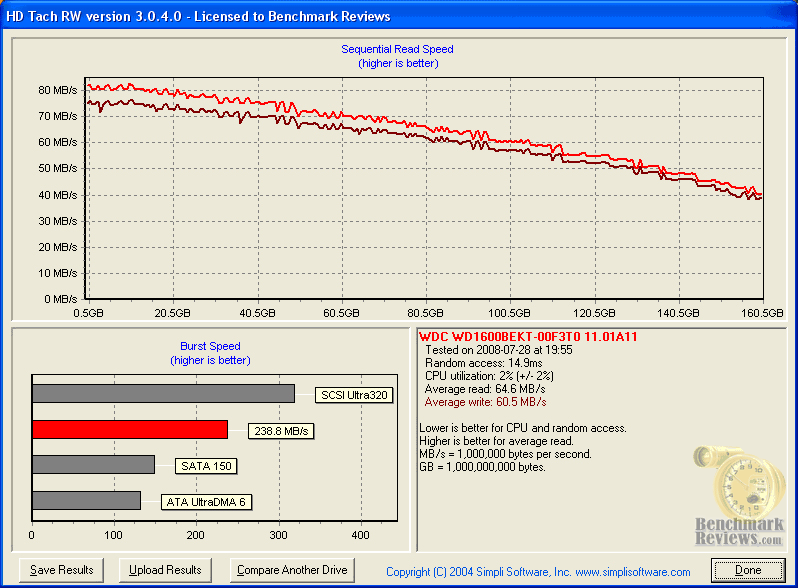
So, if you want to get the most from your portable HDDs, be prepared to put it in an enclosure that supports eSATA and find a way to get an eSATA port on your notebook. Some of the newer notebook models are using a combo port that supports either USB or eSATA and there are also PCMCIA-eSATA adapter cards that can be added to older units.
Real World RFID Usage
The basic elements of the SilverStone TS01B: a small, thin, sleek, pocket accessory bore no surprises. It's a simple matter of WYSIWYG. Take a look at the pictures on the package or the website and you know what to expect. I went into excruciating detail in the Closer Look section about its design, construction and appearance. The question I need to answer for you now is, "How does the RFID Key system work in daily life?" Wonderful, I'd say! It's quick, convenient, reliable, positive, and the nature of a physical key offers some security advantages that you can't get with a password system.
The RFID Key itself is small and innocuous in appearance; no one will give it a second glance if it's on your key-chain. There are two keys provided, so you are not totally out of luck if you lose one. You should follow the advice in the product manual to back up your data ASAP, and get a new set of matched keys right away. Maybe if I had to keep track of several of the drives and their associated keys, I would complain about matching them up. There are no special provisions on the drive enclosure or the keys for marking them with some type of human-readable ID. No problem, as Brother sells about a dozen different models of label maker, the black label tape would blend in nicely.
There are two negative issues that I have to mention, although both of them are not enough to detract from the positive experience I had. One, the manual is incorrect in its description of the removal process for Windows. It tells you to do three things, in sequence; first, do the "Safely remove USB Storage Device" step in Windows. Second, touch the RFID key to the proper spot on the enclosure and wait for the security system to give one short beep and turn the green LED off. Third, disconnect the USB cable and go on your merry way, with the data safely locked up. In reality, once you do the removal step in Windows, the security system doesn't respond to the presence of the key. Of course, the drive can't do anything else at this point, either, so it's a moot point. Once you disconnect the USB cable, the drive is locked, so there doesn't appear to be any latent security issue with this behavior. It just doesn't match up with the manual.
The second issue is with the LED indicator or its lens assembly. The pictures on the box and the manual refer to the LED turning different colors: Red, Green and Blue. On my sample, the indicator was 99.99% blue, with some tiny fringes of red and green around one or two edges when it was signaling the locked or unlocked state. I got used to squinting and moving my head to detect the very subtle change to the indicator, but it's annoying to encounter such an obvious defect in an otherwise excellent product.
SilverStone TS01B Final Thoughts
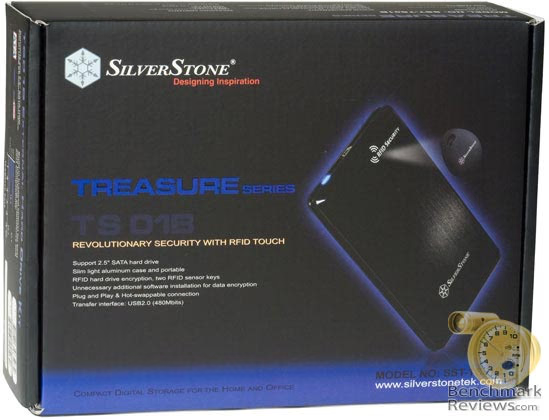
The packaging for the TS01 is more than adequate to protect the contents and is 100% recyclable, too. All of the components are individually wrapped in polyethylene bags and taped closed.

SilverStone Technology has chosen a subtle and classy color scheme to make their product stand out on the shelves. The combination of dark black background and the vibrant purple lettering really gets noticed. There are complete descriptions of the product spread across the various surfaces, including images and descriptions to highlight the flagship feature of the TS01B, the RFID security technology.
The performance of the TS01B is really a function of the interface it comes with. That's one of the nice things about building your own portable drive package; you have total control over the mix between HDD, enclosure design, and interface. In this case, the ubiquitous USB 2.0 interface assures compatibility with almost any computing device produced since the iMac G3 debuted 10 years ago. There are better interfaces, or I should say faster interfaces, such as eSATA and Firewire 800, but as of 08/2008 it makes sense to at least include a USB interface on a portable HDD, even if it also sports one of the other, faster types.
The tests show minor performance differences between the 5400 RPM and 7200 RPM 2.5" drives with the USB interface. So, it's an easy choice for the consumer as to how to allocate their dollars in this case; go for HDD capacity over speed. The tests also show some differences between the 3.5" and 2.5" external drives, but they're really different animals from different eras. I have a hard time calling any of the 3.5" external drives portable these days, and surprisingly, the smaller, portable drives hold their own over a transportable HDD, particularly the older PATA drives, when used with USB.
SilverStone TS01B Conclusion
The SilverStone SST-TS01B is really a unique product, it offers a security protocol that no one else currently has. If the RFID Key is something that solves a problem for you, there is no other solution available in the consumer marketplace.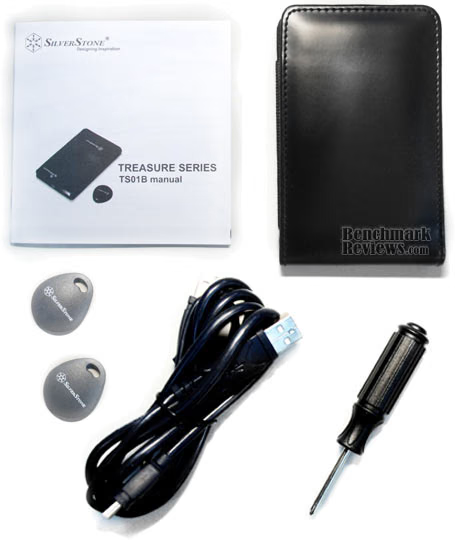
Given its status of one-of-a-kind, I'm inclined to rate this product highly, even if it was a clunky device that didn't perform or look all that great. That's not the case, however. The TS01B is nicely made, well built, looks good, works as well as it can, given the limited USB interface, and doesn't cost too much more than similar products that don't have a competitive security capability. Newegg currently sells the SST-TS01B for $45.99, placing it in the middle of their external hard drive kit product range that do not offer the same functionality. SilverStone products are never going to fall into the "low bid" category. Their products still have to compete on value, but they always seem to offer solutions that stand out from the crowd.
Every other product on the marketplace uses a password for access control, and that might not be the best solution in some cases; now you have one more option that you didn't have 6 months ago. I expect this general concept to spread though the industry pretty quickly, using a variety of hardware-based locks. It won't be long before we see a portable HDD with a thumbprint reader, for instance.
I have no problem giving this product the highest recommendation, even though its transfer speed is limited by the absence of an interface that's faster than USB 2.0. All the other HDD enclosures present the consumer with a tough purchasing choice, as there's not a whole lot to differentiate one from the other.
Everyone has their own idea of what looks good, so the choice comes down to, "Do I want the rounded one or the square one? Do I want the Red, Blue, Black, Silver or Green one?" With the SilverStone TS01B in the product mix, the purchasing decision quickly becomes: "Buy me, and only me!"
Pros:
+ Unique security solution solves the Password Problem
+ Convenient to use
+ Lightweight, slim, sleek, and attractive
+ Well thought out design and solid construction
+ Leather case included
+ Well packaged in an attractive retail box
+ Value, especially for RFID-Based Security
Cons:
- Only available with USB 2.0 interface
- LED Status indicator doesn't really change color
- Removal process not documented correctly in manual
- Not resistant to extreme shock impact
Ratings:
-
Presentation: 8.75
-
Appearance: 9.50
-
Construction: 9.50
-
Functionality: 9.50
-
Value: 9.25
Final Score: 9.30 out of 10.
Excellence Achievement: Benchmark Reviews Golden Tachometer Award.
Questions? Comments? Benchmark Reviews really wants your feedback. We invite you to leave your remarks in our Discussion Forum.