
CM Storm Ceres 400 Wired Gaming Headset
CM Storm Ceres 400 Headset Review
Manufacturer: Cooler Master Co., Ltd.
Product Name: CM Storm Ceres-400
Model Number: SGH-2010-KKTA1
UPC: 884102017490 EAN: 4719512038017
Price As Tested: $49.99 (Newegg / Amazon)
Full Disclosure: The product sample used in this article has been provided by Cooler Master.
Cooler Master's subsidiary, CM Storm, continues to develop quality PC gaming peripherals proving that it is a serious player in the industry. The CM Storm Ceres-400 wired gaming headset, model SGH-2010-KKTA1, is the organization's latest audio entry into the market, and it is clear what the objective was when developing this headset; to provide budget-conscious gamers with a high-quality set of headphones. Priced at around $50, the Ceres-400 is packed with features, such as the large 40mm drivers, you normally won't find at this price point. Benchmark Reviews is proud to take a close look at this headset in order to provide you with a thorough review of it.Even at a modest price point, the Ceres-400 has the look, feel, and performance of a high-tier headset. Considering the fact that it has 40mm drivers and very large 90mm earpads, this headset delivers quality audio while remaining quite comfortable. As you would imagine, the Ceres-400 headphones are not at all small, yet they are surprisingly light, which is just another indication of Cooler Master's innovation.
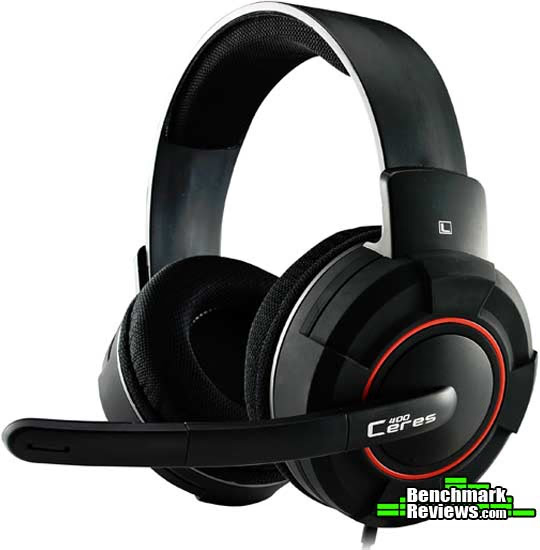
In order to give you a true and thorough evaluation of the CM Storm Ceres-400, we will test its performance in the following areas: games, music, movies, and internet calls. These are the areas that Cooler Master targeted when developing these headphones. Our objective is to ensure that you are provided with clear and unbiased results, which may help you determine the overall value of the CM Storm Ceres-400 headset.
CM Storm Ceres-400 Features
- Large high quality 40mm drivers deliver great sound quality
- Adjustable headband for a perfect fit
- Swivel Noise-Cancelling Microphone
- In-line volume control and microphone on/off switch
SGH-2010-KKTA1 Specifications
Headphone
- Driver diameter: φ40mm x 7.5 mm(H)
- Frequency range: 20 - 20,000 Hz
- Impedance: 32 ?
- Sensitivities(@1kHz): 108 dB ± 4 dB
- input: 100mW
- Connector: 3.5 mm headphone jack
- Inner Ear Cup Diameter: 90 mm
- Cable Length: 2.5m
Microphone
- Pick Up pattern: Noise-cancelling
- Frequency range: 100 - 10,000 Hz
- Signal-to-Noise Ratio: 50dB
- Sensitivities(@1kHz): -38 dB ± 3 dB
Hardware Requirements
- Audio Usage: Devices with 3.5mm audio jack
- Audio + Microphone Usage: Devices with 3.5mm audio + microphone jack(smartphones)
Source: www.coolermaster-usa.com
Closer Look: CM Storm Ceres-400
Cooler Master's vision when designing the CM Storm Ceres-400 was to provide consumers with an affordable, yet feature-rich headset that exceeds the typical performance of a headset under $50. With a retail price of $49.99 (Newegg / Amazon), Cooler Master has succeeded in making the Ceres-400 look the part of a higher-tier headset.
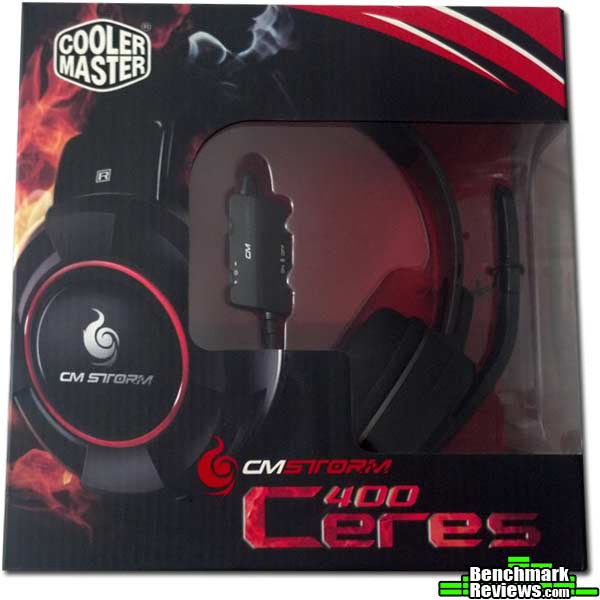
Retail packaging is certainly not one of a consumer's primary concerns. However, it can indicate an organization's attention to detail, hinting that the product inside is likely well-crafted. In my experience, the CM Storm subsidiary has always had excellent retail packaging, and they did not cut any corners when designing the retail box for and packaging the CM Storm Ceres-400.
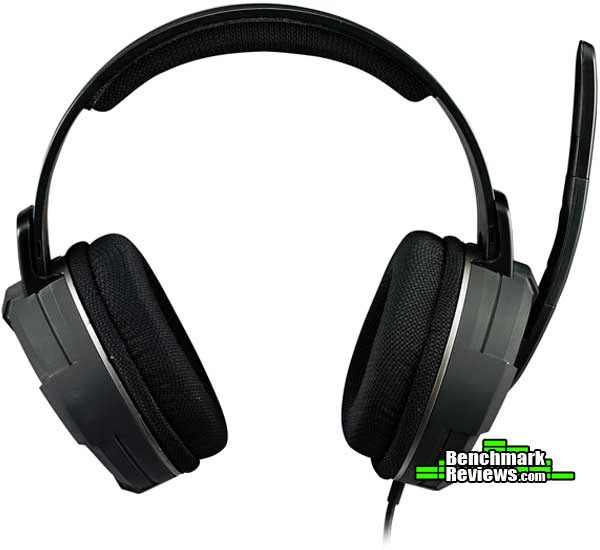
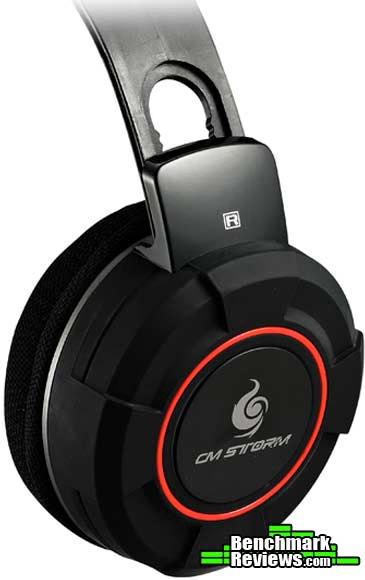
The headband is constructed of flexible, yet extremely durable plastic and will maintain its original shape. It has a number of different settings and should adjust to fit just about anyone's head. The soft padding on the headband has a generous span, ensuring that it will provide the necessary coverage and comfort for the top of your head.
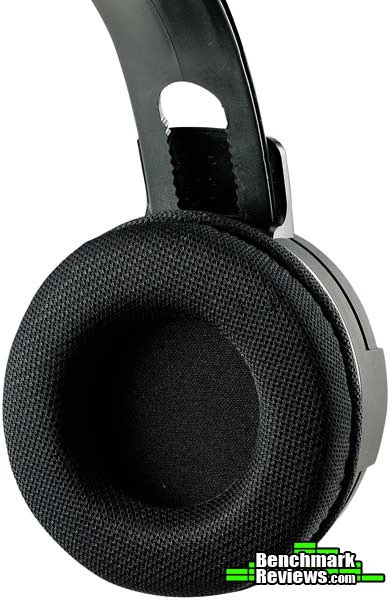
On the business-end of the significantly large 90mm ear cups, you will find some ear pads that are quite comfortable. Having worn this headset for hours at a time, I can report that I have been extremely impressed by the overall comfort level provided. If I was to log a minor complaint, it would be that the external material of the pad is a bit coarse. This wasn't a concern when wearing the headset for a long period of time; it was more of an initial reaction. I have no doubt that other users would state that I am picking nits here.
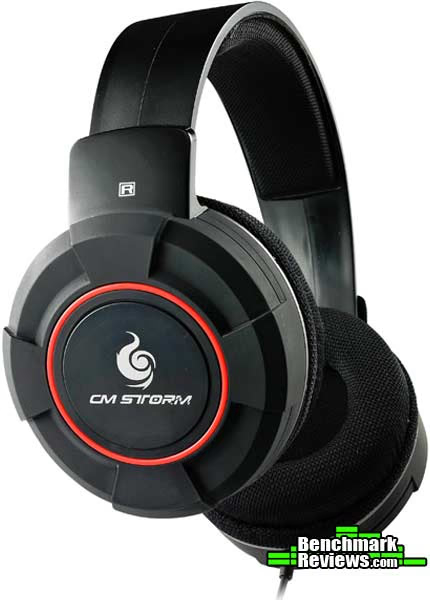
Weighing in at 40mm, the drivers in the ear cups were designed to provide the range of acoustics desired not only when gaming, but also for multimedia experiences, such as listening to music and watching movies. Considering the overall girth of the ear cups, Cooler Master wanted to ensure that the Ceres-400 was able to deliver the full range of treble and bass, enhancing the user's experience.
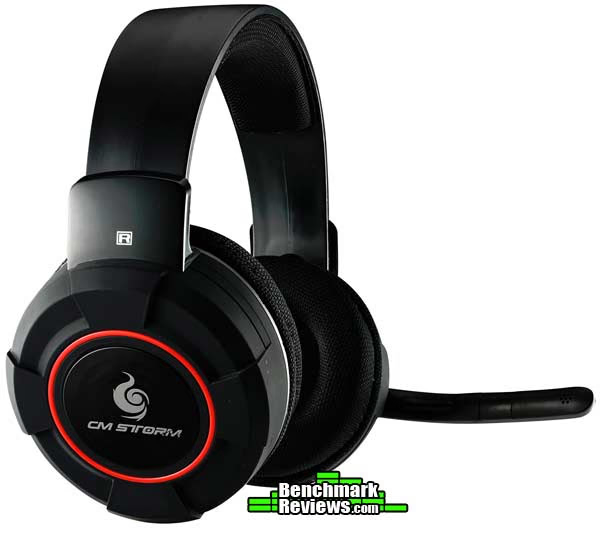
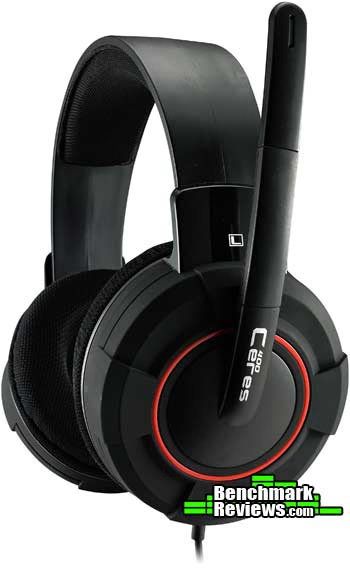
When seeing the Ceres 400 for the first time in person, my first reaction was that it looked sturdy and well-constructed. The large size of the ear cups and the overall size of the headset may lead you to believe that it is on the heavy side. That is certainly not the case; the CM Storm Ceres-400 is lightweight and quite comfortable. In addition, the headset is aesthetically pleasing. It has been given a simple, traditional design and employs both glossy black and matte black surfaces with red trim and the CM Storm logo to round out its attractive look.
CM Storm Ceres-400 Detailed Features
Cooler Master accomplished its goal when designing the CM Storm Ceres-400; to provided budget-conscious gamers with high-performing, great sounding headset. Having said that, it is absent of some of the features that come with high-end headphones. However, you will not be disappointed with Cooler Master's attention to detail when designing and constructing the Ceres-400.
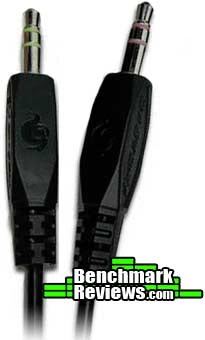
There are really no surprises when looking at the 3.5mm audio jacks. The jacks are adorned with CM Storm lettering and logos. Also, on each jack, you will find bands of color that indicate which is for the headphone (green) and which is for the microphone (red). I would suggest stamping a headphone and microphone logo on each jack for our colorblind friends out there.
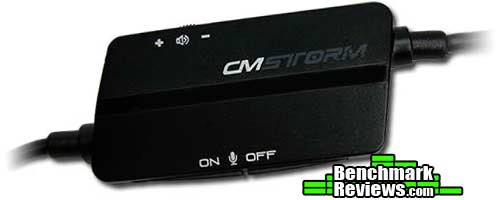
The control "capsule," as termed by Cooler Master, is on the large side making it easy to find and manipulate, which removes the necessity of taking your eyes off of the screen when an audio adjustment is needed. It is very simple to trigger the on/off button due to its size and position on the control capsule. The volume dial, however, could be a bit larger.
From a standpoint of functionality, the boom-style microphone is nothing out of the ordinary. Its range of movement and positioning is anywhere from parallel to the headband (straight up) to about 75 degrees beyond perpendicular to the headband (straight out). In other words, its overall range is approximately 165 degrees. Also, it doesn't glide when moving it. The movement is slightly restricted every 10 degrees or so giving it more of a mechanical feel, which, to me at least, proves to be more solid. Finally, the boom microphone is a bit shorter than most, yet it is very flexible, so you may position it closer to your mouth if you desire.
We discussed the headband earlier, but the above image provides a better perspective to see the positions of adjustability that the headset provides its users. Whether you have a large or small head, the CM Storm Ceres-400 should accommodate you and wear very comfortably.
CM Storm Ceres-400 Test Results
CM Storm Ceres-400 Comfort
There are a number of factors that gamers take into consideration when purchasing a new headset. One of these factors is the comfort of the headset. Now, there are many headsets out there that are comfortable when they are first put on and are great for short durations, but that comfort may deteriorate the longer you wear them.
The CM Storm Ceres-400 headset will provide the comfort you are looking for when wearing it for long periods of time. For 5 gaming sessions that ranged from 2 ½ hours to 5 hours, I never had one urge to adjust the headset due to discomfort. The padding on the headband in conjunction with the 90mm ear pads certainly delivered the level of comfort that Cooler Master promised. The only negative that I can report regarding comfort is, as mentioned earlier in the review, that the material used on the ear pads is a bit coarse.
CM Storm Ceres-400 Audio Performance
Measuring audio performance is generally a very subjective undertaking. I will attempt to describe to you what I thought of the audio performance and explain the strengths and challenges of the headset while performing a number of different functions using the CM Storm Ceres-400.
Test System
-
Motherboard: Gigabyte GA-990FXA-UD3
-
System Memory: 16GB (2 x 8GB) DDR3 1333 G.Skill Ripjaws X Series
-
Processor: AMD FX-6100 Zambezi 3.3 GHz Six-Core Processor
-
Audio: Realtek ALC899 On-Board Audio
-
Video: EVGA GeForce GTX 550 TI
-
Optical Drive: Pioneer Black Internal BD/DVD/CD Writer BDR-207DBKS
-
PSU: Corsair HX Series HX750 750W GOLD Certified Modular Active PFC Power Supply
-
Monitor: HP w2338h (24") & Samsung SyncMaster PX2370 (24")
-
Operating System: Windows 7 Ultimate
Results
While gaming, the CM Storm Ceres-400 provided audio that I would describe as deep. In games tested, which include Battlefield 3, Left for Dead 2, and Company of Heroes: Tales of Valor, my initial impression of gunshot and explosion reports was that these events resulted in a bit too much bass. The higher-toned events, such as sniper fire or air-launched rocket fire, delivered the right amount of mid-bass and treble to make these events sound authentic. In-game voices and ambient sounds came in clear and sounded rich. In addition, I found the Ceres-400 to be extremely beneficial in terms of the "directional" support that it provided. In other words, it helped me find my enemy on the battlefield.
Communicating via Skype, Ventrilo, and Teamspeak was flawless. Individuals on the other end came in perfectly clear and, according to the individuals with whom I was communicating, I came in loud and clear as well. I added background noise to the equation, and, even though it was audible on the other end, it was reported as being significantly muted. In addition to the level of quality communication that I experienced, I would like to add that I like the size and options for positioning that the microphone provides. Some headsets that I have used in the past had microphones that tended to be intrusive. The CM Storm Ceres-400 allows you to place the microphone in an out of the way position without impeding your ability to communicate clearly.
The deep bass I experienced while gaming certainly showed up during movie-watching and listening to music. While watching various scenes from movies, which included Star Trek (2009), the Matrix, and Gone in 60 Seconds, the bass seemed to overwhelm the treble slightly, but not enough to be a disappointment. Overall, the sound quality for movie-watching was very good.
While listening to tracks from a variety of music genres, I was pleased with the sound quality, but not overly impressed. As you may have already guessed by now, the bass was a bit heavy. Even though the treble was good, voices seemed to be a slightly muted due to the bass and heavy mid tones.
CM Storm Ceres-400 Final Thoughts
The ability to fully appreciate a gaming experience greatly depends upon the audio capability at a gamer's disposal. In fact, it is no secret that audio capability can directly impact a serious gamer's performance. Having the ability to hear an enemy approaching is paramount. Clear communication between teammates is detrimental. For those individuals that overlook the importance of having a quality gaming headset, the CM Storm Ceres-400 will certainly be, for lack of a better term, a game-changer.
Owners will tell you that this headset is an exceptional value. Sure, it does not have a detachable microphone. Yeah, a braided cord would be a nice touch. However, for under fifty bucks, you get a great looking headset that sounds very good and allows you to maintain the ability to communicate flawlessly. From the 2.5m cable to the 90mm ear pads, the CM Storm Ceres-400 was well thought out and well designed.
CM Storm Ceres-400 Conclusion
Important:
At Benchmark Reviews, our goal is to provide you with reviews that accurately reflect the performance that a reviewer experienced while testing a particular product. For some devices, such as a gaming headset in this case, the feedback is subjective due to the fact that it is nearly, if not completely impossible to objectively test audio quality. In addition, there are factors that may directly impact our review and ratings, e.g., changes to the product by the manufacturer. We recommend that you do not base a purchase primarily or solely on our conclusions.Designed with budget-conscious gamers in mind, the CM Storm Ceres-400 by Cooler Master is a solid headset and, overall, a very good value. The construction of this headset looks and feels rugged, yet is very appealing visually. Most of this relatively large headset is matte black with just a few areas that have a glossy black finish. Red trim, silver trim, and the CM Storm logo rounds out the design.
Let's be honest; the aesthetics aren't why we purchase a gaming headset. This headset, however, performs every bit as well as it looks. The 40mm drivers are a nice size and deliver deep bass while gaming, watching movies, or listening to music. The test revealed that the bass might be a bit heavy during gaming sessions, yet it is not a deal-breaker. The bass will be appreciated when watching movies and listening to music. The CM Storm Ceres-400 may not be the choice of an audiophile, but its high-quality sound will satisfy most of us.
Comfort is also a primary focus when in the market for a gaming headset. The padding on the headband of the Ceres-400 is wide, long, and strategically placed in an effort to avoid leaving any part of your head exposed to hard plastic. In addition, it has large 90mm ear pads that are soft. The material used on these pads feel a bit coarse, but it isn't terribly noticeable. When gaming for long sessions, I almost forgot I was wearing these headphones. Simply stated, they are light and comfortable.
The CM Storm Ceres-400 just feels solid and should provide you with several years of enjoyment. When adjusting the headband, which should easily fit anyone's head, you can feel the quality of the design as it clicks into place. The same goes for the microphone boom when it is being adjusted; it doesn't freely glide around. It has what I would describe as a mechanical feel to it. Again, this is a quality design.
Cooler Master has a developed a winner here. However, I have a couple of issues with the claims on their website regarding the Ceres-400. First, it is marketed as being an "ultra portable gaming headset." Considering its size and the fact that it does not fold up, I would suggest rethinking that tagline. And second, the ear pads are described as, "sound absorbing cushions [that] sit comfortably on your ears and help block out distractions...." Again, the Ceres-400 does not live up to that claim. In fact, it does nothing to even remotely reduce outside noise distractions.
The final word on the CM Storm Ceres-400 is that for $49.99 (as of October 2012) from Newegg or Amazon, you will have a well-built, solid performing headset that should last you for years of gaming, watching movies, and listening to music.
Pros:
+ Quality, durable construction
+ Comfort level during long sessions
+ Deep bass
+ Large 40mm driver
+ Visually appealing design
+ Adjustability of headband and microphone
Cons:
- Marketed as ultra portable. I disagree.
- Marketed as preventing outside noise, which it does not
- No detachable microphone
Ratings:
-
Performance: 8.50
-
Appearance: 9.25
-
Construction: 9.00
-
Functionality: 7.25
-
Value: 8.75
Final Score: 8.55 out of 10.
Recommended: Benchmark Reviews Seal of Approval.
Benchmark Reviews invites you to leave constructive feedback below, or ask questions in our Discussion Forum.
Reader comments from the original article
9 comments were posted before commenting closed. They are preserved as written. Original avatars no longer resolve and are shown as a placeholder.
fps Rick Permalink:
Greg, I play mostly fps counterstrike. these are on sale at newegg for $39.- Can I assume you'd recommend then at that price and can bass be adjusted through graphic equalizer to smooth out? Rick
RE: fps Greg Schepers Permalink:
Sorry for the slow reply Rick. For $39, this headset is a steal. I only have on-board audio, but I would imagine that, if you have a separate soundcard, you would be able to manipulate the levels and set them to your preference.
microphone João Permalink:
Sorry, but I can't make my microphone work can you please help with these.
RE: microphone Greg Schepers Permalink:
Hello João, sometimes it's the most obvious of solutions... been there. Go to Control Panel/Sound, click on the "Recording" tab, highlight the Ceres 400, and click on "Set Default." If that doesn't work, let me know.
RE: RE: microphone João Permalink:
Thank you, problem solved, but another problem just appeared. Yesterday I was at TeamSpeak with some friends and they sad that the sound wasn't clear, like is I were talking in the deepness of something, I've tried approach the microphone, hange some configs, none of them worked.
RE: RE: RE: microphone Greg Schepers Permalink:
This is where you may have to make some soundcard adjustments. For me, I have onboard audio and can go to Realtek HD Audio Manager and play around with it until I get it dialed in. Go to your control panel and see if you can find that application or the application that manages your soundcard. If it is the Realtek application, try checking or unchecking "Noise Suppression" and "Acoustic Echo Cancellation." Also, there are other adjustable features, such as the "Microphone Boost" button, that you can manipulate. Let me know how this turns out for you.
RE: RE: RE: RE: microphone João Permalink:
I've tried check and uncheck those functions with realtek adio manager and according to my friends all remain equal, I just hadn't tried that "microphone boost" button because I don't really know where it is. Please, if you have an xfire add me, nickname: coisadas, or if you don't have an xfire add me on skype, skype name: joao.miguel.nogueira.farinha I believe it was faster if both of us went to a team speak channel, this way you would probably identify the problem easier.
RE: RE: RE: RE: RE: microphone Greg Schepers Permalink:
Hi Jo?o, I'm not sure what additional guidance I can provide to you, so I recommend contacting Cooler Master for assistance. They will certainly have better advice for you regarding the troubleshooting of your Ceres 400.
Microphone Fabian Dominguez Permalink:
Sorry, but I can't make my microphone work, i tried with Panel/Sound, click on the "Recording" and it didn't solve the problem