
PowerColor Radeon AX6850 SCS3
PowerColor Radeon HD 6850 SCS3 Review
Manufacturer: PowerColor (TUL Corporation)
Product Name: PowerColor Radeon HD 6850 SCS3 1GB GDDR5
Model Number: AX6850 1GBD5-S3DH
Price As Tested:$204.99 at NewEgg
Full Disclosure: The product sample used in this article has been provided by PowerColor.
It's a predictable progression: NVIDIA or AMD release a new GPU, along with a "reference design" video card built around it. All of the marketing partners introduce new video cards that are tfhe reference design card with a vendor label or graphic affixed to it. And while some vendors leave it at that, others aim for the enthusiast market by designing their own video cards around the new GPUs, adding their own features and capabilities. PowerColor is one of the latter, and they have several variants of the AMD Radeon HD6850 video card ranging from plain reference designs to pre-overclocked versions to versions with a single-slot cooler to this one: the SCS3, whose giant radiator allows it to be completely passively cooled.
Changing the reference design cooler is one that that any company making a "custom" video card will do. But most of the time, the idea is to make a cooler that works better than the reference cooler; it's hard to see how a passive, fan-less cooler will be even as effective as the stock cooler, much less better. But remember that different users, and different systems, have different priorities. The advantage to a passive cooler is, of course, the fact that the video card will be completely silent. And in some cases such as HTPCs, silence is a more important consideration that performance.
PowerColor sets the clocks on the SCS3 clocks to 775MHz on the GPU cores and 1GHz on the memory. These are pretty standard speeds for a Radeon HD6850. Interestingly, PowerColor's box doesn't call out the card's "silent cooling", perhaps expecting customers to understand it intuitively from the image of the card.

Video cards based on AMD's Radeon HD6850 GPU are the very definition of AMD's "mid-range" video cards, providing good performance for most games at a reasonable price.
Closer Look: PowerColor SCS3 HD6850
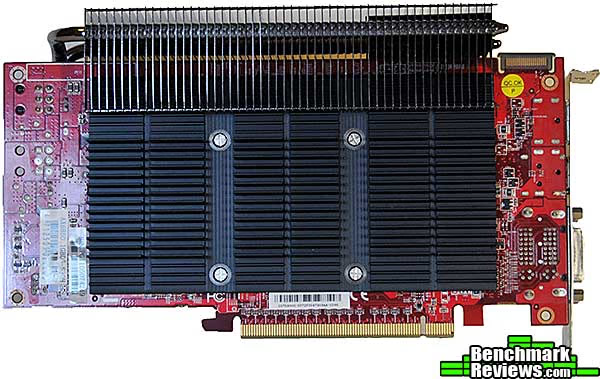
The SCS3 HD6850 comes with a quick installation guide, a CD with drivers and copies of the manual in several languages, a CrossFireX bridge, and a DVI-VGA adapter. The first thing you'll notice when you unpack this card is its sheer size. The giant cooling apparatus wraps around the top and back of the card.

This edge-on view of the card shows the five 6mm heat pipes that extend from the base of the heat sink to wrap around the edge of the card. From there they extend the full length of the card.

The back of the card gets its own thick, cast aluminum heat plate. Spring-loaded screws insert through this plate to secure the finned heat sink assembly on the other side of the board.
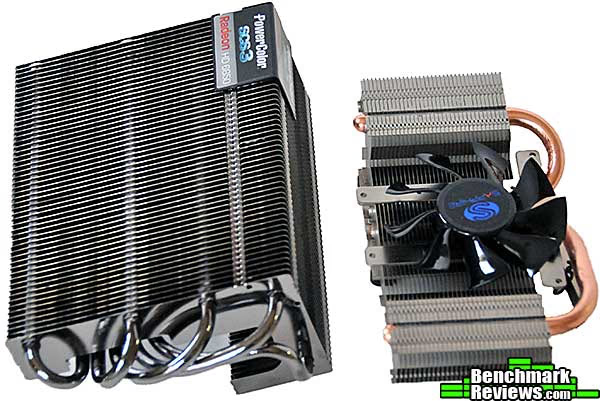
Removed from the card, the heat sink shows a polished base and five 6mm heat pipes. The heat sink on the left is from a "stock" PowerColor Radeon HD6850, which uses two 8mm heat pipes and a small fan. The size differential is apparent.

A front oblique view gives a better idea of the structural differences between these two heat sinks. Note how the edges of the fins on the standard heat sink are sealed together, forcing air from the fan to flow out each end of the card. The SCS3 heat sink, on the other hand, has widely spaced open fins.
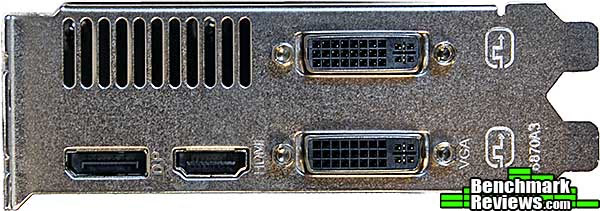
The supplied video connectors are standard Radeon fare these days: two DVI connectors, one HDMI connector, and one DisplayPort connector...choose any three.
Now let's take a look at some of the components on this card.
AX6850 1GBD5-S3DH Detailed Features
With the cooler removed, the bright red PCB is exposed. The 1GB of GDDR5 video RAM is cooled with small copper heat sinks attached with thermal adhesive. Although it makes no functional difference it would have been nice to see the RAM sinks lined up better.
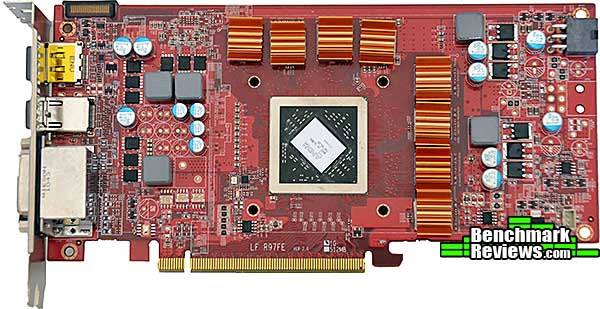
Compared to the "stock" PowerColor Radeon HD6850 video card on the left, the AX6850 1GBD5-S3DH is an obviously different board layout. PowerColor doesn't make any special claims about this board (other than its silent cooling), so the reason for the different board layout is a mystery.

Compared to the "stock" PowerColor Radeon HD6850, the extra width of the SCS3 version is obvious.

PowerColor says the AX6850 1GBD5-S3DH is a "double slot form factor", but its gigantic cooler makes it a 3-slot card at best, and the extra heat sink material on the back of the card make it a four-slot card if there's another slot behind it. It's perhaps possible you could fit a very thin card behind it, but in a standard tower case, the heat roiling off the back of the SCS3 would likely toast whatever was in the other slot.

Let's review the detailed technical specifications of this card in the next section.
Radeon HD6850 SCS3 Features
AMD's new generation GPUs were launched with the Radeon 5000 series cards in September, 2009, and were the first to feature DirectX 11 support. AMD ruled the video card performance roost until NVIDIA's introduction of the GTX480, and the two companies have continued trading marketing and technological blows since then. It's always interesting to look at the performance of the very top-end video cards, but the truth is that unless you're running a multi-monitor systems at insane resolutions, you can get more than enough performance from most mid-range cards...and AMD and NVIDIA probably sell dozens of cards in this class for every HD6990 and GTX580. Here's the complete feature list from PowerColor:
- 1GB GDDR5 Memory
- 128 Gbps memory bandwidth (maximum)
- 1.5 TFLOPS compute power
- Double slot form factor
- TeraScale 2 Unified Processing Architecture
- 960 Stream Processors
- 48 Texture Units
- 128 Z/Stencil ROP Units
- 32 Color ROP Units
- PCI Express 2.1 x16 bus interface
- "Eye-Definition" graphics
- DirectX 11 support
- Shader Model 5.0
- DirectCompute 11
- Programmable hardware tessellation unit
- Accelerated multi-threading
- HDR texture compression
- Order-independent transparency
- OpenGL 4.1 support
- Image quality enhancement technology
- Up to 24x multi-sample and super-sample anti-aliasing modes
- Adaptive anti-aliasing
- Morphological anti-aliasing (MLAA)
- 16x angle independent anisotropic texture filtering
- 128-bit floating point HDR rendering
- DirectX 11 support
- AMD Eyefinity multi-display technology
- Independent resolutions, refresh rates, color controls, and video overlays
- Display grouping
- Combine multiple displays to behave like a single large display
- AMD EyeSpeed visual acceleration
- AMD Accelerated Parallel Processing (APP) technology
- OpenCL 1.1
- DirectCompute 11
- Accelerated video encoding, transcoding, and upscaling
- UVD 3 dedicated video playback accelerator
- MPEG-4 AVC/H.264
- VC-1
- MPEG-2 (SD & HD)
- Multi-View Codec (MVC)
- MPEG-4 part 2 (DivX, Xvid)
- Adobe Flash
- Enhanced Video Quality features
- Advanced post-processing and scaling
- Dynamic contrast enhancement and color correction
- Brighter whites processing (Blue Stretch)
- Independent video gamma control
- Dynamic video range control
- Dual-stream HD (1080p) playback support
- DXVA 1.0 & 2.0 support
- AMD Accelerated Parallel Processing (APP) technology
- AMD HD3D technology
- Stereoscopic 3D display/glasses support
- Blu-ray 3D support
- Stereoscopic 3D gaming
- 3rd party Stereoscopic 3D middleware software support
- AMD CrossFireX multi-GPU technology
- Dual GPU scaling
- Cutting-edge integrated display support
- DisplayPort 1.2
- Max resolution: 2560x1600 per display
- Multi-Stream Transport
- 21.6 Gbps bandwidth
- High bit-rate audio
- HDMI 1.4a with Stereoscopic 3D Frame Packing Format, Deep Color, xvYCC wide gamut support, and high bit-rate audio
- Max resolution: 1920x1200
- Dual-link DVI with HDCP
- Max resolution: 2560x1600
- VGA
- Max resolution: 2048x1536
- DisplayPort 1.2
- Integrated HD audio controller
- Output protected high bit rate 7.1 channel surround sound over HDMI with no additional cables required
- Supports AC-3, AAC, Dolby TrueHD and DTS Master Audio formats
- AMD PowerPlay power management technology
- Dynamic power management with low power idle state
- Ultra-low power state support for multi-GPU configurations
- AMD Catalyst graphics and HD video configuration software
- Unified graphics display drivers
- Certified for Windows 7, Windows Vista, and Windows XP
- AMD Catalyst Control Center
- Software application and user interface for setup, configuration, and accessing special features of AMD Radeon products.
- Unified graphics display drivers
Video Card Testing Methodology
There are still a disturbing number of people out there using Windows XP, but here at Benchmark Reviews we switched our tests to Windows 7 a while back. It's as fast as XP in most tests and offers substantially improved security and features, but its best feature is its robust 64 bit architecture (there is a 32-bit version of Windows 7, of course, but you'd be well advised to use the 64-bit version). It's taken Microsoft a few years to get 64 bit support working well, but it's finally here. If you're running Windows XP on a computer with 4GB of memory, you probably have already noticed that you don't have all 4GB available. Plug in a PowerColor Radeon HD6850 SCS3 video card and you'll see another 1GB of working memory vanish, since the 1GB of memory on the video card has to slot into the 4GB address space of your old 32 bit operating system.
Normally, I test video cards on an open test chassis, which mounts the motherboard horizontally rather than vertically as in standard tower cases, since video cards with fans will receive the same airflow regardless of the card's orientation. However, this would give an unrealistic advantage to the passive cooler on the SCS3, since it would receive more air that it would mounted in a standard tower case. PowerColor says your case should have an intake fan at the lower front and at least one exhaust fan at the upper rear-- standard ATX fare-- so I tested the card in an NZXT M59 case. This case normally doesn't come with a front fan so I added a Thermalright TR-FDB-12-1600 fan, which is rated at 63.7 cubic feet per minute airflow.
According to the most recent Steam gaming survey, the two most popular resolutions are 1920x1080 and 1680x1050. My personal monitor's native resolution is 1920x1200, which was a very popular resolution until manufacturers decided for some reason that a computer monitor should have the same resolution as 1080p HD televisions. Consequently I run my benchmarks at 1920x1200, which will produce very slightly lower frame rates than 1920x1080.
I choose a combination of synthetic and game benchmarks for this test. The test platform was an ASUS P8Z68-V Pro motherboard and an Intel Core i7-2600K processor at stock clock speeds; the iGPU in the Sandy Bridge processor was completely disabled. As always, remember that these test results are specific to the system and software used in this review, and that different hardware, drivers, and benchmark versions will affect the results.
Intel Z68 Test System
-
Motherboard: ASUS P8Z68-V Pro (BIOS 8801)
-
System Memory: 2x2GB G.SKILL DDR3-1333 9-9-9-24
-
Processor: Intel Core i7 2600K
-
Hard Drive: Western Digital Raptor 300 WD30 00HLFS-01G6U1
-
Case: NZXT M59
-
Operating System: Windows 7 Home Premium x64 with SP1
Benchmark Software
-
AMD Catalyst 11.5
-
NVIDIA ForceWare 270.61
-
DX10: 3DMark Vantage
-
DX10: Crysis Warhead
-
DX11: Aliens vs. Predator
-
DX11: 3DMark11
-
DX11: Unigine Heaven 2.5
-
DX11: Battlefield: Bad Company 2
Video Card Test Products
| Graphics Card | Radeon HD5770 | Radeon HD6850 SCS3 | Radeon HD6850 SCS3 OC | Radeon HD6950 | Radeon HD5870 | NVIDIA GTX560Ti | NVIDIA GTX570 |
|---|---|---|---|---|---|---|---|
| GPU Cores | 800 | 960 | 960 | 1408 | 1600 | 384 | 480 |
| Core Clock (MHz) | 850 | 775 | 990 | 850 | 875 | 822 | 732 |
| Shader Clock (MHz) | N/A | N/A | N/A | N/A | N/A | 1645 | 1464 |
| Memory Clock (MHz) | 1200 | 1000 | 1150 | 1300 | 1250 | 1050 | 1900 |
| Memory Amount | 1024MB GDDR5 | 1024MB GDDR5 | 1024MB GDDR5 | 2048MB GDDR5 | 1024MB GDDR5 | 1024MB GDDR5 | 1280MB GDDR5 |
| Memory Interface | 128-bit | 256-bit | 256-bit | 256-bit | 256-bit | 256-bit | 320-bit |
DX10: 3DMark Vantage
Every few years, FutureMark updates their video card benchmark suites, but the older versions remain relevant for years after they've been superseded. 3DMark Vantage is a good example: it's an excellent test for DX10 support, and still can strain the burliest graphics cards with its two GPU-specific tests. Benchmark Reviews runs the Jane Nash and New Calico tests to stress our test cards. For this review I set the 3DMark Vantage settings to high quality, with 8x anti-aliasing and 16x anisotropic filtering.
Of the two GPU tests 3DMark Vantage offers, the Jane Nash performance benchmark is slightly less demanding. In a short video scene the special agent escapes a secret lair by water, nearly losing her shirt in the process. Let's look at the results:

The Radeon 5770 was a good card in its day (and still can be in a CrossFireX setup), but it's outclassed here. The stock 6850 results are more than 30% higher, and the overclocked results better still. But even overclocked, the Radeon HD6850 just isn't in the same class as the HD6950, which comes within fractions of a frame per second of the GTX570.
The New Calico test is more intensive, with a giant carrier spaceship sending a fleet of smaller bombers through a tumbling asteroid field with hundreds of spinning space rocks. The camera swoops among the asteroids as it follows the bombers through the field for a clear shot of the doomed planet below. Changing light sources and lens flares, as well as a fly-through of the carrier, add to the complexity of the test.

The GTX570 takes the win in the New Calico test, posting scores double those of the stock-clocked HD6850, and about 30% better than those of the overclocked HD6850.
| Graphics Card | Radeon HD5770 | Radeon HD6850 SCS3 | Radeon HD6850 SCS3 OC | Radeon HD6950 | Radeon HD5870 | NVIDIA GTX560Ti | NVIDIA GTX570 |
|---|---|---|---|---|---|---|---|
| GPU Cores | 800 | 960 | 960 | 1408 | 1600 | 384 | 480 |
| Core Clock (MHz) | 850 | 775 | 990 | 850 | 875 | 822 | 732 |
| Shader Clock (MHz) | N/A | N/A | N/A | N/A | N/A | 1645 | 1464 |
| Memory Clock (MHz) | 1200 | 1000 | 1150 | 1300 | 1250 | 1050 | 1900 |
| Memory Amount | 1024MB GDDR5 | 1024MB GDDR5 | 1024MB GDDR5 | 2048MB GDDR5 | 1024MB GDDR5 | 1024MB GDDR5 | 1280MB GDDR5 |
| Memory Interface | 128-bit | 256-bit | 256-bit | 256-bit | 256-bit | 256-bit | 320-bit |
DX10: Crysis Warhead
Crysis Warhead is an expansion pack based on the original Crysis video game. Crysis Warhead is based in the future, where an ancient alien spacecraft has been discovered beneath the Earth on an island east of the Philippines. Crysis Warhead uses a refined version of the CryENGINE2 graphics engine. Like Crysis, Warhead uses the Microsoft Direct3D 10 (DirectX-10) API for graphics rendering. In this test I use the 1.1 Warhead patch and its accompanying 64-bit game engine.
Benchmark Reviews uses the HOC Crysis Warhead benchmark tool to test and measure graphic performance using the Airfield 1 demo scene. This short test places a high amount of stress on a graphics card because of detailed terrain and textures, but also for the test settings used. Using the DirectX-10 test with High Quality settings, the Airfield 1 demo scene receives 4x anti-aliasing and 16x anisotropic filtering to create a heavy graphic load and separate the products according to their performance.
Only the most powerful graphics cards are expected to perform well in our Crysis Warhead benchmark tests. DirectX-11 extensions are not supported in Crysis: Warhead, and SSAO is not an available option.

When the Crysis franchise began, even the beefiest available video cards couldn't spit out playable frame rates at 1920x1200 with AA on...and now a relatively modest stock-clocked 6850 returns 35 frames per second! Still, the GTX570 runs away with this test.
| Graphics Card | Radeon HD5770 | Radeon HD6850 SCS3 | Radeon HD6850 SCS3 OC | Radeon HD6950 | Radeon HD5870 | NVIDIA GTX560Ti | NVIDIA GTX570 |
|---|---|---|---|---|---|---|---|
| GPU Cores | 800 | 960 | 960 | 1408 | 1600 | 384 | 480 |
| Core Clock (MHz) | 850 | 775 | 990 | 850 | 875 | 822 | 732 |
| Shader Clock (MHz) | N/A | N/A | N/A | N/A | N/A | 1645 | 1464 |
| Memory Clock (MHz) | 1200 | 1000 | 1150 | 1300 | 1250 | 1050 | 1900 |
| Memory Amount | 1024MB GDDR5 | 1024MB GDDR5 | 1024MB GDDR5 | 2048MB GDDR5 | 1024MB GDDR5 | 1024MB GDDR5 | 1280MB GDDR5 |
| Memory Interface | 128-bit | 256-bit | 256-bit | 256-bit | 256-bit | 256-bit | 320-bit |
DX11: 3DMark 11
FutureMark 3DMark11 is the latest addition the 3DMark benchmark series built by FutureMark Corporation. 3DMark11 is a PC benchmark suite designed to test the DirectX-11 graphics card performance without vendor preference. Although 3DMark11 includes the unbiased Bullet Open Source Physics Library instead of NVIDIA PhysX for the CPU/Physics tests, Benchmark Reviews concentrates on the four graphics-only tests in 3DMark11 and uses them with medium-level 'Performance' presets.
The 'Performance' level setting applies 1x multi-sample anti-aliasing and trilinear texture filtering to a 1280x720p resolution. The tessellation detail, when called upon by a test, is preset to level 5, with a maximum tessellation factor of 10. The shadow map size is limited to 5 and the shadow cascade count is set to 4, while the surface shadow sample count is at the maximum value of 16. Ambient occlusion is enabled, and preset to a quality level of 5.
3DMark 11's four graphics tests take the user through two underwater and two jungle scenarios. The underwater scenes (GT1 and GT2) do not use tessellation, but the jungle scenes (GT3 and GT4) do.

AMD's DirectX11 muscle jumps to the fore here, with the overclocked PowerColor Radeon HD6850 SCS3 turning in scores virtually identical to the NVIDIA GTX570. Even the previous-generation HD5870 does really well here.
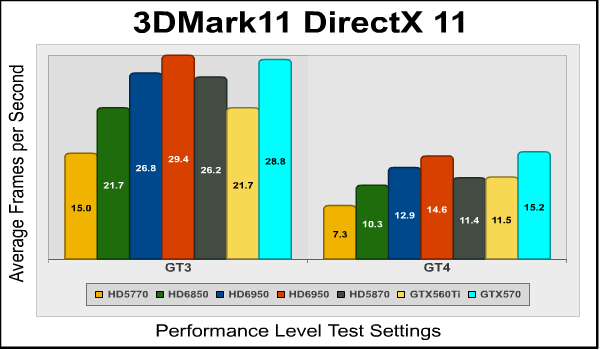
The PowerColor Radeon HD6850 SCS3 continues to do well in the GT3 and GT4 tests.
| Graphics Card | Radeon HD5770 | Radeon HD6850 SCS3 | Radeon HD6850 SCS3 OC | Radeon HD6950 | Radeon HD5870 | NVIDIA GTX560Ti | NVIDIA GTX570 |
|---|---|---|---|---|---|---|---|
| GPU Cores | 800 | 960 | 960 | 1408 | 1600 | 384 | 480 |
| Core Clock (MHz) | 850 | 775 | 990 | 850 | 875 | 822 | 732 |
| Shader Clock (MHz) | N/A | N/A | N/A | N/A | N/A | 1645 | 1464 |
| Memory Clock (MHz) | 1200 | 1000 | 1150 | 1300 | 1250 | 1050 | 1900 |
| Memory Amount | 1024MB GDDR5 | 1024MB GDDR5 | 1024MB GDDR5 | 2048MB GDDR5 | 1024MB GDDR5 | 1024MB GDDR5 | 1280MB GDDR5 |
| Memory Interface | 128-bit | 256-bit | 256-bit | 256-bit | 256-bit | 256-bit | 320-bit |
DX11: Aliens vs. Predator
Aliens vs. Predator is a science fiction first-person shooter video game, developed by Rebellion, and published by Sega for Microsoft Windows, Sony PlayStation 3, and Microsoft Xbox 360. Aliens vs. Predator utilizes Rebellion's proprietary Asura game engine, which had previously found its way into Call of Duty: World at War and Rogue Warrior. The self-contained benchmark tool is used for our DirectX-11 tests, which push the Asura game engine to its limit.
In our benchmark tests, Aliens vs. Predator was configured to use high quality settings with 4x AA and 16x AF, along with tessellation, advanced shadows, and Screen Space Ambient Occlusion (SSAO).

This is a fairly tough test, tougher even than Crysis Warhead, judging from the frame rates. Of course Warhead, being a DX10 game, doesn't have tessellation or SSAO. The HD6950 dominates here, but the overclocked HD6850 returns solidly playable frame rates.
| Graphics Card | Radeon HD5770 | Radeon HD6850 SCS3 | Radeon HD6850 SCS3 OC | Radeon HD6950 | Radeon HD5870 | NVIDIA GTX560Ti | NVIDIA GTX570 |
|---|---|---|---|---|---|---|---|
| GPU Cores | 800 | 960 | 960 | 1408 | 1600 | 384 | 480 |
| Core Clock (MHz) | 850 | 775 | 990 | 850 | 875 | 822 | 732 |
| Shader Clock (MHz) | N/A | N/A | N/A | N/A | N/A | 1645 | 1464 |
| Memory Clock (MHz) | 1200 | 1000 | 1150 | 1300 | 1250 | 1050 | 1900 |
| Memory Amount | 1024MB GDDR5 | 1024MB GDDR5 | 1024MB GDDR5 | 2048MB GDDR5 | 1024MB GDDR5 | 1024MB GDDR5 | 1280MB GDDR5 |
| Memory Interface | 128-bit | 256-bit | 256-bit | 256-bit | 256-bit | 256-bit | 320-bit |
DX11: Unigine Heaven 2.5
The Unigine Heaven 2.5 benchmark is a free publicly available tool that beautifully demonstrates the DirectX 11 graphics capabilities in Windows 7 or updated Vista Operating Systems. Set among an enchanting village built on floating islands connected by swaying rope bridges, Heaven uses advanced lighting, tessellation, smoke and particle effects, distance blur, and a host of other graphical techniques to render a photo-realistic experience. An interactive mode allows for manual exploration of the village. Of course, all of this requires considerable graphics muscle, and I've found Heaven to be an excellent tool for testing the stability of graphics card overclocks.
The distinguishing feature in the Unigine Heaven benchmark is a hardware tessellation that is a scalable technology aimed for automatic subdivision of polygons into smaller and finer pieces, so that developers can gain a more detailed look of their games almost free of charge in terms of performance. Thanks to this procedure, the elaboration of the rendered image finally approaches the boundary of veridical visual perception: the virtual reality looks real. The Heaven benchmark excels at providing the following key features:
- Native support of OpenGL, DirectX 9, DirectX-10 and DirectX-11
- Comprehensive use of tessellation technology
- Advanced SSAO (screen-space ambient occlusion)
- Volumetric cumulonimbus clouds generated by a physically accurate algorithm
- Dynamic simulation of changing environment with high physical fidelity
- Interactive experience with fly/walk-through modes
- ATI Eyefinity support

NVIDIA pulls back into the lead here, with the GTX570 doubling the scores of the stock-clocked HD6850. The overclocked HD6850 does better relative to its stock-clocked performance in this test than any other.
| Graphics Card | Radeon HD5770 | Radeon HD6850 SCS3 | Radeon HD6850 SCS3 OC | Radeon HD6950 | Radeon HD5870 | NVIDIA GTX560Ti | NVIDIA GTX570 |
|---|---|---|---|---|---|---|---|
| GPU Cores | 800 | 960 | 960 | 1408 | 1600 | 384 | 480 |
| Core Clock (MHz) | 850 | 775 | 990 | 850 | 875 | 822 | 732 |
| Shader Clock (MHz) | N/A | N/A | N/A | N/A | N/A | 1645 | 1464 |
| Memory Clock (MHz) | 1200 | 1000 | 1150 | 1300 | 1250 | 1050 | 1900 |
| Memory Amount | 1024MB GDDR5 | 1024MB GDDR5 | 1024MB GDDR5 | 2048MB GDDR5 | 1024MB GDDR5 | 1024MB GDDR5 | 1280MB GDDR5 |
| Memory Interface | 128-bit | 256-bit | 256-bit | 256-bit | 256-bit | 256-bit | 320-bit |
DX11: Battlefield Bad Company 2
The Battlefield franchise has been known to demand a lot from PC graphics hardware. DICE (Digital Illusions CE) has incorporated their Frostbite-1.5 game engine with Destruction-2.0 feature set with Battlefield: Bad Company 2. Battlefield: Bad Company 2 features destructible environments using Frostbit Destruction-2.0, and adds gravitational bullet drop effects for projectiles shot from weapons at a long distance. The Frostbite-1.5 game engine used on this game consists of DirectX 10 primary graphics, with improved performance and softened dynamic shadows added for DirectX 11 users.
At the time Battlefield: Bad Company 2 was published, DICE was also working on the Frostbite-2.0 game engine. This upcoming engine will include native support for DirectX 10.1 and DirectX 11, as well as parallelized processing support for 2-8 parallel threads. This will improve performance for users with an Intel Core-i7 processor. Unfortunately, the Extreme Edition Intel Core i7-980X six-core CPU with twelve threads will not see full utilization.
In our benchmark tests of Battlefield: Bad Company 2, the first three minutes of action in the single-player raft night scene are captured with FRAPS. Relative to the online multiplayer action, these frame rate results are nearly identical to daytime maps with the same video settings. The Frostbite-1.5 game engine in Battlefield: Bad Company 2 appears to equalize our test set of video cards, and despite AMD's sponsorship of the game it still plays well using any brand of graphics card.

Despite its advanced graphics, all you need to play Battlefield: Bad Company 2 at 1920x1200 is a humble Radeon HD5770. I wish other games could balance efficiency and cutting-edge graphics as well as BC2 does!
| Graphics Card | Radeon HD5770 | Radeon HD6850 SCS3 | Radeon HD6850 SCS3 OC | Radeon HD6950 | Radeon HD5870 | NVIDIA GTX560Ti | NVIDIA GTX570 |
|---|---|---|---|---|---|---|---|
| GPU Cores | 800 | 960 | 960 | 1408 | 1600 | 384 | 480 |
| Core Clock (MHz) | 850 | 775 | 990 | 850 | 875 | 822 | 732 |
| Shader Clock (MHz) | N/A | N/A | N/A | N/A | N/A | 1645 | 1464 |
| Memory Clock (MHz) | 1200 | 1000 | 1150 | 1300 | 1250 | 1050 | 1900 |
| Memory Amount | 1024MB GDDR5 | 1024MB GDDR5 | 1024MB GDDR5 | 2048MB GDDR5 | 1024MB GDDR5 | 1024MB GDDR5 | 1280MB GDDR5 |
| Memory Interface | 128-bit | 256-bit | 256-bit | 256-bit | 256-bit | 256-bit | 320-bit |
SCS3 HD6850 Temperatures
You might worry about the GPU temperature on this card, and you'd be right to do so. The PowerColor AX6850 1GBD5-S3DH is the most powerful GPU that's ever been fitted with passive cooling, to my knowledge. Good airflow over the card is critical to maintaining reasonable operating temperatures.
FurMark is the application to use if you want to drive video card temperatures as high as possible. Still, this is complicated by the extra controls AMD's built into its latest generation GPUs and drivers, which will automatically throttle themselves down if power draw or temperature exceed certain limits. In this respect they're similar to Intel's Sandy Bridge processors, which will also aggressively throttle themselves to stay within a pre-defined thermal and power envelope. I tested the card in a closed NZXT M59 computer case, with one intake fan at the lower front and one exhaust fan at the upper rear.
| Video Card (two case fans) | Ambient | Idle | Load |
| PowerColor Radeon SCS3 HD6850 1GB GDDR5 | 24°C | 49°C | >100°C |
The card's idle temperature is a good 15 degrees higher at idle than you'd see in a reference design HD6850, and Furmark took the GPU temperatures high enough for the card's throttling to kick in, which would significantly reduce the card's performance in a real-world situation. The thing to keep in mind here is that these results will vary dramatically depending on the airflow over the card. How dramatically? Well, those of you familiar with the NZXT M59 computer case might know that it has a standard side-panel fan, a 120mm unit that blows directly on the top of your graphics card. I left this fan disconnected for most of my testing since I wanted to test under the conditions PowerColor gave on their box, which was a case with two fans.
Turning on the side panel fan made quite a difference:
| Video Card (two cas fans + side panel fan) | Ambient | Idle | Load |
| PowerColor Radeon SCS3 HD6850 1GB GDDR5 | 24°C | 40°C | 74°C |
Yep, that's a lot cooler! The giant heat sink doesn't need much of an increase in airflow to have a dramatic effect on GPU temperature, and bear in mind that the 120mm vase fan in the NZXT's side panel probably moves a lot more air than the much smaller fan on a reference design HD6850.
Originally, I wasn't planning to overclock this card: that's not the point of the card, and after seeing it overheat under stress at stock speeds, I didn't think it would be possible. But everything changed with that side fan enabled, so off I went...
AX6850 1GBD5-S3DH Overclocking
PowerColor doesn't make any special claims about this card other than its silent cooler, and the board, while different from the reference design, doesn't seem to have enhanced power circuitry. So even with the extra cooling available, I wasn't expecting much...but I was wrong.

Using MSI's excellent Afterburner utility, I was able to take the core clock from 775MHz to 990MHz, and the memory clock from 1000MHz to 1150MHz. I could actually run most benchmarks at a nice round 1000MHz core clock, but it would crash in Unigine Heaven, so I backed it down just enough to complete this. One interesting note is that the idle and load temperatures of the overclocked card were within 1 degree of the stock-clocked card, but remember this was with the side fan on.
Here's a breakdown of the performance boost provided by this overclock at 1920x1200. Results are rounded to the nearest 0.1 FPS.
| Benchmark | Stock FPS | OC FPS | % improvement |
|---|---|---|---|
| Vantage Jane Nash | 20.0 | 26.2 | 31.0 |
| Vantage New Calico | 15.5 | 20.4 | 31.6 |
| Crysis Warhead | 35 | 42 | 20.0 |
| 3DMark11 GT1 | 15.7 | 19.6 | 28.8 |
| 3DMark11 GT2 | 16.3 | 20.5 | 25.8 |
| 3DMark11 GT3 | 21.7 | 26.7 | 23.0 |
| 3DMark11 GT4 | 10.3 | 12.9 | 25.2 |
| Aliens vs. Predator | 26.2 | 32.0 | 22.1 |
| Unigine Heaven | 24.2 | 29.0 | 19.8 |
| Bad Company 2 | 50.8 | 61.2 | 20.5 |
| Average Improvement | 24.4 | ||
So, a 24.4% average performance improvement from a 27.7% increase in core clock speed. Not bad! Really good, in fact. This is a better overclock than you'd get with almost any other HD6850 card, even "enthusiast" versions with dual-fan coolers. But remember, you must get decent airflow over the card to get this level of performance.
PowerColor Radeon HD6850 SCS3 Final Thoughts
AMD's card naming scheme has confused the marketplace: the Barts-GPU 68xx cards actually provided slightly less performance than the older 58xx series cards, although at a similar or better price-performance ratio. The HD6850's performance slots into AMD's current video card lineup so neatly that one can imagine the engineers tweaking the hardware until the card's performance dropped into the slot that the marketing department had checked.
PowerColor's Silent Cooling System 3 (aka SCS3) is obviously very effective...if you have enough airflow. You might think this card would be a natural for a home theater PC (HTPC), but HTPC cases aren't known either for their expansive interiors or excellent airflow, and I suspect this card not only wouldn't fit in many HTPC cases, but it might overheat in the HTPC cases it does fit in.

So who is this card aimed at? As we've seen from my testing, it works great in a case with a side panel fan, and it's easy to choose a 120mm fan that will provide better airflow at much lower noise levels than the much smaller fan(s) fitted to most video cards. So the card's great if you want to build a quiet mid-range gaming system, although I'd be nervous about pairing these up in CrossFireX: even at stock clock speeds, the heat sink becomes far too hot to touch, and the hot air roiling off the bottom card in a CrossFireX pair would doubtless overheat the card above it, especially since the card's giant heat sink would mean there's very little space between the two cards. It could serve as the top card in a CrossFireX system if the bottom card were actively cooled...
At $204.99, the Radeon HD6850 SCS3 is $25 to $45 more expensive that other Radeon HD6850 cards, so you're paying a substantial premium for the silent operation....but if you want to overclock the card, you must give up some of that silence to ensure adequate airflow over the card's cooler. If you don't plan to overclock the card, that's a lot of extra money to pay for a single non-performance-related feature, especially since reference design 6850s aren't exactly loud under most conditions. You'd do well to avoid using this card in combination with a "silent" case, since these cases often have less airflow than regular cases.
So the AX6850 1GBD5-S3DH is a bit of a strange beast. It's not a typical HTPC card (small, quiet, relatively low performance and price), nor is it a typical enthusiast card (actively cooled, suitable for CrossFireX), although PowerColor seems to be aiming it at the enthusiast market: one of their claims is "Play hard at absolutely silent setting."
AX6850 1GBD5-S3DH Conclusion
IMPORTANT: Although the rating and final score mentioned in this conclusion are made to be as objective as possible, please be advised that every author perceives these factors differently at various points in time. While we each do our best to ensure that all aspects of the product are considered, there are often times unforeseen market conditions and manufacturer changes which occur after publication that could render our rating obsolete. Please do not base any purchase solely on our conclusion, as it represents our product rating specifically for the product tested, which may differ from future versions. Benchmark Reviews begins our conclusion with a short summary for each of the areas that we rate.
The performance of this card was excellent, especially with the high overclock I was able to achieve. It's ironic that of all the HD6850-based video cards that Benchmark Reviews has tested, the passively cooled card is the one that achieved the best overclock, and by a pretty large margin at that. This just goes to show the importance of good cooling.
Aesthetics is always subjective, but even the most jaded geek will do a double take at the first sight of this card's massive cooler. PowerColor has thoughtfully wrapped the card's badge around the edge of the cooler so it will display well in a windowed case.
Construction quality on a video card is hard to assess (at least for me). I look for things like excess solder splashes, poor masking, and uniformity of component placement, especially on custom PCBs like this one. Everything looks good, even under high magnification, and little touches like the plastic port plugs that keep dust off unused ports and connectors add to the impression of quality. Of course, the cooler dominates this card, but it's nice to see the copper heat sinks on the RAM and the sturdy back plate. The one criticism I have of the construction quality is the slightly wonky positioning of the copper heat sinks on the RAM chips.
AMD's Barts-series GPUs like the HD6850 do have a lot of features, but AMD is deficient in two areas: 3D and PhysX. AMD's 3D implementation requires third-party software and hardware to configure, and market acceptance of this feature has been very low. The lack of a PhysX implementation would seem to be mainly a political issue rather than a functional issue, since NVIDIA claims that PhysX is an "open standard" that anyone can implement, and in fact offered to work with ATI (now AMD) on a Radeon implementation back in 2009. Over the past couple of years, PhysX has grown from a "meh" feature used to generate more elaborate explosive debris to a major feature in many games, and is now probably the biggest argument for going with NVIDIA over AMD. AMD Eyefinity means that you could run a triple-monitor gaming setup using just this one card, but an HD6850 really doesn't have the graphics muscle to pull this off for most games.
Functionally, the card is excellent, if you supply enough airflow. In my NZXT M59 case, with the recommended intake and exhaust fans, I was able to overheat the card using Furmark, and GPU temperatures soared into the 90s even with standard benchmarking software. While Furmark represents an extreme case that won't be replicated with other software, it still highlights the need to ensure adequate ventilation even if you don't plan to overclock the card at all.
The PowerColor Radeon AX6850 SCS3 currently sells for $204.99 at NewEgg. Value is this card's weak point: granted, it's dead silent, but its price is much higher than other HD6850 cards, most HD6870 cards, and is very close to the price of some Radeon HD6950 cards. That's a lot of pay for silence, especially (as I noted previously) since actively cooled HD6850 cards aren't particularly noisy. The card's giant cooler also occupies 3 or 4 of your motherboard slots, which could be a problem for some users.
The PowerColor Radeon SCS3 HD6850 1GB GDDR5 is a unique card with potentially excellent performance, but its size, price, and limitations make it appropriate for only a very limited few.
Pros:
+ Excellent cooling performance with low noise (assuming adequate case ventilation)
+ Excellent overclockability and game performance (assuming adequate ventilation)
+ Silent operation
+ Dramatic appearance
Cons:
- Triple- or quad-slot cooler, probably too large for most HTPC cases
- Requires careful system design to ensure adequate ventilation
- Significantly higher price than other HD6850-based cards
- Unsuitable for CrossFireX setups
Ratings:
- Performance: 9.5
- Appearance: 9.0
- Construction: 8.75
- Functionality: 8.0
- Value: 7.0
Final Score: 8.45 out of 10.
Questions? Comments? Benchmark Reviews really wants your feedback. We invite you to leave your remarks in our Discussion Forum.
Reader comments from the original article
11 comments were posted before commenting closed. They are preserved as written. Original avatars no longer resolve and are shown as a placeholder.
RE: PowerColor Radeon AX6850 SCS3 Mack Permalink:
Really nice review. I think I would really like this card if the unit did not eat up 3 slots, and of course price wise, you said it all.
Great review choice Jeff Permalink:
I would never buy such a card but its always interesting to see what seem to be engineering exercises by vendors. There are GPUs with quiet fans out there (like my reference GTX 460) so "silent" cards really aren't needed, but they're fun to read about. Oh, and I'm one of the "disturbing" people who still us XP. Almost all my games are DX9 (amazing how many there are - especially RPGs) and it does exactly what I need it to.
RE: Great review choice David Ramsey Permalink:
With XP, you're not only subject to memory limitations (SLI wouldn't really work for you, for example), but are much kore vulnerable to viruses and malware. But if it works for you...
RE: Great review choice kater Permalink:
Also, no SSD with TRIM for you :P And SSD w/o TRIM is basically pointless. But hey, to each his own :)
Great Review - But that price? Christopher Fields Permalink:
I looked on NewEgg this morning and found this card for $204.99 / #newegg.com/Product/Product.aspx?Item=N82E16814131442 Just thought I would drop the news for those interested in buying it from somewhere else other than "Sears", lol. Since when did Sears get into the PC Parts market?
RE: Great Review - But that price? Olin Coles Permalink:
Thank you for sharing, but the Newegg price was already linked in the first/last page of this review.
Great shot! Zodar Permalink:
I was searching exactly for this card! I use my PC (tower case) for games but also as media player with a beamer. Since my PC is very close to my ears during "movie-watching sessions"... to keep noise low is very important. Currently I am using a hd 4850 with Accelero s1 rev.2, but looking for a performance increase I was disapponted in seeing that I should had bought a card and a new separated special heatsink... So... This SCS3 for me is exceptional! It fits all my needs. Just bought! It should arrive in 5-6 days... ;)
RE: Great shot! David Ramsey Permalink:
Glad the reviewvwas useful for you! Let us know how you like it.
Nice Card! Zodar Permalink:
I tried this card not so much (I just became father... ;) ) but I like it. I put an enermax Cluster UCCL 120mm fan close to the heatsink to be sure that it will not overheat (I have a Cooler Master case, sileo 500, without side panel fan). I have to say that the card doen't seem to need the additional fan (my case is however well vented), but as I said, I trid it not so much. In my case, upgrading from 4850, the performance improvement is impressive (with Crysis 2 now I use Umtra settings, after downloaded hi-res texture and patch for dx11)! And no noise at all when I watch movies (I have scythe kaze master as reobus for fan controlling and if I don't use the card for gaming, the even -really- ultra silent "magnetic bearing" fan is off). So, in my opinion, if you search for noiseless card with high performance it is competitive with standard 6850 equipped with third part heatsinks and, for sure, with higher reliability.
Good review Daniel Permalink:
Thanks for this review. It helped me decide!
RE: PowerColor Radeon AX6850 SCS3 Fiend Permalink:
Very nice review, thank you.