
SilverStone SUGO SST-SG09 MicroATX Chassis
SilverStone SUGO SST-SG09 Computer Case Review
Manufacturer: SilverStone Technology
Model Number: SST-SG09B MicroATX Mini Tower Computer Case
UPC: 4710713969520 EAN: 844761009526
Price As Tested: $99.99 (Newegg / Amazon)
Full Disclosure: SilverStone Technology provided the product sample used in this article.
SilverStone Technology is best known for their computer cases. Some of their older models, such as the Temjin SST-TJ07, are actual classics in the field. SilverStone isn't afraid to innovate, as their "rotated motherboard" cases like the Raven, Fortress FT-02, and Temjin TJ-11 show.
With the uptick in the popularity of small form factor (SFF) cases, SilverStone has introduced dramatic new products like the FT-03, FT-03 Mini, and SG08. All of these cases abandon conventional design tropes and implement innovative new interior layouts.

The SUGO SG09 follows this path. If you think its exterior appearance is a little unusual, wait until you see how it works on the inside.
SUGO SG09 Features
-
Dual speed 180MM Air Penetrator fan with removable filter for cooling
-
Quiet 120mm rear exhaust fan
-
Independent hard drive/SSD compartment behind motherboard tray
-
Supports full size CPU cooler up to 165mm tall
-
Supports Micro-ATX, Mini-DTX and Mini-ITX motherboards
-
One slim optical drive bay included
-
Accommodates two 3.5" hard drives and four 2.5" hard drives or SSDs
-
Accommodates full sized ATX PSU up to 180mm
-
Dedicated triple GPU fan bracket with removable filter
SST-SG09B Specifications
|
Model No.
|
SST-SG09B(black) | |
|---|---|---|
|
Material
|
Plastic front panel and steel body | |
|
Motherboard
|
DTX, Mini-ITX, Micro-ATX | |
|
Drive Bay
|
External | Slim optical x 1 |
| Internal | 3.5” x 2 , 2.5”x 4 | |
|
Cooling System
|
Front | -- |
| Rear | 1 x 120mm 1200rpm 22dBA | |
| Side | Left:1 x 120mm 1200rpm 22dBA (backward compatible with 92mm) 2 x 80/92mm fan slot Right:80mm fan slot |
|
| Top | 180mm Air Penetrator 700/1200rpm, 18/34dBA (backward compatible with 140mm) | |
| Bottom | -- | |
| Internal | -- | |
|
Expansion Slots
|
4 | |
|
Front I/O Port
|
USB 3.0 x 2 Audio x 1 MIC x 1 |
|
|
Power Supply
|
Custom 600W with 80 PLUS Bronze certification and single +12V rail | |
| Power Supply Dimensions | Optional standard PS2(ATX) up to 180mm (160mm recommended to varying cable connectors) | |
|
Expansion Card
|
Compatible up to 13.3" long, width restriction-5.70" | |
|
Limitation of CPU cooler
|
165mm | |
|
Net Weight
|
5.3 kg | |
|
Dimensions
|
220 mm (W) x 295 mm (H) x 354 mm (D), 23 liters | |
Let's take a closer look at this case in the next section.
Closer Look: Exterior
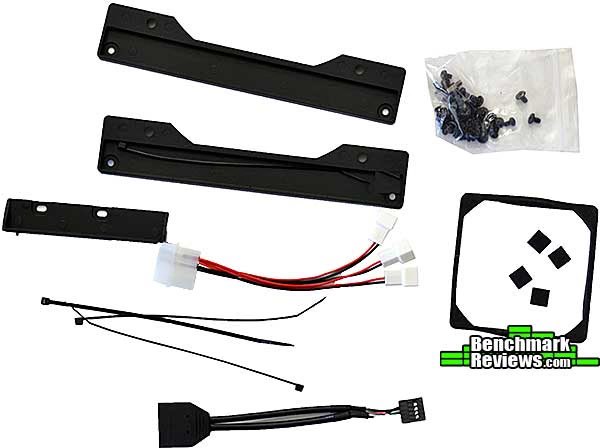
The accessories pack includes a multi-lingual manual, an adapter to allow motherboards with only USB 2.0 headers to be connected to the case's front panel, a bag of screws for mounting drives, several cable ties, a foam square for mounting an 80mm fan, a Molex to three fan leads connector, and four tiny rubber feet to raise a 9.5mm optical drive to the 12.5mm height the case is designed for. The two large black brackets are designed to let you mount a 140mm fan in place of the top-mounted 180mm Air Penetrator fan, although I can't see why you'd ever want to do this.
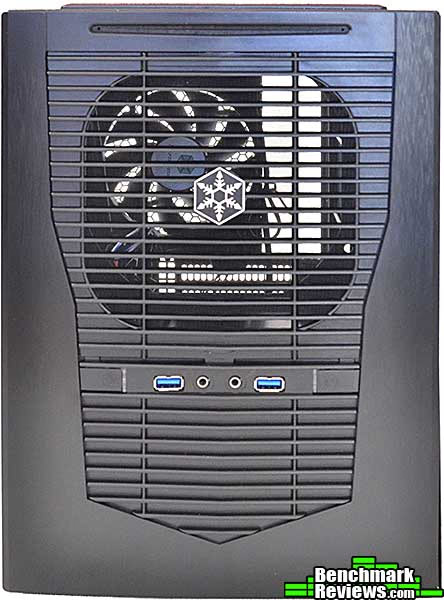
The front of the SST-SG09B case looks like sleek brushed aluminum, but it's really cleverly textured plastic. At the top is the slot for the slot-loading optical drive, below which appears to be an opening for a front-mounted ventilation fan, but it's really for your power supply's intake fan. Yes, the power supply mounts sideways at the front of the case! Below that is the front panel, with the barely-visible power button and light at the left, followed by two USB 3.0 and the audio I/O ports, and last the similarly hard to see reset button.
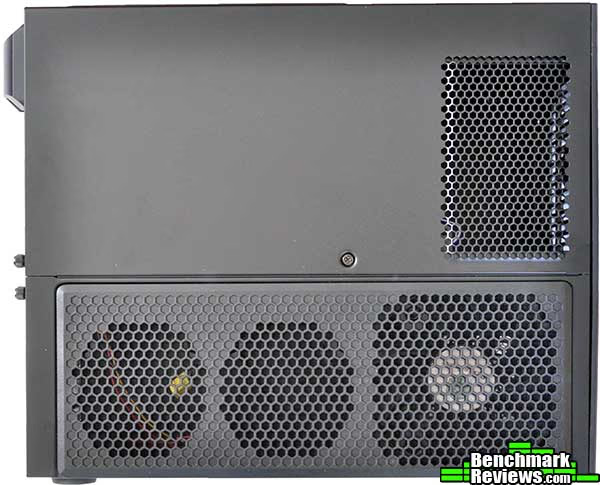
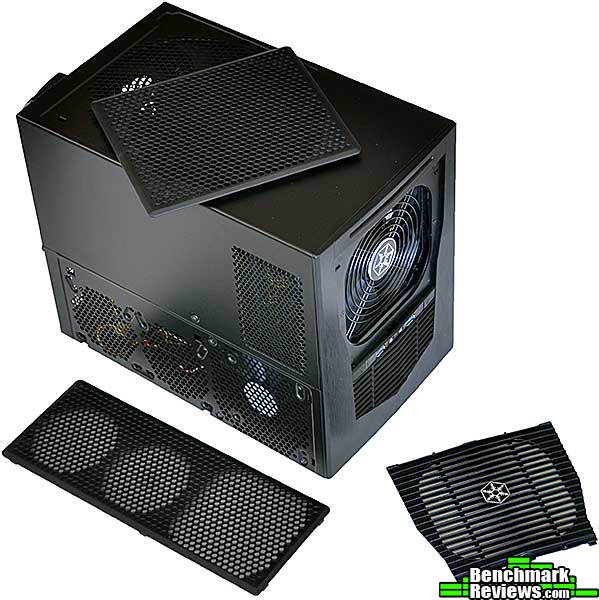
The left side has a grille for the power supply exhaust, as well as three fan intakes for blowing cool air onto your graphics cards. The largest intake has a 120mm Air Penetrator fan pre-installed. The panel containing the three GPU fans is a separate piece; note the split where it joins the main cover, as well as the screw that secures them.
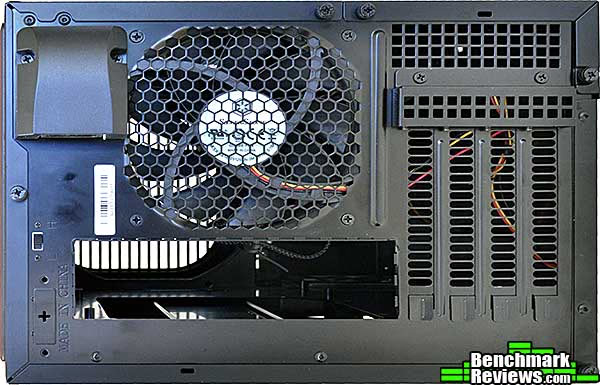
The back of the case reveals the 120mm exhaust fan, the 90-degree angled A/C plug, and the small low/high speed switch for the top-mounted fan. You can see the cutout for the motherboard I/O panel and the four slot covers, as well as the five thumbscrews that secure the main case cover and GPU fan cover.
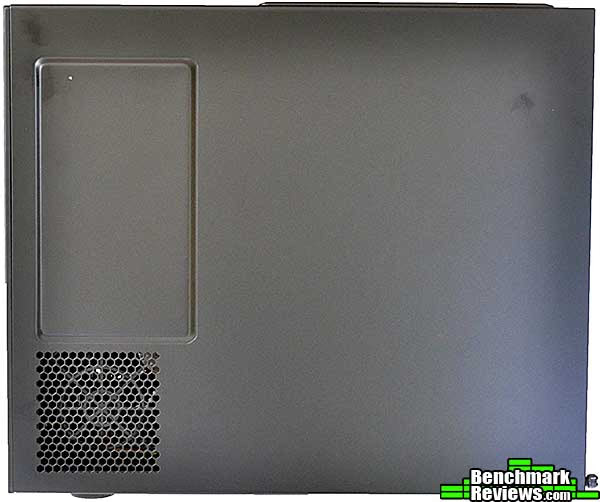
The right side of the case has a small (2-3mm) indentation to give you a little extra room for power supply cables. Below that is a grill for an 80mm fan, which is optional but you'd want to use in some cases, which I'll describe later.
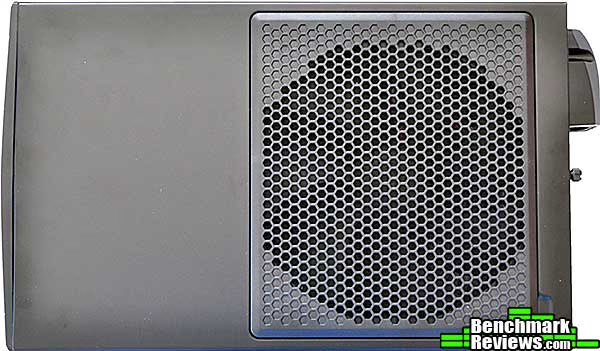
The top of the case is featureless except for the air intake for the top-mounted fan.
All of the air intakes on this case-- the top-mounted fan, the side GPU fans, and the power supply air intake-- are covered with snap-on filters.
Let's take a look inside this mATX case in the next section.
Closer Look: Interior
SilverStone's done it again: just when you thought you'd seen every possible way to arrange components in a computer case, they come up with this. A standard ATX power supply occupies the upper front area, with its cooler fan facing out the front of the case. The motherboard area is behind that, and below the power supply area you can see, on the other side of the case, a mounting point for an 80mm fan. It might initially seem an odd place to put a fan since no components are there, but the purpose is to remove any hot air exhausted by your video card(s), should you have a card or cards that push some hot air back into the case. Annoyingly, SilverStone made the same design error here they made with the SG08 case: all the interior cables are far too long. Even the internal power cord that runs from the 90 degree power plug on the back of the case to the power supply area is a good 6"-8" longer than it needs to be to reach any part of a power supply...and since this was obviously a custom made cable, why?
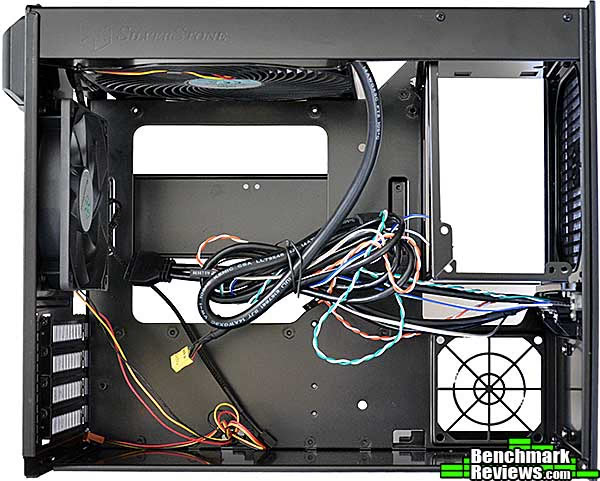
The area behind the motherboard tray is where you'll install your hard drives. The horizontal bar behind the CPU cooler cutout can hold two 3.5" drives, while the pair of plastic brackets at the bottom can hold two 2.5" drives each, for a total of six drives mounted at once.
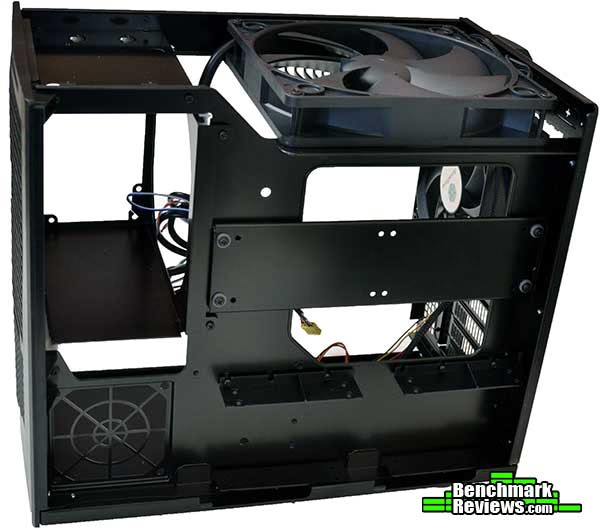
A top view shows the massive Air Penetrator fan that blows straight down across the motherboard. Even if you have a good CPU cooler, your VRMs and memory will appreciate the ventilation. Note that a tiny slice of the fan extends over the hard drive area, but I'm not sure how much air actually flows down here. Just in front of the fan is the mounting tray for the slim optical drive. In a welcome change, the SG09 does not require you to secure the drive with the watchmaker-sized micro-screws most other cases do: one edge of the drive is secured by the tabs at the lower part of the tray (as seen in this image), while a plastic bracket with pins that engage the screw holes on the other side of the drive snaps into place and is then secured to the drive tray with screws. A clever design that makes dealing with these drives much easier.

Your power supply screws into a framework that slides into the front of the case on nylon rails.

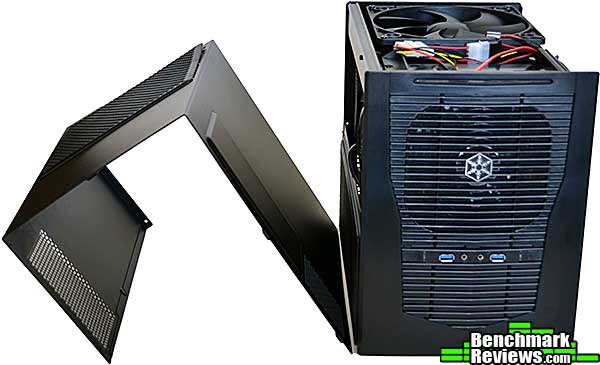
Of course, to get inside the case, you have to remove the cover...or two covers. The main, asymmetrical cover is shown below, but you must also remove the cover that mounts the GPU fans. This requires you to remove a total of five thumb screws and two regular screws. The GPU cover folds around and forms part of the bottom of the case, and it's a part with rubber feet on it, so the case sits slightly tilted with the GPU cover off, and you can scratch your work surface with the bare metal case edges if you're not careful moving it.
Let's give this case a real test: building a system in it.
Building a System
Micro ATX systems haven't been as pigeonholed to the HTPC and SOHO server roles as have mini-ITX systems, but it's still unusual to find them on enthusiasts' desks. Still, micro ATX motherboards are much more common than mini ITX motherboards, and the aspiring system builder has a wide variety of choices in this area. ASUS even has an X79 micro ATX motherboard!
There are several restrictions you'll run into when building in the SG09: for one, you'll need a slim optical drive (if you plan to have an optical drive), and you'll want to choose your power supply carefully. SilverStone has shrunken the interior of the case around its components like a Vac-U-Form, and the space for cables in this case seems even tighter than it was in the mini-ITX cases I've reviewed. You're really going to want a power supply with modular cabling, and you should probably look hard at Silverstone's own Strider series of power supplies, if only because SilverStone sells an inexpensive "short cable kit" for them.
| Motherboard | ASUS Maximus V Gene | Newegg |
|---|---|---|
| Memory | Corsair Vengeance (4x4GB) | Newegg |
| CPU | Intel Core i5-2500K | Newegg |
| CPU cooler | Intel RTS2011LC water cooler (using Asetek LGA1155 mounting) | Amazon |
| Power Supply | SilverStone ST85F-G with PP05 short cable kit | Newegg |
| Video Cards | 2 x NVIDIA GTX580 | -- |
There's plenty of room for almost any video card or cards you want to use, although third party cards that take up more than two slots will obviously prevent you from using more than one card. If your card's cooling system exhausts all the hot air out the back of the case, great; otherwise, consider mounting an 80mm exhaust fan below the power supply in the mount provided, oriented to blow hot air out the side of the case.
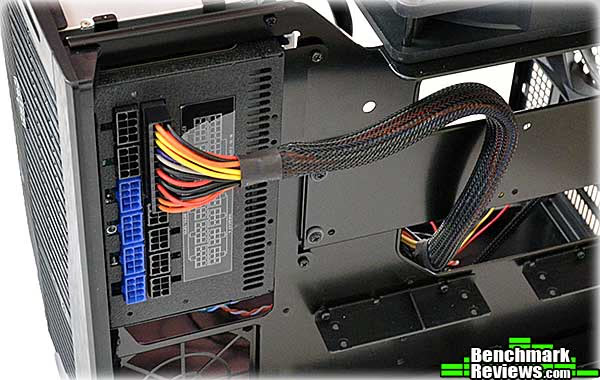
SilverStone says a modular power supply up to 180mm long will fit, but that they "highly recommend" sticking to 160mm if you can. Here's an example of why, with a 180mm SilverStone ST85F-g modular power supply installed. Yeah, there's going to be a little pressure on those cables when the cover's on.
This problem was unexpected: a standard slim optical drive adapter cable (this particular one is actually supplied by Silverstone with their SOD02 slim optical drive) plugged into a slim optical drive butts right up against the Air Penetrator fan. This puts a lot of pressure on the cable connector, which in turn puts a lot of pressure on the connector in the drive. How much? Well, the first time I powered the system up, something near the connector in the optical drive instantly shorted out, puffing smoke out the rear of the now-dead drive. Now, it's certainly arguable that I should have been more careful as I was aware of the stress on the cable before I powered the system up. Still, as you can see, the only solution to this problem is to carve away part of the fan frame to give the cable more clearance. For folks with Dremels, it's easy, but you shouldn't have to carve on part of your new computer case to get it to accept the components it's advertised as supporting.
Note: SilverStone now offers a new right-angled slim optical drive adapter cable, part number CP10, that doesn't have clearance problems and should be available soon.

Here are the drives and all power supply cables installed. Obviously the wiring hasn't been neatened up yet, although there's really not a whole lot more you can do. The area under the power supply is the only place you have to stuff any extra cable length.
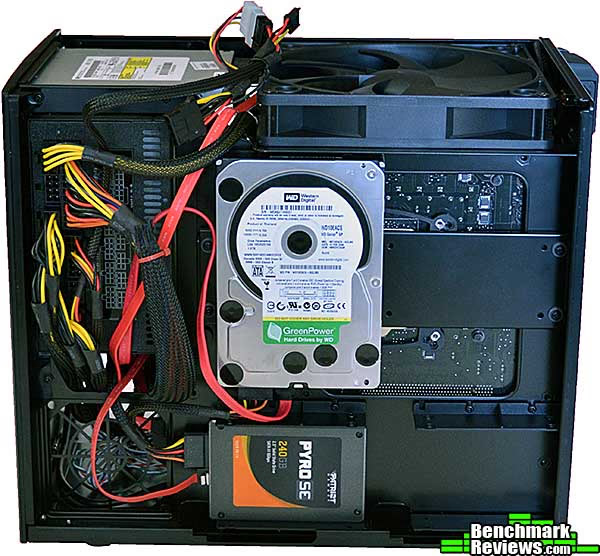
About that 180mm modular power supply: it's a real tight fit. Amazingly, I was able to move the cables into a position that let me secure the cover correctly, and it's not even bulging...but I don't like to think about the pressure that's being exerted on the cable connectors. I'm definitely going to swap this out for a 160mm supply. Fortunately SilverStone has a broad selection of 160mm power supplies ranging from 500 to 1000 watts in their Strider Plus line. This is a lesson to take to heart when you're building a small form factor system: do your research on component size and clearances up front, before you begin the build!

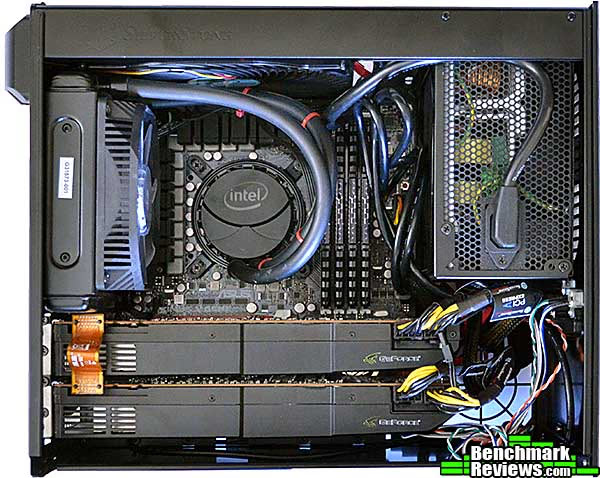
Things look better from this side. An Intel RTS2011LC water cooler, unknown in the wild except for Sandy Bridge Extreme reviewers, sucks the heat from the 2500K CPU courtesy of some Asetek mounting components. The excessively long USB 3 header cable is kind of coiled between the back of the power supply and the memory, and as you can see even the case's integrated power cord to the PSU has a good 6" of length that could be snipped out. At least the two NVIDIA GTX580s look cozy. It's not obvious in this shot but there's about 1.5" of space between the tops of the video cards and the side of the case.
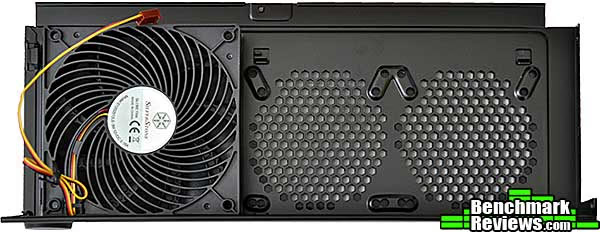
Here's the PSU fan cover with the supplied 120mm Air Penetrator fan. There's plenty of room above the video cards for the fan, even with the power cables coming out of the top of the cards. And the fan is positioned perfectly to blow cool outside air right into the intakes of the 580s. As you can see there are mounting mounts for two additional 80mm or 92mm fans available.
The hardest part about this build was routing the power supply cables. SilverStone's PP05 short cable kit is the only thing that made it possible; I don't see how building a system in this case with a power supply with standard length cables would even be feasible, but if it were, it would be even more of a nightmare than this was.
SilverStone sent along a..."case accessory"...with the review unit I received. Let's check it out in the next section.
SilverStone SUGO Pack
One of the reasons you might want a small form factor system is that they're easier to move that a large tower system. Well, "easier" to move the computer part, anyway. There's still all the stuff you have to plug into the system: keyboard, mouse, various cables...you get the idea. SilverStone has their own solution, which they sent along with the SG09 review case, the SST-PA01B SUGO Pack.
The SUGO Pack is a nylon duffel-bag like carrying case designed specifically for toting small form factor systems around. The main compartment has a rigid bottom and Velcro straps to secure your CPU. The SG09 fills the front-to-back space in the case, but there's enough extra side to side clearance to fit a SilverStone FT03 mATX case.
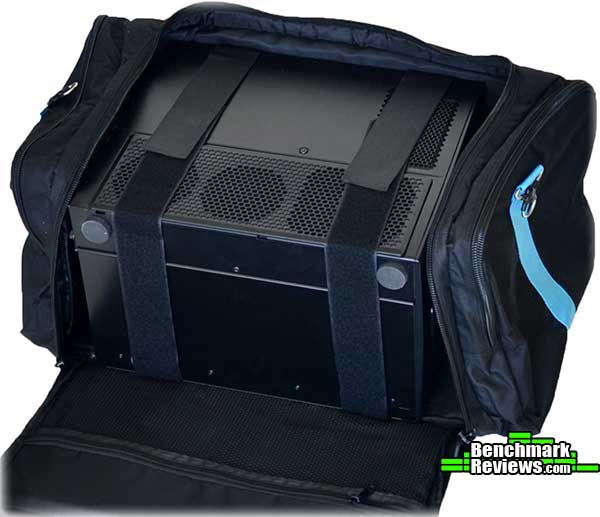
The bag is festooned with various Velcro and zipper-secured compartments; there's plenty of room for your rig, keyboard, mouse, mouse pad, cables, and whatever other accessories you need, with space left over for several cans of Jolt or Monster Energy Drink. With the case zippered shut, and a 104-key keyboard held in place under the top flaps, I am ready to travel! The bag's a little weighty with the 25-pound system in it, but not to worry: SilverStone includes a shoulder strap that clips to metal latches on either side of the bag.
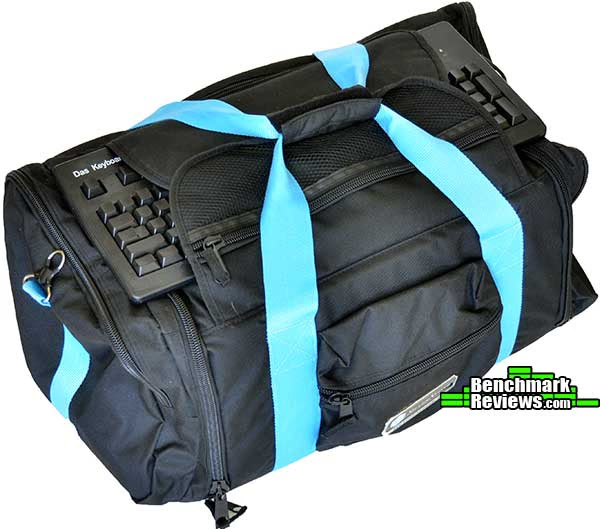
If you have to move your system around, using the SUGO pack means that the only extra item you'd need to carry is your monitor. The SUGO Pack SST-PA01B can be had for $42.00 at Amazon.
Join me in the next section as I give my final thoughts and conclusion about the SilverStone SUGO SG09 case.
Micro ATX Case Final Thoughts
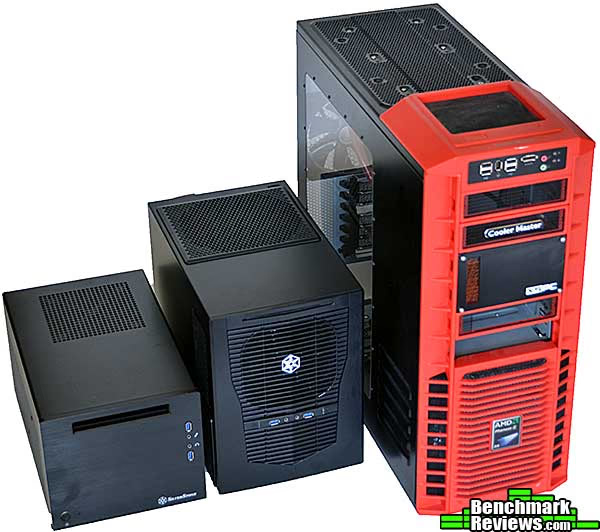
SilverStone's reputation for innovative case design is well-earned, and the SG09 shows why. Its unique design is not without drawbacks, but it allowed SilverStone to make the case as small as possible while still fitting all the other components an enthusiast mATX dual-video card setup would need. The SST-SG09B is only about 30% larger than the mini-ITX sized SG08, and much smaller than a standard full tower ATX case:
SilverStone doesn't claim this is the smallest micro ATX case available, and it might not be. But I really don't see where they can trim any more cubic inches. In fact, I kind of wish they'd added a few millimeters here and there: for example, another 5mm front-to-back distance would solve the problem with the cable from the optical drive hitting the 180mm top fan. Another 5mm in width would make cable routing easier, too. However, according to SilverStone, a volume of 23 liters is the maximum size for a case that can be considered a "small form factor" system, and the SG09 as delivered encompasses 22.974 liters. So it's really not possible to make the case any larger and stay within this seemingly arbitrary limit.
After hours of gaming the temps and fan speeds on the GTX580s were only slightly higher than they were in a giant ultra tower case I'd been using previously, and there the full ATX motherboard allowed me to separate the video cards for better airflow. But the 120mm Air Penetrator blowing right onto the cards almost made up the difference. You're going to want a quiet power supply in this case, since the intake fan is facing straight out the front, but I've found SilverStone's power supplies to be reasonably quiet.
All in all, this is a very impressive case, although the $99.00 price seems a little high. After all, the much larger SilverStone Temjin TJ08 mATX case is only $5 more, and has an aluminum front bezel rather than the plastic front bezel of the SG09. Of course the TJ08 doesn't come with two Air Penetrator fans, so perhaps that makes up some of the difference.
My complaints about this case are few:
- The asymmetric top panel can be quite a pain to put back on. No matter how many times I did it, it was still a clumsy process.
- Excess internal cable lengths are really annoying... everything is too long, from the cables on the top 180mm fan to the front panel connectors and USB 3.0 cable to the internal power cord.
- The clearance problem with the 180mm top fan and the slim optical drive really needs to be addressed. This is the first build I've ever had that killed a component. At the very least SilverStone should include a CP10 cable with the case.
- Like the SG08, the steel SilverStone uses for the chassis is rather thin, and you need to be careful snapping the motherboard I/O shield into place lest you deform the rear panel.
The audience for this case is gamers or anyone else looking to build the smallest possible rig that can handle an SLI or CrossFireX setup-- or anyone else that wants a really small system but needs more memory or PCI-E slots than a mini ITX system can provide. If you need more interior space or 5.25" drive bays but still want to stick with the mATX form factor, SilverStone has several other cases for your consideration.
SilverStone SST-SG09B Conclusion
SilverStone set out to make the smallest possible micro-ATX computer case they could that could still serve as the basis of a high-performance system. The SUGO SG09 is it, but as with all things there are tradeoffs. The ability to handle six drives (two 3.5", four 2.5" is unique in this segment as far as I know, although I suspect you'd need to fabricate your own SATA power cables to actually use this many drives.
The SG09 is not as dramatic as the FT03, but is more interesting than the bland TJ08, two other mATX cases SilverStone offers. It looks rather industrial, but the design is inoffensive rather than striking. Frankly it looks more like a UPS than a computer to me!
The case body and frame are mild steel, with a plastic front bezel. I was a little disappointed to see that the front was plastic rather than aluminum, although it's visually indistinguishable from aluminum and it does have a very subtle curve that might have been difficult to reproduce in metal for the same price. The unique cover design, with an asymmetric top/sides piece and a separate GPU fan piece that forms part of the bottom of the case, is an obvious "part optimization" that removes the need for a separate GPU fan bracket. That's good, I suppose, but after working with another case whose slide-on side and top panels always snicked perfectly into place, it was jarring to wrestle with the large, floppy top/side cover. During the course of this review I had that cover off and on a dozen or more times, and it never got any easier. This a consequence of design rather than construction quality, but it still affects the "perceived quality" of the case.
Like most SFF cases, the front I/O panel is very simple: a couple of USB 3.0 ports and audio I/O. I would have liked to see eSATA and at least an SD card reader, but since nobody else is doing it, it's hard to complain. (No, actually, it isn't. I will keep complaining.)
For $99.99 (Newegg / Amazon), this is a moderately expensive mATX case, although you can certainly spend a lot more money on SilverStone's own FT03 or some Lian Li cases if you wish. Given that SilverStone makes larger mATX cases with more aluminum for the same price, I think the SG09 could be a little cheaper.
The SUGO SG09 is an interesting case aimed at a small audience. Does the size differential relative to somewhat larger cases that would be much easier to build in worth it to you? If so, this is your case.
Pros:
+ Unique design allows high performance components in a very small case
+ Included Air Penetrator fans for motherboard area and graphics cards
+ Uses (most) standard ATX power supplies. Technically.
+ All air intakes have easy to clean snap-off filters
Cons:
- Replacing the top/side cover is a nail-shredding pain
- Internal cables are far too long for this case, making cable management difficult
- Clearance problem with top fan and optical drive cable make it easy to kill your drive
- No integrated memory card reader
- Design almost mandates the use of a SilverStone power supply with short cable kit
Ratings:
- Presentation: 9.50
- Appearance: 8.25
- Construction: 8.00
- Functionality: 9.00
- Value: 8.75
Final Score: 8.70 out of 10.
Recommended: Benchmark Reviews Seal of Approval.
Benchmark Reviews invites you to leave constructive feedback below, or ask questions in our Discussion Forum.
Reader comments from the original article
11 comments were posted before commenting closed. They are preserved as written. Original avatars no longer resolve and are shown as a placeholder.
How well does it work Jeff Permalink:
Just wondering if you actually started up the system, ran some tests. I am very interested in how your setup worked in terms of cooling.
RE: How well does it work David Ramsey Permalink:
Jeff, as I mentioned in the review: "After hours of gaming the temps and fan speeds on the GTX580s were only slightly higher than they were in a giant ultra tower case I'd been using previously, and there the full ATX motherboard allowed me to separate the video cards for better airflow. But the 120mm Air Penetrator blowing right onto the cards almost made up the difference."
RE: RE: How well does it work Jeff Permalink:
Sorry I was more referring to how well the water cooler on the cpu worked in this box. Trying to decide whether to go air or water for a build in this box. I imagine that using water left the air from the 180mm unblocked by a tower cooler and keeps the entire box pretty cool.
RE: RE: RE: How well does it work David Ramsey Permalink:
That's how it seems to work. The water cooler gets a shot of cool air from the outside, and if I switch the fan to "High", the temps on the upper graphics card drop by 3 degrees C under load.
RE: SilverStone SUGO SST-SG09 MicroATX Chassis SSR Permalink:
Like man SFF aficionados, I've been waiting for a Micro ATX case like this for a long time. In addition to the "cons" listed in the article, I'd also like to point out (1) The "Air Penetrator" fan is voltage controlled rather than PWM, and (2) sadly the front of the case is major-league fugly. I'm hoping Silverstone releases an SG10 that fixes some of these issues sooner rather than later!
RE: SilverStone SUGO SST-SG09 MicroATX Chassis Paul Blakeley Permalink:
Looking to build a new SFF system(daughter broke a couple USB ports and my power button is defunct on my Thermaltake LanBox, I will miss the handle, but the bag SilverStone makes looks nice) and was trying to find a new case/chassis to use. Came across your SST-SG09 review and really like the design here. Also thanks for the thorough review! Very helpful. If you were building this today would you use the same parts? I am only planning on using 1 video card for now. I also have never used water cooling before. Am I using thermal paste as I would with a standard CPU fan? Also the link listed to Amazon does not include the Asestek mounting parts you described, correct? Will this be difficult/not able to install with out these? If so where can I get them, or am I better off using a standard CPU fan or different wc system?
RE: RE: SilverStone SUGO SST-SG09 MicroATX Chassis David Ramsey Permalink:
If you are not planning to overclock and only need one video card, you could easily get by with a mini ITX case like the SG08 or Cooler Master Elite 120, both of which I've reviewed here. The closed loop water coolers are very easy to use and install, and any one you buy new today will come with the mounting components you need, so that won't be a problem. All the water coolers come with pre applied thermal paste. I like water coolers for these small cases since ventilation is frequently constrained.
RE RE RE Paul B Permalink:
Thanks for the reply David, I am currently not planning to OC and am just using one two slot GPU, but like the idea that I can upgrade whenever I want to something more powerful. Do you currently recommend the same closed loop cooler? The link to the one currently on this review has no stock images on the Amazon website, so I just wanted to make sure it is current.
RE: SilverStone SUGO SST-SG09 MicroATX Chassis David Ramsey Permalink:
Sorry, Paul, I somehow missed your follow up question. The Intel cooler was simply what I had laying around at the time I did the review. Its performance is not that great compared to some of the current closed loop coolers available now; I'd recommend one of the Corsair coolers if you're going to buy one.
Thank you for a splendid review Johan Sundberg Permalink:
This is one of the best reviews and pictures I have seen. Thank you and happy new year. Sincerely Johan Sundberg
RE: Thank you for a splendid review David Ramsey Permalink:
You're welcome, Johan!