
Logisys Area 51 Black ATX Window Case CS51WBK
Logisys CS51WBK Computer Case Review
Logisys started something back in 2003 when they introduced the Logisys Acrylic LED PC feet for PC chassis, and began to infuse gamers hearts alike with innovations with LED’s and case design. Now years later we have a something LAN gamers alike can take from LAN party to LAN party playing games they all enjoy while sporting the Logisys Area 51W computer case. New to this Area 51W case is a large side window that a previous Area 51 did not have, true to Logisys design, we can enjoy superb air flow and functionality. Benchmark Reviews gives you an up-close look at the Logisys CS51WBK Black ATX Window Case.
Features & Specifications
- Dimension:250mm(W)x488mm(H)x540mm(D)=9.8"x19.2"x21.3"mm
- Max. Motherboard size:12"x10"
- 4 open 5.25" drive bays
- 2 open 3.5" drive bays
- 5 hidden 3.5" drive bays
- A total of 11 drive bays
- Built-in 2 front USB 2.0+Audio Output
- An 80mm RGBY LED fan is included
- This case comes with a LOGISYS SATA Cable power supply, compatible to 20/24pin MotherBoard, Labeled 480watts MAX
- Rear Fan Mount x1 for 80mm / 90mm / 120mm Cooling Fan
- Toolless Thumb Screws
Closer Look: Exterior
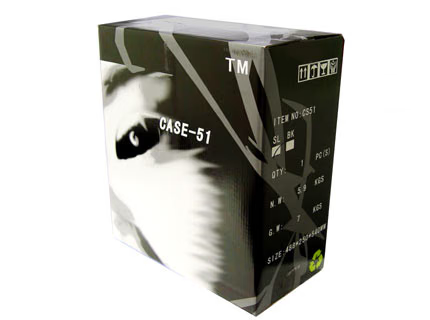
Logisys has done a great job with packaging and once the bubble wrap was removed everything was protected very well to ensure a scratch free case to the end user. Thanks to UPS, we can give the box it came in to your cat to play in, shipping is not what it once was!
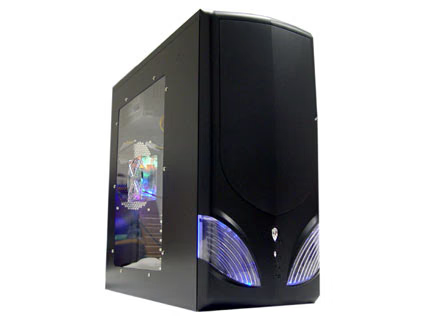
I received the black Area 52 case, which was highlighted by the two exaggerated alien eyes lit up by blue LED light, a customized power and reset buttons and a large rectangular side window built-in with side 4 LED RGBY fan.
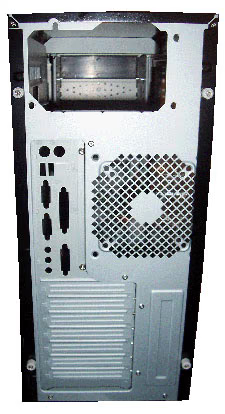
This case features plastic covered thumb screws for easy upgrade and modding needs. Enjoying the ease of setup and installation Logisys has giving you for twist screws on the back for breaking down the case as needed. Removing all the panals was a snap, and it all fit togeather great.
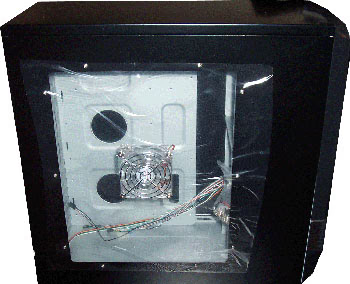
The 80mm side fan attached to the clear panel was clear to see and something added over the older Case-51. I think most would agree that the clear plastic does open up the side, but the rest of the side cover just covers up your drive bays, but do we need to see your RAID 5 setup, or additional wires that you may not want to clean up as you sport the case to a friends house?

Opening the front face I noticed that the door opened from the right to the left and allowed us to the I/O panel with two USB 2.0 ports and two audio ports. I would have liked to see more USB here but 2 seems to be the norm now.
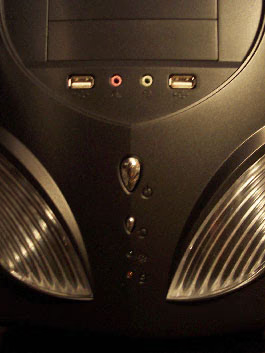
The one thing I did like was the layout of the power and reset buttons…thought it was true to the cases name to put a alien head for the main power button, and a “min-me” version of that below it for the reset. The reset button takes a good finger nail to push in, or a pen to get it all the way down to re-set the system. The USB and audio outputs are in the middle instead of in the bottom of the front panel.
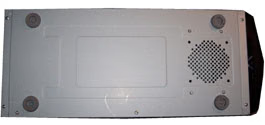
The underneath showed us yet an additional spot for a 80mm fan to force air up towards the top across all hard drives. I was disappointed not to find that there was no location to install a fan on the top of the case, would much rather had seen that location over the bottom of the case.
Closer Look: Interior
Logisys has giving us the industry basics allowing Four 5.25” and two 3.5” external drive bays for your entertainment pleasure. Plenty of room to get cables in and the wire setup for this system is a breeze and is a nice welcome.
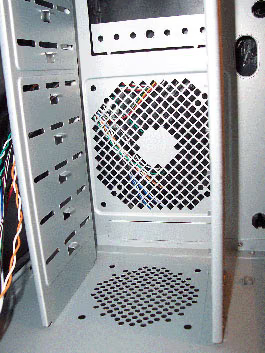
In front of the drive bays you can install a 80mm, 90mm or 120mm fan, there is not much access to the air coming into the fan due to the large alien eyes blocking air flow.
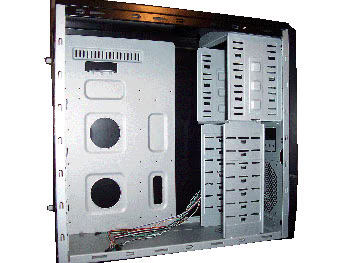
Logisys thinking may be by drilling a location for a 80mm fan on the bottom of the case this would be enough air to push up to the larger fan then allow it to work it into the case from front to back.

One thing I did like was the interior wiring… simple. You have the basics for the plugs to wire up your two USB ports, and that headphone jack along with your microphone. You have the necessary POWER LED, RESET SW, AUDIO,H.D.D LED, POWER LED, and the plug to get those eyes a glowing.
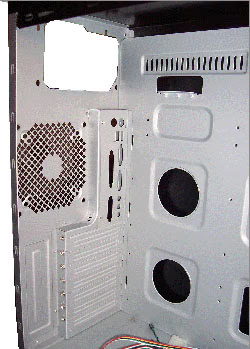
Giving us 7 slots for expansion cards seems to be the norm, and where the Power supply is to rest we can gather you will have plenty of room for just about any PSU, while getting those cables where they need to go. Below the PSU location we have the last spot for another 80mm, 90mm or 120mm fan to push the hot air out, and keep everything cool.
Area 51 Final Thoughts
Logisys has given us yet another case to fill the rooms of gamers, or the casual PC user with a stylish case that has simplicity at its core. The bays holding your hardware are basic, and the air flow I would say are above par for most that are out in this price and class range. I do enjoy the front of the case and the black luster on the exterior case over the high gloss, or painted aluminum that are on so many others.
This unit did have the wiring for the clear panel 80mm fan facing to the right rather than the bottom, but with a few twists of the wrist you can make the adjustment. If you enjoy anything other than that 1980’s beige look at a price point that will make anyone happy I would suggest making the leap into today’s case and pick up the Logisys Area 51W keep the lights off, and enjoy the blue as you play your favorite games.

CS51WBK Conclusion
Logisys gives us a case with a value and functionality on the up swing of most in this range. The simply semi-gloss black and blue LED’s are great for anyone looking for something different. The construction is great. Each part needs to be where it should, and the side panels are secured in place without any gaps, or hang ups. Functionality is wonderful, all a while giving you a place for each component and room to lay even the largest of video cards along with that PSU. Bottom line, the value for this case is even better.
I would say that the age long saying “you get what you pay for” is true with Logisys Area 51W and for once you can be happy with what you get! I would recommend this case to anyone who is in need for a case to replace the plane cubical tower that so many of us have looked at next to our desks or in our home office.
Pros:
+ Inexpensive
+ Plenty of Drive bays
+ Nice amount of interior room
+ Great quality
Cons:
- No additional fan location on top
- No additional screws beyond mounting ones
Ratings:
-
Presentation: 8.0
-
Appearance: 8.25
-
Construction: 8.0
-
Functionality: 8.75
-
Value: 9.5
Final Score: 8.5 out of 10.
Questions? Comments? Benchmark Reviews really wants your feedback. We invite you to leave your remarks in our Discussion Forum.