
NZXT Hades Computer Case HADE-001BK
NZXT Hades Computer Case Review
NZXT has been making quality computer cases since 2004. They have become a popular brand among computer enthusiests, and for good reason. NZXT cares about style and functionality. Here at Benchmark Reviews, we also care about style and functionality, and when NZXT agreed to let us review its new Hades (HADE-001BK) mid-tower Chassis, we happily agreed. The Hades boasts such features as up to nine 5.25" bays, or five 5.25" and four 3.5" bays. It touts room for up to 5 cooling fans and large video cards, and it also features a cable management system; all for around $100. Will the Hades live up to the NZXT reputation of quality? Stay tuned to find out!
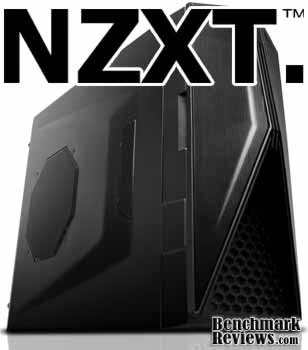
Advertising such features as having ample room for hard drives and larger video cards can grab enthusiasts attention easy enough. Saying that the Hades case has a wire management system will entice the neat-minded folk. Promising all of these things and delivering them are two completely different things. During this review, we will take a look at these features, as well as the other features of the case and find out just how well NXZT delivers on its promise.
NZXT Hades Features
- Expansion galore: Nine 5.25" bay setup or Five 5.25" and Four 3.5"
- Latest Hardware Support: VGA clearance room for 300mm cards like the ATI 5970
- CPU Heatsink clearance: 131.5mm w/ 200mm fan, 165mm w/o side fan installed.
- Dual 200mm intake Large air system: 200mm front fan, dual top 140mm fan, Side 200mm fan, rear 120mm exhaust. NZXT includes the chassis with all fans except for one top 140mm fan
- Control the flow: Gaming, overclocking, or office work the dual 8W per channel fan control allows control over the dual 200mm fans that spin up to 150 CFM each
- Monitor your system: A three C/F temperature display at front panel allows the user to see temperatures inside the chassis even with the door closed. A slant on the door allows for easier viewing from above.
- Punched side panel: Besides aesthetics, the side mesh and extrusion allows for even greater and ease of wire management on the right side panel
- Meshed front: 5.25" meshed bays, meshed door, and meshed bottom panel allows for air to flow into the system with ease.
- Wire Routing: Motherboard punched holes allows for quick CPU bracket removable and optimal wire routing.
- NZXT Solid State bracket allows for two SSD drives to be installed
- Pre-drilled water cooling holes on the backplate
- Front mounted 2 USB, Audio, and E-SATA ports
- Mounting holes for dual radiator at the top
- Removable filter at the bottom PSU
Hades Specifications
| MODEL | Hades Series |
|---|---|
| CASE TYPE | Mid Tower Steel |
| FRONT PANEL MATERIAL | PLASTIC |
| DIMENSIONS (W x H x D) | 200 X 430 X 501 mm / 7.87" x 16.9" x 19.7" |
| COOLING SYSTEM |
FRONT, 1 X 200mm red LED (included) SIDE, 1 x 200mm (included) TOP, 2 X 120/140mm (1 include 140mm) |
| DRIVE BAYS | 9 DRIVE BAYS 9 EXTERNAL 5.25" DRIVE BAYS 4 INTERNAL 3.5" DRIVE MOUNTS Screwless Rail Design |
| MATERIAL(S) | Steel with black finish |
| EXPANSION SLOTS | 7 |
| POWER SUPPLY | 500 WATT PS2 ATX 12V 2.0 ( OPTIONAL ) |
| WEIGHT | 6.95 KGS (W/O Power) |
| MOTHERBOARD SUPPORT | MOTHERBOARDS: ATX, MICRO-ATX, BABY AT |
About the company: NZXT.
NZXT, a company built upon gamers' dreams, hopes to create products that put consumers first. With the objective of designing unique products catered for hardware enthusiasts and gamers, NZXT has grown into a globally renowned brand recognized for dedication towards creating the next great gaming product. NZXT has won numerous awards from media and publications from across the globe with a product line spanning from gaming chassis, power, and gaming input devices. As a corporation formed by gamers, NZXT continues to expand into new horizons and push the limits further with each product unveiling.Our dedicated sales and customer service team will work diligently to earn your trust and loyalty. All our products are built with high quality material and engineered in the best conditions. NZXT products are designed and engineered in the United States and manufactured overseas in China and Taiwan. NZXT was established in 2004 in Los Angeles, California.
Closer Look: Exterior
The NZXT Hades series case is quite stunning to look at. The sharp lines and all black look give it a very sleek shape and feel to it. There are elements of both form and functionality implemented in a variety of ways on this chassis. This section will highlight some of the basic and obvious external features of this case.

This is an image of the case from the front looking at the removable side used for component installation. Notice the large fan grille for the 200mm fan located on the side of the case. Notice the forward facing vent which serves for airflow purposes, and it also looks good too.
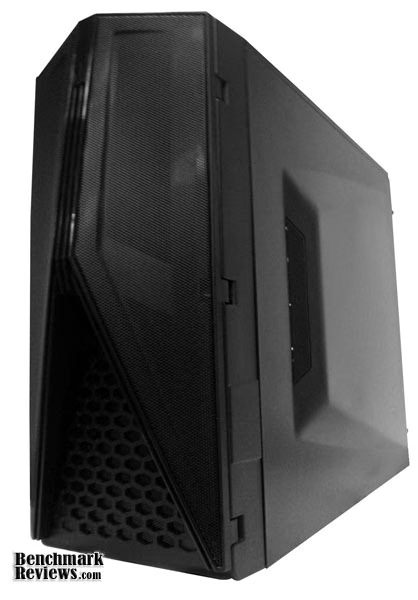
This is a picture of the opposite side of the case. This side is where you hide the nasty tangle of cables that is inevitable when building a system. It also features a stylish looking air vent to allow airflow from the bottom side of the motherboard.

Here is a picture showing the top of the case. There are two openings with mountings for two ##mm fans. Additionally, there are 2 USB ports, a Mic/Headphone Jack, as well as a firewire port. I am not particularly fond of having these ports on the top of the case, as it prevents the case from being enclosed in a small space within a desk or similar, while still making use of the ports. I prefer them to be on the front.
Detailed Exterior Features
In this section, we will inspect some of the exterior features in detail. NZXT is known for their attention to detail, we will investigate just how well they maintained their reputation for the Hades Case.
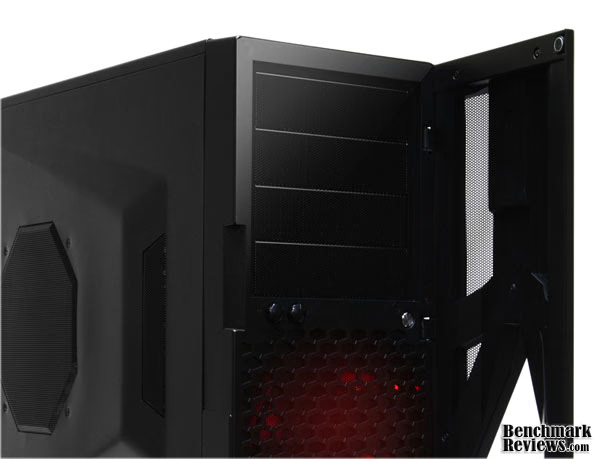
Here is what the case looks like with the front door open and with the front case fan running. The red glow can be seen with the door closed as well. Opening this door gives you access to the fan controller knobs, reset button, C/F toggle for the front temperature display, and any optical drives or whatnot you have in your 5.25" expansion bays. If you notice in the top right of the photo, there is a small magnet that is on the corner of the door that allows the door to stay in place without having obnoxious clips or snaps. Unfortunately, the door only opens in one direction, and has no option to allow that to be changed. It is not a huge let-down, but worth noting.

This shows a close-up of the fan controller knobs, as well as the reset button. Notice the attractive dust-collecting-foam backed grills used on the expansion bay covers, as well as the quality workmanship on the fan grille (which is also backed by dust collection foam).
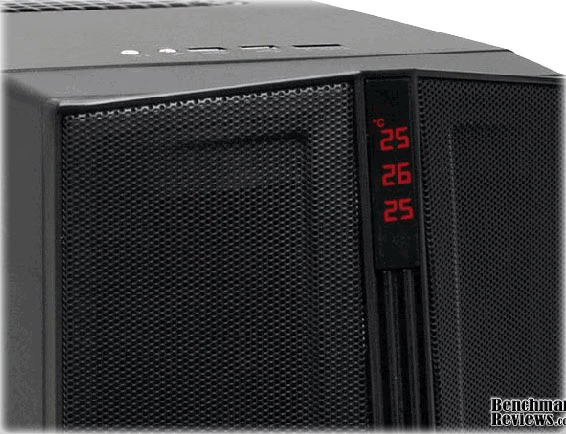
This is a photo of the front LCD screen showing the temperature reading from the included 3 probes. These probes can be placed anywhere you like around the case. The LCD screen can show the temperatures in both Fahrenheit and Celsius. If you look closely at the previous pictures, you may see the button on the back side of the door that is used to toggle between C and F readings.
Closer Look: Interior
The outside of the case is what is seen for the majority, but the interior simply cannot be overlooked. People pay a great deal of money for their computer equipment, so if a case does not accommodate properly, it will not win many people over. We will inspect the basics of the NZXT Hades' interior in this next section.
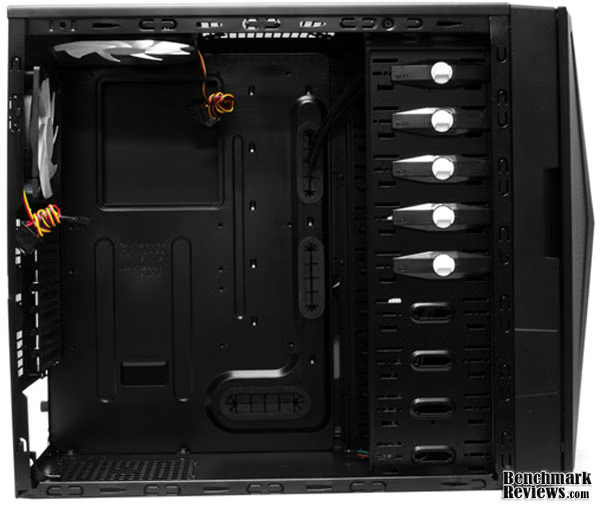
This full-on shot of the empty Hades case shows such touted features as the tool-less Optical Drive and Hard Drive bays, the bottom PSU mount, and a quick look at the fans and wire management grommets. We will get into each of these further along in the review.

If you are one who notices things very easily, you may have noticed right away the difference in the wiring on the fans. The above photo is a promotional picture, but the previous photo is an actual photo. It is not to say that the fan cables will be colored one way or the other for sure, but mine were not black and gray, which I would have preferred. That aside, you can see the mounts for the 3 possible fans. The two shown in this photo are included. Two 140mm fans can be mounted in the top and one 120mm fan in the back, which should provide ample airflow to and from your CPU and motherboard. Also in this photo are the grommets used for wire management to and from the motherboard. How you mount your devices will determine what these grommets will contain, and we will go further into detail on this later on.

Here we see a better view of the drive mounting system. The optical drives are mounted using the devices with the white knobs on them. You turn the knobs, pull the clips off, slide the drive in, and then put the clips back on. The hard drives use a thumb-screw to secure them in place. They go in the four bays on the bottom. There also is an included bracket for SSD's and laptop hard drives. I would have greatly preferred side-facing hard drive mounts here. Once you get all your components installed, the only good way to add or remove hard drives is through the front panel.
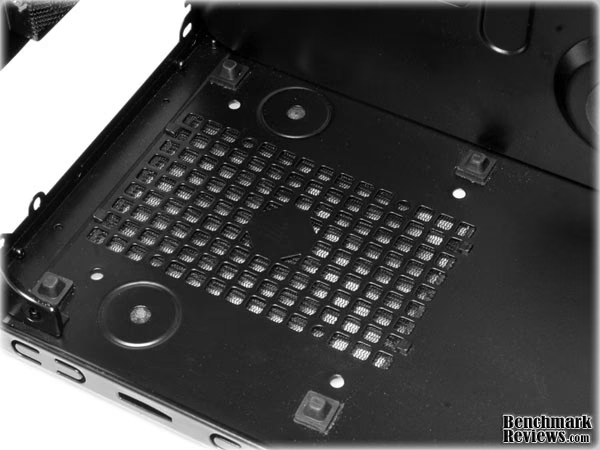
This is where the PSU mounts. Notice the rubber feet that the Power Supply will rest on. These feet provide a great vibration and noise resistant resting place, as well as a decent amount of room for ample airflow. The way that the mounting holes in the back of the case are laid out allows the PSU to be mounted both ride side up, or upside down to allow for a variety of Power Supply designs.

Shown in this photo are the rear expansion slot covers. These are grilled to allow for air to flow through them, and unlike some cases, can be re-used, as they screw in, instead of break out. Also located here are the two grommets to be used for a water cooling system, which can be connected to up two a dual radiator system that can be mounted natively on the top fan slots.
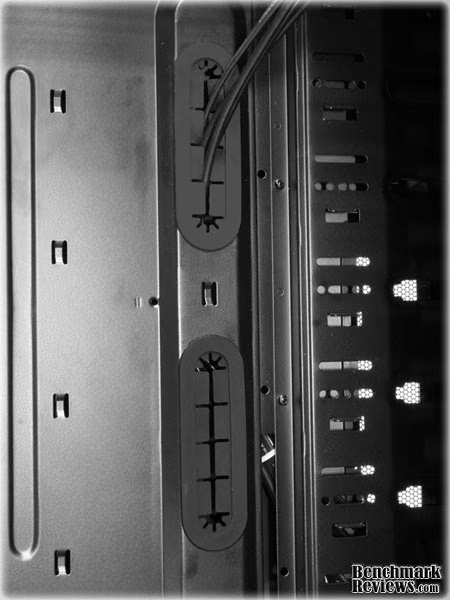
This is a close-up of the grommets that are between the Motherboard and the ODD/HDD Drive mount. These lead directly to the opposite side of the case, where they are to be hidden behind the motherboard mount. The wires from the front and top panel are already run through these grommets from the factory.

This grommet is for the Power Supply, the Hard Drives, and anything else mounted in the bottom of your case. This is located on the bottom right of the motherboard mount, between the PSU and HDD.
Detailed Interior Features
A case can look good all day long, but you need to actually put your components in it to make any good use of it. This section will further go into detail about the features inside the NZXT Hades. This section will show the case with the components installed. It will also go over the wire management system. We will talk about some of the good and/or bad things that may come up during an installation.
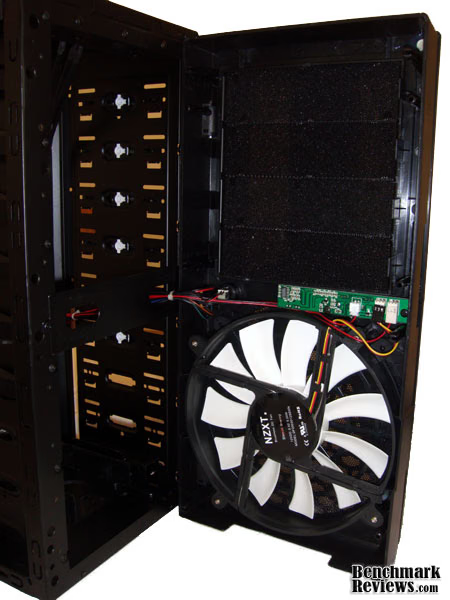
This is a detailed look at the front of the case. It is designed to allow you to open it for maintenance on the front 200mm fan that cools the HDD, as well as gain access to the drive bays for installation and removal. It is technically possible to get your drives in and out of the case without removing the front, but once you have your components inside the case, this makes it far easier. If you notice the cables connecting the fan controller to the fans inside the case, they are the only thing holding this front panel on at this point. It makes for a bit of an awkward moment trying to balance the panel while installing drives. It seems like any wrong move could easily bend a few pins, or pull a wire loose.

This is the hard drive bracket I mentioned before. It allows the use of smaller drives such as a laptop drive or SSD. Sadly, there was only one of these included, but I imagine that these would be available for purchase from NZXT.

This is the 200mm fan that sits on the side opposite the motherboard. The fan provides a great amount of airflow across the entire motherboard to provide excellent cooling to many of your components. I enjoy that NZXT opted for the typical 3-pin connector on this fan instead of the 4-pin molex connector. Too many times do you have to run a single Power Supply cord out to a case fan, making cable management difficult.

This is an image of my components installed. There is nothing to drool over, but take note of the Nvidia 9600GT. It fits in there with room to spare, however, if you were to fill the drive cage using all available slots, you will find that you have very little space between the card and the drive. You may find that, depending on the exact size of your GPU, you have no room to spare. NZXT says that there is enough room for up to a 300mm card. The cable management system is sufficient enough to hide the majority of my cabling, but there is no practical way for me to route my 4pin Motherboard connector, so I had to run it from my PSU across the Motherboard to its home. This is one of the pitfalls of having a Power Supply on the bottom of the case.

After installing all the power cables, hard drive cables, USB/Audio headers, etc., there can be a lot of messy cables going everywhere. NZXT tries to mitigate that clutter with the grommets leading to the rear of the case I spoke of earlier. This image shows my attempt at routing the cables the best I could through these grommets. I found that my Power Supply ATX cable was not long enough to go through the top grommet, and just barely long enough to go through the middle one. It may not appear that way in the image, but it is stretched pretty tight. It is tough to blame one thing for something like this. It could be the Power Supply cords need to be longer, the motherboard plugs should be in different spots, etc. There is no real blame on NZXT for this, but it is something worth noting. Another thing worth noting is that if you are like me and still use older IDE drives, you will have a hard time fitting them through the gromets with everything else. Rounded cabling sure helps, but SATA devices all around would be ideal.

Here is an image of the PSU and HDD cabling going through the bottom grommet. This looks substantially neater than the previous image, but there are far less cables going through here. One thing I noticed over and over again while running these cables through the grommets, is that the grommets constantly kept coming out of their holes. It is not the easiest thing to put them back in, especially with a bunch of wires running through them, so it quickly got annoying.

If you thought that the wires going through the grommets inside the case was at all mess, this image will make you run in horror. This is what the other side of the case looks like. This is the side all the grommets lead to. The wires for the fans included in the case were already routed back here, but add in a hard drive or two, an optical drive, the unused Power Supply cables (even more so if you don't have a modular Power Supply), and you have a recipe for a nice big rat's nest. I am very glad that this mess will be covered up by the other side panel. Also take note of the opening tat leads to the back of the CPU. I am a firm believer that this should be standard on every single case, and I am glad that NZXT chose to include it on the Hades. Having to remove the entire motherboard (and everything connected to it) just to replace a Heatsink is extremely frustrating and time consuming.
NZXT Hades Conclusion
NZXT is no newcomer when it comes to quality cases, and the Hades is no exception. The Hades shows that both form and function can be had in an affordable chassis. Such high points as the sleek looks, ample room, and useful cable management system are strong positives. Small missteps such as the HDD mounting orientation don't detract enough from the case to be any kind of a deal breaker. NZXT's attention to detail is very easy to see in this case easily allow the Hades to be recommended.Performance was easily above average. There seems to be no major flaws in the cooling or airflow design. I had no trouble with any of the I/O ports, LCD screen, or any of the buttons/knobs.
The Appearance of this case lives up to the NZXT name. It looks very sleek, and if you are in to red, the subtle lighting is very appealing.
Construction appears to be of high quality. I did not have any trouble installing any components, taking anything apart, or putting anything back together. The buttons, knobs, fans, and other accessories are of high quality.
This case is a lesson of both Functionality and form. It functions like you would think a good quality case should. The tool-less design features make installation of components easy. NZXT's cable management system is very useful and very helpful.
Value-wise, the NZXT Hades (model HADE-001BK) is in a slightly higher range of cases. Newegg.com lists it currently at $99.99. It is not overly expensive for what you get, however.
I cannot see much of any reason why someone looking to get a midsize chassis with room for plenty of components that does not want to spend an arm and a leg should not give this case at least a close second look.
Pros:
+ Good Looking Design
+ Tool-less installation features
+ Ample room for components
+ Good cooling features with room for expansion
+ LCD Temperature display
+ Good design efforts to keep the case dust free
Cons:
- Non-typical size for fan mounts
- Top-mounted I/O ports don't allow tucking the case into tight spaces
- Hard Drives mounting orientation could be facing to the side
- Cable management grommets easily come out of their holes
Ratings:
- Performance: 8.50
- Appearance: 9.5
- Construction: 9.5
- Functionality: 8.5
- Value: 8.50
Final Score: 8.9 out of 10.
Quality Recognition: Benchmark Reviews Silver Tachometer Award.
Questions? Comments? Benchmark Reviews really wants your feedback. We invite you to leave your remarks in our Discussion Forum.
Reader comments from the original article
3 comments were posted before commenting closed. They are preserved as written. Original avatars no longer resolve and are shown as a placeholder.
Poor Cable Management mike Permalink:
There was obvious poor cable management not because of the case, but because of the components chosen to be used in the review. The use of an unsleeved power supply is a terrible choice when reviewing a case like the HADES. This case was meant for people who choose better than average components. Also, the use of an IDE drive cable is ridiculous. Overall a very messy job managing the cables.
RE: NZXT Hades Computer Case HADE-001BK Adam Permalink:
I have to agree with the Mike, using an unsleeved psu and an IDE drive is obviously going to result in crappy cable management. As far as I can see all of the components used were a little on the cheap side.
# RE: NZXT Hades Computer Case HADE-001BK Russ Permalink:
over all i thought it was a good review it let me know what i would encounter if i had bought the case, tho i think my 4890s in crossfire are probably much longer than a 9600gt it is a shame you don't have a newer card. 4870s arent that expensive anymore but, good review. the only thing im not sure about is if my video cards will fit with me having 4 sata drives in raid or not, lol i will be using a corsair tx 750w power supply it has long sleeved cables so cable managent should be a snap. but i like how the drives mount in the other case, so ill get it with a fan controller. good review for the parts you have, i hope you have luck upgrading soon. i don't think you should be critizied if u can't afford it tho