
Corsair Vengeance M90 Laser Gaming Mouse
With fifteen buttons, a 5700 DPI laser sensor, a solid aluminum core, and onboard memory the Corsair Vengeance M90 can be customized to fit almost every users need. However, button counts, high DPI sensors, and unique designs do not automatically guarantee a great product and so each product must be evaluated on its usefulness as a tool and not just raw numbers. So please join Benchmark Reviews as we review the Corsair M90 and evaluate if it is worthy of the legendary Corsair name or if it is simply marketing hype with no substance to back it up.

Corsair Vengeance M90 Laser Mouse Review
Manufacturer: Corsair
Product Name: Vengeance M0
Model Number: CH-9000003-NA
Price As Tested:$79.99 (Newegg)
Full Disclosure: The product sample used in this article has been provided by Corsair.
With fifteen buttons, a 5700 DPI laser sensor, a solid aluminum core, and onboard memory the Corsair Vengeance M90 can be customized to fit almost every users need. However, button counts, high DPI sensors, and unique designs do not automatically guarantee a great product and so each product must be evaluated on its usefulness as a tool and not just raw numbers. So please join Benchmark Reviews as we review the Corsair M90 and evaluate if it is worthy of the legendary Corsair name or if it is simply marketing hype with no substance to back it up.
The Corsair Vengeance M90 caters to enthusiasts who play MMO and RTS games frequently. The 15 customizable buttons allow for a multitude of combinations designed for many different gaming styles. However, the M90 is not a one trick pony either; its 5700 DPI sensor with on-the-fly adjustments will also quickly vanquish the enthusiasts enemies in quick paced FPS games. The solid aluminum chassis will be able to take a beating and should help this mouse stand up the test of time, while at the same time giving the K90 quite a unique design. Combined with the simple but powerful software it appears that Corsair has the possibility of a real winner on its hands. So without further ado join Benchmark Reviews as we jump into the review of the Corsair Vengeance M90.
When it comes to testing mice, it is best to not look only at one area or you may overlook flaws that a peripheral has. This is why when testing a gaming mouse it is best to look at many aspects of your daily experience on a computer. This means that you should not only test one type of game but multiple styles such as RTS, FPS, and MMO's along with making sure that the mouse is usable in non-gaming situations such as web browsing or photo editing.
Corsair Vengeance M90 Specifications
- 5700 DPI Avago Technologies ADNS-9500 LaserStream Gaming Sensor
- Adjustable DPI in 100 DPI increments
- 1000Hz/500Hz/250Hz/125Hz - 1msec/2msec/4msec/8msec response time - user selectable
- Tracking rate of up to 165 inches per second, up to 30g acceleration, automatic frame rate control
- Adjustable lift distance
- Five selectable levels to fit your play style
- Surface quality detection
- 15 programmable buttons
- Nine ergonomically placed, side-mounted programmable buttons
- Comfortable ergonomic design with soft-touch surfaces and grip improving textures
- Omron left and right click switches rated for eight million operations
- 48KB of on-board memory for storing up to six "on the go" profiles with active profile LED
- Aluminum metal frame and base for improved rigidity and mass distribution
- Solid metal, weighted scroll wheel with rubberized scroll surface for improved finger traction control and feel
- Ultra Low Friction PTFE pads for smooth performance and accurate gliding
- USB Connector with gold plated contacts
- 1.8m lightweight non-tangle cable
Closer Look: Corsair Vengeance M90
The Corsair Vengeance M90 with its silky black exterior, metallic frame and blue accents is gorgeous from every angle. Even better, the M90 was not designed to just be beautiful but also is extremely comfortable and conforms quite well to a user's hand.
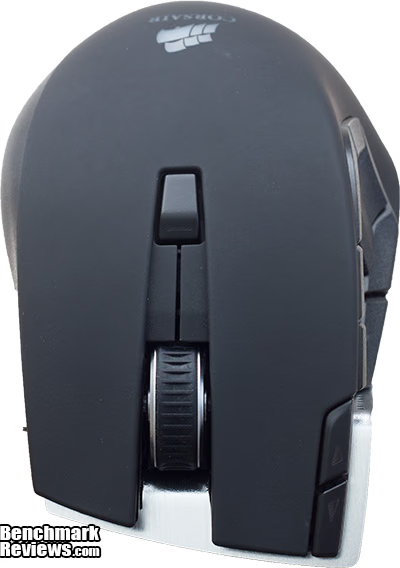
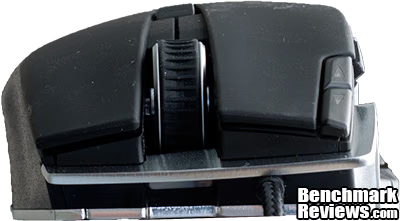
From the top you can see the first six of 15 buttons that the M90 offers. Although each button can be customized as the user would like, by default the center button is unbound, the scroll wheel is the traditional middle mouse button and to the buttons to the right allow users to cycle through one of the three DPI settings that they have set. The primary mouse buttons are sufficiently flexible to allow quick and accurate actions without users worrying about accidently firing when they do not mean to.
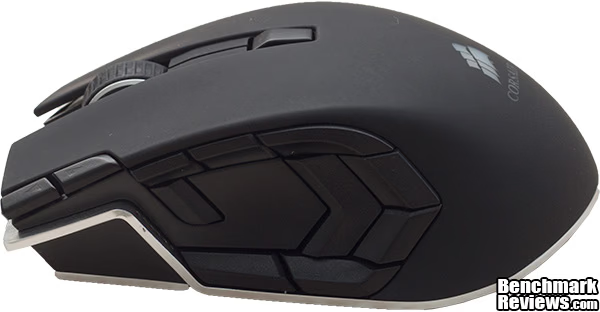
On the left, it is apparent what sets the up M90 apart from many of the other mice on the market. The nine buttons are each customizable to the user's needs and by default the only buttons bound are 10 and 11 in the rear which allow users to switch between profiles, and button 14 which enables sniper mode. In the center of the nine buttons is an island that users can rest their thumb on ensuring that they do not accidently activate a button while moving.

On the right, Corsair designed the M90 with a stepped design that is quite comfortable to hold on to for long periods. The design when combined with the textured rubber surface make it quite easy to quickly and accurately move around with the M90.

From the rear you can see the distinctive shape of the M90. To the left are the six LED's which light up depending on the profile selected giving the enthusiast a visual cue as to which profile they are using.

From the bottom, it is clear that unlike many of its competitors the Corsair M90 is built off a solid aluminum core. This is an interesting design aspect and gives the M90 a nice weight. Corsair user four large PTFE pads to that help the M90 slide around with no effort at all.
Corsair Vengeance M90 Detailed Features
The Corsair M90 like the K90 comes with a very nice piece of software that allows the user to tailor the M90 as they see fit. It allows customization of almost every major feature of the M90 including lift rate, DPI, or binding for each of the 15 buttons.

On the first page, users will be greeted with the all of the options need to quickly and easily customize each button of the M90. If users would like to forgo making each of these profiles themselves Corsair has created a list of premade profiles that can be downloaded directly from their site. Games included in the list include Star Wars The Old Republic, Bulletstorm, Team Fortress 2, and Deus Ex, plus many more.
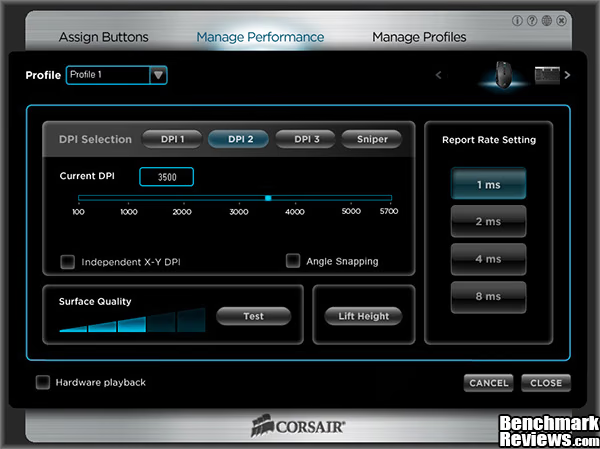
The second page allows for users to customize the hardware of the M90 a bit. Starting from the top Corsair allows users to set three separate DPI profiles that can easily be switched between with the buttons on the M90. The final DPI setting labeled Sniper is a bit more specialized. When a user sets a DPI to this area it is only activated when the user depresses the button which to which the sniper command has been bound to, this will immediately change the DPI to the Sniper setting allowing for users to make the final fine adjustments with a lower DPI setting than they may normal use. Users can also test the surface quality of the material they are using for their mouse pad helping ensure they are getting the best possible performance out of the M90.
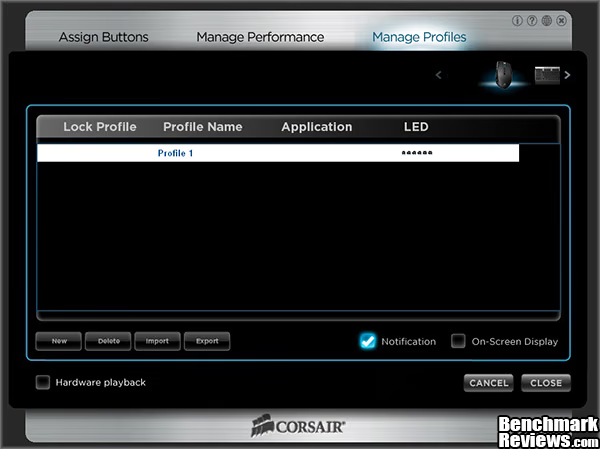
The final page of the M90's software allows users to create and save up to 50 unique profiles. Up to six of these can be assigned to the M90's memory. This allows users to quickly cycle between their onboard profiles using the built in commands that can be assigned to multiple buttons. These six profiles can also save directly to the M90 and when enabled hardware playback allows these profiles to be used without the need for the supplied software, instead each command is directly played from the mouse.
Testing & Results
Testing Methodology
Testing peripherals like the Corsair Venegeance M90 are quite simply a matter of using them in the real world for an extended amount of time. Unfortunately, due to the nature of the product they are no standardized test that can be done but rather it is a matter of personal opinion from the time spent using the product. In order to analyze the qualities of the M90 I focused on looking at the many different realms of work and play that the M90 is expected to be subjected to.
Test System
- Motherboard: MSI P67-GD65
- System Memory: 4 x 4GB 1866Mhz 9-10-9-28 1.65v
- Processor: Core i5 2500k 3.3Ghz @ 4.7Ghz
- Audio: Creative X-fi Titanium Fatal1ty
- Video: 2 x ASUS GTX 580
- Disk Drive 1: Mushkin Enhanced Chronos 240GB
- Disk Drive 2: 2 x 1TB Seagate 7200RPM RAID 0 Array
- Disk Drive 3: 1 x 500GB Seagate 7200RPM
- Optical Drive: DVD Burner
- Enclosure: Silverstone Raven RV02-EW
- PSU: Cooler Master SilentPro 1000w
- Monitor: ASUS 27.5" 1920x1200
- Operating System: Windows 7 64-bit Professional
Software Tested
- Battlefield 3
- Photoshop CS6 Beta
- Mass Effect 3
Results
Using the Corsair M90 took some getting used to, especially since I was coming from the Razer Deathadder 3.5G. The M90 I found it to be slightly larger and its egg shape was quite different from what I was used to. After a few days though I actually found I quite enjoyed using it. Although, with my smaller hands I found that some of the buttons where difficult to reach unless I held the M90 in a very particular way.
When I game I tend to be extremely competitive. I always play to win, and I want peripherals that can help me do that. Thankfully the M90 does a fantastic job keeping up in games. During my Battlefield 3 sessions I found that the sniper mode and adjustable DPI settings helped me to really step up my sniper skills. Instead of missing every other shot while sniping I found that I was missing one in five shots instead. The ability to instantly drop my DPI using the sniper button enabled me to quickly aim to the general area I need and then immediately drop to 1200 DPI for my final adjustments. In more action oriented battle I found that at 3500 DPI I could easily aim as the M90 effortlessly slid across the surface I was using as a mouse pad. I also bound my buttons for speaking, reloading, throwing a grenade and knife to my mouse making initiating actions easy and seamless as I dodged fire and attempted to stay alive.
In Photoshop CS6 I used the M90 to edit all of the photos used in this article. I found that it was accurate enough for me to do all of the work that needed to be done without fighting with my peripherals to get the final results I was looking for. The ability to quickly change between DPI settings made my work extremely easy and I found that the sensor is extremely sensitive to even the smallest of movements.
In Mass Effect 3 I found it was comfortable even as I forced my way through hordes of enemies or fended off bosses. I found that while fighting the Geth that my ability to accurately aim really made my sniper rifle a superb companion for the battlefield that was ahead of me. At the same time I was able to bind all of my slots to M90 allowing me easy access to my abilities which helped give me a upper hand in many of the tough battles that I fought.
Gaming Mouse Final Thoughts
The Corsair Vengeance M90 is a fantastic mouse that provides many features to enthusiasts. With its 15 programmable buttons the M90 has a near infinite number of uses based on the needs of the user. Whether it is simple commands to reload or throw a grenade in Battlefield, or a complex set of commands for a MMO like Star Wars the Old Republic the M90 is up to the task. Backing up the usefulness of the M90 is its durability since it is build off of a sold aluminum core which also gracefully accents the black exterior of the M90. Finally with the ability to store up to six profiles on board the M90 really allows for enthusiast to be able to take their settings with them to a LAN party or a friend's house without the need to install additional software.

Normally this section is dedicated to me looking at how a product could be improved in future revisions. Up until now I have always compared the mouse I am looking at to my Razer Deathadder and there are always faults that for some reason or another that would keep me from replacing it. For once though I am at a loss for words with the M90 it has the perfect combination of appearance, performance, functionality and value that really make it a winner.
Corsair Vengeance M90 Conclusion
The Corsair M90 with its 15 buttons, 5700 DPI sensor, 1000Hz polling rate, and on-the-fly DPI changes has every bit of performance a user could want in a mouse. For users who do lots of high speed gaming the high sensitivity of the Avago Technologies ADNS-9500 sensor allows for quick, accurate movements. When it comes to more subtle movements the lower DPI settings allow for very accurate sweeping motions with final adjustments made using the sniper setting allowing for a quick drop to a very low DPI setting. At the same time the design of the M90 makes for a very comfortable experience allowing for long term use even in tense situations.
Much like each of the products in the many different markets Corsair has ventured into the M90 is a truly beautiful design. Its matte black exterior is accented with the aluminum frame that the M90 is built on. When combined with the blue hue that each of the LED's gives off and the white Corsair logo and it comes together for a truly beautiful mouse.
With a solid aluminum body under the matte rubber exterior the Corsair M90 is built for the long haul. Corsair also stands behind their M90 providing their users with a 2 year warranty should something go awry.
With 15 buttons the Corsair M90 has excellent functionality. The software allows for the creation of 50 profiles of which six can be stored on the M90 allowing for an enthusiast to take their configurations with them to LAN parties or to a friend's home without the need to install new software. These profiles can be designed for a million different uses and with the prebuilt profiles that Corsair provides many games will already have many of the best options already mapped out in the most efficient manner possible.
For $79.99 at Newegg, the Corsair M90 is a fairly expensive mouse which competes directly with the Razer Naga MMO mouse which is priced $10 below it for the standard wired edition. Both of these mice have laser sensors in the 5600-5800DPI range, 15-17 buttons, a 1000Hz polling rate, and fantastic software. Overall I would say that although expensive the Corsair M90 fits into the market segment it was designed for.
Because of its beautiful design, dominating performance, extreme customizability, and its durable frame I am honored to present the Corsair Vengeance M90 Benchmarks Reviews Golden Tachometer award for excellence.
Pros:
+ Low actuation force allows for quick and precise clicks
+ Solid aluminum body for a very solid feeling mouse
+ Sniper action allows for a instantaneous drop in DPI for accurate last moment adjustments
+ Beautiful black and aluminum exterior
+ 2-Year warranty
+ 15 customizable command buttons
Cons:
- Expensive enthusiast product
Ratings:
-
Performance: 9.50
-
Appearance: 10.00
-
Construction: 9.50
-
Functionality: 9.50
-
Value: 9.0
Final Score: 9.5 out of 10.
Benchmark Reviews invites you to leave constructive feedback below, or ask questions in our Discussion Forum.
Reader comments from the original article
6 comments were posted before commenting closed. They are preserved as written. Original avatars no longer resolve and are shown as a placeholder.
Nice Review Josh Permalink:
Thanks for the review... looks like a few too many buttons for my liking but I am going to keep an eye out for something slightly simpler that offers on the fly DPI adjustments - that's something I've been thinking about for a long time.
RE: Nice Review chuck Permalink:
check out the CM Storm Inferno. there is a review here on benchmarkreviews on page 4 of Input Devices. I've had mine for about a year and its a great mouse and not overly complicated with dozens of buttons.
mr PaulNCarter Permalink:
Looks really nice, but it seems like but thumb buttons are further back, and thats where i have trouble hitting them! #goo.gl/pIHdv
Vengeance M90 mice Review bogami Permalink:
I buy M90 and i can sey good for moust of the fichers on the mouse and a loth of options ,quite comfortable to hold yes , Som butns on side are to stift .we hawe to considr thes is MMO mice and cood preforme as a FPS mice as well. Onle serius isius are with pad's !! On all my 4 pad's onle on 1 mice respond es shood be normal. Som mouse pod,s do not reflect at all,(no pointer moowmends on my Verbatin,Razer Galiathus'a..)so don't panic if pointer don't rispond.Chek your pod.
Pretty good mouse Mergatroid Permalink:
I have this mouse in my drawer right now. It's a pretty good mouse even if you have to jump through a few hoops to get it working properly. The thumb buttons are great, and the nice thing is that you don't have to use them all, but just set up the ones that are in the best positions for you. Another great thing is that there is actually a blank spot in the middle of all the buttons for you to place your thumb, something some other mice I could mention seem to have forgotten about. I also like the fact that you can program the "Sniper Button" feature for any of the side buttons. This allows you to get it us for perfect positioning for your thumb, while other mice with this feature are usually stuck using one particular button which may or may not be suitable for your use. Finally, the tracking on this mouse is one of the absolute best I have felt on any of the laser mice I have used. It was consistently accurate and felt smooth. It's a good mouse if you don't mind fighting with the software. I was one of the early adapters and I had a heck of a time getting it to work. I hope they've fixed that all up now. If anyone has a problem, visit the Corsair forum, in the Mouse Thread right at the top are instructions that will work for getting everything on the mouse functioning properly.
RE: Corsair Vengeance M90 Laser Gaming Mouse kalpi Permalink:
I aint touching this mouse ever again! I buy one bring it home.. it DOESN'T WORK! straight out of the box and it is broken... I go back to the store get it replaced.. okay this one works... for 4 weeks then just as dead as the first one! And even then in too many games the buttons didn't work.