
NZXT Phantom 820 Tower Computer Case
NZXT Phantom 820 Computer Case Review
Manufacturer: NZXT Corporation
Product Name: Phantom 820
Model Number: CA-PH820-G1
UPC: 815671011053
Price As Tested: $249.99 (Amazon / Newegg)
Full Disclosure: The product sample used in this article has been provided by NZXT.
A great case can last an enthusiast many builds. This means that case designers need to create cases that can handle many different configurations, with many different requirements. A multi-GPU system has different requirements than a single GPU system, which in turn has different requirements than professional workstation. While NZXT attempts to cater to all of these parties, designing a case involves making compromises between the three areas of quality, features, and cost. Therefore, the question Benchmark Reviews will attempt to answer is what compromises did NZXT make in the creation of the NZXT Phantom 820.
NZXT is a case manufacturer that has always had some interesting design aspects in its systems that some people liked and others did not, but since they were well priced many things could be forgiven. The Phantom 820 is a completely different beast, set out from the beginning to become NZXT's flagship product and priced as such. It has a $250 price tag, which is $70 greater than any other NZXT case on the market. It is also is their largest case so far measuring in at 9.25" x 25.59" x 24.09" which puts it in the same size and price league as the Corsair 800D, Thermaltake Level 10M, and the SilverStone FT02. The objective of this review will be to examine how the Phantom 820 differentiates itself from each these highly respected competitors.

When reviewing a case you have four major things you need to look at. First, you need to look at build quality because no one wants to spend hours putting hardware in a case only to find defects or to have parts that will fail months later. Secondly, you need to look at cooling because as the heat output of components goes up, so do cooling needs. Third, you need to look at the acoustics of your new case because as anyone who has worked on or near servers knows adequate cooling can come at an acoustic cost unless a company put expenses into preventing this. Lastly, you need to look at the ease of build, which depending on your system may or may not play a big role in your choice of case. If you like, I spend lots of time inside of your case modifying parts then you want a system that you can easily move around in while making modifications. On the other hand if you want to setup your system and leave it then this becomes less of an importance and therefore can be moved lower on the requirements for your case.
NZXT Phantom 820 Features
- Fully equipped with one 140mm and three 200mm fans for the high airflow and low noise
- Integrated HUE lighting for illuminating the exterior/interior of your enclosure with option to turn on/off and allow you to customize the colors at your heart's content
- High-end water cooling solutions up to three fans for a push-pull configuration: 90mm of internal top space with top 280/360mm and bottom 240/280mm radiator support for unmatched liquid cooling
- State-of-the-art integrated 4 channel digital fan controller with 15 watts per channel and LED indicators that progressively gets brighter on high speeds and dimmer for low settings
- Easily removable filters located in the top, front, side, and bottom to prevent dust from entering your rig and simple maintenance
- Adjustable interior pivot 120/140mm fan slot for directional airflow
- Removable HDD cage and large storage capacity for 6 hard drives
- Dual USB 3.0, quad USB 2.0, microphone, and audio jack along with a SD media card reader for high-speed data transfer and quick access to multimedia
- Stylish acrylic window with a view to show off the interior of your rig
- Unrivalled Cooling Capacity to mount up to nine fans for a maximum airflow
- Rear I/O white light for visibility in dark environments with a toggle switch
- Extruded right side panel for an elegant look and achieves 36mm clearance for cable wire management
- Equipped with a stylish pedestal that lifts your enclosure off the ground for increased airflow.
NZXT Phantom 820 Specifications
| Model | Phantom 820 |
|---|---|
| Case Type | Full Tower |
| Front Panel Material | Plastic/Steel |
| Dimensions (W x H x D) | 235mm (W) x 650mm (H) x 612mm (D) |
| Special Features | Integrated HUE LED lighting system, SD Card Reader, 4-channel 15-watt Fan Digital Controller |
| Cooling System | 1x200mm@800rpm Front 1x200mm@800rpm Top 1x200mm@800rpm Side 1x140mm@1100rpm Rear Fan Blades white fin/black frame Fan Capacity Top: 2x 200mm/2x 140mm/3x 120mm Front: 1x 200mm Bottom: 2x 140mm/2x 120mm Rear: 1x 140mm/1x 120mm Side: 1x 200mm Pivot: 1x 140mm/1x 120mm |
| Drive Bays |
4 x External 5.25" |
| Materials | Steel/Plastic |
| Expansion Slots | 9 |
| Weight | 15kg/32LBS |
| Motherboard Support | E-ATX, XL-ATX, ATX, MICRO-ATX, Mini-ITX |
Closer Look: Exterior
A lousy exterior can ruin a great case. I find the biggest problem with a case is if it looks or feels cheap. Thin plastic, sides that flex too much, or any number of other issues are the kind problems I look for in the exterior of a case. Thankfully, NZXT did a great job with the Phantom 820 providing an interesting exterio,r with good build quality, and some unique features. So without further ado let us look at the exterior features of the NZXT Phantom 820.

Like its predecessor, the NZXT Phantom 820 has a style similar to a stealth fighter (with the size of a stealth bomber). The front door is held closed by a rather strong magnet and covers the front panel and 5.25" drive bays. While I am not normally a fan of front panel doors, on the NZXT Phantom 820 it works well, looks great, and most importantly is not cheap feeling.

From the left you can see more of the stealth fighter design, along with some of the cooling prowess of the NZXT Phantom 820. On the side NZXT has included the NZXT FS-200RB 200mm fan which spins at 800RPM and is rated for 89.5CFM@20dBA. The NZXT FS-200RB uses a 3-pin connection, which means there is no PWM, but with the Phantom's integrated fan controller, this fan can be throttled from full blast to being completely off quite easily.

From the rear, we can start to see the meat of the NZXT Phantom 820. With nine expansion slots, the Phantom 820 is ready for all but the most extreme builds, including Tri-SLI/CFX systems with space for breathing room between each card. NZXT also opted to put the rear 140mm fan on a rail system so that a enthusiast can easily align the exhaust with the air flow of the processors heatsink inside. A unique feature of the Phantom 820 that I really appreciate are the two white LED's that NZXT has included above the expansion slot and the I/O shield. This small but significant feature makes working on the rear of the system much easier by providing some extra light to an area that can be rather dark and therefore difficult to work in.
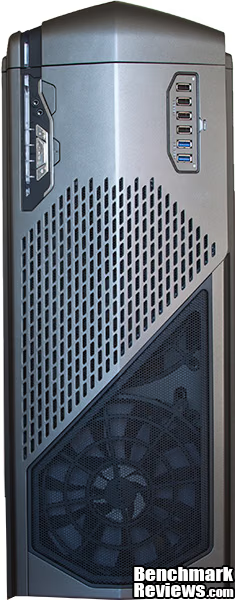
From the top we can see that NZXT has included 200mm fan and we can see the edge of the space that can be used to house another 200mm fan should a enthusiast want to expand the cooling capacity of the NZXT Phantom 820.

Focusing in on the top of the Phantom 820 reveals a multitude of options for users to play with. On the left, we have the power and reset switch along with our integrated audio ports. More importantly to many users is the integrated four channel fan controler which can provide 15w to each of the channels and is being fed by an internal Molex connection. The middle "S" button select the channel you would like to modify and the +/- modify the amount of powering being fed to each channel. As an enthusiast changes the amount of power being provided one of the four lights will change in intensity allowing a user to visually ascertain how much power is being given. One the right we have four USB2.0 ports and two USB 3.0 ports being fed from internal connectors.

The front panel of the Phantom 820 is full of goodies for enthusiast to use. First, we have our SD card reader perfect for a user who may do photography and needs a way to quickly offload photos from a long day of shooting. To the immediate right of the SD card reader we have a color wheel that lets user select any number of colors for the interior and exterior accent lighting in the system. To the right of our color wheel we have a way to turn off our I/O LED's when they are not needed. Looking to the left of the SD card slot we have a LED mode switch which will allow enthusiasts to select which sets of lights they would like to use.
Closer Look: Interior
The inside of a nice case will be easy to work in, take care of a enthusiast equipment, and will have many different configurations it can have thrown at it. Thankfully, the NZXT Phantom 820 easily meets all of these requirements.


From the rear, we can see that NZXT has provided a very healthy sized cutout behind the motherboard that will allow users to easily attach large air cooler or CPU water-block for their water cooling system. NZXT also provided plenty of room for cable management and in a surprise move that I wish more companies would follow has also provided an extension for the 8-pin AUX 12V power that goes to the CPU. In large cases like the NZXT Phantom 820 frequently I find myself using an extension for this cable out of necessity and it is nice to see companies like NZXT looking out for their users.

In our previous photo, we can see that NZXT designed the Phantom 820 to have its 3.5"/2.5" drive bays filled from the rear. At first I questioned this design but then I realized when user wants to add or remove a drive from the system they do not need to take off both sides of the case like a more traditional design would require. I found that the sleds used were flimsy though and they could have used some strengthening throughout. NZXT also designed the bottom three-drive bays to easily be removed by simply pinching the two plastic strips and pull the entire block of drives out.
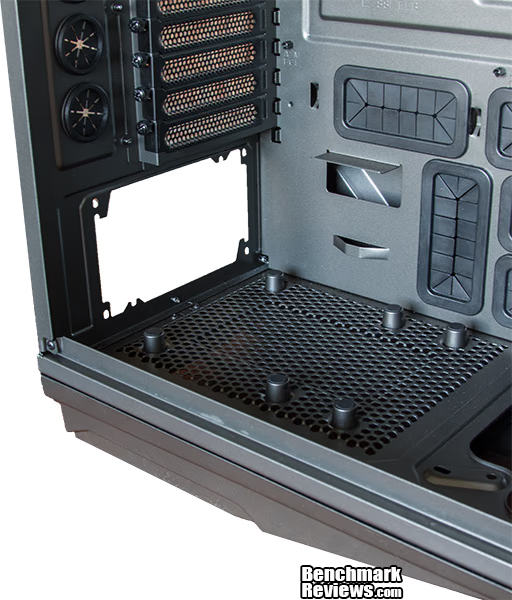
In the all-important power supply area NZXT has worked to ensure that a enthusiast PSU is well ventilated and taken care of. This is achieved by lifting the PSU up to ensure that the fans are not damaged and providing plenty of opening in the bottom to allow the system to breath. Also visible are the thumbscrews used to keep the expansion slot covers in place.

In the rear, NZXT included a removable filter that will help keep an enthusiasts system clear of dust and debris which will in turn ensure a efficient and long lasting system.

NZXT has also included front filter on the Phantom 820. This filter covers the entire front 3/4 of the Phantom 820 so that if enthusiast were to add fans or a radiator dust will not be sucked into their system.

In the rear, we have a 140mm fan, which is a 1300RPM fan rated for , and a 200mm fan that we previously discussed which is rated for 89.5CFM@20dBA. Along the top we have a string of multi-colored LED's which are controlled from the front panel color selector and work together with the front accent lighting to give the system a truly unique look. Also visible is the 90mm of extra vertical space that NZXT added in order to allow for a 360mm radiators.
NZXT Phantom 820 Final Thoughts
Building in the NZXT Phantom 820 is one of the easiest builds I have ever completed. (Especially compared some of my Silverstone cases). Even though I used a full sized ATX motherboard the Phantom 820 and its gargantuan internals just ate up my motherboard, video card, and PSU. Even using a PSU that is not modular, I found that proper cable management was extremely easy due to the large size and many different cable management openings provided by NZXT.

During this section, I normally explain where I would have changed areas of the case to better fit what in my opinion is an optimal design but for the NZXT Phantom 820 I really could not find aspects of the case that I would change. The Phantom 820 could easily accommodate many configurations including an E-ATX motherboard, three video cards, and an extremely large air cooler without breaking a sweat. Although I generally do not like using massive cases, they are easy to build in but from that point forward they are a pain. Enthusiasts looking into the Phantom 820 should be aware of its awkwardly large size but should also not shy away from Phantom 820 if their needs require the extra space it provides.
NZXT Phantom 820 Conclusion
Performance in system is about being able to effectively keep temperatures down while at the same time not making so much noise as to be distracting. The NZXT Phantom 820 succeeds immensely by using its three large 200mm fans to move large amounts of air at low RPM's which keeps the noise and temperatures down. Showing forethought NZXT also placed the single 140mm fan on rails so that a enthusiast is able to align it with their CPU heatsink. Overall, in the performance category the Phantom 820 succeeds where many others fail providing great cooling without sacrificing acoustic performance.
As many of our long time readers will know, I have very particular tastes in what I like from a case. Although the Phantom 820 almost completely breaks the mold of what I like with its flashy exterior I find on the Phantom 820 it works. It reminds me of a case that a car company like Lamborghini would make and I think the exterior has quite a bit of potential for a enthusiast who would modify their case towards a more unique design.
The construction of the NZXT Phantom 820 is superb but I feel like the Phantom 820 is let down buy the plastic exterior that NZXT elected to use. Still NZXT stands behind their product by providing potential customers with a 2 year warranty should something go wrong.
Functionality wise the Phantom 820 hits it out of the ballpark; it can do almost anything. From a mundane system to some of the more extreme configurations possible the Phantom 820 has the space and cooling prowess to accommodate for their needs. For the enthusiast wanting a extreme cooling configuration NZXT has even included the space needed a 360mm radiator up top and a 280mm radiator in the bottom along with four cutouts to run tubing out of the rear of the case.
For $249.99 (Amazon / Newegg), the Phantom 820 is at the top tier of case prices, and there are many cases that provide 80-90% of the features for 50% of the price. As such, it is hard to give the Phantom 820 an outstanding rating when it comes to our value category.
Although it is extremely large, and quite expensive, if an enthusiast is in the market for a case that can do almost anything, while keeping their components cool, and staying quiet I would not hesitate to recommend the Phantom 820. Because of this, I gladly present the NZXT Phantom 820 Benchmark Reviews coveted Golden Tachometer.
Pros:
+ Great looking exterior
+ Can be used for any number of configurations from lowest to the most extreme configurations
+ The large fans used throughout the system help move monuments amounts of air while being quiet
+ Beautiful lighting system can be used in a enthusiasts system to really accent the color scheme they may be already going for
+ Water cooling can easily be added later on
+ 9 expansion slots
Cons:
- Expensive, especially for a product that has a plastic exterior
- Heavy
- Extremely large
- Flimsy drive sleds
Ratings:
- Performance: 9.75
- Appearance: 9.00
- Construction: 9.00
- Functionality: 9.75
- Value: 7.50
Final Score: 9.0 out of 10.
COMMENT QUESTION: Does the NZXT Phantom 820 appeal to you?
Reader comments from the original article
1 comment were posted before commenting closed. They are preserved as written. Original avatars no longer resolve and are shown as a placeholder.
RE: NZXT Phantom 820 Tower Computer Case David Ramsey Permalink:
I want shots of the LED lighting!