
Logitech G700 Wireless Gaming Mouse
Logitech G700 Wireless Gaming Mouse Review
Manufacturer: Logitech International
Product Name: G700 Wireless Gaming Mouse
Model Number: 910-001436
UPC: 097855067326
Price As Tested: $71.76 (Amazon) / $89.99 (Newegg)
Full Disclosure: The product sample used in this article has been self supplied.
I wanted to try one of these for quite a long time - I tried to find every angle of every picture of it, even ventured in to Best Buy (!!!) to take a look and go hands-on. I had done some research, read up on my consumer reviews, and thought I had a pretty good idea of what to expect. Best Buy had one in stock locally, so I was mere minutes away from gaming mouse bliss. When I arrived, I quickly scanned the boxes in the (shrinking) PC section - and there it was! Actually, it was more of a...oh. There it is. I guess. Thankfully, I hope the trend of placing mice in formed plastic packaging sticks around, because it makes it much easier to "try" a mouse before putting down some cash. I tried it. I walked away.
What?!? What was I doing! Turning down my chance!? But what of the GAMING BLISS!?! (Oh, won't someone think of the BLISS!) Truth be told, I wasn't sold. Seeing it in person, it just looked...normal. I blame Razer and their extravagant, almost over the top packaging. I suppose it didn't help that the price tag was NOT what was displayed online, but I didn't care enough to ask about it - my dreams were already smashed.
Okay, so I wasn't that upset about it, I may have dressed that up a bit. Normally, I AM excited to try out a new mouse, so it was strange to just...walk away. That is very unlikely behavior for me when it comes to high quality mice. I personally maintain that a quality mouse will absolutely change your computing experience. It may sum up my experiences with this mouse though - it's just too easy to walk away from.
So why am I still reviewing it? How did I get my hands on one? Why am I still interested when I wasn't interested? How is that last sentence even possible to write? I guess I still had to "know." So, a couple days later, a G700 shows up at my door. Time to find out what this thing is really made of.
Mice are pretty subjective beasts - one of the best ways to determine their benefits and pitfalls is just to use them for the tasks you normally perform on a computer. I test mice by comparing them to their competition (mostly price-wise) and seeing if they can measure up to their marketed claims.
G700 Specifications
System Requirements
- Windows-based PC
- Windows XP, Windows Vista or Windows 7
- Powered USB port
- Internet connection for software download
Warranty Information
- 3-year limited hardware warranty
Package Contents
- Mouse
- Wireless receiver
- Charging cable
- Receiver extender cable
- User documentation
Tracking
- Resolution: 200 - 5,700 dpi
- Image processing: 12 megapixels/second
Responsiveness
- USB data format: 16 bits/axis
- USB report rate: Up to 1,000 reports/second
- Sleep mode: variable
Glide
- Dynamic coefficient of friction - Mu (k): .09**
- Static coefficient of friction - Mu (s): .14**
Durability
- Buttons (Left / Right): 8 million clicks
- Feet: 250 kilometers
- Max. acceleration
- 30G* Max. speed: up to 165 inches(4.19 m)/second*
* Tested on most popular gaming-mouse pad surfaces.
** Tested on wood-veneer desktop.
Features and specifications provided by Logitech.
Closer Look: Logitech G700
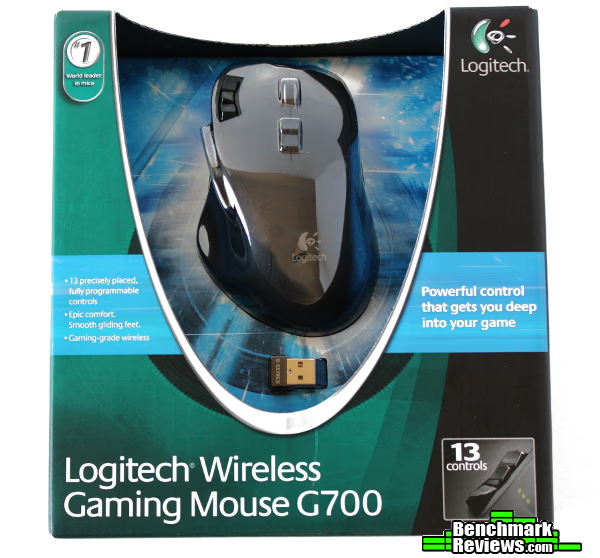
The packaging is perfect, in my opinion. It showcases and protects the mouse and accessories without going over the top like many Razer products - yes, the Razer packaging does make you feel special but after the first time, it starts to get…in the way. I love that they pay attention to every aspect of their products, but I’d love the option to purchase one of their mice in a simple brown box for a lower price.

Extracting the mouse didn’t require tools, and in short order I had everything I needed to get up and running. The G700 comes with a wired cable, a wired extender for the wireless dongle (which is of the “nano receiver” style), a little manual, an eneloop rechargeable AA battery (installed), warranty information and a driver disc. Nice and straightforward.
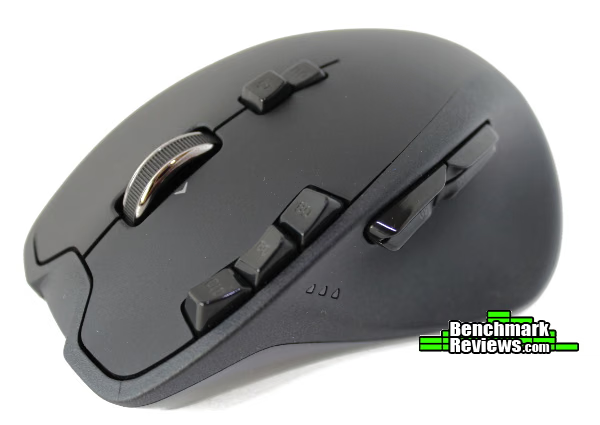
The mouse itself is a professional looking peripheral. The top matte black finish blends well with the side textured surfaces, and the curves overall are very Logitech. The textured surfaces are pretty rough compared to most of what you find on mice, but not in an uncomfortable or unpleasant way. I’m much more of a fan of the textured sides of any mouse - those are the surfaces I grip and use when moving the mouse around, so they become the major contributor to the overall “feel” of a mouse. In the G700’s case, the sides compliment the overall look of the mouse while adding a lot of practicality and feeling of control.

This is a peripheral that will blend in with almost any set up, while looking excellent and remaining professional. My personal preference would be more “rubber” feel and less “sandpaper” feel, but that’s pretty subjective - to a point. The textured plastic does get slicker if the humidity is up that day - or you’re on the final set of MCOMs on a Rush map in Battlefield 3 with less than 10 tickets remaining. Either add more texture or change the material to something that doesn’t need it - that’s my input. It does look nice aesthetically though…
Logitech G700 Detailed Features

The extra G buttons tip you off to the special nature of this device, and all are easy to reach (with the exception of G11 - the button at the highest point in the arc of the mouse, which I wouldn’t expect to be used much anyway). I’ve used a G300 as well, and I have learned to appreciate the manner in which Logitech has sculpted each G button to feel unique to your fingers. It is really easy to tell which button you are pushing without looking because of their shapes, which is a wonderful design choice. I have not seen this tactic used on any other brand as of yet, at least not to the extent that Logitech does. It’s something you’ll probably have to try for yourself, but it really does make it simple to put a cluster of buttons in close proximity and still have them be usable.

The primary mouse buttons seem to be weighted for positive, tactile goodness - I very much dislike squishy buttons, so these are one of my all-time requirements for passing the mouse “feel” test. I still prefer the tactile feedback and button feel of the Razer Lachesis over any other mouse, but this one is close. The G buttons are not quite as clicky, the ones on the side are almost silent - the “feel” is okay if somewhat mushy, and they lack that satisfying mechanical click. Again, this is pretty subjective. I’m a sucker for tactile feedback; others may really enjoy the quiet and softer feel of these buttons.
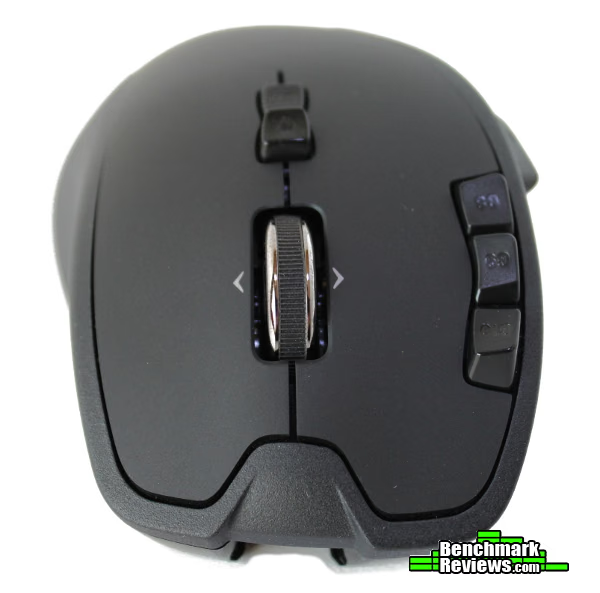
The scroll wheel is tilt-able, giving you two extra buttons if you should so desire - or just let you scroll horizontally. While this is a great feature for productivity, it lead to one of my biggest complaints with the G700 - the scroll wheel is nicely weighted, but because of this any side-to-side movement (which means most of them) results in the scroll wheel shifting ever so slightly - which you can feel EVERY TIME. It even results in a muted (but still very audible) mouse click sound. To me, it feels like it cheapens the whole mouse. I know it’s a little thing, but when you’re paying $99.99 USD retail for a mouse, the experience should reflect that investment (understandably, different people have different ideas on how $100-worth of mouse should feel).
My other gripe with the G700 is the body shape. It’s pleasing to look at, if a bit normal - which isn’t a bad thing at all. However, when you place your hands on it, it does not instantly link to that place in your brain where there’s a tiny gaming gnome rubbing his hands together saying “Good….gooood!” in an excited whisper. (Who just found out they have brain gnomes??) Some mice just feel “right,” others you need to grow into, and still others never quite match your hand or style. For me, this mouse falls under the last category - it never felt “right.” The grip where you rest your thumb seems too narrow, especially if you have to pick up the mouse - this may work if the sides were “grippier” or the mouse was lighter, but it isn’t! It just results in my thumb having to angle out and point straight into the side of the mouse to be comfortable, or tuck weirdly almost under the same plane as my index finger to fit along the mouse.

Yeah, I get it, I’m probably the only one that cares about these things… It didn’t fit me, but there seem to be many who are quite satisfied with the shape and ergonomics of this mouse, so don’t let my nitpicking deter you. It’s a different experience for everyone, so the best you can do is just give it a try.
The SetPoint software is sufficient, but could use a lot more work to appear friendly - they could do a lot to improve the usability and interface design to reflect a premium product. It could be slightly intimidating at first glance, but not too bad once you become more familiar with changing the settings.

Every "gaming" option seems to be there, but WHY doesn't the G700 use the same software / driver (Logitech Gaming Software) as all of their other G-Series mice?? Even my HEADPHONES use the same interface. C'mon. Yes, a little bit of reading can alert you to this fact, but it's still an unpleasant surprise. I have grown to really appreciate the LGS package, and to not include their flagship wireless "gaming" mouse seems like a really glaring omission. Refer to my above comment on usability and interface design - if they used the Logitech Gaming Software for the G700, I'd have nothing to say here but positive things. That being said, the software package does do what it needs to without any fuss. Many games will have trouble assigning functions in-game to any mouse button past #5, but here you can assign individual keys to whatever button you'd like. It is a powerful piece of software - I can't fault Logitech for the pure functionality here, it'd just be nice if they dressed it up a bit.

A comment on the above - while I DO admire what they've done with the Logitech Gaming Software, it seems my comment is inaccurate - the G9x and G500 don't seem to use LGS either, the driver page on www.logitech.com has you download SetPoint for these models (all of which have the Hyper-Response scroll wheel...). Hopefully they'll include all of their G-series mice eventually.
Testing & Results
So what is it like to use it? I brought it to work, where I could test out the all-day ergonomics and the productivity enhancing features like the micro-gear scroll wheel. I discovered the shape annoyed me less during productivity tasks (where I usually switch often from all keyboard to mouse and back - spending less time with my hand on the mouse), and in general the other productivity features such as the horizontal scrolling and lots of programmable buttons more than made up for the intermittent lack of comfort. Again, it’s tough to benchmark comfort, as everyone has a different experience. If you like the Logitech “grip” like the G500, G5, G400, etc., you’ll probably like this mouse as well. However, at the end of the day, switching back to my Razer Mamba felt…better. The rubberized texture Razer uses just felt smooth and comfortable, while being grippy at the same time. Little things, like the mouse pointer going exactly where I’m expecting it to with the Mamba, compared to the tiny adjustments I’d find myself making with the G700 (acceleration was turned off for both mice and in the OS). I know it isn’t very scientific and could be entirely a result of familiarity, but I just felt like I was constantly fighting to find reasons to choose the G700 over the Mamba at work (even after a full week of constant use). The scroll wheel is wonderful for productivity, but I have a wireless Logitech notebook mouse that will do the same thing for me (and cost about a third as much as the G700).
Well, it doesn’t say “G700 Wireless *Productivity* Mouse” on the package, so I figured it was time to fire up some Torchlight 2 and really test the mouse buttons on this thing. I was torn on my opinions with the G700 when it came to work, so maybe some play would change my mind.

After playing through to Act II, I can’t say my mind was changed. The buttons responded appropriately, the sensor tracked all of the movements accurately, the extra buttons did come in handy for assigning skills or other hotkeys… but the experience wasn’t game changing. Other than the ability to map extra abilities to the G buttons, I didn’t feel like my game experience was improved drastically over any other mouse. The wireless ability is nice, but the first act seemed to drain close to a third of the battery life (polling at 500 Hz). I don’t often use a mouse long enough in one sitting to require a recharge, so this isn’t that big of a deal, but something to think about if you really want the convenience of wireless and hate changing batteries or plugging in a cable - which to the G700’s credit, is a pretty seamless operation.
Logitech G700 Conclusion
The Logitech G700 presently sells for $71.76 at Amazon, and $89.99 at Newegg. At the end of the day, I’m still undecided. To me, that means I’m not putting money down for the privilege of programmable buttons and a wireless interface - especially when there are so many products available for $100. It almost pains me to say it, because I really want to like the Logitech G700.
This wireless mouse is well built (I still don’t like the wiggle in the scroll wheel though…), aesthetically pleasing, and a solid performer. Not once did it falter or hiccup during my testing. The software is solid as well, but it could stand to get dressed up a bit.
I think most of my complaints regarding comfort would be fixed if this mouse were much lighter. Widen that thumb grip a little bit and make it a bit more “rubbery,” and I’d find more reasons to hang onto it (ha!). I think what I’m trying to say is this: I didn’t like it, but I have very specific requirements for a mouse. There was nothing really horrible about the experience, and it IS a great product. If one of the features checks a box for you that you can’t get elsewhere (the extra buttons, micro-gear scroll wheel, horizontal scrolling, wireless with up to 1000Hz polling), you really can’t go wrong.
The biggest fault I have with this product, in all honesty, is that they placed a “Gaming” label on it. Not that it doesn’t deserve it, but I feel like this is much more of a fully featured productivity or work mouse, rather than one you’d want to use for long sessions of Battlefield or Action RPGs like Torchlight or Diablo. If you’re looking to spend $100 to improve your *gaming* experience, I feel like you could do better with different products.

Pros:
+ Professional enough to use in any environment
+ Large number of features that work well
+ Good looking, well built
Cons:
- Comfort may vary per user
- Average weight for a wireless mouse, but there are lighter ones…
- Unfortunate marketing label
Ratings:
- Performance: 8.50
- Appearance: 7.50
- Construction: 9.00
- Functionality: 9.50
- Value: 6.00
Final Score: 8.1 out of 10.
Benchmark Reviews invites you to leave constructive feedback below, or ask questions in our Discussion Forum.
Reader comments from the original article
7 comments were posted before commenting closed. They are preserved as written. Original avatars no longer resolve and are shown as a placeholder.
RE: Logitech G700 Wireless Gaming Mouse Argos Permalink:
I have had one for a long time now. I do not use it as a wireless mouse. As a gamer I hate wireless input peripherals. I love the fact that this mouse can be both: wireless or cabled. I love the build quality of Logitech mice. After having used two other famous but flimsy gaming brands that broke down on me repeatedly it was a relief to come back to a brand that builds mice that last. I perceive this as a very comfortable and versatile mouse. The software though is indeed somewhat of a disappointment. The buttons on the side are extremely well designed. Although they are placed close together you will never accidentally push the wrong one. The only thing that sometimes happens to me during intense gaming is that I accidentally push the button close to the mouse wheel that switches between click-scrolling and smooth scrolling. This strong workhorse of a mouse and its multi-button versatility has really grown on me. Until today I have not seen a single gaming mouse I would switch for it (and I easily switch between peripherals and have a large collection of mice to show for it), certainly not for one of those oh so popular but badly constructed and easily breakable gaming brands.
RE: Logitech G700 Wireless Gaming Mouse Skidmarks Permalink:
Logitech was always my "go to" brand for mice because they were far superior to other brands in all regards. Nowadays with a million different choices out there & some very respectable mice the picture is not so clear anymore. Although they still seem like a decent alternative choice I'm yet to find any mouse that comes close to Roccat mice especially their new Pure mouse but as always it's a personal thing. I won't be switching brands in a hurry.
RE: Logitech G700 Wireless Gaming Mouse kzinti1 Permalink:
I completely agree your conclusion of this mouse. A mouse is something that has to be held in your own hand to judge whether you like it or not. In a mouse review, only the basics can be mentioned because everybody's personal ergonomics are as disparate as their fingerprints. My personal favorite was a Microsoft SideWinder X8. I found a MadCatz R.A.T. 7 "Contagion" on sale during Black Friday and finally realized how much dragging my pinkie across the mousepad was hurting my game. The software sucks, there isn't a single game on the long preset list that I ever have, or ever will play, but I can't see myself going back to the SideWinder. The simple pinkie rest is something that can be described, but it must actually be experienced in action to really understand its implications and its effect on your gaming. I've always liked Logitech mice but they have always lacked something even if I didn't know exactly what it was.
So, wait. Stamps Permalink:
Your review of this mouse is based on what? "I didn't use it at all, so it's bad?" 0/10.
CAN YOU READ??? ron Permalink:
@Stamps: There is a point in life that you need to make an effort not to be so sad and angry with life. He did receive the mouse and test it thoroughly. The review is excellent and leaves no point(excuse the pun) uncovered. Read again before you rate, then say sorry and give him the rating he deserves for a job well done. @Tom: I personally am a huge Logitech supporter. Their ViP store lets you buy all their products at a decent discount. I recently bought a G600 to (give a try) over my G9x which has served me well. I have found it to feel strange in my hand, it may be theat I am 2m tall and have LONGGGGG fingers but the G600 doesn't feel right to me. Very dissappointed. I am now considering the G700. Would you think that it would feel better in a bigger hand?? Does it have a similar feel to the Logitech MX518 which I love.
RE: CAN YOU READ??? Tom Jaskulka Permalink:
Thanks for the feedback ron - it's always great to have a sensible discussion regarding my favorite computer peripheral :) If you like the MX518, I think you'd like the G700 grip style equally well. I found myself wishing the body was a little wider in the "thumb-rest" region, but considering you felt the G600 was strange (which I haven't used personally, but it *looks* wider) I think the G700 would probably be a good fit. It's a great mouse - just didn't fit me :) I should update this review as well - the new Logitech Gaming Software driver now includes the G9x and G700, which was about my only other complaint... Thanks for the heads-up on the VIP store, I'll have to look into that further!
RE: Logitech G700 Wireless Gaming Mouse Tom J Permalink:
Appreciate the feedback everyone - it's nice to know that some of you search far and wide for "that perfect mouse" as well (and have the collection to prove it). Mice are so terribly subjective, and I fear my search is far from over. Hopefully the conclusion sums it up well for everyone - I think there's a reason Logitech has such a good reputation with peripherals, and at the same time I think there's a reason this mouse is rarely at full MSRP. I went back and forth with a coworker during an impromptu and "highly scientific" survey - opinions were pretty evenly split between the feel of a Mamba and the G700. It just goes to show one mouse doesn't fit everyone, and the best thing you can do is try one out for yourself. I'd invite my fellow mouse aficionados to provide whatever input they would have in the forums, I'd be interested to hear opinions on models I haven't tried. I'm convinced the perfect mouse is out there somewhere... :)