
CM Storm Recon Mouse and Skorpion
CM Storm Recon Mouse and Skorpion Review
Manufacturer: Cooler Master
Product Name: CM Storm Recon and Skorpion
Model Number: SGM-4001-KLLW1 (Recon) and SGA-2000-BKNX1 (Skorpion)
UPC: 884102015373 (Recon) and 884102018046 (Skorpion)
Price As Tested:$39.99 (Recon) and $19.99 (Skorpion)
Full Disclosure: The product sample used in this article has been provided by Cooler Master.
There are many different aspects to an enjoyable computer experience, and one of the foremost of those is input devices. The right mouse or keyboard can make or break a game, cause the death of a boss, or the death of your party, make your headshot across the map, or end up with you staring at a respawn timer. Cooler Master recently released their Storm Recon mouse, as well as the Skorpion mouse bungee.
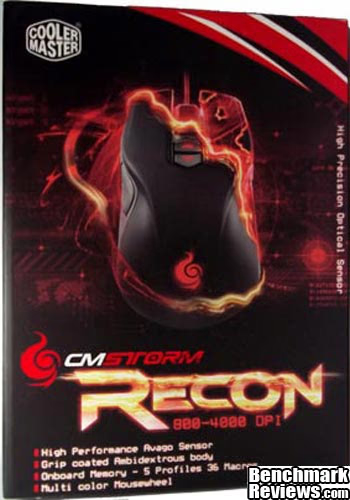
The ambidextrous Storm Recon boasts many different bells and whistles, and here at Benchmark Reviews, we will put both items through their paces.The CM Storm Recon features include an ambidextrous 9 programmable button body, on-the-fly DPI switching with a 4000 DPI optical sensor, Omron micro switches, among many other features. The Skorpion has a flexible rubber mouse cord arm, a heavy iron core, and super-grip feet, as well as maximum portability through disassembly. I, among many others at Benchmark Reviews, am an avid gamer, and appreciate quality and functionality as much as any gamer.
Closer Look: CM Storm Recon and Skorpion
In this section we will take a closer look at the Storm Recon and Skorpion and discuss their main features.
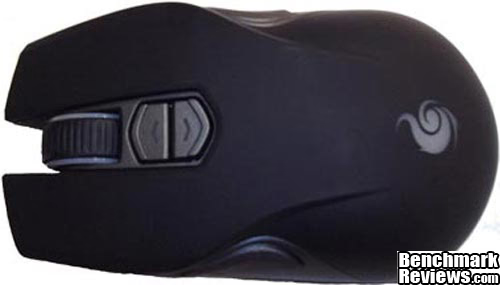
The Storm Recon is a smaller mouse, fitting comfortably in my narrow hands. The Recon is an ergonomic mouse, built to be ambidextrous, and it works well as such. I can/did use this mouse with both my left and right hands, and it was easy to use both ways. Recon has a rubberized grip, which gives the mouse a matte look (no fingerprints!) and aids in the user's grip.
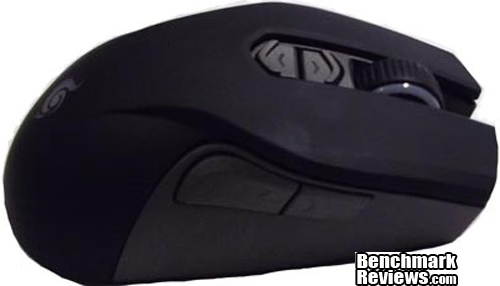
In this side shot we can see seven of the nine buttons Recon has, the other two being in the same position on the left side piece as these two are. The buttons are easy to use, although a bit too "soft" and I could see mis-clicking with them if your hand isn't positioned just so.
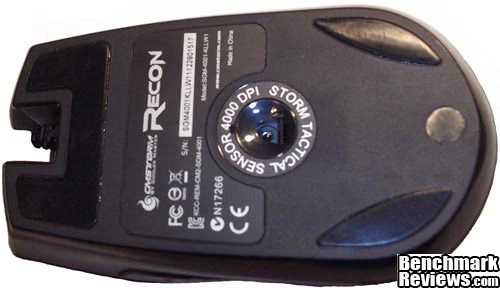
From the bottom we see the teflon feet, and the 4000 DPI sensor. A very quick mouse, I had no problem navigating around two 20+inch screens at max resolution. It also offers 3 individual multi-color LED zones, which can be fine tuned to any color you like, or turned off.

CM Storm Recon and Skorpion Detailed Features
In this section we will take a close look at the CM Storm Recon mouse, and discuss its main features.
Recon boasts precise tracking with an optical sensor, an extra wide 16 bit USB data path, the highest grade micro switches, onboard profile memory and an ambidextrous body. The Teflon feet on the bottom of the mouse add an ease of movement to an already fast mouse. The mouse buttons are responsive, although a little soft and a little too easy to push.The LED lights are bright, and offer a wide variety of colors to play with. The mouse cord is a standard cord, with plain black plastic sheathing on it.
The body is ambidextrous, covered in an easy grip rubberized coating, which does make the mouse easier to grip, and is a very comfortable cover. The mouse is small, measuring 2.5 inches wide by 4.58 inches long and 1.65 inches tall. This fit nicely in my hand, but I have small hands, and it was too small for my husband's hands, so if you have large hands, this would not be the mouse for you. Skorpion is designed to prevent mouse cord snag, and make your wired mouse feel like a wireless mouse. Personally, I found it got more in my way than anything, but for someone switching from a wireless mouse to a wired, I could see its appeal.

Skorpion is a sturdy piece of hardware, heavy enough to prevent tipping, with grippy feet on the legs to hold it in place. The upper part (what would be a tail on a scorpion) is made of rubber and is flexible, the rest is made of plastic.
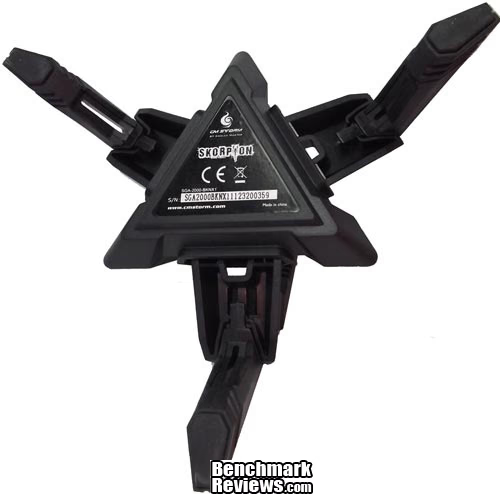
The legs are detachable, as is the "tail" for holding the mouse cord. This compacts the device further, making for easy transportation.

It certainly looks fancy, and it does its job of holding your mouse cord very well. It took me awhile to find the sweet spot for where the mouse cord would be held without being too tight, or too lose. Once I found that, we were in business.
Testing & Results
Testing Methodology
There are no real benchmark tests for a mouse that can measure the performance, so it falls to personal observation. So, I have used the Recon mouse as my primary mouse in various applications and games over the past couple of weeks, using the different profiles, button combinations and surfaces to test the different aspects of the mouse.
Test Software
- Adobe Photoshop
- Firefox, Chrome, and Opera web browsers
- OpenOffice Applications (Spreadsheets, Text Documents)
- EVE Online
- World of Warcraft
- Portal
Results
Recon is by no means my first gaming mouse, and I adjusted to it quickly. It is a sensitive and responsive mouse, that fit well in my admittedly smaller-than-average hands. For someone just starting out with a gaming mouse, I would recommend easing yourself into the sensitivity of a 4000 DPI sensor, which is aided by the buttons on the top to on-the-fly switch your DPI settings. I found a lot of use for this in Photoshop, when getting up close to images for editing. I use my side buttons on my mouse (mouse button 4 and 5) for navigating in browsers, so I did not change the default settings for that, although there are options to do so in the software. The biggest hurdle I ran in to with macros on this mouse was in World of Warcraft.
My previous mouse had seventeen buttons, and although this mouse has nine, I found it was time consuming to get the game to recognize the extra two buttons on the right side of the mouse (or left if you're left handed), and allow me to use them. I ended up macroing numpad keys to them in order to have the game register the mouse so that I could bind spells to it. In order to get your full nine buttons, you would need to macro the DPI buttons on the top, as well as the two on the non-thumb side of the mouse (whether left or right-handed), which would cause you to lose the on-the-fly DPI switching.
The mouse tracked well across multiple surfaces, but did best on a mouse pad. The buttons are a little bit too soft for my liking, and I did find myself accidentally pushing buttons four and five (the side thumb buttons) at the same time more than once. It is a good all-around mouse, and is sensitive enough to fly around my dual 22" monitors. Skorpion I found more or less useless for me. Every mouse I've owned has been corded, and I found that the cord being held just irked me. For someone used to a wireless mouse, this would not be an issue, and in fact would probably add to the experience of a wired mouse. Combined, the Recon and Skorpion are an excellent team, and Skorpion definitely does its job of holding your mouse cord and not allowing you to snag it.
Final Thoughts
The Recon and Skorpion are both good products from CM Storm and I thoroughly enjoyed trying them out. For me, I had a few too many things I was looking for from this mouse that I just didn't find. I would have liked those extra side buttons to be picked up by games/windows as something separate rather than cloned thumb-side buttons, but I did find a work around for that. Skorpion just didn't work for me, I'm too used to my mouse cord dangling, although it did do its job excellently. I found I had to fiddle with the LEDs to get some of the blended colors I wanted, but that's just fun for me. The sensitivity is excellent, although the buttons are just a touch too sensitive in my opinion.CM Storm Recon Conclusion
In this section, I will write a brief summary on the Performance, Appearance, Construction, Functionality and Value. These are my personal views, which allow me to give the CM Storm Recon and Skorpion a rating out of 10. A high score does not necessarily mean that it is better than a similar product, nor does a low score mean that it is worse. I would urge you to do your research, read this review, if you haven't already, and make a decision based on that.
Performance-wise the Recon and Skorpion do well, although I would have liked some more button customization options from the Recon, and some stiffer mouse buttons. Recon is a fast mouse, although not so sensitive as to be too fast for your average gamer.
The Cooler Master Storm Recon mouse and Skorpion both offer a flat-black tactical sort of look to them. It's a nice change from the glossy mice you usually see, and the finish on both seem very durable. The Skorpion definitely has a unique design, but it just looks cool.
Both products are constructed well, and feel like they would stand up to the rigors of your average gamer. I did feel that they could have put a nylon sheathing around the mouse cord, but ultimately that boils down to personal preference.
Here's the sticky part. Functionality. For your FPS gamer, this mouse would do wonderfully. I found in an MMORPG setting, where I am used to mouse-binding 17+ spells, having to spend time to figure out how to get my mouse to be picked up by my game, and losing one of the more attractive features in the process seemed like a missing link. The mouse functioned as a mouse well, it just didn't have what I was looking for. The Skorpion again, functioned at its job well, it just wasn't for me.
The value out of both of these products is exceptional. Recon retails for $39.99 (Amazon) and Skorpion retails for $19.99 (Amazon). This is a very low price for a gaming mouse/accessory, and kudos to CM Storm for making a budget-priced gaming mouse.
Pros:
+ 4000 DPI Sensor
+ Ambidextrous Body
+ On-The-Fly DPI Switching
+ Teflon Feet
Cons:
- Not customizable enough buttons
- Buttons a little bit too sensitive
- Skorpion seems like a niche product
Ratings:
-
Performance: 9.5
-
Appearance: 9.0
-
Construction: 9.0
-
Functionality: 7.5
-
Value: 9.5
Final Score: 8.9 out of 10.
Quality Recognition: Benchmark Reviews Silver Tachometer Award.
Benchmark Reviews invites you to leave constructive feedback below, or ask questions in our Discussion Forum.