
PowerColor Radeon HD5850 PCS+ Video Card
PowerColor Radeon HD5850 PCS+ Review
NVIDIA and AMD build such great products that it's not always easy for their partners to improve upon the initial design. A perfect example is the ATI Radeon HD 5850, which has earned accolades from consumers and critics alike. While the original ATI design worked well, there's always room for improvement. Offering a robust PCS+ (Professional Cooling System Plus) feature that adds better thermal management over the Cypress GPU, the PowerColor Radeon HD5850 is designed with overclocker enthusiasts in mind. Delivered with a factory overclock, Benchmark Reviews tests the HD5850 PCS+ AX5850-1GBD5-PPDHG model against the original reference ATI design, and a large collection of competing graphics cards.
While the list of DirectX 11 video games has just started to grow, with one of the first being a free Massive Multiplayer Online Role Playing Game (MMORPG) named BattleForge. Perhaps ATI has created the perfect storm for their Radeon HD 5800-series by offering a price-competitive graphics card with several free games included or available. While NVIDIA toils away with CUDA and PhysX, ATI is busy delivering the next generation of hardware for the gaming community to enjoy.
AMD launched their Radeon 5800-series as the first assault on their multi-monitor ATI Eyefinity Technology feature, using native HDMI 1.3 output paired with DisplayPort connectivity. The new Cypress GPU features the latest ATI Stream Technology, which is designed to utilize DirectCompute 5.0 and OpenCL code. These new features improve all graphical aspects of the end-user experience, such as faster multimedia transcode times and better GPGPU compute performance. AMD has already introduced a DirectCompute partnership with CyberLink, and the recent Open Physics Initiative with Pixelux promises to offer physics middleware built around OpenCL and Bullet Physics. This looks like ATI's recipe for success, since NVIDIA does not have a GPU to compete against the Radeon 5800 series or support DirectX 11. It doesn't help matters any that NVIDIA GPUs do not support OpenCL and DirectCompute 11 environments, leaving them out in the cold for the coming winter months.
From these developments ATI has distanced themselves ahead of NVIDIA by placing gamers first in their consideration, and have positioned the ATI 5xxx-series to introduce enthusiasts to a new world of DirectX 11 video games on the Microsoft Windows 7 Operating System. While most hardware enthusiasts are familiar with the back-and-forth competition between these two leading GPU chip makers, it might come as a surprise that NVIDIA actually remarked that DirectX 11 video games won't fuel video card sales, and have instead decided to revolutionize the military with CUDA technology. Perhaps we're seeing the evolution of two companies: NVIDIA transitions to the industrial sector and departs the enthusiast gaming space, and ATI successfully answers retail consumer demand.

As of 23 September 2009 AMD was rightful to claim that the ATI Cypress GPU inside the Radeon HD 5800 series could achieve 2.72 TeraFLOPS, more powerful than any other known microprocessor. ATI's next-generation Radeon HD 5800 graphics card share also the world's first and only GPU to fully support Microsoft DirectX 11, the new gaming and compute standard that ships with the Microsoft Windows 7 operating system. The ATI Radeon HD 5800 series effectively doubles the value consumers can expect of their graphics purchases, beginning with the release of two cards: the ATI Radeon HD 5870 and the ATI Radeon HD 5850, each with 1GB GDDR5 memory. With the ATI Radeon HD 5800 series of graphics cards, PC users can expand their computing experience with ATI Eyefinity multi-display technology, accelerate their computing experience with ATI Stream technology, and dominate the competition with superior gaming performance and full support of Microsoft DirectX 11, making it a "must-have" consumer purchase just in time for Microsoft Windows 7 operating system.
Modeled on the full DirectX 11 specifications, the ATI Radeon HD 5800 series of graphics cards delivers up to 2.72 TeraFLOPS of compute power in a single card, translating to superior performance in the latest DirectX 11 games, as well as in DirectX 9, DirectX 10, DirectX 10.1 and OpenGL titles in single card configurations or multi-card configurations using ATI CrossFireX technology. When measured in terms of game performance experienced in some of today's most popular games, the ATI Radeon HD 5800 series is up to twice as fast as the closest competing product in its class; allowing gamers to enjoy incredible new DirectX 11 games - including the forthcoming DiRT 2 from Codemasters, and Aliens vs. Predator from Rebellion, and updated version of The Lord of the Rings Online and Dungeons and Dragons Online Eberron Unlimited from Turbine - all in stunning detail with incredible frame rates.
About PowerColor
PowerColor, established by Tul Corporation in 1997, is a graphics industry leading brand name now and well known for its outstanding performance and innovative technology. As a leading provider of graphics card, PowerColor offers powerful, reliable and cost-effective solutions to customers worldwide.
PowerColor is the platform of choice for avid PC gamers and video prosumers looking to get the best possible performance out of the latest graphics processors from ATI. PowerColor graphics cards deliver every-last-drop of super-charged performance from ATI's most advanced visual processing units (VPU). Running a PowerColor graphics card, today's gamers are able to unleash the 3D graphics performance of their favorite game playing it the way it was meant to be played.
ATI Radeon HD 5850 Features
-
Microsoft DirectX 11 Support
-
ATI Eyefinity Technology
-
ATI Stream Technology Designed for DirectCompute 5.0 and OpenCL
-
Accelerate Video Transcoding
-
40 nm Process Technology
-
Advanced GDDR5 Memory Technology
-
2nd Generation TeraScale Engine
-
Microsoft Windows 7 Support

-
ATI CrossFireX Technology
-
Enhanced Anisotropic Filtering
-
Accelerated Video Transcoding
-
Display Flexibility, Supports DL-DVI, DP, HDMI and D-Sub
-
HDMI 1.3 support with Deep Color and 7.1 High Bitrate Audio
-
On chip HDCP Support
-
ATI CrossFireX multi-GPU support for highly scalable performance. (Use up to four discrete cards with an AMD 790FX based motherboard)
-
ATI Avivo HD Support
-
ATI Unified Video Decoder 2 (UVD) for Blu-ray and HD Video.
-
Accelerated Video Transcoding (AVT)
-
DVD Upscaling
-
Dynamic Contrast
-
Built-in HDMI with 7.1 surround sound support
-
Dynamic power management with ATI PowerPlay technology including memory clocks
-
Dolby TrueHD and DTSHD Master Audio Support
-
AX5850-1GBD5-PPDHG Specifications
-
SKU: AX5850-1GBD5-PPDHG
-
AISC: PowerColor Radeon HD5850 PCS+
-
Bus Interface: PCI-E x16 (PCI-E 2.0)
-
Memory: 1024MB / 256-bit GDDR5
-
Clock Speed: GPU=760MHz Eclk / Memory=1050MHz
-
Cooling System: Dual slot Fan with auto fan control
-
Bracket: Full Height
-
Display Support: Dual DL-DVI-I, Display Port, HDMI, VGA (Via adaptor)
-
HDCP: Supported
-
Crossfire Support: Native Hardware Crossfire
-
External Power: PCIe Graphic External 2 x 6 pin
-
Accessories:
-
Crossfire Interconnect Cable x 1
-
DVI to VGA Adaptor x 1
-
6 PIN to 4 PIN Power Cable x 2
-
Radeon Video Card Reference
| Radeon HD 4870 | Radeon HD 5850 | Radeon HD 5870 | |
|---|---|---|---|
|
Process |
55nm |
40nm |
40nm |
|
Transistors |
956M |
2.15B |
2.15B |
|
Engine Clock |
750 MHz |
725 MHz |
850 MHz |
|
Stream Processors |
800 |
1440 |
1600 |
|
Compute Performance |
1.2 TFLOPs |
2.09 TFLOPS |
2.72 TFLOPs |
|
Texture Units |
40 |
72 |
80 |
|
Texture Fillrate |
30.0 GTexels/s |
52.2 GTexels/s |
68.0 GTexel/s |
|
ROPs |
16 |
32 |
32 |
|
Pixel Fillrate |
12.0 GPixels/s |
23.2 Gpixel/s |
27.2 GPixel/s |
|
Z/Stencil |
48.0 GSamples/s |
92.8 GSamples/s |
108.8 GSamples/s |
|
Memory Type |
GDDR5 |
GDDR5 |
GDDR5 |
|
Memory Clock |
900 MHz |
1000 MHz |
1200 MHz |
|
Memory Data Rate |
3.6 Gbps |
4.0 Gbps |
4.8 Gbps |
|
Memory Bandwidth |
115.2 GB/s |
128.0 GB/s |
153.6 GB/s |
|
Maximum Board Power |
160W |
170W |
188W |
|
Idle Board Power |
90W |
27W |
27W |
ATI Eyefinity Multi-Monitors
ATI Eyefinity advanced multiple-display technology launches a new era of panoramic computing, helping to boost productivity and multitasking with innovative graphics display capabilities supporting massive desktop workspaces, creating ultra-immersive computing environments with super-high resolution gaming and entertainment, and enabling easy configuration and supporting up to six independent display outputs simultaneously.
In the past, multi-display systems catered to professionals in specific industries. Financial, gas and oil, and medical are just some industries where multi-display systems are not only desirable, but a necessity. Today, even graphic designers, CAD engineers and programmers are attaching more than one displays to their workstation. A major benefit of a multi-display system is simple and universal - it enables increased productivity. This has been demonstrated in industry studies which have shown that attaching more than one display device to a PC can significantly increase user productivity.
The early multi-display solutions were non-ideal. The bulky CRT monitors claimed too much desk space, thinner LCD monitors were very expensive, and external multi-display hardware was inconvenient and also very expensive. These issues are much less of a concern today. LCD monitors are very affordable and current generation GPUs can drive multiple display devices independently and simultaneously, without the need for external hardware. Despite the advancements in multi-display technology, AMD engineers still felt there was room for improvement, especially regarding the display interfaces. VGA carries analog signals and needs a dedicated DAC per display output, which consumes power and ASIC space. Dual-Link DVI is digital, but requires a dedicated clock source per display output and uses too many IO pins from our GPU. If we were to overcome the dual display per GPU barrier, it was clear that we needed a superior display interface.

In 2004, a group of PC companies collaborated to define and develop DisplayPort, a powerful and robust digital display interface. At that time, engineers working for the former ATI Technologies Inc. were already thinking about a more elegant solution to drive more than two display devices per GPU, and it was clear that DisplayPort was the interface of choice for this task.
In contrast to other digital display interfaces, DisplayPort does not require a dedicated clock signal for each display output. In fact the data link is fixed at 1.62Gbps or 2.7Gbps per lane, irrespective of the timing of the attached display device. The benefit of this design is that one reference clock source can provide the clock signals needed to drive as many DisplayPort display devices as there are display pipelines in the GPU. In addition, with the same number of IO pins used for Single-Link DVI, a full speed DisplayPort link can be driven which provides more bandwidth and translates to higher resolutions, refresh rates and color depths. All these benefits perfectly complement ATI Eyefinity Multi-Display Technology.

ATI Eyefinity Technology from AMD provides advanced multiple monitor technology delivering an incredibly immersive graphics and computing experience with innovative display capabilities, supporting massive desktop workspaces and super-high resolution gaming environments. Legacy GPUs have supported up to two display outputs simultaneously and independently for more than a decade. Until now graphics solutions have supported more than two monitors by combining multiple GPUs on a single graphics card. With the introduction of AMD's next-generation graphics product series supporting DirectX 11, a single GPU now has the advanced capability of simultaneously supporting up to six independent display outputs.
ATI Eyefinity Technology is closely aligned with AMD's DisplayPort implementation providing the flexibility and upgradability modern user's demand. Up to two DVI, HDMI, or VGA display outputs can be combined with DisplayPort outputs for a total of up to six monitors, depending on the graphics card configuration. The initial AMD graphics products with ATI Eyefinity technology will support a maximum of three independent display outputs via a combination of two DVI, HDMI or VGA with one DisplayPort monitor. AMD has a future product planned to support up to six DisplayPort outputs. Wider display connectivity is possible by using display output adapters that support active translation from DisplayPort to DVI or VGA.

The DisplayPort 1.2 specification is currently being developed by the same group of companies who designed the original DisplayPort specification. This new spec will include exciting new features for our customers. Its feature set includes higher bandwidth, enhanced audio and multi-stream support. Multi-stream, commonly referred to as daisy-chaining, is the ability to address and drive multiple display devices through one connector. This technology, coupled with ATI Eyefinity Technology, will re-introduce multi-display technology and AMD will be at the forefront of this transition.
HD5850 PCS+ Closer Look
The video card industry is hurting as bad as anyone during this economic recession, and nobody is walking around happy about PC graphics these days. They can't, really; not when many of the latest video game titles for the personal computer are released only after console versions have been made available first. Even once you get past that initial burn, you're greeted by yet another. During the past year we've seen dozens of great video games released on the PC platform, but very few of them demand any more graphical processing power than what games demanded back in 2006. Video cards certainly got bigger and faster, but video games were lacking fresh development. DirectX-10 helped the industry here and there, but every step forward received two steps back because of Windows Vista. Introduced with Windows 7 (and also available to Vista via update), enthusiasts now have DirectX 11 detail and special effects in their video games.

Unlike most of AMD's add-in card partners, PowerColor deviates from the ATI reference design and implements their own custom engineering. While the PowerColor Radeon HD5850 PCS+ shares certain aspects of the reference design, such as the same 9.5" total video card length, and the Cypress GPU.
The factory-overclocked HD5850 PCS+ raises the GPU clock to 760MHz over the 725MHz stock setting, and also increases GDDR5 speeds from 1000MHz up to 1050MHz. Printed circuit board (PCB) aside, the AX5850-1GBD5-PPDHG model offered by PowerColor is all original.

Most overclocker-enthusiasts prefer an externally-exhausting VGA cooler (such as the one used on reference-design Radeon HD 5850 video cards) over a cooler that vents back into the computer case. While the majority of the heated air does pass through the vent on the I/O plate, it's only about 0.5x1.5" in diameter. Additional ventilation is located directly beside the external vent, located along the 'spine' of the video card near the I/O plate (visible below).

Probably the newest edition to the ATI Radeon series is the inclusion of DisplayPort output beside a native HDMI 1.3 port, which is available on all Radeon HD 5700/5800-series video cards, and not specific to the PowerColor Radeon HD5850 PCS+ model we're testing. Two DVI digital video outputs are connected to monitors for dual-view, or a third monitor can be added via DisplayPort to enable ATI Eyefinity technology.

Four 6mm copper heat-pipes span from the base of the cooling unit, specifically where the Cypress GPU resides, and travel to the outer edges of the aluminum finsink hidden beneath the plastic shroud.
The PowerColor Radeon HD5850 PCS+ video card does exhaust heated air out in all directions, but because of a forward-mounted fan the majority does make it out through the front. The amount of heated air circulated inside the case is relatively low, thanks to improved thermal performance by the PCS+ (Professional Cooling System Plus) feature.
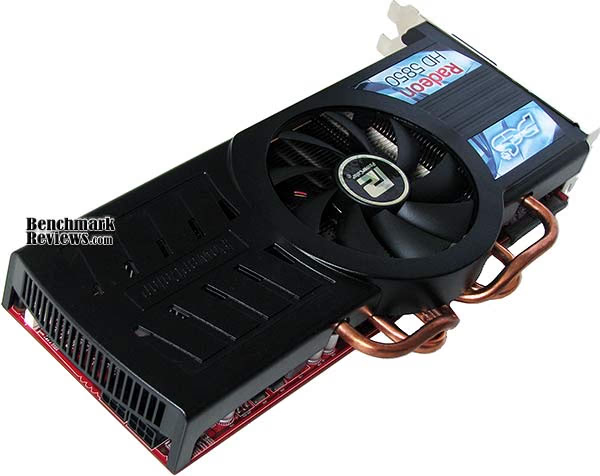
The plastic PCS+ cooling unit shroud on the PowerColor Radeon HD 5850 video card can be removed with two screws at the tail end, and two more on the I/O header panel. After the shroud is removed, the PCS+ heatsink can be separated from the 40nm "Cypress" GPU by removing four spring-loaded screws on the backside of the PCB. If you're an overclocker, the extra cooling performance helps reduce unit temperatures and makes this video card more stable during hardcore high-temp gaming sessions.
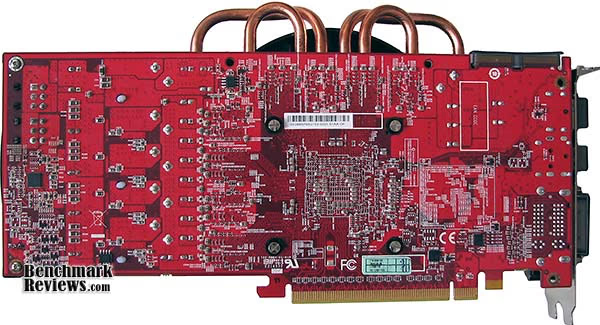
In next several sections Benchmark Reviews details our ultra-exciting video card test methodology, which we follow with several performance comparisons against many of the most popular graphics accelerators available today. The PowerColor Radeon HD5850 PCS+ video card AX5850-1GBD5-PPDHG is priced to compete against the NVIDIA GeForce GTX 275; so of course we'll be keeping a close eye on comparative frame rate performance.
VGA Testing Methodology
As of November 2009 Benchmark Reviews has discontinued testing on the Windows XP (DirectX 9) Operating System, although it is recognized that 50% or more of the gaming world still use this O/S. DirectX 11 is native to the Microsoft Windows 7 Operating System, and will be the centerpiece of our test platform for the foreseeable future. DirectX 11 is also available as a Microsoft Update to the Vista O/S. Because not all graphics solutions were DX11 compatible at the time this article was published, DirectX 10 test settings are utilized on the Windows 7 platform to standardize results.
According to the Steam Hardware Survey published at the time of Windows 7 launch, the most popular gaming resolution is 1280x1024 (17-19" standard LCD monitors) closely followed by 1024x768 (15-17" standard LCD). However, because these resolutions are considered 'low' by most standards, our benchmark performance tests concentrate on the up-and-coming higher-demand resolutions: 1680x1050 (22-24" widescreen LCD) and 1920x1200 (24-28" widescreen LCD monitors). These resolutions are more likely to be used by high-end graphics solutions, such as those tested in this article.
In each benchmark test there is one 'cache run' that is conducted, followed by five recorded test runs. Results are collected at each setting with the highest and lowest results discarded. The remaining three results are averaged, and displayed in the performance charts.

Intel X58 Test System
-
Motherboard: Gigabyte GA-EX58-UD4P (Intel X58/ICH10R Chipset) with F10h BIOS
-
Processor: Intel Core i7-920 Nehalem 2.67 GHz (BX80601920)
-
System Memory: 6GB (3x 2GB) OCZ Triple-Channel 1333 MHz DDR3 CL 7-7-7-20 OCZ3P1333LV6GK
-
Primary Drive: OCZ Vertex EX SLC SSD OCZSSD2-1VTXEX120G
-
Power Supply Unit: OCZ Z Series Gold 850W OCZZ850
-
Monitor: 26-Inch Widescreen LCD (up to 1920x1200@60Hz)
Benchmark Applications
-
3DMark Vantage v1.01 (Extreme Quality, 8x Multisample Anti-Aliasing, 16x Anisotropic Filtering, 1:2 Scale)
-
BattleForge (Very High Quality, 8x Anti-Aliasing, Auto Multi-Thread)
-
Crysis Warhead v1.1 with HOC Benchmark (DX10, Very High Quality, 4x Anti-Aliasing, 16x Anisotropic Filtering, Airfield Demo)
-
Devil May Cry 4 Benchmark Demo (DX10, Super-High Quality, 8x MSAA)
-
Far Cry 2 v1.02 (DX10, Very High Performance, Ultra-High Quality, 8x Anti-Aliasing, HDR + Bloom)
-
Resident Evil 5 Benchmark Demo (DX10, Super-High Quality, 8x MSAA)
-
S.T.A.L.K.E.R. Call of Pripyat Benchmark Demo (Ultra-Quality, Enhanced DX10 light, 4x MSAA, SSAO on and off)
-
Unigine Heaven Benchmark Demo (DX11 and DX10, High-Quality Shaders, Tessellation, 16x AF, 4x AA)
Video Card Test Products
| Product Series | GeForce GTS 250 | Radeon HD 5770 | Palit GTX 260 | Radeon HD 5850 | HD5850 PCS+ | GeForce GTX 275 | ASUS GTX 285 | Radeon HD 5870 |
|---|---|---|---|---|---|---|---|---|
| GPU Cores | 128 | 800 | 216 | 1440 | 1440 | 240 | 240 | 1600 |
| Core Clock (MHz) | 738 | 850 | 625 | 725 | 760 | 633 | 670 | 850 |
| Shader Clock (MHz) | 1836 | N/A | 1348 | N/A | N/A | 1296 | 1550 | N/A |
| Memory Clock (MHz) | 1100 | 1200 | 1100 | 1000 | 1050 | 1134 | 1300 | 1200 |
| Memory Amount | 512MB GDDR3 | 1024MB GDDR5 | 896MB GDDR3 | 1024MB GDDR5 | 1024MB GDDR5 | 896MB GDDR3 | 1024MB GDDR3 | 1024MB GDDR5 |
| Memory Interface | 256-bit | 128-bit | 448-bit | 256-bit | 256-bit | 448-bit | 512-bit | 256-bit |
-
NVIDIA GeForce GTS 250 Reference Design (738 MHz GPU/1836 Shader/1100 vRAM - Forceware 195.62)
-
ATI Radeon HD 5770 Reference Design (800 MHz GPU/850MHz vRAM - ATI Catalyst 10.1)
-
Palit GeForce GTX 260 Sonic 216SP (625 MHz GPU/1348 MHz Shader/1100 MHz vRAM - Forceware 195.62)
-
ATI Radeon HD 4890 RV790 (850 MHz GPU/975 MHz vRAM - ATI Catalyst 10.1)
-
ATI Radeon HD 5850 Reference Design (725 MHz GPU/1000MHz vRAM - ATI Catalyst 10.1)
-
PowerColor Radeon HD 5850 PCS+ (760 MHz GPU/1050MHz vRAM - ATI Catalyst 10.1)
-
NVIDIA GeForce GTX 275 Reference Design (633 MHz GPU/1296 Shader/1134 vRAM - Forceware 195.62)
-
ASUS GeForce GTX 285 ENGTX285 TOP (670 MHz GPU/1550 MHz Shader/1330 MHz vRAM - Forceware 195.62)
-
ATI Radeon HD 5870 Reference Design (850 MHz GPU/1200MHz vRAM - ATI Catalyst 10.1)
-
NVIDIA GeForce GTX 295 Reference Design (576 MHz GPU x2/1242 MHz Shader/999 MHz vRAM - Forceware 195.62)
-
ATI Radeon HD 5970 Reference Design (725 MHz GPU x2/1000MHz vRAM - ATI Catalyst 10.1)
3DMark Vantage GPU Tests
3DMark Vantage is a PC benchmark suite designed to test the DirectX10 graphics card performance. FutureMark 3DMark Vantage is the latest addition the 3DMark benchmark series built by FutureMark corporation. Although 3DMark Vantage requires NVIDIA PhysX to be installed for program operation, only the CPU/Physics test relies on this technology.
3DMark Vantage offers benchmark tests focusing on GPU, CPU, and Physics performance. Benchmark Reviews uses the two GPU-specific tests for grading video card performance: Jane Nash and New Calico. These tests isolate graphical performance, and remove processor dependence from the benchmark results.
3DMark Vantage GPU Test: Jane Nash
Of the two GPU tests 3DMark Vantage offers, the Jane Nash performance benchmark is slightly less demanding. In a short video scene the special agent escapes a secret lair by water, nearly losing her shirt in the process. Benchmark Reviews tests this DirectX 10 scene at 1680x1050 and 1920x1200 resolutions, and uses Extreme quality settings with 8x anti-aliasing and 16x anisotropic filtering. The 1:2 scale is utilized, and is the highest this test allows. By maximizing the processing levels of this test, the scene creates the highest level of graphical demand possible and sorts the strong from the weak.

As far as 3dMark Vantage is concerned, the ATI Radeon HD 5770, NVIDIA GeForce GTX 260, and Radeon HD 4890 (not shown) are all less than optimal graphics solutions for 'extreme' settings like 8x AA and 16x AF. With that being the case, we'll concentrate more on the higher-level video cards. The NVIDIA GeForce GTX 275 is just barely able to reach into decent frame rates, but doesn't add much above and beyond the GTX 260.
The reference ATI Radeon HD 5850 outperforms the overclocked ASUS GTX 285 TOP model in both resolutions, and the PowerColor Radeon HD 5850 PCS+ adds another 4 FPS on top of references performance. ATI's Radeon HD 5870 widens this lead as the most powerful single-GPU graphics card with a full 30% advantage at 1680x1050 and nearly 32% at 1920x1280. While the NVIDIA GeForce GTX 295 does manage to out-muscle the Radeon HD 5870, it's nowhere near the level demonstrated by the ATI Radeon HD 5970 Hemlock video card. The dual Cypress-XT GPUs in the HD5970 offer a 33% advantage over the dual GT200 GPUs in the GeForce GTX 295, when operating at 1920x1200.
3DMark Vantage GPU Test: New Calico
New Calico is the second GPU test in the 3DMark Vantage test suite. Of the two GPU tests, New Calico is the most demanding. In a short video scene featuring a galactic battleground, there is a massive display of busy objects across the screen. Benchmark Reviews tests this DirectX 10 scene at 1680x1050 and 1920x1200 resolutions, and uses Extreme quality settings with 8x anti-aliasing and 16x anisotropic filtering. The 1:2 scale is utilized, and is the highest this test allows. Using the highest graphics processing level available allows our test products to separate themselves and stand out (if possible).

Last year's top-end is this year's middle market graphics solution, which is why a newly released low-end Radeon HD 5770 can match brawn with the GTX 260, GTX 275, and HD4890 (not shown). The DirectX 11-compatible Cypress GPU clearly dominates the field in this test, allowing the ATI Radeon HD 5850 to easily overtake the GeForce GTX 285 by 11% at 1680x1050 and then an astonishing 27% at 1920x1200, while the factory overclocked PowerColor Radeon HD 5850 PCS+ adds nearly 2 FPS more performance over the stock ATI reference design.
The Radeon HD 5870 is well ahead of NVIDIA's GTX 285 by more than 40% at 16x10 and 46% at 19x12 resolutions. NVIDIA's GeForce GTX 295 is no match for the HD5870 in the New Calico benchmark, which allows the more-powerful ATI Radeon HD 5970 to literally step over it to establish a 61% performance advantage at 1920x1200.
Although Benchmark Reviews does not include CrossFire HD5850 test results in this article, past experience has shown us that two Radeon video cards placed in CrossFire do not amount to exactly twice the performance. Under optimal circumstances and the ideal game engine, an ATI Radeon CrossFire set may provide up to 90% improvement over a single video card. In terms of confronting the claim that the ATI Radeon HD 5970 is simply a portable CrossFire 5850 alternative, the HD5970 actually appears to match the 'best case' CrossFire performance. It should be noted however, that the HD5970 was built as an enthusiast video card and designed to be overclocked beyond the specs of a HD5870.
| Product Series | GeForce GTS 250 | Radeon HD 5770 | Palit GTX 260 | Radeon HD 5850 | HD5850 PCS+ | GeForce GTX 275 | ASUS GTX 285 | Radeon HD 5870 |
|---|---|---|---|---|---|---|---|---|
| GPU Cores | 128 | 800 | 216 | 1440 | 1440 | 240 | 240 | 1600 |
| Core Clock (MHz) | 738 | 850 | 625 | 725 | 760 | 633 | 670 | 850 |
| Shader Clock (MHz) | 1836 | N/A | 1348 | N/A | N/A | 1296 | 1550 | N/A |
| Memory Clock (MHz) | 1100 | 1200 | 1100 | 1000 | 1050 | 1134 | 1300 | 1200 |
| Memory Amount | 512MB GDDR3 | 1024MB GDDR5 | 896MB GDDR3 | 1024MB GDDR5 | 1024MB GDDR5 | 896MB GDDR3 | 1024MB GDDR3 | 1024MB GDDR5 |
| Memory Interface | 256-bit | 128-bit | 448-bit | 256-bit | 256-bit | 448-bit | 512-bit | 256-bit |
BattleForge Performance
BattleForge is free Massive Multiplayer Online Role Playing Game (MMORPG) developed by EA Phenomic with DirectX 11 graphics capability. Combining strategic cooperative battles, the community of MMO games, and trading card gameplay, BattleForge players are free to put their creatures, spells and buildings into combination's they see fit. These units are represented in the form of digital cards from which you build your own unique army. With minimal resources and a custom tech tree to manage, the gameplay is unbelievably accessible and action-packed.
Benchmark Reviews uses the built-in graphics benchmark to measure performance in BattleForge, using Very High quality settings (detail) and 8x anti-aliasing with auto multi-threading enabled. BattleForge is one of the first titles to take advantage of DirectX 11 in Windows 7, and offers a very robust color range throughout the busy battleground landscape. The first chart illustrates how performance measures-up between video cards when Screen Space Ambient Occlusion (SSAO) is disabled, which runs tests at DirectX 10 levels.

When SSAO is disabled, older GeForce and Radeon products are compared on a more even playing field (so long as you discredit the fact that we have a few DirectX 10 cards in the mix, and that BattleForge is a DirectX 11 game). Looking at performance using the 1920x1200 resolution, the ATI Radeon HD5770 Juniper GPU does extremely well and slightly outperforms the overclocked GTX 260 model with 29.1 FPS. The ASUS GeForce GTX 285 TOP comes in right behind them, scoring 34.0 FPS. ATI's Radeon HD 4890 (not charted) still has muscle to flex, rendering 36.2 FPS and trailing just behind the GeForce GTX 275 with 37.8 FPS. The reference ATI Radeon HD 5850's score 38.8 FPS is further improved with the PowerColor Radeon HD 5850 PCS+, which tacks on five more FPS at 1920x1200.
Even when Screen Space Ambient Occlusion is disabled to give older cards their last chance for high frame rates, the ATI Radeon HD 5870 reminds them that SSAO isn't a challenge it has to concern itself with. Scoring 45.3 FPS, the Radeon 5870 outperforms an overclocked GTX 285 by more than 33% when settings are uniform to accommodate all products. The next chart (below) illustrates how BattleForge reacts when SSAO is enabled, which forces multi-core optimizations that DirectX 11-compatible video cards are best suited to handle:

As expected, the DirectX 11-compatible ATI 5000 series runs rings around everything NVIDIA currently offers. SSAO isn't a technology that GeForce products handle very well, and thus far it seems that aside from CUDA technology there is little advantage to be gained over the Radeon 5000-series. If gaming is the primary purpose for a discrete graphics card, then you will want to consider that nearly all new video games will be developed with SSAO and other DirectX 11 extensions. These features make it difficult (and sometimes impossible) to enjoy the game on non-compliant graphics hardware.
In respect to EA's BattleForge, a reference-design mainstream ATI Radeon HD 5770 is able to outperform the overclocked ASUS GeForce GTX 285 TOP by 29% at 1920x1200, thus proving that Windows 7 will re-center the definition of 'mainstream' products. What was top shelf in Windows XP or Vista will soon become the low end with DirectX 11 in Windows 7. For gamers who plan to use Windows 7, and especially those who play BattleForge, the Radeon HD 5850 offered excellent performance and topped our overclocked GTX 285 by 91%, while the PowerColor HD5850 PCS+ offered a 100% improvement over the GeForce GTX 285. If that wasn't proof evident that NVIDIA should be worried, the ATI Radeon HD 5870 DirectX 11 video card was able to easily outperform NVIDIA's GTX 285 by more than 125% at the same price point when SSAO is called into action. NVIDIA's GTX 295 does much better than the GTX 285, but still falls just ahead of the HD5770 and below the HD4890. This allows the Radeon HD5970 (not charted) to clinch a 266% FPS advantage over the GTX295, and clearly demonstrates how unprepared for SSAO the current NVIDIA GeForce products are.
In terms of CrossFire HD5850 vs single HD5970, the ATI Radeon HD 5970 does appear to match the ideal CrossFire output. As previously mentioned, the HD5970 is intended for overclockers and is given the headroom to exceed HD5870 specifications. Doing so will boost performance well beyond a CrossFire set of HD5850's.
| Product Series | GeForce GTS 250 | Radeon HD 5770 | Palit GTX 260 | Radeon HD 5850 | HD5850 PCS+ | GeForce GTX 275 | ASUS GTX 285 | Radeon HD 5870 |
|---|---|---|---|---|---|---|---|---|
| GPU Cores | 128 | 800 | 216 | 1440 | 1440 | 240 | 240 | 1600 |
| Core Clock (MHz) | 738 | 850 | 625 | 725 | 760 | 633 | 670 | 850 |
| Shader Clock (MHz) | 1836 | N/A | 1348 | N/A | N/A | 1296 | 1550 | N/A |
| Memory Clock (MHz) | 1100 | 1200 | 1100 | 1000 | 1050 | 1134 | 1300 | 1200 |
| Memory Amount | 512MB GDDR3 | 1024MB GDDR5 | 896MB GDDR3 | 1024MB GDDR5 | 1024MB GDDR5 | 896MB GDDR3 | 1024MB GDDR3 | 1024MB GDDR5 |
| Memory Interface | 256-bit | 128-bit | 448-bit | 256-bit | 256-bit | 448-bit | 512-bit | 256-bit |
Crysis Warhead Test
Crysis Warhead is an expansion pack based on the original Crysis video game. Crysis Warhead is based in the future, where an ancient alien spacecraft has been discovered beneath the Earth on an island east of the Philippines. Crysis Warhead uses a refined version of the CryENGINE2 graphics engine. Like Crysis, Warhead uses the Microsoft Direct3D 10 (DirectX 10) API for graphics rendering.
Benchmark Reviews uses the HOC Crysis Warhead benchmark tool to test and measure graphic performance using the Airfield 1 demo scene. This short test places a high amount of stress on a graphics card because of detailed terrain and textures, but also for the test settings used. Using the DirectX 10 test with Very High Quality settings, the Airfield 1 demo scene receives 4x anti-aliasing and 16x anisotropic filtering to create maximum graphic load and separate the products according to their performance.
Using the highest quality DirectX 10 settings with 4x AA and 16x AF, only the most powerful graphics cards are expected to perform well in our Crysis Warhead benchmark tests. DirectX 11 extensions are not supported in Crysis: Warhead, and SSAO is not an available option.
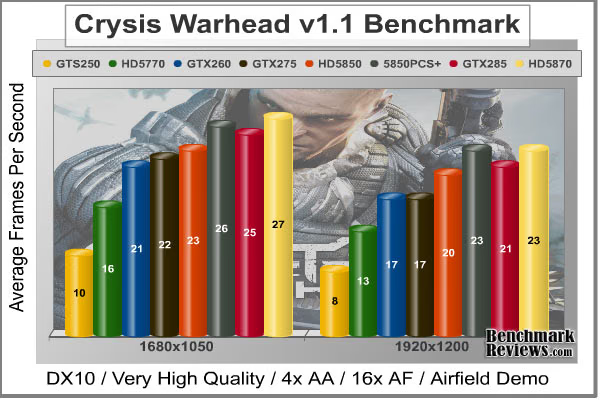
The GTS 250 is a rebranded GeForce 9800 GTX, which means it's also an automatic fail for Crysis testing. The ATI Radeon HD 5770 does surprisingly well, especially considering it's only meant as a lower mid-level graphics solution, yet still falls short of the GeForce GTX 260 and GTX 275, or the Radeon HD 4890 (not charted) which share the same 21 frames per second performance. There are a few frames between the Radeon HD 5850 and HD5850 PCS+, and at 1920x1200 the overclocked ASUS GeForce GTX 285 TOP is matched for performance. The Radeon HD 5870 video card doesn't flex its muscle in this NVIDIA-optimized game the way it does in DirectX 11, but it still outperforms the GTX 285 within the same price point.
For the dual-GPU products, the NVIDIA GTX 295 muscles its way to the #2 position ahead of the Radeon HD 5870, but it falls very short of matching performance with the ATI Radeon HD 5970. At 1920x1200 resolution the GTX 295 produces only 27 FPS, and while this is still better than the HD5870's 23 FPS or the overclocked GTX285's 21 FPS, it's 44% behind the Radeon HD5970's 39 FPS. The single HD5970 actually comes close to doubling the performance of a single HD5850, but also consumes far less power in it's factory 'underclocked' state.
| Product Series | GeForce GTS 250 | Radeon HD 5770 | Palit GTX 260 | Radeon HD 5850 | HD5850 PCS+ | GeForce GTX 275 | ASUS GTX 285 | Radeon HD 5870 |
|---|---|---|---|---|---|---|---|---|
| GPU Cores | 128 | 800 | 216 | 1440 | 1440 | 240 | 240 | 1600 |
| Core Clock (MHz) | 738 | 850 | 625 | 725 | 760 | 633 | 670 | 850 |
| Shader Clock (MHz) | 1836 | N/A | 1348 | N/A | N/A | 1296 | 1550 | N/A |
| Memory Clock (MHz) | 1100 | 1200 | 1100 | 1000 | 1050 | 1134 | 1300 | 1200 |
| Memory Amount | 512MB GDDR3 | 1024MB GDDR5 | 896MB GDDR3 | 1024MB GDDR5 | 1024MB GDDR5 | 896MB GDDR3 | 1024MB GDDR3 | 1024MB GDDR5 |
| Memory Interface | 256-bit | 128-bit | 448-bit | 256-bit | 256-bit | 448-bit | 512-bit | 256-bit |
Devil May Cry 4 Benchmark
Devil May Cry 4 was released on PC in early 2007 as the fourth installment to the Devil May Cry video game series. DMC4 is a direct port from the PC platform to console versions, which operate at the native 720P game resolution with no other platform restrictions. Devil May Cry 4 uses the refined MT Framework game engine, which has been used for many popular Capcom game titles over the past several years.
MT Framework is an exclusive seventh generation game engine built to be used with games developed for the PlayStation 3 and Xbox 360, and PC ports. MT stands for "Multi-Thread", "Meta Tools" and "Multi-Target". Originally meant to be an outside engine, but none matched their specific requirements in performance and flexibility. Games using the MT Framework are originally developed on the PC and then ported to the other two console platforms.
On the PC version a special bonus called Turbo Mode is featured, giving the game a slightly faster speed, and a new difficulty called Legendary Dark Knight Mode is implemented. The PC version also has both DirectX 9 and DirectX 10 mode for Microsoft Windows XP and Vista Operating Systems.
It's always nice to be able to compare the results we receive here at Benchmark Reviews with the results you test for on your own computer system. Usually this isn't possible, since settings and configurations make it nearly difficult to match one system to the next; plus you have to own the game or benchmark tool we used.
Devil May Cry 4 fixes this, and offers a free benchmark tool available for download. Because the DMC4 MT Framework game engine is rather low-demand for today's cutting edge multi-GPU video cards, Benchmark Reviews uses the DirectX 10 test set at 1920x1200 resolution to test with 8x AA (highest common AA setting available between GeForce and Radeon video cards) and 16x AF. The benchmark runs through four different test scenes, but scenes #2 and #4 usually offer the most graphical challenge.

Devil May Cry 4 doesn't stress the GPU to the extent that other game engines do. This isn't to say that the graphics don't look good, because they do, it's just that the MT Framework game engine is very well optimized. At 49/58 FPS in test 2 and 4, even the GTS 250 can play DMC4. The Juniper GPU inside ATI's Radeon HD 5770 produced 72 FPS in test 2, which is extremely close to the 79 FPS rendered by our overclocked Palit GeForce GTX 260 Sonic video card and GeForce GTX 275. The ATI Radeon HD 4890 (not shown) matched the overclocked ASUS GeForce GTX 285 TOP video card performance with 89 FPS. ATI's Cypress GPU found in the Radeon HD 5850 and 5870 certainly stood out from the crowd.
The reference design ATI Radeon HD 5850 produced 108 FPS, which equates to 21% better performance than the GeForce GTX 285, but the PowerColor Radeon HD 5850 PCS+ raises this lead by another 4 FPS in test scene #4. Sapphire's ATI Radeon HD 5870 rendered 126 FPS in the second benchmark scene, outperforming the NVIDIA GTX 285 counterpart by nearly 42%. Despite wearing a NVIDIA The Way It's Meant to be Played (TWIMTBP) logo, the Capcom MT Framework game engine appears to enjoy ATI's latest Cypress and Juniper GPUs.
The dual-GPU GeForce GTX matches performance to the single-GPU Radeon HD 5870, yet still falls way behind the twin Cypress-XT (Hemlock) GPUs inside the Radeon HD 5970.
| Product Series | GeForce GTS 250 | Radeon HD 5770 | Palit GTX 260 | Radeon HD 5850 | HD5850 PCS+ | GeForce GTX 275 | ASUS GTX 285 | Radeon HD 5870 |
|---|---|---|---|---|---|---|---|---|
| GPU Cores | 128 | 800 | 216 | 1440 | 1440 | 240 | 240 | 1600 |
| Core Clock (MHz) | 738 | 850 | 625 | 725 | 760 | 633 | 670 | 850 |
| Shader Clock (MHz) | 1836 | N/A | 1348 | N/A | N/A | 1296 | 1550 | N/A |
| Memory Clock (MHz) | 1100 | 1200 | 1100 | 1000 | 1050 | 1134 | 1300 | 1200 |
| Memory Amount | 512MB GDDR3 | 1024MB GDDR5 | 896MB GDDR3 | 1024MB GDDR5 | 1024MB GDDR5 | 896MB GDDR3 | 1024MB GDDR3 | 1024MB GDDR5 |
| Memory Interface | 256-bit | 128-bit | 448-bit | 256-bit | 256-bit | 448-bit | 512-bit | 256-bit |
Far Cry 2 Benchmark
Ubisoft has developed Far Cry 2 as a sequel to the original, but with a very different approach to game play and story line. Far Cry 2 features a vast world built on Ubisoft's new game engine called Dunia, meaning "world", "earth" or "living" in Farci. The setting in Far Cry 2 takes place on a fictional Central African landscape, set to a modern day timeline.
The Dunia engine was built specifically for Far Cry 2, by Ubisoft Montreal development team. It delivers realistic semi-destructible environments, special effects such as dynamic fire propagation and storms, real-time night-and-day sun light and moon light cycles, dynamic music system, and non-scripted enemy A.I actions.
The Dunia game engine takes advantage of multi-core processors as well as multiple processors and supports DirectX 9 as well as DirectX 10. Only 2 or 3 percent of the original CryEngine code is re-used, according to Michiel Verheijdt, Senior Product Manager for Ubisoft Netherlands. Additionally, the engine is less hardware-demanding than CryEngine 2, the engine used in Crysis.
However, it should be noted that Crysis delivers greater character and object texture detail, as well as more destructible elements within the environment. For example; trees breaking into many smaller pieces and buildings breaking down to their component panels. Far Cry 2 also supports the amBX technology from Philips. With the proper hardware, this adds effects like vibrations, ambient colored lights, and fans that generate wind effects.
There is a benchmark tool in the PC version of Far Cry 2, which offers an excellent array of settings for performance testing. Benchmark Reviews used the maximum settings allowed for DirectX 10 tests, with the resolution set to 1920x1200. Performance settings were all set to 'Very High', Render Quality was set to 'Ultra High' overall quality, 8x anti-aliasing was applied, and HDR and Bloom were enabled.

Although the Dunia engine in Far Cry 2 is slightly less demanding than CryEngine 2 engine in Crysis, the strain appears to be extremely close. In Crysis we didn't dare to test AA above 4x, whereas we used 8x AA and 'Ultra High' settings in Far Cry 2. The end effect was a separation between what is capable of maximum settings, and what is not. Using the short 'Ranch Small' time demo (which yields the lowest FPS of the three tests available), we noticed that there are very few products capable of producing playable frame rates with the settings all turned up.
Inspecting the performance at 1920x1200 resolution, it appears that every graphics card we tested can handle higher quality settings and post-processing effects in Far Cry 2. The GTS 250 is a beaten horse, producing 15.7 FPS and not worth using on FC2. ATI's Radeon HD 5770 produces 29.0 FPS, which is extremely close to the 31.4 FPS delivered by the Radeon HD 4890 (not charted). Palit's factory overclocked GeForce GTX 260 Sonic performed at 36.4 FPS, followed by the reference NVIDIA GeForce GTX 275. At 43.0 FPS the overclocked ASUS GeForce GTX 285 TOP rubs elbows with the stock-clock Radeon HD 5850, with the PowerColor Radeon HD 5850 PCS+ pulling ahead with 45.1 FPS on average. The reference ATI Radeon HD 5870 DirectX 11 video card topped the single-GPU Far Cry 2 performance chart with 51.3 FPS at 1920x1200, with a 19% lead over NVIDIA's direct competition.
Moving on to dual-GPU comparisons, the NVIDIA GeForce GTX 295 displayed 56 FPS at 1920x1200 and edged out the HD5870's 51.3 FPS. This is fine if you're comparing those two cards (which sell at very different price points), but the ATI Radeon HD 5970 leaps over the GTX295 by almost 37% and produces a 76.6 frame rate under the same load. Perhaps that's The Way It's Meant To Be Played.
| Product Series | GeForce GTS 250 | Radeon HD 5770 | Palit GTX 260 | Radeon HD 5850 | HD5850 PCS+ | GeForce GTX 275 | ASUS GTX 285 | Radeon HD 5870 |
|---|---|---|---|---|---|---|---|---|
| GPU Cores | 128 | 800 | 216 | 1440 | 1440 | 240 | 240 | 1600 |
| Core Clock (MHz) | 738 | 850 | 625 | 725 | 760 | 633 | 670 | 850 |
| Shader Clock (MHz) | 1836 | N/A | 1348 | N/A | N/A | 1296 | 1550 | N/A |
| Memory Clock (MHz) | 1100 | 1200 | 1100 | 1000 | 1050 | 1134 | 1300 | 1200 |
| Memory Amount | 512MB GDDR3 | 1024MB GDDR5 | 896MB GDDR3 | 1024MB GDDR5 | 1024MB GDDR5 | 896MB GDDR3 | 1024MB GDDR3 | 1024MB GDDR5 |
| Memory Interface | 256-bit | 128-bit | 448-bit | 256-bit | 256-bit | 448-bit | 512-bit | 256-bit |
Resident Evil 5 Tests
Built upon an advanced version of Capcom's proprietary MT Framework game engine to deliver DirectX 10 graphic detail, Resident Evil 5 offers gamers non-stop action similar to Devil May Cry 4, Lost Planet, and Dead Rising. The MT Framework is an exclusive seventh generation game engine built to be used with games developed for the PlayStation 3 and Xbox 360, and PC ports. MT stands for "Multi-Thread", "Meta Tools" and "Multi-Target". Games using the MT Framework are originally developed on the PC and then ported to the other two console platforms.
On the PC version of Resident Evil 5, both DirectX 9 and DirectX 10 modes are available for Microsoft Windows XP and Vista Operating Systems. Microsoft Windows 7 will play Resident Evil with backwards compatible Direct3D APIs. Resident Evil 5 is branded with the NVIDIA The Way It's Meant to be Played (TWIMTBP) logo, and receives NVIDIA GeForce 3D Vision functionality enhancements.
NVIDIA and Capcom offer the Resident Evil 5 benchmark demo for free download from their website, and Benchmark Reviews encourages visitors to compare their own results to ours. Because the Capcom MT Framework game engine is very well optimized and produces high frame rates, Benchmark Reviews uses the DirectX 10 version of the test at 1920x1200 resolution. Super-High quality settings are configured, with 8x MSAA post processing effects for maximum demand on the GPU. Test scenes from Area #3 and Area #4 require the most graphics processing power, and the results are collected for the chart illustrated below.

Resident Evil 5 has really proved how well the proprietary Capcom MT Framework game engine can look with DirectX 10 effects. The Area 3 and 4 tests are the most graphically demanding from this free downloadable demo benchmark, but the results make it appear that the Area #3 test scene performs better with NVIDIA GeForce products compared to the Area #4 scene that favors ATI Radeon GPUs. Although this benchmark tool is distributed directly from NVIDIA and GeForce Forceware drivers likely have optimizations written for the Resident Evil 5 game, there doesn't appear to be any favoritism towards GeForce products over Radeon counterparts from within the game itself.
Even so, the GeForce GTS 250 delivered 33 FPS while the Radeon HD 5770 rendered 36 FPS in test scene 3, while jumping to 47 FPS in test scene 4. This loosely indicates that lower-end graphics cards can still play Resident Evil 5 at 1920x1200, and produce good 30+ frame rates with maximum settings. For these results however, it seems that driver optimizations between manufacturers could account for the disparity among test scenes, although the Resident Evil 5 game itself 'normalizes' in the two other (less demanding) scenes.
Much of the test results in Resident Evil 5 were identical to performance standings in our other tests. The GTX260, GTX275 and HD4890 produce the same frame rates, while the HD5850 and GTX285 push and pull between tests. The PowerColor Radeon HD 5850 PCS+ pulls ahead only a few frames per second, but does so without a noisy cooling fan. The Radeon HD5870 keeps up with the GTX295, while the Radeon HD 5970 performs ahead of them all with a 38% lead. With a 123 FPS peak frame rate in scene 4, the HD5970 certainly delivers enough performance to guarantee smooth fast motion on even larger display resolutions.
| Product Series | GeForce GTS 250 | Radeon HD 5770 | Palit GTX 260 | Radeon HD 5850 | HD5850 PCS+ | GeForce GTX 275 | ASUS GTX 285 | Radeon HD 5870 |
|---|---|---|---|---|---|---|---|---|
| GPU Cores | 128 | 800 | 216 | 1440 | 1440 | 240 | 240 | 1600 |
| Core Clock (MHz) | 738 | 850 | 625 | 725 | 760 | 633 | 670 | 850 |
| Shader Clock (MHz) | 1836 | N/A | 1348 | N/A | N/A | 1296 | 1550 | N/A |
| Memory Clock (MHz) | 1100 | 1200 | 1100 | 1000 | 1050 | 1134 | 1300 | 1200 |
| Memory Amount | 512MB GDDR3 | 1024MB GDDR5 | 896MB GDDR3 | 1024MB GDDR5 | 1024MB GDDR5 | 896MB GDDR3 | 1024MB GDDR3 | 1024MB GDDR5 |
| Memory Interface | 256-bit | 128-bit | 448-bit | 256-bit | 256-bit | 448-bit | 512-bit | 256-bit |
STALKER Call of Pripyat Benchmark
The events of S.T.A.L.K.E.R.: Call of Pripyat unfold shortly after the end of S.T.A.L.K.E.R.: Shadow of Chernobyl. Having discovered about the open path to the Zone center, the government decides to hold a large-scale military "Fairway" operation aimed to take the CNPP under control. According to the operation's plan, the first military group is to conduct an air scouting of the territory to map out the detailed layouts of anomalous fields location. Thereafter, making use of the maps, the main military forces are to be dispatched. Despite thorough preparations, the operation fails. Most of the avant-garde helicopters crash. In order to collect information on reasons behind the operation failure, Ukraine's Security Service send their agent into the Zone center.
S.T.A.L.K.E.R.: CoP is developed on X-Ray game engine v.1.6, and implements several ambient occlusion (AO) techniques including one that AMD has developed. AMD's AO technique is optimized to run on efficiently on Direct3D11 hardware. It has been chosen by a number of games (e.g. BattleForge, HAWX, or the new Aliens vs Predator) for the distinct effect in it adds to the final rendered images. This AO technique is called HDAO which stands for ‘High Definition Ambient Occlusion' because it picks up occlusions from fine details in normal maps.
Put in simple terms, ambient light occlusion can be described as the parts of the scene where light finds it hard to reach. In the real world, light has to bounce off many surfaces in order to reach some places. Classically this problem is solved with a radiosity technique but this is usually too expensive for real-time applications. For this reason, various screen space techniques have been invented to emulate the effect of ambient occlusion.

S.T.A.L.K.E.R. Call of Pripyat is a video game based on the DirectX 11 architecture and designed to use high-definition SSAO. If Benchmark Reviews were to test this game with the developers recommended settings for desired gaming experience, only the ATI Radeon HD 5000-series video cards would be tested. Having the good fortune to experience this free benchmark demo run through all four tests (Day, Night, Rain, Sun Shafts) with the highest settings possible (HDAO mode with Ultra SSAO quality), the Radeon HD5970 produced 30+ FPS (in the Day test) while the GTX295 looked like a slide show with 6 FPS. Needless to say, this wouldn't be the most educational way of testing video cards for our readers. For this reason alone, we reduced quality to DirectX 10 levels, and ran tests with SSAO off and then enabled with Default settings on our collection of higher-end video cards.
Without SSAO and using DX10 lighting, the (finally charted) HD4890 actually comes amazingly close to the reference stock Radeon HD 5850 with 42 FPS in the 'Day' test run, while both are well ahead of the GTX275's 32 FPS performance. PowerColor's HD5850 PCS+ climbs the FPS performance to 44.5 FPS without SSAO. The overclocked ASUS GeForce GTX 285 TOP rendered only 38 FPS on DX10 settings, which isn't very convincing argument for NVIDIA's current top-end product. The Radeon HD 5870 performed on-par with the GeForce GTX 295 using DX10 lighting and produced 51 FPS, but then the Radeon HD 5970 comes in and tacks on 42% gain for 75.1 FPS. That might not seem like good news for NVIDIA GeForce products, but it only gets worse.
Even though we've restrained the STALKER CoP tests to a meager DirectX 10 level, the benchmark allows us to add SSAO. There are three SSAO modes: Default, HBAO, and HDAO; this test uses Default. Each mode then has three SSAO levels of detail: Low, Medium, High, and specific to HDAO you can add Ultra. Our tests use the Default-High settings, which rank #3 out of 10 SSAO levels.
Again, the HD4890 (31.6 FPS) is somewhat close to the HD5850 (34.6 FPS) and HD5850 PCS+ (36.1 FPS), but the GeForce GTX 285 (21.6 FPS) is way below them all. The ATI Radeon HD 5870 flexes its lonely Cypress-XT GPU and squeezes out 41.9 FPS, all while looking down at the dual GT200-GPU NVIDIA GeForce GTX 295 video card. The GTX295 squeaks out 28.8 FPS using both GPUs, but then the ATI Radeon HD 5970 steps in and shows how it's to be done: 62.8 FPS (118% faster).
It seems evident that even DirectX 10 platforms favor the ATI Radeon 5000-series. It also seems that NVIDIA should have choose its words carefully when extolling DirectX 10 and condemning DirectX 11.
| Product Series | GeForce GTS 250 | Radeon HD 5770 | Palit GTX 260 | Radeon HD 5850 | HD5850 PCS+ | GeForce GTX 275 | ASUS GTX 285 | Radeon HD 5870 |
|---|---|---|---|---|---|---|---|---|
| GPU Cores | 128 | 800 | 216 | 1440 | 1440 | 240 | 240 | 1600 |
| Core Clock (MHz) | 738 | 850 | 625 | 725 | 760 | 633 | 670 | 850 |
| Shader Clock (MHz) | 1836 | N/A | 1348 | N/A | N/A | 1296 | 1550 | N/A |
| Memory Clock (MHz) | 1100 | 1200 | 1100 | 1000 | 1050 | 1134 | 1300 | 1200 |
| Memory Amount | 512MB GDDR3 | 1024MB GDDR5 | 896MB GDDR3 | 1024MB GDDR5 | 1024MB GDDR5 | 896MB GDDR3 | 1024MB GDDR3 | 1024MB GDDR5 |
| Memory Interface | 256-bit | 128-bit | 448-bit | 256-bit | 256-bit | 448-bit | 512-bit | 256-bit |
Unigine Heaven Benchmark
The Unigine "Heaven" DirectX 11 benchmark is a free publicly available tool that grants the power to unleash the graphics capabilities in Windows 7 or updated Vista Operating Systems. It reveals the enchanting magic of floating islands with a tiny village hidden in the cloudy skies. With the interactive mode, emerging experience of exploring the intricate world is within reach. Through its advanced renderer, Unigine is one of the first to set precedence in showcasing the art assets with tessellation, bringing compelling visual finesse, utilizing the technology to the full extend and exhibiting the possibilities of enriching 3D gaming.
The distinguishing feature in the Unigine Heaven benchmark is a hardware tessellation that is a scalable technology aimed for automatic subdivision of polygons into smaller and finer pieces, so that developers can gain a more detailed look of their games almost free of charge in terms of performance. Thanks to this procedure, the elaboration of the rendered image finally approaches the boundary of veridical visual perception: the virtual reality transcends conjured by your hand. The "Heaven" benchmark excels at providing the following key features:
-
Native support of OpenGL, DirectX 9, DirectX 10 and DirectX 11
-
Comprehensive use of tessellation technology
-
Advanced SSAO (screen-space ambient occlusion)
-
Volumetric cumulonimbus clouds generated by a physically accurate algorithm
-
Dynamic simulation of changing environment with high physical fidelity
-
Interactive experience with fly/walk-through modes
-
ATI Eyefinity support

Just like we've already done in BattleForge and S.T.A.L.K.E.R. Call of Pripyat, the Unigine "Heaven" benchmark was reduced to DirectX 10 levels to make sure everyone had a fair chance. The Heaven benchmark is a free demo that makes use of the unigine game engine, and is designed to show off the most detailed cobblestone and smoke you've ever seen a graphics card generate... in DirectX 11.
Last years' high-end ATI HD4890 does its best to compete with this year's lower mid-level Radeon graphics solution, yet somehow matches performance with the GeForce GTX 275 and reaches dangerously close to the GTX 285 when 4x AA is applied (and bests the GTX285 with 8x AA enabled). Likewise, both the reference Radeon HD 5850 and factory overclocked PowerColor HD5850 PCS+ render 33.7 and 35.4 FPS respectively and climb well-beyond the performance an overclocked GTX 285 offers in the Heaven benchmark.
The HD5870 produced the same 41 FPS that the GeForce GTX 295 did, but when 4x AA is increased to 8x the results favor the HD5870 by more than 18%. Then comes the ATI Radeon HD 5970, which improves on the GTX295 by 54% with 4x AA and 81% when it's turned up to 8x AA.
While the Unigine Heaven benchmark is a sample for what a game developer could do with their engine, as of now it's merely a synthetic benchmark with the same punctuation as 3dMark Vantage. Nobody plays a benchmark as I frequently say, but it seems evident that everyone can expect to see great things come from a tool this detailed. For now though, those details only come by way of the ATI Radeon 5000-series.
| Product Series | GeForce GTS 250 | Radeon HD 5770 | Palit GTX 260 | Radeon HD 5850 | HD5850 PCS+ | GeForce GTX 275 | ASUS GTX 285 | Radeon HD 5870 |
|---|---|---|---|---|---|---|---|---|
| GPU Cores | 128 | 800 | 216 | 1440 | 1440 | 240 | 240 | 1600 |
| Core Clock (MHz) | 738 | 850 | 625 | 725 | 760 | 633 | 670 | 850 |
| Shader Clock (MHz) | 1836 | N/A | 1348 | N/A | N/A | 1296 | 1550 | N/A |
| Memory Clock (MHz) | 1100 | 1200 | 1100 | 1000 | 1050 | 1134 | 1300 | 1200 |
| Memory Amount | 512MB GDDR3 | 1024MB GDDR5 | 896MB GDDR3 | 1024MB GDDR5 | 1024MB GDDR5 | 896MB GDDR3 | 1024MB GDDR3 | 1024MB GDDR5 |
| Memory Interface | 256-bit | 128-bit | 448-bit | 256-bit | 256-bit | 448-bit | 512-bit | 256-bit |
Radeon HD5850 PCS+ Temperatures
Benchmark tests are always nice, so long as you care about comparing one product to another. But when you're an overclocker, or merely a hardware enthusiast who likes to tweak things on occasion, there's no substitute for good information. Benchmark Reviews has a very popular guide written on Overclocking the NVIDIA GeForce Video Card, which gives detailed instruction on how to tweak a GeForce graphics card for better performance. Of course, not every video card has the head room. Some products run so hot that they can't suffer any higher temperatures than they already do. This is why we measure the operating temperature of the video card products we test.
FurMark does do two things extremely well: drive the thermal output of any graphics processor higher than any other application of video game, and it does so with consistency every time. While I have proved that FurMark is not a true benchmark tool for comparing video cards, it would still work very well to compare one product against itself at different stages. FurMark would be very useful for comparing the same GPU against itself using different drivers or clock speeds, of testing the stability of a GPU as it raises the temperatures higher than any program. But in the end, it's a rather limited tool.

To begin my testing, I use GPU-Z to measure the temperature at idle as reported by the GPU. Next I use FurMark 1.7.0 to generate maximum thermal load and record GPU temperatures at high-power 3D mode. The ambient room temperature remained at a stable 20.0°C throughout testing, while the inner-case temperature hovered around 36°C. The PowerColor Radeon HD5850 PCS+ video card model AX5850-1GBD5-PPDHG recorded a cool 32°C in idle 2D mode, and increased to only 69°C in full 3D mode. Despite an overclocked Cypress GPU, these temperatures are better than the reference HD5850 at idle and the PCS+ Professional Cooling Solution feature PowerCooler offers improvs leaded temperatures by a few degrees.
The Cypress GPU has a massive 334 mm2 die size, which offers a much larger footprint for cooling the 2.154 billion transistors when they're just sitting idle. So with this in mind, it's understandable to see an impressive low idle temperature (although it's slightly highter than the Radeon HD 5870's idle temp). The reduced clock speed lends itself to a reduced maximum loaded temperature, making clear that the ATI Cypress GPU has thermal and power management under close control.
VGA Power Consumption
Life is not as affordable as it used to be, and items such as gasoline, natural gas, and electricity all top the list of resources which have exploded in price over the past few years. Add to this the limit of non-renewable resources compared to current demands, and you can see that the prices are only going to get worse. Planet Earth is needs our help, and needs it badly. With forests becoming barren of vegetation and snow capped poles quickly turning brown, the technology industry has a new attitude towards suddenly becoming "green". I'll spare you the powerful marketing hype that I get from various manufacturers every day, and get right to the point: your computer hasn't been doing much to help save energy... at least up until now.
To measure isolated video card power consumption, Benchmark Reviews uses the Kill-A-Watt EZ (model P4460) power meter made by P3 International. A baseline test is taken without a video card installed inside our computer system, which is allowed to boot into Windows and rest idle at the login screen before power consumption is recorded. Once the baseline reading has been taken, the graphics card is installed and the system is again booted into Windows and left idle at the login screen. Our final loaded power consumption reading is taken with the video card running a stress test using FurMark. Below is a chart with the isolated video card power consumption (not system total) displayed in Watts for each specified test product:
VGA Product Description(sorted by combined total power) |
Idle Power |
Loaded Power |
|---|---|---|
NVIDIA GeForce GTX 480 SLI Set |
82 W |
655 W |
NVIDIA GeForce GTX 590 Reference Design |
53 W |
396 W |
ATI Radeon HD 4870 X2 Reference Design |
100 W |
320 W |
AMD Radeon HD 6990 Reference Design |
46 W |
350 W |
NVIDIA GeForce GTX 295 Reference Design |
74 W |
302 W |
ASUS GeForce GTX 480 Reference Design |
39 W |
315 W |
ATI Radeon HD 5970 Reference Design |
48 W |
299 W |
NVIDIA GeForce GTX 690 Reference Design |
25 W |
321 W |
ATI Radeon HD 4850 CrossFireX Set |
123 W |
210 W |
ATI Radeon HD 4890 Reference Design |
65 W |
268 W |
AMD Radeon HD 7970 Reference Design |
21 W |
311 W |
NVIDIA GeForce GTX 470 Reference Design |
42 W |
278 W |
NVIDIA GeForce GTX 580 Reference Design |
31 W |
246 W |
NVIDIA GeForce GTX 570 Reference Design |
31 W |
241 W |
ATI Radeon HD 5870 Reference Design |
25 W |
240 W |
ATI Radeon HD 6970 Reference Design |
24 W |
233 W |
NVIDIA GeForce GTX 465 Reference Design |
36 W |
219 W |
NVIDIA GeForce GTX 680 Reference Design |
14 W |
243 W |
Sapphire Radeon HD 4850 X2 11139-00-40R |
73 W |
180 W |
NVIDIA GeForce 9800 GX2 Reference Design |
85 W |
186 W |
NVIDIA GeForce GTX 780 Reference Design |
10 W |
275 W |
NVIDIA GeForce GTX 770 Reference Design |
9 W |
256 W |
NVIDIA GeForce GTX 280 Reference Design |
35 W |
225 W |
NVIDIA GeForce GTX 260 (216) Reference Design |
42 W |
203 W |
ATI Radeon HD 4870 Reference Design |
58 W |
166 W |
NVIDIA GeForce GTX 560 Ti Reference Design |
17 W |
199 W |
NVIDIA GeForce GTX 460 Reference Design |
18 W |
167 W |
AMD Radeon HD 6870 Reference Design |
20 W |
162 W |
NVIDIA GeForce GTX 670 Reference Design |
14 W |
167 W |
ATI Radeon HD 5850 Reference Design |
24 W |
157 W |
NVIDIA GeForce GTX 650 Ti BOOST Reference Design |
8 W |
164 W |
AMD Radeon HD 6850 Reference Design |
20 W |
139 W |
NVIDIA GeForce 8800 GT Reference Design |
31 W |
133 W |
ATI Radeon HD 4770 RV740 GDDR5 Reference Design |
37 W |
120 W |
ATI Radeon HD 5770 Reference Design |
16 W |
122 W |
NVIDIA GeForce GTS 450 Reference Design |
22 W |
115 W |
NVIDIA GeForce GTX 650 Ti Reference Design |
12 W |
112 W |
ATI Radeon HD 4670 Reference Design |
9 W |
70 W |
The reference ATI Radeon HD 5850 asks for only 24W of electricity at idle, and even though the PowerColor Radeon HD5850 PCS+ video card offers a factory overclock it still managed to sip only 18 watts at idle. This means that the HD5850 PCS+ video card offers more efficient energy consumption than the GeForce 8800 GT, GTX 285, and Radeon HD 4890.
I suspect that PowerCooler achieves this low idle power draw due to a very low fan speed at idle, whereas the reference design uses a blower fan that consumes more power and operates at a higher RPM.
Once 3D-applications begin to demand power from the GPU, electrical power consumption does climb as expected. Under full 3D load the reference ATI Radeon HD 5850 requires 157W, but thanks to the GPU and vRAM overclock PowerColor's Radeon HD 5850 PCS+ consumes 219W, which is incredibly close to the 204W consumed by a GeForce GTX 260 video card under load, and still better than the GeForce GTX 275 that it more directly competes with.
Radeon 5000-Series Final Thoughts
Reading the editorial articles surrounding the launch of ATI's Radeon 5800-series video cards has become entertainment in and of itself. Websites loyal to NVIDIA assert that the Cypress GPU is nothing more than an overpowered product trying to push DirectX-11 onto unwilling consumers, or that NVIDIA is doing more for gamers than ATI because they offer The Way It's Meant to be Played, GeForce 3D Vision, PhysX, and CUDA. Some websites have even taken the time to research the amount of progress AMD has had with their Stream technology, and then complain that ATI isn't doing enough to compete with NVIDIA in regard to GPGPU. All of this rhetoric amounts to a desperate attempt at hiding some very frightening facts.
NVIDIA was extremely vocal when Windows Vista launched with DirectX-10, and they couldn't over-emphasize how important Vista/DirectX-10 was going to be to gamers and that enthusiast should upgrade to their recently announced DirectX 10-compliant GeForce video card series. Oddly enough gamers didn't take to Windows Vista like NVIDIA had hoped, and as Windows 7 launched there was still a 52.6% market share using Windows XP compared to 36.4% using Vista (with 10% of the market already using a beta version of Windows 7). The DirectX-11 Direct3D API is native to the Windows 7 Operating System, a product Microsoft is releasing, not AMD. ATI has simply prepared for the launch of Windows 7 better than NVIDIA, and now the green machine claims nobody will buy a video card for DirectX-11.

From these developments ATI has distanced themselves ahead of NVIDIA by placing gamers first in their consideration, and have positioned the ATI 5000-series to introduce enthusiasts to a new world of DirectX 11 video games on the Microsoft Windows 7 Operating System. While most hardware enthusiasts are familiar with the back-and-forth competition between these two leading GPU chip makers, it might come as a surprise that NVIDIA actually states that DirectX-11 video games won't fuel video card sales, and have instead decided to revolutionize the military with CUDA technology. This kind of sentiment doesn't make sense, especially when you consider the work they've put into the NVIDIA GF100 GPU Fermi Graphics Architecture.
AMD has launched the Radeon 5870 as their first assault on their multi-monitor ATI Eyefinity Technology feature, using native HDMI 1.3 output paired with DisplayPort connectivity. The new Cypress GPU features the latest ATI Stream Technology, which is designed to utilize DirectCompute 5.0 and OpenCL code. These new features improve all graphical aspects of the end-user experience, such as faster multimedia transcode times and better GPGPU compute performance. AMD has already introduced a DirectCompute partnership with CyberLink, and the recent Open Physics Initiative with Pixelux promises to offer physics middleware built around OpenCL and Bullet Physics. This looks like ATI's recipe for success, since NVIDIA does won't have their GF100 GPU inside GeForce products until March 2010 to compete against the Radeon 5800 series or support DirectX-11. It doesn't help matters any that existing NVIDIA GPUs do not support OpenCL and DirectCompute 11 environments, leaving them out in the cold through these winter months.
Any GeForce DirectX-11 graphics solution is still at least two months away for NVIDIA and not expected until March 2010 at the soonest, which leaves very few options in the fiercely competitive discrete graphics market until then. So far NVIDIA's only counter-attack on ATI's new 5000-series product line has been the ultra low-end GeForce 200 (no letter designation) and GeForce GT 220 series meant to one-up integrated graphics. Integrated graphics? You read that correctly, NVIDIA launched a product so feeble that it competes with older Integrated graphics. Outstanding. Maybe you can enable triple-SLI and get GeForce GTS 250 performance out of them for a good game of Solitaire? This ulitimately increases the demand for Fermi to succeed in the desktop sector.
So what can NVIDIA do to compete with ATI until Fermi makes and appearance? Since DX11 is dominated by ATI until GT100 launches, it would seem that GeForce price reductions should be in order. Just not yet, apparently. It's not clear what NVIDIA is waiting for, but the price of their current GeForce family hasn't changed much since the ATI Radeon 5870/5850 launch. ATI's Eyefinity Technology is another tough nut to crack for NVIDIA, since their DirectX-10 products only offer dual-DVI output. As an alternative, NVIDIA GeForce owners can use the $300 Matrox TripleHead2Go add-on peripheral to spread the picture across up to three screens. Just make sure you're using a GeForce GTX-275 of higher, since the added resolution is more than the video card was designed to accommodate.
PowerColor HD5850 PCS+ Conclusion
Although our rating and final score are made to be as objective as possible, please be advised that every author perceives these factors differently at various points in time. While Benchmark Reviews does its best to ensure that all aspects of the product are considered, there are often times unforeseen market conditions and unannounced manufacturer changes which occur after article publication that would render our rating obsolete. Please do not base your purchases solely on our conclusion, as it represents our product rating at the time of publication. Benchmark Reviews begins our conclusion with a short summary for each of the areas that we rate.
The first section we rate in our conclusion is performance, which considers how effective the PowerColor Radeon HD5850 PCS+ DirectX 11 video card, model AX5850-1GBD5-PPDHG, performs in designated operations against direct competitor products. Nailing down a direct competitor model is tricky though, since the NVIDIA GeForce GTX 260 and GTX 275 both sell in the same $240-260 price segment as reference ATI Radeon HD 5850 models. In terms of DirectX 10 performance however, the PowerColor HD5850 PCS+ was more of a threat to the GeForce GTX 285. In synthetic 3DMark Vantage tests, the HD5850 PCS+ performed up to 27% better than an overclocked GTX 285, depending on the test scene and resolution. In DX10 games the HD5850 PCS+ either met or exceeded GTX285 performance, but when SSAO or DX11 games were introduced it completely left the GeForce series behind. Temperatures at load were very good for the factory-overclocked PowerColor HD5850 PCS+, even though the Cypress GPU has 54% more transistors per square millimeter of chip die than the GT200. Aside from impressive DirectX 11 performance, electrical power consumption was extremely efficient with only 18W consumed at idle and 219W under full 3D load. For the time being, AMD's ATI Radeon HD 5850 product line is the best value among single-GPU products available, and one the few graphics cards capable of playing DirectX 11 games in Windows 7.
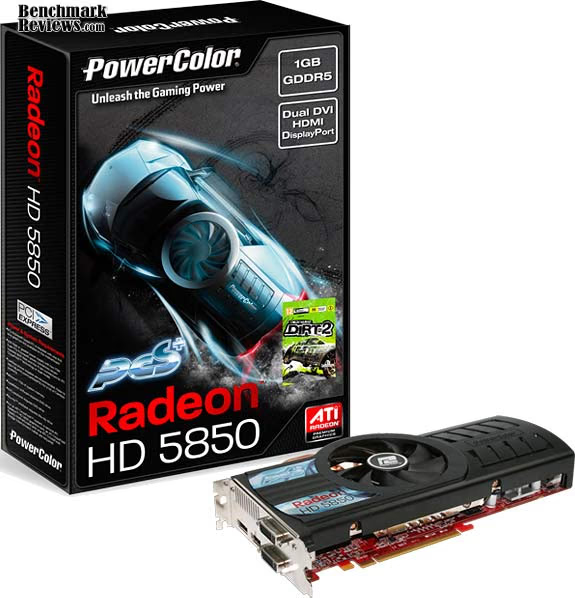
Product appearance is relative to personal tastes, but the entire Radeon 5000-series looks very similar to one another with the only difference being overall length. The PowerColor HD5850 PCS+ measures 9.5" long, making it a good fit for most all ATX cases. Lately it seems that almost everything has been encased in a plastic housings with a label fixed to the top, so I'm rather used to the basic style lines. In the end, PowerColor's PCS+ Professional Cooling Solution design strikes a comfortable blend of elegance and flair that seems appealing to my senses.
Construction is solid, but there seems to be some room for design improvements. While I appreciate ATI for not placing memory module IC's on the backside of the PCB, the heated exhaust vents could have received more attention. Most overclockers do not want hot air inside the computer case, and the ventilation design of the PowerColor HD5850 PCS+ doesn't exhaust all heated air outside of the enclosure. Instead of the 0.5x1.5" diameter vent in the I/O plate, ATI or PowerColor could have extended the vent to at least 2.0-2.25" wide with larger vent holes.
While most consumer buy a discrete graphics card for the sole purpose of PC video games, there's a very small niche who expect extra features beyond frame rates. AMD isn't the market leader in GPGPU functionality, but their ATI Stream Technology is the only one designed to utilize DirectCompute 5.0 and OpenCL code. More impressive is the ATI Eyefinity multi-monitor technology, as it demonstrates yet another dimension of visual experience that the competition cannot offer. For most consumers, it's the added connectivity that really counts: native DisplayPort and HDMI interfaces. Of course the PCS+ Professional Cooling Solution is an improvement over the reference design, and certainly handles the factory overclock extremely well.
As of February 2010 the factory overclocked PowerColor HD5850 PCS+ video card didn't appear to be listed at NewEgg, although their reference version sells for $289.99. Consider these things if you're in the market for an NVIDIA GeForce GTX 285 video card (that sells for roughly $330), because the PowerColor HD5850 PCS+ is obviously the winning choice. DirectX 11 and energy efficiency change this dynamic considerably, and make the decision even more favorable towards the new Radeon 5800-series.
In conclusion, there's a long future ahead for the Radeon HD 5850... especially when PowerColor adds the overclock and PCS+ Professional Cooling Solution. DirectX 11 gaming is here and now whether the competition likes it or not, and ATI has a huge head-start on absorbing an early market share. Eyefinity is a nice touch and it certainly adds to the gaming experience, but there's such an incredibly small portion of potential users for the technology that in reality the Radeon 5800-series has only its shear graphics power to make the sales pitch. Although the PowerColor HD5850 PCS+ is clocked to 760MHz and doesn't have the top-end power (or shaders) as the HD5870, it also doesn't share the premium price tag. For the cost, my recommendation is for the PowerColor HD5850 PCS+ DirectX 11 video card AX5850-1GBD5-PPDHG. High-performance gamers and multi-monitor power users can't go wrong at this price point, and it will only get better.
Pros:
+ Factory overclocked to 760MHz GPU and 1050 GDDR5
+ Second-fastest DirectX 11 graphics accelerator available
+ Consumes only 18W or power at idle
+ Native HDMI 1.3b streams uncompressed audio and video output
+ Outstanding performance for ultra high-end games
+ Eyefinity Technology through DisplayPort and DVI (x2)
+ 1440 GPU cores at 760 MHz
+ 1 GB of 1000 MHz 256-bit GDDR5 vRAM
+ 1080p HDMI Audio and Video supported for HDCP output
+ PCS+ Offers very-quiet cooling fan under loaded operation
+ Supports CrossFireX functionality
+ 2.154 Billion-transistor ATI 'Cypress' GPU
+ 9.5" Length fits most standard ATX cases
+ Kit includes CrossFire bridge and Dirt-2 DirectX-11 video game
Cons:
- Fan exhausts some heated air back into case
- Maximum post-processing Anti Aliasing is limited to 8x
- Expensive premium-level product
Ratings:
-
Performance: 9.50
-
Appearance: 9.25
-
Construction: 9.50
-
Functionality: 9.75
-
Value: 7.00
Final Score: 9.0 out of 10.
Excellence Achievement: Benchmark Reviews Golden Tachometer Award.
Questions? Comments? Benchmark Reviews really wants your feedback. We invite you to leave your remarks in our Discussion Forum.
Reader comments from the original article
2 comments were posted before commenting closed. They are preserved as written. Original avatars no longer resolve and are shown as a placeholder.
PowerColor HD5850 PCS+ manikanta Permalink:
sir, i haveto buy powercolor pcs+ 5850 but iam not able to understand in power consumptiion as u told ya 18Watts that equals to how many units in idle mode? pleaseee tell me.
banana hey Permalink:
google is your friend