
Cooler Master HAF XM Computer Case
Cooler Master HAF XM Computer Case Review
Product Name: HAF XM Mid-Tower
Model: RC-922XM-KKN1
Full Disclosure: The product sample used in this article was provided by Cooler Master.
At Benchmark Reviews, we have established that the main three items to look for in a computer case are price, functionality, and style. All three of these are vitality important for a case that will be taking up space in your home or office for the foreseeable future. None of them should be overlooked. As a gamer, I take a special interest in Full Tower cases because of the functionality they offer. But sometimes Full Tower cases are just too big to fit comfortably where they need to. Mid-Tower cases can provide a lot of the functionality of a Full Tower case but with the style that might be preferred, depending on the circumstance. It's the balance of providing that functionality that often gets case manufacturers into trouble. Benchmark Reviews has Cooler Master's new HAF XM case on hand and this article is dedicated to discovering if the famous HAF-X's little brother holds true to the family tree.
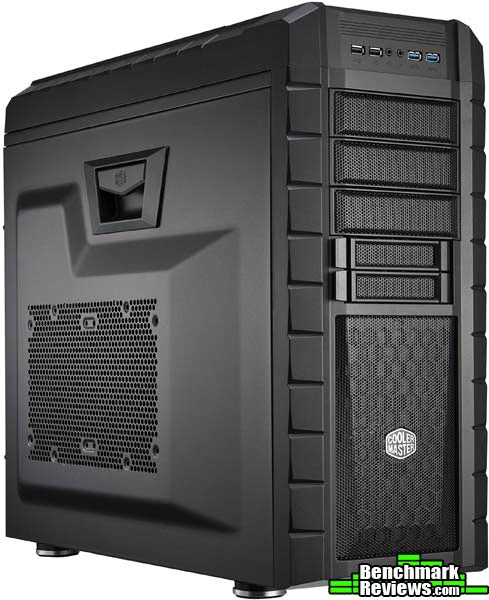
Cooler Master is an old name in the computer chassis arena. They churn out many various styles and sizes of cases and also delve into the peripheral community. One of my favorite peripherals of all time is the CM Storm Sentinel Advance Laser Gaming Mouse. With this much experience in the game, Cooler Master should know how to keep their ear tuned to the needs and wants of computer users.
Keeping those desires in mind, Cooler Master shrunk their extremely popular HAF-X case into a Mid-Tower size with the HAF XM. The HAF (High Air Flow) line of chassis was designed by Cooler Master for those computer gamers and enthusiasts that need more than the normal amount of air flow to cool their components. The HAF-X provided that with a militaristic style and with plenty of fans. The HAF-XM keeps a very similar style to its big brother and tries to maintain the same level of cooling in a slightly smaller enclosure. Let's move on inside to take a look at the features of the HAF-XM and to see if it lives up to its legacy.
HAF XM Mid-Tower Features
- Rich I/O support (USB 3.0 x2 , USB 2.0 x 2, audio in/out); Intelligent fan LED control on the top
- Supports high-end hardware such as E-ATX motherboards, 3-Way SLI or CrossFire (8+1 expansion slots)
- Room for future upgrades with support for up to 6 tool-free HDD or SSD
- Hidden 2.5" SSD/HDD mount behind motherboard tray
- Dust filters on every intake are removable to allow easy cleaning
- Support for a 2 x140mm fan radiator up top and a 140mm fan radiator in the rear
- Easy cable management and routing
- Sliding power supply cable cover
- Supports large 140mm case exhaust fan
- Supports long graphics cards (up to 13.9" or 354mm)
- Two external hot-swap X-Docks
HAF XM Specifications
|
MODEL |
HAF XM |
|---|---|
|
CASE TYPE |
Mid-Tower |
|
FRONT PANEL MATERIAL |
Plastic/Steel |
|
DIMENSIONS |
252(W) X 530.5(H) X 579(D) mm / 9.9 x 20.9 x 22.8 inch |
|
VGA Clearance Maximum |
354.0mm/13.9 inch (w/ HDD cage) / 463.0mm/18.2 inch (w/o HDD cage) |
|
COOLING SYSTEM |
FRONT, 1 X 200mm Red LED Fan (included) (or 2x120/1x140) |
|
DRIVE BAYS |
3 External 5.25" DRIVE BAYS |
|
MATERIAL(S) |
Outer body: coated steel mesh and Synthetic compounds; Inner body: coated enforced steel alloy |
|
EXPANSION SLOTS |
8 + 1 |
|
WEIGHT |
10.5 kg / 23.1 lbs |
|
MOTHERBOARD SUPPORT |
E-ATX, XL-ATX, ATX, MICRO-ATX, Mini-ITX |
|
PSU Type |
Standard ATX PS2 / EPS |
|
CPU Cooler Height |
196mm / 7.7 inch |
Features and Specifications provided by COOLER MASTER.
Closer Look: Exterior
Although the Cooler Master HAF XM is a Mid-Tower case, it's pretty large. While it is a little shorter than a Full Tower case, it's just as wide and deep, and maybe even a little more so than some cases. It also weighs a lot. In fact, it weighs more than the full tower NZXT Switch 810 we looked at a little while ago. The HAF XM has a black matte finish on top of its steel mesh and synthetic material construction. Like many large cases, the HAF XM isn't easy to carry around. There aren't any handles or handhold areas on here.
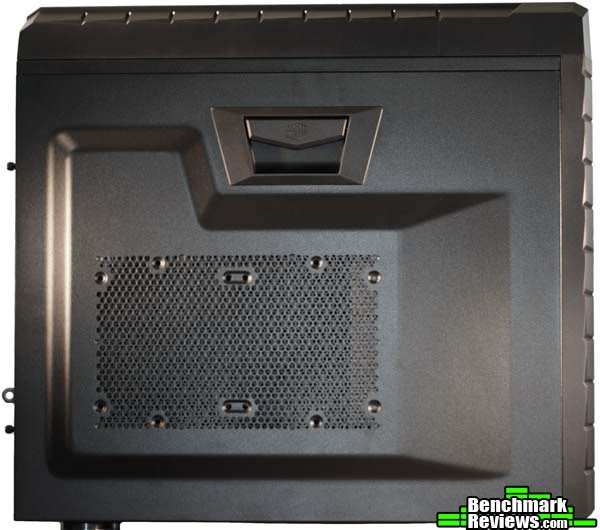
One of the first things that stand out on the HAF XM is the main side panel. The HAF XM does come in a version with a side panel window, but the sample we received comes without the window. What the side panel does have is a latching system. Lift up on the latch and the side panel falls outward. From there you can simply lift it off the bottom of the case and you have access to the inside. I must admit that I really like this feature. Far too often I find it extremely difficult to get a side panel off or put it back on. Cooler Master makes this chore simple with the latch here on the HAF XM.
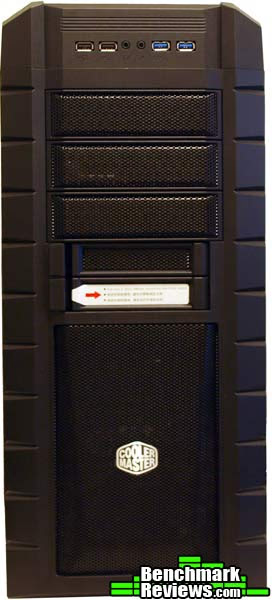
Moving to the front of the case you can see I/O panel and the external drive bays. There are three 5.25" and two 3.5" external drive bays. Below that is the front air intake. Cooler Master has emblazoned their logo about three quarters of the way down the front panel. The sides of the front panel beveled and edged to create a militaristic look, similar to the HAF X case.
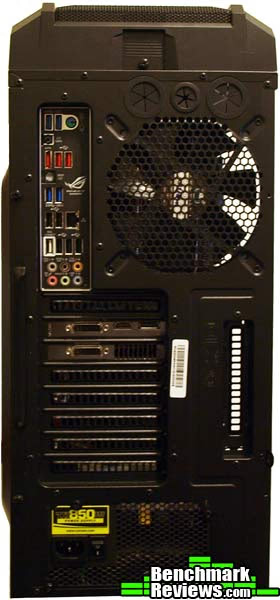
The rear of the Cooler Master HAF XM case is laid out in pretty standard fashion. Up at the very top you can see the thumbscrew that allows for removal of the top of the case and gives access to the fan area up there. Just below that are three holes for water cooling tubes if you decide to mount your reservoir on the outside of the case. The rear exhaust fan here doesn't have a filter, but as an exhaust fan, it shouldn't need one as much as the others. There are eight expansion slots lined up along the rear of the HAF XM case and a spare ninth sits vertically to the right of them.
The backside panel of the Cooler Master HAF XM looks a lot like the main panel, but without the fan slots and the latch at the top. That stylized bubble in the panel is very nice, as it adds a good half inch of clearance on the back for cable management.
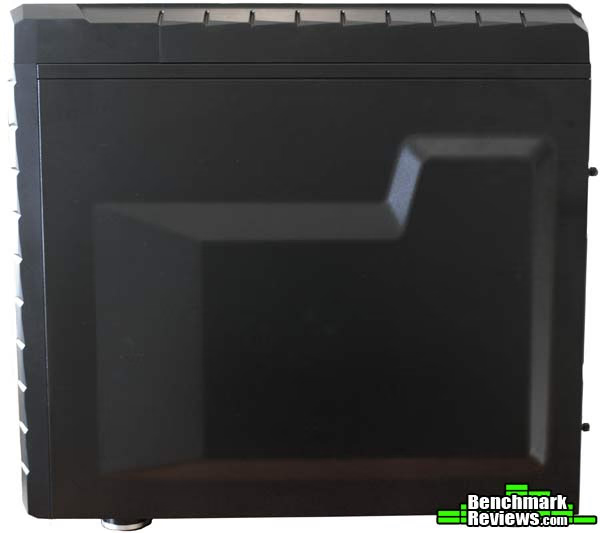
Let's get a little more detailed look at the exterior of the Cooler Master HAF XM.
Detailed Exterior Features
The front panel of the Cooler Master HAF XM case sports three distinctive sections. The top section is comprised of the I/O panel and the three external 5.25" drive bays. Starting with the I/O panel, you can see that the HAF XM has all the basics covered but not much else. There are a total of four USB ports, the two in black are USB 2.0 ports and the two in blue are USB 3.0 ports. Between the two sets of USB ports are the front audio jacks. They are clearly labeled, which is nice. Believe it or not, I've come across cases that don't have these labeled.

Below the I/O panel is the 5.25" external drive bays. Three is a good amount for a Mid-Tower case. In all honesty, I can't see myself using any more than that, even on a bigger case. The drive bays are meshed and allow for air to flow into the case if there isn't a drive installed in the bay.

Under those is the next section, made up of two X-Dock slots. The X-Dock slots are hot-swappable 3.5" or 2.5" drive bays. Press the latches on the bays and they swing open and pull out for installation or removal of the drives. These X-Dock bays can be removed and you can install a 3.5" external faceplate like an SD card reader or a fan controller.
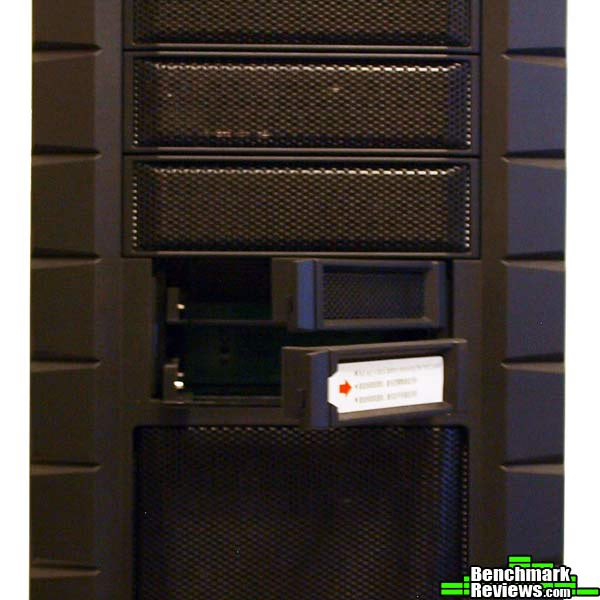
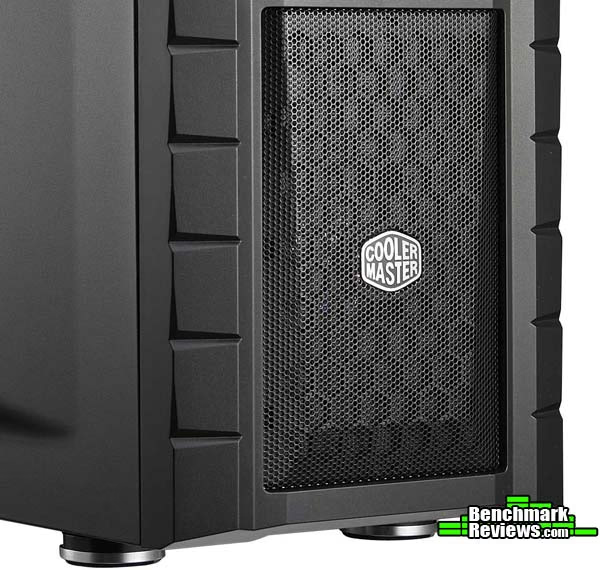
The third section of the front panel is the meshed intake fan area. You can see the Cooler Master logo in the middle of this section. This area comes with a 200mm red LED fan included, but you can swap it out for two 120mm or 140mm fans if you'd like. Of course, you'd give up the cool red LED, unless your fans have that too.
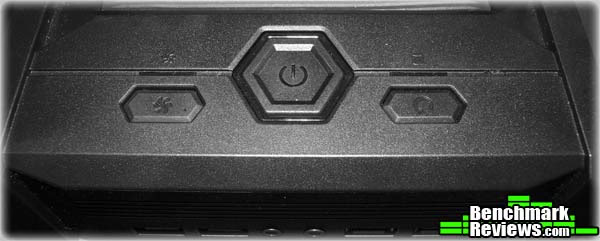
Up on top of the case, above the I/O panel is the power and reset buttons. That button farthest left on the top here is the fan LED controller. When the light is on above this button, the front panel LED is on.
An interesting feature of the Cooler Master HAF XM is the fact that all of the intake fan areas on the case have filters. This includes the front panel fan and the fan areas on the main panel. It also includes the area at the bottom of the case where your PSU intake fan is located.
Now let's move inside the Cooler Master HAF XM.
Closer Look: Interior
The Cooler Master HAF XM, while just a Mid-Tower case, can fit a lot inside of it. In fact, it can fit motherboards of all sizes up to E-ATX. That means you can fit almost any gaming or enthusiast grade motherboard inside this thing. There are a few that won't fit, but most will. In addition, there is plenty of room for long video cards inside the HAF XM as well. With the HDD cage installed, you have room for GPUs up to 13.9" in length. You can also remove the HDD cage and fit GPUs over 18" in length.
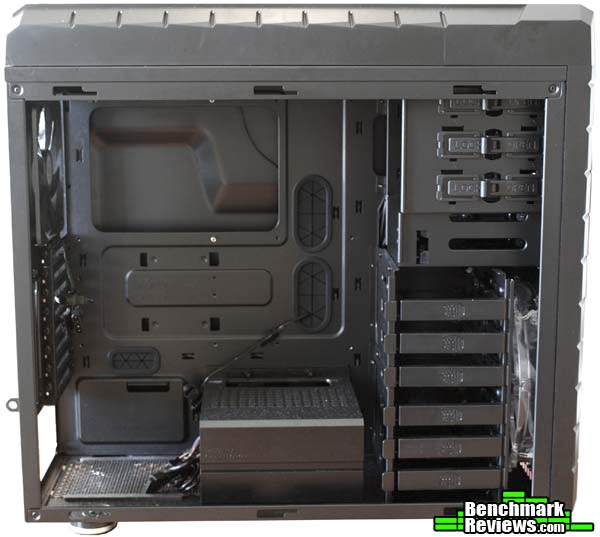
If you use the two 3.5" external bays as the hot swappable bays, there is space for eight 3.5" hard drives. Any of those can be used for 2.5" drives as well and there is a hidden 2.5" drive bay on the back of the motherboard tray right under the CPU socket access hole. The lower six drive bays can also be completely removed. I only use two drives anyway, so this could be an option for me. In its place you can have room for a longer video card or you can put a water cooling pump or radiator. Keep in mind that this is where the front intake fan pushes all of its air, so you may want to keep it open just to keep the air moving.
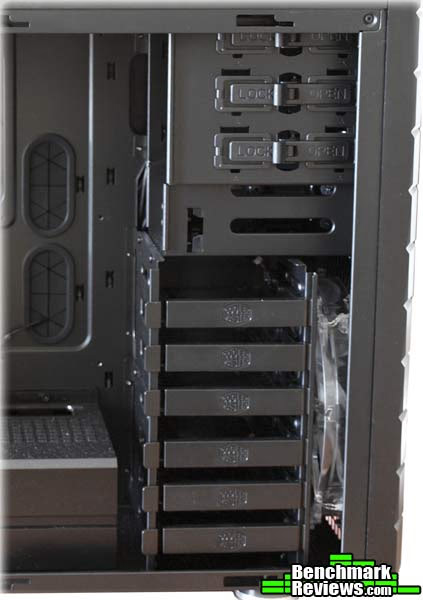
Both the 5.25" optical drive bays and the 3.5" hard drive bays use tool free designs. To secure a 5.25" drive bay, simply release the latch, slide in the drive, then lock the latch back into place. We'll take a look at the how the 3.5" and 2.5" drives are secured in the next section.

The PSU is mounted on the bottom of the Cooler Master HAF XM, which is something that is becoming increasingly more common. While the HAF XM doesn't sit the PSU up off the floor of the case like I have seen in the past, the feet give it about half an inch of clearance off the ground. This isn't as much as I'd like to see, but it's better than nothing. Just keep this in mind if you plan on putting the Cooler Master HAF XM on thick carpet.
Let's take a closer look at some of the interior features of this case in the next section.
Detailed Interior Features
Cable management is always a key feature in any gaming or enthusiast chassis these days. Every manufacturer seems to have its own solution to the problem. Some of them work out and others don't. The Cooler Master HAF XM, like most enthusiast cases now, has an area behind the motherboard tray for routing cables. There are plenty of grommeted holes through which you can route your cables and plenty of tie-downs to keep them slightly in the back. As I mentioned before, there is over an inch of clearance in back in all. That's plenty of room for all those cables. Unlike many other cases I've seen recently, the Cooler Master HAF XM doesn't provide a junction with fan headers for all the fans the case has room for.
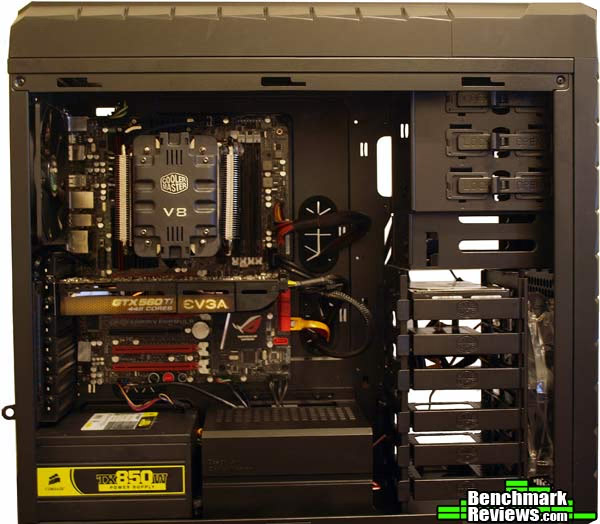
The Cooler Master HAF XM does have an outstanding cable management feature that I immediately fell in love with as well. Just to the right of the PSU area is a small stand, about the size of a PSU itself. It's completely hollow under there, which gives you enough room to fit all of the excess cabling from your PSU. This means that if I have a modular PSU, I can just go ahead and plug in all of the spare cables. That kind of defeats the purpose, sure, but I won't have to go searching around for them if I need them.

Speaking in absolute maximums, the Cooler Master HAF XM case has room for 11 fans; up to four on top, two in the front, two on the side panel, one on the rear of the case, and two mystical optional fans for the HDD. I still haven't quite figured out where those are supposed to go yet.
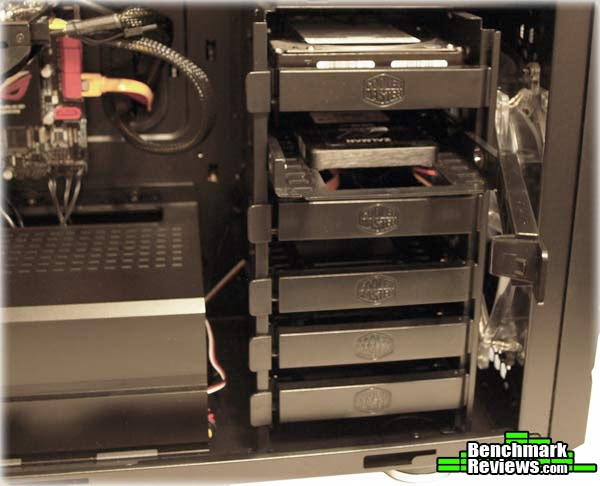
The 3.5" HDD cage is an interesting concept in the Cooler Master HAF XM. The latching drive bay system is great, and if you use 3.5" hard drives, it's completely tool free. Just unlatch the drive tray and pull it out. After that you can situate your drive in the tray and fit the push-pins into the screw holes on the side of the drive. Slide the tray back into the bay, lock the latch into place, and you are ready to roll. The trays also fit 2.5" drives, but you'll have to screw them into the underside. The screws are included, of course.
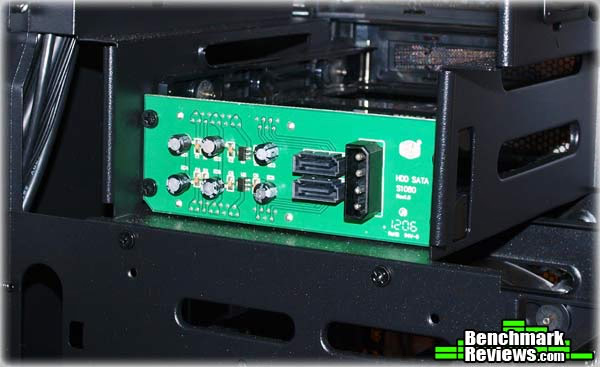
As I mentioned before, two of the 3.5" or 2.5" drives can be installed in the hot-swappable bays that takes up the two 3.5" external drive bays. This image shows the backside of the hot-swappable drive bay on the Cooler Master HAF XM. All it takes to power the drive is a molex power connector and SATA cables. If you want to use these drive bay as external bays and get rid of the hot-swappable bays, it's as easy as unscrewing this backplane and removing it.
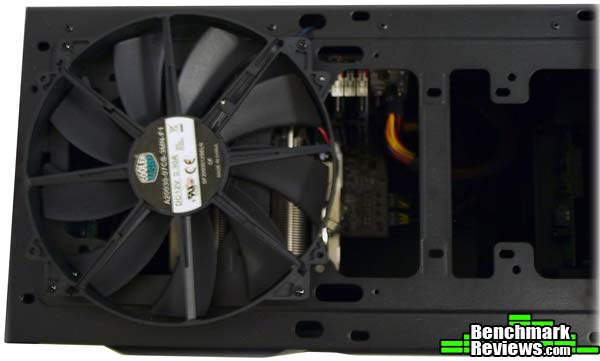
The space at the top of the Cooler Master HAF XM has room for two 200mm fans or up to four 120mm or 140mm fans. That's a lot of cooling. It also provides plenty of space to install a water cooling radiator up there. In fact, even with the included 200mm fan installed, there is still a lot space for a water cooling system.
Gaming Chassis Final Thoughts
Even as a Mid-Tower case, the Cooler Master HAF XM is quite large. It is certainly one of the largest Mid-Tower cases I have looked at and it's heavier than some of the Full Tower cases I've seen. The Cooler Master HAF XM is also priced a little higher than most gaming or enthusiast targeted Mid-Tower cases. That being said, it provides a very wide feature set that steps into the realm of most Full Tower cases.
Generally speaking, I'd say most Mid-Tower cases, because of the smaller size, are more mobile than full tower cases. In the case of the Cooler Master HAF XM, I don't think that applies. Weighing in at 23 lbs before you've installed your enthusiast system means I don't want to be carrying this case around, even empty. It doesn't look like it was made to be all the portable anyway, with no handholds or any easy way to grab onto it to help you move it. The nice part about the HAF XM being a shorter case is that it will fit more comfortably on top of a desk than a Full Tower case would.
The Cooler Master HAF XM only came with three case fans. I would have liked to see at least one more, preferably on the main panel. One thing I've seen on cases recently that I really like is panel fans that are wired to connectors on either side so that the circuit is completed when you close the case. That way you don't have to pull the fan off the motherboard every time you want to open the case. That would be a nice feature to see here, especially with the easy latch system making it simple to take off the main panel. I can't complain too much about the fans included, however, since two of them were 200mm fans. The front fan even comes equipped with red LEDs. That's pretty cool.
Another thing about the fans that is missing on the Cooler Master HAF XM case is fan speed controllers. These are becoming increasingly more common on gaming and enthusiast chassis. Hopefully the fans are all running at highest in the Cooler Master HAF XM. After all, this is a High Air Flow case. The fans do run very silently, I noticed. When I had the full system installed and turned on, it took me until the loading screen came up to realize I hadn't placed the power switch cable on wrong. I didn't even realize the system was running. I can't really complain about silence, but high air flow usually means higher noise levels.
Despite the silence, the temperature within the Cooler Master HAF XM stayed within an average and normal range. I stuck two GTX 560's in the case and ran furmark for a while to try and build the temperatures up. The GPUs got up to around 50 degrees Celsius after a few hours, but didn't climb any higher than that. That seems like pretty good airflow to me, and with the silent operation and Full Tower features, I'd call this case a really good deal.
Cooler Master HAF XM Conclusion
Although we strive for objectivity here at Benchmark Reviews, please remember that each author perceives these points differently, and our conclusions and recommendations will necessarily differ from others. Also, prices can fluctuate and designs change after publication, so that the product we review might not have the same price and specifications of a product that's available later. Please do not base any purchase solely on our conclusion, as it represents our product rating specifically for the product tested, which may differ from future versions. Benchmark Reviews begins our conclusion with a short summary of each of the areas that we rate.
Measuring a case in terms of performance generally means how it performs in noise level and cooling ability. With the three fans that came with it, the Cooler Master HAF XM was able to keep a dual GPU system quite cool. I wouldn't say it's the best cooling case I've ever seen, but it definitely outperformed a lot of much more expensive cases I've looked at. If water cooling is your thing, the Cooler Master HAF XM gives you plenty of room for your water cooling equipment, so keeping those components cool will not be an issue. Even using the fans for air flow, the Cooler Master HAF XM ran extremely silently. I was very impressed with low noise level, especially considering that isn't one of the features that Cooler Master touts for the case. A fan controller might be a nice addition, but it certainly doesn't seem necessary here.
Unfortunately for me, the stylized militaristic look of the Cooler Master HAF XM just doesn't do it. I've realized that I am a fan of white cases with black accents. Don't get me wrong, I don't have anything specifically against the Cooler Master HAF XM case. I think it looks nice, but it just isn't my style. Style is very subjective, however, so you'll have to make that determination for yourself. I really like the red LED on the front panel, though.
As you can tell from the 23 lbs of empty weight, the Cooler Master HAF XM is a beast. I wouldn't worry about this case taking much damage. It is made from a coated steel mesh and other synthetic compounds on the outer body and the inner body is made from a coated enforced steel alloy. No light aluminum here. The HAF XM is quite durable all over. I did notice the bottom half of the front panel start to bend as I was putting the hot swappable bays back in but it didn't seem in danger of cracking or breaking. Throughout the installation process I didn't notice any weak points at all.
The Cooler Master HAF XM has all the functionality you are likely to find in many top of the line Full Tower cases. There is room for eight 3.5" hard drives or nine 2.5" drives and up to three 5.25" drives. Two of those hard drive bays are hot swappable. This is a feature I think you will start to see more and more. I love it. It definitely makes jumping from testbed to testbed with the same hard drive a breeze. Besides the drive bays, there is ninth, vertical expansion slot in the rear for extra USB ports, eSATA ports, or any number of other expansion options. Room for water cooling pumps or radiators in practically endless as well. The HAF XM even includes USB 3.0 ports on the front panel, another feature that many cases are adopting. It doesn't have an SD card reader, but I can live without that.
At an MSRP of $129.99, the Cooler Master HAF XM is priced near the top of most Mid-Tower cases. That being said, it's really a Full Tower case in sheep's clothing based on the functionality. It has room for up to E-ATX motherboards, four GPUs, and liquid cooling solutions. To top it all off, the case is extremely quiet. There is a lot of room for extra fans and tons of space for cable management throughout. Overall, while the price might be a little high, I have to say this case is worth it. It's a good deal.
Pros:
+ Two Hot-Swappable Drive Bays
Cons:
- Heavy, Hard to Move
- No Integrated Fan Controller
- Limited clearance on the bottom
- Only three fans included
Ratings:
- Performance: 9.50
- Appearance: 8.00
- Construction: 9.50
- Functionality: 9.50
- Value: 9.00
Final Score: 9.1 out of 10.
Excellence Achievement: Benchmark Reviews Golden Tachometer Award.
Benchmark Reviews invites you to leave constructive feedback below, or ask questions in our Discussion Forum.
Reader comments from the original article
4 comments were posted before commenting closed. They are preserved as written. Original avatars no longer resolve and are shown as a placeholder.
RE: Cooler Master HAF XM Computer Case Rio Darmasetiawan Permalink:
another great case from CM.. wonder its availibity around my area.. perhaps it can replace my haf 922..
RE: Cooler Master HAF XM Computer Case David Ramsey Permalink:
That case looks like an incredible bargain for the price. It certainly the least expensive case I've ever seen with hot-swappable drive bays.
RE: Cooler Master HAF XM Computer Case Stupido Permalink:
Ha! I think I just found my next case! nd to me the selling point is tat I can put my Thermalright Archon cooler without twisting the side panel... :)
RE: Cooler Master HAF XM Computer Case stratosrally Permalink:
I believe the extra 2x120mm fan mounts are on the sides of the 3.5" bays closest to the motherboard. This is similar to the new Corsair Vengeance C70 case design, they blow directly on the video card(s). Look at #5 on their cooling diagram here: ##coolermaster-usa.com/landing/hafxm/home.php?page=cooling