
Kingston SSDNow V+ Series 64GB SSD SNV225-S2
Kingston SSDNow V+ SSD Review
Early on in their debut, Solid State Drives were planned as included equipment on new computers coming from tier one manufacturers such as Dell, HP, and Apple. In one way or another they made good on their word, but the inflated price for these premium options made SSDs a distant reality. This situation created the perfect condition for a enthusiastic upgrade market. Not surprisingly, manufacturers went after the individual consumer after losing traction with mass system builders, and upgrade kits became the obvious solution for many enthusiasts. Kingston is well known for manufacturing their own memory products, but when it came to the new SSD technology they turned to proven sources such as Samsung. In this article, Benchmark Reviews tests the Kingston SSDNow V+ Series 64GB SATA-II MLC SSD SNV225-S2/64GB.
Anyone familiar with articles published at Benchmark Reviews is very well aware of our obsession with Solid State Drive technology. They're complex, and every SSD is different than the next. Nothing like Hard Disk Drive technology, which improves as spindle speed and cache buffer are increased, SSDs are the future and because of this their internal architecture is constantly evolving. This is why we offer so much coverage on the topic: it's interesting and exciting. Plus, they can turn the average computer system into a roaring beast. It's not marketing hype; for once the truth is stranger than fiction.
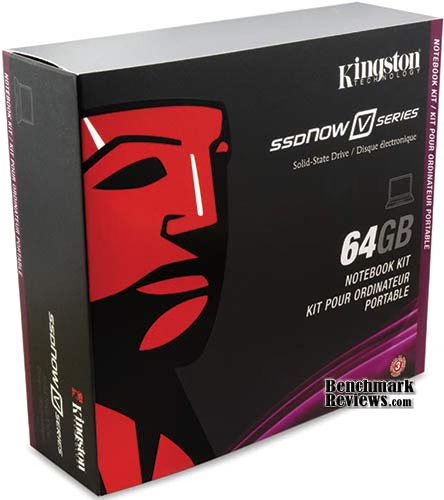
Since first making a public debut at the 2007 Consumer Electronics Show, Solid State Drives (SSDs) have been a topic of hot discussion among performance enthusiasts. These nonvolatile flash memory-based drives feature virtually no access time delay and promise a more reliable storage medium with greater performance while operating at a fraction of the power level. Moving into 2008, SSDs became a consumer reality for many performance-minded power users. Now that 2009 has proven how strong the industry support behind Solid State Drive technology is, we should hope that mainstream acceptance moves faster than it did for DDR3 SDRAM.
Solid State Drive products are no longer restricted to bleeding edge hardware enthusiasts or wealthy elitists. Heading into 2009, SSD storage devices were available online for nearly $2 per gigabyte of storage capacity while the most popular performance desktop hard drive hovered just above $1/GB. While most consumers are waiting for that day when SSD costs the same as HDD, they seem to be forgetting how Solid State Drives have already surpassed Hard Disk performance in every other regard. Our collection of SSD reviews is a good starting point for comparing the competition.
SSD Testing Disclaimer
Early on in our SSD coverage, Benchmark Reviews published an article which detailed Solid State Drive Benchmark Performance Testing. The research and discussion that went into producing that article changed the way we now test SSD products. Our previous perceptions of this technology were lost on one particular difference: the wear leveling algorithm that makes data a moving target. Without conclusive linear bandwidth testing or some other method of total-capacity testing, our previous performance results were rough estimates at best.
Our test results were obtained after each SSD had been prepared using DISKPART or Sanitary Erase tools. As a word of caution, applications such as these offer immediate but temporary restoration of original 'pristine' performance levels. In our tests, we discovered that the maximum performance results (charted) would decay as subsequent tests were performed. SSDs attached to TRIM enabled Operating Systems will benefit from continuously refreshed performance, whereas older O/S's will require a garbage collection (GC) tool to avoid 'dirty NAND' performance degradation.
It's critically important to understand that no software for the Microsoft Windows platform can accurately measure SSD performance in a comparable fashion. Synthetic benchmark tools such as HD Tach and PCMark are helpful indicators, but should not be considered the ultimate determining factor. That factor should be measured in actual user experience of real-world applications. Benchmark Reviews includes both bandwidth benchmarks and application speed tests to present a conclusive measurement of product performance.
About Kingston Technology Company, Inc.
Kingston Technology Company, Inc. is the world's largest independent manufacturer of memory products. Kingston designs, manufactures and distributes memory products for desktops, laptops, servers, printers, and Flash memory products for PDAs, mobile phones, digital cameras, and MP3 players. Through its global network of subsidiaries and affiliates, Kingston has manufacturing facilities in California, Malaysia, Taiwan, China and sales representatives in the United States, Europe, Russia, Australia, New Zealand, India, Taiwan, China, and Latin America. 
Founded in 1987 with a single product offering, Kingston now offers more than 2,000 memory products that support nearly every device that uses memory, from computers, servers and printers to MP3 players, digital cameras and cell phones. In 2006, the company's sales exceeded $3.7 billion.
With global headquarters in Fountain Valley, California, Kingston employs more than 3,300 people worldwide. Regarded as one of the "Best Companies to Work for in America" by Fortune magazine, Kingston's tenets of respect, loyalty, flexibility and integrity create an exemplary corporate culture. Kingston believes that investing in its people is essential, and each employee is a vital part of Kingston's success.
Kingston serves an international network of distributors, resellers, retailers and OEM customers on six continents. The company also provides contract manufacturing and supply chain management services for semiconductor manufacturers and system OEMs.
At the Forefront of Memory: The History of Kingston
Kingston Technology grew out of a severe shortage of surface-mount memory chips in the high-tech marketplace in the 1980s. John Tu and David Sun were determined to find a solution. They put their engineering expertise to work and designed a new Single In-Line Memory Module (SIMM) that used readily available, older technology through-hole components. A new industry standard was born - and, on October 17, 1987, so was Kingston Technology.
Adding an SSD to a desktop already using a standard hard disk drive is a smart and efficient way to upgrade. Transferring the operating system and applications from the HDD to the SSD allows the SSD to be used as a bootable drive that takes full advantage of the Flash-based technology. The SSD and the HDD then co-exist to drive optimal performance in the upgraded desktop .
.
For notebooks, SSDNow V+ drives are a perfect replacement for hard drives resulting in faster, more reliable performance. Making this change will improve a notebook's efficiency in a wide range of tasks, from booting up to running the most robust operating system and demanding applications.
SSDNow V+ uses a standard SATA interface but, unlike a regular HDD, SSD is very rugged and built with no moving parts, making it ideal for power users and road warriors who push the limits of their notebooks. Other benefits include reduced power usage, less noise and less heat generation.
Kingston's SSDNow V+ Series offers performance gains and power consumption reductions at a fraction of the cost of a new system. For added peace of mind, they're backed by 24/7 tech support, a three-year warranty and legendary Kingston reliability.
Kingston SSDNow V+ Features:
-
Performance - enhances productivity; makes users more efficient
-
Innovative - 2.5" form factor; uses NAND flash memory components.
-
Silent - Runs silent and cool with no moving mechanical parts
-
Reliable - less likely to fail than a standard hard drive
-
Shock Resistant - No moving mechanical parts so the SSD handles rougher conditions.
-
Supports S.M.A.R.T. - Self-Monitoring, Analysis and Reporting Technology tells the user when a drive is about to fail
-
Guaranteed - 3 year legendary Kingston warranty, 24/7 tech support
SNV225-S2/64GB Specification
- Sequential Access - Read: 220 MB/sec. maximum
- Sequential Access - Write: 140 MB/sec. maximum
- Capacity: 64GB, 128GB, 256GB
- Storage Temperatures - -40° C to 85° C
- Operating temperatures - 0° C to 70° C
- Vibration Operating - 2.17 G (7-800Hz)
- Vibration Non-Operation - 20 G (20-2000Hz)
- Power Specs -128GB Active: 2.5W (TYP) Sleep: 0.45W (TYP)
- 64GB Active: 2.0W (TYP) Sleep: 0.45W (TYP)
- Life expectancy - 1 million hours mean time before failure
First Look: Kingston SSDNow V+
When it comes to the appearance of notebook drives, most people forget that the product you've just bought will be hidden away from view and forgotten once it gets installed. Keeping in mind that this product is also of solid state design and therefore has no moving parts, it takes extra attention towards product presentation in order to help keep consumers feeling comfortable with their premium-priced purchase. Kingston might have borrowed the same internal components as others for their SSDNow V+, but the outside bares the always-unique Kingston artwork. A textured metal enclosure disassociates itself with so many of the plain black designs we've seen lately, and adds a touch of class to the product line.

Unlike desktop computers which utilize a SATA cable system to connect drive to motherboard, nearly all notebooks are designed to allow the 2.5" drive to slide directly into a connection bay within the system. In addition to notebooks and desktop computer application, this Kingston SSDNow V+ series MLC Solid State Drive can be utilized for mission-critical backups or high-abuse data systems; but its real focus is on high-performance date transfer speeds. Unfortunately, the Kingston SNV225-S2/64GB model does not offer an integrated High-Speed USB 2.0 Mini-B port such as we've seen on older competitor products.

Unlike the average Hard Disk Drive (HDD) storage product, SSD's are nearly impervious to impact damage and do not require or benefit from any kind of special vibration dampening or shock-proof enclosures. Kingston utilizes a textured rough-looking metal enclosure for their SSDNow V+ Solid State Drive series, which reveals the internal components after removing just four small counter-sunk Torx screws on the underside.

Standard 2.5" drive bay mounting points are pre-drilled and threaded into the SSDNow V+ SSD, which allows for quick upgrade or addition into any existing notebook or desktop system. The mounting positions matched up to the drive bracket on my laptop, and after only a few minutes of drive cloning I was quickly loading the Windows O/S. The Kingston SSD kit we received (SNV225-S2/64GB) does not include a 2.5" to 5.25" converter tray with the kit, but Kingston does offers full upgrade kits with these components in other retail packages.
Now that you're acquainted with the basic exterior features of the Kingston SSDNow V+ SSD, it's time to peek inside the SNV225 enclosure and inspect the internal components...
SSDNow V+ Internal Components
Samsung engineers and constructs the components inside the Kingston SSDNow V+ series, which share the exact same architecture as the Samsung PB22-J. Benchmark Reviews previously exposed these parts in detail within our OCZ Summit review. For the SSDNow V+ Internal Components section, we have reused the images from our original inspection of the Samsung S3C29RBB01 controller found in the PB22-J.
Built from the PB22-J model SSD that Samsung decided not to ODM and sell themselves, the Kingston model SNV225 SSD is equipped with a Samsung S3C29RBB01 SSD controller and 128MB cache buffer to eliminate intermittent and delayed response cycles (stuttering). Consumers first experienced the bitter taste of stuttering SSD performance with several popular brands of SSD products using the first-generation JMicron JMF602 SSD controllers. The phenomenon occurs when the drives buffer is filled faster than it can read or write data.
Although stuttering is generally a MLC-specific problem, Samsung intends to remedy it by using a massive 128MB buffer and improved SATA controller. So how well can the Kingston SSDNow V+ series produce read-from and write-to bandwidth using the new architecture matched to Multi-Layer Cell construction without suffering from response stuttering? Our test results are only pages away, but let's first inspect the internal components.

To the untrained eye, the Kingston SSDNow V+ series SSD looks like every other Solid State Drive you've probably seen when the internal components have been exposed. There's a collective bank of DRAM, usually with Samsung markings, followed by the SATA controller chip. This is the customary layout for most SSDs currently produced.
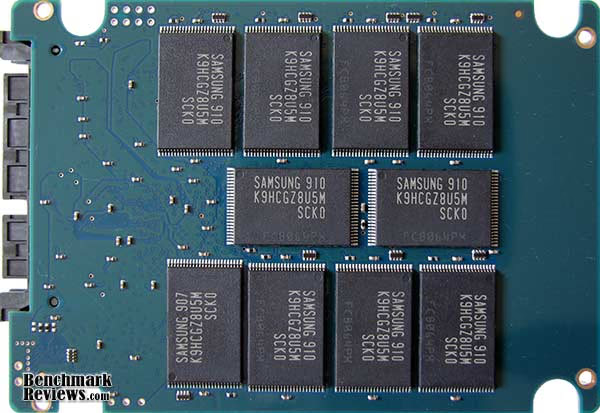
Kinston's OEM manufacturer, Samsung, decided to use ARM architecture to deliver powerful SATA controller performance in their SSD processor. The Samsung-branded S3C29RBB01-YK40 (NZ8T7MB4) SATA controller in the Kinston SSDNow V+ series SSD is also the same one found in the Corsair P256 SSD (who have declined to have their product compared against OCZ and Kingston) and Samsung's PB22-J SSD (which is not sold in North American markets).
The Samsung S3C29RBB01-YK40 controller is specified as capable of 220 MBps maximum read performance, and 200 MBps write performance. While there is very little known about the internal architecture of the S3C29RBB01 chip, we do know that it relies heavily on a large cache buffer to attain the rated performance.

A single Samsung 128MB SDRAM module is marked with K4X1G323P0-8GC6, with supporting GML239A2 marking below it. Although there are several different Samsung SKU's beginning with K4X1G323, there are no public data sheets available for the K4X1G323P0 version at this time.

The internal DRAM is comprised of Samsung K9HCGZ8U5M-SCK00 IC parts, which bare the branding mark K9HCGZ8U5M SCK0. These lead-free RoHS-compliant 48-pin ICs are multi-layer, with one IC directly atop another. Each IC has an operating voltage of 2.7-3.6V, with a 25ns speed rating. The K9HCGZ8U5M parts offer 64GB in 8x organization.

In the next section, Benchmark Reviews begins performance testing the Kingston SSDNow V+ series SSD for maximum bandwidth speed and IOPS routines. Our tests should determine just how well this Samsung-based SSD compares to rest of the competing SSD market.
SSD Testing Methodology
Solid State Drives have traveled a long winding course to finally get where they are today. Up to this point in technology, there have been several key differences separating Solid State Drives from magnetic rotational Hard Disk Drives. While the DRAM-based buffer size on desktop HDD's has recently reached 32 MB and is ever-increasing, there is still a hefty delay in the initial response time. This is one key area in which flash-based Solid State Drives continually dominates because they lack moving parts to "get up to speed".
However the benefits inherent to SSD's have traditionally fallen off once the throughput begins, even though data reads or writes are executed at a high constant rate whereas the HDD tapers off in performance. This makes the average transaction speed of a SSD comparable to the data burst rate mentioned in HDD tests, albeit usually lower than the HDD's speed.
Comparing a Solid State Disk to a standard Hard Disk Drives is always relative; even if you're comparing the fastest rotational spindle speeds. One is going to be many times faster in response (SSD's), while the other is usually going to have higher throughput bandwidth (HDD's). Additionally, there are certain factors which can affect the results of a test which we do our best to avoid.
SSD Testing Disclaimer
Early on in our SSD coverage, Benchmark Reviews published an article which detailed Solid State Drive Benchmark Performance Testing. The research and discussion that went into producing that article changed the way we now test SSD products. Our previous perceptions of this technology were lost on one particular difference: the wear leveling algorithm that makes data a moving target. Without conclusive linear bandwidth testing or some other method of total-capacity testing, our previous performance results were rough estimates at best.
Our test results were obtained after each SSD had been prepared using DISKPART or Sanitary Erase tools. As a word of caution, applications such as these offer immediate but temporary restoration of original 'pristine' performance levels. In our tests, we discovered that the maximum performance results (charted) would decay as subsequent tests were performed. SSDs attached to TRIM enabled Operating Systems will benefit from continuously refreshed performance, whereas older O/S's will require a garbage collection (GC) tool to avoid 'dirty NAND' performance degradation.
It's critically important to understand that no software for the Microsoft Windows platform can accurately measure SSD performance in a comparable fashion. Synthetic benchmark tools such as HD Tach and PCMark are helpful indicators, but should not be considered the ultimate determining factor. That factor should be measured in actual user experience of real-world applications. Benchmark Reviews includes both bandwidth benchmarks and application speed tests to present a conclusive measurement of product performance.
Test System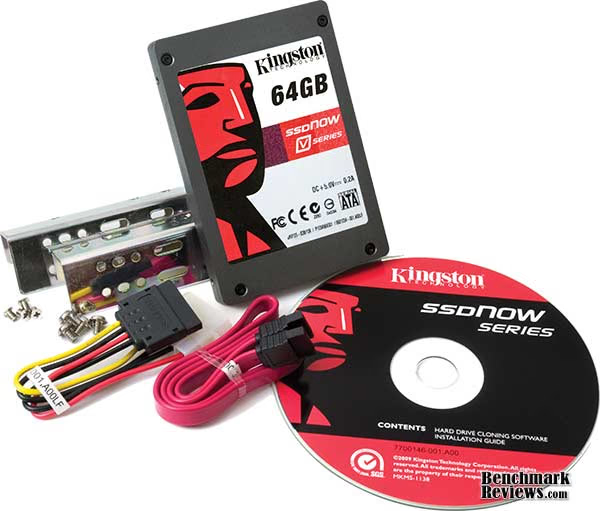
-
Motherboard: Gigabyte GA-EX58-UD4P (Intel X58/ICH10R Chipset) with version F9d BIOS
-
Processor: Intel Core i7-920 BX80601920 @ 2.667 GHz
-
System Memory: 6GB Tri-Channel DDR3 1600MHz CL6-6-6-18
-
Operating System: Windows XP Professional SP-3 (optimized to 16 processes at idle)
Drive Hardware Tested
The following storage hardware has been used in our benchmark performance testing, and may be included in portions of this article:
-
Crucial / Lexar 32GB 2.5" SATA-2 SSD CT32GBFAB0
-
Hitachi Travelstar 5K160 2.5" 40GB SATA 5,400 RPM HDD HTS541640J9SA00 (8MB Cache Buffer)
-
Hitachi Travelstar 7K100 2.5" 60GB SATA 7,200 RPM HDD HTS721060G9SA00 (8MB Cache Buffer)
-
Intel X25-E Extreme SATA-II SLC SSD SSDSA2SH032G1GN
-
Kingston 80GB SATA SSD SSDSA2MH080G1GC
-
OCZ Vertex 120GB SATA SSD OCZSSD2-1VTX120G (Firmware version 1.30)
-
OCZ Vertex Turbo 120GB SATA SSD OCZSSD2-1VTXT120G (Firmware version 1.0)
-
OCZ Vertex EX 120GB SATA SLC SSD OCZSSD2-1VTX120G (Firmware version 1.20)
-
Samsung 64GB 2.5" SATA-2 SSD MCCOE64G5MPP-0VA
-
Seagate Momentus 5400.6 320GB ST9320325AS 2.5" 5,400 RPM SATA-II Hard Disk Drive
-
Seagate 7200.11 500GB 3.5" ST3500320AS 7,200 RPM SATA-II Hard Disk Drive (32MB Cache Buffer)
-
Western Digital Raptor 74GB 3.5" WD740ADFD 10,000 RPM SATA Hard Disk Drive (16MB Cache Buffer)
-
Western Digital VelociRaptor 150GB WD1500HLFS 10,000 RPM SATA Hard Disk Drive (16MB Cache Buffer)
-
Western Digital VelociRaptor 300GB WD3000HLFS 10,000 RPM SATA Hard Disk Drive (16MB Cache Buffer)
Test Tools
-
System Speed Test v4.78 by Vladimir Afanasiev: Accurately measures random access response time
-
ATTO Disk Benchmark v2.34: Spot-tests static file size chunks for basic I/O bandwidth
-
HD Tune Pro v3.5 by EFD Software: Measured random access IOPS and speed
-
Iometer 2006.07.27 by Intel Corporation: Tests IOPS performance and I/O response time
-
EVEREST Ultimate Edition v5.00.1650 by Lavalys: Disk Benchmark component tests linear read and write bandwidth speeds
-
CrystalDiskMark v2.2 by Crystal Dew World: Sequential speed benchmark spot-tests various file size chunks
-
HD Tach RW v3.0.4.0 by Simpli Software: Measures approximate buffered read and write bandwidth speeds
System Speed Test
I doubt that when DOS was put to rest, Vladimir Afanasiev ever thought he would see his System Speed Test software used again in professional reviews. This program offers comprehensive system information, but it also has a powerful benchmarking tool for memory, processor, and disks. In terms of disk performance, it measures interface and physical transfer rates, seek and access times at the hardware level, and it does so without delay or interference from Operating System software or running processes. This is why Benchmark Reviews will continue to use this test: it polls its results directly from the hardware layer without the need for an Operating System (such as Windows).
System Speed Test does not require a partition to be present for testing, so all of our Random Access Time benchmarks are completed prior to drive formatting. To detect the Random Access Time, each device runs the full test routine a total of five times. The highest and lowest scores were ignored, and the remainder was averaged. This would be prove pointless however, because the access time benchmark for every single SSD recorded identical test results between runs.

Using the System Speed Test software, the top Random Access Time benchmarks places the OCZ Vertex EX, Mtron Pro 7500, and ACARD ANS-9010 at the very top of our results. The 0.9 ms performers include: MemoRight GT, Intel X25-E Extreme, Mtron Pro 7000, Mtron MOBI 3500, Intel 80GB X25-M, and the OCZ Summit. With a Random Access Time of 10ms, the following SSDs were included: OCZ Vertex Turbo, OCZ Vertex, Patriot Torqx, Super Talent UltraDrive ME, Crucial M225, OCZ Agility, and lastly the Mtron MOBI 3000. With a lightning-fast sub 0.1 ms access time, every other SSD is forced to live in the shadow that these nearly-instant products have just created.
Some of the slower Random Access Times include the following SSD products: Kingston SSDNow V+ Series (Samsung PB22-J) with 0.14 ms, The Silicon Power SLC SATA-II SSD SP032GBSSD750S25 with 0.17 ms, the OCZ Apex at 0.18 ms, the Patriot Warp v2 with 0.19 ms, and finally the G.Skill Titan finishing at 0.21 ms. There were slower SSD products, but obsolescence removed them from our results.
The DRAM cache buffer is common link between request and response time. Solid State Drive devices have the advantage of a nearly instantaneous NAND storage bank responding to an even faster DRAM buffer. Conversely, Hard Disk Drive products depend on a fast spindle speed to reduce the delay before the buffer transmits data.
Although the SSDs at the slower end of our Response Time chart may seem less impressive, in reality you couldn't begin to perceive these subtle differences in real-world applications. Still, the slowest SSD product (0.51ms) is 14x more responsive than the fastest desktop hard drive. Hard Disk Drive alternatives are much slower to react, regardless of spindle speed and cache buffer size.
Even the very best of the desktop hard drive products, such as Western Digital's VelociRaptor, only produced a best response time of 7.15 ms. The older Western Digital Raptor took 8.53ms to respond, followed by 12.99ms for the Seagate 7200.11, and 15.39ms for the 7200 RPM Hitachi Travelstar 7K100 notebook drive. The worst performer was the standard 5400 RPM notebook drive (Hitachi Travelstar 5K160 HTS541640J9SA00), which recorded a painfully slow 17.41ms Random Access Time.
Drive Hardware
-
Crucial / Lexar 32GB 2.5" SATA-2 SSD CT32GBFAB0
-
Intel X25-E Extreme SATA-II SLC SSD SSDSA2SH032G1GN
-
OCZ Agility 120GB SATA-II MLC SSD OCZSSD2-1AGT120G (Firmware v1.00)
-
OCZ Vertex 120GB SATA SSD OCZSSD2-1VTX120G (Firmware v1.20)
-
OCZ Vertex Turbo 120GB SATA SSD OCZSSD2-1VTXT120G (Firmware v1.00)
-
OCZ Vertex EX 120GB SATA SLC SSD OCZSSD2-1VTX120G (Firmware v1.11)
ATTO Disk Benchmark
The ATTO Disk Benchmark program is free, and offers a comprehensive set of test variables to work with. In terms of disk performance, it measures interface transfer rates at various intervals for a user-specified length and then reports read and write speeds for these spot-tests. There are some minor improvements made to the 2.34 version of the program, but the benchmark is still limited to non-linear samples up to 256MB. ATTO Disk Benchmark requires that an active partition be set on the drive being tested.
While the bandwidth results are not realistic for determining the maximum drive speeds, ATTO Disk Benchmark is still a good tool for illustrating bandwidth using various file size chunks. Please consider the results displayed by this benchmark to be basic bandwidth performance indicators.

Our basic I/O bandwidth tests begin with the Kinston SSDNow V+ SSD connected to the integrated Intel ICH10R Southbridge chip, as the ATTO Disk Benchmark tools performs file transfers ranging from 0.5 KB to 8192 KB. The 64GB SATA-II SSD SNV225-S2/64GB model reveals a 230 MBps read plateau from 128-8192 KB file chunks, while the 149 MBps write performance plateaus from 64-8192 KB. Notice that the write bandwidth dips almost 20 MBps when 512Kb file chunks are used on the Kingston SSDNow V+. This phenomenon was the repeated on all five tests we ran using ATTO Disk Benchmark.
Generally speaking, hard drive products such as the WD VelociRaptor reach their performance plateau 'earlier' around the 16-32KB chunk range, however SSD products pick-up performance around the 64-128KB file chunk range.
Drive Hardware
In our next section, Benchmark Reviews compares random access IOPS performance among high-end storage devices using HD Tune Pro...
HD Tune Pro Benchmarks
In the past, Benchmark Reviews has avoided HD Tune benchmarks because the software was so similar to others already being used in our articles. However, EFD Software has released several versions of this program, which now adds functionality and features not available in previous revisions. The latest edition of HD Tune Pro allows random access read and write testing, a feature not available to other similar software benchmark tools. HD Tune is a low-level test that will not operate on a drive which contains a partition, so Benchmark Reviews uses DISKPART to prepare hardware and remove any partitions before conducting these tests.
Random Access tests are divided into 512b, 4KB, 64KB, 1MB and random size test files sizes. The Random Access test measures the performance of random read or write operations. The amount of data which will be read varies from 512 bytes to 1 MB. Performance is reported in operations per second (IOPS), average access time, and average speed. Because it is our intent to compare one product against another, Benchmark Reviews has focused on random transfer size IOPS performance.

Benchmark Reviews has tested the Kingston SSDNow V+ Series against a collection of top-performing desktop storage drives for our random IOPS benchmarks. The 4 KB random IOPS performance in HD Tune measured 5982 for read IO, and only 5197 for write.

The tight range of IO is an indicator of operational bottlenecks. For example, the WD VelociRaptor WD3000HLFS SATA Hard Disk Drive indicates a read-IOPS range of 10-150 whereas the average SSD might offer 200-1,000. As a direct result, in most cases SSDs will offer a much higher IO over their hard disk counterparts.

Charted above, the OCZ Vertex EX (firmware 1.20) enjoys the benefit of SLC construction that delivers traditionally better IOPS performance than MLC counterparts, and also offers the best measured random IOPS performance of the group with 384 read and 477 write IOPS. The OCZ Vertex Turbo (MLC) leads the pack of Indilinx-based SSDs which follow behind (Vertex, CT128M225, Torqx, UltraDrive ME, Agility) and performs at near-SLC levels with 327 read and 429 write IOPS. The Intel X25-E Extreme SSD performed well, and produced 337 random read IOPS, and 394 write.
Our test results were obtained after each SSD had been prepared using the DISKPART program, and in the case of products using the Indilinx Barefoot controller they were further prepared with the Sanitary Erase application. In our tests, we discovered that the maximum performance results (charted) would decay as subsequent tests were performed. As a word of caution, applications such as Sanitary Erase (SE) and Wiper offer immediate but temporary restoration of original 'pristine' performance levels.
Drive Hardware
-
Intel X25-E Extreme SATA-II SLC SSD SSDSA2SH032G1GN
-
OCZ Vertex 120GB SATA SSD OCZSSD2-1VTX120G (Firmware version 1.30)
-
OCZ Vertex Turbo 120GB SATA SSD OCZSSD2-1VTXT120G (Firmware version 1.00)
-
OCZ Vertex EX 120GB SATA SLC SSD OCZSSD2-1VTX120G (Firmware version 1.20)
-
Seagate Momentus 5400.6 320GB ST9320325AS 2.5" 5,400 RPM SATA-II Hard Disk Drive
-
Seagate 7200.11 500GB 3.5" ST3500320AS 7,200 RPM SATA-II Hard Disk Drive (32MB Cache Buffer)
Benchmark Reviews measures I/O Response Time and IOPS performance using the Iometer tool in our next section...
Iometer IOPS Performance
Iometer is an I/O subsystem measurement and characterization tool for single and clustered systems. Iometer does for a computer's I/O subsystem what a dynamometer does for an engine: it measures performance under a controlled load. Iometer was originally developed by the Intel Corporation and formerly known as "Galileo". Intel has discontinued work on Iometer, and has gifted it to the Open Source Development Lab (OSDL).
Iometer is both a workload generator (that is, it performs I/O operations in order to stress the system) and a measurement tool (that is, it examines and records the performance of its I/O operations and their impact on the system). It can be configured to emulate the disk or network I/O load of any program or benchmark, or can be used to generate entirely synthetic I/O loads. It can generate and measure loads on single or multiple (networked) systems.
Benchmark Reviews has resisted publishing Iometer results because there are hundreds of different configuration variables available, making it impossible to reproduce our tests without having our Iometer configuration file. To measure random I/O response time as well as total I/O's per second, Iometer is set to use 4KB file size chunks over a 100% random sequential distribution. The tests are given a 50% read and 50% write distribution. Our charts show the Read and Write IOPS performance as well as I/O response time (measured in ms). Iometer was configured to test for 120 seconds, and after five tests the average is displayed in our benchmark results. The first tests included random read and write IOPS performance, where a higher I/O is preferred.

In the Random IOPS performance tests the single layer cell (SLC) Intel X25-E Extreme (3543/3548) and OCZ Vertex EX (3106/3091) outperformed all other products by a wide margin. The OCZ Vertex Turbo SSD rendered 1774 read/1770 write I/O's, which is just slightly ahead of a single Vertex 1.3 SSD that produced 1702 for read and write IOPS. Sharing the same Indilinx Barefoot controller and NAND architecture, the Crucial CT128M225 SSD (Firmware 1571) reported a read and write I/O of 1695. The mainstream OCZ Agility SSD trails behind with 1625/1618 I/O's while the OCZ Summit MLC SSD completed 730/733 I/O's. Every other product thereafter performs far beneath the above-listed products, and are not suggested for high input/output applications.
The 64GB Kingston SSDNow V+ (which is a rebranded Samsung PB22-J SSD) produced a meager 150 I/O's with Iometer. While offering better IO than any other desktop hard drive (and most first- and second-generation SSDs), the Western Digital VelociRaptor still fell short on IOPS performance compared with several current-generation SSDs and produced only 134/138 IO's. The Mtron MOBI 3000 performed 107 read and write IOPS, while the Western Digital WD5001AALS rendered 86 and the Seagate 7200.11 completing 77. The Seagate Momentus 5400.6, which is a 5400 RPM notebook hard drive, produced 60/59 IO's. The newer Mtron MOBI 3500 rendered 58 IOPS, which was worse than the older 3000 model. The OCZ Apex struggled to complete 9 IOPS, and its identically-designed G.Skill Titan managed only 8 IOPS. Clearly, the twin RAID-0 JMicron controllers are built for speed and not input/output operations. Next comes the average I/O response time tests...

The Iometer random IOPS average response time test results were nearly an inverse order of the IOPS performance results. It's no surprise that SLC drives perform I/O processes far better than their MLC versions, but that gap is slowly closing as controller technology improves the differences and enhances cache buffer space. The Read/Write IOPS performance for the Intel X25-E Extreme SSD measured 0.22/0.06 ms, while the OCZ Vertex EX (firmware 1.20) achieved 0.26/0.06 ms. Both of these premium MLC products share a dramatic lead ahead of the other SSDs tested.
The OCZ Vertex Turbo SSD scored 0.50/0.06ms, while the Vertex 1.30 and Crucial CT128M225 SSD both offered 0.52/0.06ms. The mainstream Agility SSD produced 0.55/0.06ms, and the OCZ Summit responded to read requests in 0.78ms while write requests were a bit quicker at 0.59ms. Kingston's SSDNow V+ (Intel X25-M) produced 3.50/3.14 ms. The Western Digital VelociRaptor did very well compared against SSD products, producing 6.59/0.82ms. These times were collectively the best available, as each product measured hereafter performed much slower.
The Mtron MOBI 3000 offered a fast 0.42ms read response time, but suffered a slower 8.97ms write response. Both the WD5001AALS and Seagate 7200.11 hard drives performed around 11ms read and 1.2ms write. The Seagate Momentus 5400.6 offered 15.3/1.36ms response times. Mtron's newer MOBI 3500 offered great read response times at 0.19ms, but suffered poor write responses at 17.19ms. The worst was yet to come, as the G.Skill Titan and OCZ Apex offered decent 0.42ms read response times but absolutely unacceptable 127ms write times.
Drive Hardware
-
Intel X25-E Extreme SATA-II SLC SSD SSDSA2SH032G1GN
-
OCZ Vertex 120GB SATA SSD OCZSSD2-1VTX120G (Firmware version 1.30)
-
OCZ Vertex Turbo 120GB SATA SSD OCZSSD2-1VTXT120G (Firmware version 1.0)
-
OCZ Vertex EX 120GB SATA SLC SSD OCZSSD2-1VTX120G (Firmware version 1.20)
-
Seagate Momentus 5400.6 320GB ST9320325AS 2.5" 5,400 RPM SATA-II Hard Disk Drive
-
Seagate 7200.11 500GB 3.5" ST3500320AS 7,200 RPM SATA-II Hard Disk Drive (32MB Cache Buffer)
In our next section, we test linear read and write bandwidth performance and compare its speed against several other top storage products using EVEREST Disk Benchmark. Benchmark Reviews feels that linear tests are excellent for rating SSDs, however HDDs are put at a disadvantage with these tests whenever capacity is high.
EVEREST Disk Benchmark
Many enthusiasts are familiar with the EVEREST benchmark suite by Lavalys, but very few are aware of the Disk Benchmark tool available inside the program. The EVEREST Disk Benchmark performs linear read and write bandwidth tests on each drive, and can be configured to use file chunk sizes up to 1MB (which speeds up testing and minimizes jitter in the waveform). Because of the full sector-by-sector nature of linear testing, Benchmark Reviews endorses this method for testing SSD products, as detailed in our Solid State Drive Benchmark Performance Testing article. However, Hard Disk Drive products suffer a lower average bandwidth as the capacity draws linear read/write speed down into the inner-portion of the disk platter. EVEREST Disk Benchmark does not require a partition to be present for testing, so all of our benchmarks are completed prior to drive formatting.
The high-performance storage products tested with EVEREST Disk Benchmark are connected to the Intel ICH10R SATA controller resident on the Gigabyte GA-EX58-UD4P motherboard. Using the 1MB block size, read performance of the Kingston SSDNow V+ Series 64GB SATA-II MLC SSD SNV225-S2/64GB measured an average 240.9 MBps with a maximum peak of 241.5 MBps. Linear write-to tests were next...

Linear disk benchmarks are superior tools in my opinion, because they scan from the first physical sector to the last. A side affect of many linear write-performance test tools is that the data is erased as it writes to every sector on the drive. Normally this isn't an issue, but it has been shown that partition tables will occasionally play a role in overall SSD performance (HDDs don't suffer this problem). The 128MB buffer and fast NAND flash memory on the Kingston SSDNow V+ SSD helped improve results in our linear testing, as shown in the waveform chart below.
Although the chart makes the linear write performance appear unsteady, the results seen here are actually decent compared to most other SSD products we've tested in the past. The Kingston SSDNow V+ Series 64GB SSD recorded an average linear write-to speed of 149.7 MBps , with a maximum performance of 156.1 MBps.

The chart below shows the average linear read and write bandwidth for a cross-section of other SATA drives attached to the Intel ICH10 Southbridge:

Linear bandwidth certainly benefits the Solid State Drive, since there's very little fluctuation in transfer speed. Hard Disk Drive products decline in performance as the spindle reaches the inner-most sectors on the magnetic platter. I personally consider linear tests to be the single most important comparison of storage drive products, although hard disk drive products decrease performance as they reach the edge of the spindle, SSD products operate at a relatively smooth speed from start to finish.
Drive Hardware
-
Intel X25-E Extreme SATA-II SLC SSD SSDSA2SH032G1GN
-
OCZ Vertex 120GB SATA SSD OCZSSD2-1VTX120G (Firmware version 1.30)
-
OCZ Vertex Turbo 120GB SATA SSD OCZSSD2-1VTXT120G (Firmware version 1.0)
-
OCZ Vertex EX 120GB SATA SLC SSD OCZSSD2-1VTX120G (Firmware version 1.20)
In the next section, Benchmark Reviews tests sequential performance using the CrystalDiskMark software tool...
CrystalDiskMark Tests
CrystalDiskMark is a very basic read and write benchmark tool by Crystal Dew World that offers performance speed results using sequential, 512KB random, and 4KB random samples. For our tests, sequential read and write performance was measured using a 1000MB file size, with 50, 100, and 500MB being the other available options. CrystalDiskMark requires that an active partition be set on the drive being tested, and all drives are formatted with NTFS.
Benchmark Reviews uses CrystalDiskMark to confirm manufacturer suggested bandwidth speeds. In addition to our other tests, the sequential read and write benchmarks allow us to determine if the maximum stated speed of any storage product is within reasonable specification. In the chart below illustrated below, our sequential read and write performance speeds are organized from highest to lowest based on total bandwidth.
Enjoying a noticeable lead atop of our sequential performance chart, both the Intel X25-E Extreme (261/206 MBps) and the OCZ Vertex EX Single-Layer Cell SSD (256/182 MBps) offer the highest read and write bandwidth performance. Followed closely behind was the OCZ Summit MLC SSD with 128MB cache buffer, producing 227/191 MBps. Not far behind the top leaders was the OCZ Apex, and it's twin cousin the G.Skill Titan (not shown). The OCZ Vertex Turbo offered 248/145, which is slightly faster than the Kingston SSDNow V+ and standard Vertex SSD performance of 230/138. The Crucial CT128M225 is essentially identical to the OCZ Vertex, as is the Patriot Torqx and Super Talent UltraDrive ME. The OCZ Agility followed closely behind the other Indilinx Barefoot SSDs and shared the same sequential write speed penalty.
Although the remaining drives are much older models, the SLC construction keeps the OCZSSD2, Mtron MOBI 3500, and MOBI 3000 all within respectable range. Even though the high-performance VelociRaptor hard drive is made to look low-end by the results charted below, it's actually very encouraging to see that a hard disk can still keep pace with a few SSDs. The WD VelociRaptor offers sequential read and write performance comparable to the Mtron MOBI 3500 and the first-generation OCZ SLC SSD.

Drive Hardware
-
Intel X25-E Extreme SATA-II SLC SSD SSDSA2SH032G1GN
-
OCZ Vertex 120GB SATA SSD OCZSSD2-1VTX120G (Firmware version 1.30)
-
OCZ Vertex Turbo 120GB SATA SSD OCZSSD2-1VTXT120G (Firmware version 1.0)
-
OCZ Vertex EX 120GB SATA SLC SSD OCZSSD2-1VTX120G (Firmware version 1.20)
-
Seagate Momentus 5400.6 320GB ST9320325AS 2.5" 5,400 RPM SATA-II Hard Disk Drive
Benchmark Reviews tests and compares buffered transaction speed using HD Tach in the following section...
HD Tach RW Results
Although HD Tach (and also HD Tune or Crystal Disk Benchmark) are all excellent tools for measuring Hard Disk Drive products, they fail to offer the same precision with Solid State Drive products. These programs offer only an approximate estimate of bandwidth speed through their quick-result sample-testing mechanisms, as I have proven in the Solid State Drive (SSD) Benchmark Performance Testing article published not long ago. Nevertheless, HD Tach is still useful for offering an alternative perspective at performance, even if it isn't precisely correct when used with SSD architecture.
HD Tach is a software program for Microsoft Windows that tests the sequential read, random access and interface burst speeds of the attached storage device. For the record. every single product tested was brand new and never used. HD Tach allows write-bandwidth tests only if no partition is present. Additionally, each and every product was tested five times with the highest and lowest results removed before having the average result displayed here. The graphical user interface (GUI) of the Windows-based benchmark tool HD Tach is very convenient. and allows the test product to be compared against others collected on your system or those registered into the Simpli Software database. HD Tach will not test write performance if a partition is present, so all of our benchmarks are completed prior to drive formatting.
In the tests below, Benchmark Reviews utilizes the HD TachRW tool to compare the fastest collection of desktop hard drives and competing SSD's we can get our hands on. Using the Intel ICH10R SATA controller on the Gigabyte GA-EX58-UD4P, HD Tach was used to benchmark the test SSD five times with the best results displayed below. It's important to note that HD Tach's Burst Speed result should be ignored for Solid State Drives due to the cache methods inherent to each memory controller architecture. There are times where this number will be extremely high, which is a result of the optimized cache used for SSD's.
The important numbers used for comparison are the sustained read and write bandwidth speeds, which indicate an approximate performance level of the product. Our featured test item, the Kingston SSDNow V+ Series 64GB SATA-II MLC SSD SNV225-S2/64GB, performed at an average 178.3 MBps best sustained average read speed and a best average sustained write bandwidth of 94.3 MBps. Our test results were very different among benchmarks, so the average result is displayed below.

The chart below illustrates the collected averages for benchmark results using HD Tach RW on the Intel ICH10 SATA controller, with the read and write bandwidth results added together to determine rank placement. The first group is a collection of high-performance storage products. With an improved write performance, the SLC Vertex EX finds itself positioned in first place and Intel X25-E Extreme SSD in second, both well ahead of the MLC Vertex Turbo and several other Indilinx Barefoot-based SSDs. (Crucial M225, OCZ Vertex, Patriot Torqx, Super Talent UltraDrive, and Agility). A set of Western Digital VelociRaptor hard drives paired into a RAID-0 stripe array come close, but just aren't enough to stave off SSD performance.
The ACARD ANS-9010 RAM-Disk, OCZ Summit SSD, OCZ Agility SSD, OCZ Apex SSD, Intel X25-M, and Kingston SSDNow V+ SSD all trail behind in overall performance and finish out the top five positions. Nearly every other storage product trails distantly behind these leaders, which all recorded a combined HD Tach bandwidth to over 300 MBps for each.
A single (non RAID-0) VelociRaptor and Seagate 7200.11 hard drive begin the next segment of upper midrange performers, offering nearly 200 MBps of combined bandwidth. Trailed by a closely-packed group consisting of the Patriot Warp v2 SSD, Silicon Power SP032GBSSD750S25, and G.Skill FM-25S2S-64GB, are SSDs generating between 168-172 MBps of combined average bandwidth.

The lower-midrange SSD products begin with the Western Digital Raptor, scoring a combined total bandwidth of 154 MBps delivering half the performance of the leaders. Yesterday's high-performance SSD is today's low-performance drive, and the Mtron MOBI 3500, OCZ OCZSSD2-1S32G SSD, Super Talent MasterDrive MX SSD and Mtron MOBI 3000 all comprise products with less combined performance than Hard Disk Drive alternatives (except in regard to response time).
Drive Hardware
-
Intel X25-E Extreme SATA-II SLC SSD SSDSA2SH032G1GN
-
OCZ Vertex 120GB SATA SSD OCZSSD2-1VTX120G (Firmware version 1.30)
-
OCZ Vertex Turbo 120GB SATA SSD OCZSSD2-1VTXT120G (Firmware version 1.0)
-
OCZ Vertex EX 120GB SATA SLC SSD OCZSSD2-1VTX120G (Firmware version 1.20)
-
Seagate Momentus 5400.6 320GB ST9320325AS 2.5" 5,400 RPM SATA-II Hard Disk Drive
-
Seagate 7200.11 500GB 3.5" ST3500320AS 7,200 RPM SATA-II Hard Disk Drive (32MB Cache Buffer)
-
Western Digital VelociRaptor 150GB WD1500HLFS 10,000 RPM SATA Hard Disk Drive (16MB Cache Buffer) configured in RAID-0
Please continue on to the Final Thoughts sections, where the state of SSD testing and Data Storage market sector are put under analysis...
SSD vs Hard Disk Drive
The only things standing in the way of widespread Solid State Drive (SSD) adoption is the capacity and price of Hard Disk Drive (HDD) devices. Because flash-based SSD technology costs more per gigabyte of capacity than tradition magnetic hard drives, the benefits of speed and input/output performance are often overlooked. Like most consumer products, it wasn't a question of how much improvement was evident in the new technology, it was price. I'll discuss product costs more in just a moment, but for now consider how each new series of SSD product employs greater performance than the one before it, convincing would-be consumers into waiting for the right time to buy.
There's also a gray area surrounding SSD performance benchmarks that has me concerned. You might not know this, but SSDs can be very temperamental towards the condition of their flash NAND. My experience testing dozens of Solid State Drives is that a freshly cleaned device (using an alignment tool) will always outperform the same device once its been formatted and used. A perfect example is Indilinx Barefoot-based SSDs, which suffers severely degraded performance when writing to 'dirty' flash NAND. The reason that all of this matters is simple: the performance results reported to consumers in product reviews (such as this one) often report the very best performance scores, and the process used to obtain these results is not applicable to real-world usage. This is where garbage collection techniques such as TRIM become important, so that end-users will experience the same performance levels as we do in our tests.
| Manufacturer | Indilinx | Intel | JMicron | JMicron | Samsung | Toshiba | SandForce | Marvell |
|---|---|---|---|---|---|---|---|---|
| Controller | IDX110M00-FC 'Barefoot' | PC29AS21AA0 | JMF602 | JMF612 | S3C29RBB01-YK40 | T6UG1XBG | SF1500 | 88SS8014-BHP2 |
| Max Cache | 64MB | 16MB | Proprietary | 128KB+256MB | 128MB | 128MB | Proprietary | 128MB |
| Max Capacity | 256GB | 160GB | 256GB | 256GB | 256GB | 512GB | 512GB | 256GB |
| Read/Write Speed | 230/170 MBps | 250/70 MBps | 170/135 MBps (SLC) | 250/200 MBps | 220/200 MBps | 230/180 MBps | 280/270 MBps | Proprietary |
| Interface | SATA-II 3-Gbps | SATA-II 3-Gbps | SATA-II 3-Gbps | SATA-II 3-Gbps | SATA-II 3-Gbps | SATA-II 3-Gbps | SATA-II 3-Gbps | SATA-III 6-Gbps |
| Garbage Collection | GC/TRIM | None | None | None | GC/TRIM | GC/TRIM | GC/TRIM | GC/TRIM |
|
Chart Data By: |
BmR |
Garbage Collection (GC) is the current solution for keeping flash NAND in 'clean' condition, while maintaining optimal performance. Windows 7 offers native TRIM support, and most retail SSDs also include this special GC function or at least offer a firmware update that brings the drive up-to-date. For anyone using an Operating System or SSD that does not offer Garbage Collection functionality, you'll be using 'dirty' flash NAND modules and suffering sub-optimal performance for each write-to request. A few SSD manufacturers offers free tools to help restore peak-level performance by scheduling GC to 'clean' used NAND sectors, but these tools add excessive wear to the NAND the same way disk defragmenting tools would. SLC flash modules may resist wear much better than MLC counterparts, but come at the expense of increased production cost. The best solution is a more durable NAND module that offers long-lasting SLC benefits at the cost of MLC construction. Adoption is further stalled because keen consumers aware of this dilemma further continue their delay into the SSD market.
Getting back to price, the changes in cost per gigabyte have come as often as changes to the technology itself. At their inception, high-performance models such the 32GB MemoRight GT cost $33 per gigabyte while the entry-level 32GB Mtron MOBI 3000 sold for $14 per gigabyte. While an enjoyable decline in NAND costs forced consumer SSD prices lower in 2009, the price of solid state components has been on the rise during 2010. Nevertheless, SSDs continue to fill store shelves despite price or capacity, and there are a few Solid State Drive products now costing only $2.33 per gigabyte. Although the performance may justify the price, which is getting dangerously close to the $1.13 per gigabyte WD VelociRaptor hard drive, costs may still close some buyers out of the market. Price notwithstanding, the future is in SSD technology and the day when HDDs are obsolete is nearing; but there are still a few bumps in the road to navigate.
Kingston SSDNow V+ Conclusion
Benchmark Reviews begins each conclusion with a short summary for each of the areas we rate. The first is product presentation, which takes packaging into consideration only to the extent that it provides adequate packing material and delivers important consumer information for an informed purchase. Since the national economy in the midst of an economic recession, manufacturers are forced to use some creative ideas to help lure consumers to their product. SSD technology already carries a premium price tag over the alternative, which is why product presentation becomes so important. The Kingston SNV225-S2/64GB SSDNow V+ SSD received for testing came in a plain brown box with little more than the part number sticker and bar code on top; not exactly the kind of presentation that coerces you to reach for the wallet. The limited detail is likely due to Kingston's product delivery: online retailers and direct e-commerce only, which enable a web page to deliver the data that their packaging does not. Similar to cardboard box that offered no useful information, the Kingston website was equally devoid of features and product specifications.
Solid State Drives are low-visibility products: you see them just long enough to install and then they're forgotten. Despite this, Kingston has taken the added step of upgrading the SSD enclosure from the standard black painted chassis used on nearly all other SSD products, and uses a textured metal finish. Because Solid State Drives, like their Hard Disk Drive counterparts, are meant to place function before fashion, anything above and beyond a simple metal shell is more than what's expected of the appearance. To this end I still wish manufacturers would return to using sealed plastic enclosures (such as the MOBI 3000) to prevent moisture or electrical shock damage, though the trend doesn't seem likely.

Construction is probably the strongest feature credited to the entire SSD product segment, and Kingston Solid State Drive products are no exception. Solid State Drives are by nature immune to most abuses, but add to this a hard metal shell and you have to wonder what it would take to make this drive fail. If a Kingston SSDNow V+ product fails during the limited 3-year warranty period, end-users can contact Kingston Technology via the company support website. Fortunately, there's also a toll-free telephone number for support or customer service questions (800-435-0640).
Benchmark Reviews has tested the 64GB Kingston SSDNow V+ Solid State Drive, and unfortunately the performance results were not very impressive. Based on the results of several benchmark tests, the SSDNow V+ series delivers a noteworthy 0.14 ms response time which assures a nearly-instant reaction time, and the SNV225-S2/64GB model showed absolutely no sign of data read/write stuttering during our tests. ATTO Disk Benchmark tool reported an speedy 230 MBps maximum read bandwidth in our tests, but only a mellow 149 MBps maximum write bandwidth. EVEREST's linear full-sector read-from bandwidth performance was an impressive 241 MBps, while the write-to performance was a less-impressive 150 MBps. CrystalDiskMark reported 226/148 MBps, and HD-Tach produced only 178/94 MBps. All combined, these benchmarks indicate the general bandwidth performance for the Kingston SSDNow V+ is among the slowest MLC SSDs available, which is likely due in-part to the 64GB design, since we've seen better performance from the 128GB OCZ Summit that shares the same architecture. Input/Output performance results are also less-impressive than other MLC SSDs. Iometer tests produced a random read and write IOPS of only 150, while HD Tune produced only 5982 read IO and 5197 write during the 4 KB random IOPS performance tests.
As of September 2009, the Kingston SSDNow V+ series of Solid State Drives is sold at NewEgg in several capacities. The 64GB SNV225-S2/64GB model Benchmark Reviews has tested for this article is listed for $185, while the 128GB version, model SNV225-S2/128GB, is available for $349. Kingston is one of the few companies to presently sell a 256GB SSD, and model SNV225-S2/256GB demands $699. Compared against competitor products with identical architecture, the Kingston SSDNow V+ actually delivers the value true to its namesake at the 64GB capacity. Kinston costs considerably less than the 60GB OCZ Summit SSD (OCZSSD2-1SUM60G) which sells for $235, and even after the $30 mail-in rebate, Kingston still owns this price point by $20. The story changes for the 128GB price point, since the 120GB Summit sells for only $314 and is chased by Corsair's P128 SSD priced at $346... still a few dollars better than the SSDNow V+. Kingston takes back the advantage over the jumbo-capacity 250GB OCZ Summit SSD which lists for $749, but it's the Corsair P256 that controls the price point at $669, for a $30 discount.
In conclusion, the Kingston SSDNow V+ series adds another possibility for consumers picking through SSD choices. Based on seemingly lackluster performance results, the 64GB model SNV225-S2/64GB didn't offer much incentive from my perspective. Since the 128GB OCZ Summit is the only other Samsung S3C29RBB01-based SSD we've tested, and it performed considerably better, it seems that there could be more value from the higher capacities. Don't take our word for it though; make sure to read around for a differing perspective if one exists. As for recommending the SNV225-S2/64GB kit featured in this review, there isn't enough evidence to sway me away from suggesting any one of the more-affordable Inidilinx Barefoot-based SSDs, or even an Intel alternative. Kingston offers excellent desktop and notebook upgrade kits, which are more than just a brown-boxed SSD, and the Kingston SSDNow E+ series is identical to the Intel X25-E Extreme series but wears a better price. In the end, price and performance outweigh all other factors, and the Kingston SSDNow V+ series isn't victorious on those fronts.
Pros:
+ Impressive 241 MBps read bandwidth with EVEREST
+ 128MB Cache buffer overcomes 'stuttering' data problem
+ Very low 0.14 ms random access time
+ Lightweight compact storage solution
+ Resistant to extreme shock impact
+ Up to 256 GB of SSD capacity
+ 3-Year Kingston limited product warranty
+ Low power consumption may extend battery life
Cons:
- Unimpressive 150 MBps write bandwidth with EVEREST
- Metal case is heavier and less durable than plastic
- Poor IOPS performance
- Specifications and product documentation are unavailable
- Lacks integrated USB 2.0 Mini-B data connection
- Expensive enthusiast-level product
- No public firmware updates available
Ratings:
-
Presentation: 5.00
-
Appearance: 9.25
-
Construction: 9.75
-
Functionality: 8.75
-
Value: 7.25
Final Score: 8.0 out of 10.
Questions? Comments? Benchmark Reviews really wants your feedback. We invite you to leave your remarks in our Discussion Forum.
Reader comments from the original article
1 comment were posted before commenting closed. They are preserved as written. Original avatars no longer resolve and are shown as a placeholder.
metal case is LESS durable? EH? Pipo Permalink:
You write at the Cons: section - Metal case is heavier and less durable than plastic I thought that metal is MORE durable then plastic.