
Lian Li PC-V1020R Full Tower Computer Case
Lian Li PC-V1020 Full Tower Computer Case
There's been a lot of innovation in the computer case market in the last couple of years, and while there have been some real advances in features and utility, there's also been some stuff that's best described as "silly". As cases evolve to handle the demands of enthusiast systems, Lian Li has been updating their traditional designs to meet the challenges posed by the competition (and your hot components). Today Benchmark Reviews looks at the Lian Li PC-V1020 full tower aluminum computer case.

Lian Li cases are not those you're likely to find at your local computer store. Aimed at the enthusiast for whom appearance is just as important as performance, they're much more expensive than most cases, and represent a tiny fraction of the overall computer case market. Lian Li is not averse to making specialized cases for even tinier segments of the market; for example, their PC-V2120 case is designed to handle HPTX form-factor motherboards. Right now there is exactly one of these motherboards on the market (EVGA's "SR-2"), so they're probably not going to sell very many PC-V2120s.
Most of their cases, though, are designed for more mainstream use. According to Lian Li, the PC-V1020 case we're reviewing "...has classic looks and the latest in tool-less design." It accommodates ATX and smaller motherboards.
Manufacturer: Lian Li Industrial Co., Ltd.
Model Number: PC-V1020R
Price As Tested:$299.99 (red), $259.99 (silver), and $249.99 (black) at Newegg
Full disclosure: The product used in this review was supplied by Lian Li.
PC-V1020 Features
- Slide-out motherboard tray
- Thermal flow
- Two front 140mm fans and two rear 120mm fans
- Removable HDD rack
- The HDD rack supports seven 3.5" HDDs secured using thumb screws with rubber suspension. Users can choose for their HDDs to face forward or backward.
- Wheeled chassis
- Rubber-rimmed, lockable wheels make moving the chassis easy
- USB 3.0 and multi-media ports
- Filtered air intake for power supply
- Tool-less 5.25" device mounting
- Lockable side panel
- Internal mounting options for 2.5" drives
PC-V1020 Specifications
|
Model No. |
PC-V1020B (black) | |
|---|---|---|
| PC-V1020A (silver) | ||
| PC-V1020R (red) | ||
|
Material |
Aluminum | |
|
Motherboard |
ATX / M-ATX | |
|
Net weight |
9.15KG | |
|
Drive Bay |
External | 5.25" x 3 |
| 3.5" x 1 | ||
| Internal | 3.5" x 7 , 2.5” x1 | |
|
Cooling System |
Front | Two 140mm, red LED-lit fans |
| Rear | One 120mm fan | |
| Top | One 120mm, red LED-lit fan | |
|
Expansion Slots |
8 |
|
|
I/O Ports |
USB 3.0 x 4 |
|
|
Max. video card size |
305mm | |
|
Dimensions |
220mm (W) x 562mmmm (H) x 505mm (D) | |
Features and specifications provided by Lian Li Industrial Co. Ltd.
Let's unbox this case and check it out...
Closer Look: Exterior
The Lian Li PC-V1020 case is available in three versions: the standard silver, black, and red. The silver case has silver internals while the black and red cases have black internals. The review sample was the PC-V1020R, which is red with black internals. The box calls out the major features of the case.

The accessories bundle includes a single-sheet manual, adapter plates to mount up to two 2.5" devices in a 3.5" drive bay, a plug-in speaker, an extra cable management clip, a pass-through card slot cover, an adapter cable to connect two of the top USB ports to your motherboard's internal USB connector, and a lot of black screws and rubber washer/mounts of various types. Lian Li also threw in a compartmentalized plastic box to hold all the screws, a much-appreciated touch.

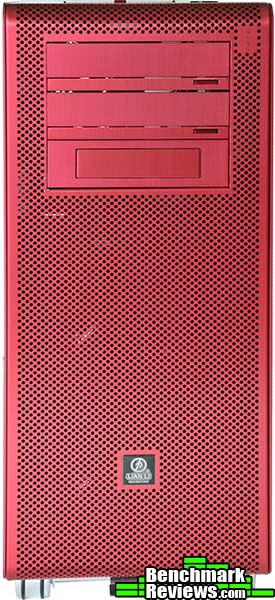
Unboxed, the case presents a striking appearance with its solid red color. This isn't paint, but color that's anodized right into the aluminum. It's hard to reproduce the color in these photos: it's not a bright, fire engine red, but a more subdued, almost wine-red. I've seen other Lian Li cases in this exact shade. It's also quite difficult to photograph consistently, with the color changing dramatically depending on whether it's shot under natural light, studio lights, or ambient interior light.
The front of the case shows the three 5.25" drive bays. The top two come with "stealth" flip-down covers and integrated buttons for optical drives, while the bottom bay has a plate for a 3.5" device should you wish to use one there. The space below the bays is completely occupied by the two 140mm front intake fans, which aren't visible in this image.
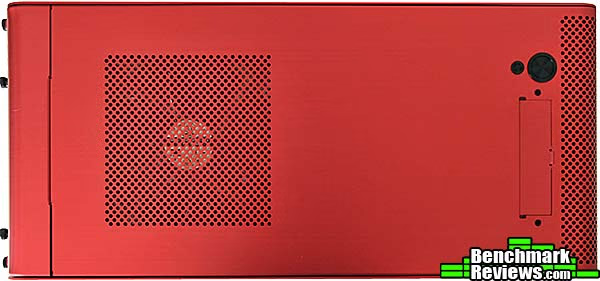
Both side panels on this case are completely blank. There are no windows, designs, logos, or structural embossings, just flat sheets of red-anodized aluminum. The left-side panel can be secured with a small padlock if desired. The black tab between the front wheels controls the locking mechanism that prevents the wheels from turning once you have the case positioned where you want it.

The top of the case contains the I/O panel under a small flap, and the exhaust for the top-mounted 120mm fan, which is lit with red LEDs.
Let's check out this case in more detail in the next section.
Detailed Exterior Features
Many "aluminum" cases these days are only partially aluminum, with substantial amounts of steel and plastic in addition to the aluminum. This is understandable: aluminum costs more than steel or plastic. This is not one of those cases. With the exception of a few tiny bits (steel thumbscrews, plastic internal cables, etc.) the entire case is aluminum. All of the aluminum is "grained" in the same direction and has the same texture, matching perfectly.

Under a small flap at the top of the case are four SuperSpeed USB 3.0 ports, a microphone and audio-out port, and an ESATA connector. A space designed for a FireWire 1394a connector is empty. Just to the right of the I/O panel are the power and reset buttons. The reset button is small enough to require an implement to press - your finger will be too large. The top-mounted ports indcate that Lian Li expects you to use this case on the floor, but personally I want something this nice on my desk.

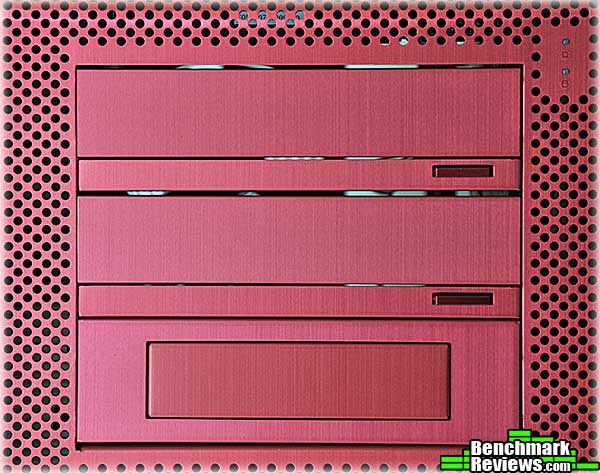
A closeup of the 5.25" drive bays shows the two "stealth" covers for the optical drives, and the 3.5" device plate, handy for card readers and the like. At the upper right you can see the power and hard drive activity LEDs. The power LED (upper) is blue and the drive activity LED (lower) is red.
Turning to the rear of the case we see the 120mm exhaust fan, two grommeted holes for water-cooling hoses or USB 3.0 cables, the removable power supply mounting plate, and a full eight card slots! Every full-tower case should have eight slots these days, but surprisingly many don't.

Lian Li has upgraded their aluminum wheels by adding twin rubber runners. The lever in the middle serves to lock the front wheels in place, so you don't have to worry about the case rolling off your desk.

Let's take a look at the interior of the case now.
Closer Look: Interior
The inside of the case is more anodized aluminum, this time in black. It's a modern design, with the 3.5" drives mounting sideways for good airflow, and several cable management holes in the motherboard tray. Some cases use press-on plastic edging to cover the sharp metal edges in the interior, but not Lian Li: every edge is smoothed or rolled over. Another nice touch: all four internal fans come with detachable 3-pin to Molex adapters, so you can plug them into either your motherboard or the power supply. None of the fans are PWM fans, though, so your motherboard won't be able to control their speed.
Just above the CPU cooler cutout on the motherboard tray, you'll see another hole: this is for the EPS-12V cable for the four or eight pin EPS-12V connector by your CPU socket. Since the power supply mounts at the bottom of the case, you may need an EPS-12V extension cable, which some other full tower cases such as Cooler Master provide, but Lian Li does not.
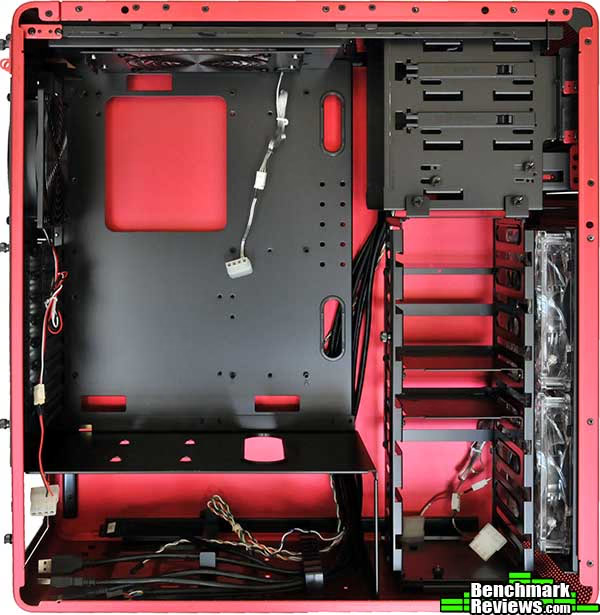
Refreshingly, the motherboard tray is easily removable. This once-common feature of high-end cases is rare these days, and it's a pleasure to see it here. Motherboard standoffs for a standard ATX motherboard are pre-installed. Although there are some cable routing holes in the motherboard, there are no tie-down points.

The removable hard drive rack has space for 7 3.5" drives (an adapter is included for mounting two 2.5" drives in one of these bays). To mount a drive, you install four rubber grommets on the drive using supplied screws, and then slide it into a slot on the rack; the grommets prevent metal-to-metal contact that might transmit noisy vibrations. Once all the drives are in the rack, you loosen a thumbscrew at the side of the rack and slide down a locking plate to keep the drives in place.

The power supply mounts at the bottom of the case. Lian Li provides a mounting plate that you attach to the supply; you then slide the whole assembly into the case from the rear. The power supply is held about 3/4" off the floor of the case, and the intake below has a removable filter. In front of the power supply is a plastic cable management clip to help route your power cables.

We continue checking out the interior in the next section.
Detailed Interior Features
The trend these days seems to be to reduce the number of 5.25" bays and increase the number of 3.5" bays. I'm not sure this is best for most users, but it does make a lot of room available for fans below the 5.25" bays. Looking in through the rear of the Lian Li PC-V1020 with the hard drive rack removed, we can see that most of the front of the case is occupied by the two LED-lit 140mm intake fans. You can also see the oddly elaborate bracket and mount for the upper exhaust fan. I'm not sure why this is built this way or what advantages it has over simply screwing the fan to the top of the case. Many full-tower cases these days provide top mounting points for a 2x120mm or even 3x120mm radiator; the Lian Li PC-V1020 does not, but the case would need an extra inch or two of height above the motherboard for this to be a workable option anyway.
I wasn't able to find any air flow or noise specifications for the four fans included with the case. They're all rather quiet and don't seem to move a lot of air, and the front intake fans are not filtered. You can of course replace any of the fans with fans of your own choosing. Integrated fan controllers are starting to appear in much less expensive cases, and it would be nice to see something like that here.

The 5.25" bays include stealth covers for two optical drives (a nice touch). Flip-out levers operate locking pins to secure devices in the top two bays, but the bays are hardly tool-less: to install your optical drive, you'll need to remove the four thumbscrews holding the 3.5" adapter in the bottom bay and slide it out of the case, then remove the two small Phillips-head screws securing the stealth cover, slide it down into the area vacated by the 3.5" bay adapter you removed in the first step, and slide your drive in from the front of the case.

In addition to the adapter Lian Li provides to mount two 2.5" devices in the hard drive rack, there are mounting holes for a single 2.5" device directly above the power supply.
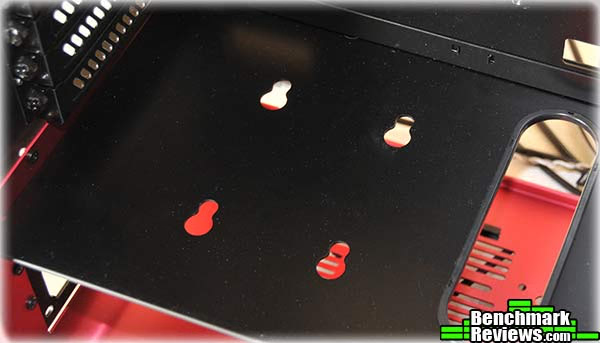
As I mentioned previously, this case has eight slots, necessary for most motherboards if you want to run a tri-SLI or CrossFireX system. Although Lian Li touts the PC-V1020 as having the "latest in tool-less design", it does not have the clever mounting clamps used to secure cards in some other Lian Li cases, opting instead for simple thumb screws. As is standard these days, a large cutout in the motherboard tray provides access for CPU cooler mounting hardware.

One expects a lot of room in a full tower chassis. Here are the clearances I measured for the Lian Li PC-V1020:
| Video card length (back of slot covers to hard drive rack) | 12" |
| Top of motherboard tray to left side panel | 7.25" |
| Bottom of motherboard tray to right side panel | 1 1/16" |
There should be enough room for any video card short of an ATI Radeon 5970 (12.25"), although a little Dremel work on the hard drive cage would let even that fit. Let's build a system in this case and see what it's like to work with.
Building a System
The ultimate test of any case is building a system in it. I love removable motherboard trays: it's so much easier to build everything on the tray rather than laying a large case on its side and working around its other internals. The removable motherboard tray of the Lian Li PC-V1020 makes the initial system build easy. Just slide the tray out and install everything!

At 10.6", the width of the ASUS Rampage III Extreme motherboard I'm using in this build, while not as large as an EATX board, is still one inch wider than the ATX standard of 9.6". The extra inch covers some of the cable management holes in the motherboard tray. "Extra wide but not quite EATX" performance motherboards are becoming more common, and there are even some P55 motherboards that exceed the ATX standard width. Although there's still plenty of room inside the PC-V1010 to route your cables, an extra inch added to the motherboard tray (and therefore the size of the case) would have been nice.
Once I installed everything on the removable motherboard tray, I realized why this feature might not be so popular any more. A modern high performance system with multiple graphics cards and a huge cooler can weigh quite a lot: in this case, just over 12 pounds. And although that doesn't sound like much, it's actually kind of tough to maneuver when you're trying to slide it back into the case. And then there was this little problem:
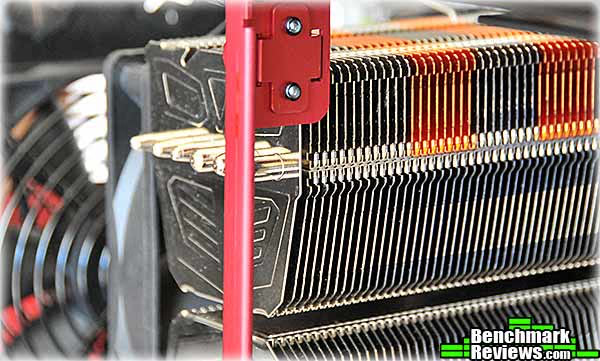
Oops. The Prolimatech Super Mega cooler I'm using hits the side panel latch mechanism going in. I had to remove the cooler, slide the motherboard tray back in, and then re-install the cooler. Although this was easy with the Super Mega, whose mounting mechanism is secured to the motherboard separately from the actual cooler, it might have proved problematic with other coolers, depending on your motherboard. On the Rampage III Extreme, the back of the CPU socket doesn't line up well with the cutout in the motherboard tray.

Other than these minor issues, the build went well. The power supply I used doesn't have modular cabling, but in a case without a side window, who cares? And yes, that is just a cheap excuse for being too lazy to clean up my cables. In this photo you can see a Patriot Torx SSD mounted in the top slot of the drive rack using the adapter plates Lian Li supplies.

The components I used in this build came out of a SilverStone Fortress FT02 case. The PC-V1020's two 140mm intake fans blow air across the hard disks and then into the video card area, but Lian Li seems to have chosen the fans more for silence than airflow. The load temperatures of the NVIDIA GTX480 video cards were 2-4 degrees higher than their load temperatures in the Fortress FT02. Still, the cards managed to keep themselves at acceptable temperatures even after 12 hours of protein folding, and since these are probably the hottest cards you'd ever have in your system, the Lian Li PC-V1020 cooling seems adequate, although asking it to handle a triple-GTX480 system might be a little much.
PC-V1020 Final Thoughts
In many ways, a computer case is one of the least important parts of your system. Potential cooling issues with high-end components aside, your rig will operate the same whether it's in a $40 no-name case or an $800 Thermaltake Level 10. But if you're an enthusiast, there are other considerations to keep in mind when choosing a case, especially one as expensive as this:
- Is the case built well?
- Does its design make it easy to build a system, and replace components in an existing system?
- Does it offer enough expansion capability for your future hardware acquisitions such as additional hard drives, video cards, and such?
- Does it provide enough airflow to keep your components cool?
- Is it a good-looking case?
The last issue might seem petty, but it reminds me of a study done some years back about the things people looked for when buying a car. When asked by the interviewer, people responded with considerations like mileage, safety, features, value, and so forth. But although the styling of the car was never mentioned, it turned out to be one of the most important (if not the most important) considerations. If you're spending upwards of $200 on a computer case, you'd probably like it to at least look as though it's worth the money, and Lian Li's design strikes a good balance between the dull conservatism of most cases on one hand and the over-the-top techno-military designs on the other. The anodized red of the PC-V1020 is very striking, but the case is also available in somewhat lower-key finishes of anodized black or plain silver if you wish.

Functionally, the case was very easy to build a system in, aside from the minor issues I noted, which were really due more to the slightly non-standard design of the ASUS Rampage III Extreme motherboard. I'd prefer more 5.25" device bays, since adding a couple of optical drives leaves only one bay free for fan controllers, card readers, or whatever else you might want. Other cases have solved this "cooling versus expansion" problem by either using two smaller fans in front (Antec Dark Fleet series cases) or going to an extra-wide case design with a single 240mm front fan (Cooler Master HAF series). The PC-V1020 designers compromised on a more slender, elegant case design with fewer device bays, and that's just something prospective purchasers will have to factor into their buying decision.
Lian Li PC-V1020 Conclusion
Although we strive for objectivity here at Benchmark Reviews, please remember that each author perceives these points differently, and our conclusions and recommendations will necessarily differ from others. Also, prices can fluctuate and designs change after publication, so that the product we review might not have the same price and specifications of a product that's available later. Please do not base any purchase solely on our conclusion, as it represents our product rating specifically for the product tested which may differ from future versions. Benchmark Reviews begins our conclusion with a short summary of each of the areas that we rate.
The performance of this case was very good. While it doesn't offer the highest levels of cooling, or options for internal water cooling (without modding, anyway), it should be able to ha7ndle all but the very hottest systems. The design of the case makes it easy to build a system in and provides plenty of room for expansion for everything except 5.25" devices.
The appearance of Lian Li cases has always tended towards the elegant, and the PC-V1020 is no exception. In a market crammed with stylistas like the Thermaltake Level 10, Cooler Master HAF series, Bitfenix Colossus, and the new NZXT Phantom, Lian Li generally maintains a lower-key style.
The quality of construction of the case was exceptional. Side panels and internal parts snap and slide into place perfectly; panel gaps are tight and regular, and the anodized, brushed finish is perfect. This is perhaps to be expected of cases in this price range, but I've seen cases that cost more with noticeably poorer construction and finish.
The functionality is very good, but could be improved by a slightly longer motherboard tray, cable tie-down points, and perhaps one more 5.25" drive bay.
At $299.99 (red), $259.99 (silver), and $249.99 (black) at Newegg, this is a very expensive case, and cases with equivalent functionality are available for much less money. Lian Li cases offer superior quality, design, and aesthetics, and that's what you're paying for. In the company of similar cases such as the NZXY Khaos or Silverstone TJ07, the price is competitive. While you can certainly make do with a less expensive case, if your budget will stretch to cases at this price level, it's hard to go wrong with the PC-V1020.
Pros:
+ Functional update of classic full-tower design; dramatic yet elegant appearance
+ Removable motherboard tray
+ Ultra high-quality all-aluminum construction
+ Lockable, rubber-rimmed aluminum wheels
+ USB 3.0 ports
+ Plenty of internal room for ATX systems
+ Many little touches: storage bin for extra screws, LED-lit fans, included stealth bay covers...
Cons:
- Very expensive (black and silver versions are somewhat cheaper)
- Only three 5.25" drive bays
- Not really "tool-less" as Lian Li claims
- Relatively low-performance fans
- Lack of cable tie-down points
Ratings:
- Performance: 8.75
- Appearance: 9.25
- Construction:9.75
- Functionality: 8.50
- Value: 7.50
Final Score: 8.75 out of 10.
Quality Recognition: Benchmark Reviews Silver Tachometer Award.
Questions? Comments? Benchmark Reviews really wants your feedback. We invite you to leave your remarks in our Discussion Forum.
Reader comments from the original article
26 comments were posted before commenting closed. They are preserved as written. Original avatars no longer resolve and are shown as a placeholder.
RE: Lian Li PC-V1020R Full Tower Computer Case Doug Permalink:
Wait, I didn't read the entire article word for word. I skimmed most of it and looked at the images. First, nice review. Second, I hate this case. (1) Cooling seems skimpy. I'm not talking about the included fans, but possible fan mounting options. Two front, one back, one top? (2) What is the advantage of putting the PS under everything? Heat rises. I've never understood that trend. (3) Waste of space taking up bays only for fans. My old 830 Stacker has space to include two 120mm front fans and bays all the way down, nine of them! This case is not impressive to me from a technical point of view; however, it is nice to see a full aluminum case so nicely finished, so nice in fact it looks sterile. But I still like the case in a spartan way. What I would like to see in case manufacturers is a fully removable slide out motherboard tray that includes the power supply and drives. In other words, the entire guts of the computer would slide out on a roller rack, like a drawer in your house. You would simply turn the case on it's end, for one example, and pull the entire guts out of the other end, complete, everything ready to work on. Once it's out a modular design would then allow you to separate the PS and drives from the motherboard, if one wished.
RE: RE: Lian Li PC-V1020R Full Tower Computer Case Jeff Permalink:
Doug is mistaken in his reply to features of this Lian Li tower. 1. Cooling system is adequate for sure! The inside fans, both the rear and top fans, are optimally placed for efficient heat removal. The two 140mm front fans provides volumes of air to cool effectively. 2. The bottom-mounted power supply is the most efficient way to accomplish several purposes. First, the weight of the PSU is at the bottom preventing the case from being top-heavy as in older case designs. Second, the power supply has its own dedicated air vents on the bottom of the case so the psu fan is mounted facing the bottom vents pulling in cooler air and then venting out the rear of the PSU. Therefore the PSU's fan acts as a third vent fan pulling out the PSU heat most effectively. 3. The space is not wasted, it provide ample room for proper effective air circulation throughout the case. 4. Lian Li makes very well engineered and constructed computer cases. The "fit and finish" is bar-none in my opinion and their products excel and will last for many years. The front panel wiring, switches and connectors are all top quality and heavy duty. I have owned a Lian Li case for a few years now and it is by far the best computer case I have ever owned.
Good chassis but could be better Robert Johnson Permalink:
Windowed side panel would be good by default. One top fan is insufficient. Cable management could be better. Otherwise a nice build from Lian-Li
RE: Good chassis but could be better Jeff Permalink:
Again as I stated in an earlier reply. The rear and top fans are adequate; however if more cooling is needed for hot video cards Lian Li make a dedicated VGA cooler fan assembly which bolts onto the back of the case and either pulls hot air out or blows cool air in depending the way the cooler fan is configured. Cable management looks as if it's adequate. The reviewer did a poor job of cable management in the product build photos. If he would have spent another 30 minutes, he could have cleaned up his cable routing significantly.
Mr Jeanlou Permalink:
Hi, You both should better write "negative comments" after using the Lian-Li cases for a while! We use Lian-Li cases since years from now, for industrial quality control systems, and... try to find better, and let us know ! Thanks for the review. Jean
Expansion card clamps Barry Permalink:
Lian Li sell their expansion card clamps separately. Although it's a pity that they weren't included, I assume that the clearly visible mounting holes permit this?
RE: Lian Li PC-V1020R Full Tower Computer Case Chris Permalink:
They are really expensive cases, but they are really nice to work with. I'd say that this case seems to not have as good cooling as the other cases. Jeff, you may want to take a look at the PC-A77F. I think you wrote about it: /index.php?option=com_content&task=view&id=3658&Itemid=47 Still, here's a video: ##youtube.com/watch?v=RIOP8-bt7tg ##vortez.co.uk/articles_pages/lian_li_pc_a77f_revi ew.html I wonder how this compares to say, the HAF-X or 800D?
RE: RE: Lian Li PC-V1020R Full Tower Computer Case Chris Permalink:
Edit: I meant Doug, not Jeff, as Jeff is not satisfied about the cooling options.
RE: RE: RE: Lian Li PC-V1020R Full Tower Computer Case Jeff Permalink:
I am satisfied with the cooling options. If readers will notice, the motherboard tray has a set of vertical slots near the PCI slots section. This gives the ability to mount the Lian Li Aluminum PCI Cooling Kit Model # BS-03
RE: RE: RE: RE: Lian Li PC-V1020R Full Tower Computer Case Chris Permalink:
I went out to a LAN party a few weeks ago and saw a few Lian Li cases in person. It does make you want an aluminum version of other cases like from Cooler Master and for them to be all metal. Still, it doesn't seem worth the price premium. Lian Li cases cost about $350 here in Canada: ##newegg.ca/Product/Product.aspx?Item=N82E16811112261&nm_mc=OTC-sho6b0tCA&cm_mmc=OTC-sho6b0tCA-_-Cases+%28Computer+Cases+-+ATX+Form%29-_-Lian-Li-_-11112261 and the US: #newegg.com/Product/Product.aspx?Item=N82E16811112261&nm_mc=OTC-sho6b0tCA&cm_mmc=OTC-sho6b0tCA-_-Cases+%28Computer+Cases+-+ATX+Form%29-_-Lian-Li-_-11112261 Plus expensive shipping (as it's a case). After shipping is factored, that's more than double the price of the HAF-X (which I can get at a local computer store). That means about $200 less cash to spend on the parts in your PC, which is the difference between a mid-range GPU and a high-end GPU.
RE: RE: RE: RE: RE: Lian Li PC-V1020R Full Tower Computer Case David Ramsey Permalink:
True, cases at this level are expensive. For every one of these that Lian Li sells, Antec probably sells a thousand $100 cases, just as Chevy outsells Mercedes. It all depends on your priorities.
Cooling Could be Better Robert Permalink:
Of course this Lian Li case is extremely well made, but as with anything, nothing is perfect and trade-offs are made to enhance one thing over another. While it's cooling is adequate, it is not optimal, IMO. First, bottom mounted PS, the only way to go, the PS's fan only cool itself, I only use bottom-PS mounted cases. Second, the omission of side-mounted fans is where this case is not optimal. Blowing air directly on the mother board and it's components makes a huge difference in temperatures, particularly with video cards. Take a look at many Cooler Master cases if you want to see optimal cooling. Even the CM 690-II allows two 140mm exhaust fans, two 140mm intake fans, two 140mm side intake fans, the standard 120mm exhaust, and mounting points for an internal 120mm fan. Of course there are compromises with that configuration, it tends to be noisier. While this Lian Li case is gorgeous (not in red!) and I would like to have one, it's cooling options are not optimal, hopefully adequate, but not optimal.
Custom System Builder Arron Permalink:
To Robert: Cooling Could be Better - If you want the best cooling you put a bunch of fans at the front (yes, all of it), back and top rear. You ensure the CPU cooler is firing straight into one of the case fans, or even build a small tunnel to make it so. You place the PSU at the bottom with its own filtered air inlet - by definition, the PSU generates more power than any other component. There is still some argument about positive or negative air pressure configurations being better, however via fan controllers and fan speed adaptors (i.e. Noctua ULNA) you can play with it and achieve cool and quiet machines. The reason - you are moving the air in straight lines. As soon as you add any fan to the side, you get turbulence and vortexes and the cooling performance plummets. That is why every Lian Li I have built (at least 40) is always a lot cooler than almost any other equivalent case (several thousand - 1981 to date). Like most of the other guys in these comments, I now use Lian Li exclusively. Oh yes, and I have tried almost every brand of case in BMR except the NZXT.
Top fan Bob Permalink:
I love the case, and am thinking of putting a water system in it. One big question: How easy is it to remove the top fan mount? I plan on cutting a 2x120 rectangle on the top, and mounting the fans inside, and the rad outside the case. (I did this on a PC-V1100 and it works well.) ie: [ rad ] ---------- case fan1 fan2 Is the top fan mount bolted in? Is it riveted in? If just a few screws, does it leave the top clean of obstructions once it is removed up there? You didn't show a god picture of it, and no mention of how it is held in. This is the only big question I have before getting this case.
RE: Top fan David Ramsey Permalink:
Bob, the top fan mount simply unscrews. If you're looking to put in a dual-120 or dual-140mm radiator, it should fit, but obviously you'd have to do a bit of cutting for the layout you proposed to work.
RE: Top fan Bob Permalink:
Cutting on the top plate sure, I'm expecting that ;) But, would I have to cut anything else, like anything on/around/by the rails that run lengthwise front-to-back just under the roof? Anything functional to the case itself, like slots for the door to lock into, etc? Anything like structural supports that might be there to add strength to the frame? ie after removing the fan assembly, is it clear up there to then simply cut the 240x120 hole out of the top plate?
RE: RE: Top fan David Ramsey Permalink:
I don't think so (but I don't have any rads laying around to check). There are internal rails at the top that latch into the side panels, but I think there's enough room for a rad between them. You can remove all the brackets for the top fan, leaving only the top panel.
RE: Top Fan Bob Permalink:
As I said in the first post, I put the rad on top, outside of the case, with just the fans under it on the inside of the case. Since the fans are narrower than the rad, based on what you've said, it should be fine. Thanks for the info and the great review!
RE: RE: Top Fan Bob Permalink:
Well, I bought the case, and the box in the top really makes it a mess to put a rad up there. The box is for a 140mm fan. I have a 2x120 rad. I had to cut part of the box away to get the fans in under the roof. More work than I was expecting. FYI.
RE: RE: RE: Top Fan David Ramsey Permalink:
You had to cut part of the box away? Doesn't it unbolt or unscrew from the inside of the case?
Top Dog Reid Permalink:
Having found and used the earlier versions of this case for my last 3 computers, I am completely unsatisfied with anything else. The case is gorgeous, easy to trick out, and building in it is a joy. And cooling? The thing is a giant heatsink! After I am done with my builds, Mac Users weep at what Apple dumps on them. The latest innovations in this case prove LL is thinking and listening to what builders want and what would make an already stellar case shoot for the moon. I am hugely pleased and will be building 3 i7 systems with this case.
How about installing... Thomas Permalink:
... big items, i.e. a Thermalright Archon CPU cooler? The PC-V1020 has a width of 220 mm, the Archon requires 170 mm - but you need to take that "wasted space" for the slide for the mobo tray into account. Plus: As far as I understood, the reviewer installed a 10,6" larger-than-ATX-but-smaller-than-E-ATX mobo. As I intent to do the very same thing - would the cable management spare holes in the slide tray be covered and, in consequence, become useless? Thanks for your comments, guys. Thomas
RE: How about installing... David Ramsey Permalink:
Hi Thomas, At the bottom of the "Detailed Interior Features" page, I measured the specific clearances you're looking for. The "top of motherboard tray to left side panel" distance is 7.25", or a touch over 184mm, so the Archon should fit, although you might have to install it after sliding the motherboard tray in. Any motherboard longer (front to back) than the ATX standard of 9.6" is probably going to cover some of the cable routing holes.
RE: How about installing... Bob Permalink:
I have a Asus Maximus IV Extreme, which is 1" longer than normal. It covers up about 80% of the 2 holes on the side. You can still fit a SATA cable in there (at an angle), or the case connections (like power led, etc), but nothing bigger than that.
Thank you... Thomas Permalink:
...David and Bob. Your comments are very helpful and appreciated :-) Thomas
RE: Lian Li PC-V1020R Full Tower Computer Case WhyNot Permalink:
After reading the review on Thermaltake's Level 10 GT I thought I'd poke around here more and totally forgot about this case. My comment here today is nothing more than to say how awesome Lian Li cases are. I have a Lian-Li PC65B I've had for a little over 4 years and I've upgraded and/or put 4 systems into it. Even with the PSU top mounted and the tiny fan at the top of the case, air moves really well insdie and I've not had any cooling issues *knock on wood* Am I running some god-like system? Nope, but a quadcore AMD processor, GTS250 video card, 8GB RAM a couple of Hard Drives and SSDs with a 750w PSU...there's room to make it far warmer inside :) Lian Li all the way!!!