
NETGEAR XS708E ProSafe Plus 10GbE Switch
NETGEAR XS708E ProSAFE Plus
10GbE Switch Review
Manufacturer: NETGEAR, Inc.
Model Number: XS708E-100NES
UPC: 606449090550
Price As Tested: $936.99 (NewEgg | Amazon)
Full Disclosure: The product sample used in this article has been supplied by NETGEAR.
The first public cell phone call was placed on April 3rd 1973 by Marty Cooper, who championed the development of the first truly portable device while he was with Motorola. Something else happened that same year which has arguably had the same level of impact on society. Ethernet is also 40 years old this year (2013) and has established itself in almost every facet of our digital lives. Like many ubiquitous elements of modern consumer technology, it was developed at XEROX PARC (Palo Alto Research Center) and then commercialized elsewhere. Ethernet came to the PC in 1982, with inexpensive twisted-pair network cabling as a bonus, and the rest is history. The original bandwidth cap was 10 Megabits per second, the current top spec is 100 Gigabits per second, and the IEEE 802.3 Ethernet Study Group is currently finalizing the standards for 400 Gb/s. Most consumers and small businesses are operating at single GbE speeds (1Gb/s), but that will change in the next few years to 10GbE, based on trends I'm seeing in the market. The server market is already there, it's just a question of when the consumer product lines adopt the latest NIC-on-a-chip solutions from the major suppliers. The next piece in the puzzle is 10GbE switches and routers to link the networks together.
Network switches are not reviewed by the press that often, but they are a necessary part of many home or small business networks, so we need to be aware of what's available and what works well. NETGEAR is a long-established player in the networking market, and they have many different product lines to choose from. Today, Benchmark Reviews is looking the NETGEAR XS708E, a break-out offering in their ProSAFE Plus Switch line that brings eight ports of 10GbE connectivity down to the masses. 10GbE switches are a critical part of the infrastructure that needs to be in place before adoption of this faster networking standard can spread.

First, let's clarify what a network switch is. It is strictly a wired device, and is most often designed to switch Ethernet traffic. There are telco switches, and video switchers, and fiber optic switches, but the vast majority of network switches you and I will encounter handle Ethernet. In Wireless networks, routers and adapters generally communicate directly with one another, but wireless media bridges are starting to make that distinction a little fuzzy. You could use the couple of ports on the back of your router to connect a few devices together, but switches still have some advantages:
-
Switches allow dozens of devices to connect
-
Switches keep traffic between two devices from getting in the way of your other devices using the same network
-
Switches allow control of who has access to various parts of the network
-
Switches allow you to monitor usage
-
High-end switches have pluggable modules to tailor them to network needs
Until recently, there were only two types of switches, un-managed and managed. The first type is truly plug-and-play, there are no settings to make, no configurations to set, and they always work the same way, for every device plugged into one of its ports. This was the only kind of switch available to the average consumer, and they served their purpose well. The managed switches were strictly for the corporate LANs and data centers. They were configured by the high holy priests of corporate IT, called "LAN Administrators". No one could make a change in the network unless they logged into one or more switches and made it, usually with cryptic command-line instructions. Nowadays, they can log in to a GUI via a web browser, but I know some of them still use command line arguments.
Today, there are some new classes of switches sandwiched between these two extremes. The most common type is usually called a "Smart Switch". It has a number of features that come straight from the managed switch play book, and is targeted to both corporate users and what the industry politely calls "ProSumers". That's you and me, in case you didn't recognize your new title. The NETGEAR GS110T that was featured in a recent Benchmark Reviews article is a good example of a Smart Switch. The XS708E we are investigating today is part of the ProSAFE Plus line, with a feature set somewhere between the unmanaged and Smart Switch products. The Plus line management tools include VLAN support, QoS, IGMP snooping, port trunking, rate limiting, and traffic monitoring. That's enough for most SMB users, especially those who are willing to trade some high-end features for pure speed.
The XS708E is the lowest cost model in the new NETGEAR family of ProSAFE Plus 10GbE Switches. It's got eight 100/1000/10000 Mbps RJ45 ports, with one combo port supporting 10 Gigabit speed on an SFP+ connector. This type of port is commonly used to support fiber optic cables, but lower cost direct-connect copper cables are available for short haul applications. For now, the most likely application of the XS708E is simple and affordable 10GE connectivity for 10G-capable servers and storage devices employed by smaller organizations. If you've followed some of my NAS reviews, it should come as no surprise that the first thing I did after I powered up the XS708E, was to connect it to one of the 10GbE capable NAS models on my test bench. The sense of relief was palpable - THAT'S the way a NAS ought to run...
Let's take a closer look at the XS708E, and see what it offers in both features and performance.
Closer Look: NETGEAR XS708E
The ProSAFE Plus product line is at least one layer removed from the consumer line of NETGEAR's network devices, and its form, fit, and function are all consistent with its intended purpose. A grey suit in the business world imparts a certain gravitas to the wearer, and the same trick works for networking equipment. There are a total of eight 10GbE ports lined up in two groups of four on the front panel. All use the common RJ-45 spec connector, with dual LEDs on the upper corners. When used to support 10GbE, these type of ports are known as 10GBASE-T. The last port is a dual-purpose arrangement, with a Small Form-factor Pluggable (SFP+) Port wired in parallel. This greatly increases the versatility of this switch, since some devices are only outfitted with SFP+ connections, and it's not easy or cost-effective to convert 10GBASE-T to SFP+, or vice-versa. We'll explore the SFP+ ports in more detail later, but the important thing to know is that they are primarily intended for interfacing with fiber optic cables, and they have a potential transmission range of 10 km. The overall package is slim and sturdy, with an all metal case. Some people like to have the ports on the front, with integrated status lights, as the XS708E has. Other folks like to have the ports on the back, with separate status lights on the front panel. I'm always plugging things in and taking them out, or trying to figure what's plugged into what, so I like having the ports on the front. In a typical home environment though, I can understand wanting the ports in the back, to avoid cable clutter.

The eight RJ-45 connectors on the front of the XS708E are auto-sensing and auto-negotiating ports that support 100BASE-TX, 1000BASE-T, and 10GBASE-T. When the green LED indicator on the upper left of a port is lit, that indicates the presence of a valid 10Gb/s link. If the amber LED indicator on the upper right of a port is lit, that indicates the presence of a valid 100Mb/s or 1000Mb/s link. The indicators blink when packets are transmitted and/or received on that port. These 10GBASE-T ports can drive Cat5e cables out to 55 meters, Cat6 (or 6a) is required if you want to go the full supported distance of 100m. Thousands of miles of Cat5 and Cat6 cable are already in place in data centers throughout the world, and this switch makes it easy to upgrade your network with the infrastructure that's already wired into place.

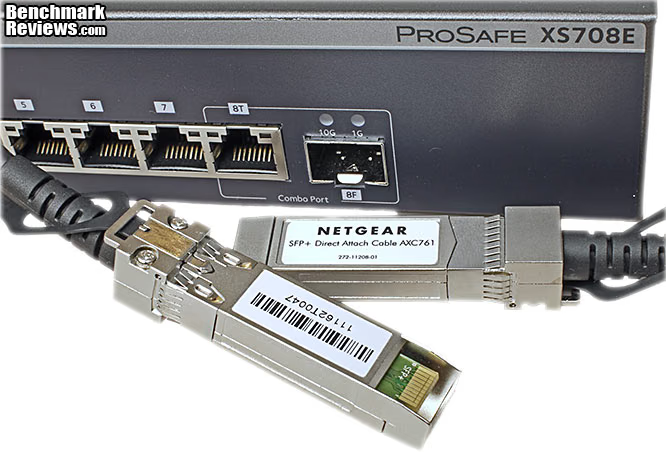
The SFP port indicators are similar in operation, but the LEDs sits just above the port instead of being integrated into the connector body. The SFP+ port has support for 10GBASE-SR, 10GBASE-LX, 10GBASE-LRM, 1000BASE-SX, 1000BASE-LX, 1000BASE-LHA, and 1000BASE-LHB. All of these standards require the use of connector modules which slide into the standardized SFP+ interface. There is also an option to use "Direct Attach Copper" cables, with a 10 meter limitation. These Direct Attach cables are much less expensive than the combination of two connector modules and a fiber optic cable assembly, of any type or length. Fiber connections have a potential range that's 1,000 times longer though, up to 10km. Plus, the optical cables are completely immune to RFI interference and data snooping.
At the far left, the power LED indicator flashes yellow while the switch is booting up and green when it's ready for normal operations. Also during boot up, all the LED indicators on the individual ports flash once, just to test their function. Below the power indicator is a warning LED that signals if there is a fan failure. I don't know if it is monitoring the fan(s) directly, or is triggered from a thermal sensor. One reset button is provided, which can be accessed through a small hole in the front panel, directly below the LED status indicators. It's marked "Factory Defaults", and it resets everything, including the password, VLAN settings, and individual port configurations. I never had the need to use the reset button, as the switch didn't need to be rebooted during my testing, which spanned several months. I was always able to connect to it, and use the ProSAFE Plus Utility software to make any configuration changes. With fewer configuration choices available, I never managed to lock myself out. Either the switches are getting smarter, or I am...

The bottom is almost completely unadorned, with markings for four small rubber feet that come packaged in the box. They can be applied by the user, if needed. There are also rack mount ears included in the accessory kit, along with the necessary mounting screws. The default MAC address and default password for accessing the switch is printed on the S/N label here, and on the back. This is a welcome aid, as I usually have to go back to the product manual to find this information. This usually means more paper, stuffed in a drawer somewhere, taking up space. The rear of the XS708E is also very plain, with just the necessary features. The IEC power receptacle is on the far right and accepts the normal 3-pin AC power cord, as supplied in the accessory kit. Power input is pretty universal: 100-240VAC 50-60Hz, 2.2A Max. Towards the center is a hole for a Kensington lock. Since one possible use case for this switch, with its long-haul fiber optic port, is remote deployment, the lock hole might prove useful. This is just the sort of device that would be useful in a room full of video editing workstations, with seven ports for users in the room and a fiber link back to the main LAN room. If deployed inside the LAN room or data center, the K-Lock is not needed.

The NETGEAR XS708E is actively cooled, with two 40mm fans on the left side pulling cool air into the enclosure from holes on the opposite side of the case. They are heavily modulated by a temperature controller within the switch. At startup, they make a powerful noise as they initially get full voltage before the controller comes online. In use, they spin at a much lower RPM, unless the switch is fully utilized and it's operating in a very warm room. In my testing, they were very effective, and produced a noise level that was noticeable in a quiet room, but would be completely swamped by a typical server rack. Data centers are loud places; if you spend a significant amount of time in them, you are required by law to wear hearing protection. During the time I used it, it never got beyond "warm" on the outside surfaces, and the air exiting the case was not hot, just warm. We'll take a look later at the internal components and device packaging, and see what kind of heat sinking is required for chips that can pump 160 Gigabits/second around on a continual basis.

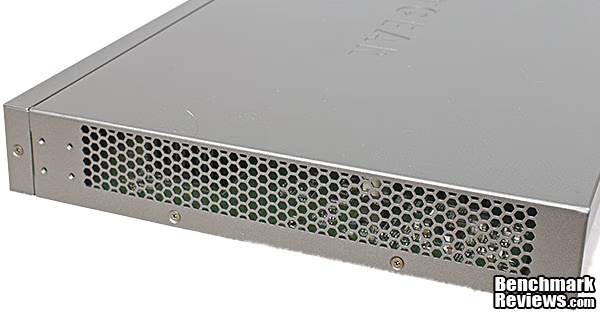
The right side of the XS708E has most of the surface covered by vents letting in fresh air. There are no other vents in the case, all the air moves through the enclosure from right to left. In a simple square box like this, there's no better way to make sure all the componennts are getting their fair share of cool air.
Now that we've seen the external features of the NETGEAR XS708E, let's break out the tools and see what's under the hood.
NETGEAR XS708E Detailed Features
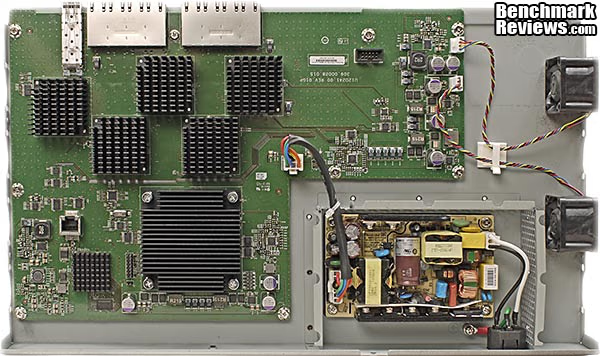
Once the top cover is removed, all of the construction details are laid bare. There's only one printed circuit board, which covers about two thirds of the width and depth of the unit, and all the components and functions are integrated on this PCB. The board is held down with several screws to standoffs attached to the bottom plate, and is very firmly mounted. There are quite a few integrated circuits on the board that have heavy duty heat sinks on them, indicating a lot of bandwidth under the hood. There is one main Switching IC, and it has a lower level of integration than you will typically see on less powerful devices; its only function is switching. The CPU controller function, flash memory, and PHY interfaces are all handled by separate ICs on the XS708E. This level of performance can't be provided by a one-size-fits-all IC. There are just a few signals that need to get to the indicator LEDs on the front panel, carried by a small ribbon cable. The power supply has only one output connector, which goes directly to the main PCB. All the Ethernet signal connectors are soldered directly to the PCB, with their nine sockets poking through holes in the front panel.

The chassis has a very straightforward layout, as does the PCB. The power supply is mounted right next to the IEC power receptacle on the far right. Power input is pretty universal: 100-240VAC 50-60Hz, which covers pretty much the entire world. The cooling fans are on the far right, and get their 4-wire PWM power supplied from controllers on the PCB. The main power input on the PCB is equidistant from the switching IC and the five PHY chips that drive the actual ports on the front edge of the board. If you imagine Ethernet signals flowing into the ports, coursing through the PHYs under the small heat sinks, getting switched around in the main IC under the big heatsink, and then reversing back through the other PHYs to get back to the port where each part of the data are predestined to go, you can see that there is a very tight little U-shaped signal path on the PCB. On the lower left corner of the board, a CPU with integrated flash memory sits off to the side, along with a dedicated power section to provide it with clean, isolated voltage and current. Nearby is a PCB-mount RJ-45 connector that is used for loading programs onto the CPU and flash memory at the factory, and for servicing the unit, if required.
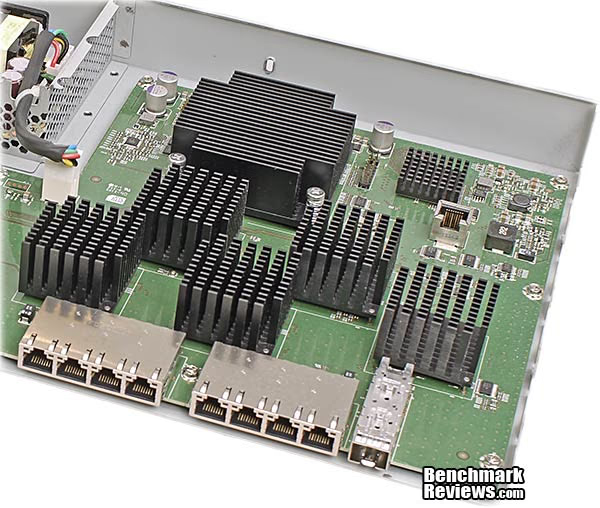
The relative size of each of the heat sinks is more obvious if you see them from more of a ¾ viewing angle. Here, you can see that the switching IC is topped with a more densely constructed heat sink, which has a lot more mass than the others. That helps even out temperature fluctuations, which are more likely to occur on the switching component, than the PHY modules. The heat sink on the main switching IC is held down with four spring-loaded screws, which maintain pressure on the heatsink and keep it firmly planted on the chip it serves. This is one of the clear lessons in CPU cooling we've learned at Benchmark Reviews, that consistent, firm pressure at the heatsink/chip interface is a key element in heat transfer performance. The switching IC was covered with a high performance heat transfer compound, similar to what one would use on a CPU or GPU. There was 100% coverage of the metal heat spreader, and the proper amount of thermal compound was applied, that is to say not too much. The smaller chips have foam thermal pads between their top surface and the smaller heat sinks. The small heat sinks were held down with a novel method, which I've not seen before. There are slender metal rods at two opposing corners that are press fit into the aluminum body of the heat sink. They are long enough to thread down through a hole in the PCB, and then they are soldered in place on the board at the opposite end. Given the amount of compliance that the foam thermal pads offer, this method offers just enough tension and precision to make the thermal interface effective and consistent. The bad news is that I didn't pull out my soldering iron and remove any of these heat sinks, so I don't know what kind of PHY chips are underneath. Especially, with the dual-purpose, copper + fiber eighth port, I wanted to see how the designers made that work. Oh well, there's only so much havoc and destruction I can visit on a product under test, and desoldering PCB components is just over the edge for me.
There are two 40mm x 28mm fans mounted on left side of the chassis, and three possible mounting locations, all in a row. My guess is, the 12 port switch in this 10GbE family needs a little extra cooling, so it gets three fans. The supplied fans from NIDEC are no shy little things - at 13,500 RPM they can each push out 28CFM at a raucous 55dBA. Yes, that thirteen thousand, five hundred RPMs.... Fortunately, they rarely need to run at full speed, and the PWM fan controller on the XS708E PCB keep them turning at a much slower and quieter RPM, based on the temperature inside the case. PWM fans and controllers are more expensive, but they provide better motor performance at lower RPMs, so they're a good fit for this application.

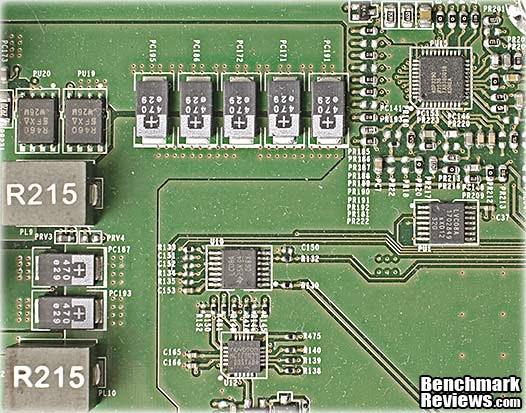
The main power regulator section on the PCB uses an ADP3290 8-Bit, Programmable 4-Phase Synchronous Controller from ON Semiconductor to regulate and control the incoming 12VDC main power supply down to the 0.5 V and 1.6 V level that the primary ICs need to perform. This controller is normally used to supply power to Intel CPUs, so you know they are capable of excellent performance. Modern switching MOSFETS do the heavy lifting required for supplying the high current requirements, and Tantalum de-coupling capacitors provide stable, long-life service filtering out any spurious high frequency artifacts that are generated by the controller.
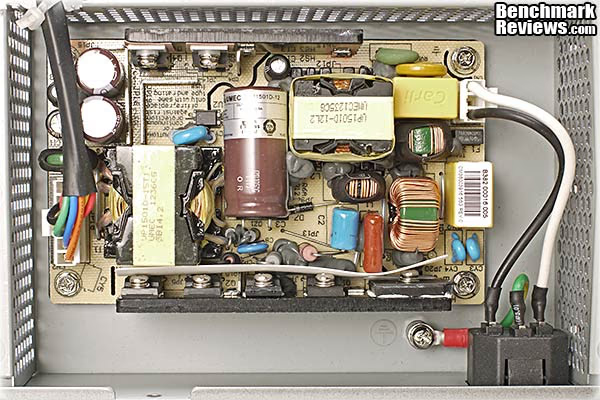
The open-frame power supply is supplied by UMEC and provides a single 12VDC output, with a maximum current of 12.5A. That's a total output power of 150W, for those who are counting. Component quality looked good, with top brands like Panasonic in evidence, and 105°C ratings on the electrolytic capacitors. Construction details were good as well, with all the components mounted securely and electrical barriers in all the right places. The perforated sheet metal surrounding it is there for protection from humans (the other way around, really...) and as an electrostatic shield for RFI. Switching power supplies can generate an awful lot of high frequency electromagnetic fields, so RFI shielding is crucial to keep those stray fields from leaking out.
Now that we've had a good look at the internals of the NETGEAR XS708E, let's dig down one more later, to the chip level. The next section is called Technology Details...
NETGEAR XS708E Technology Details
The star of the NETGEAR XS708E 10GbE switch is the actual switching IC, which is hidden beneath the largest heat sink under the hood. It's a very powerful device, and is built to do one thing only, very fast. Since the CPU and 10Gbps PHY functions are not built in, there are several smaller ICs surrounding the switching module. Just to the left is a small System-on a-Chip (SOC) controller that includes a basic CPU, flash memory to hold the device firmware, and communication modules that allow it to talk mainly to the switching IC, and also for a programming port that is used for loading the required software. The embedded web server runs entirely from this one component, and although it doesn't get quite the workout that it would in a Smart Switch, it still needs to provide all the same basic functions.
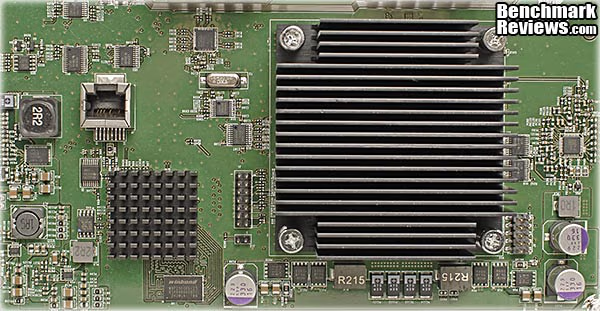
Here at last is a peek at the brains behind the XS708E's excellent performance. The Broadcom BCM56822 is contained in a fairly large package, measuring 45mm x 45mm, with an aluminum heat spreader on the surface. The BCM56822 is a relatively new chip, targeted at the lower cost 8-port applications. Its big brother, the BCM56821, with twelve 10GbE lanes has been in the pipeline longer, and is part of the same family of devices. There's not a whole lot of information floating around about these switching ICs in general, and none was publicly available for the BCM56822 chip that's installed in the NETGEAR XS708E.

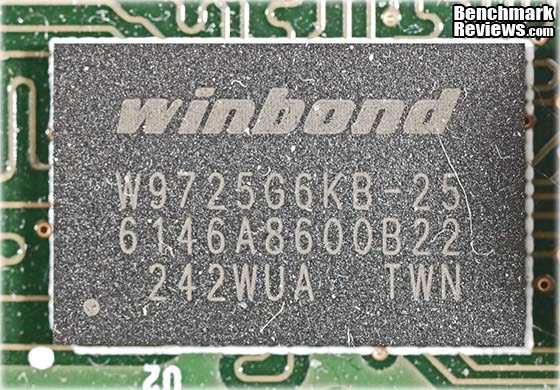
The switching module and the integrated CPU both need access to some basic DRAM in order to do their jobs. In the XS708E, Winbond provides a single DDR2-800 chip, which has an overall capacity of 256Mb, primarily for use by the CPU. I suspect the switch module carries its own RAM, based on its need for very low latency.
The construction quality was top notch, throughout the XS708E, even down to the manufacturing processes used on the printed circuit board. The wave soldering process looks excellent here, and throughout the rest of the board. On the down side, the component side of the PCB was littered with remnants of brushes used during the cleaning process. There were fuzzy bits all over the top side of the board, and even though they are plastic filaments and don't conduct electricity, it's disconcerting to see so many of them. Thankfully there was none of this on the bottom side of the PCB, as you'll see in the last image in this section. Reliability is a non-negotiable quantity for these kinds of devices; the customers who routinely buy this class of switch are building networks for people and companies that use them for profit, not for fun. If they stop working, everyone stops working and the company loses money until it's fixed.

Directly below the main switching IC, CPU, and the PHYs, there are a hundred or so surface mount devices soldered to the PCB. This area of the board almost always has the highest component density, and some of these resistors and capacitors are hard to see with the naked eye. This is always the acid test for assembly quality, because these components are absolutely critical to keeping the high speed processors running without a hitch. All of these little tiny capacitors are there to prevent the signals from being corrupted by RFI and transient voltages that can spread from other areas of the PCB. At ultra-high frequencies, even the spacing of these components can have an effect. Placing them accurately, making sure they're lined up straight, and soldering them precisely is an important part of getting the maximum possible performance from the high speed processors mounted on the top side.
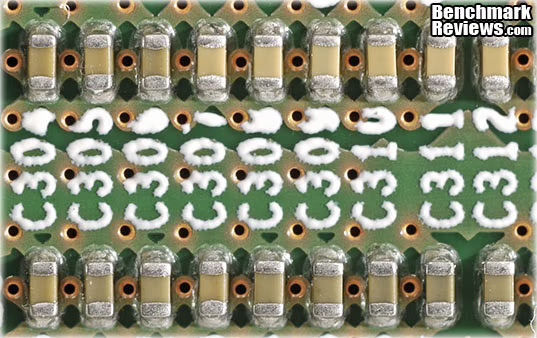
Unless you want to start straining your eyeballs on block diagrams and logic/timing charts, that's about as far as we can go on the hardware side. Let's start digging into the features and specifications of the NETGEAR XS708E before we fire it up and see how fast it goes.
NETGEAR XS708E Features
The XS708E belongs to the NETGEAR ProSAFE Plus switch line. ProSAFE Plus switches are an incremental upgrade from unmanaged switches, and in this case the emphasis is on delivering exceptional performance at low cost. In addition to the headlining 10 Gigabit Ethernet connectivity, it offers enough fundamental network management features to fit into a typical business network, such as VLAN, QoS, IGMP Snooping, Link Aggregation (LAG), rate limiting and traffic monitoring. The Smart Switch products offer more management features, but 10GbE performance is going to cost a lot more within that product line. This is the first switch that comes remotely close to approaching a $100 per port cost metric, at 10Gb/s. Before now, you could expect to pay more than $300 per port, and there were no mid-line products with 6-8 10GbE ports. The lowest cost units had two to four 10GbE ports tacked on to a 16-24 port GbE switch, and they sold for more than $2,000. None of them offered 10GBASE-T, so you had no choice but to run fiber optic cabling, which increased deployment costs, as well. Bottom line - the biggest "feature" of the NETGEAR XS708E is its performance per dollar. Nothing else comes close, at the moment.
Network traffic and network storage continue to grow exponentially. In recent years storage systems, in particular, have outpaced the defacto 1 Gb/s standard for Ethernet. 10GbE is the natural upgrade path in order to keep up with network performance demands inside the data center, especially between servers and storage networks. Virtualization and clustering has also created much higher demands for bandwidth between platforms. Many SMBs are operating with big data sets even though the company size may be small. With 10GBASE-T, customers can use existing Cat6 copper cabling that is already in widespread use in current networks. The XS708E provides eight 10GbE copper ports with one combo 10GbE Fiber SFP+ port. That's enough 10GbE connectivity to keep the core systems of most SMBs functioning at peak performance.
The list of features and specifications for the NETGEAR XS708E isn't especially long. Even with the built-in management features that distance it from a basic plug-n-play unmanaged switch, it's a pretty short list. Let's take a minute to summarize what this device offers:
-
8 switching ports delivering Non-blocking 10Gigabit bandwidth per port
-
Simple, yet useful network set-up on top of plug-and-play connectivity
-
VLAN support for traffic segmentation
-
Quality of Service (QoS) for traffic prioritization
-
Auto "denial-of-service" (DoS) prevention
-
Troubleshoot connection issues via cable test
-
Loop prevention and broadcast storm controls
-
IGMP snooping for multicast optimization
-
Rate limiting for better bandwidth allocation
-
Port Trunking
-
Port mirroring for network monitoring
-
Jumbo frame support
NETGEAR XS708E Specifications
System Requirements
- Ethernet Category 6 (Cat6) or better if cable distance is greater than 55 m (180ft).
- Network card for each PC
- Microsoft® Windows® 8, Windows 7, XP or Vista®,for running Configuration Utility
Standards Compliance
- IEEE 802.3u 100BASE-TX
- IEEE 802.3ab 1000BASE-T
- IEEE 802.3z 1000BASE-X
- IEEE802.3aq 10GBASE-LRM
- IEEE802.3ae 10GBase Ethernet
- IEEE802.3an 10GBase-T
- IEEE802.3aq 10GBASE-LRM
- Compatible with all major network software
Network Ports
- Eight 100/1000/10000 Mbps RJ45 ports with one combo port supporting 10 Gigabit SFP+ fiber
AC Power
- 100-240V, 50-60Hz, 2.2A max, localized to country of sale
Physical Specifications
- Dimensions (h x w x d): 43.2 mm x 330.2 mm x 207 mm (1.7 in. x 13 in. x 8.15 in.)
- Weight: 3.6 Kg (7.94 lbs)
Environmental Specifications
- Operating temperature: 32 to 122F (0 to 50)
- Operating humidity: 90% maximum relative humidity, non-condensing
Electromagnetic Compliance
- CE mark (commercial), FCC Part 15 Class A, EN 55022 (CISPR 22)Class A, VCCI Class A, C-Tick, KC and CCC
Safety Agency Approvals
- UL/cUL 60950, CB, KC and CCC
Package Contents
- ProSAFE® Plus Switch 8-port 10-Gigabit Ethernet Switch (XS708E)
- Rack-mount kit
- Power cord
- Quick Install Guide
- Installation CD with Configuration Utility software
Warranty
- NETGEAR Lifetime Warranty‡
ProSupportTM Service Packs Available
- OnCall 24x7, Category 2
- PMB0332-100 (US)
- PMB0332 (non-US)
- XPressHW, Category 2
- PRR0332
Ordering Information
- North America: XS708E-100NES
- Europe: XS708E -100NES
- Asia/Japan: XS708E -100AJS
* 1-year 24x7 Advanced Technical Support includes Remote Diagnostics performed by our technical experts for prompt resolution of technical issues.
† Lifetime warranty for product purchased after 05/01/2007. For product purchased before 05/01/2007, warranty is 3 years.
NETGEAR ProSafe Plus Switch Setup
Initial Settings
The NETGEAR XS708E ProSAFE Plus Switch uses an embedded Web server and management software for configuring and monitoring its functions, and the XS708E acts like a simple switch in its base configuration. The management software uses a standard Web browser to access more advanced features, which allows you to monitor the performance of your switch and optimize its configuration for your network. When the switch is powered up for the first time, the provided ProSAFE Plus Switch Utility software is used to discover the switch and view the default network information that is loaded into its flash memory. If a DHCP server is present on the network, the switch may get an IP address assigned to it; otherwise it will use the static network ID that it has stored in its configuration file. Here's what it looks like when you first log in; you will probably only see one device on your screen. If you make any changes to the network, just press the "Refresh" button on the lower right, and any new devices will show up in the list.

One of the first decisions that need to be made is whether to use DCHP to assign IP addresses or to use static IP addresses. If you're used to unmanaged switches, this is going to be all new to you, unless you went through this process with your router. A router is typically the first piece of network equipment a homeowner acquires, simply because it comes as part of the package their ISP sends to them. Without prior knowledge or experience, the typical user just leaves them on the default settings. Most routers are set to be the DCHP server on the network, by default. If that's the case on your network, when the switch is powered up it will request an IP address, and the router will assign a dynamic IP address. If your network does not have a DHCP server, a time-out message displays and the switch assigns itself a default IP address of 192.168.0.239.

Port Status
Once you've logged in, the next step is to configure the ports that you will be using. There are two different views available, a basic tabular version or a more graphical device view. This truncated view shows some of the configuration options for each of the ports. Ports with a device connected to them will show up with an entry in the Physical Status column. In this case, two GbE devices are connected to ports 1 & 4, and a Fast Ethernet (100 Mbps) device is attached to port number 3.

The XS708E supports Link Aggregation through Link Aggregation Groups (LAGs), which allow multiple Ethernet links to be combined into a single logical link. The switch and other network devices treat the LAG as a single link, which increases fault tolerance and load sharing. In the specs for the XS708E, this feature is called Port Trunking, which is another common industry term for the same thing. The configuration process is similar to what is done on the Smart Switches - create a Link Aggregation Group, with a unique name, then add members (ports) to the group.

Now that we've covered the basics for setting up the switch, let's investigate some of the management features that NETGEAR includes with the ProSAFE Plus models.
ProSafe Plus Network Management Settings
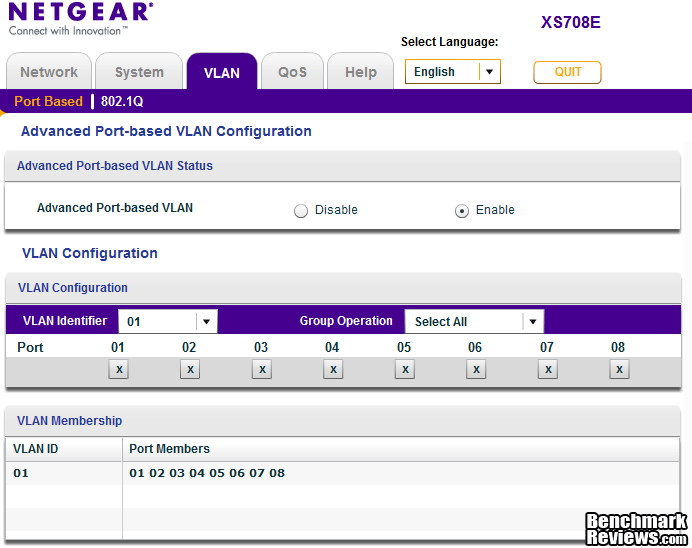
Unmanaged switches have the ability to aggregate connected devices, and allow them to communicate freely. Managed switches, even the ones that have barely enough features to make it out of the unmanaged category, also have the ability to segregate network traffic. The most common way of doing this is to set up Virtual LANs, which are made up of networked devices that are grouped logically into separate (virtual) networks. On the XS708E, VLANs can be created using port-based groupings or 802.1Q based criteria.

Port Based VLANs are simple in concept and operation. Once the VLAN is created, ports can be assigned to be members of that virtual network. Data from a port that is a member of a VLAN group is restricted to other members of that VLAN group. This feature provides an easy way to partition a network into private sub networks. It's simple, but it's rigid and restrictive for some applications. 802.1Q based VLANS are more complex, because they allow communication between devices based on VLAN IDs. The scheme is based on tagging data with VLAN ID tags, for all data packets sent through the configured port. The tag identifies the VLAN to receive the data. When a port receives data tagged for a VLAN group, the data is discarded unless the port is a member of the VLAN group. This technique is useful for communicating with devices outside of your local network as well as still receiving data from other ports not in your VLAN group. It's the electronic equivalent of the secret society lapel pin. As long as you are wearing the right tag on your lapel, you can freely communicate with other members of your club, because you can recognize them. If someone without a pin approaches and tries to discuss anything about the club, you ignore them.
Another common network management technique is called Quality of Service. This is a critical feature if you have different classes of data running across a network. When networks are first created, they tend to carry only one type of data. Phone lines are a good example; when the first telephone lines were strung, they carried analog voice signals. Today, they carry analog voice, digital voice (4-bit), FAX, TTY, DSL, and another couple dozen communication protocols that I can't name. On an Ethernet network, where you might have Streaming audio, Streaming video, VOIP, security monitoring systems, Internet, and plain old data all using the same resources, you generally need to prioritize some of those data feeds to make sure they meet the needs of the attached device(s). For instance, you don't want your 911 call to drop out or break up because someone on the network just clicked on a YouTube video. On a lesser note, you also don't want your home theater movies stuttering and stopping just because one of the PCs upstairs is performing its nightly backup.

The way to fix the issue of data prioritization is to assign different levels of quality to different data streams, so that the ones you don't want interrupted get priority over those that can run slower, if they have to. NETGEAR makes it easy to set up varying levels of QoS with the ProSAFE Plus Switch Utility software. On a typical home network, the port connected to the VOIP appliance gets High Priority, the HDTV(s) gets Medium, the DSL Modem gets Normal, and the printers get Low priority. Of course, no one in their right mind is going to use the XS708E to hook up network printers, but you get the idea. This ProSAFE Plus Switch Utility software is used across a broad product line of switches. It just so happens that this one is a speed demon, which will normally be used in situations where bandwidth requirements are super high. Still, if the company has a videoconferencing suite, I would put that connection at the top of the priority listing.

Traffic control on the XS708E is restricted to Rate Limiting and Broadcast Filtering. Rate Limiting limits the rate that the switch accepts incoming data and the rate that it retransmits outgoing data. It's a simple technique, and it can be applied to each port on an individual basis, with different rate settings for each one.

Broadcast Filtering is also known as Broadcast Storm Protection. It works by preventing a large number of broadcast messages from being transmitted to all other ports simultaneously. It blocks the messages coming into to the port that is being monitored for this kind of activity. Think of it like a spam filter that stops the unwanted message at the source, before it gets sent to everyone else on your network.

There are only a few management tools available on the Plus series of switches, but the basics are all there, and the features are all fully implemented where they do exist. Version 5 of the ProSAFE Plus Switch Utility software user guide for the XS708E is only 44 pages long. Compare that to the 240 page software manual that was provided for one of the simpler models in the NETGEAR family of ProSAFE Smart Switches, and you can see the difference easily. I'm perfectly fine with that, because the price to performance ratio of the XS708E is outstanding, and it's meant to fill a specific market need. It's not meant to do double duty as a security appliance; it's intended to sit between several high performance devices, deep in the data center where speed is king. You don't need an over-abundance of management features to succeed in that role.
Network Switch Testing Methodology
To benchmark networking components, I've typically used the most straightforward and standardized test I have: Passmark Performance v7.0 Advanced Network Test. This test measures throughput between two PCs connected through the device under test. One PC is set up as the 'Client' and the other is set up as the 'Server'. With single Gigabit devices this test scenario worked extremely well, and provided very accurate results. 10GbE devices are a whole another story, unfortunately. I ran tests with this and several other network test programs, and none of them came close to pushing 10Gb/s between two Core i5 Intel workstations. Interestingly, the highest throughput I recorded was transferring data between a PC and a NAS. I'll present the benchmark data I have, but just know that the only way to really stress test one of these enterprise level 10GbE devices is with dedicated test equipment, like a SmartBits box from Spirent. Someone have an extra five to ten grand lying around...?
What I liked about the Passmark Network Test, when I used it for testing GbE devices, is that the data set was 100% repeatable for all users. Until the IEC or IEEE comes up with some standard data sets for testing computer devices, there are always going to be random differences between file transfer benchmarks that you and I run on the same component. Your 1GB test file could be produced from an uncompressed WAV file of your favorite CD, and mine is a RAR file from highly compressed MPEG-4 video. Someone else might use a truncated copy of their Outlook PST file, and another might put 1000 digital photos together to create theirs. All of these files are the same size, but wide-spread benchmark results from SSD testing has shown that the type of data used does make a difference in transfer rates. So far, the best idea I've seen from others is using an ISO rip from a widely available DVD or Blu-ray disk - something like Avatar, for instance. That way, everyone has easy access to the same data set.
I connected two workstations (Test System #1 and #2, below) to two 10GBSAE-T ports on the NETGEAR XS708E switch, and ran several networking tests in Client-Server mode. Almost all the network test programs are designed to test the data transfer rate between two computers while each one of them are running the client and server test applications. One of the computers acts as the server and the other one acts as a client. I tried several programs:
- Passmark Performance v7.0 Advanced Network Test
- iPerf3 Compiled for Win7/8 by WLAN Book
- TamoSoft Throughput Test v1.0
- NetMeter v3.6 from Hoo Technologies
None of them offered the combination of a simple, robust test method and accurate results. The first three operated pretty much the same, albeit with different interfaces. None of them seemed to tax either the server or client machine; the CPU load of 9% shown below was typical. The last one, NetMeter v3.6 from Hoo Technologies, offered a traffic monitoring application that ended up providing the most accurate data. I had to provide the data transfer portion of the test protocol though, as NetMeter just monitored transfer speeds, it didn't run the data transfer test on its own. Fortunately, that's exactly what I do in my NAS tests, so I had data sets and a stable, robust transfer process already in my back pocket. Let's have a quick look at what didn't work....

I tried Passmark Performance v7.0 Advanced Network Test first, because it gave such good results with GbE testing. Unfortunately, it also wasn't able to demonstrate the performance level that I knew the system was capable of. 5.2 Gbps is a better result than I got from other tests, but it's still not up to what I'd already seen the network do. My NAS testing, which I'll show you at the end of this page, routinely delivered more than 6 Gbps throughput. Putting a disk-based system into the mix isn't normally a recipe for speeding up network transfers. I was getting close to what I believed was max performance from my test setup, but I wanted the max, not something close to it.

TamoSoft Throughput Test was a pleasure to use, had a great feature set, and it provided a useful set of test results. Unfortunately, it seemed "stuck" at GbE performance levels, or just barely above them. Maybe there are some interactions with the test systems that are causing this, but we'll see later that 6-7Gb/s is possible with simple file transfers, so something isn't right with this test scenario.

iPerf3 is a strictly command-line tool, and it is firmly established in the engineering and scientific community, particularly on Linux and Unix-based systems. Zaib Kaleem from WLANBook.com compiled it for Windows 7/8, and I had high hopes that this tool would be robust and provide good results. I wasn't so lucky, as the results below indicate. I wasn't even able to achieve Gigabit speeds with this tool, and the output format didn't tell me much, besides the average value of the transfer rate over the time period of the test.
C:\iperf>iperf3-s
-----------------------------------------------------------
Server listening on 5201
-----------------------------------------------------------
Accepted connection from 192.168.0.50, port 54068
[ 5] local 192.168.0.9 port 5201 connected to 192.168.0.50 port 54069
[ID] Interval Transfer Bandwidth
Sent
[ 5] 0.00-5.38 sec 468 MBytes 730 Mbits/sec
Received
[ 5] 0.00-5.38 sec 468 MBytes 730 Mbits/sec
-----------------------------------------------------------
Finally, I tried a monitoring application, where all it was doing was measuring throughput at the adapter. I had to supply the data transfer that was to be monitored, and I stuck with the multiple 1GB and 10GB files that I use for simple file transfer testing of NAS products. I was inspired to do this because of the excellent performance I got with 10GbE network tests on the latest high performance NAS I have on the test bench. I was able to get 6-7 Gb/s performance with the NAS and one workstation, so I was hoping to get similar or better performance between two workstations. After setting up large RAM Disks on both machines to handle the file transfers, I finally got the results I was looking for, with consistent results in the 6-7Gb/s range.

As an aside, here's an example of what I was able to measure on the workstation 10GbE NIC while doing timed file transfers to a NAS. You can see the steady-state transfer rate is between 6Gb/s and 7Gb/s. I had run these tests on the NAS before trying to wring the maximum performance from the switch, which is why I was so surprised when the dedicated network test applications kept giving me such low numbers. I knew the switch could push data through its 10GBASE-T ports a lot faster than what I was seeing on the test results, and after some digging I proved it.

I also ran the ATTO benchmark on the NAS, and saw consistent results in the 800MB/s range for writes to the NAS, which translates to about 6.5Gb/s, once you trade bits for bytes. Knowing that the XS708E switch was capable of this kind of performance when connecting a workstation and a high performance NAS, helped push me to explore beyond the poor results I got initially with dedicated network test applications.

My needs for a 10GbE switch were simple - I needed something that could take full advantage of the high performance NAS products I have on the test bench. That's not so different from the users that wants to use the 10GbE capability built into the server and storage products they already own. I still wish I could push the performance even further, to the maximum level of a 10Gb/s rate, but these are excellent results for a Win7 workstation running an i5 Sandy Bridge CPU. The bottom line is that the NETGEAR XS708E is faster than any component I have on the test bench, and that's exactly what I need. A high-end dual-CPU server, running either Linux or MS Server 2012 is what this switch is designed to interface with, at least on one end. There are only a few applications where 10GbE is needed on a workstation, things like multimedia editing and 3D CADD or 3D graphics. On the business side, once you get a data set big enough to reap the benefits of a 10GbE pipe, you're often better off running the application directly on the server rather than pumping the data back and forth to a workstation.
Test System 1 (Server)
- Motherboard: MSI Z68-Express Z68A-GD80 (1.23.1108 BIOS)
- System Memory: 4x 4GB Corsair Vengeance LP DDR3 1600MHz (9-9-9-24)
- Processor: Intel Core i5-2500K Sandy Bridge 3.3GHz (BX80623I52500K)
- CPU Cooler: Thermalright Venomous-X (Delta AFB1212SHE PWM Fan)
- Video: Intel HD Graphics 3000
- Drive 1: OCZ Agility3 SSD 120GB (AGT3-25SAT3-120G)
- Enclosure: Lian Li Armorsuit PC-P50R
- PSU: Corsair CMPSU-750TX ATX12V V2.2 750Watt
- Operating System: Windows 7 Ultimate Version 6.1 (Build 7600)
Test System 2 (Client)
- Motherboard: ASUS P7P55D-E Pro (1002 BIOS)
- System Memory: 4x 2GB GSKILL Ripjaws DDR3 1600MHz (7-8-7-24)
- Processor: Intel Core i5-750 (OC @ 4.0 GHz)
- CPU Cooler: Prolimatech Megahalems (Delta AFB1212SHE PWM Fan)
- Video: ATI Radeon HD 5770 1GB GDDR5 (Catalyst 8.840.3.0)
- Drive 1: OCZ Agility3 SSD 240GB (AGT3-25SAT3-240G)
- Drive 2: Seagate Momentus-XT Solid State Hybrid Drive ST95005620AS 500GB
- Enclosure: CM STORM Scout 2 Gaming Case
- PSU: PC Power and Cooling Silencer 750W Crossfire Edition
- Operating System: Windows 7 Home Premium SP1
Support Equipment
- Intel E10G41AT2, 10Gbps Ethernet NIC, x8 PCIe 2.0, 1x CAT6a
- Intel E10G42BT, X520-T2, 10Gbps Ethernet NIC, x8 PCIe 2.0, 2x CAT6a
- Dataram RAMDisk v3.5.1.130R22
- NetGear AXC761-10000S 1M Direct Attach SFP+ Cable
- 10-Foot Category-6 Solid Copper Shielded Twisted Pair Patch Cables
Networking Comparison Products
- NETGEAR GS110T 10-port GbE Smart Switch
- TRENDnet TEG-S80G 8-port GbE Switch
- TRENDnet TEW-673GRU Dual Band N300 Wireless Router
- Linksys EA4500 Dual Band N450 Wireless Router
NETGEAR XS708E TestResults
Throughput Benchmarks
Wired networking equipment is part of a very mature industry. At the high end of the market, there is still a lot of new technology and innovation, however. Recent shifts toward virtualization and cloud computing demand extreme bandwidths and scaling factors. In order to deliver on the many promises the industry has made for these two technologies, something "simple" like a switch or router better not get in the way of overall performance. It's the same way in the home or small business. More and more devices are connecting to smaller, domestic networks, and the backbone has to keep up, or everyone suffers. Something as simple as a 4-bay NAS has the potential to use a lot of network bandwidth, in a good way.
This is the first 10GbE switch I've had on the bench, so I can't compare it with any other units that have similar performance. What I can do, is show you how much more performance is available once you move from GbE up to 10Gbe. The perceived difference is huge, even more than when I upgraded to SSDs in all my various systems. Think about it, we didn't go from HDDs at 55MB/s immediately to SSDs at 550MB/s. There were some intermediate steps in there with first and second generation SSDs, and some of us had 10,000 RPM HDDs as our baseline. So, an immediate 10X speed increase is a very noticeable change. Let's take a look at how the NETGEAR XS708E compares to several GbE solutions I have in the test lab.

In TCP/IP V4 file transfers, the NETGEAR XS708E ProSAFE Plus Switch achieved an average speed of 6.90 Gbps. Compared to the other devices under test, the XS708E is more than 7 times faster, at least on my test bench. I've detailed the struggles I encountered with getting a reliable test methodology on the previous page, and two things are clear to me. This switch is better suited to communicating with Dual-CPU Servers and SANs than Win7 workstations, and the common benchmarking test suites aren't quite ready for 10GbE. So please, don't take my result as indicative that the XS708E is limited to ~ 7Gb/s. I have no doubts that under the right test conditions it can meet its full 10GbE specification. As tested, the performance difference was noticeable; file transfers were much quicker and backup jobs were done in a fraction of the normal time. Those are the two main tasks I perform that benefit from faster sequential transfer speeds. Almost all my other applications and daily tasks are more sensitive to latency, which has greatly improved since I put SSDs in all my workstations.
The total available bandwidth of the XS708E is a full 160 Gbps, the maximum rated capacity of the device, and I wish I had a way of testing that. Eight 10GbE devices at max speed, in full duplex - I have trouble imagining a scenario that generates that much data, outside of a scientific research lab. Obviously datacom providers and folks like Amazon Web Services, who manage one of the biggest cloud computing centers in the world, would have no trouble filling this sort of pipeline a thousand times over. For the rest of us, the challenge will almost always rest on the limited capability of a single device on the network, to feed a number of other devices, all at the same time. What happens when everyone decides to back up their data to the single NAS at the same time? Four TVs, all streaming HD video from one DVR? Most houses just have one Internet feed, and 3-4 people watching YouTube, Netflix, and Hulu in the evenings. For now, we can only dream about internet speeds that approach 10GbE.
Power Consumption
One aspect that has become important for many switch users is power usage and the ability to reduce it through power management techniques. As one Benchmark Reviews reader pointed out recently in comments, just the network controller part of computing used up 5.3 terawatt-hours of electricity in the US, back in the year 2005. The XS708E does not have the same Green Ethernet features that are included in NETGEAR's SmartSwitch product line. The ProSAFE Plus models do not have software control over auto power-down of unused ports, or the ability to use a special short cable mode to reduce power on connected links. These are the two main techniques that are commonly used to reduce power consumption in network switches, besides the overall improvements in power consumption that is naturally occurring at the chip level.

One big factor in power consumption for network switches is the type of cable that is used to connect the switch to other devices. The 10GBASE-T connections that constitute most of the ports on the XS708E use much more power than a typical short-range fiber optic connection. Short range, in the case of 10GBASE-SR, means less than 400 meters. There has been a debate going on in IT circles about what connection technology should be promoted for 10GbE usage in the data center, and there are some good arguments on both sides of the issue. It boils down to three factors: operating costs v. capital costs; what technology dominates the existing infrastructure, if there is one; and whether or not latency is an issue. The following chart from Mellanox, illustrates the power differences clearly; a lot of modern switches will have 28nm silicon inside them, and so the middle bar (3.5W/port) is more relevant than the one on the right (5W/port).

At startup, the XS708E turns on the two 40mm cooling fans at full speed; this consumes 22 watts at first, then they are modulated down to low speed as the temperature controller takes over. Once all the subsystems inside the switch complete their boot-up process, the switch eventually settles down to a steady state consumption of 33W, with no links connected to any of the ports. Adding network links increased the measured power consumption an average of 4W per link, while the ports are idle. Pushing several Gigabits per second through multiple ports increased power consumption by only 1-2W overall, during my testing. That was with a mix of short (6') and long (100') cables. Fully utilized, the XS708E should consume about the same amount of energy as a 60W light bulb
Now that we've examined the functionality and the performance of the NETGEAR XS708E ProSAFE Plus Switch, let's look at some of the reasons why you might want to take the plunge into 10GbE, in our Final Thoughts section.
NETGEAR Switch Final Thoughts
One question lies at the heart of this review - who needs a 10GbE wired switch? Let's look at where it makes the most sense to deploy them, and also look at where and when 10GbE is currently being rolled out in the overall networking ecosystem.
The adoption curve for 10GbE has been much slower than early proponents of the standard expected. According to industry analyst Crehan Research though, we've reached an inflection point in deployment of 10GbE ports within data centers and on servers, especially. Several issues kept the technology from taking off initially and right now there are a couple of industry drivers that are going to increase that adoption rate. Part of the problem is that 10GbE was often viewed as a high-end networking solution, but when you looked at it closer, its performance was found wanting. The reality, as everyone is finally seeing, is that 10GbE is not meant to compete with, or replace existing high-end Ethernet connections. Its real purpose is to replace the existing commodity Ethernet standard, which is GbE. That 1000BASE-T standard is so ubiquitous and it continues to perform well in a majority of applications, so it was never going to be displaced until it truly ran out of steam.

The realization that 10GbE is the new entry-level Ethernet protocol also coincides with the industry's new emphasis on using it with the existing Cat6 copper wiring that is already so prevalent. The prominence of fiber optic connections on 10GbE equipment sold in the past kept it isolated in a marketplace that didn't quite understand it. Most of that equipment is still in place, so the single SFP+/RJ-45 combo port that's on the XS708E provides a critical increase in flexibility. The rapid growth of 10GBASE-T (Cat6~Cat7 copper) ports means it will catch up to the SFP+ installed base within a couple of years, according to Intel and Crehan Research. Much of that will be driven by the adoption of 10GBASE-T in the LAN-On-Motherboard (LOM) segment. The latest Intel server architecture, code-named Romley, features the company's Xeon E5 chips and an embedded or modular 10G Ethernet LOM device. SFP+ interfaces will be available, but RJ-45 will likely dominate this important market. Intel and Broadcom both have low power, low cost, integrated solutions that have already been specified by all the major server suppliers for products that are shipping now. While 10GBASE-T is making inroads into data centers, SMBs are also finding it to be the most attractive option for their smaller operations. The XS708E is perfectly suited to the SMB market, where it can increase overall IT performance, at a very low cost.

Major changes in the architecture of data centers have also driven the demand for a faster Ethernet landscape. Virtualization has taken the corporate IT world by storm, and with it, there's been an interrelated change in how storage is organized. Single-application servers, with dedicated, bus-level connections to localized storage hardware rarely saturated their single GbE connection to the rest of the world. A modern server, with 16 cores fully utilized as virtual machines, has a lot more information it needs to communicate to the outside world. The storage for all the applications running on VMware is frequently not located within the server anymore. It's contained in an iSCSI NAS, or a SAN, which is providing storage for multiple servers. The need for faster networks gets even more obvious when many physical server boxes are connected into a VM cluster. There is no way that even a small cluster, like four dual-CPU servers, isn't going to run out of bandwidth trying to exchange data over GbE, with a common data storage system.

I know we all hate our cable company. Some of us hate all cable companies. I'm not going to try and defend them here, but it's worth looking at the landscape that they operate in. The technical landscape that is, not the political one. The Institute of Electrical and Electronics Engineers (IEEE) IEEE 802.3 Ethernet Working Group published a report in 2012 on the industry bandwidth trends impacting Ethernet wired applications. Since so many of us get their daily dose of data from a cable connection, it's worth looking at the growth in data in that sector. Growth in DSL bandwidth has stagnated, and getting fiber optic connections delivered to point-of-use has just started hitting its stride, so cable is where the meaningful data is. Every 5 years or so, the amount of data that consumers download through their cable modems goes up by a factor of 10. It's actually sort of amazing that the data growth is so consistent.

Now that we've seen why the market for 10GbE switches is about to ramp way up, let's review what we've learned about the NETGEAR ProSAFE Plus XS708E 10GbE Switch, and see how it rates.
NETGEAR XS708E Conclusion
Although the rating and final score mentioned in this conclusion are made to be as objective as possible, please be advised that every author perceives these factors differently at various points in time. As Albert Einstein said, "Not everything that can be counted counts, and not everything that counts can be counted." While we each do our best to ensure that all aspects of the product are considered, there are times that unforeseen market conditions and manufacturer changes occur after publication, that could render our rating obsolete. Please do not base any purchase solely on our conclusions, as they represent our product rating for the sample received which may also differ from retail versions.
The real-world performance of the NETGEAR ProSAFE Plus XS708E Switch was simply fantastic. I know it was just performing the way it's supposed to - no amount of overclocking, overvolting or anything else is going to make it exceed 10Gbps. In fact, I couldn't quite push it all the way to 10Gb/s, but it pulled 6.9Gb/s in simple file transfer tests between two Win7 workstations. I was very pleased with the 7X performance increase over all of the GbE networking gear I currently have in house; and that's the real story for this product. People buying the XS708E switch are more than likely getting their first taste of 10GbE performance, and it WILL be a revelation for them. As I've routinely experienced in NAS testing, 1GbE can be a real performance restraint when you've got more than 4 HDDs in RAID, which are each capable of 125 MB/s transfer rates. Now that costs for 10GbE network gear have finally come down, we're not stuck with single GbE bottlenecks anymore. Reliability was 100% during the couple of months that it's been running 24/7 on my test bench, and I expected nothing less.
The appearance of the NETGEAR XS708E is clearly aimed at the business consumer. This is not a product that you're going to see on the shelves of your local big box store. The plain cardboard box it comes in, also underscores that aspect of its market positioning. Just because the outsides aren't trendy or flashy doesn't mean that it doesn't look good, though. I happen to like understated design themes, so I warmed up to the XS708E right away. The appearance is still modern, even if it isn't a white, rounded rectangle. The rack mounting ears that come in the accessory pack are probably going to be installed on 80% of these switches, which means very few people will be looking at anything more than the front panel, anyway.

The construction of the XS708E ProSAFE Plus Switch was top notch. The enclosure was quite sturdy and well fitted together. All the mating parts lined up perfectly and when it was time to reassemble the unit after the teardown, and it went back together very easily. There were no sharp edges to worry about and the surface finish on all the parts was impeccable. The PCB was manufactured to a high standard, just like the GS110T I reviewed recently. Some fiber remnants from the PCB cleaning process were the only negative mark on build quality. These switches are designed to last a long time and operate in tough environments, and high build quality is a prerequisite for reliability.
Functionality is not where the XS708E really shines, but that's by design. It's not a Smart Switch, it's a ProSAFE Plus Switch, and so it has fewer features than some of its smarter (and costlier) siblings. There is no hard and fast rule for what functionality must be included in order to qualify as a smart switch, but the XS708E falls short of what NETGEAR offers in their higher-priced Smart Switch line. The ProSAFE Plus Switch Utility software is less powerful than the Smart Control Center software that handles all the management functions for the ProSAFE series of Smart Switches. For many uses, the basic functions that are available on the XS708E are enough to ensure that it doesn't become a liability in terms of configuration or security as part of a larger corporate network. It's not meant to do double duty as a security appliance; it's intended to sit between several high performance devices, deep in the data center where speed is king. The XS708E does get points for including one SFP+ port, in addition to the eight RJ-45 10GBASE-T ports. The eighth port is a combo unit, which can use one or the other type of connection, but not both at the same time.
The NETGEAR ProSAFE Plus XS708E Switch is available for $936.99 from NewEgg, and can be had for somewhat less (or somewhat more) from a few vendors on Amazon. This is a huge breakthrough in price v. performance, and the XS708E is the first of what I can only assume will be several new products that will finally bring 10GbE into the mainstream. Previous 10GbE switches were $300/port and above, the XS708E is close to one third of that, at roughly $120/port. 10GBASE-T switch shipments are expected to increase by a factor of forty before the year 2020, and the NETGEAR XS708E is one reason why. There is no reason now, for an SMB to pass up the advantages of putting their core servers and storage systems on a 10Gbit pipe.
The new class of 10GbE switches isn't for everyone, but for those that have a need for speed, they're a real game changer. Their cost is finally down to a very sensible price point. There are other 10GbE models in the ProSAFE product line that have more capabilities than the XS708E, more ports, more management features, etc. and they all push the price/performance line down from where it was. The XS708E has the potential for making the biggest impact though, because the price is so attractive. The barrier to implementing 10GbE in your SMB is virtually gone, as of now.
Pros:
+ SPEED on a budget
+ Basic switch management controls
+ SFP+/RJ-45 combo port increases flexibility
+ Excellent throughput on TCP/IP traffic
+ Cat6 wiring for 10GBASE-T is often pre-existing
+ Cat6a wiring is cheap for new cable runs
+ Expected long-term reliability
+ Software ease-of-use
+ Fiber optic port, if you need it
+ Easy setup with appropriate defaults
+ Good documentation
+ Large product line with many choices
+ Strong user community support
Cons: 
- No power management features
- Copper cables use more energy than fiber
- Copper cables have limited range v. fiber
Ratings:
- Performance: 9.75
- Appearance: 9.00
- Construction: 9.50
- Functionality: 9.00
- Value: 9.75
Reader comments from the original article
9 comments were posted before commenting closed. They are preserved as written. Original avatars no longer resolve and are shown as a placeholder.
Try PCATTCP Dave Permalink:
I ran into the exact same problem testing some Emulex 10GbE NIC/iSCSI adapters and our Cisco Nexus 5000 series 10GbE switches. In order to verify full 10GbE, I used PCATTCP in a client/server config to stress the network. I was able to get full 10GbE (~1200MBytes/sec each way, ~2400+MBytes/sec total) using this tool. You need to increase the buffers to 256K from 8K to get it to saturate the link. Google PCATTCP to get the software (runs in Windows, tested on 2K8 and 2K3). Here's the CLI argumetns for the server I used: C:\> pcattcp -r -c -l 262144 -A 0 And here's the CLI arguments for the client C:\> pcattcp -t - l 262144 -A 0 -c -D server_IP Note: The only way I got full line rate was to make sure TOE (TCP Offload Engine) was running, and that RSS (receive-side-scaling) was on to distribute the load across cores. Oh, and I also discovered that not all 10GbE Copper SFP+ cables are made equal =) The first two sets were flaky, the third provided solid throughput. -Dave
Good Info...! Bruce Normann Permalink:
Thanks Dave, This is all bleeding edge at the moment, so I appreciate you sharing. Our readers are the BEST! I'll definitely look into that PCATTCP software.
If you run into complications... Dave Permalink:
Let me know, I might be able to assist. 10GbE can be tricky and it starts to push the limits of what TCP can handle. Some of the defaults used by older OS's for TCP were fine with 100Mbit and 1Gbit, but start to hold back 10GbE (hence the buffer window increase to 256K with PCATTCP). If you can't get the 10GbE link up to full rate, try using multiple clients against a single server (you can run pcattcp multiple times with different ports). -Dave
RE: NETGEAR XS708E ProSafe Plus 10GbE Switch Richard Wyattt Permalink:
Newegg is really overpriced on this switch
Cheaper Fernando Permalink:
Correct, Newegg super overpriced this puppy. If you look around you can find for $840 or lower. Soon it will be $799 and lower.
may be pci-e to power system ? jean-christophe geny Permalink:
the box is clean but the power system looks heavy . today i should received a platinum psu i paid 320 euros : Corsair AX1200i 80PLUS Platinum , mostly because it has seven years warranty i selected platinum , mostly because it has an usb connector to check its health had made me take this one. i am sure these kind of psu could power 6 to 8 of these boards using the pci-e 6 or 8 cables plugs and the main pc of the network having a cpu or two and at least one or more 10 Gb link that are not used to have great vga card . so board could get down to nearly half of the current price . can you check that #techplayboy.com ?
DC Power in data Centers Bruce Bruce Permalink:
Jean-Cristophe, what you are describing (I think...) is not a very common power distribution architecture. I agree that it is wasteful to have a 150W PSU for a component that uses only half of the available power. Some data centers are using centrallized DC power supplies, that push 24VDC out to the racks. In that case, you can eliminate the PSU inside the component, which reduces heat generation within the rack and allows tighter spacing. This arangement is very specialled though, and the reason it's done is not to reduce capital cost, but to reduce operating costs. In that regards, your 80 Plus Platinum rated PSU is a step in that direction, i.e. you've got a large, very efficient PSU, why not use it? As far as reducing cost goes, the PSU in this switch doesn't contribute very much to the BOM cost. Like most leading edge technology products, it's the latest, greatest chips buried deep inside that are the main cost component.
RE: NETGEAR XS708E ProSafe Plus 10GbE Switch Ron Permalink:
Ethernet is also 40 years old this year (2013) The idea was documented in a memo in 1973. Experiments run 3 years later at PARC ran at only 2.94Mbps. PC in 1982, with inexpensive twisted-pair network cabling as a bonus 10base5 "Thicknet" was the medium in 1982. 10baseT didn't become popular until the 1990s.
RE: NETGEAR XS708E ProSafe Plus 10GbE Switch Ron Permalink:
There's a noticeable amount of cut-and-paste from the NETGEAR GS110T.