
SPEEDLINK KUDOS RS Gaming Mouse
Manufacturer: SPEEDLINK via Jöllenbeck GmbH
Product Name: KUDOS RS
Model Number: SL-6398-RD
UPC: 4027301263985
Price As Tested: €49.99 (MSRP)
Full Disclosure: The product sample used in this article has been provided by SPEEDLINK.
It's annoying when certain jazzed up peripherals are branded as 'Gaming' especially when they have no particular benefit to gamers. SPEEDLINK on the other hand have made a very good effort with the KUDOS RS Gaming Mouse, while it is very flashy looking with its red metallic finish it also packs some good features too.
The KUDOS RS features include a 5700 dpi laser sensor, on-the-fly sensitivity and profile switching, 7 programmable buttons and a 4D scroll wheel to name but a few. Here at Benchmark Reviews many of us are enthusiastic gamers and we strive for quality and functionality just as much as you guys.

Many gaming peripheral companies have already established their name and continue to release quality hardware year after year but SPEEDLINK have a way to go yet if they want to play with the big boys. Gimmicks and shiny plastic won't cut muster here at Benchmark Reviews, so we aim to put the KUDOS RS Gaming Mouse through its paces and see if it has what it takes to earn our respect as a true 'Gaming' peripheral.
SPEEDLINK KUDOS RS Specifications
- Professional USB gaming mouse
- Seven programmable buttons
- Two quick-access switches for in-game dpi and profile switching
- Distinctively notched, extra-wide 4-way scroll wheel
- Cutting-edge ultra-precise laser sensor with configurable sensitivity levels from 90 to 5700dpi
- Sensor dpi separately adjustable for X and Y axes
- Freely customisable USB ultrapolling rate of up to 1000Hz
- 150ips (inches per second) tracking speed for lag-free movement sensing
- Internal memory for five customisable profiles and freely programmable macros
- Color dpi and profile indicator bar
- Software offers extensive configuration and customisation options
- Six additional weights (each 6g) for custom weight and balance
- Ultimate control thanks to non-slip rubberised sides and gaming-optimised ergonomics
- Ultra-low-friction, long-life Teflon feet
- Highly flexible 1.8m cable with gold-plated USB connector
Closer Look: SPEEDLINK KUDOS RS
In this section we will have a close up look at the SPEEDLINK KUDOS RS gaming mouse and discuss its main features.

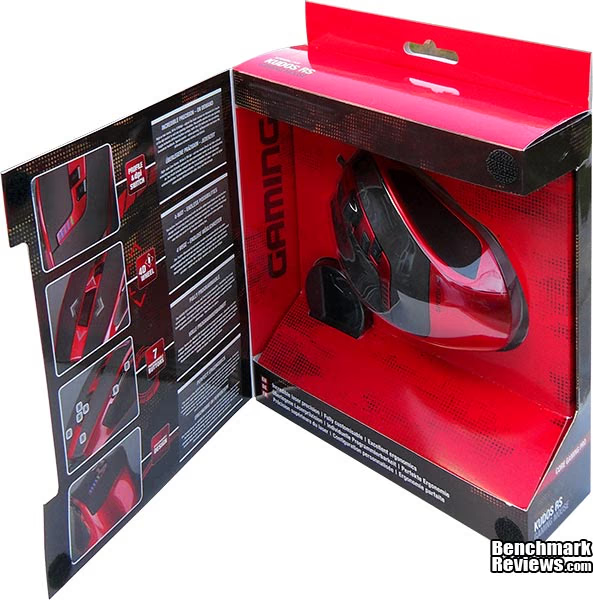
In terms of box design the KUDOS RS gaming mouse is sure to stand out and even compete with top brand designs, there is a wealth of information presented on the box exterior so there is no question about what this mouse can and can't do.

More information relative to the features of the KUDOS RS can be found under the front flap of the box printed in English and also German.

The KUDOS RS gaming mouse is ergonomically built with right handed gamers in mind. The black areas are covered with a soft feel rubber coating and enhance the feel of the mouse.

In this side profile shot we can see that the right side is somewhat lower than the left side, this is intended to make it more ergonomic and comfortable to use. There is more soft feel rubber coating used here to aid in gripping the mouse.

The left side of the KUDOS RS features two thumb buttons. I personally feel that these are located too far back for ease of access, but it isn't too much of an issue. The left side of the KUDOS RS mouse is a little higher than the right which allows room for your thumb and produces a side slant which adds to the comfort.

Both of the main buttons have the soft rubber feel coating and the KUDOS RS also features a wide and textured rubberized scroll wheel.
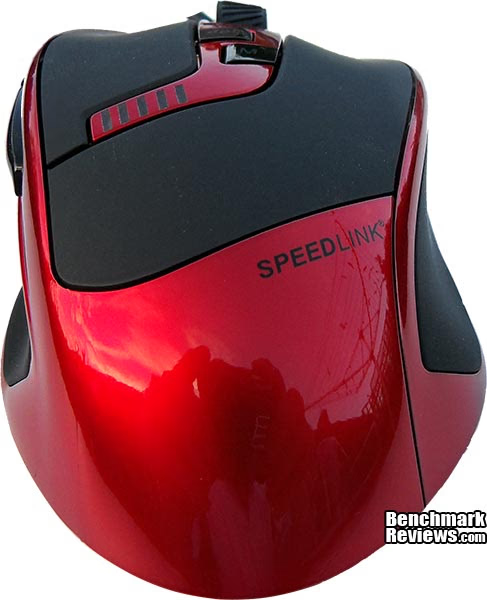
The view from the rear shows off the main ergonomic curves of the KUDOS RS. I feel that KUDOS RS has found a nice balance between the claw-grip and palm-grip styles and is probably best suited for larger hands, although the left and right click buttons respond even when pressed in line with the dpi and profile selection buttons towards the middle.

The KUDOS RS has four large low friction teflon feet pads that reduce resistance during use. As is the case with any mouse you will need to clean these pads from time to time as they are the primary point of contact and will accrue dirt oveer time.
SPEEDLINK KUDOS RS Detailed Features
In this section we will have an up close look at the SPEEDLINK KUDOS RS gaming mouse and discuss its main features.
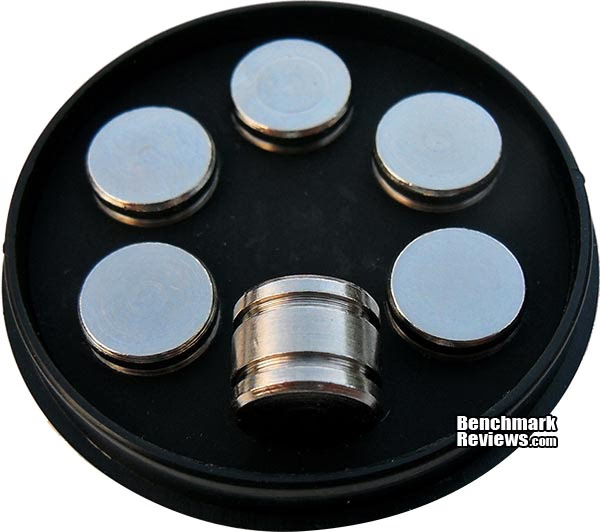
Bundled with the KUDOS RS gaming mouse are a set of six 6g weights that allow you to customize its weight to suit your personal preference. The weights come in a nice round container that allows you to securely store them whilst not in use.

On the underside of the KUDOS RS is where the extra weights can be inserted. A small push button near the bottom left gives you access to this interior section of the KUDOS RS gaming mouse.

Under constant use it is possible that low friction teflon feet pads on your gaming mouse can become loose or simply wear out. Speedlink have covered the bases here by supplying extra feet pads, let's hope that the KUDOS RS is built to last the duration, otherwise these replacement feet are just a gimmick.

All mice these days have a scroll wheel as it has become a standard but SPEEDLINK have took it to the next level by giving it extra functions and kudos go to them for it. The 4D scroll wheel has an extra two functions over a standard scroll wheel and gives the mouse extra functionality without adding extra external buttons. This novel feature included on the KUDOS RS gaming mouse is not seen on many gaming mice but could be a great standard if it was widely adopted.

There is nothing worse than loading software to make simple changes when dedicated buttons are so easy to implement. Speedlink saw fit to include on-the-fly profile switching and dpi switching buttons and even LED indicators that make it simple and intuitive to change profiles and adjust sensitivity in the heat of the moment. The first four LED's tell you what level of sensitivity you are at and the last LED on the right cycles between five colors that represent pre-defined profiles.
Testing & Results
Testing Methodology
Testing a mouse is easy, all one must do is use it for an extended period of time, the problem is that there are no quantative benchmark tests that can report back performance, so now it falls to personal observation. I have used the KUDOS RS gaming mouse as my main mouse in various applications such as web surfing, image editing and some popular games over the past few weeks or so. I also tried the KUDOS RS on various surfaces to test the tracking of the laser sensor, and tried different profiles and button combinations to see how they can help with productivity.
Test Software
- Adobe Photoshop
- Firefox and Internet Explorer web browsers
- Microsoft Office applications
- Call of Duty:MW3 / Black Ops
- Just Cause 2
- Left 4 Dead 2
- GTA IV
Results
The SPEEDLINK KUDOS RS is not my first gaming mouse, so my adjustment period didn't take too long. I do however remember how long it took me to get used to sensitivity of my first gaming mouse, and the added sensitivity afforded by the 5700 dpi sensor will definitely take newcomers some getting used to. Seasoned gamers moving from another high sensitivity gaming mouse shouldn't find any problems getting used to the KUDOS RS.
Thanks to having the two middle buttons set to adjust sensitivity and switch profile, when using the KUDOS RS in Photoshop CS4 I could lower the sensitivity on the fly to get better control for detailed work. I don't normally use mouse shortcuts outside of the right click context menu but I do find myself using copy/paste a lot, so I created a macro for each of these functions and assigned them to the two left side buttons.

I mentioned earlier in the article that these two side buttons were located a little too far back for my preference, but others might find them to be in a great position. There is no way any manufacturer can best please everyone and we have to master the tools we use, this however this still takes a bit of getting used to.
Overall I am impressed with the KUDOS RS gaming mouse and it was able to track effectively on any surface I tried, this is beneficial for portability reasons and situations where you may not be in the comfort of your own home where you don't have the luxuries of a quality mouse mat etc. The buttons have a slight tactile feel and are not so sensitive that you can make an accidental press. I found that when lifting the KUDOS RS gaming mouse the cursor tends to move a little to the left (about 1" on a 22" 1920x1080 monitor), but this doesn't seem to cause me any problems in game. The KUDOS RS is a good all round mouse but it won't instantly improve your skill, but this also goes for any other gaming mouse on the market. Simply put, the best way to get good at games is to play hard and learn your opponents; a gaming mouse merely unlocks added potential already inside you.
KUDOS RS Gaming Mouse Final Thoughts
The KUDOS RS is a good entry from SPEEDDLINK and I commend their effort considering the competition they are up against, it does exactly what it was created for and it is highly sensitive and very accurate. Gaming performance is excellent as is usage in image editing software, being able to adjust sensitivity on the fly helps when you are doing detailed work and perfecting your aiming in games. The extra sensitivity also allows me to better navigate my 22" monitor at 1920x1080 resolution. My favorite feature has got to be the 4D scroll wheel and I would like this to become a standard found in all mice.
SPEEDLINK KUDOS RS Conclusion
In this section I am going to write a brief five point summary on the following categories; Performance, Appearance, Construction, Functionality and Value. These views are my own and help me to give the SPEEDLINK KUDOS RS gaming mouse a rating out of 10, a high score does not necessarily mean that it is better than a similar gamin mouse which has been reviewed by another writer here at Benchmark Reviews, which may have got a lower score. It is however a good indicator of whether the mouse is good or not. I would strongly urge you to read the entire review, if you have not already, so that you can make an educated decision for yourself.
The performance of the SPEEDLINK KUDOS RS is excellent, while 5700 dpi is not the highest sensitivity available it is more than enough for me and still too much for my non geek friends and family. While gaming 5700 dpi is very nice indeed, The speed of online gaming has increased significantly over the years and to keep up you will need to advance with the technology. Also, thanks to the 'on the fly' sensitivity adjustments I can drop my sensitivity right down and snipe with better accuracy, without my crosshair jumping all over the place.
Appearance is subjective to the individual and thanks to the graphical nature of this review you can make your own opinion here. The design of the KUDOS RS is generally what I would refer to as a gimmick; It is made shiny to appeal to a wider audience (everyone like shiny stuff after all). I will not knock SPEEDLINK for using this tactic in the design though because they need to make it more visually appealing considering their place in the market under the big boys.
As with all products made in china you have to be aware that mass production is not without its downsides. During the course of this review we had to request another sample from SPEEDLINK as the first sample I received had a faulty scroll wheel that wouldn't register up and down scrolling, thankfully this was not the case with the second sample and all was well. The KUDOS RS feels robust and should last the duration.
Most importantly, the KUDOS RS is right up there with the best of them when it comes to functionality and the configuration utility is very intuitive and needs no real explanation. The KUDOS RS has seven buttons which can be re-assigned to different functions and macro's are easily created and assigned. Sensitivity adjustment and profile switching are made simple through the use of dedicated buttons and LED indicators so you don't need to launch software to implement changes.
The SPEEDLINK KUDOS RS has an MSRP of €49.99 (Currently available throughout Europe) equivalent to around $65 (US) and is priced competitively considering its features.
Pros:
+ 5700dpi laser sensor
+ Customizable weight system
+ Intuitive utility software
+ On-the-fly profile and sensitivity switching
+ LED indicators for dpi setting and profiles
+ Seven customisable buttons
+ 4D scroll wheel for added functionality
+ On-board memory for Macro's and Profiles
+ Rubberized coating for added grip
+ Low friction and long life teflon feet (spares included too!)
Cons:
- Designed for right handed gamers only
- Side buttons not located well for my preference
- Price is competitive but still high
- First sample received had faulty scroll wheel (second sample had no issues)
Ratings:
-
Performance: 9.00
-
Appearance: 7.50
-
Construction: 8.00
-
Functionality: 9.00
-
Value: 7.50
Final Score: 8.20 out of 10.
Benchmark Reviews invites you to leave constructive feedback below, or ask questions in our Discussion Forum.
Reader comments from the original article
9 comments were posted before commenting closed. They are preserved as written. Original avatars no longer resolve and are shown as a placeholder.
4d scroll wheel Brian Permalink:
You spoke highly of this novel 4D scroll wheel, but you never explained exactly what that is and why it's novel. I see it can go up and down and left or right, but that's available on plenty of mice. IMHO Logitech has the perfect scroll wheel with their notched and free spin settings. Please help me understand about this 4D version. Thank you!
RE: 4d scroll wheel kzinti1 Permalink:
Same here. The scroll wheel rolls forwards and back, tilts left and right and finally depresses as a button. That's 3 axes. What, exactly, is the 4th? The only 4th dimension I'm familiar with is time. I don't see any way that could possibly be incorporated in a run of the mill gaming mouse.
RE: RE: 4d scroll wheel Steven Iglesias-Hearst Permalink:
Kzinti1 and Brian; It's novel because it goes up down left and right, as you both pointed out. Why do I need to go more in depth? It's a novel feature that not all computer mice have so it got a noteworthy mention. SPEEDLINK call it a 4D scroll wheel not me, it's a marketing term. Maybe you could aim your comments towards SPEEDLINK to get some feedback.
Mr Skidmarks Permalink:
The actual saying is "cut the mustard" not "cut the muster". I have no idea how it came about but there's probably no shortage of theories.
Wrong..... Bruce Permalink:
It started out as an unnoficial military term, probably in the British Empire. Look up the definition of muster, and you'll get an idea of what it means.
RE: Mr Steven Iglesias-Hearst Permalink:
Muster: To call (troops) together, as for inspection. The figure of speech "Won't cut muster" is used in the army. I believe people say "Won't cut mustard" because they have been taught wrong or simply heard it wrong.
A problem with almost all mice reviews s2korpio Permalink:
Not specifically to the writer, but every reviewer out there. Why, for the love of God why do everyone always seem to skip the part of how the "clicking" feels? Isn't that action suppose to be the most essential part of the mouse? To be honest, I'm just sick of all the expensive mice that has a shallow click.
RE: SPEEDLINK KUDOS RS Gaming Mouse s2korpio Permalink:
Simply put, I'd rather have simple mouse that has a good, satisfying click over one that puts excessive effort into dpi and styling.
RE: RE: SPEEDLINK KUDOS RS Gaming Mouse Steven Iglesias-Hearst Permalink:
I think you may want to give this one a miss then buddy. The click is extremely light has virtually no tactile feedback whatsoever, even the click sound is quiet.