
MSI N275GTX Twin Frozr OC Video Card
MSI N275GTX Twin Frozr OC
The graphics card market is pretty much a two man slugfest at the moment. ATI and NVIDIA trade blows at irregular intervals in a brutal game of strategy. The GeForce GTX 275 was a punch that NVIDIA held in reserve, just waiting for ATI to release their HD4890 card. When launch day came for ATI, lo and behold, NVIDIA had the GTX 275 up their sleeve, ready for production. Essentially, the GTX 275 combines the GPU of the GTX 285 with the memory architecture of the GTX 260 with performance and pricing that neatly slots between the two.

MSI is an established player in the graphics card market, and their take on the GTX 275 pulls no punches. They put together a unique design, featuring twin PWM fans and a 5-heatpipe cooler, for their N275GTX Twin Frozr OC Edition, and one look should tell you that they are serious about performance. Benchmark Reviews is pleased to offer you a detailed, fact-filled look at one of the products at the heart of the sweet spot for gaming graphics.
About Micro-Star International Corporation, Ltd.
Founded in August 1986, MSI has continued to uphold a business philosophy that stresses "Award-winning product quality and outstanding customer service." MSI specializes in the design and manufacture of motherboards, graphics card, add-on cards, servers/workstations, iPC, barebones, communication devices, CE products, Notebooks, car infotainment products, and All-in-One PC.
"Quality Products Create Faithful Customers" is a motto that guides all that we do at MSI. For this reason, MSI goes all out to be the best of the best in research and development. Currently, 2,500 experienced engineers staff our research and development department. This talented team carries out its work with the latest research equipment, continuing to raise the bar on product quality and innovative product features.
At MSI, we put our motto -- "Quality Products Create Faithful Customers"--into living practice. In 1995 and 1996, we received ISO-9002 and ISO-9001 product quality certification, respectively. In 1999, MSI received ISO-14001 environmental certification, affirming our commitment to the environment. Furthermore, MSI products undergo rigorous quality control testing, attaining a 99.6% quality rate, a level far higher than the industry standard. MSI's superior product quality has garnered exceedingly favorable coverage from the global media, countless awards, and a very enthusiastic customer response.
In recent years, MSI has aggressively expanded into mainland China to meet the needs of our global customers. In 2000, the Baoan Plant in Shenzhen started production, vastly increasing MSI's production output as well as revenue. Aside from the Baoan Plant in Shenzhen, MSI has also established production facilities and a research and development center in Kunshan, China in 2001. The motherboard annual production is expected to reach 20.8 million units and the annual graphics card production is expected to reach 11.8 million units. Combined with the production from Taiwan, MSI is now becoming one of the biggest motherboard and graphics card manufacturers in the world.
Twin Frozr OC Features
The feature set of the MSI N275GTX is primarily aimed at providing the maximum performance at a competitive cost. Some elements add cost, like the 5-heatpipe cooler and the twin PWM fans, but they also increase potential performance.
Twin Frozr - Dual Fan and industry-leading five heatpipes design
MSI entirely new Twin Frozr on N275GTX series utilizes an intelligent PWM dual-fan design. The fan speed is automatically adjusted according to the core temperature of the GPU, guaranteeing ultra-low noise emissions under regular load while dynamically adjusting the fan speed during game play and 3D-operations and still remaining quiet. Moreover the dual-fan design naturally also provides twice the cooling efficiency. With two fans the user is always on the safe side, should for some reason one fan not operate correctly, the second fan still secures effective cooling, thereby making sure that your graphics card won't be damaged.
In addition, the Twin Frozr on MSI N275GTX series uses an industry-leading five heatpipes design, compared to conventional 2 or 4 heatpipes designs this greatly improves heat dissipation efficiency. So in the first step the heat will be evenly distributed over the fins, while in the second step the dual-fan will blow it away. Rest assured, with these highly effective measures all your over-heating problems belong to the past.
MSI Solid Capacitor Graphic Card
MSI Graphics Card products utilities high quality solid capacitor. For the gamers and high-end users, this feature not only means that product has better quality components within, but also provide much stronger support while users want to engage in hard-core tuning.
MSI Dual CoreCell Technology
The Dual CoreCell is an ASIC (Application-Specific Integrated Circuit) that has been designed to improve the performance of MSI's motherboards and VGA components in four key areas, Performance, Image, Sound and Silence.
MSI Vivid is an easy tool to enhance "image quality". It can helps users to get better image quality in viewing digital photos, document & games
• Vivid brings the easiest way to optimize graphic quality.
• Colorize your vision when browsing digital photos
• Sharpen characters edge
• Enhance contrast when playing game
MSI DOT Express Technology is the most advanced Dynamic Overclocking Technology Express enabling supreme overclocking, cooling and de-noise performance. It is an advanced overclocking engine, designed to deliver up to 10% extra performance and greatly enhances the synchronized GPU & DDR performance.
MSI StarOSD is a very helpful utility for the avid PC gamers. Users can easily access the StarOSD to adjust the contrast, brightness, overclocking and temperature according to each user's individual preference.
Note:Star OSD function that be used on different games has some difference cause the game different design.
MSI Live Update online is designed to automatically download and update the BIOS and driver when there's a new version online. It helps reduce the risk of getting the wrong file and minimize the trouble of searching the files from MSI website.
MSI Live Update 3 is a single utility software that automatically checks BIOS, driver and utility updates and installs for you , which can save your time for searching and lower the risk while updating.
PhysXTM is designed specifically for hardware acceleration by powerful processors with hundreds of cores. Combined with the tremendous parallel processing capability of the GPU, PhysXTM will provide an exponential increase in physics processing power and will take gaming to a new level delivering rich, immersive physical gaming environments with features such as:
Explosions that cause dust and collateral debris
Characters with complex, jointed geometries for more life-like motion and interaction
Spectacular new weapons with incredible effects
Cloth that drapes and tears naturally
Dense smoke & fog that billow around objects in motion
NVIDIA CUDATM technology is the world's only C language environment that enables programmers and developers to write software to solve complex computational problems in a fraction of the time by tapping into the many-core parallel processing power of GPUs. With millions of CUDATM-capable GPUs already deployed, thousands of software programmers are already using the free CUDATM software tools to accelerate applications-from video and audio encoding to oil and gas exploration, product design, medical imaging, and scientific research.
Bundled MSI developed driver and utilities
-Blocks online identity theft by phishing Web sites
-Detects and eliminates spyware
-Removes viruses and Internet worms automatically
-Protects against hackers
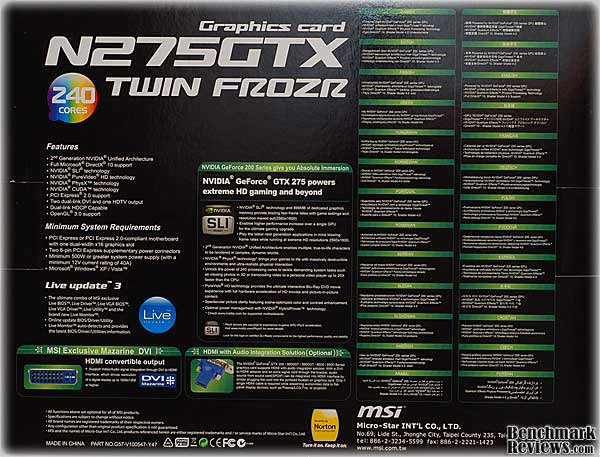
The list of features is not completely spelled out on the back of the retail package, but I guess MSI expects potential buyers to do their research ahead of time. I have to agree with them on this one; I don't know anyone that would go to a retail store and drop hundreds of dollars on a video card without knowing they were getting what they need, or want.
MSI N275GTX Specifications
|
Graphics Engine |
NVIDIA GeForce GTX 275 |
|---|---|
|
Bus Standard |
PCI Express 2.0 |
|
Video Memory |
DDR3 896MB |
|
Engine Clock |
666 MHz |
|
Shader Clock |
1476 MHz |
|
Memory Clock |
2322 MHz (1161 MHz DDR2) |
|
RAMDAC |
400MHz |
|
Memory Interface |
448-bit |
|
CRT Max Resolution |
2048 x 1536 |
|
DVI Max Resolution |
2560 x 1600 |
|
D-Sub Output |
Yes x 1 (via DVI to D-Sub adaptor x 1 ) |
|
DVI Output |
Yes x 2 (DVI-I) |
|
HDMI Output |
Yes x 1 (via DVI to HDMI adaptor x 1 ) |
|
HDTV Output (YPbPr) |
Yes |
|
HDCP Support |
Yes |
|
TV Output |
Yes (YPbPr to S-Video and Composite) |
|
Adapter/Cable Bundled |
1 x DVI to D-Sub adaptor |
|
Software Bundled |
MSI Utilities & Driver |
|
Size |
The card size is 4.376 inches x 10.5 inches |
These specifications aren't out of the ordinary for a GTX 275 card; the 55nM version of the NVIDIA GT200 GPU is a pretty flexible GPU and it's not strained by its application here. The 275 has been available for awhile now, and is represented in all the major video card maker product lines. Let's take a closer look at this MSI version, and its unique features, to see what's really different about this card.
Closer Look: MSI N275GTX
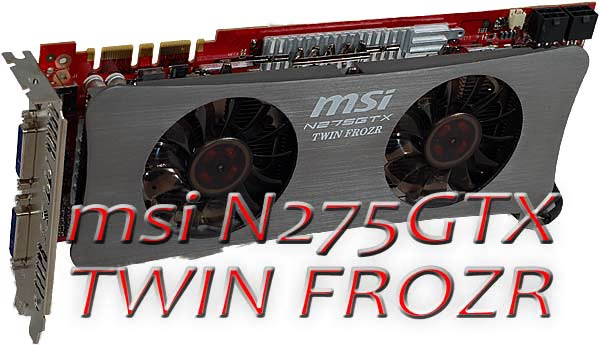
The dual fans on the face of the MSI N275GTX Twin Frozr OC give away the game, immediately. This card is meant to run above stock speeds and voltages, and to prove that, it comes that way from the factory. Standard clocks for the GTX 275 are GPU-633MHz, Shader-1404MHz, Memory-1134MHz. MSI takes these up to 666MHz, 1476MHz, and 1161MHz, respectively. These aren't huge overclocks, 5-10%; just enough to let you know that it's OK to turn up the wick.

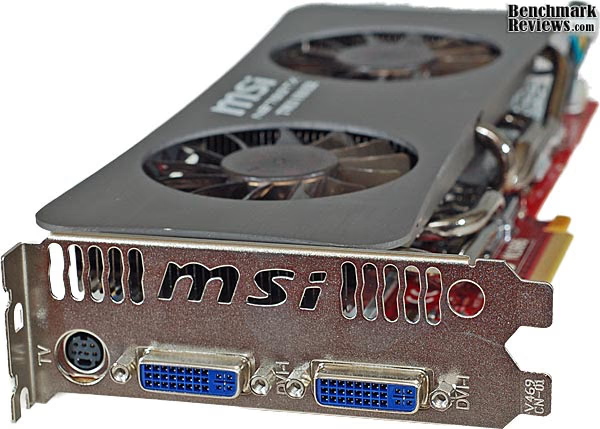
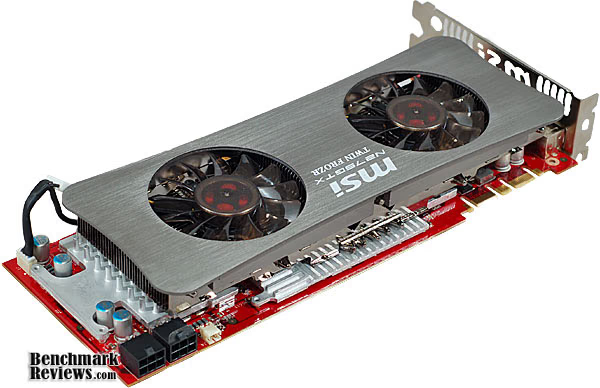
The N275GTX Twin Frozr OC is definitely a dual-slot device, as the following image shows. The full width adapter plate at the rear is slotted to allow some of the heat to escape from the case. Because of the open design of the fan shroud, not a lot of airflow is going to get directed out there from the fans on the video card. If you have a case with positive pressure, like the SilverStone Fortress FT01B, there's a better chance that some warm air will get pushed out the back vents.
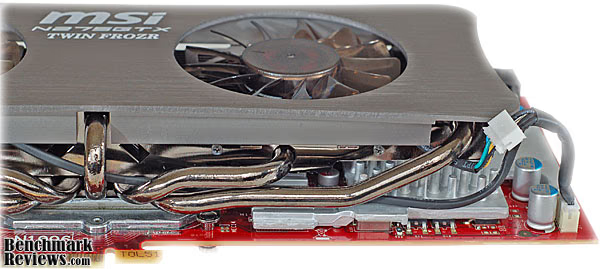
The cooling system is fairly straightforward, except for the use of five separate heatpipes to pull the heat away from the GPU core. MSI is one of the few companies using a heatpipe cooler on a GTX 275, and no one else is using more than four pipes, that's for certain. The heatpipes spread out from the centrally located GPU and funnel heat to a full length fin assembly. There are two large pulse-width-modulated (PWM) fans, which have their speed controlled by a custom ASIC; they are wired together and their speed is controlled by one common circuit. Here's a detail shot of the heatpipes, their cooling fins, the rear fan, and the power cable splitter for the fans. Note the use of all four wires in the fan cable, which is required for the PWM style fans.
The power section provides 6-phase power to the GPU and 2-phase power to the GDDR3 memory. It's becoming more common place to modulate multiple power phases to achieve better voltage regulation, improve efficiency, and reduce heat. The MSI N275GTX Twin Frozr OC offers the same capability as some high-end motherboards in this regard, and given the power density in video cards these days, it's a welcome feature. The power MOSFETs at the rear of the card are fitted with their own heatsink, and there is direct airflow from the rear fan to keep all the power components plenty cool.

The RAM chips are cooled by their own aluminum heat sinks/spreaders that also get cooling airflow from the two fans.

Twin Frozr OC Detailed Features
Cooling performance is an important part of the Twin Frozr product line, it makes sense that MSI wouldn't skimp on the fans. The 13-blade impellers are not your typical design; they seem custom built for the application. They were effectively silent while processing 2-D material, and didn't annoy when the 3-D setting kicked in. The radial fans on the GT200 reference coolers generally sound awful when they're cranked up to 100%. Most of the time, the firmware on the board keeps the speed as low as possible; it's only when the tech rats burrow into the software and run them up, that we hear them moan.
When I'm benchmarking a card, I've often felt the need to intervene with control software (RivaTuner), pushing the fans up to 100% speed in order to keep the card healthy. Especially when overclocking them, and pushing the limits of the components, I want to get the best possible performance. The MSI N275GTX Twin Frozr is the first card where I felt I didn't have to do that; the cooling system had enough capacity to take whatever I threw at it, and the fan control firmware wasn't stingy with the PWM power.

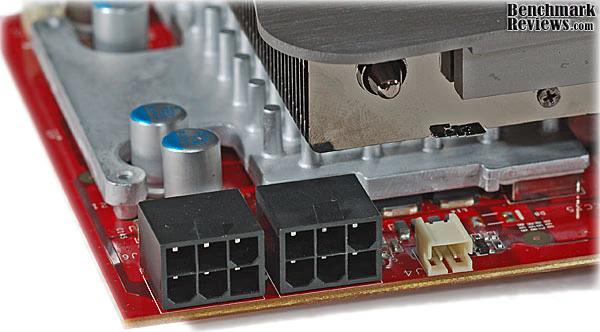
Power requirements are supplied by two auxiliary PCI-E connectors, of the 6 pin variety. This is a common feature of most of the NVIDIA GT200 series cards. The 10.5" length of the card necessitates putting them along the upper edge, which is generally convenient for access, but not as slick for us OCD cable management types. Next to the power connectors is the S/PDIF connector for your HDMI interface needs. The board has some exposed components, which are vulnerable to getting knocked off or damaged, so be gentle when wrestling around inside the case.
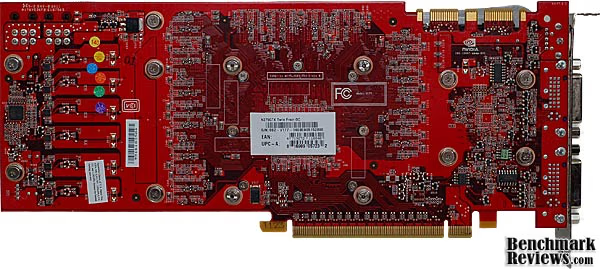
The design of the PCB makes good use of the back side of the board. There are hundreds of small, surface mount resistors and capacitors located there, along with a couple small MOSFET drivers and logic chips. It's the perfect place for all those low profile components.
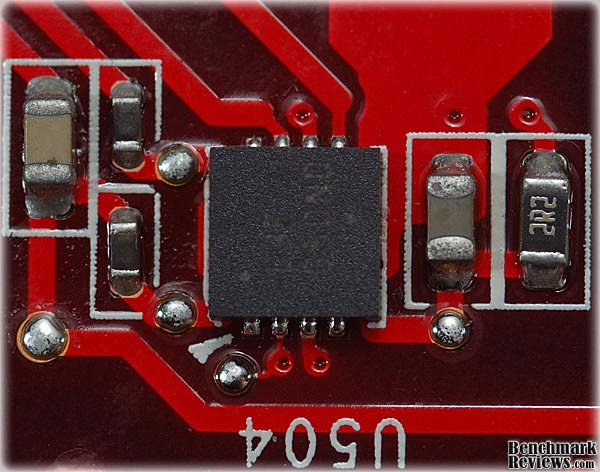
I was extremely impressed by the assembly quality on the PCB. I always get out my 10X loupe to inspect the minute details, and what I see doesn't always impress me. The precision shown in component placement and consistency of the solder joints on this board is world class, as this macro image shows.
Many hardware products come with some utility software bundled along with them. For most of recorded PC history, this software wasn't worth the cost of the storage media it was burned on. That's starting to change; for the past year or so there have been several products that shipped with usable monitoring and control, and other utilities. MSI follows the trend, shipping the N275GTX OC with some basic utilities that I tried during the review. "MSI Dual Core Center" is that monitoring and control part I just mentioned. Normally, I would just load up RivaTuner and go, but I've had some good experiences lately, so I gave the MSI app a chance. MSI Dual Core Center didn't provide all the functionality I was looking for, as I couldn't control the clock frequency of the shader processors or the fan speed, but it was straightforward to use, and didn't have any strange behavior during operation. I know, those sound like pretty minimal requirements, but until recently, most software supplied by PC hardware vendors didn't meet them.

There are five default profiles loaded into MSI Dual Core Center:
-
AV
-
Game
-
Office
-
Silence
-
Cool

There are also fully manual settings available for the Core and Memory clocks. It was relatively easy to manipulate the Core and Memory, with pull down menus for the clock speeds, but where's the Shader clock? Also, you can see that the fan settings are disabled, whereas RivaTuner picked them up, and GPU-Z 3.0 had no trouble displaying them.
Video Card Testing Methodology
At the start of all tests, the previous display adapter driver is uninstalled and trace components are removed using Driver Cleaner Pro.We then restart the computer system to establish our display settings and define the monitor. Once the hardware is prepared, we begin our testing. The synthetic benchmark tests in 3DMark06 will utilize shader models 2.0 and 3.0. In our higher-end VGA products we conduct tests at the following resolutions: 1280x1024 (19" Standard LCD), 1680x1050 (22-24" Widescreen LCD), and 1920x1200 (24-28" Widescreen LCD). In some tests we utilized widescreen monitor resolutions, since more users are beginning to feature these products for their own computing.
Each benchmark test program begins after a system restart, and the very first result for every test will be ignored since it often only caches the test. This process proved extremely important in the World in Conflict and Supreme Commander benchmarks, as the first run served to cache maps allowing subsequent tests to perform much better than the first. Each test is completed five times, with the average results displayed in our article.
Our site polls and statistics indicate that the over 90% of our visitors use their PC for playing video games, and practically every one of you are using a screen resolutions mentioned above. Since all of the benchmarks we use for testing represent different game engine technology and graphic rendering processes, I feel that this battery of tests will provide a diverse range of results for you to gauge performance on your own computer system. Since most gamers and enthusiasts are still using Windows XP, DirectX 9 will be used for all tests until demand and software support improve for Windows Vista or Windows 7 gains widespread acceptance.
Test System
-
Motherboard: ASUS M4A79T Deluxe (0902 BIOS)
-
System Memory: 2X 2GB OCZ Reaper HPC DDR3 1600MHz (7-7-7-24)
-
Processor: AMD Phenom II 720 Black Edition (Overclocked to 3.8 GHz)
-
CPU Cooler: CoolerMaster Hyper Z600
-
Video: MSI N275GTX Twin Frozr OC 896MB GDDR3 PCI-E 2.0
-
Drive 1: OCZ Vertex Series SSD, 30GB
-
Drive 2: Seagate ST3750330AS 750GB 7200RPM SATAII
-
Optical Drive: Sony NEC Optiarc AD-7190A-OB 20X IDE DVD Burner
-
Enclosure: CM STORM Scout Gaming Case
-
PSU: Corsair CMPSU-750TX ATX12V V2.2 750Watt
-
Monitor: SOYO 24" Widescreen LCD Monitor (DYLM24E6) 1920X1200
-
Operating System: Windows XP SP3
Benchmark Applications
-
3DMark06 v1.1.0 (8x Anti Aliasing & 16x Anisotropic Filtering)
-
Crysis v1.21 Benchmark (High Settings, 0x and 4x Anti-Aliasing)
-
Devil May Cry 4 Benchmark Demo (Ultra Quality, 8x MSAA)
-
Far Cry 2 v1.02 (Very High Performance, Ultra-High Quality, 8x AA)
-
World in Conflict v1.0.0.9 Performance Test (Very High Setting: 4x AA/4x AF)
Video Card Test Products
-
MSI Radeon HD4830 (R4830 T2D512 - Catalyst 9.4)
-
ASUS Radeon HD4850 (EAH4850 TOP - Catalyst 9.4)
-
ASUS GeForce GTX 260 (ENGTX260 MATRIX - Forceware v181.22)
-
ASUS Radeon HD 4890 (EAH4890 TOP - Catalyst 9.4)
-
MSI GeForce GTX 275 (N275GTX Twin Frozr OC - Forceware v185.85)
-
ASUS GeForce GTX 285 (ENGTX285 TOP - Forceware v181.22)
Support Equipment
-
P3 International Kill-A-Watt EZ (model P4460)
|
Product Series |
MSI Radeon HD4830 (R4830 T2D512) |
ASUS Radeon HD4850 (EAH4850 TOP) |
ASUS GeForce GTX 260 (ENGTX260 MATRIX) |
Radeon HD 4890 (EAH4890 TOP) |
MSI GeForce GTX 275 (N275GTX Twin Frozr OC) |
ASUS GeForce GTX 285 (ENGTX285 TOP) |
|---|---|---|---|---|---|---|
|
Stream Processors |
640 |
800 |
216 |
800 |
240 |
240 |
|
Core Clock (MHz) |
585 |
680 |
576 |
900 |
666 |
670 |
|
Shader Clock (MHz) |
N/A |
N/A |
1242 |
N/A |
1476 |
1550 |
|
Memory Clock (MHz) |
900 |
1050 |
999 |
975 |
2322 |
1300 |
|
Memory Amount |
512MB - GDDR3 |
512MB - GDDR3 |
896MB - GDDR3 |
1024MB - GDDR5 |
896MB - GDDR3 |
1024MB - GDDR3 |
|
Memory Interface |
256-bit |
256-bit |
448-bit |
256-bit |
448-Bit |
512-bit |
3DMark06 Benchmark Results
3DMark is a computer benchmark by Futuremark (formerly named Mad Onion) to determine the DirectX 9 performance of 3D game performance with graphics cards. 3DMark06 uses advanced real-time 3D game workloads to measure PC performance using a suite of DirectX 9 3D graphics tests, CPU tests, and 3D feature tests.
3DMark06 tests include all new HDR/SM3.0 graphics tests, SM2.0 graphics tests, AI and physics driven single and multiple cores or processor CPU tests and a collection of comprehensive feature tests to reliably measure next generation gaming performance today. Some enthusiasts may note that Benchmark Reviews does not include CPU-bound tests in our benchmark battery, and that only graphic-bound tests are included.
Here at Benchmark Reviews, we believe that synthetic benchmark tools are just as valuable as video games, but only so long as you're comparing apples to apples. Since the same test is applied in the same controlled method with each test run, I believe 3DMark is a very reliable tool for comparing graphic cards against one-another.
1680x1050 is rapidly becoming the new 1280x1024. More and more widescreen are being sold with new systems or as upgrades to existing ones. Even in tough economic times, the tide cannot be turned back; screen resolution and size will continue to creep up. Using this resolution as a starting point, the maximum settings were applied to 3dMark06 which for these tests include 8x Anti-Aliasing and 16x Anisotropic Filtering.
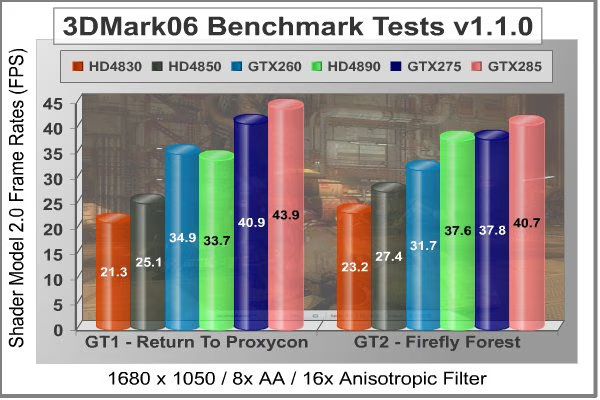
The four test scenarios in 3DMark06 provide a varied set of challenges for the video cards and their subsystems. I am sometimes a little puzzled by the results of the Shader Model 2.0 results, as they always seem to throw a wrench in the works. In this case, the GT2 results are almost perfectly scaled, according to the theoretical processing power and price of the cards in the test. GT1 however throws a wicked curveball at the HD4890. In many cases, the best advice for selecting a video card is to buy it based on its performance with the applications you will be using. The SM2.0 benchmarks aren't exactly one of those applications, but for those gamers who play their favorite oldies that may be based on Shader Model 2.0, this is an important test.
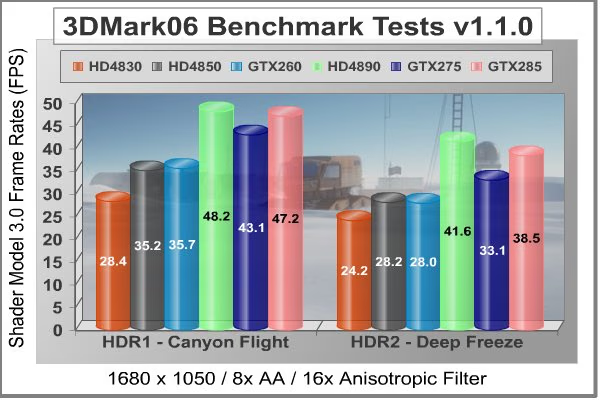
The SM3.0 benchmarks provide a more consistent set of results, even if they do favor the Radeon processors. Based on these results, it wouldn't pay to spend any extra money for the GTX275 over the HD4890, as it's the king of the hill, even edging out the GTX285 by a small margin. These two high-end cards both loom tall over the rest of the pack, however, by providing a significant performance gain.
|
Product Series |
MSI Radeon HD4830 (R4830 T2D512) |
ASUS Radeon HD4850 (EAH4850 TOP) |
ASUS GeForce GTX 260 (ENGTX260 MATRIX) |
Radeon HD 4890 (EAH4890 TOP) |
MSI GeForce GTX 275 (N275GTX Twin Frozr OC) |
ASUS GeForce GTX 285 (ENGTX285 TOP) |
|---|---|---|---|---|---|---|
|
Stream Processors |
640 |
800 |
216 |
800 |
240 |
240 |
|
Core Clock (MHz) |
585 |
680 |
576 |
900 |
666 |
670 |
|
Shader Clock (MHz) |
N/A |
N/A |
1242 |
N/A |
1476 |
1550 |
|
Memory Clock (MHz) |
900 |
1050 |
999 |
975 |
2322 |
1300 |
|
Memory Amount |
512MB - GDDR3 |
512MB - GDDR3 |
896MB - GDDR3 |
1024MB - GDDR5 |
896MB - GDDR3 |
1024MB - GDDR3 |
|
Memory Interface |
256-bit |
256-bit |
448-bit |
256-bit |
448-Bit |
512-bit |
Crysis Benchmark Results
Crysis uses a new graphics engine: the CryENGINE2, which is the successor to Far Cry's CryENGINE. CryENGINE2 is among the first engines to use the Direct3D 10 (DirectX10) framework of Windows Vista, but can also run using DirectX9, both on Vista and Windows XP.
Roy Taylor, Vice President of Content Relations at NVIDIA, has spoken on the subject of the engine's complexity, stating that Crysis has over a million lines of code, 1GB of texture data, and 85,000 shaders. To get the most out of modern multicore processor architectures, CPU intensive subsystems of CryENGINE 2 such as physics, networking and sound, have been re-written to support multi-threading.
Crysis offers an in-game benchmark tool, which is similar to World in Conflict. This short test does place some high amounts of stress on a graphics card, since there are so many landscape features rendered. For benchmarking purposes, Crysis can mean trouble as it places a high demand on both GPU and CPU resources. Benchmark Reviews uses the Crysis Benchmark Tool by Mad Boris to test frame rates in batches, which allows the results of many tests to be averaged.
Low-resolution testing allows the graphics processor to plateau its maximum output performance, which thereby shifts demand onto the other system components. At the lower resolutions Crysis will reflect the GPU's top-end speed in the composite score, indicating full-throttle performance with little load. This makes for a less GPU-dependant test environment, but it is sometimes helpful in creating a baseline for measuring maximum output performance. At the 1280x1024 resolution used by some newer 17" and most 19" monitors, all of the video cards tested performed at very respectable levels. At the widescreen resolutions of 1680x1050 and 1900x1200, the performance differences start appearing between video cards under test.
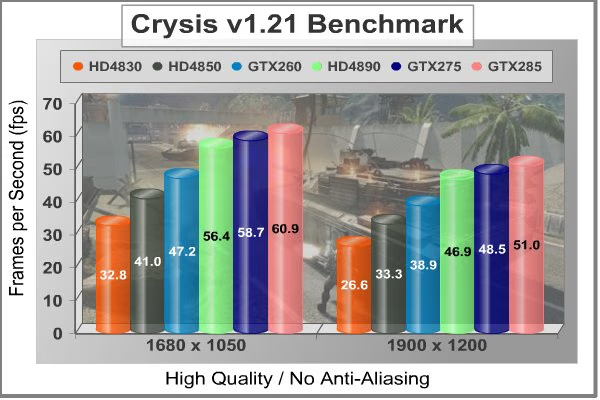
Crysis used to be the toughest game in town, but the latest generation of video cards are starting to get a handle on it. Certainly with no anti-aliasing dialed in, any of the tested cards provide a usable solution. The MSI N275GTX easily beats the GTX260 by roughly 10 FPS at either resolution and comes within 1-2 FPS of a factory overclocked GTX285 based card. This would be front page news, if people played Crysis without anti-aliasing.
The MSI N275GTX also beats the HD4890 by 1-2 FPS in this benchmark, earning it's keep in the ongoing battle between ATI and NVIDIA. Keep in mind; none of these cards were overclocked, meaning I didn't push them any faster than their out-of-the-box settings. Most of these cards are factory overclocked, but I'm sure there are still a few MHz left on the table, even for them.
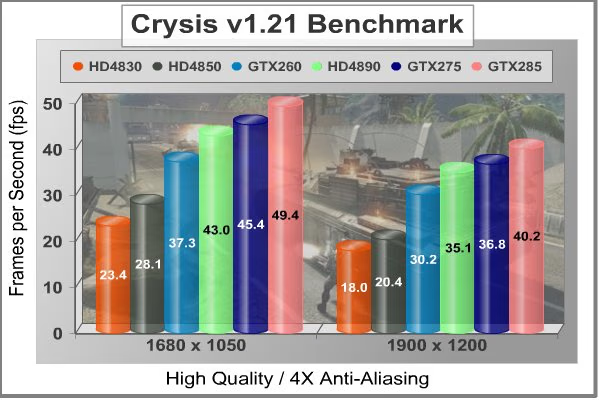
Once a decent amount of anti-aliasing is factored in, the high end cards start to show what they're made of. At 1680x1050 you start to see some degradation in game play with the HD4830 and HD4850, at 1900x1200, it becomes a major issue. The GTX275 keeps pace at both resolutions, offering a major step up from the mid-range offerings from ATI and 1-2 FPS advantage over the HD4890 again. The GTX285 pulls away from the rest of the pack a bit more here, offering an extra 3-4 FPS over the GTX275 at these resolutions. That additional memory bandwidth (512 bit) comes in handy during AA processing.
|
Product Series |
MSI Radeon HD4830 (R4830 T2D512) |
ASUS Radeon HD4850 (EAH4850 TOP) |
ASUS GeForce GTX 260 (ENGTX260 MATRIX) |
Radeon HD 4890 (EAH4890 TOP) |
MSI GeForce GTX 275 (N275GTX Twin Frozr OC) |
ASUS GeForce GTX 285 (ENGTX285 TOP) |
|---|---|---|---|---|---|---|
|
Stream Processors |
640 |
800 |
216 |
800 |
240 |
240 |
|
Core Clock (MHz) |
585 |
680 |
576 |
900 |
666 |
670 |
|
Shader Clock (MHz) |
N/A |
N/A |
1242 |
N/A |
1476 |
1550 |
|
Memory Clock (MHz) |
900 |
1050 |
999 |
975 |
2322 |
1300 |
|
Memory Amount |
512MB - GDDR3 |
512MB - GDDR3 |
896MB - GDDR3 |
1024MB - GDDR5 |
896MB - GDDR3 |
1024MB - GDDR3 |
|
Memory Interface |
256-bit |
256-bit |
448-bit |
256-bit |
448-Bit |
512-bit |
Devil May Cry 4 Benchmark
Devil May Cry 4 was released for the PC platform in early 2007 as the fourth installment to the Devil May Cry video game series. DMC4 is a direct port from the PC platform to console versions, which operate at the native 720P game resolution with no other platform restrictions. Devil May Cry 4 uses the refined MT Framework game engine, which has been used for many popular Capcom game titles over the past several years.
MT Framework is an exclusive seventh generation game engine built to be used with games developed for the PlayStation 3 and Xbox 360, and PC ports. MT stands for "Multi-Thread", "Meta Tools" and "Multi-Target". Originally meant to be an outside engine, but none matched their specific requirements in performance and flexibility. Games using the MT Framework are originally developed on the PC and then ported to the other two console platforms.
On the PC version a special bonus called Turbo Mode is featured, giving the game a slightly faster speed, and a new difficulty called Legendary Dark Knight Mode is implemented. The PC version also has both DirectX 9 and DirectX 10 mode for Microsoft Windows XP and Vista Operating Systems.
It's always nice to be able to compare the results we receive here at Benchmark Reviews with the results you test for on your own computer system. Usually this isn't possible, since settings and configurations make it nearly difficult to match one system to the next; plus you have to own the game or benchmark tool we used.
Devil May Cry 4 fixes this, and offers a free benchmark tool available for download. Because the DMC4 MT Framework game engine is rather low-demand for today's cutting edge multi-GPU video cards, Benchmark Reviews uses the 1920x1200 resolution to test with 8x AA (highest AA setting available to Radeon HD video cards) and 16x AF.

Devil May Cry 4 is not as demanding a benchmark as it used to be. Only scene #2 and #4 are worth looking at from the standpoint of trying to separate the fastest video cards from the slower ones. Still, it represents a typical environment for many games that our readers still play on a regular basis, so it's good to see what works with it and what doesn't. Any of the tested cards will do a credible job in this application, and the performance scales in a pretty linear fashion. You get what you pay for in this game. This is one time where you can generally use the maximum available anti-aliasing, so NVIDIA users should feel free to crank it up to 16X.
The GTX275 suffers a bit compared to the HD4890 in this benchmark, but when you're up in the 90 FPS range, does it really matter?
|
Product Series |
MSI Radeon HD4830 (R4830 T2D512) |
ASUS Radeon HD4850 (EAH4850 TOP) |
ASUS GeForce GTX 260 (ENGTX260 MATRIX) |
Radeon HD 4890 (EAH4890 TOP) |
MSI GeForce GTX 275 (N275GTX Twin Frozr OC) |
ASUS GeForce GTX 285 (ENGTX285 TOP) |
|---|---|---|---|---|---|---|
|
Stream Processors |
640 |
800 |
216 |
800 |
240 |
240 |
|
Core Clock (MHz) |
585 |
680 |
576 |
900 |
666 |
670 |
|
Shader Clock (MHz) |
N/A |
N/A |
1242 |
N/A |
1476 |
1550 |
|
Memory Clock (MHz) |
900 |
1050 |
999 |
975 |
2322 |
1300 |
|
Memory Amount |
512MB - GDDR3 |
512MB - GDDR3 |
896MB - GDDR3 |
1024MB - GDDR5 |
896MB - GDDR3 |
1024MB - GDDR3 |
|
Memory Interface |
256-bit |
256-bit |
448-bit |
256-bit |
448-Bit |
512-bit |
Far Cry 2 Benchmark Results
Ubisoft has developed Far Cry 2 as a sequel to the original, but with a very different approach to game play and story line. Far Cry 2 features a vast world built on Ubisoft's new game engine called Dunia, meaning "world", "earth" or "living" in Farci. The setting in Far Cry 2 takes place on a fictional Central African landscape, set to a modern day timeline.
The Dunia engine was built specifically for Far Cry 2, by Ubisoft Montreal development team. It delivers realistic semi-destructible environments, special effects such as dynamic fire propagation and storms, real-time night-and-day sun light and moon light cycles, dynamic music system, and non-scripted enemy A.I actions.
The Dunia game engine takes advantage of multi-core processors as well as multiple processors and supports DirectX 9 as well as DirectX 10. Only 2 or 3 percent of the original CryEngine code is re-used, according to Michiel Verheijdt, Senior Product Manager for Ubisoft Netherlands. Additionally, the engine is less hardware-demanding than CryEngine 2, the engine used in Crysis.
However, it should be noted that Crysis delivers greater character and object texture detail, as well as more destructible elements within the environment. For example; trees breaking into many smaller pieces and buildings breaking down to their component panels. Far Cry 2 also supports the amBX technology from Philips. With the proper hardware, this adds effects like vibrations, ambient colored lights, and fans that generate wind effects.
There is a benchmark tool in the PC version of Far Cry 2, which offers an excellent array of settings for performance testing. Benchmark Reviews used the maximum settings allowed for our tests, with the resolution set to 1920x1200. The performance settings were all set to 'Very High', DirectX 9 Render Quality was set to 'Ultra High' overall quality, 8x anti-aliasing was applied, and HDR and Bloom were enabled.
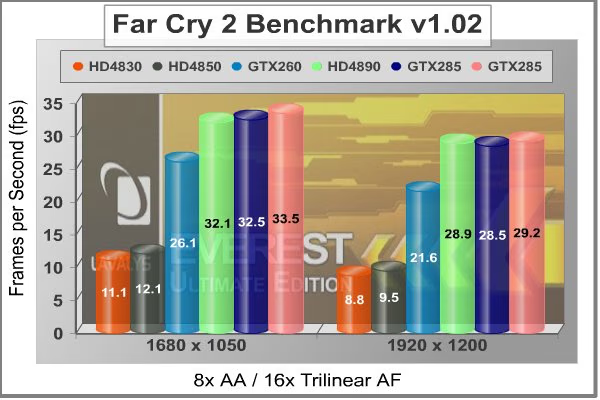
Although the Dunia engine in Far Cry 2 is slightly less demanding than CryEngine 2 engine in Crysis, the strain appears to be extremely close. In Crysis we didn't dare to test AA above 4x, whereas we used 8x AA and 'Ultra High' settings in Far Cry 2. The end effect was a separation between what is capable of maximum settings, and what is not.
Using the short 'Ranch Small' time demo (which yields the lowest FPS of the three tests available), only a few products are capable of producing playable frame rates with the settings all turned up. Far Cry 2 shows a huge gap opening up between the HD4850 and the GTX260, at both resolutions. I can tell you, it was no fun playing Far Cry 2 at 10-12 frames per second, using these challenging benchmark settings. The GTX275, HD4890 and GTX285 all take the performance up to another level, though. They all turned in very similar performance, especially at 1920x1200. Based on some driver testing I did in a recent GTX260 article, this is one test where the newer Forceware 185.85 driver gives some advantage, so expect the GTX285 to do a little better than this with the new driver.
Our last benchmark of the series is coming next, which puts our collection of video cards against some very demanding graphics with World in Conflict.
|
Product Series |
MSI Radeon HD4830 (R4830 T2D512) |
ASUS Radeon HD4850 (EAH4850 TOP) |
ASUS GeForce GTX 260 (ENGTX260 MATRIX) |
Radeon HD 4890 (EAH4890 TOP) |
MSI GeForce GTX 275 (N275GTX Twin Frozr OC) |
ASUS GeForce GTX 285 (ENGTX285 TOP) |
|---|---|---|---|---|---|---|
|
Stream Processors |
640 |
800 |
216 |
800 |
240 |
240 |
|
Core Clock (MHz) |
585 |
680 |
576 |
900 |
666 |
670 |
|
Shader Clock (MHz) |
N/A |
N/A |
1242 |
N/A |
1476 |
1550 |
|
Memory Clock (MHz) |
900 |
1050 |
999 |
975 |
2322 |
1300 |
|
Memory Amount |
512MB - GDDR3 |
512MB - GDDR3 |
896MB - GDDR3 |
1024MB - GDDR5 |
896MB - GDDR3 |
1024MB - GDDR3 |
|
Memory Interface |
256-bit |
256-bit |
448-bit |
256-bit |
448-Bit |
512-bit |
World in Conflict Benchmarks
The latest version of Massive's proprietary Masstech engine utilizes DX10 technology and features advanced lighting and physics effects, and allows for a full 360 degree range of camera control. Massive's MassTech engine scales down to accommodate a wide range of PC specifications, if you've played a modern PC game within the last two years, you'll be able to play World in Conflict.
World in Conflict's FPS-like control scheme and 360-degree camera make its action-strategy game play accessible to strategy fans and fans of other genres... if you love strategy, you'll love World in Conflict. If you've never played strategy, World in Conflict is the strategy game to try.
Based on the test results charted below it's clear that WiC doesn't place a limit on the maximum frame rate (to prevent a waste of power) which is good for full-spectrum benchmarks like ours, but bad for electricity bills. The average frame rate is shown for each resolution in the chart below. World in Conflict just begins to place demands on the graphics processor at the 1920x1280 resolution, so we'll jump ahead for our consensus.

The GT200 series GPUs from NVIDIA, show their collective muscle in the World In Conflict benchmark. All three NVIDIA cards are within 4 FPS at either resolution. There are only small, incremental improvements as you move from GTX 260 to GTX 275 and GTX 285. The MSI N275GTX OC is only two frames faster than the ATI HD4890 at 1680x1050 resolution, but runs the score up at 1920x1200 to a 5 FPS (10%) difference. The GTX 260 and GTX 275 perform within one FPS of one another in this application; you need the extra memory bandwidth of the GTX 285 to get better performance with this game.
|
Product Series |
MSI Radeon HD4830 (R4830 T2D512) |
ASUS Radeon HD4850 (EAH4850 TOP) |
ASUS GeForce GTX 260 (ENGTX260 MATRIX) |
Radeon HD 4890 (EAH4890 TOP) |
MSI GeForce GTX 275 (N275GTX Twin Frozr OC) |
ASUS GeForce GTX 285 (ENGTX285 TOP) |
|---|---|---|---|---|---|---|
|
Stream Processors |
640 |
800 |
216 |
800 |
240 |
240 |
|
Core Clock (MHz) |
585 |
680 |
576 |
900 |
666 |
670 |
|
Shader Clock (MHz) |
N/A |
N/A |
1242 |
N/A |
1476 |
1550 |
|
Memory Clock (MHz) |
900 |
1050 |
999 |
975 |
2322 |
1300 |
|
Memory Amount |
512MB - GDDR3 |
512MB - GDDR3 |
896MB - GDDR3 |
1024MB - GDDR5 |
896MB - GDDR3 |
1024MB - GDDR3 |
|
Memory Interface |
256-bit |
256-bit |
448-bit |
256-bit |
448-Bit |
512-bit |
GeForce GTX 275 Temperature
Benchmark Reviews has a very popular guide written on Overclocking the NVIDIA GeForce Video Card, which gives detailed instruction on how to tweak a GeForce graphics card for better performance. Of course, not every video card has the head room. Some products run so hot that they can't suffer any higher temperatures than they already do. This is why we measure the operating temperature of the video card products we test.
To begin my testing, I use GPU-Z to measure the temperature at idle as reported by the GPU. Next I use FurMark 1.7.0 to generate maximum thermal load and record GPU temperatures at high-power 3D mode. The ambient room temperature remained stable at 28C throughout testing (it's a hot summer in DC...). The MSI N275GTX Twin Frozr OC video card recorded 39C in idle 2D mode, and increased to 72C after 20 minutes of stability testing in full 3D mode, at 1920x1200 resolution and the maximum MSAA setting, 16X.
FurMark is an OpenGL benchmark that heavily stresses and overheats the graphics card with fur rendering. The benchmark offers several options allowing the user to tweak the rendering: fullscreen / windowed mode, MSAA selection, window size, duration. The benchmark also includes a GPU Burner mode (stability test). FurMark requires an OpenGL 2.0 compliant graphics card with lot of GPU power! As an oZone3D.net partner, Benchmark Reviews offers a free download of FurMark to our visitors.

FurMark does do two things extremely well: drive the thermal output of any graphics processor higher than any other application or video game, and it does so with consistency every time. While Furmark is not a true benchmark tool for comparing different video cards, it still works well to compare one product against itself using different drivers or clock speeds, or testing the stability of a GPU, as it raises the temperatures higher than any program. But in the end, it's a rather limited tool.
72°C is an excellent result for temperature stress testing, coming in just below the GTX260-216SP card I tested recently. That card also had a beefed up cooler with dual fans, and thermal testing was with an ambient temp 4°C lower. The HD4890 and GTX285 products hovered in the mid 80s while running Furmark in stability testing mode. I know all of you can do the math, but for those of us in the U.S., it still amazes me that these chips can run at 185°F and above for extended periods. The human body is physiologically incapable of holding on to any object that's hotter than 140°F, so yes, these chips are literally too hot to touch.
VGA Power Consumption
Life is not as affordable as it used to be, and items such as gasoline, natural gas, and electricity all top the list of resources which have exploded in price over the past few years. Add to this the limit of non-renewable resources compared to current demands, and you can see that the prices are only going to get worse. Planet Earth is needs our help, and needs it badly. With forests becoming barren of vegetation and snow capped poles quickly turning brown, the technology industry has a new attitude towards suddenly becoming "green". I'll spare you the powerful marketing hype that I get from various manufacturers every day, and get right to the point: your computer hasn't been doing much to help save energy... at least up until now.
To measure isolated video card power consumption, Benchmark Reviews uses the Kill-A-Watt EZ (model P4460) power meter made by P3 International. A baseline test is taken without a video card installed inside our computer system, which is allowed to boot into Windows and rest idle at the login screen before power consumption is recorded. Once the baseline reading has been taken, the graphics card is installed and the system is again booted into Windows and left idle at the login screen. Our final loaded power consumption reading is taken with the video card running a stress test using FurMark. Below is a chart with the isolated video card power consumption (not system total) displayed in Watts for each specified test product:
VGA Product Description(sorted by combined total power) |
Idle Power |
Loaded Power |
|---|---|---|
NVIDIA GeForce GTX 480 SLI Set |
82 W |
655 W |
NVIDIA GeForce GTX 590 Reference Design |
53 W |
396 W |
ATI Radeon HD 4870 X2 Reference Design |
100 W |
320 W |
AMD Radeon HD 6990 Reference Design |
46 W |
350 W |
NVIDIA GeForce GTX 295 Reference Design |
74 W |
302 W |
ASUS GeForce GTX 480 Reference Design |
39 W |
315 W |
ATI Radeon HD 5970 Reference Design |
48 W |
299 W |
NVIDIA GeForce GTX 690 Reference Design |
25 W |
321 W |
ATI Radeon HD 4850 CrossFireX Set |
123 W |
210 W |
ATI Radeon HD 4890 Reference Design |
65 W |
268 W |
AMD Radeon HD 7970 Reference Design |
21 W |
311 W |
NVIDIA GeForce GTX 470 Reference Design |
42 W |
278 W |
NVIDIA GeForce GTX 580 Reference Design |
31 W |
246 W |
NVIDIA GeForce GTX 570 Reference Design |
31 W |
241 W |
ATI Radeon HD 5870 Reference Design |
25 W |
240 W |
ATI Radeon HD 6970 Reference Design |
24 W |
233 W |
NVIDIA GeForce GTX 465 Reference Design |
36 W |
219 W |
NVIDIA GeForce GTX 680 Reference Design |
14 W |
243 W |
Sapphire Radeon HD 4850 X2 11139-00-40R |
73 W |
180 W |
NVIDIA GeForce 9800 GX2 Reference Design |
85 W |
186 W |
NVIDIA GeForce GTX 780 Reference Design |
10 W |
275 W |
NVIDIA GeForce GTX 770 Reference Design |
9 W |
256 W |
NVIDIA GeForce GTX 280 Reference Design |
35 W |
225 W |
NVIDIA GeForce GTX 260 (216) Reference Design |
42 W |
203 W |
ATI Radeon HD 4870 Reference Design |
58 W |
166 W |
NVIDIA GeForce GTX 560 Ti Reference Design |
17 W |
199 W |
NVIDIA GeForce GTX 460 Reference Design |
18 W |
167 W |
AMD Radeon HD 6870 Reference Design |
20 W |
162 W |
NVIDIA GeForce GTX 670 Reference Design |
14 W |
167 W |
ATI Radeon HD 5850 Reference Design |
24 W |
157 W |
NVIDIA GeForce GTX 650 Ti BOOST Reference Design |
8 W |
164 W |
AMD Radeon HD 6850 Reference Design |
20 W |
139 W |
NVIDIA GeForce 8800 GT Reference Design |
31 W |
133 W |
ATI Radeon HD 4770 RV740 GDDR5 Reference Design |
37 W |
120 W |
ATI Radeon HD 5770 Reference Design |
16 W |
122 W |
NVIDIA GeForce GTS 450 Reference Design |
22 W |
115 W |
NVIDIA GeForce GTX 650 Ti Reference Design |
12 W |
112 W |
ATI Radeon HD 4670 Reference Design |
9 W |
70 W |
The MSI ENGTX275 pulled 39 (117-78) watts at idle and 275 (353-78) watts when running full out, using the test method outlined above. These numbers are with the standard factory overclocks, as that's the way most people are going to run this card.
GeForce GTX 275 Final Thoughts
One of the enduring differentiators between NVIDIA and ATI GPU products is the quality and quantity of drivers that are available to support the latest hardware. You might think that quality is the only relevant consideration, but that ignores the fourth dimension of product development: Time. It's impossible to produce a driver package that is all things, to all people, all at once. It takes time to get everything right, and to incorporate all the desired features and enhancements that the customer wants.

At the risk of offending all the software engineers reading this.... there are two major methodologies for S/W development; waterfall and spiral. At the end of the waterfall process, everything that was planned to go in the S/W is in there, the software is released, and the project is finished. Just like a real waterfall, once you start, you don't stop until you reach the end. There are no intermediate steps; you get into the barrel at the beginning and you get out of the barrel (one way or another) at the end.
In spiral development, you zero in on the goal in a continuous spiral path. Every 360 degrees or so (one iteration of the design cycle), you release a partially complete, functional version of the desired final product. Every time you complete one loop, you either enhance existing features, or you add new ones. For a number of reasons, spiral development is the norm in driver software for video cards. Life as a computer enthusiast would certainly be simpler if the manufacturers all followed the waterfall development process, but we would still probably be waiting for the 8800GT drivers if they did. We have to live with a far greater amount of diversity and some instability in the video card market than we would prefer, just so we can get the ultimate payoff, like the 14% increase in frames per second that the Forceware 185.85 driver delivered for Far Cry 2 players. Next month, Cryis might get the bump, after that WOW and L4D, and so it goes.
To get back to the beginning of this section, where I mentioned Quality and Quantity, now you can see why it's pretty much impossible to have one without the other. This is where NVIDIA distinguishes itself, they consistently provide more rapid, and consequently, more optimized driver updates for their products. Sometimes this is maddening; some of us don't feel like checking every week to see if a new driver's been released, but if you're willing to put in the effort, you will generally be rewarded with a more highly optimized video system.
On the hardware side, it's useful to look at two bits of news that relate to the graphics card market. First, the graphics chip market is predicted to suffer its worst ever year-on-year shipments performance in 2009, to be followed by an amazing comeback in 2010, according to market tracker Jon Peddie Research (Tiburon, Calif.). Global shipments this year are expected to reach 328.4 million units, down from 373 million last year (a 12 percent decline), and then increase to 398.9 million in 2010 (up by 21.5 percent), rising dramatically to 446.8 million graphics chip units sold in 2011.
Second, Nvidia needs to make sure their technology partners are keeping up with the Jones', as ATI has a very aggressive chip making partner with GlobalFoundries. Here is their current process roadmap:
-
Q1 2010 - Ramp a 32-nm process based on SOI and a high-k/metal-gate scheme
-
Q2 2010 - Ramp a 45-/40-nm low-power process. The bulk technology will not include SOI or high-k
-
Q4 2010 - Offer a 28-nm generic bulk process, based on high-k. It will not include SOI
-
Q1 2011 - Offer a 28-nm low-power bulk process, also based on high-k
Taken together, what this means is that the major players are trying very hard to be the one with the most compelling product choice on the market, when the buying public returns in earnest. So, expect to see continued product development and enhancements from both companies, because they each want to be the one waiting in the wings when the money starts flowing again.
MSI N275GTX Conclusion
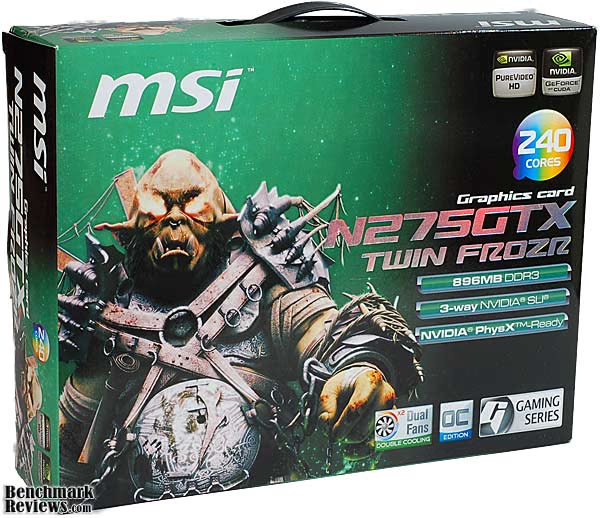
The presentation of the N275GTX Twin Frozr OC was above average, not surprising for an item that has to compete with premium product lines from other manufacturers. The retail box design is pretty unsettling, with a very large, gruesome looking, humanoid siege creature staring out at you. There is a convenient plastic handle on the top edge which is well secured to the inner tray. The inner packaging is a combination of high density polystyrene that protects the card, and a cardboard divider that keeps the accessories in their place. The card is double wrapped; a static dissipative bag inside another static dissipative bubble wrap bag, the first time I've seen such care.
The appearance of the product itself is a mix of function and styling. Unlike the fully enclosed, boxy versions of the GTX275 cards that use the reference cooler design, the MSI N275GTX Twin Frozr OC only covers up what needs to be covered in order to make the cooling system function. There are some definite downsides to this approach, mainly the recycling of heat generated by the GPU into the case. However, if you've got a case that has enough airflow in the right direction and locations, you may not be affected. The metallic mill-grain finish of the fan shroud is a nice compliment to the red PCB and the nickel plated finish of the heatpipes. The aluminum heat spreaders for the memory add some visual heft, as well. It's a purposeful design, not sleek and shiny like some; more like 1990s German styling, strong and powerful.
The build quality of the MSI N275GTX is well above average, especially the assembly of the PCB with its hundreds of components, all precisely positioned and soldered. You do see some variability in this from different suppliers; it's not a given. In addition all the components and materials are first rate.
The performance of this particular GTX275 is right where it needs to be. In some cases, it's knocking on the door of the GTX 285, and we're comparing it to a factory overclocked unit from the ASUS TOP series. Some games like World in Conflict take full advantage of the higher performance memory system of the GTX 285 and that puts some distance between the two. It goes toe-to-toe with the ATI HD4890, just like it was designed to do. There are always certain games that do better on the NVIDIA architecture and others that are optimized for ATI. A couple of applications, such as Folding@home, absolutely thrive on this platform, so it may be the only choice for some.
The fans are quiet enough to forget about, unlike some of the radial blowers found on the boxy units. When you're done gaming, the built-in custom ASIC automatically throttles them back down to 2-D speed, and leave you in peace and quiet.
As of late July 2009 the MSI N275GTX Twin Frozr OC is available at NewEgg for $184.99 after a $15 manufacturer's rebate. The Benchmark Reviews price comparison tool also found other retailer for the N275GTX. There is a wide price range for GeForce GTX 275-based video cards; Newegg lists them from $205 to $270, all of them 896MB versions. Of course the highest price models are factory overclocked to within an inch of their lives, the MSI only moderately so. There are also some 1.8GB versions available for an extra premium. The MSI N275GTX Twin Frozr OC is the only GTX 275 based product with the superior heatpipe cooling solution, which improves its value considerably. The various HD4890 models are still some $20 - $30 cheaper, though video card pricing is a very dynamic business. The ATI offerings also offer more widespread compatibility for multi-card graphics, as Crossfire-X will work with both AMD and Intel chipsets. Still, for some there is a bit of loyalty to the Green Team, and the GTX 275 will be an easy choice.
The MSI N275GTX Twin Frozr OC occupies the first step on the high ground of enthusiast video cards. The price is still within reason, but it's not going to be the fastest card in town, if that's what you want. For a price point though, the GTX275 performs very well, and this card from MSI is a well designed example of the breed.
It earns a Silver Tachometer Award, partly because of what the basic GTX 275 architecture brings to the table, and also because MSI has gone above and beyond what was necessary to bring a new GTX 275 card to market. The MSI N275GTX Twin Frozr OC is a unique design among all the GTX 275 offerings; because of its potential for extra performance, it's a better value than most.
Pros:
+ Extra Cooling Capacity
+ Quiet PWM Fans
+ Fan speed control built into hardware, no SW to install
+ Build quality is A++
+ Premium looks, unique design for GTX 275
+ Some overclocking headroom still available
Cons:
- All the heat from the GPU stays in the case
- Exposed components on PCB vulnerable to damage
- Utility software missing some functionality
Ratings:
-
Presentation: 8.75
-
Appearance: 8.75
-
Construction: 9.25
-
Functionality: 9.00
-
Value: 9.00
Final Score: 8.95 out of 10.
Excellence Achievement: Benchmark Reviews Silver Tachometer Award.
Questions? Comments? Benchmark Reviews really wants your feedback. We invite you to leave your remarks in our Discussion Forum.