
OCZ Fatal1ty DDR3 Memory Kit OCZ3F1600LV6GK
OCZ Fatal1ty Edition 6GB Low-Voltage kit
OCZ introduced their latest Fatal1ty Edition Memory kit in early 2010. The difference between this DDR3 system memory kit and the previous Fatal1ty kits is that the OCZ3F1600LV6GK model supports triple-channel bandwidth and works with a relatively low voltage. DDR3 memory prices are going down and 6GB kits are very affordable now. What happens when you mix a professional video-game player with the design of a memory kit, and is the OCZ 1600MHz Low-Voltage DDR3 kit "fatal" enough to surpass Benchmark Review's performance tests? In this article the OCZ Fatal1ty 1600MHz DDR3 memory kit is stressed to the point of failure.
DDR3 memory prices are going down while DDR2 is getting more expensive. All I can say is that we must surf and take advantage of the prices and products available at the right time. A year ago, when X58-Express platforms were launched, triple channel memory was introduced to our geek world. Kits normally go from 3GB to 12GB, but being realistic, 3GB were expensive enough to say it was too much to spend. Right now DDR3 is getting lower prices and so 6GB are very affordable.
But Servando, 6GBs is too much, right? Most people still use a 32 bit OS such as Windows XP or 2000.
Sure, many people use 32-bit OS but that is changing with time, and maybe it´s changing faster than you think. For example: 42% of the PC users still work with Win XP 32-bit. After that, almost 20% use Windows 7 64 bit. Yes, people use Windows-7 64-bit more than Vista-32 and even more than Windows-7 32-bit. Rumors are that Microsoft is working for 128 bit support on the next OS. Is that enough for you? I bet it is. As far as I've tested, 4GB o RAM is pretty much the best point in an enthusiast PC. But since we shouldn´t use 4 GB in a triple channel motherboard we are "limited" to 6GB.
As a finished goods company, OCZ is one of the biggest memory producers in the world. They have a different system memory kit for each kind of market and they have great quality and support. I must recognize that this kit has nothing special or new at this time. Latencies are ok for a 6GB kit. Frequencies are also good, without being impressive and the cooling system is enough without being intrusive.

So, what happens when you mix a world´s 12-time champion gamer like Jonathan Fatal1ty with a memory design? I actually think there is nothing special on it. You will have a great looking RAM with the Fatal1ty logo on the side and probably an expensive price too. I can´t really think on other than that, but I hope I´m wrong. Let´s have a look at the features and specifications.
OCZ Fatal1ty Edition DDR3 Features
These high-performance memory kits were co-developed with the expertise of the world's 12-time champion to meet the needs of fellow gamers, and are designed to help deliver exceptional gaming visuals and overclocking potential to ensure your high-powered gaming PC maintains unsurpassed stability.
The OCZ PC3-12800 triple-channel memory kits are designed specifically for the Intel CoreTM i7 processor / Intel X58 Express Chipset. Optimized for the Core i7's triple channel mode, these new 6GB kits ensure optimal performance via an ideal combination of low voltage requirements, speed, and latency.
Developed for enthusiasts and early-adopters, the low voltage OCZ Triple Channel solutions are the choice counterparts for leading-edge performance that won't inhibit the functionality of Core i7 CPUs. In addition, modules are tested in matched triplets ensuring superior compatibility.
OCZ's Triple Channel kits are 100% hand-tested for quality assurance and compatibility and feature propriety XTC (Xtreme Thermal Convection) heat spreaders for the most effective heat dissipation. Furthermore, each OCZ memory module is backed by the industry leading OCZ Lifetime Warranty and technical support for unparalleled peace of mind.
OCZ3F1600LV6GK Specifications
-
Brand: OCZ Technology
-
Series: Fatal1ty Edition
-
Model: OCZ3F1600LV6GK
-
Type: 240-Pin DDR3 SDRAM
-
Capacity: 6GB (3 x 2GB)
-
Speed: DDR3 1600 (PC3 12800)
-
Cas Latency: 7
-
Timing: 7-8-8-26 (CAS-TRCD-TRP-TRAS)
-
Voltage: 1.65V
-
ECC: No
-
Buffered/Registered: Unbuffered
-
Multi-channel Kit: Triple Channel Kit
-
Heat Spreader: Fatal1ty Branded XTC Heat Spreader
-
Manufacturer Warranty: Lifetime
About OCZ Technology

OCZ Technology Group, a member of JEDEC, designs, develops, and manufactures ground-breaking, high performance memory and premium computer components. OCZ products are the first choice for users needing high-reliability, enthusiast-grade solutions. OCZ continually invests in R&D to push the limits of performance, speed, and value for consumers, system integrators, and OEM clients.
OCZ Technology was founded by enthusiasts, for enthusiasts, and our commitment to that end-user group has not digressed. Entering the memory market in August 2000, OCZ was built around the determination to manufacture the very best high-speed memory for overclockers. In this pursuit, OCZ became the first manufacturer to make "dual channel" optimized memory kits available to the public, which originally took advantage of NVIDIA's Twinbank, or Dual DDR architecture, found in their nForceTM chipset. Over the last decade, we have maintained that thirst for innovation and performance leadership in multiple categories including power management and solid state storage.
Today, OCZ continues to be a frontrunner in the memory industry, offering high-performance DDR3 modules for the next generation of JEDEC standards. OCZ was the first to release DDR3 Intel Extreme Memory for the X38/48 Chipset, along with other high-compatibility and high-speed modules that were some of the fastest on the market. By breaking speed barriers and maintaining the reputation of quality, OCZ is a name enthusiasts have turned to time and time again for cutting-edge memory solutions.
Now that we've heard what OCZ has to say about the kit, let's take a closer look ourselves.
Closer Look: OCZ Fatal1ty Edition DDR3
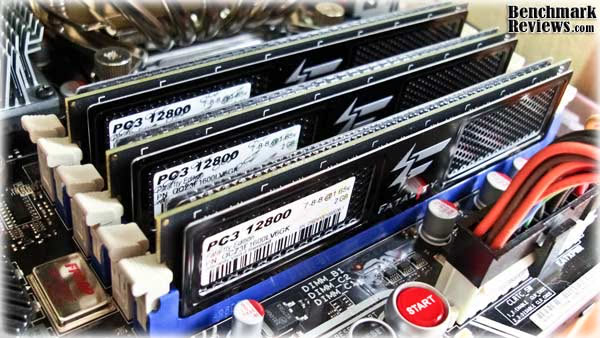
OCZ Fatal1ty Edition sticks are definitively appealing. OCZ keeps the XTC design in their heat spreaders introduced some years ago and they love them black. A clear example comes at the OCZ AMD Black Edition review . The big thing about these heat spreaders is that they won´t block any heatsink on your motherboard. The Fatal1ty Edition sticks are small and they barely increase the size of a normal DIMM.
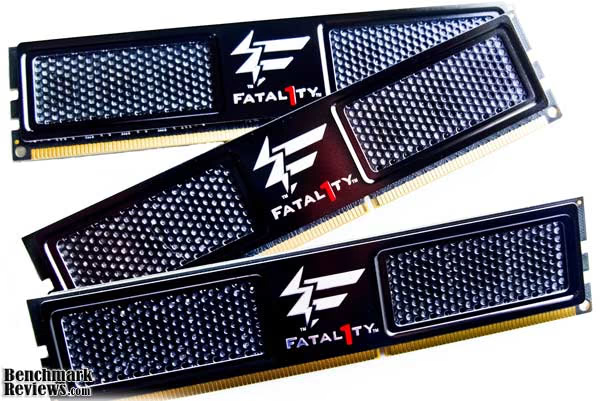
As you can see, Fatal1ty use low-profile heat spreaders without clips or any extra brackets many memory kits sport. The problem could be that uninstalling the heat spreaders would be dangerous if not done properly. The spreaders are glued to the memory circuits, so I don´t recommend this at all, but I have done it many times in the past to check the IC of the memory... and, of course, installing aftermarket heat spreaders.

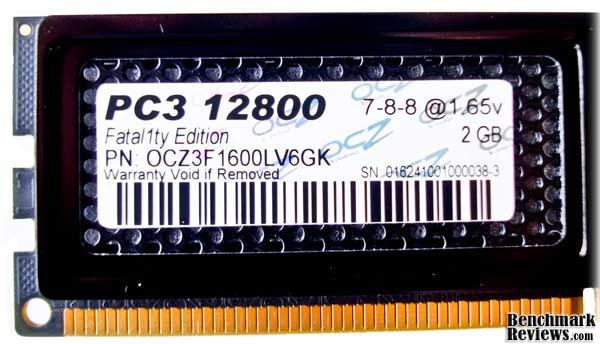
Each stick comes with the memory specs printed on a small label at one side of the DIMM. We can see each DIMM is 2GB size and they work at 1.65 volts with the rated frequencies and latencies. Don´t remove this sticker or you will lose your warranty.
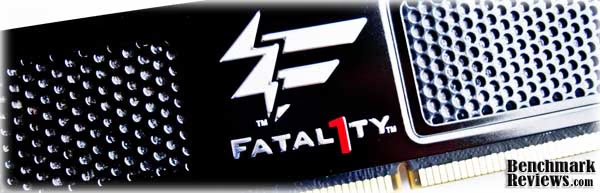
Let´s have a closer look at the spreader. It won´t hurt the installation or the pins contact to the motherboard. Actually, the heat spreaders make the installation easier because you have a bigger area to push against the memory slots.

Here´s another shot of the OCZ Fatal1ty Edition DDR3 where you can closely watch the heat spreaders and the XTC panel forms in contact with the Integrated Circuits of the DIMMs. They should make their work all right.

Fatal1ty Edition Memory SPD
Just because of the fact that the kit is "Fatal1zed" I expected some great SPDs or profiles on the memory. At least, XMP support for Intel platforms since they are optimized for them. Unluckily me, when I installed the RAM on my testbed I found nothing more than very poor memory profiles in the SPD. Basically, the best profile works at 1220MHz 8-9-9-19 with 1.5 volts. That is all. No 1600MHz or else on the JEDECs.

OCZ does this to have a wider support on the motherboard´s market, but I wouldn´t hate to have a 1600MHz or XMP profile in the SPDs. CPU-Z even reports part number as 1066MHz and JEDEC #1 and # 2 have weird configurations... Well, not a problem at all, as long as they can work at their rated speeds on X58 platforms everything should be ok. Just to make sure it wasn´t a CPU-Z problem I checked the SPDs with CPU Tweaker.
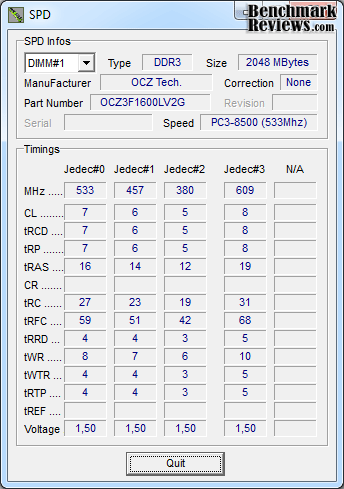
And yes, it seems the memory profiles in the SPD are right. CPU Tweaker reports the same values but more info about the SPDs. OCZ didn´t include 1.65v profiles and that´s why we are watching some poor configurations at the moment. They better clock and work at 1600MHz 7-8-8 if they want to pass Benchmark Reviews tests.
RAM Testing Methodology
In order to keep tests as objective as possible, we normally delete al the extra variables in our systems. That means, if we want to test RAM, we should try to keep all other components settings the same between the tests. That way we can play with RAM frequencies or latencies and see if there is actually a difference between those.
Each benchmark is done 5 five times to prevent weird results and the average is shown on our graphics. Each memory configuration is tested with Memtest86 v4.00 and OCCT 3.0.1 Perestroika before the tests. Otherwise, if 1 test failed we would need to do all the benchmarks again with other settings.
Most people have the Intel Core i7 920 in their X58 systems. We know this implies lower multiplier and so Overclocking can become difficult at some points. In order to keep the CPU at 2.66GHz and try different memory frequencies I had to raise the BCLK and lower the CPU multiplier. This only applies to the highest settings because many motherboards can do up to 1600MHz using memory dividers.
| Memory Speed |
Memory Timings |
Voltage |
BCLK |
CPU Multiplier |
CPU Frequency |
|---|---|---|---|---|---|
| 1066 MHz | 6-6-6-18 1T |
1.65V | 133 MHz | 20 |
2.66GHz |
| 1333 MHz | 7-7-7-20 1T |
1.65V | 133 MHz | 20 |
2.66GHz |
| 1600 MHz | 7-8-8-20 1T |
1.65V | 133 MHz | 20 |
2.66GHz |
| 1785 MHz | 9-9-9-20 1T |
1.65V | 167 MHz | 16 | 2.66GHz |
You already noticed my max frequency setting is 1785MHz. First of all, because that setting allows having the CPU at the same stock frequency and the second reason is because the RAM doesn´t clock that well. Just for the record, I was able to achieve 1850MHz with the OCZ Fatal1ty Edition and run many of the tests, but it wasn´t stable at all. Max stable frequency was 1800MHz, which isn´t very different from 1785MHz (only 25MHz extra). Having some pretty good Overclocker RAM is one of my hobbies, and I have some RAM that can do more than 2000MHz with 1.65v without problems and low latencies. So I know it´s not my CPU or motherboard limiting the clocks.
Problem is: going to 2GB size DIMMs change the story a lot, and there are just a few integrated circuits that can go that high. So, 1800MHz is a good frequency (from 1600MHz original), but not that impressive. I was expecting a little bit higher from the Fatal1ty modules, but it seems Jonathan Fatal1ty Wendel doesn´t need those extra MHz to win his tournaments (damn GPU dependant games!). Anyway, before you start asking why should I expect some higher performance from this memory I can easily list 5 memory kits with the same default settings that can go higher (both frequency and lower latencies) without being that expensive.
Test System
-
Motherboard: ASUS Rampage II Extreme X58 (1704 BIOS)
-
System Memory 1: 3x2GB Corsair XMS3 DDR3 @ 1333mhZ (7-7-7-20 1T)
-
System Memory 2: 3x2GB OCZ Fatal1ty Edition @ 1600MHz (7-8-8-20 1T)
-
Processor: Intel Core i7-920 CPU BX80601920 (Speed Step/Turbo Boost disabled)
-
CPU Cooler: Noctua NH-D14 Premium
-
Video Adapter: ATI Radeon HD 5850
-
Drive 1: WD Raptor 150GB 10,000 rpm S-ATA II
-
Enclosure: Sunbeam Ultra Tech Station
-
PSU: Antec Signature 850 Watt
-
Monitor: Acer P241 24" 1920x1200
-
Operating System: Windows 7 Ultimate x64-bit
Benchmark Applications
-
Passmark Performance Test v7.0 x64
-
EVEREST Ultimate Edition v5.30.1900
-
SiSoftware SANDRA v2010
-
Crysis v1.21 Benchmark Tool
-
Memtest86 v4.00
-
Unigine Heaven Becnhmark
-
Adobe Photoshop CS4 64 bits - Retouch Artists Test
-
WinRAR 3.9 x64 bits
Benchmark Test Results
Testing RAM is a little bit tricky. Benchmark Reviews knows that different applications will show difference performance gains. Showing some games won´t show any difference because they are all about GPU. In the other hand, we have our memory suite which consists on some Synthetic Memory Benchmarks, and a Game just to show how little the RAM frequency can affect the final performance. I added another game benchmark (Unigine´s Heaven) and also a pair of CPU daily applications like WinRAR 3.9 and the Retouch Artists Test for Adobe Photoshop CS4. Hopefully, this will give you a wide idea of how RAM affects overall performance.

Passmark Performance Test shows minimal gains from different memory settings. I´m showing Uncached Read and Write since those are the most important memory values of this benchmark. Other values add the CPU cache to the result making them less useful. Please notice that the best configuration is exactly the default one of our today´s contender (1600MHz 7-8-8-20 1T). Normally, all 1600MHz kits work at 8-8-8 latencies, and this small difference in the CAS latency should be doing a difference since it´s the most important value. The difference though, is not enough to make it worth it.
EVEREST Ultimate Edition offers three simple memory bandwidth tests that focus on the basics; Read, Write, and Copy. In order to avoid concurrent threads competing over system memory bandwidth, the Memory benchmarks utilize only one processor core and one thread.

Lavalys Everest shows us the 3 basic operations for RAM memory in MB/s. This time you can see how it benefits from higher bandwidth even if timings are higher than at low frequencies. There is up to 30% gain between 1066MHz and 1785MHz. The real question if this can be translated into real-world performance, but it seems not. Reason is RAM memory is becoming less important with the years. 5 years ago, RAM could make a noticeable difference in applications because the CPUs had smaller and fewer caches. Right now, the Intel Core i7 is an example of how adding fast and big caches can make the memory timings and frequencies somewhat un-useful. By the way, Everest results are very inconsistent and it´s difficult to measure bandwidth results with it. Sometimes results vary up to 10%, but still is one of the best benchmarks for memory testing.

Sandra is based on STREAM, a popular memory bandwidth benchmark that has been used on personal computers to super computers. It measures sustained memory bandwidth not burst or peak. Therefore, the results may be lower than those of other benchmarks. STREAM 2.0 uses static data (about 12M) - Sandra uses dynamic data (around 40-60% of physical system RAM). This means that on computers with fast memory Sandra may yield lower results than STREAM. It's not feasible to make Sandra use static RAM - since Sandra is much more than a benchmark, thus it would needlessly use memory.
A major difference is that Sandra's algorithm is multi-threaded on SMP/SMT systems. This works by splitting the arrays and letting each thread work on its own bit. Sandra creates a thread for each CPU in the system and assigns each thread to an individual CPU. Another difference is the aggressive use of scheduling/overlapping of instructions in order to maximize memory throughput even on "slower" processors. The loops should always be memory bound rather than CPU bound on all modern processors.
Sandra results are much more precise than Everest. The results vary no more than 1% between tests. We can see the higher frequency-higher performance tendency on this benchmark again. The more MHz you have, the more performance you get.
Application Performance Results
Crysis needs no introduction at Benchmark Reviews. Try playing 2 years old games with 3 months old GPUs and not getting the big FPS numbers you desire. That's enough to make us choose this game for the tests. Any high-end GPU will scream at high resolutions with this game, which means it is very high GPU dependant.

So, have a look at the results obtained with different memory settings and you will notice a very small difference between them. For average and maximum FPS lower frequencies and tighter latencies seem to work well. For minimum FPS it seems the default memory setting is doing great. Do you think it is worth it to pay 50-100 USD difference to get higher MHz memory kits for your gaming rig? I think not. Let´s re-affirm this sentence with the next benchmark.

Unigine´s Heaven Benchmark introduces DX 11 API to gaming. Tessellation is a great way to enjoy the new games and graphics behind them. Again, we put to test different memory settings to see if there was an impact on performance for the future games, but guess what? There isn´t.
Highest difference is less than ½ FPS. It seems there is a gain with higher memory bandwidth (and frequency), but how many MHz we need to add 5FPS to our game? That would be too much to be important for us. Again, high performance memory doesn´t help on games at the moment. How is this Fatal1ty kit promoted by one of the best Gamers on the world? I have no idea.
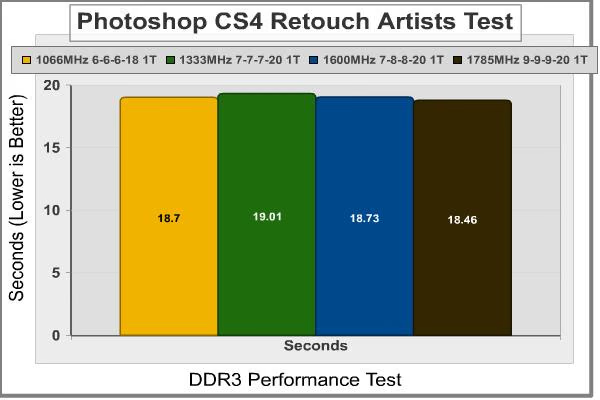
It is real-world applications time and Adobe Photoshop CS4 is our new contender. This program can benefit from both CPU and memory, and additionally, it supports Nvidia CUDA and ATI Stream but I didn´t enabled anything related to those technologies. Retouch Artists Test does a list of basic processes into an image similar to what someone would do to edit their vacation photos. There are some image resizing, duplicated layers, colors levels and image adjustments involved on the test. Notice the more MHz, the faster performance. But again, the gain is so small that I can´t say the memory is worth it enough. Maybe we should try some harder tests so that we can see if the gain is bigger there.

WinRAR is a very simple, yet useful application. How many times do you compress or decompress random files in a day? Well, WinRAR has its own integrated benchmark which measures an average of KB/s compression. This application supports multi-threading and is very CPU dependant, but I was very surprised to see that there is a real noticeable change on performance between different memory settings. Clearly, 1600MHz 7-8-8 seems to be the best setup for files compression. There is a 10% difference between this and the other settings which work very similar between them.
Fatal1ty Edition Final Thoughts
So, spending $200 USD on this kit is worth enough? Let´s have some thoughts before answering this question. First of all, whoever pays $200 for a 6GB triple channel isn´t messing with a low or even mid end computer. It´s impossible to call the fastest platform on earth a mid-end PC. You should consider that it needs an Intel Core i7 paired with an X58 motherboard. Probably you will also add a good PSU and a high-end graphics card. What´s the purpose of this new computer you just built? Is it gaming, entertainment, working with CAD applications? Video and Audio encoding?
If you use applications which potentially use the memory on the system then 6 GB will be great. If you seek for high bandwidth applications they might work also. But if you are looking for a fast gamer machine this kit doesn´t seem to offer anything better than the whole bunch of different kits on the market. While the OCZ Fatal1ty Edition price starts at $200 USD there are plenty of other kits which perform very similar and cost $30-$50 USD less. The only difference you will find is that other brands normally don´t offer a 7-8-8 timings combination, but who cares if you target is to beat Jonathan Fatal1ty on a 1 vs. 1 Crysis Multiplayer session.
Also, other brands might Overclock equal or better than this with a lower price. I don´t like proprietary SPDs like EPP or XMP, but being an enthusiast kit, this should have at least a pair of XMP (Intel Optimized) profiles for those who don´t want to mess up with the BIOS settings. That way you can just select the XMP, restart and run everything ok without messing with 30 different timing settings at your BIOS. Other than that, I can think on lowering the timings a little bit more to, let´s say, 7-7-7-20 or maybe lowering the required voltage to 1.5 volts. I did tried lowering voltage when Overclocking session failed to go higher than 1800MHz, but this DIMMs just can´t work at 7-8-8 1600MHz with 1.5 volts without getting memtest errors and BSODs.

OCZ3F1600LV6GK DDR3 Conclusion
Performance on the Fatal1ty Edition modules is just as it should be. Messing with 1600MHz and 7-8-8-20 Timings can give a little boost on some applications from time to time. Too small to be noticed but it is still there. They can´t be run under the voltage specified, or they won´t be able to maintain that CL 7 latency. But pretty much different memory brands will perform the same on the same configuration with the same settings, so there is nothing to be surprised here. Overclocking also gave a small boost with 200MHz, but it doesn´t sound that great after watching 2000MHz+ kits on the market.
The OCZ Fatal1ty Edition kit is very appealing. The black PCB, paired with a black heat spreader and a red Fatal1ty logo definitively makes people look at your PC. The product´s package is simple, yet ok for a memory kit. The memory even comes protected with a thin transparent plastic layer to avoid scratches on shipping (don´t forget to take it off before installation).
OCZ construction is definitively top notch. The heat spreader quality, overall design and the logos on it are just great. The smaller components soldered on the memory just show how good the quality is. You can also count on OCZ lifetime warranty and the great support at their forums to help you set or RMA a product.
As for functionality, I am having a hard time to decide. With time I´ve learned that I can expect some extra performance on products targeted for the high-end market, especially on the Overclocking section, but this memory kit isn´t that impressive, and it certainly won´t help you or do better when gaming than any other memory kit without the Fatal1ty logo. Let´s face it; we are talking about RAM memory here. When you make RAM tests with different brands, they should perform the same as long as they use the same settings with the same components, there is no magic behind, but the way you set them in your BIOS and how much your motherboard allows you to tweak them. That is all.
With a retail price of $199 USD at NewEgg, this memory isn´t what I´d call cheap. But it is still reasonably priced. You can find some $150-$160 USD kits but you will also find $350-$400 USD kits from Corsair, which won´t give you the boost they cost for. Since this kit is practically new, I expect it to come down $15-$20 USD in the next months, and so they will be a more affordable product. The memory just works great out of the box after you set your timings and frequencies on your BIOS. There were no memory errors or any faulty DIMMs on the package, but I wouldn´t worry about that with the great OCZ support.
Pros:
+ 1600MHz rating
+ Low CL7 latency at 1600 MHz (other timings remain at 8-8-26)
+ Lifetime memory warranty
+ Great Looking module design
+ Product Support from OCZ is the best
+ Low Profile Heat Spreaders won´t block CPU heatsinks
Cons:
- Memory SPD is too simple. It doesn´t include XMP either.
- Overclocking is just ok, not as impressive as we would expect from a Fatal1ty kit
- Price is still high compared with similar products, but expect it to decrease in the next weeks
Ratings:
-
Performance: 9.00
-
Appearance: 9.50
-
Construction: 9.00
-
Functionality: 7.00
-
Value: 8.00
Final Score: 8.5 out of 10.
Recommended: Benchmark Reviews Seal of Approval.
Questions? Comments? Benchmark Reviews really wants your feedback. We invite you to leave your remarks in our Discussion Forum.