
SilverStone SST-AP181 Air Penetrator Fan
SilverStone SST-AP181 Air Penetrator Fan Review
SilverStone is a company that needs no introduction to most enthusiasts. Although they're best known for their extensive line of computer cases, the company also produces power supplies, fans, and other computer-related hardware. As high end computer components increasingly use more power and thus generate more heat, dealing with the increasing "thermal load" of an enthusiast-level systems becomes more and more difficult, especially if you don't want to resort to water cooling or even more exotic methods. Although simplified all-in-one water cooling systems like the CoolIT ECO A.L.C. have performance equal to some high-end air coolers, the vast majority of systems continue to be air cooled.
A systems builder or enthusiast must weigh a variety of factors when choosing fans for their air-cooled system. The main criteria when selecting fans are airflow, typically expressed in cubic feet per minute (CFM) and noise, measured in decibels (dB or db(A)). Some manufacturers will also specify the "static pressure" their fans can maintain when blowing air into an enclosed or obstructed area; this is useful information when a fan is blowing into an obstruction like a radiator, but less important when it's not.
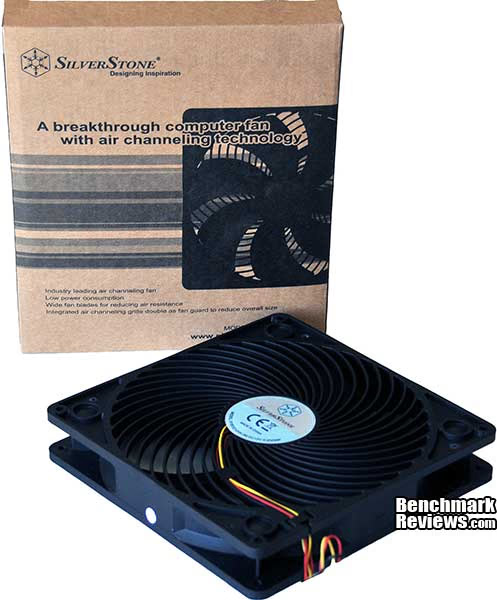
One big different between fan specifications and other part specifications is that most users have no way to verify them, since measuring the air flow, noise, and static pressure of a fan is difficult or impossible without specialized equipment. What we can do is test the cooling performance, and in this test, Benchmark Reviews will compare the cooling performance of the SilverStone SST-AP181 "air penetrator" fan with the performance of SilverStone's stock 180mm fan in the Fortress FT02 computer case.
Manufacturer: SilverStone Technology
Product Name:Air Penetrator 180mm case fan
Model Number: SST-AP181
Price As Tested:$24.99
Full Disclosure:The product samples used in this article has been provided by SilverStone Technology.
Air Penetrator Features
-
Industry leading air channeling fan
-
Wide fan blades for reducing air resistance
-
Integrated air channeling grille double as fan guard to reduce overall size
-
Low power consumption
SST-AP181 Specifications
| Model No. |
SST-AP181
|
|---|---|
| Color |
Black
|
| BEARING |
Sleeve
|
| RATED VOLTAGE |
12V DC
|
| START VOLTAGE |
10.8V DC (in low rpm mode)
|
| RATED CURRENT |
0.45 AMP
|
| RATED POWER |
5.4W
|
| SPEED |
700 ; 1200 rpm
|
| Effective airflow range |
1.2 ; 3 Meter
|
| AIRFLOW |
80 ~ 130 CFM
|
| STATIC PRESSURE |
Max 1.1~2.45mmH2O
|
| Air flow |
1.9m/s ; 3.1m/s (measured at fan exit)
|
| NOISE LEVEL |
18 / 34dB(A)
|
| DIMENSION |
180mm (L) x 180mm (W) x 32mm (H)
|
Features and specifications provided by SilverStone Technology
Closer Look: SilverStone SST-AP181 Fan
The SilverStone SST-AP181 fan is delivered in a rather plain brown box. The fan's features are enumerated on the front.

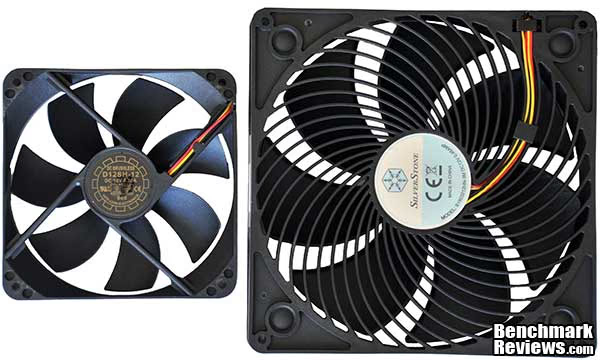
A 180mm fan is much larger than the 120mm fans normally used in computer cases. The fan on the left in this photo is the Yate Loon D12SH-12 fan, a popular choice among enthusiasts given its rated 88CFM airflow and $6.99 price; it's dwarfed by the SilverStone SST-AP181 fan on the right. Size aside, both fans have 7 blades of similar design. One interesting thing about the AP181 is its integrated fan grille.
Each AP181 has a standard 3-pin power lead and a separate "low/high" speed switch. The switch is designed for the SilverStone Raven and Fortress FT02 cases, which have specific mounting areas for it; if you don't have one of these cases, you'll need to come up with some place to put the switch (you could, of course, simply leave it inside the case as well). At low speed, the fan runs at 700RPM; at high speed, it runs at 1200RPM.
Standard computer case fan sizes are 80mm, 92mm, 120mm, and 140mm; a few cases will accept larger 200 and 220mm fans, but the smaller sizes dominate. In general, larger fans more air with less noise than smaller fans; but the wider blade area means the airflow is spread over a larger area. As far as I know, SilverStone is the only vendor that (a) makes 180mm case fans and (b) has cases designed to accept this unusual size. Unless you own a SilverStone Raven RV01/RV02, or Fortress FT02 case, or are building your own highly customized computer case, you're probably not in the market for one of these fans.
Air Penetrator Detailed Features
I'm comparing the AP181 fan to the 180mm fans used as the stock fans in an SilverStone Fortress FT02 case. These seem to be modified versions of the FM181 fan SilverStone sells separately. Since SilverStone doesn't sell a stand-alone version of the FT02 fan, I'll simply call it "the FT02 fan". The chart below compares the specifications of the three fans.
| FT02 fan | FM181 fan | AP181 fan | |
|---|---|---|---|
| Speed controller | two speed switch | continuously variable | two speed switch |
| Low speed | 700 RPM | 500 RPM | 700 RPM |
| High speed | 1000 RPM | 1300 RPM | 1200 RPM |
| Amps | 0.30 | 0.45 | 0.45 |
| Airflow | 100 - 130CFM | 65 - 150CFM | 80 - 130 CFM |
| Noise | 18 - 27dB(A) | 17 - 36dB(A) | 18 - 34dB(A) |
| Static pressure | 0.98 - 1.6mm H20 | 0.48 - 2.38mm H20 | 1.1 - 2.45mm H20 |
Compared to the FT02 fan, the AP181 seems very similar. The only visual difference is the integrated grille of the AP181. The FM181 sold separately has no grille, but the FT02 fan has a honeycomb grille (removed for this photo) that SilverStone makes available as an option for those buying the FM181 fan.

Given the amperage these fans draw, it's probably a good idea to run them directly from your power supply rather than from a motherboard header. But looking at the comparative specs of the FT02 fan and the AP181, there doesn't seem to be much difference: the latter draws significantly more power at maximum, but is specified to deliver the same 130CFM airflow. Your first clue might be the higher static pressures (especially at the high speed), but if you missed that, SilverStone provides a hint on the back of the box.

SilverStone claims the "Air Penetrator" design provides (for lack of a better term) a more "focussed" column of air from the fan. They've even prepared an interesting YouTube video showing the difference.
It looks like the Air Penetrator blows a much more coherent column of air than ordinary fans. But will this translate into better performance? Let's see...
Air Penetrator Fan Installation
These fans, with their long power leads and integrated speed switches, are designed to be plug-in replacements for the stock fans used in an SilverStone RV01, RV02, or FT02 computer case. The fan speed switches are located at the top of these SilverStone cases, and each switch is secured by two very small, easy to drop and loose screws. Remove the screws holding in these switches and put them carefully away.

Next, remove the two screws at the front of each fan bracket. This allows the stock fan to slide out of the bottom of the case. Carefully feed the leads for the power and speed switch through the case as you remove the stock fan.

Once the fan is removed from the case, you'll need to unscrew and remove the combination mounting bracket/filter holder, since you'll be using this to mount the AP181 fan.

After you've secured the AP181 fan to the mounting bracket, it slips easily back into the case. Slide the filter in the slot in the bracket, then secure the speed switch at the appropriate place at the top of the case. The yellow wire of the switch should be nearest the "H" setting.

OK, the fans are installed. Let's see how they perform relative to the stock FT02 fans.
Fan Testing and Results
The system I used for testing is the same one I built into the FT02 case originally, which I described in my SilverStone FT02 Computer Case review. It comprises an ASUS P6T V2 Deluxe motherboard, 12G of Corsair Dominator memory, two NVIDIA GTX480 video cards, and an Intel Core i7 980X processor.
I used Everest Ultimate version 5.5 to load the processor with the "Stress CPU" and "Stress FPU" tests. The results are presented as "thermal difference": the difference between the processor temperature and the ambient temperature. For these tests the Intel Core i7 980x processor was overclocked to 4.1GHz with a 160MHz BCLK and 1.35 volts.

The CPU cooler used was a dual-fan Cooler Master V6GT. And here are the results:

SilverStone claims that the AP181 fans set to "low" provide the same performance as the original case fans set to "High". This certainly seems to be true: in fact, the AP181's on low provide slightly better performance than the FT02 fans on high. The difference between the stock fans on low and the AP181 fans on high is 3.7 degrees.
Now let's look at the NVIDIA GTX480 temperatures with the video card fans set to "auto". I took idle and load temperature measurements (using Furmark 1.8.2 Multi GPU version to load the cards) with the case fans set to both low and high speeds.

Here we see much less difference between the FT02 fans and the AP181 fans. The AP181 wins by a degree or so at idle with low fan speed, but actually falls behind slightly at idle with high fan speed. When the cards are loaded with Furmark, the temperatures with the AP181 fans are actually higher than the temperatures with the FT02 fans. Let's try the test again with the GTX480 fans set to 100%, as they might be in an overclocking or benchmarking scenario.

Here, the AP181 fans provide a much better performance: the GTX480 load temperatures are 0.9 to 5.9 degrees cooler with the case fans set to "low", and 3.9 to 4.9 degrees lower when the case fans are set to "high".
But then I had a crazy thought...
Who needs a CPU fan?
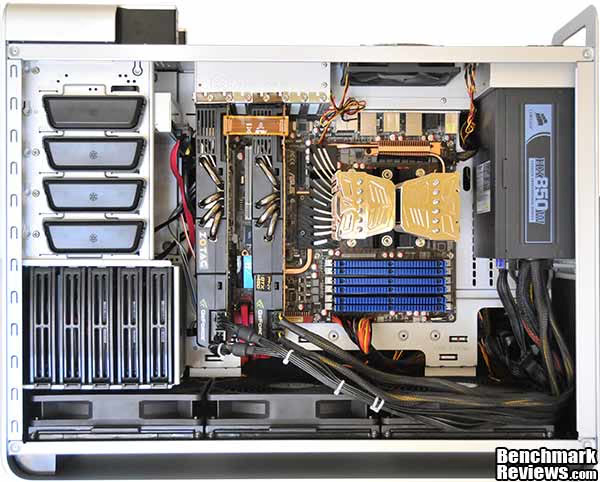
Given the impressive results of the AP181 fans with the Cooler Master V6GT CPU cooler, it occurred to me that it might be interesting to focus on using these fans to make a system quieter rather than just cooler. After all, an Intel Core i7 980X processor is plenty fast even at its stock speeds. So I reset the processor's clock and voltage to their stock levels, and replaced the Cooler Master V6GT CPU cooler with a Prolimatech Super Mega cooler:

While the Prolimatech Super Mega came in a degree or two behind the Megahalems cooler in our recent tests, it's still one of the very best air coolers you can buy...which is why I decided to try it with no fans at all. By making sure that no cables lie on top of the case fans, I can ensure that the Super Mega gets a nice shot of air.
And here are the results:

You could never pull this off in most computer cases. Remember, while I'm still running the same Everest stress tests I ran in the previous section, the processor's now clocked at its stock speed and voltage. With the stock FT02 fans on low, the processor temperatures are higher than I'd like, but things change dramatically once you turn the stock fans to high or use the Air Penetrator fans. Running a system like this with no CPU cooler becomes entirely possible, even easy; and in the "FT02 fans high" or "AP181 fans low" scenarios, the system at idle is almost silent, with only the faintest whooshing noise being audible. And since there's no CPU fan, stressing the processor results in no increase in noise at all (stressing the GTX480s, of course, is an entirely different proposition!)
Air Penetrator Final Thoughts
It's clear that in most cases, the SilverStone SST-AP181 "Air Penetrator" fans provide better cooling performance than the FT02 fans; in some scenarios, like the fan-less Super Mega test, the performance difference is dramatic. SilverStone has been showing new case designs (the Raven RV03 and Temjin TJ11) with these fans, so perhaps they'll become standard across SilverStone's "rotated motherboard" case line.
The overclocked and overvolted Intel 980X processor and twin NVIDIA GTX480 video cards represent a worst-case scenario for air cooling, and it's possible that the advantages my tests showed for these fans would not be as dramatic with, say, an Intel 930 and NVIDIA GTX260 video cards. High-end systems like the one I tested with are the best application for these fans.
SilverStone has used the 180mm size of their fan to good advantage. Most of the larger-than-120mm fans I've used, especially 140mm case fans, move rather feeble amounts of air, trading performance for silence. The AP181's are noisier than the stock FT02 fans, especially at the "high" setting, but even at their loudest, they're much quieter than any "high performance" 120mm fan. I just bought a Delta FFB1212EH to keep around for cooler testing, and while its 150CFM output is only a little better than the AP181's 130CFM, the SilverStone fan's noise is a low-pitched hum, whereas the Delta emits a piercing shriek. At its low speed, the AP181 fan makes very little noise, especially in the acoustically-padded FT02 case.
The AP181 fan available for $24.99 at Newegg. This is a very reasonable price given the performance of the fan, and in fact is a few dollars cheaper than the price of the similar FM181 (which does come with the infinitely variable fan speed controller, though). The only problem is that you're probably not in the market for this fan unless you have an existing SilverStone case, and if you do, then you already have some pretty nice 180mm fans anyway, and you need to consider whether the extra few degrees you get in cooling is worth the $75 or so you'd spend to replace all three fans. I'd recommend that you only replace the rearmost two fans, though, as the frontmost fan provides plenty of cooling for even the hottest hard drives
SilverStone SST-AP181 Conclusion
The performance of these fans is exemplary. They provide a significant increase in cooling performance over the already excellent FT02 standard fans. Their focused column of air puts a lot of airflow wherever you aim them, all at a very low "cost" in noise.
There's not much I can say about the appearance of the fans; they're plain black case fans. The integrated grille is interesting, but its design was dictated by performance considerations (since the fan rotor and blades seem to be identical to those in the standard FT02 case fans, the grille must be the part that directs the airflow so well).
The fans are solid and well constructed. The hub motors use sleeve bearings, and there are some who will insist on ball bearings or fluid dynamic bearings. However, I don't see how these would make this fan any better, although they would certainly increase its cost. I'd like to have seen sleeving on the power and speed selector wires; both sets of wires are unsecured and quite long, leading to merry colorful tangles when you install the fan and try to route the wiring neatly.
Functionally, the fan exceeds SilverStone's claim of providing the high speed performance of the FT02 fans while running at low speed. In all but one of my tests, the AP181 Air Penetrator fans provided better performance at low speeds than the stock FT02 fans on high.
Priced for $24.99 at Newegg, these fans represent an excellent value given their almost unbeatable noise/performance combination...but remember that you'll most likely be using them to replace what are already a pretty good set of fans to begin with. But if you're reaching for the best air cooling performance possible, or trying to build a silent, high performance workstation, they're fans you should consider.
Pros:
+ Provides excellent airflow with minimal noise
+ Integrated two-speed controller
+ Integrated fan grille shaves a few millimeters off the size of the FT02 fans
+ Easy replacement of stock fans in SilverStone cases
Cons:
- Unsleeved wiring easy to tangle
- Replacing all the fans in your SilverStone case costs $75.00
- Limited real-world applicability due to unusual 180mm size
Ratings:
- Performance: 9.75
- Appearance: 9.00
- Construction: 8.50
- Functionality: 9.75
- Value: 9.50
Final Score: 9.3 out of 10.
Excellence Achievement: Benchmark Reviews Golden Tachometer Award.
Questions? Comments? Benchmark Reviews really wants your feedback. We invite you to leave your remarks in our Discussion Forum.
Reader comments from the original article
12 comments were posted before commenting closed. They are preserved as written. Original avatars no longer resolve and are shown as a placeholder.
Quiet FT02 Peter Hopewell Permalink:
I'm interested in running a quiet FT02 system and wondering if these fans offer any advantages. I want to run the 980X at stock with a Magahalem and quiet PWM fan and use a passive 5750 (e.g. Powercolor Go Green). Could these fans be run at lower RPM via a fan controller? Any thoughts on how stable a system at lower RPM might be?
RE: SilverStone SST-AP181 Air Penetrator Fan David Ramsey Permalink:
That's a good question, Peter. The fans are virtually silent at "low" RPM, so I don't see any real advantage to running them any more slowly (I wasn't clear in the article when I said that they were noisier than the stock fans, which I only noticed at the "high" speed setting). You might be able to run the fans with a separate fan controller, leaving the attached switches set to "high", but not knowing how the attached switches are wired up, it's just a guess. Since you'll be running the system at its stock clocks, why bother with a fan on the Megahalems at all? As my tests showed, a Megahalems will keep a 980X nice and cool with no attached fan, just using the airflow from the AP181s.
FT02 with Super Mega side panel closure? Harry Permalink:
Hi, I would like to know when you install the Prolimtech SM Cooler in FT02 your review, could the FT02 case side panel be closed? Isn't the spec for this cooler very tall and could touch the side panel case? /index.php?option=com_content&task=view&id=553&Itemid=62&limit=1&limitstart= I am thinking of getting similar sized cooler for my RV02 like CM Hyper 212+ GP which is cheaper. Your assistance is very much appreciated. Thank you. Cheers, Harry
RE: SilverStone SST-AP181 Air Penetrator Fan David Ramsey Permalink:
Yes, the side panel fits on with no clearance problems. There's maybe 1/2" of clearance between the top of the Super Mega cooler and the side panel window.
RE: SilverStone SST-AP181 Air Penetrator Fan Jiri Permalink:
Hi, thank you for the review. I was wondering, is it possible to thest the Thermalright HR-02 in the passive setup with the FT-02 case (AP-181 fan)? That would be lovely :) Take care
RE: RE: SilverStone SST-AP181 Air Penetrator Fan David Ramsey Permalink:
Sadly, I don't have a Thermoright HR-02 available, but I imagine it would work fine passively as long as you weren't over clocking too much.
RE: SilverStone SST-AP181 Air Penetrator Fan Mike Cannon Permalink:
David, I have a Thermaltake 360 rad with standard fans. They were noisy so I put a drop of sowing machine oil in the bearings. I was going to ditch them for new fans and was considering the air penetrator. It is expensive in Aussie. Would this type of fan be a good radiator fan?
RE: RE: SilverStone SST-AP181 Air Penetrator Fan David Ramsey Permalink:
Mike, I don't know. Normally for a radiator fan you want a high static pressure to move air through the fins. You can see the official static pressure rating in the chart on the first page of this review, but I don't know how that compares to the fans you're using now.
RE: RE: RE: SilverStone SST-AP181 Air Penetrator Fan Mike Cannon Permalink:
The fans on the rad are Thermaltake. TT-1225. A1225L 12S. I don't know what these model numbers mean. You might have a better idea. In the meantime I might try a search. Regards and thanks.
RE: SilverStone SST-AP181 Air Penetrator Fan Athlonite Permalink:
just a note if you buy FM181 fans to replace the fans in an RV02 or FT02 they don't come with the inbuilt speed controller they only run at 700rpm 100cfm
RE: RE: SilverStone SST-AP181 Air Penetrator Fan David Ramsey Permalink:
That's why you'd want to buy the AP181 fans, like the ones in this review, since they _do_ come with the speed control switches...
RE: RE: RE: SilverStone SST-AP181 Air Penetrator Fan Athlonite Permalink:
Ufortunatley for me SilverStone hadn't yet started making the AP181 so I had to buy 3 FM181LED fans instead and assumed because it was stated that they ran 700~1000rpm they included the speed controller well was I ever wrong (grrrr)