
Kingston HyperX Genesis 16GB DDR3-1600
Kingston HyperX Genesis 16GB DDR3-1600 Memory Kit Review
Manufacturer: Kingston Technology
Product Name: HyperX Genesis DDR3-1600 Memory Kit
Model Number: KHX1600C9D3K4/16GX
Price As Tested: $89.99 (Newegg and Amazon)
Full Disclosure: The product sample used in this article has been provided by Kingston Technology.
With the introduction of Intel's X79 Express chipset, enthusiasts must now consider quad-channel memory kits, and vendors like Kingston are rushing to assert themselves in this new market. This 1600MHz, 16GB kit runs fairly relaxed timings of 9-9-9-27 and at under $100 represents the lower end of Kingston's "HyperX" line of enthusiast memory. Benchmark Reviews tests it against lower-latency 1600MHz kits as well as Kingston's own ultra-high performance 2133MHz kit in this review.
High performance memory is one facet of a high performance system; a balanced approach to system performance considers processor speed, the amount of memory (as well as the speed), the GPU (for gamers), and the storage device (hard disk or SSD). Enthusiasts commonly concentrate on one or two of these items to the exclusion of others, which leads to systems that produce great benchmarks scores in some instances but drag in others.

HyperX Genesis Specifications
-
CAS Latency (IDD) 9 cycles
-
Row Cycle Time (tRCmin) 49.5ns (min.)
-
Refresh to Active/RefreshCommand Time 160ns (min.)
-
Row Active Time (tRASmin) 36ns (min.)
-
Power (Operating) 1.410 W* (per module)
-
UL Rating 94 V - 0
-
Operating Temperature 0 C to 85 C
- Storage Temperature -55 C to +100 C
HyperX DDR3-1600 Features
- JEDEC standard 1.5V (1.425V ~ 1.575V) Power Supply
- VDDQ = 1.5V (1.425V ~ 1.575V)
- 667MHz fCK for 1333Mb/sec/pin
- 8 independent internal banks
- Programmable CAS Latency: 9, 8, 7, 6
- Posted CAS
- Programmable Additive Latency: 0, CL - 2, or CL - 1 clock
- Programmable CAS Write Latency(CWL) = 7 (DDR3-1333)
- 8-bit pre-fetch
- Burst Length: 8 (Interleave without any limit, sequential with starting address "000" only), 4 with tCCD = 4
- Bi-directional Differential Data Strobe
- Internal(self) calibration : Internal self calibration through ZQ pin (RZQ : 240 ohm ± 1%)
- On Die Termination using ODT pin
- Average Refresh Period 7.8us at lower than TCASE 85°C, 3.9us at 85°C < TCASE < 95°C
- Asynchronous Reset
- PCB : Height 1.18" (30mm) w/ heat spreader, double sided component
Increasing CPU speed and on-chip cache memory has reduced the performance impact of high-speed system memory relative to older systems. Kingston's DDR3-1600 memory kit, at less than $100, represents a compromise between lower-end DDR3-1333 memory and more expensive DDR3-1866 and higher speed memory.
Closer Look: Kingston HyperX Genesis
The Kingston KHX1600C9D3K4/16GX memory kit is delivered in a plastic tray with slots that hold the modules upright. I prefer this to the more standard practice of enclosing each module in an individual plastic shell. The Kingston tray has slots for 10 DIMMs and can be used to store memory you're not using.

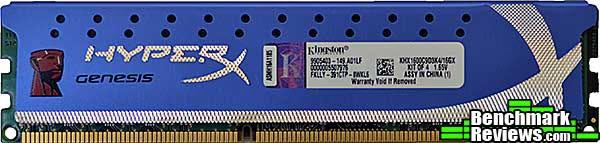
The individual modules use blue-anodized low-profile aluminum heat spreaders. Kingston specs these at 30mm high, but I measure just under 32mm as shown below. I recommend low-profile memory for X79 Express systems since many CPU air coolers will extend over one or both sets of DIMM sockets.

Most of the information on the label is probably internal Kingston parts numbers and the like, but the DDR3 speed (XMP profile, anyway) and memory kit size can be determined from the "KHX" part number. The 1.65V voltage shown is for the XMP profile. If for some reason you want to run this memory at 1333Mhz, it'll work fine at 1.50V.

Overall, Kingston's blue anodized heat spreaders with bright accents make for an attractive package. Of course, they won't be very visible installed in your system; even a windowed case will only show the uninteresting tops of the memory modules.

Although the SPD timings on these modules are for 1333MHz, anyone buying this memory would immediately set the XMP profile of DDR3-1600 at 9-9-9-27. These timings are fairly loose but help keep the cost of the kit low...and, as we'll see, don't hamper real-world performance.
Join me as I explain my test methodology in the next section.
Testing & Results
Testing Methodology
For comparison against the Kingston HyperX Genesis 1600MHz memory kit, I rounded up several other new quad-channel memory kits. All kits comprised four 4GB DIMMs for a total of 16GB of memory. There was one DDR3-1333 kit, a high-performance Corsair DDR3-1600 memory kit with tighter timings, a (very expensive) Kingston HyperX Genesis DDR3-2133 kit, and the Kingston HyperX 1600MHz kit that's the subject of this review. I ran all the memory kits at their XMP profile speeds on an Intel X79 Express system using an ASUS X79 Sabertooth motherboard and an Intel Core i7 3960X processor running at its stock clock speeds.
For this test I used three synthetic benchmarks to measure memory performance, and three application-based benchmarks to assess real-world performance.

Test System
-
Motherboard: ASUS X79 Sabertooth
-
System Memory
-
Generic DDR3-1333 9-9-9-25
-
Corsair Vengeance LP DDR3-1600 8-8-8-24
- Kingston HyperX DDR3-1600 9-9-9-27
-
Kingston HyperX DDR3-2133 (XMP Profile 2) 11-12-11-30
-
-
Processor: Intel Core i7-3960X
-
Video: AMD Radeon HD6850
-
Operating System: Windows 7 Home Premium 64-bit
Test Software
-
AIDA64 1.85.1600
-
SiSoft Sandra Lite 2011.10.17.79
-
Euler 3D 2.2
-
CINEBENCH R11.5
-
Blender 3D Rendering
-
Handbrake 0.95
Let's start with the synthetic testing...
AIDA64 Memory Test
Benchmark Reviews has used AIDA64 and its predecessor Lavalys Everest for years, mainly for its processor benchmarks and CPU stress-testing features. But it also includes a "Cache and Memory Benchmark" that performs read, write, and copy bandwidth tests on a system's installed memory.

The Kingston HyperX Genesis 2133MHz memory wins on the Read and Copy tests, but loses out very slightly to the 1600MHz memory in the Write test. If you're impressed by the 7.35% better Read score the DDR3-2133 memory (red bar) turns in relative to the DDR3-1600 memory (blue bar), bear in mind that you'll pay over three and a half times as much for the former as you will for the latter ($318 vs. $90). The generic DDR3-1333 memory trails in all three tests.
SiSoft Sandra Memory Test
SiSoft's Sandra Lite is a free version of SiSoftware's "Sandra" benchmarking utility. Its comprehensive memory benchmark tests report a number of items, but we're interested memory throughput tests. Unlike some other benchmarks that merely perform straight sequential reads and writes, Sandra reads and writes different areas of memory, using integer as well as floating point data, all in SMP mode.

The HyperX 2133 memory wins decisively in these tests. Interestingly the looser-timed Kingston 1600 memory turns in fractionally better scores than the tighter Corsair 1600 memory, which retails for $60 more.
Euler 3D
Euler 3D is a Computational Fluid Dynamics (CFD) program that is multi-threaded and computationally very intensive. The benchmark version by Case Labs is built with the Intel FORTRAN compiler and uses 8-byte double precision floating-point math. The test case simulates Mach 0.5 airflow over a NACA 65A004 airfoil section. The benchmark score is the CFD cycle frequency, with higher scores being better.

The Kingston 2133 "wins" again, albeit by only 4% over the much cheaper Kingston 1600 memory.
Join me in the next section as I run the application benchmarks.
CINEBENCH 11.5 Multi-Core Rendering Test
Maxon CINEBENCH is a real-world test suite that assesses the computer's performance capabilities. CINEBENCH is based on Maxon's award-winning animation software, Cinema 4D, which is used extensively by studios and production houses worldwide for 3D content creation. Maxon software has been used in blockbuster movies such as Spider-Man, Star Wars, The Chronicles of Narnia, and many more. CINEBENCH Release 11.5 includes the ability to more accurately test the industry's latest hardware, including systems with up to 64 processor threads, and the testing environment better reflects the expectations of today's production demands. For this test I ran the multi-core rendering test, which resulted in 12 threads rendering the test scene. The CINEBENCH score is a dimensionless number that's only useful for comparison to other CINEBENCH results.

In the synthetic tests in the previous section, we saw performance scores ordered, for the most part, by memory speed, which the Kingston DDR3-2133 memory winning every test and the other memory kits lining up behind it.
But those were synthetic memory tests designed to highlight the smallest performance differences. In our first application test, we see virtually no difference, with less than 1% separating the lowest and highest scores.
Blender/Icetest
Blender is an open-source, free content creation suite of 3D modeling, rendering, and animation capabilities. Originally released in 2002, it's available in versions for Mac OS X, Windows, Linux, and several Unix distributions. It supports rigid and soft-body objects and can handle the draping and animation of cloth, as well as the rendering and animation of smoke, water, and general particle handling.
Our Blender test renders multiple frames of an animation of a rotating chunk of ice, with translucency and reflections. Rendering of this model uses ray-tracing algorithms and the program reports the rendering time for each of the animation's 25 frames. The results are a summation of the rendering times for all frames and the lower the score, the better.

The Kingston KHX1600C9D3K4/16GX kit wins this one...but again, the margin is so narrow-- less than two percent better than the slowest score-- that it should be considered within the margin of error.
Handbrake 0.95
The immense power (and cost!) of Intel's Sandy Bridge Extreme Core i7-3960X CPU virtually ensure that it will see a lot of video rendering and transcoding work, since this is one of the few applications that can really use the resources this processor has. My standard Handbrake test transcodes a standard-definition video of a Family Guy episode to the "iPhone and iPod Touch" presets. I report the time it took to perform the transcode in seconds; lower scores are better.

Here again we see razor-thin differences: with the Kingston HyperX 2133MHz memory, the test system completes the encode a mere 0.8 seconds faster than it does when equipped with the generic DDR3-1333MHz memory, and only 0.7 seconds faster than with the much less expensive Kingston 1600MHz set.
HyperX Genesis Final Thoughts
A common mistake for enthusiasts to make is to concentrate on only a single aspect of system performance: a fast CPU can be hobbled by a low-end video card, or too little memory or hard drive space. Hard drive prices have skyrocketed in recent months due to the flooding in Thailand, which makes SSDs more attractive (although there's still a huge price differential).
But while hard disk prices are up, memory has become absurdly cheap in the last couple of years, with prices as much as 80% lower than prices just two years ago. This is good news for computer users: 16GB of memory for under $100 from top-tier vendors like Corsair and Kingston! It's hard not to like that. But the profit margins in the memory business are razor-thin, and vendors are (understandably) trying to pad their bottom lines with expensive, high-performance memory aimed at overclockers and other enthusiasts who must have the "fastest" and are willing to pay the price. But as our tests at Benchmark Reviews have shown, all this faster memory is really good for is turning in marginally better benchmark scores, with real-world performance improvements that are almost impossible to discern.
Even today, very few consumers will have real need for 16GB of memory. While those editing huge videos or running virtual machines may benefit, right now this much RAM represents "room to grow" more than anything else. Still, at just $89.99 from Newegg or Amazon, there's little reason to go with a smaller kit unless your budget is tight...and if it is, Kingston sells these same memory modules in a two-DIMM, 8GB package for about half this price
Modern processors contain megabytes of cache memory. While the Core i7-3960X I used in this test has 15MB of internal cache, even lower-end CPUs will have 2-4M or more. This means that most memory accesses are handled from the processor cache, and continuous accessing of system memory rarely happens except in synthetic benchmarks designed to do just that...which is why you see memory performance differences in these benchmarks, and not in applications.
KHX1600C9D3K4 Conclusion
The whole point behind paying more for high-performance components, be they fast CPUs, killer graphics cards, SSDs, or performance memory, is to see this better performance in your system. While the Kingston HyperX DDR3-2133 memory showed its mettle in benchmark tests, application tests show that there's virtually no real-world benefit to be had from this very expensive memory. For less than one-third the price, you can get the same 16GB capacity, physical appearance, and Kingston lifetime warranty and support with this DDR3-1600 memory kit.
HyperX is Kingston's enthusiast memory brand, and all HyperX memory is dressed with heat spreaders. The low-profile anodized aluminum spreaders on this kit look good, but won't be visible installed in anything other than an open-air test chassis.
Construction quality was good; there were no obvious physical flaws on the DIMMs and the performance was reliable.
As of December 2011, the 16GB Kingston HyperX Genesis 1600MHz Quad-Channel DDR3 Memory Kit KHX1600C9D3K4 sold at Newegg and Amazon for $89.99.
Functionality is excellent:the user can choose to run at the default 1333MHz or the XMP-profile 1600Mhz by selecting the desired profile in their computer's BIOS, with no overclocking or guesswork needed. While the 1600MHz speed won't provide much performance improvement over 1333MHz, you're paying for it, so you might as well use it. The low profile heat spreaders eliminate the possibility of heat sink interference, which I expect to be a significant problem as Intel X79 Express systems become more popular.
This memory hits the sweet spot for price vs. performance: it's faster than DDR3-1066 and DDR3-1333 (besides, there's some subtle enthusiast stigma attached to memory slower than 1600MHz), and provides virtually the same performance as much more expensive "high performance" memory. You get Kingston's lifetime warranty and support in a 16GB kit that's less than $100. Grab this while you can: you never know when some natural disaster will force component prices up!
Pros:
+ Low-profile heat spreaders won't present cooler clearance problems
+ XMP profile makes getting the best performance easy
+ Lifetime warranty
+ Comes in a useful memory storage bin
Cons:
- None
Ratings:
-
Performance: 9.0
-
Appearance: 9.00
-
Construction: 9.00
-
Functionality: 8.75
-
Value: 9.75
Final Score: 9.1 out of 10.
Excellence Achievement: Benchmark Reviews Golden Tachometer Award.
Benchmark Reviews invites you to leave constructive feedback below, or ask questions in our Discussion Forum.
Reader comments from the original article
7 comments were posted before commenting closed. They are preserved as written. Original avatars no longer resolve and are shown as a placeholder.
Overclocking results? Anusha Permalink:
No overclocking results?
DITTO kzinti1 Permalink:
Where are the overclocking results? Without them this review does nothing more than say that the memory works. If it cannot be OC'd then the memory is of very low quality, thus, that is how I will think of Kingston Memory from now on. Not overclockable according to Benchmark Reviews.com.
RE: DITTO David Ramsey Permalink:
Since even large increases in memory frequency make virtually no real-world performance difference (look at the results for this memory compared to Kingston's own DDR3-2133 memory in the charts in this review), I normally don't bother to overclock memory unless it's specifically targeted at that market-- say, Corsair Dominator memory or Kingston's own HyperX T1 memory. Memory overclockability was more important back in the days when raising the FSB was the only way to overclock the CPU. These days, Intel processors either have unlocked multipliers or locked-down BCLKs (like Sandy Bridge) and almost all AMD processors allow multiplier overclocking. Granted, X79 does bring back a limited BCLK adjustability, but again, it's just not going to make any real difference. Granted, some people just like to see how high their memory benchmark scores can be... I also disagree that "if it cannot be OC'd then the memory is of very low quality." Overclocking is never guaranteed and is dependent on the motherboard as well as the memory; just because I could take (for example) this memory to 1800MHz at 9-8-9-22 is no guarantee at all that you could. High quality memory runs at its specs (XMP if so equipped) reliably; there's really no other criterion that makes sense. If you're interested in real world performance improvements (as opposed to benchmark scores), concentrate on overclocking your CPU and video card.
RE: RE: DITTO Anusha Permalink:
what if you are geting them for AMD APU based system? Memory frequency affects the GPU performance significantly.
RE: RE: RE: DITTO David Ramsey Permalink:
Any cites? Unfortunately I don't have an AMD APU-based system to test with...
RE: RE: RE: RE: DITTO Anusha Permalink:
#pcper.com/reviews/Graphics-Cards/AMD-3850-Llano-Desktop-Processor-Review-Can-AMD-compete-Sandy-Bridge/Memory-S
RE: RE: RE: RE: RE: DITTO David Ramsey Permalink:
Interesting...I'll keep that in mind, since it appears as though higher memory frequencies can indeed bump the graphics performance of AMD Fusion processors (although it didn't seem to do anything for the integrated GPU in Intel procs). Note, though, that they were using Corsair Dominator memory, which will typically have more overclocking headroom than this stuff.