
Roccat KONE[+] Gaming Mouse
Roccat KONE[+] Gaming Mouse Review
Manufacturer: Roccat
Product Name: KONE[+]
Model Number: INT-ROC-11-801
Price As Tested: $99.99 (Amazon, NewEgg)
Full Disclosure: The product sample used in this article has been provided by Roccat.
In a market segment rife with choice, any manufacturer which wants to stand out must innovate their way past the rest of the crowd or use clever marketing techniques to dupe their target market. Fortunately for us here at Benchmark Reviews, Roccat chose to innovate when they created their KONE[+] Gaming Mouse. I honestly believed that there wasn't much more that could be done in the field of pointing and clicking mouse technology but I was wrong.
Roccat has introduced three great features unique to the KONE[+] mouse and also equipped it with a 6000dpi Pro Aim laser for some extremely responsive pointing ability. The first innovation is the 4D scroll wheel, which not only scrolls up and down and acts as a button, but also tilts left and right giving you two extra functions without taking up any more space. Secondly is their tracking and distance and control unit, an on board processor that can adapt the KONE[+] to work at its best on any flat surface. Lastly is the introduction of EasyShift[+]. By assigning one of the side buttons to EasyShift[+] you can effectively double the amount of functions the KONE[+] can perform, much like using the shift button of your keyboard, a feature that is further extended by Roccat Talk.
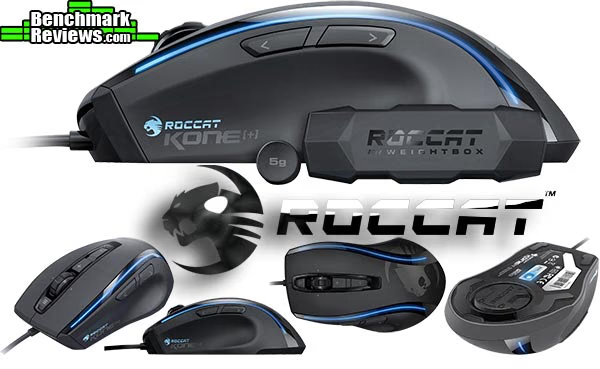
In this review we will have a good look at the design and features of the Roccat KONE[+] mouse and deliver our verdict on how it performs and functions.
Roccat KONE[+] Features
- 6000DPI PRO-AIM LASER SENSOR for maximum precision
- EASY-SHIFT[+] BUTTON DUPLICATOR for 22 directly accessible mouse functions
- 4-LED LIGHT SYSTEM for individual colors + effects
- TRACKING & DISTANCE CONTROL UNIT ultimate tracking; minimizes pick-up-flight
- ROCCAT DRIVER + MACRO MANAGER includes Macro Presets for games & apps
- ONBOARD MEMORY (576KB) store 5 Game Profiles with macros
- 4 EASY-TO-CLIP-IN WEIGHTS (4X5G) for individual weight adjustment
- 8 MOUSE BUTTONS programmable + solid 4D mouse wheel
- ULTRA QUIET low friction mouse feet
INT-ROC-11-801 Specifications
- Pro-Aim Laser Sensor R2 with up to 6000dpi
- 1000Hz polling rate
- 1ms response time
- 11750fps, 10.5megapixel
- 30G acceleration
- 3.8-5m/s (150-200ips)
- 16-bit data channel
- Tracking & Distance Control Unit
- 72MHz TurboCore processor
- 576kB onboard memory
- 2m USB cable
Closer Look: Roccat KONE[+]
Let's have a good look at the Roccat KONE[+] to see what sets it apart from the rest.

The KONE[+] box front is quick to boast about the most important features of this mouse and provides a nice window to showcase the unit itself. The flipside of the box goes into more detail about these features, you would not be short of information if you were to pick it up on a store shelf and you would quickly be able to make an informed decision.

This shot of the KONE[+] shows all of its buttons, while it looks minimal compared to offerings by other manufacturers you actually have 22 mouse functions thanks to Roccat's Easyshift[+] feature and 4D mouse wheel. Not counting scroll and tilt there are eight clickable mouse buttons; Left click, Right click, Wheel click, + button, - button, < button, > button and Ξ button. All of the buttons on the KONE[+] are programmable using the Roccat mouse settings utility. If you pair this mouse with the Roccat ISKU keyboard then you can utilize the Roccat Talk feature and assign the Easyshift[+] key on the ISKU to be the function modifier for itself and the KONE[+] too and vice versa the EasyShift[+] button on the KONE[+] can be the modifier for the ISKU keyboard and itself.

The KONE[+] has quite a high arch profile that manages to merge the 'claw' style grip and the 'palm' style grip into one, it is hard for me to translate the feeling into words but the KONE[+] feels really comfortable in the hand whatever the grip style I tried.

It is quite obvious that the KONE[+] is designed for right handed people but those of you out there that tackle tasks primarily with your left hand would only lose the function of the two side buttons, this is a compromise but it means you don't have to overlook this mouse altogether. The KONE[+] is quite a large mouse measuring approximately 13cm x 7.5cm at its longest and widest points respectively. This coupled with the high arch profile makes it quite a handful, suited to the larger hand although my 6 and 8 year old sons don't seem to have any problems using it.

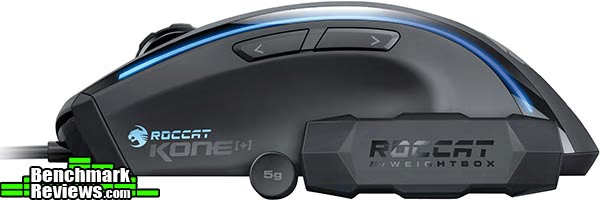
Flip the KONE[+] over and you have access to the weight adjustment system, simply rotate the disk to unlock it which allows you to populate it with up to four 5g weights (shown below). Also shown here is the layout of the low friction mouse feet, the entire heel is one big U shape of low friction material and two smaller pieces are used at the front corners. It is important that you remember to clean the bottom of the mouse regularly to maintain optimal performance as these feet pick up a lot of dirt on their travels which will introduce drag. This won't be noticeable during rapid movement but precision movement will be affected slightly.

The weights for the KONE[+] mouse come in their own little 'weightbox' and there are four 5g weights altogether. I know 20g doesn't seem like a lot, but the KONE[+] is quite a light mouse to begin with which heightens the perception of sensitivity, so the extra weight is welcomed.
Roccat KONE[+] Detailed Features
Now that we have had a look at the KONE[+] mouse it's time to look at what drives it. In this section we look at the KONE[+] utility to see what level of customization and adjustment we have available.

Roccat does not bundle the software with the device so you must download it from their website. After downloading and installing the software it will automatically flash new Firmware to your device.

Opening the Roccat KONE[+] mouse settings utility can be done in one of two ways, either by clicking on the KONE[+] icon in the windows notification area or by holding EasyShift[+] and pressing the Ξ button. The first screen you will see deals with the sensitivity options, wheel speed, DPI stages and double click speed. Adjusting the various options doesn't require explanation and sliders make changing settings super easy. The contrast of blue on black neatly matches the color theme of the company.
The KONE[+] can have up to five different profiles set to activate when a certain game or application is launched. You can also set one of these profiles as windows profile (by clicking the WP button on any of the five profiles), as soon as you exit any application or game that has a profile assigned to it, the settings utility will automatically switch back to your defined windows profile so you don't need to worry about (or check) which profile is active.

Next is the button assignment tab, pretty much self explanatory I think you'll agree. Settings on the left are the default functions and settings on the right are the functions executed when each button is used in conjunction with the EasyShift[+] key. By default the EasyShift[+] key is assigned to button 5 as seen above, and can only be assigned to buttons 4 or 5 unless you have the Roccat Talk compatible ISKU illuminated gaming keyboard which can also have a key assigned as the EasyShift modifier for the KONE[+].
Creating a macro should be simple but unfortunately it isn't, at the same time it isn't a difficult task it's just more long winded than anything. Fist you must select or create a macro set before you can create a macro, I couldn't figure out how to create a new set so I had to create new macro's in existing sets. From here it is quite simple but the steps up to here were unnecessary in my eyes.

Next up is color control, from here you have a plethora of color choices guaranteed to suit any preference. There are four points of illumination on the KONE[+] mouse and 34 colors to choose from, which by my calculations gives you 1,048,576 different color combinations. There are also quite a few possibilities with light effects when mixed with flow effects (243 altogether). When you start playing with the light effects and mix them with the flow effects the color selection is disregarded and the KONE[+] will cycle through all of the colors available. Better still, you could have the lights stay on or turn them off altogether.

This enhanced image gives you a good idea of the possibilities available. The actual colors are not as intense as shown above and fade towards the middle but still give a very nice effect all the same. The sheer amount of color combinations and effect combinations available mean that the Roccat KONE[+] can be suited to anyone's taste.
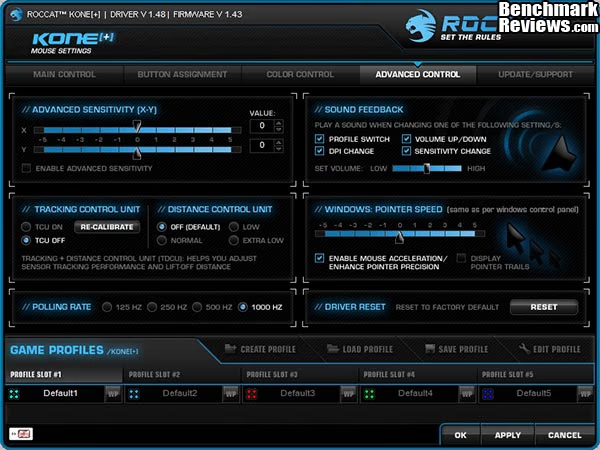
Next up are the advanced options and here we have a couple of options unique to Roccat, known as the Tracking and Distance Control Units. These two features really take the KONE[+] to a new level when used in conjunction and give you great control of the mouse. Lift off has long been an issue with some well known brands and Roccat's distance control unit goes a long way to alleviating this problem. Tracking on a wide range of surfaces can also be a big issue for some laser mice and the tracking control unit allows the KONE[+] to adapt the laser sensor to track at its best on nearly any flat surface. It is recommended that the surface should be one uniform color for the most optimal results. the TCU (Tracking Control Unit) setting didn't seem to make much of a difference to me but I am playing on a laminated wood effect surface so I wasn't expecting too much. The DCU (Distance Control Unit) set to extra low really had an impact on cursor movement during mouse lift-off, keeping it very low indeed. I'm not sure who would want cursor movement during lift-off but leaving the setting to default (off) or on normal will see some movement for sure.
You can have a sound (voice) play when you change various options as shown above in the top right corner, this is really helpful when you are in game to get aural feedback rather than visual feedback as the latter will definitely distract you more.

The last tab of the KONE[+] utility allows you to check for driver updates and get online support in one convenient location, this saves you having to trawl through the website in order to find the relevant pages.
There is but one underlying problem though and this fault is either inherent to the software itself or maybe it is the process of flashing the ROM onboard the mouse. When you make any changes you need to apply them, this takes approximately 28 seconds from clicking apply to the changes actually taking place on the mouse. While 28 seconds might not seem like a long time, when you are experimenting with color combinations these 28 seconds each time can soon mount up. Changing settings, buttons or color combinations can become a time consuming and laborious task.
Testing & Results
Testing Methodology
Testing an input device is simple, all one needs to do is use it, unfortunately there are no quantative benchmarks to run, no numbers to compare, and no software used that can test the quality of the hardware. Testing an input device like the Roccat KONE[+] Gaming Mouse is going to be based around personal opinion and preference. In this section I will present my unbiased opinion with regards to the use and operation of the Roccat KONE[+] and report back any improvement benefiting directly by its use in various games and programs listed below. Your mileage may vary slightly and as such this should be taken as a guide only.
Test System
- Motherboard: ECS P55H-AK (Intel P55)
- System Memory: 4GB OCZ Blade ST 2000MHz
- Processor: Core i5 760 @ 4.0GHz
- Video: MSI N560GTX-Ti HAWK
- Disk Drive 1: OCZ Vertex 2 60GB
- Disk Drive 2: Seagate Barracuda 7200.12 1TB
- Enclosure: Thermaltake Overseer RX-I
- PSU: Corsair HX750W 750 watt Modular
- Monitor: HKC 22" Widescreen (1920x1080)
- Operating System: Windows 7 Ultimate x64 (SP1)
Test Software
- Adobe Photoshop CS5
- Firefox and Internet Explorer web browsers
- Microsoft Office applications
- Call of Duty: Black Ops (mainly zombies)
- Battlefield: BC2
- Need for Speed: World
- GTA IV
Results
The Roccat KONE[+] is not my first gaming mouse. Prior to this I have been using a Razer Lachesis 5600dpi for the past year now, so my adjustment period didn't take too long. I can say with all honesty that the KONE[+] was way too light for my liking before adding the weights, which added a lot to my perception of its sensitivity. Even after adding the weights I started out using it on 5000dpi, stepping it up now and then to 6000dpi until I became used to it. I noticed as I was looking through the button configurations that there was a function called EasyAim, what this does is allows you to assign a different DPI setting to a mouse button that is only active while you hold the selected button down. In my case I used my lowest setting of 900dpi assigned to the EasyAim button, this is really effective for sniping and also really useful for precise movements during image editing in Photoshop. When set to 6000dpi the added sensitivity proves beneficial for controlling recoil and tracking fast moving targets.
As games these days get more complex and require more keys assigned to important tasks, along with having external programs such as teamspeak etc. running, it is essential to have many commands at your finger tips. It is hard to give a mouse more buttons while at the same time keeping it easy to use but I think Roccat may have cracked it with their EasyShift[+] feature. What EasyShift[+] does is it allows you to assign two commands to a single key, with the EasyShift[+] key acting as the modifier.
This feature is expanded further with Roccat Talk, a communication protocol between compatible Roccat devices. Using Roccat Talk allows you to assign the EasyShift[+] and EasyAim keys to either device, the benefit inherent here is that you will have more control of the mouse and/or keyboard in many different situations. The limit is your imagination, pressing the side buttons of a mouse in the heat of action to modify a function isn't the easiest thing to do but controlling two peripherals has become second nature to us now. The benefit also works the other way round. While holding the EasyShift[+] button of the mouse you can change certain keys on your compatible keyboard to perform another task without contorting your fingers. The 4D mouse wheel is another great feature and uses no extra room whatsoever. Because it is such a new innovation I keep forgetting about its presence, maybe if I assigned some important features to it I will have to use it more. As it is I have enough keys at my fingertips to deal with all the commands I need, but it's great to know the expansion possibilities are right there in waiting.
Roccat KONE[+] Final Thoughts
The KONE[+] is a great gaming mouse and only has a few minor niggles. My first problem was its light weight, but this was solved simply by loading in the four supplied 5g weights. I'm sure there are those of you out there that could really use a lightweight mouse to your advantage, so its weight would actually be seen as a benefit but that's not me. My second problem was with the waiting period between making changes in the software and them being applied to the mouse. As I stated earlier it takes approximately 28 seconds between clicking apply for the settings to be active on the mouse. In an age where my computer can boot up in less time I expect such relatively small changes to be more instantaneous. Once you are happy with your load out this will of course become a non issue, but if like me you have only just got the mouse and you want to experiment with settings these 28 second periods feel like they are taking an age and will soon mount up. My last niggle is with the scroll wheel. I haven't mentioned this until now because it really is just a minor thing. Occasionally when I scroll down (during web browsing etc.) I have observed that the page scrolls up ever so slightly before scrolling down. It doesn't happen all the time and can't be reproduced on demand but the problem is there all the same.
There are however some really great features exclusive to the KONE[+] that easily counter these minor niggles. They are EasyShift[+], EasyAim and Roccat Talk. Used in conjunction these features really will take your game to another level. As with all gaming peripherals you won't get immediate improvements, to think such a thing is silly. Over time, as you learn to use the KONE[+] properly, you will really start to appreciate what it can do. Pair the KONE[+] mouse with the ISKU keyboard and you can enjoy the benefits inherent to Roccat Talk, both of these devices have EasyShift[+] buttons and you can assign these buttons to either device and they will communicate seamlessly. EasyAim can also be assigned to a button on the keyboard so you will have more precise control with your mouse hand.
Roccat KONE[+] Conclusion
In this section I am going to write a brief five point summary on the following categories; Performance, Appearance, Construction, Functionality and Value. These views are my own and help me to give the Roccat KONE[+] gaming mouse a rating out of 10, a high score does not necessarily mean that it is better than a similar mouse which has been reviewed by another writer here at Benchmark Reviews, which may have received a lower score. It is however a good indicator of whether the KONE[+] mouse is good or not. I would strongly urge you to read the entire review, if you have not already, so that you can make an educated decision for yourself.
The Roccat KONE[+] performs very well in all tasks, the 6000dpi laser really takes it to another level in FPS games, it's also quite amusing to watch a noobie family member trying to use my PC at 6000dpi when they are used to the basic 800dpi of a normal mouse. The mouse wheel has a little bit of a bug when scrolling (noted in my final thoughts) but it really is only a minor niggle.
Appearance is normally a touchy subject but with the level of customization available with the KONE[+] (1,048,576 color combinations, 243 effect combinations) I'm sure there is a look that could suit you personally.
The construction of the KONE[+] is of exceptional quality. There is no doubt in my head that this mouse will last a long time and it can take a bit of a beating along the way and remain in good order. The materials used are of high quality which is expected in a gaming mouse of this level.
Functionality is top notch, EasyShift, EasyAim and Roccat Talk really set this mouse out from the rest, the issue of the waiting time when changing settings is almost moot next to these. It used to be the case that DPI was the only highlight of a gaming mouse, it does play a massive part but it is not a deal breaker. The KONE[+] does not disapoint with its 6000dpi laser sensor, it takes some time to get used to but when you have got to grips with it you will love every minute of gameplay.
The Roccat KONE[+] will set you back $99.99 (Amazon, NewEgg). This is what I would call the high end price range, reserved for the most elite of pointing devices and the KONE[+] fits in just nicely. Not everyone can afford to throw $100 at a gaming mouse and I understand that but the KONE[+] has features that no other mouse has. For that reason Roccat could have easily charged more (like razer does) but they played it just right I think.
The Roccat KONE[+] is a great all around mouse. If you are an FPS gamer then you will really appreciate the 6000dpi laser sensor and the EasyAim function, but all the extra buttons may well be wasted on you. MMO and RTS gamers will really appreciate the EasyShift[+] and Roccat talk capabilities that will surely increase your APM to all new levels.
Pros:
+ 6000dpi Pro-Aim Laser Sensor
+ EasyShift[+] and EasyAim are game changers
+ Roccat Talk compatible
+ Loads of color customisation and effect options
+ 22 functions thanks to EasyShift[+]
+ 8 programmable buttons + solid 4D scroll wheel
+ Tracking and Distance Control Unit
+ Low friction mouse feet really work well
+ Excellent build quality
Cons:
- Scroll wheel bug
- Takes 28 seconds to apply settings
- Too light without supplied weights
- Drivers not included - Must be downloaded from Roccat website
- Macro creation is over complicated
Ratings:
-
Performance: 9.50
-
Appearance: 9.00
-
Construction: 9.00
-
Functionality: 9.00
-
Value: 8.50
Final Score: 9.0 out of 10.
Excellence Achievement: Benchmark Reviews Golden Tachometer Award.
Benchmark Reviews invites you to leave constructive feedback below, or ask questions in our Discussion Forum.
Reader comments from the original article
4 comments were posted before commenting closed. They are preserved as written. Original avatars no longer resolve and are shown as a placeholder.
RE: Roccat KONE[+] Gaming Mouse Andreaz Permalink:
I bought the first Roccat Kone. That was before I had heard rumors of breaking mouse wheel constructions. After a year the mousewheel indeed broke. I loved that mouse. It handled superbly and the customization options with LEDS were unique. The software was very good too. Never saw anything like it. Because of the weak mousewheel construction of the first Roccat Kone I will not take the risk to buy this one. It is too expensive to have give up on me after a year. Now I own a Logitech G700 gaming mouse. Less fancy, customization wise, but very sturdy because of the superior build quality. Gaming mice need to be strong and to be able to take punishment. Logitech never has disappointed me. I have never had to throw away a logitech (or a microsoft mouse) because it fell apart. But I would buy this mouse if it had a more reliable construction than the first Kone.
RE: Roccat KONE[+] Gaming Mouse Spas Permalink:
Would be nice if you guys had some standardized testing for the sensor itself rather than simply listing its software features. A lot of these laser sensors are still worse than the optical ones found in mice like the deathadder. doesn't make as much sense to buy a complicated mouse if it's fundamentally worse.
RE: RE: Roccat KONE[+] Gaming Mouse Olin Coles Permalink:
Thanks for the feedback. What do you suggest we do in terms of standardized testing?
Mouse Benchmarking Xadow Permalink:
I read someone making a quantitative test using a spinning disk, which tested true DPI, acceleration and accuracy.