
QNAP TS-209 Pro Gigabit SATA NAS
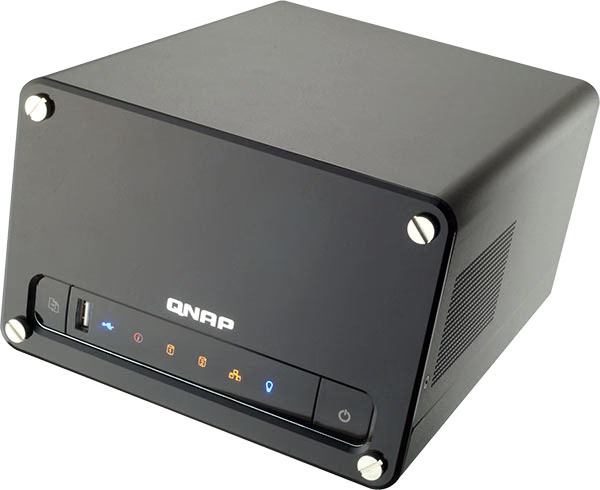
QNAP TS-209 Pro NAS
Shoppers today are faced with many options when choosing where to store their valuable data: from traditional optical media and hard drive based storage, to flash drives and even more exotic third party online storage - each with its own advantages and disadvantages. In this article Benchmark Reviews will look at one such option that's recently emerged in the storage market; the network-attached storage (NAS), in the form of the QNAP TS-209 Pro Gigabit SATA NAS. The NAS has lately gained popularity as more and more consumers realize the need for a reliable, cost effective, and easy to access centralized way to store their data.However, with so many competing products it's not always possible for buyers to easily compare what's on the market. Read on as Benchmark Reviews puts this "all-in-one" NAS through its paces.
Intended for small/medium business (SMB) and small office/home office (SOHO) users, The QNAP TS-209 Pro TurboStation offers a relatively inexpensive and easy to use data storage and backup that's sure to appeal to home users as well.
Modern business needs a reliable network storage system for centralized file sharing, network printer sharing, FTP upload/download, and data backup, etc. To store, back up, manage, and share these digital assets and outputs appropriately have become increasingly essential. However, it is a challenging job for most small business and small office/home office (SOHO) users due to the lack of resources and professional IT staff. Now, QNAP TS-209 Pro Turbo Station offers the most ideal solution to accomplish all these needs.
QNAP TS-209 Pro Turbo Station is a 2-bay, hot-swappable All-in-one NAS (Network Attached Storage) Server supporting up to 2TB storage capacity and abundant valuable server functions. Adopting the latest powerful 500MHz CPU with 128MB DDR II RAM and Gigabit Ethernet design, TS-209 Pro's ultra-high-speed performance significantly boosts the file sharing speed and makes it a perfect choice for business users who need faster performance and useful server features. With the friendly web-based interface, users can easily set up a network system for all sorts of server applications without MIS help.
About the company: QNAP Systems, Inc.
QNAP Systems, Inc. (QNAP) is a devoted and dominant provider of Internet Appliance products. With our solid and integrated expertise in the Linux embedded platform, QNAP has released more than 30 models for the network storage and digital network surveillance series over the past 6 years, providing our consumers with high performance and high reliability storage, backup, and surveillance solutions. Today, QNAP continues to lead the industry with our innovation in design and technology.
QNAP TS-209 Pro: Features & Specifications
The QNAP TS-209 Pro Gigabit SATA NAS unit is essentially a self-contained computer, with its own CPU and RAM, that when connected to a network supplies file-based data storage services to other devices via local network or Internet.
Due to its limited hardware the TS-209 Pro is not designed to carry out general-purpose computing tasks like a PC, however, the TS-209 Pro can run version of stripped down applications. And for those with Linux knowledge the TS-209 PRO can be used as a light-duty Linux box since QNAP provides full terminal access to all their NAS products.
The operating system and other software on the QNAP TS-209 Pro provide the functionality of data storage, file systems, and access to files, and the management of those functionalities. Additionally, The QNAP TS-209 Pro forgoes a keyboard or display; rather it is controlled and configured over a network by web browser making it location independent.
QNAP TS-209 Pro: Specifications
| Processor | System on Chip (SoC) 500 MHz |
|---|---|
| Memory | 128MB DDRII RAM, 8MB Flash |
| HDD Capacity | 2* 3.5" SATA I/II HDD, up to 2TB (HDD is not included) |
| LAN Port | 1 x Gigabit RJ-45 Ethernet port |
| LED Indicator | USB, Status, HDD1, HDD2, LAN, Power |
| USB | 3 x USB 2.0, support USB - printer, disk, digital camera, pen drive, card reader, USB hub |
| Buttons | Intelligent USB auto copy button Power button Reset button |
| Alarm Buzzer | System warning |
| Form Factor | Compact cubic type |
| Dimension | 214(D) x 175(W) x 115(H) mm |
| Weight | Net weight: 2.4Kg (Without HDD) Gross weight: 3.5Kg (Without HDD) |
| Operation Environment | Temperature 0~35°C Humidity 0~95% R.H |
| Power Supply | External power adapter, 60W, 100~240V |
| Power Consumption | Sleep Mode: 14.8W Operation: 29.3W |
| Thermal Solution | Smart Fan |
| Secure Design | K-Lock security slot for theft prevention |
| Supported file systems | FAT, FAT32, EXT3, NTFS (read only) |
| Construction Material | Steel, Plastic |
QNAP TS-209 Pro: Features
-
File server
-
FTP server
-
Backup server
-
Encrypted Remote Replication
-
Web Server with Built-in phpMyAdmin
-
MySQL Server
-
Printer Server
-
Photo Sharing
-
UPnP Media Server (with built-in TwonkyMedia Server)
-
iTunes Server
-
Download Station
-
The Most Advanced RAID Management with Hot-swap Design
-
Online RAID Capacity Expansion and Online RAID Level Migration
-
S.M.A.R.T & Advanced HDD Health Scanning (HHS)
-
Comprehensive Event Log System
-
Sharing files across Windows and Mac
-
Secure data storage, access, and sharing
-
Share Folder Management
-
One touch USB auto copy
-
Web File Manager
-
Network Recycle Bin
-
Built-in DDNS support
-
Surveillance Station
From QNAP:
TS-209 Pro supports multiple file sharing protocols for business users to share files across Linux, Unix, Mac, and Windows platforms. Many valuable server functions including File Server, FTP Server, and Printer Server, etc., are supported to satisfy the business needs. Meanwhile, Windows ADS (Active Directory Service) is supported to help create an easy-to-access environment and lower the maintenance cost by centralized management. With the dual support of MySQL and SQLite, SMB & SOHO users can easily set up their own web and database servers flexibly.
Advanced RAID-1 mirroring with hot-swapping design, which is unique in 2-bay storage in the market, provides enterprise-class data protection and non-stop service. In case of drive failure, the hard disk drive can be replaced immediately without turning off the server and the data can be rebuilt by RAID auto-rebuilding.
TS-209 Pro provides the most complete backup solution for secure data protection with the professional backup software: NetBak Replicator. Users can select Auto-Sync/ Instant/ Schedule backup modes to back up the data on multiple Window PCs. The encrypted Remote Replication and RAID 1 disk mirroring ensures exclusive data protection.
TS-209 Pro supports various security mechanisms for data storage and management. The FTP Server enables data transfer and sharing over SSL/ TLS (explicit) encryption. The server can be accessed by remote login by SSH connection and browser-based SSL log-in. Users can access, store and share data securely.
QNAP TS-209 Pro: Package & Contents
Most of us take for granted a products packaging, that is till the day we receive something that's been damaged in transit due to lack of, or improper packaging. Equally important to protection is proper labeling. For these reasons Benchmark Reviews is always critical of how companies pack their product; making sure the item well labeled, informative, and secure enough to make the punishing journey through shipping. As such, we will always spend some time in reviews on what most people will probably throw away without a second thought.
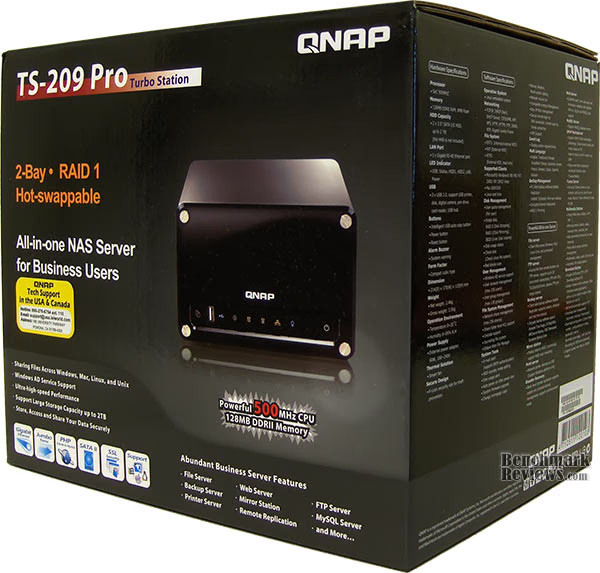
The retail package the TS-209 Pro arrived in one of the most well packed box we have seen to date. QNAP uses a basic double-walled carton design that houses the TS-209 Pro snugly between double foam inserts and wrapped in a polyethylene dust bag. Tightly packed in a box just larger than the TS-209 Pro itself, QNAP has also managed to fit in another smaller box for accessories.

The outside of the TS-209 Pro retail box is has a high-gloss finish and is adorned with an abundance of information regarding many virtues of the TS-209 PRO as well as NAS's in general.
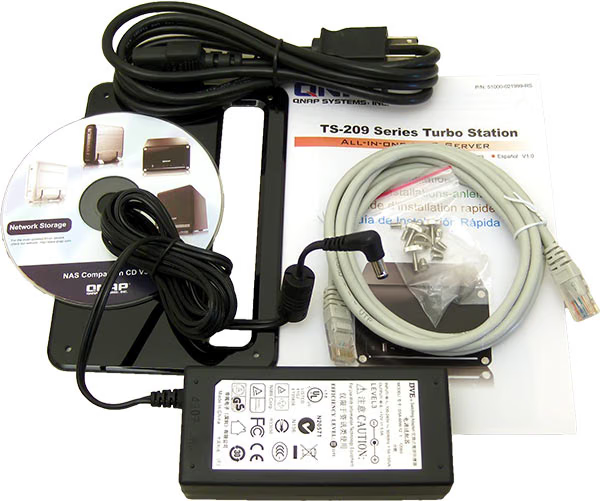
The accessories that come with the TS-209 PRO are limited to the essentials only, but enough to get started. Only one issue arose with the network cable included being a Category 5e cable, and not the Cat 6 cable that has become the standard for Gigabit Ethernet. With such a big ticket price for the TS-209 PRO this minor detail is expounded to a major oversight on QNAPS behalf.
Package Includes:
-
TS-209 Pro Install CD-ROM (user manual, Quick Install Wizard and software inclusive)
-
Front Panel & 4x Thumb Screws
-
Quick Installation Guide
-
Power Adaptor & Power cord
-
1x Cat5e Ethernet cable
-
8x Flat head HDD Mounting Screws
QNAP TS-209 Pro: Closer Look
In this section Benchmark Reviews takes a first had look at the TS-209 PRO. QNAP's TS-209 Pro leaves behind many of the aesthetics of form in favor of functionality; certainly a nod to its intended demographic of business users. The chassis is constructed of painted gun-metal grey steel save for the high-gloss plastic removable front panel and unfinished steel drive cage.

The front of the NAS provides two buttons as well as informational LED lit indicators. Starting from the left: One touch USB copy button, USB 2.0 port, USB activity light, Information light, HDD Disk 1 indicator, HDD Disk 2 indicator, Network activity light, Power indicator, and Power button.
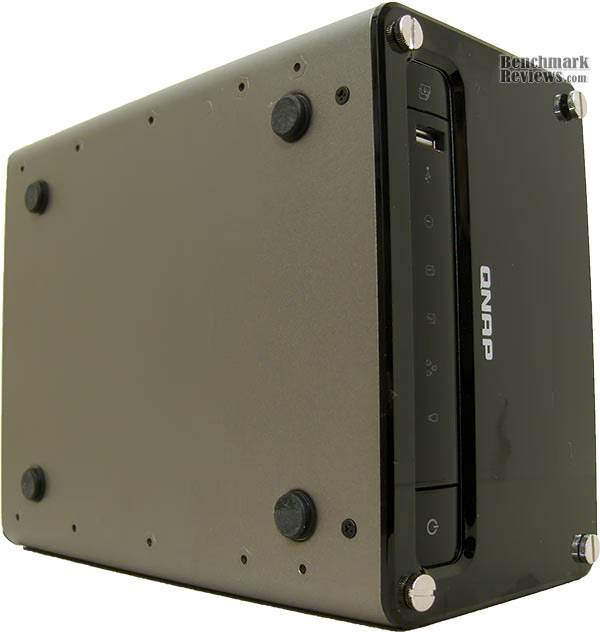
Taking a look at the bottom of the TS-209 Pro shows the four non-skid rubber stands, and ten pre-threaded mounting holes. The mounting holes are presumable for use in a rack system.

The back if the TS-09 Pro features two additional USB 2.0 ports, a Gigabit LAN port, reset switch, power port, and Kensington (K-Lock) hole. Most of the rear panel is dominated by the 70mm Bi-Sonic DC7020 exhaust fan. From this image it's clear how QNAP has designed their cooling scheme for the TS-209 PRO - cool air is brought in from the air vents at either side of the chassis front over the HDD to be exhausted from the rear. As a note on the cooling: The fan QNAP uses is thermally controlled, and remains at a low RPM and low dB noise during normal usage. QNAP assures operational temperatures of under 50c.
QNAP TS-209 Pro: Detailed Features
Many products that consumers are interested in never make their way to store shelves, let alone as displays that one can examine themselves. In this section, as with all our reviews, we get hands-on with the TS-209 Pro.

After the four thumb-screws that attach the faceplate to the TS-209 PRO are removed the drive bay is exposed. There are four additional thumb-screws that hole each drive plate in place. These screws are spring loaded and permanently fixed to the drive plates for quick install/uninstall, and negate the chance of ever losing them. In the above image shown where the fresh air intake vents are located in relation to hard drives.

Once the thumb-screws that hold the drive plates are loosened, the two plates can be independently slid out for easy disk installation.

Each of the two steel drive plates are labeled as either HDD1 or HDD2, a feature to reduce the chance of mixing up disks. The drive plates are vented along each side and bottom with the top left open to help maintain ad adequate amount of air-flow across each drive.
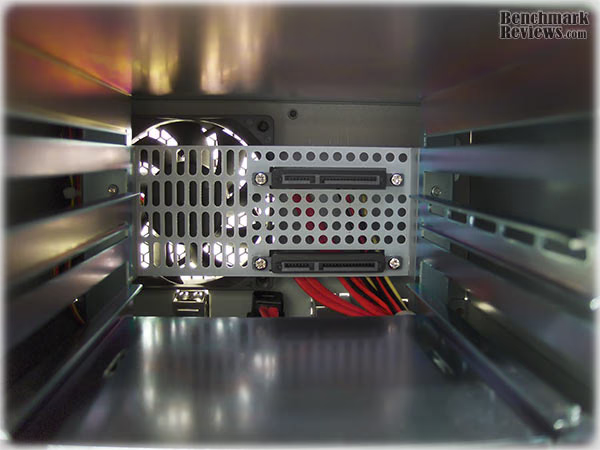
Taking a Look inside the TS-209 PRO at the back are two sets of SATA v1.2 (3 Gbits/s) and SATA power interconnects, one for each drive. It does not seem so from just the image; however, installing the drives was exceptionally easy, requiring almost no force at all. The design is certainly something PC case makers should consider for their chassis, as this method of disk install is tool-less and quick.
QNAP TS-209 Pro: Installation
The TS-209 PRO is part of a series of the TurboStation NAS from QNAP, with the TS-209 PRO being their mid-range offering. As such the basic software for each of TurboStations is identical with the exception of RAID options. For the scope of this article I will omit basic set-up and features to focus on performance and extended feature. Those that wish to can get a broader scope of QNAP's available services from our excellent review of the TS-409 PRO.
Getting Started:
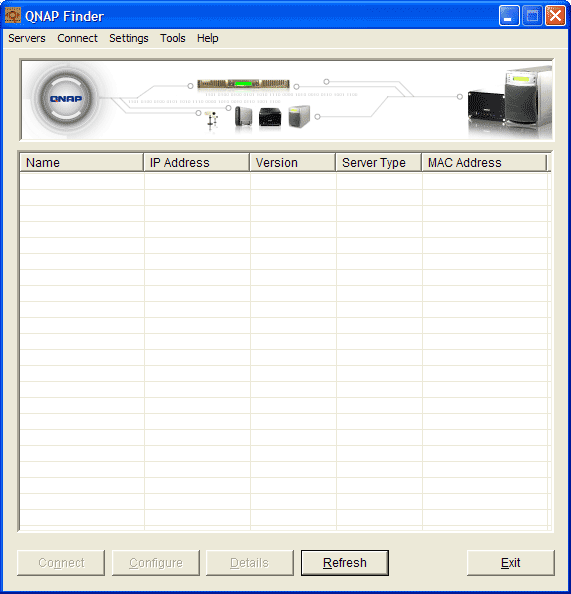
As with their other models of NAS, QNAP provides a proprietary utility on their install CD aptly named "QNAP Finder" that quickly locates the TS-209 Pro over the LAN and allows for basic network and hard disk drive (HDD) set-up, as well as firmware updates.
Web Access:
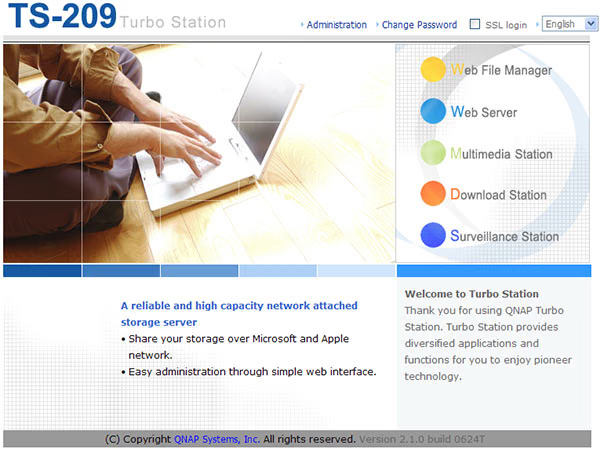
Once the initial set-up had been completed via QNAP Finder, access to the TS-209 PRO features settings is web-based only. By selecting "connect" in QNAP Finder, or manually typing in the I.P. address in a browser, brings the user to the welcome page. From the welcome screen the user can directly change the settings of Web File Manager, Web Server, Multimedia Station, Download Station, and Surveillance Station. Access to these and to the Administration pages are password protected.
Administration:
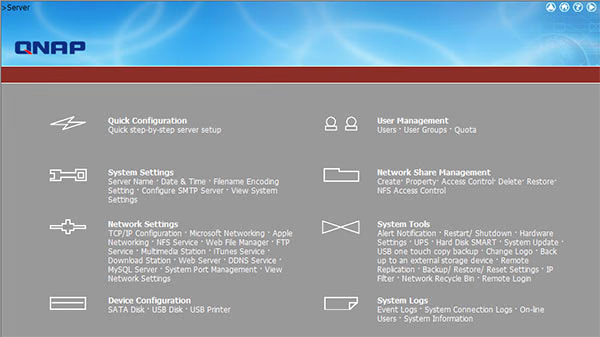
Selecting "Administration" from the welcome page gives users quick access to all of the TS-209 PRO's settings and features.
QNAP TS-209 Pro: Network Setup
The TS-209 PRO supports the multi-disk data storage scheme known as RAID, which can divide and replicate data among multiple hard disk drives. The TS-209 PRO give users' three basis options for multi-disk RAID configuration: increased data reliability through redundancy (disk mirroring - RAID1), increased performance via faster input/output (disk striping - RAID 0) or increased disk space without striping, known as "just a bunch of disks" (JBOD).
Disk Configuration:
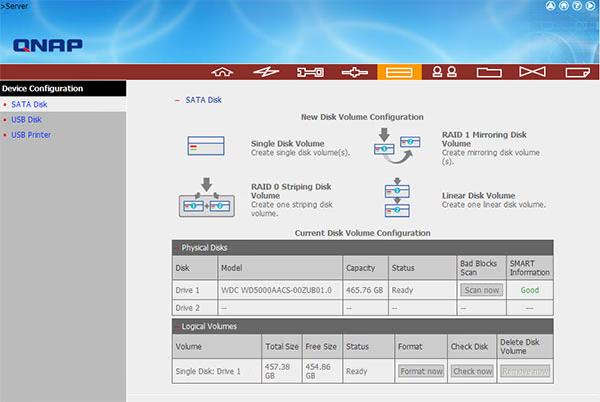
With maximum throughput to the NAS capped at Gigabit speeds, RAID 0 would be overkill and (not tested) possible increase overhead enough to make transfers slower. Of the remaining two RAID options the choice is wholly dependent on individual user needs: those with non-critical data will opt for JBOD for the biggest return on disk space, conversely those who need redundancy will want for RAID 1. Whichever the case the TS-209 PRO has something for each user.
Network Configuration:
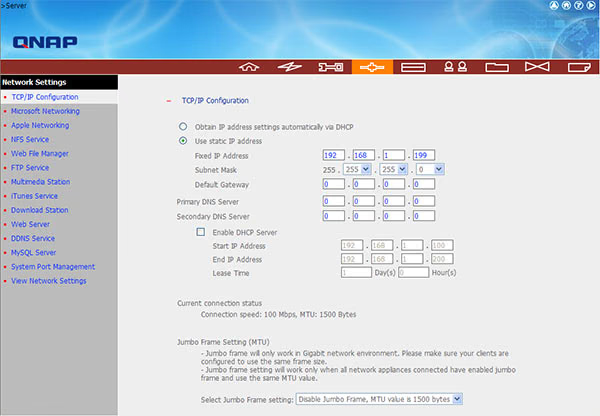
By default the TS-209 PRO is set to use an IP address given by a DHCP server, however users can configure the IP manually, or even choose to set-up the TS-209 PRO as a DHCP server itself. In addition to the basic Net settings the TS-209 PRO also supports Jumbo Frame. Using Jumbo Frames reduces CPU utilization (mostly due to interrupt reduction) and increases throughput by allowing the systems on both the send and receive sides to concentrate on the data in the frames, instead of the frames around the data. Jumbo frames must be supported and enabled on the network adapter connected to the TS-209 PRO to take advantage of this feature.
Network Shared Folders:
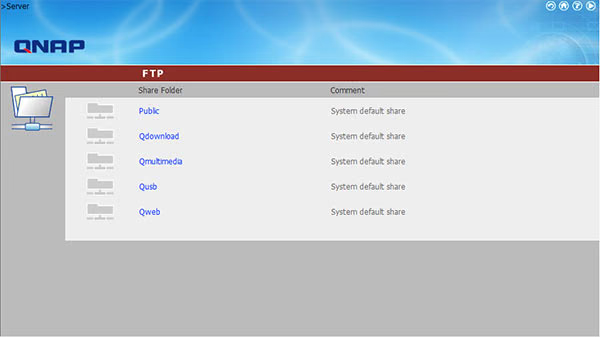
The QNAP TS-209 Pro Gigabit SATA NAS unit is essentially a self-contained computer, with its own CPU and RAM, that when connected to a network supplies file-based data storage services to other devices via local network or Internet. The file based system is seen by network users as a system of network folders or "shares". The TS-209 PRO by default has five basic network shared folders with the ability for the admin to add more, or modify the existing set.
User Management:
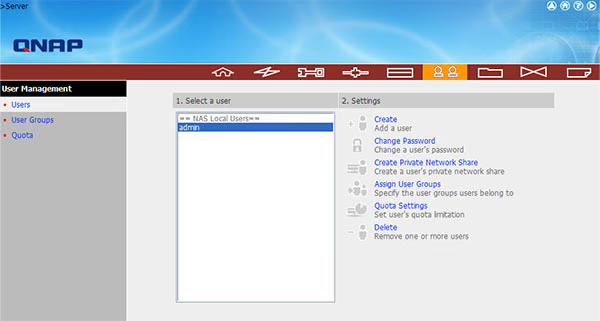
To manage users QNAP has given the TS-209 PRO a user management system for adding single users and/or user groups with the option of password restriction, Read Only access, and individual or group disk quota limitations.
QNAP TS-209 Pro: Multimedia
Covering the multimedia ability as well as basic NAS features, the TS-209 PRO offers users the ability to store, and share their pictures, music, and videos in one centralized and easy to manage place.
Multimedia Station:

Users can access the Qmultimedia directory as either a network share, or directly via web browser to upload, playback, or modify media files. The TS-209 PRO uses an indexing service that provides thumbnail views for images, with the ability to print directly from the NAS.
UPnP Media Server:

The TS-209 PRO also uses PacketVideo's UPnP TwonkyMedia MediaServer to enable users to share multimedia throughout the home/office. With built in support for many different platforms and client devices including: XBox 360TM, Sony PS3TM, Sony PSPTM and Apple TV . TwonkyMedia requires few resources, and provides features to help users enjoy large media collections, and enables users to define personal navigation structure.
Download Station:
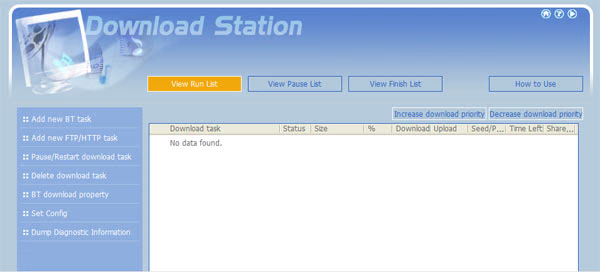
Rounding up this brief overview of features is the ability of the TS-209 PRO to utilize a BitTorrent (BT) client for managing torrent downloads. QNAP's documentation state that the included BT client is not as fast as a PC based version, however, the benefit of having a dedicated out of box BT server far outweighs the potential loss in download speed.
NAS Testing
Benchmark Reviews doesn't have a vast array of Network Attached Storage devices in our collection product resources, however, we do our best to compare products to as many related devices as possible. In this review, the QNAP -TS-209 PRO NAS was compared to the reigning champ, the Synology Cube Station CS407 4-Bay SATA Gigabit, as well as the D-Link DNS-323 SATA RAID Gigabit NAS, the QNAP TS-409 PRO, the QNAP TS-109 PRO, and the older QNAP TS-201 SATA Gigabit NAS Server. All six are Gigabit-speed Ethernet network devices, and all six share the same RAID-0, RAID-1, JBOD, and single disk capability.
In case you're not up to speed with network terminology, or you're just new to the technology, here is a little refresher for you. The basic unit data measurement is called a bit (one single binary digit). Computers use these bits, which are composed of ones and zeros, to communicate their contents. All files are stored as binary files, and translated into working files by the Operating System. This two (base two) number system is called a "binary number system". In comparison, the decimal number system (base ten) has ten unique digits consisting of zero through nine.
Have you ever wondered why your 500GB hard drive only has about 488GB once it has been formatted? Most data files use the binary number system to express file size; however the prefixes for the multiples are based on the metric system. The nearest binary number to the metric amount of 1,000 is 1,024; which means that 1,024 bytes is named a Kilobyte. So even though a metric "Kilo" equals 1,000, a binary "Kilo" equals 1,024. Are you confused yet? Don't be surprised, because even the most tech savvy people often mistake the two. Plainly put, the Kilobyte is expressed as 1000 bytes, but it is really comprised of 1,024 bytes.
Most network engineers (myself included) are not fully aware that the IEC changed the way we calculate and name data chunks when they published the new International Standards back in December 1998. The International Electrotechnical Commission (IEC) removed the old metric prefixes for multiples in binary code with new prefixes for binary multiples made up of only the first two letters of the metric prefixes and adding the first two letters of the word "binary". For example, instead of Megabyte (MB) or Gigabyte (GB), the new terms would be mebibyte (MiB) or gibibyte (GiB). While this is the new official IEC International Standard, it has not been widely adopted yet because it is either still unknown by institutions or not commonly used.
Personally, I think the IEC took a confusing situation and simply made it more of a mess. As I mentioned earlier, the Kilobyte was previously expressed as 1000 bytes, even though it was really comprised of 1,024 bytes. Now, the Kilobyte really is expressed correctly as 1000 bytes, and the Kibibyte is the item comprised of 1,024 bytes. In essence, the IEC just created a new name for the binary item and left the existing name for the metric item. Hopefully that clears things up, and you can thank Benchmark Reviews for training the next generation of Network Engineers.
Testing Methodology
For our operating system (OS) we chose a fresh install of Windows XP with Service Pack 3 RTW (SP3). Microsoft'sService Pack 3 rolls out some new features; however, it is essentially a cumulative update pack for all Microsoft's hotfixes and updates. Although we had the option to test on a newer OS, we wanted the results to reflect better with real-world users, and according to a recent survey more than 80% of users still run Windows XP.
Although each of the devices we tested can accommodate several different disk configurations, it was decided that the single disk test was the best way to measure throughput. This configuration removed the chance that RAID array overhead would affect the test results.
Connected directly to the Marvell Yukon 88E8056 NIC by a CAT6 patch cable, the NAS products received one test transfer followed by three timed transfers. Each test file was sent to 500GB Seagate 7200.10 HDD installed in the NAS for a time write test, and that file was sent back to an identical 500GB Seagate 7200.10 drive in the test system to record the read test.
The two transfer tests: read and write, were conducted on each NAS appliance using the 100 MiB file and then the 1 GiB file. Additionally, a second set of tests were conducted with Jumbo Frame enabled. While the Synology Cube Station CS407 and QNAP TS-201 had 9000K MTU Jumbo Frame settings available, the D-Link DNS-323 did not have any. In the Jumbo Frame tests the Marvell Yukon 88E8056 Integrated NIC was set to use the 9014 Bytes value with Jumbo Frame enabled.
NAS Comparison Products
-
QNAP TS-201 SATA Gigabit NAS Server
-
QNAP TS-209 Pro Gigabit NAS Server
Support Equipment
-
P3 International KILL-A-WATT
-
Seagate 500GB 7200.10 SATA-II 7200 RPM Hard Disk Drives
-
3-Foot Category-6 Solid Copper Shielded Twisted Pair Patch Cable
-
Marvell Yukon 88E8056 PCI-E Gigabit Ethernet Controller (Driver Version 8.59.1.3)
-
100 Binary Megabytes Test File (100 MiB/Mebibyte = 104,857,600 bytes)
-
1024 Binary Megabytes Test File (1 GiB Gibibyte = 1,073,741,824 bytes)
Test System Hardware
-
Motherboard: ASUS P5K3 Deluxe Wi-Fi-AP Intel P35 Chipset (BIOS 810)
-
Processor: Intel E6600 Core 2 Duo 2.44GHz ~1.3v (9x333MHz FSB) 3.0Ghz
-
Cooling: Zalman CNPS8700 LED
-
Memory: 2 GB (1,024 MB x2 modules) Patriot PC3-15000 DDR3 @ 1333Mhz
-
Video: Diamond Multimedia VIPER HD 3870 512MB @ Stock w/ ATI Catalyst v8.4
-
Audio: Sound Blaster X-Fi
-
Hard Disk: OS - WD RAPTOR 74GB 16MB Cache 10,000rpm, Storage - 1x WDC WD4000AAJS-00YFA0 (372 GB, IDE)
-
Optical Drive: SONY DVD RW DRU-830A SCSI Cd-Rom Device, HL-DT-ST DVD-ROM GDRH10N (16x/48x DVD-ROM)
-
PSU: Ultra X3 1000 watt modular cables
-
Operating System: Windows XP Professional Service Pack 3, v.080413-2111 with IE7
QNAP TS-209 Pro: Testing Results
With quite a few products for comparison it's clear to see where the TS-209 PRO sits performance wise, as the benchmarks speak for themselves.
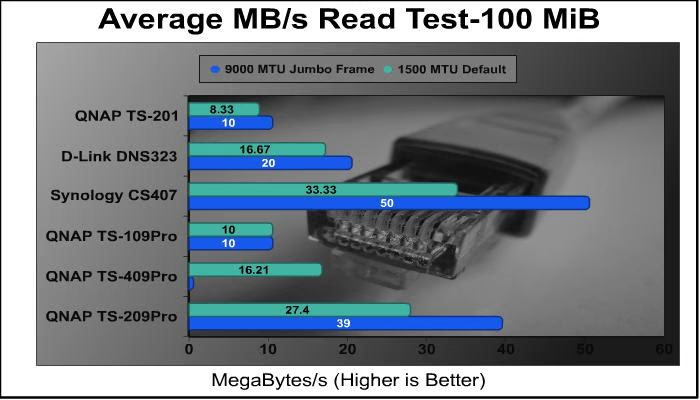
The TS-209 PRO outpaces its more expensive counterpart the TS-409 PRO in the 100MiB read test, placing a close second to the equally more expensive Synology CS407.
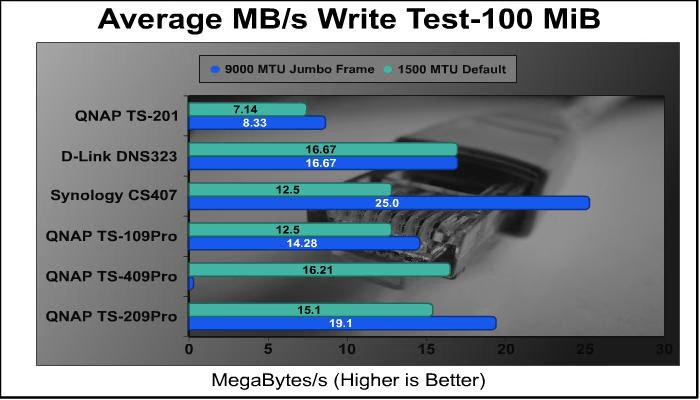
In the 100MiB write test numbers are down as expected with and disk write, though the TS-209 PRO again out performs it's less expensive counterparts, and comes in just behind its sibling the TS-409 PRO.
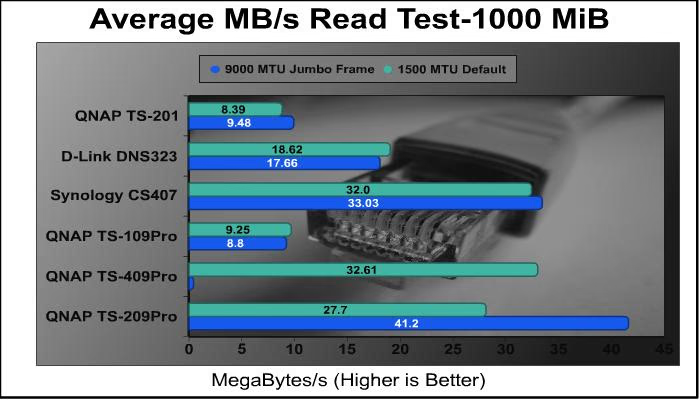
As we moved the testing to 1000 MiB (1 GiB) the competition falls away handily, and even solutions priced at twice the TS-209 PRO are dominated with Jumbo Frames enabled.
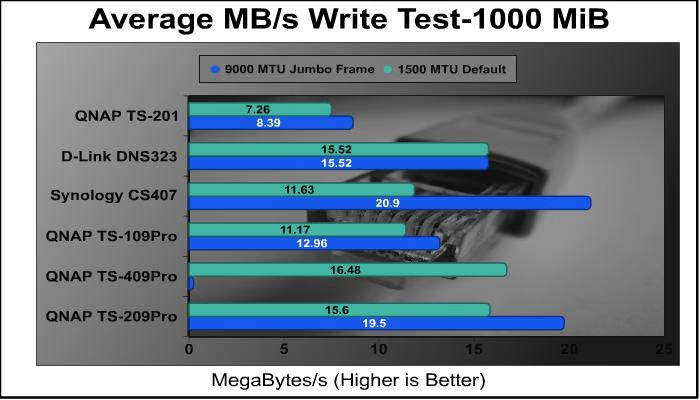
As with the Read test, the Write speeds show the continued dominance of the TS-209 Pro over more expensive parts. With default write speeds of more than 25% over the Synology CS407, a device which costs 35% more than the QNAP.
In light of these results, the truly outstanding realization for this reviewer are the gains to be had when enabling Jumbo Frames over the default configuration.
QNAP TurboStation Final Thoughts
The staff here at Benchmark Reviews is constantly building up and tearing down our computers for testing; this is our passion and in no way a chore, however, this leaves our systems in no shape for data storage. The only logical solution that comes to mind is a network-attached storage device that can easily serves up our much needed benchmarking programs no matter what the state our PCs are in, or where their located. In this regard the TS-209 Pro had been an invaluable help, allowing access to files, and media without the hassle associated with OS installs.
Serving up files is only one of the functions provided by the TS-209 Pro, and it does it supremely. In addition to handily beating the competition, this NAS box offers functionality that goes beyond mere filer serving with a laundry list of features nearly on par with traditional PCs, with the added caveat of being pre-set and costing a fraction of what a server PC would.
TS-209 Pro Conclusion:
The retail package of the QNAP TS-209 Pro is devoid of any garish characters or color schemes, while maintaining all the relevant product details in an easy to understand way. Intended for the "informed" consumer, the package list many of the NAS features with minimal hype or marketing.
With an intentional audience of business users the TS-209 Pro's aesthetic, or lack of, is understandable. Not entirely without some flare, the front panel that covers the drive bay is given a high-gloss finish that adds a touch of class. In addition to the front panel, the information lights and surrounding area are all tastefully done.
Made from steel the main chassis of the TS-209 Pro is virtually indestructible. And no sharp edge means it won't destroy users either. The front panel is made of rugged high grade plastic and the overall construction is solid and well built.
Regarding functionality, the TS-209 Pro really earns the name "all-in-one NAS". From application to print sharing, web hosting to media serving, the list goes on.
Presently NewEgg sells the TS-209 Pro for $389.99, a steep price for a disk-less system. However, QNAP is constantly releasing firmware updates that add more-and more functionality for their products. Add in the performance compared to more expensive offerings, coupled with the entry price for a PC with equal features really paints the picture of the value to be had with the TS-209 Pro.
I don't say this about products often, but I like the QNAP TS-209 Pro. And I feel it embodies what a product released from a company should be. With regular upgrades via firmware, a website dedicated to educating and helping users with their products, to mention a product itself that couldn't be easier to set-up and use. The TS-209 Pro is a solid choice when it comes to NAS devices.
Pros:
+ Feature-Rich
+ Regular Updates/Upgrades
+ Easy to use/set-up
+ Low Power Usage
+ Small Form Factor
+ Performance to Match More Expensive Products
+ Hot Swappable Drive
+ Extensive Online Support
Cons:
- Drab Aesthetics
- Price
- Lack of Included Disks
- Legacy Cat 5e network cable
- Lengthy Startup Time
Ratings:
-
Presentation: 9.00
-
Appearance: 8.75
-
Construction: 9.00
-
Functionality: 9.50
-
Value: 8.75
Final Score: 9.00 out of 10.
Excellence Achievement: Benchmark Reviews Golden Tachometer Award.
Questions? Comments? Benchmark Reviews really wants your feedback. We invite you to leave your remarks in our Discussion Forum.